Skip to content

Restore: Show up to three report fields per row and edit them inline - #102142

Merged
AndrewGable merged 23 commits into
mainfrom
claude-reportFieldsGridInlineEditing-restore
Oct 12, 2026
Merged

AndrewGable merged 23 commits into
mainfrom
claude-reportFieldsGridInlineEditing-restore

Conversation

@MelvinBot

@MelvinBot MelvinBot commented Sep 24, 2026 •

Copy link
Copy Markdown
Contributor

Explanation of Change

This PR restores the work that was reverted, unchanged. It is a revert of the revert in [CP Staging] Revert: Show up to three report fields per row and edit them inline, which backed out Show up to three report fields per row and edit them inline because of regressions in the report fields UI.

daledah asked for the reverted changes to be put back on a branch as-is so the regressions can be listed against them. No fixes have been applied — the known regressions from the original PR are still present. Nothing here is new work.

The restore was produced by reverse-applying the revert diff onto current main. The resulting diff is the exact inverse of the revert, file for file and line for line. The only hunk that needed a hand edit was config/eslint/eslint.seatbelt.tsv, whose surrounding entries had drifted on main; its two target entries were set back to the values they held at the original merge commit 44bd04c — the src/pages/DynamicEditReportFieldPage.tsx no-unsafe-type-assertion entry removed, and src/components/ReportActionItem/MoneyReportView.tsx set back to 1.

What the restored change does (from the original PR)

Report fields used to render as a vertical stack of full-width rows, each one navigating to the report field editor page to change a value. With nine report fields that filled the whole screen and pushed the expense list out of view, and every edit cost a navigation.

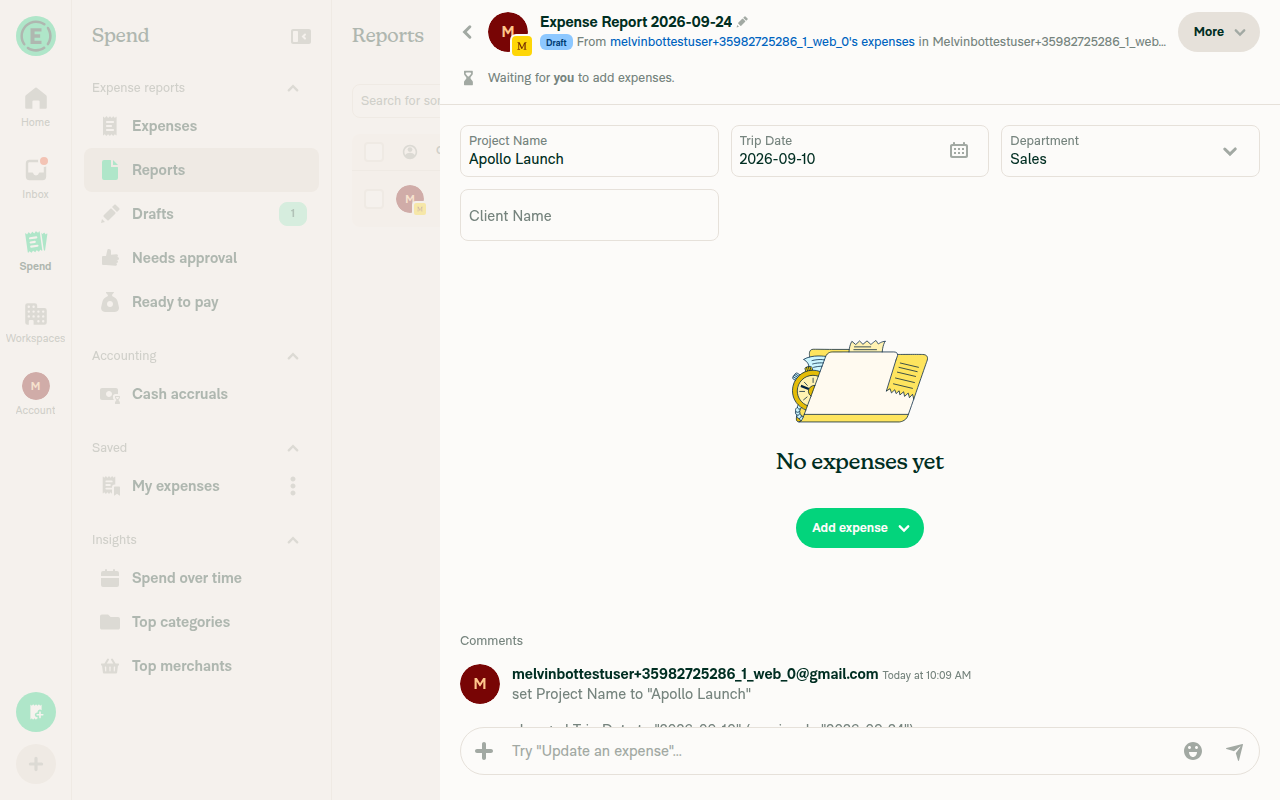
Up to three fields per row. MoneyRequestViewReportFields chunks the sorted fields into rows of CONST.REPORT_FIELDS_PER_ROW (3) and lays each row out as a flexRow of equal-width cells. A partly filled last row is padded with empty cells so its fields keep the same width as the rows above. On a narrow layout the column count drops to 1. Both existing call sites — the report list header and the empty report view — render the same component.

Inline editing. ReportFieldInlineInput renders each field as one of our regular 52px inputs instead of a row that navigates away:

Type Control
text TextInput, saved on blur and on submit, skipped when unchanged
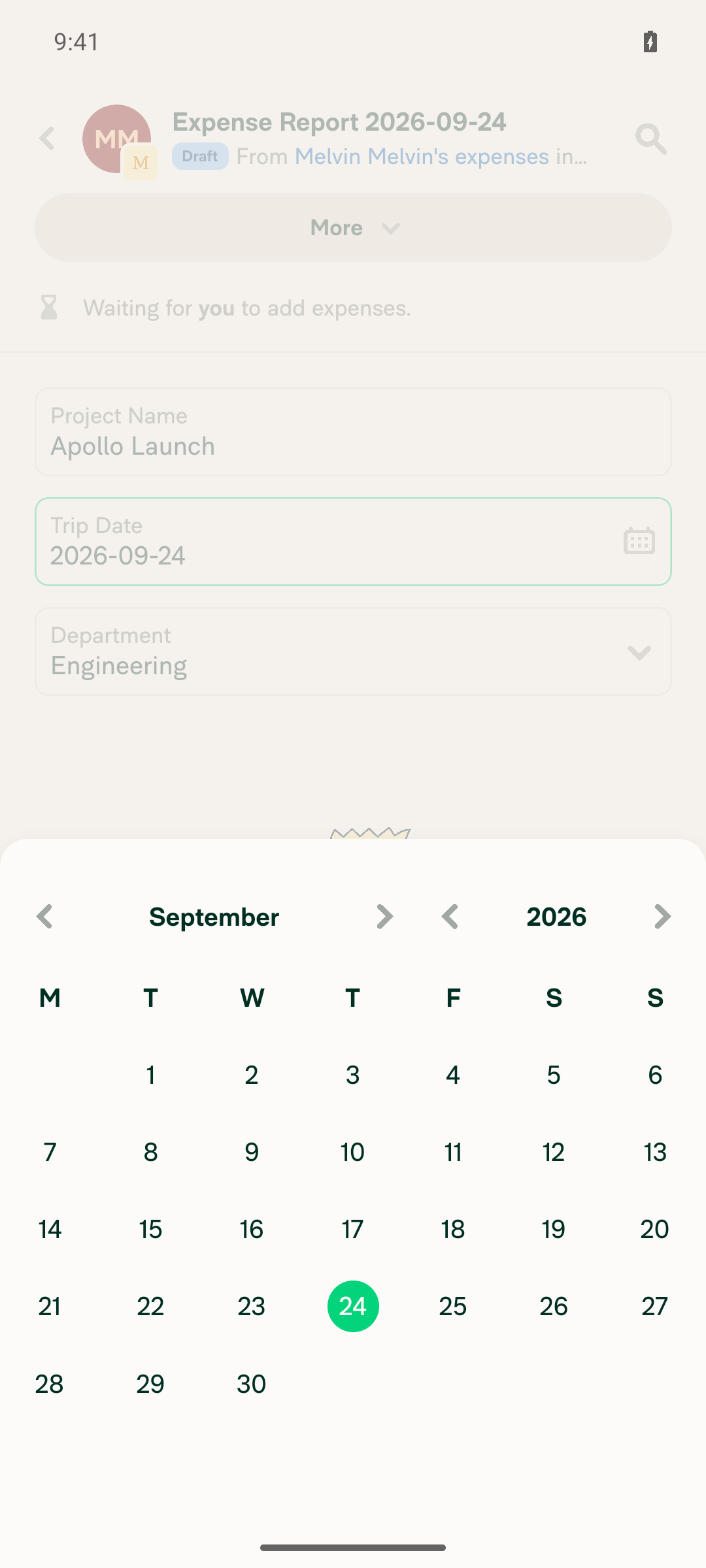
date DatePicker — the calendar opens over the report
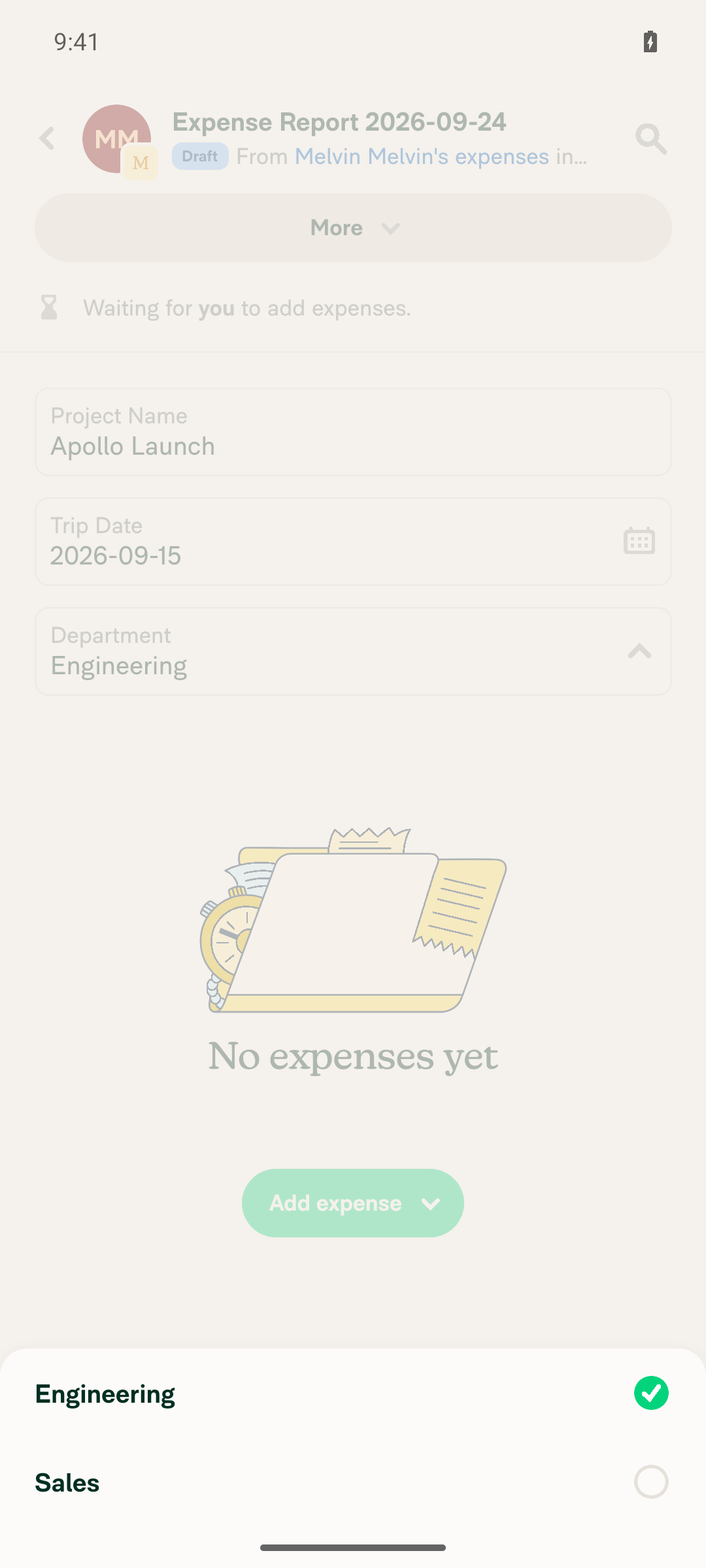
dropdown Press-to-open modal reusing EditReportFieldDropdown, so search and recently-used values are preserved
formula Read-only input, matching the previous disabled behavior

Shared save path. The save logic that lived inline in DynamicEditReportFieldPage moved into useSaveReportField, so violation, ASAP-submit and recently-used handling only exists in one place.

Fixed Issues

$ #100259
PROPOSAL: #100259 (comment)

Tests

// TODO: The human co-author must fill out the tests you ran before marking this PR as "ready for review".
// Please describe what tests you performed that validate your change worked.

  • Verify that no errors appear in the JS console

Offline tests

QA Steps

Precondition: A Control workspace with Report fields enabled and these report fields:

  • Text A: Text, with initial value x
  • Text B: Text, with any initial value
  • Date: Date
  • List: List, with at least 8 values
  • Formula: Formula
  1. Go to the workspace chat, create an expense, and open the expense report.
  2. Verify the report fields show above the expense list as inputs. On a wide screen, verify up to three fields per row. On a narrow screen or mobile, verify one field per row.
  3. Click Text A, type a new value, and click away. Verify the value saves without leaving the report, and a system message shows the change.
  4. Clear Text A and press Enter, then click away. Verify the empty value saves with no blocking error, and a "required" violation shows under the field.
  5. Close and reopen the report. Verify Text A is still empty.
  6. Click Date. Verify the calendar opens in place. Click the month or year header and verify the Month/Year picker opens with the background dimmed. Pick a date and verify it saves.
  7. Click List. Verify the option list opens under the field with a search input, and stays open. Pick a value and verify it saves.
  8. Android only: focus Text B so the keyboard is open, then tap List. Verify the option list opens and stays open.
  9. Verify Formula is read-only.
  10. Android and mWeb only: go offline and open List. Verify there is no extra blank space at the bottom of the option list. Go back online.
  11. Create a second expense report in the same workspace. Use the next and previous report arrows to move between the two reports. Verify the field values and labels do not jump.
  12. Go to workspace settings > Report fields and delete Text B and Date. Go back to the report.
  13. Verify Text B and Date still show their values, each with a trash button on the right edge. Verify List and Formula have no trash button.
  14. Click the trash button on Date and confirm "Delete field". Verify the field is removed. Repeat for Text B.
  15. Close and reopen the report. Verify Text B and Date stay removed.
  • Verify that no errors appear in the JS console

AI Tests

Automated checks run locally on this branch:

Check Result
npm run typecheck ✅ passed
npm run lint-changed ✅ passed
npm run spell-changed ✅ passed (17 files, 0 issues)
npm run react-compiler-compliance-check check (9 changed components/hooks) ⚠️ 8 passed; src/components/DatePicker/index.tsx fails, but pre-existing — the origin/main version of that file fails identically ("Cannot access refs during render", both babel and oxc), so this is not a regression
npm test -- tests/ui/MoneyRequestViewReportFieldsTest.tsx tests/ui/EditReportFieldDropdownTest.tsx tests/unit/ReportFieldOptionsListUtilsTest.ts tests/ui/MoneyReportViewTest.tsx ✅ passed (41 tests)
npm test -- tests/actions/ReportFieldTest.ts tests/ui/DynamicReportDetailsPageTest.tsx tests/ui/MoneyRequestReportViewTest.tsx tests/ui/MoneyRequestReportTransactionsNavigationTest.tsx ✅ passed (29 tests)
npm run lint (full repo) ⚠️ not run — exceeds the local command time limit; lint-changed covers every file in this diff
oxfmt --check ⚠️ not run — the formatter could not be invoked in this environment. The restored bytes are identical to those that passed the formatting gate when #100735 merged
Browser verification ⚠️ not run — deliberately skipped. This PR intentionally restores known-broken UI, so a browser pass would only re-confirm the regressions the requester is about to list

PR Author Checklist

  • I linked the correct issue in the ### Fixed Issues section above
  • I wrote clear testing steps that cover the changes made in this PR
    • I added steps for local testing in the Tests section
    • I added steps for the expected offline behavior in the Offline steps section
    • I added steps for Staging and/or Production testing in the QA steps section
    • I added steps to cover failure scenarios (i.e. verify an input displays the correct error message if the entered data is not correct)
    • I turned off my network connection and tested it while offline to ensure it matches the expected behavior (i.e. verify the default avatar icon is displayed if app is offline)
    • I tested this PR with a High Traffic account against the staging or production API to ensure there are no regressions (e.g. long loading states that impact usability).
  • I included screenshots or videos for tests on all platforms
  • I ran the tests on all platforms & verified they passed on:
    • Android: Native
    • Android: mWeb Chrome
    • iOS: Native
    • iOS: mWeb Safari
    • MacOS: Chrome / Safari
  • I verified there are no console errors (if there's a console error not related to the PR, report it or open an issue for it to be fixed)
  • I followed proper code patterns (see Reviewing the code)
    • I verified that comments were added to code that is not self explanatory
    • I verified that any new or modified comments were clear, correct English, and explained "why" the code was doing something instead of only explaining "what" the code was doing.
    • I verified any copy / text that was added to the app is grammatically correct in English. It adheres to proper capitalization guidelines (note: only the first word of header/labels should be capitalized), and is either coming verbatim from figma or has been approved by marketing (in order to get marketing approval, ask the Bug Zero team member to add the Waiting for copy label to the issue)
  • If a new code pattern is added I verified it was agreed to be used by multiple Expensify engineers
  • I followed the guidelines as stated in the Review Guidelines
  • I tested other components that can be impacted by my changes (i.e. if the PR modifies a shared library or component like Avatar, I verified the components using Avatar are working as expected)
  • If a new CSS style is added I verified that:
    • A similar style doesn't already exist
    • The style can't be created with an existing StyleUtils function (i.e. StyleUtils.getBackgroundAndBorderStyle(theme.componentBG))
  • If new assets were added or existing ones were modified, I verified that:
    • The assets are optimized and compressed (for SVG files, run npm run compress-svg)
    • The assets load correctly across all supported platforms.
  • If the PR modifies code that runs when editing or sending messages, I tested and verified there is no unexpected behavior for all supported markdown - URLs, single line code, code blocks, quotes, headings, bold, strikethrough, and italic.
  • If the PR modifies a generic component, I tested and verified that those changes do not break usages of that component in the rest of the App (i.e. if a shared library or component like Avatar is modified, I verified that Avatar is working as expected in all cases)
  • If the PR modifies a component related to any of the existing Storybook stories, I tested and verified all stories for that component are still working as expected.
  • If the PR modifies a component or page that can be accessed by a direct deeplink, I verified that the code functions as expected when the deeplink is used - from a logged in and logged out account.
  • If the PR modifies the UI (e.g. new buttons, new UI components, changing the padding/spacing/sizing, moving components, etc) or modifies the form input styles:
    • I verified that all the inputs inside a form are aligned with each other.
    • I added Design label and/or tagged @Expensify/design so the design team can review the changes.
  • I added unit tests for any new feature or bug fix in this PR to help automatically prevent regressions in this user flow.
  • If the main branch was merged into this PR after a review, I tested again and verified the outcome was still expected according to the Test steps.

Screenshots/Videos

Android: Native
Android: mWeb Chrome
iOS: Native
iOS: mWeb Safari
MacOS: Chrome / Safari

Reverts the revert in PR 101854, restoring the changes originally merged
in PR 100735 so the work is available on a branch for regression triage.

Co-authored-by: daledah <daledah@users.noreply.github.com>
@MelvinBot
MelvinBot requested a review from a team September 24, 2026 09:40
@melvin-bot

melvin-bot Bot commented Sep 24, 2026

Copy link
Copy Markdown

Hey! I see that you made changes to our Form component. Make sure to update the docs in FORMS.md accordingly. Cheers!

@melvin-bot melvin-bot Bot added Melvin-Test-Android Melvin-Test-Web Triggers Melvin to run the testing steps of the PR on web labels Sep 24, 2026
@MelvinBot

Copy link
Copy Markdown
Contributor Author

I created this PR from an upstream branch since I don't have push access to your fork.

To take ownership of this branch and be able to push updates, run:

git remote add upstream https://github.com/Expensify/App.git
git fetch upstream claude-reportFieldsGridInlineEditing-restore
git checkout -b claude-reportFieldsGridInlineEditing-restore upstream/claude-reportFieldsGridInlineEditing-restore
git push -u origin claude-reportFieldsGridInlineEditing-restore

Then you can close this PR and open a new one from your fork. Alternatively, leave it as is and reply with @MelvinBot <request> and I'll push changes to this branch for you.

@codecov

codecov Bot commented Sep 24, 2026 •

Copy link
Copy Markdown

Codecov Report

✅ Changes either increased or maintained existing code coverage, great job!

Files with missing lines Coverage Δ
src/CONST/index.ts 95.90% <ø> (ø)
src/components/DatePicker/index.tsx 52.21% <100.00%> (+1.31%) ⬆️
...equestReportView/MoneyRequestReportActionsList.tsx 97.08% <100.00%> (ø)
...estReportView/MoneyRequestReportEmptyStateView.tsx 100.00% <100.00%> (ø)
...rc/components/ReportActionItem/MoneyReportView.tsx 100.00% <100.00%> (+3.94%) ⬆️
...nents/Search/FilterDropdowns/FilterPopupButton.tsx 100.00% <100.00%> (ø)
src/libs/ReportFieldOptionsListUtils.ts 100.00% <100.00%> (+3.84%) ⬆️
src/libs/actions/Report/index.ts 72.61% <ø> (+0.04%) ⬆️
src/pages/EditReportFieldDropdown.tsx 100.00% <100.00%> (+100.00%) ⬆️
src/styles/index.ts 62.79% <ø> (ø)
... and 4 more
... and 13 files with indirect coverage changes

@MelvinBot

MelvinBot commented Sep 24, 2026 •

Copy link
Copy Markdown
Contributor Author

🤖 Android test steps verification results: ✅ pass

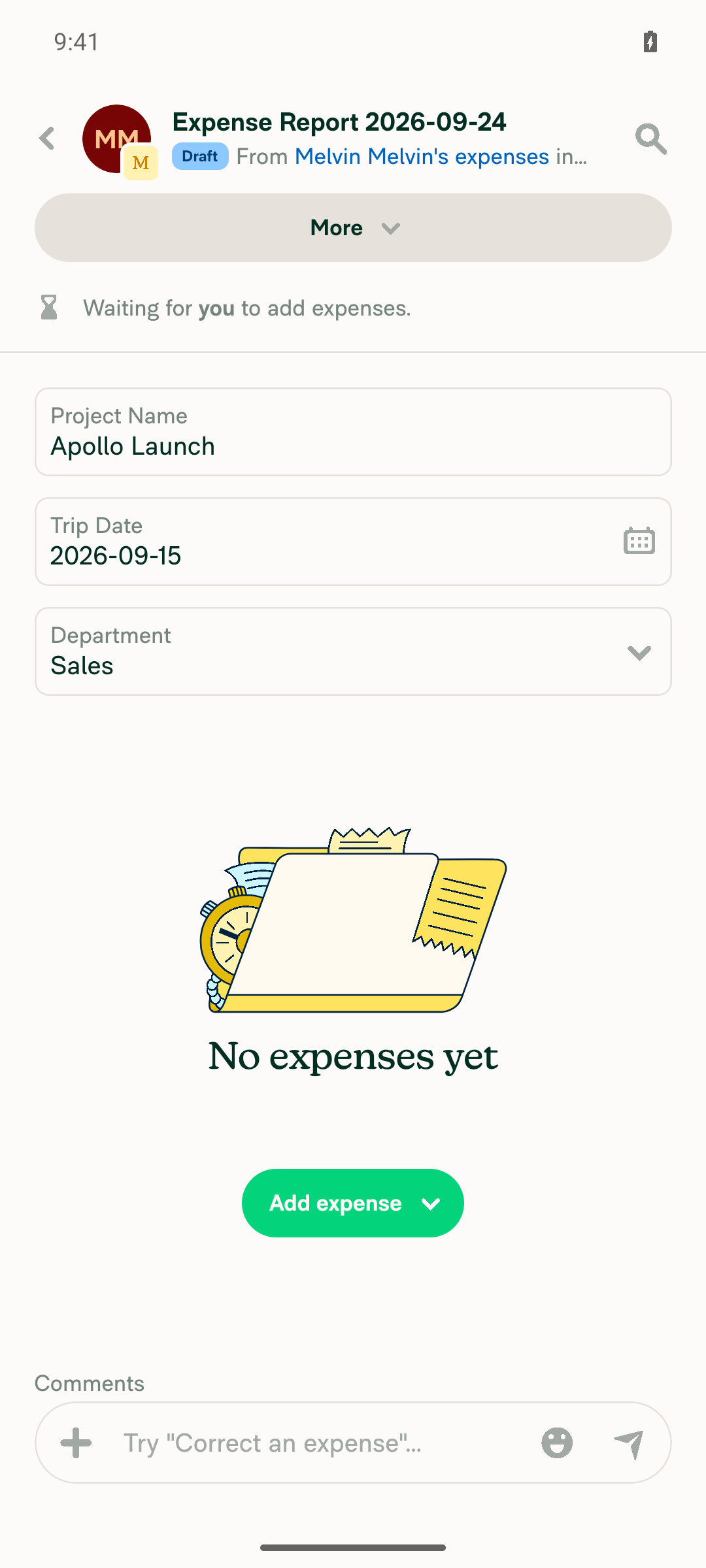
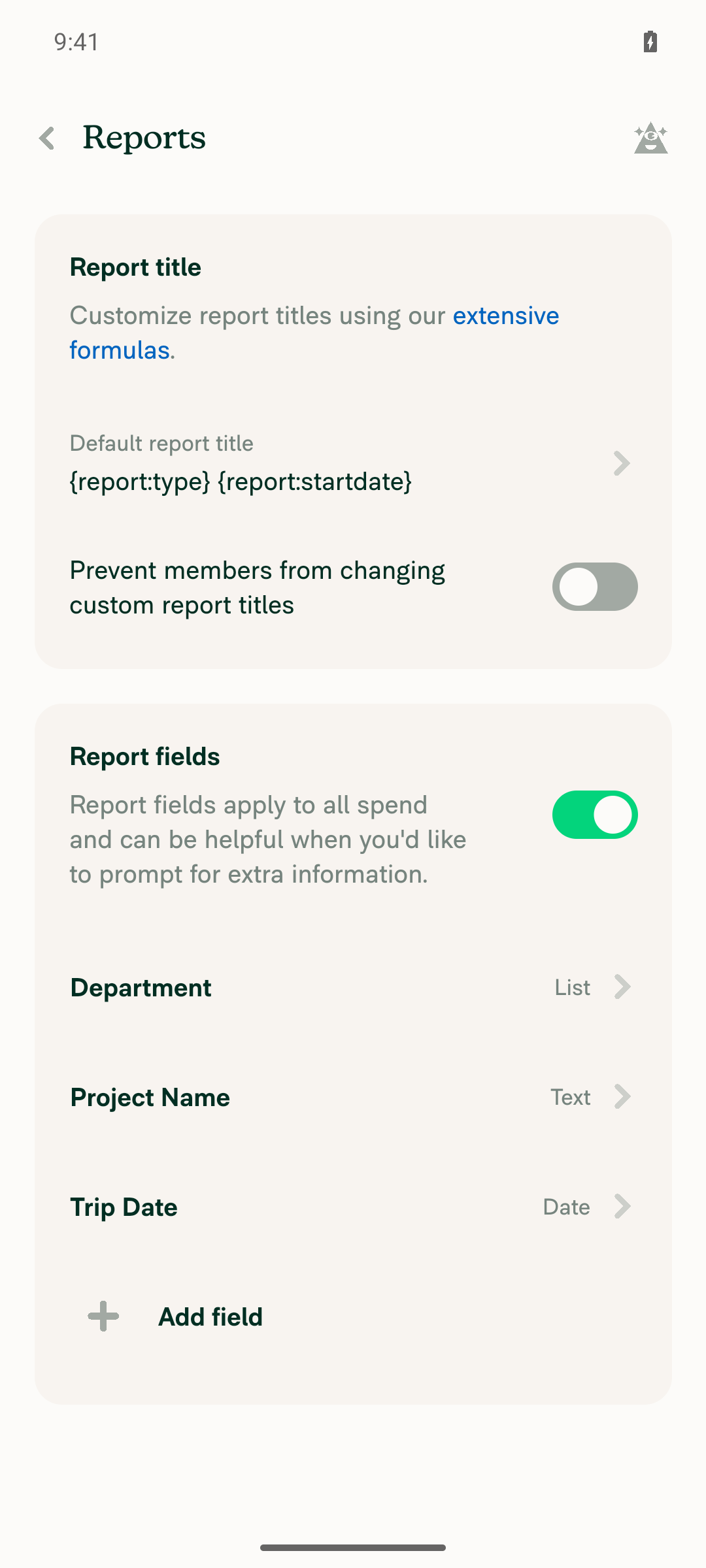
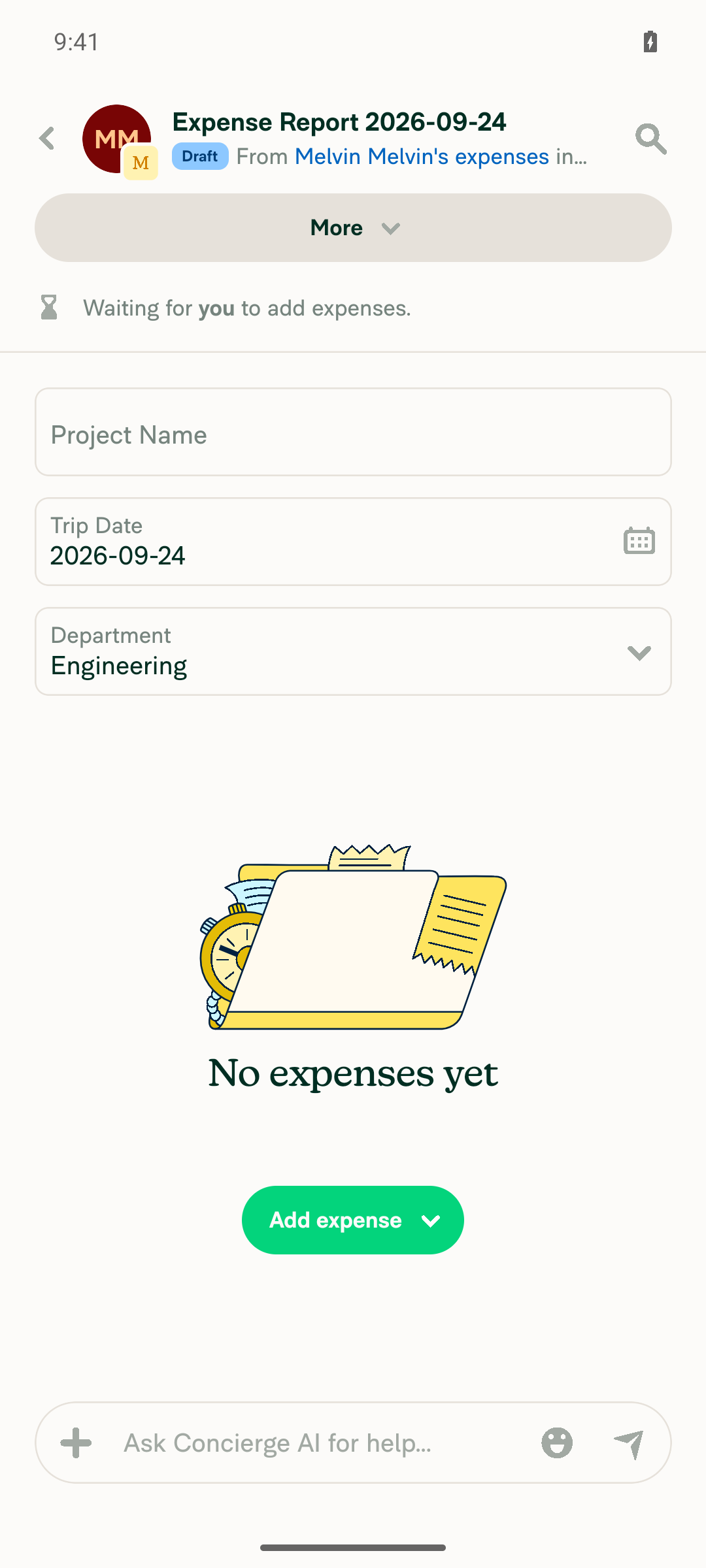
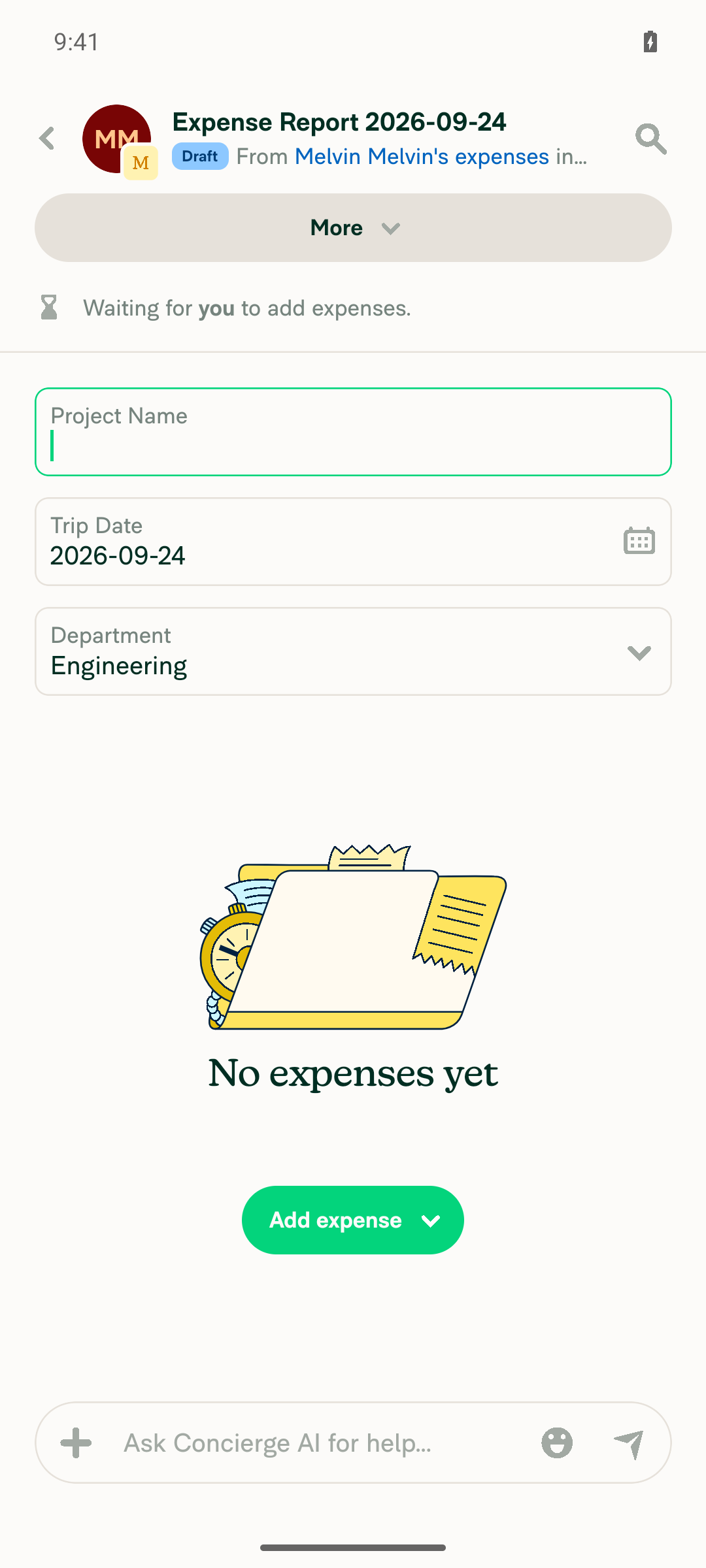
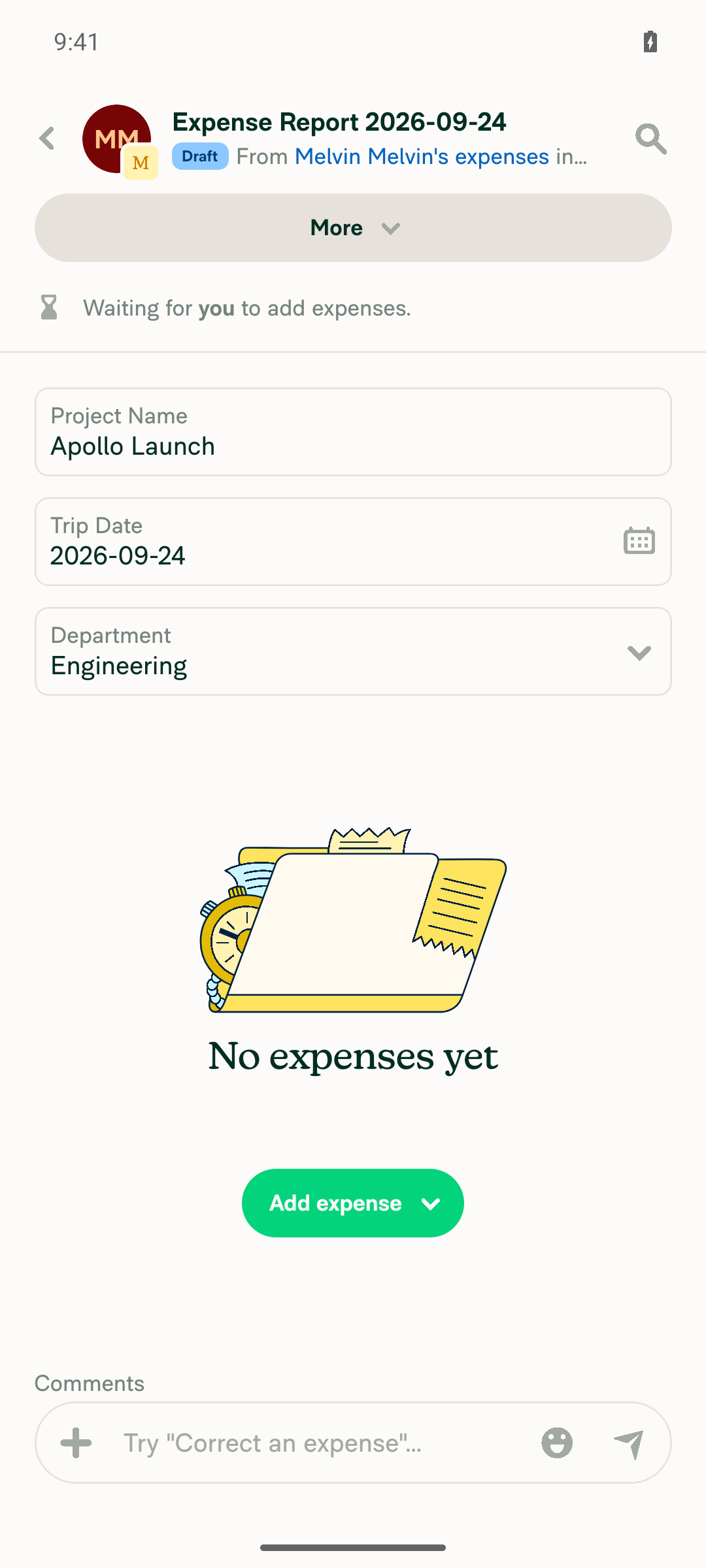
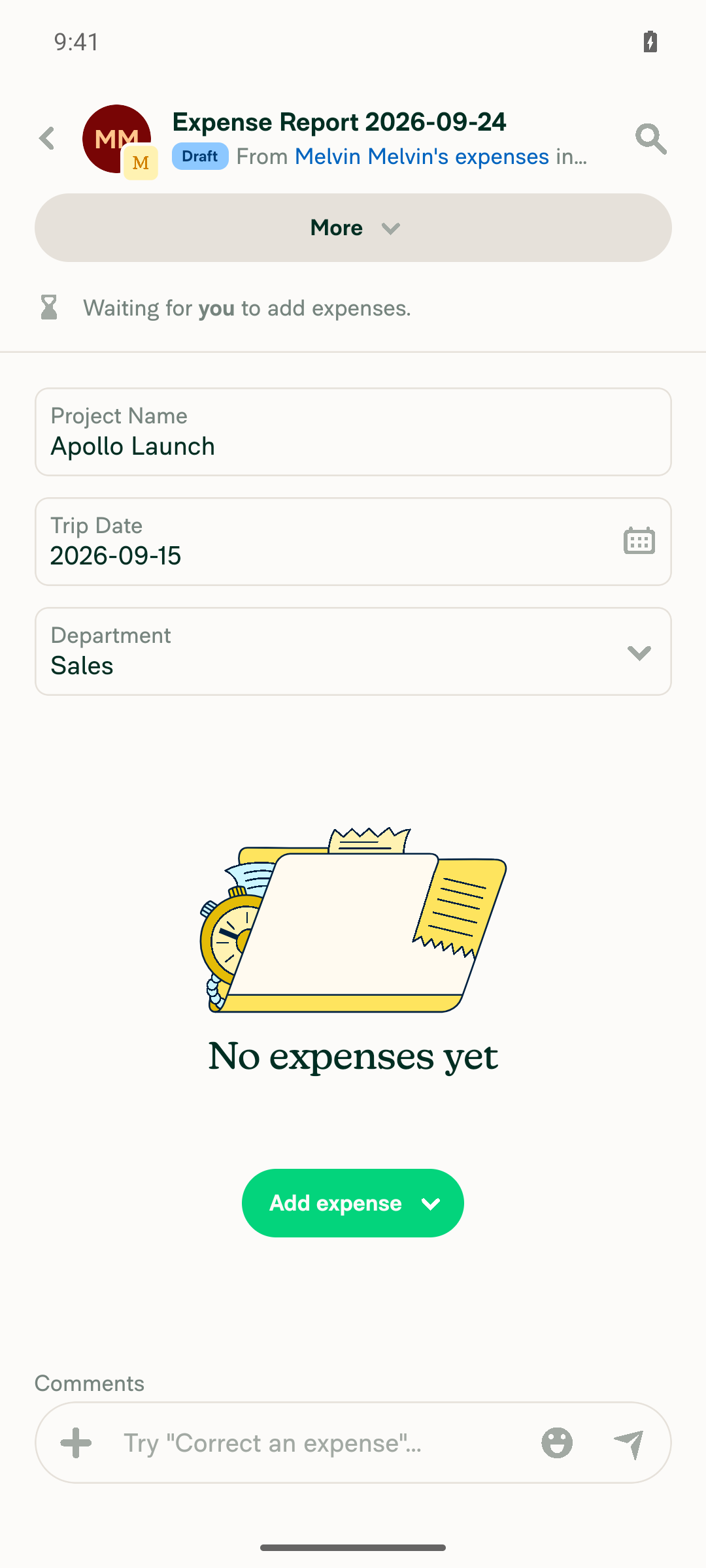
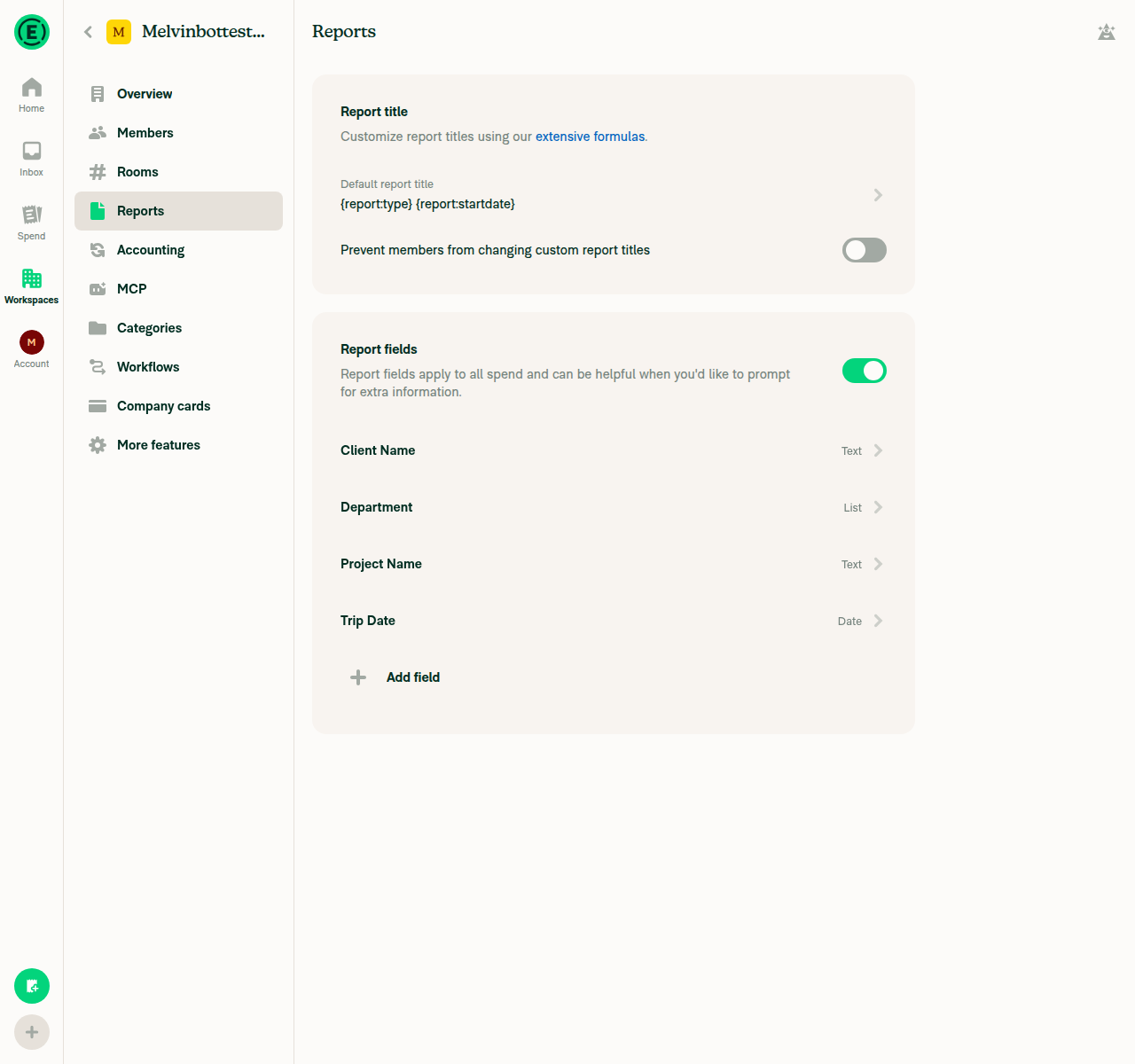
This PR has no written test steps — the Tests and QA Steps sections are still the // TODO placeholder, and so are the ones on the original Show up to three report fields per row and edit them inline. I derived six checks from the change description and the mockup in [Due for payment 2026-09-30] [CFI] Report Fields: Add up to 3 fields per row and add in-line editing, then ran them on a standalone Android build of claude-reportFieldsGridInlineEditing-restore. All six passed: report fields render as inline inputs instead of navigate-away rows, and text, date and dropdown fields all save in place with no redbox or Metro error. Setup was a fresh Control workspace with three report fields — Project Name (text), Trip Date (date), Department (list: Engineering/Sales) — and a draft expense report on it.

Final report state with all three report fields filled inline

Step Status
1. Fields render as inline 52px input controls, not full-width rows with a chevron that navigate awayThe report shows a reportFieldsRow group holding an editable text input, a date control and a dropdown control. No chevron rows, no navigation to the editor page.
Workspace report fields configured: Project Name (text), Trip Date (date), Department (list)
Expense report showing report fields as inline inputs, one per row on the phone layout
✅
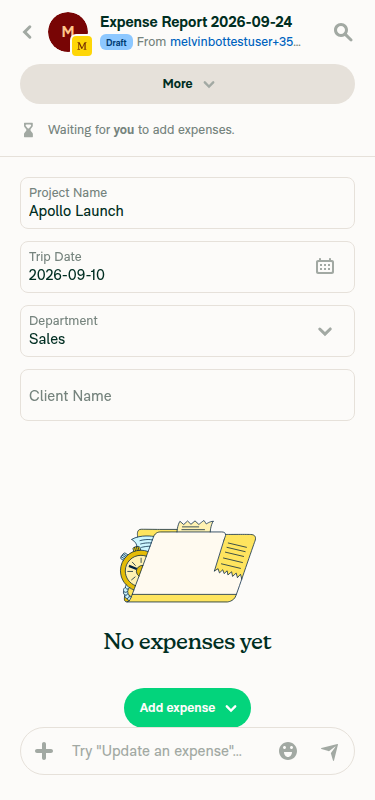
2. Narrow (phone) layout renders one field per rowAll three fields stack vertically, one per row, on the 1080px phone viewport — the narrow-layout branch of the grid. The three-per-row layout needs a wide viewport and was not exercised here.
Expense report showing report fields as inline inputs, one per row on the phone layout
✅
3. Text field edits in place and the value persistsTyped "Apollo Launch" directly into Project Name with no navigation, blurred by tapping elsewhere on the same screen, left to the Home tab, then reopened the report — the value was still there.
Typing Apollo Launch into the text report field in place
Text field value persisted after leaving and reopening the report
✅
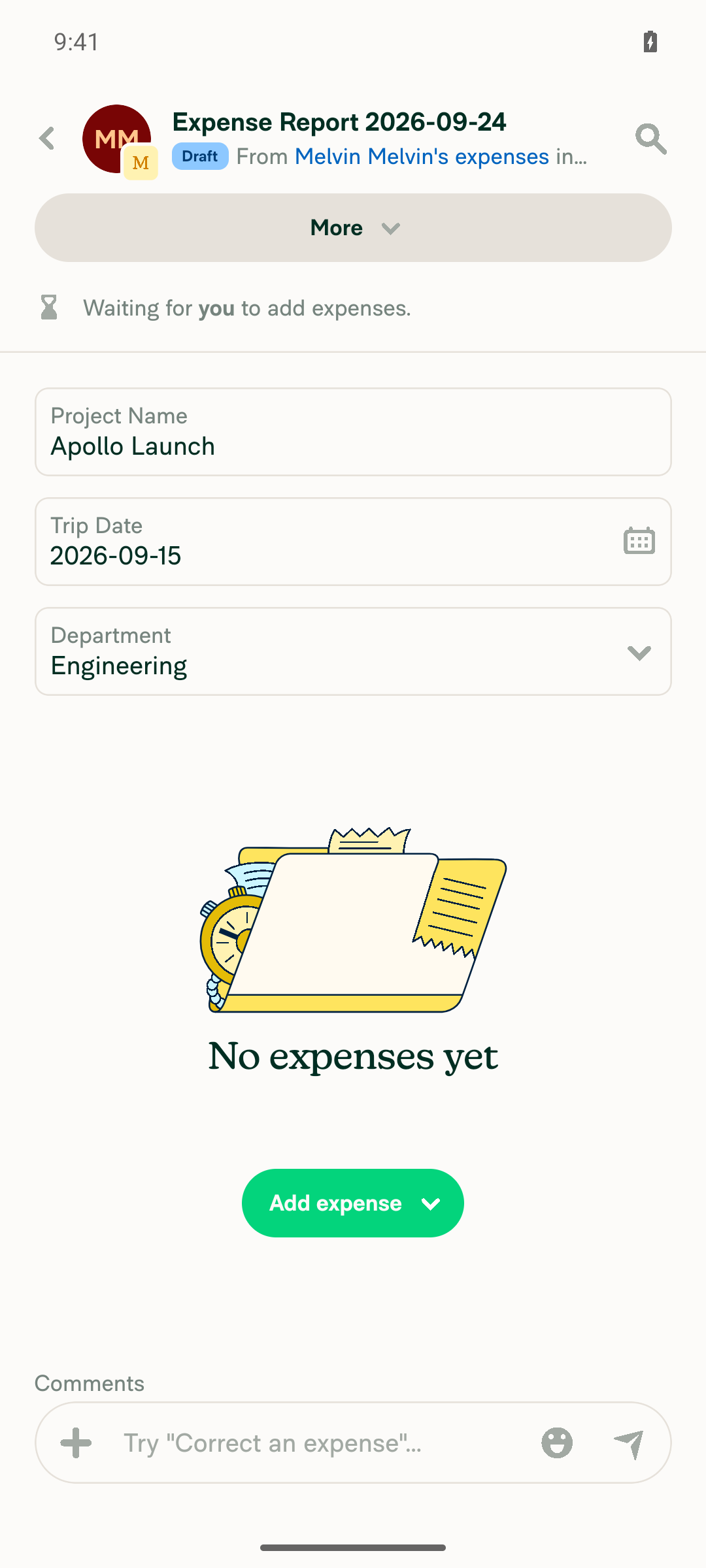
4. Date field opens a calendar over the report and saves the picked dateTapping Trip Date opened the calendar as an overlay on the report. Picking Sept 15 closed it and the field immediately read 2026-09-15.
Calendar opening over the report when tapping the date report field
Date field updated to 2026-09-15 after picking a date
✅
5. Dropdown field opens a selection modal and saves the chosen optionTapping Department opened a bottom-sheet selection list with Engineering and Sales. Choosing Sales closed the modal and updated the field. With only two values the search box does not appear — that is the standard selection-list threshold, not a change from this PR.
Dropdown report field opening a selection modal with Engineering and Sales
Dropdown field saved as Sales after selection
✅
6. No JS console or redbox errors during the flowNo redbox appeared at any point. The Metro log for the session contains only Reanimated warnings — no error or exception entries.
✅

One thing worth a look, not a failure: the dropdown field's tap target reads narrower than its row. Taps landed reliably on the label and value text but not across the full row width.

The PR body says it deliberately restores the reverted code unchanged so the known regressions can be listed against it. This Android pass did not reproduce any of those regressions on a phone layout — if the regressions you want captured are wide-layout or three-per-row specific, they need a web or tablet run instead. This PR also carries the Melvin-Test-Web label, so tell me if you want that run too.


view run · view recording

@MelvinBot

MelvinBot commented Sep 24, 2026 •

Copy link
Copy Markdown
Contributor Author

🤖 Web test steps verification results: ✅ pass

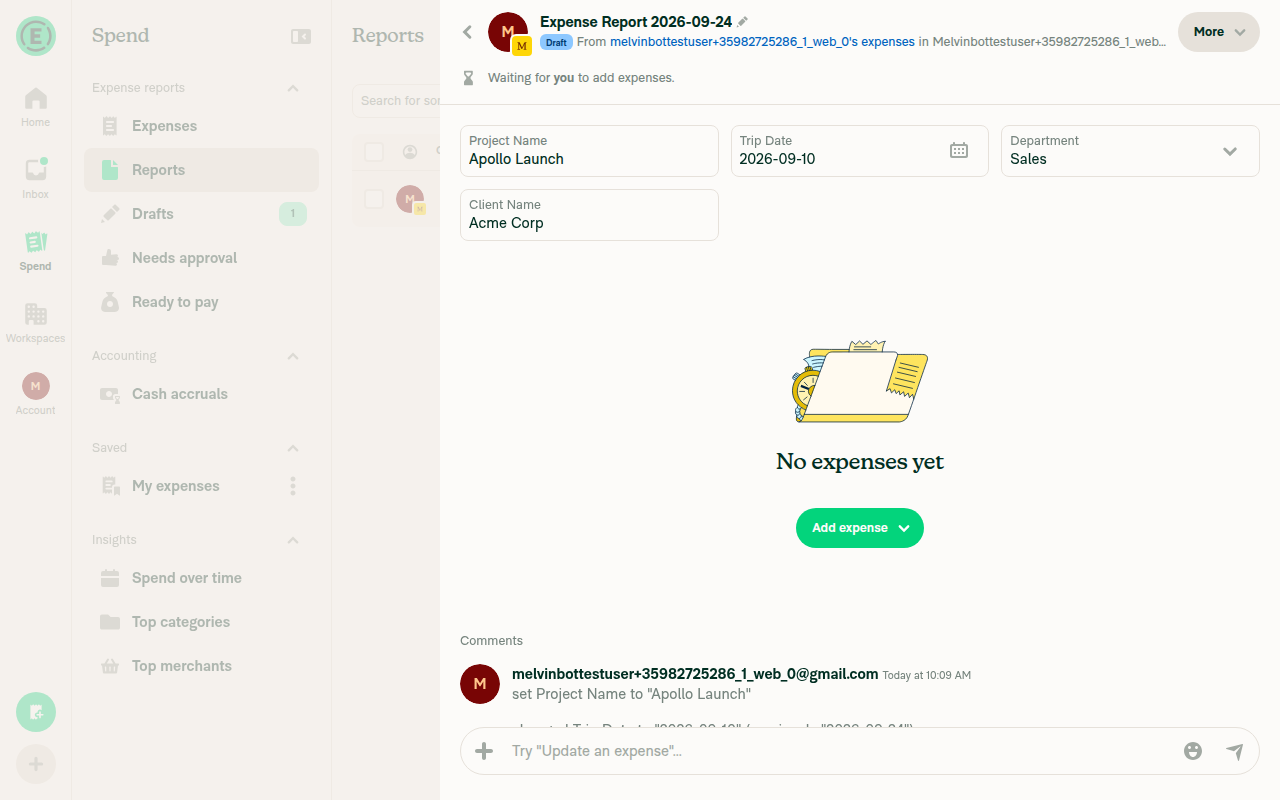
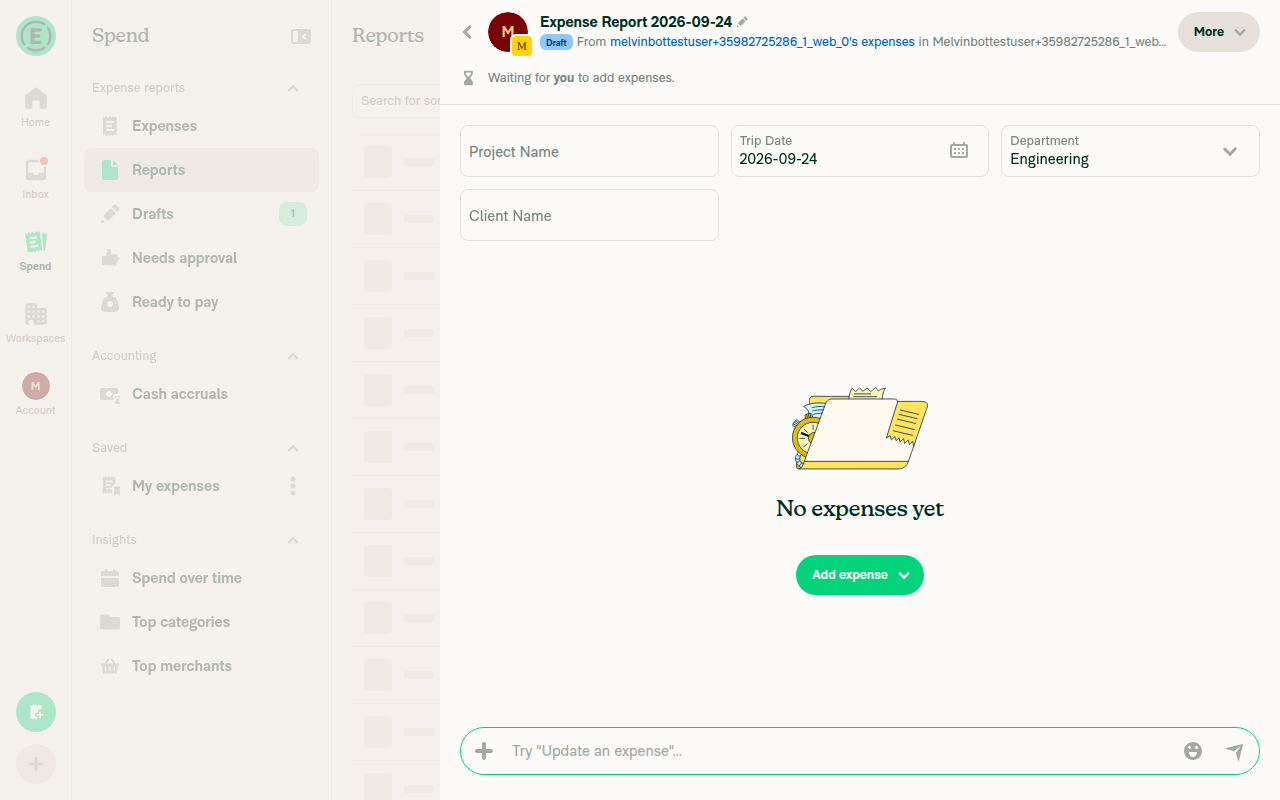
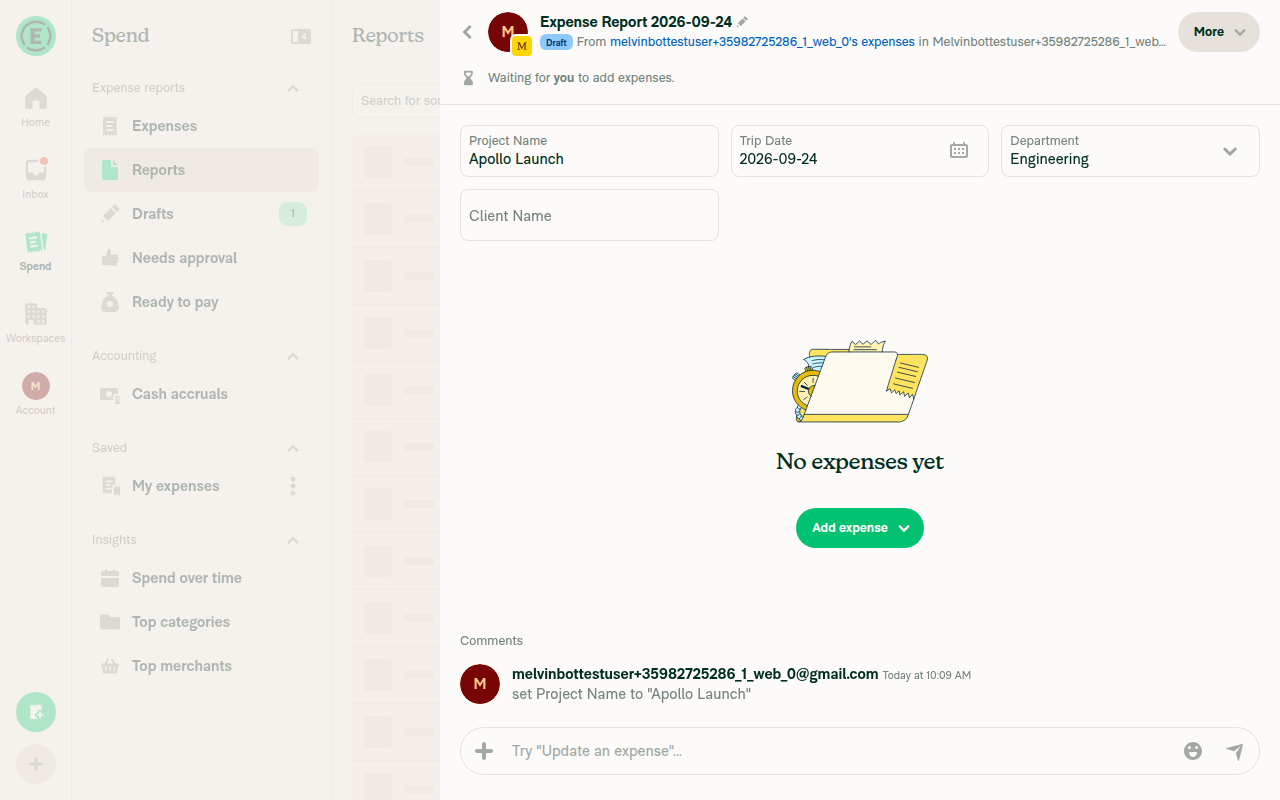
All seven checks passed on dev NewDot web: report fields render as an inline grid — three per row on a wide layout, one per row at mobile width — and text, date and dropdown fields all edit and save in place without navigating to a separate page. No failed network calls or error dialogs occurred during the flow. This PR still has no written test steps (the Tests and QA Steps sections are the // TODO placeholder, as they are on the original Show up to three report fields per row and edit them inline), so I derived the checks below from the change description and the mockup in [Due for payment 2026-09-30] [CFI] Report Fields: Add up to 3 fields per row and add in-line editing. Setup was a Control workspace with four report fields — Project Name (text), Trip Date (date), Department (list: Engineering/Sales), Client Name (text) — and an expense report on it.

All four report fields showing their values as inline inputs

Step Status
1. Wide layout renders up to 3 fields per row with equal cell widths, and the 4th field on row 2 keeps the same width rather than stretchingAt 1280px, Project Name / Trip Date / Department render as three equal-width cells in row 1. Client Name sits alone in row 2 at the same width as the cells above it, not full width.
Workspace report fields configured: Project Name, Trip Date, Department, Client Name
Four report fields in a 3-per-row grid on a wide layout
✅
2. Each field is an inline compact input showing its value, not a full-width chevron row that navigates awayProject Name and Client Name render as text boxes, Trip Date as a date value with a calendar icon, Department as a value with a dropdown chevron — all inline in the report view. Clicking any of them opened an in-place editor and the app stayed on the same expense report screen throughout.
All four report fields showing their values as inline inputs
✅
3. Text field edits in place and the value persists after blurTyped "Apollo Launch" into Project Name and "Acme Corp" into Client Name directly in the grid. After blurring, both values remained and the report history logged changed 'Project Name' to 'Apollo Launch'.
Text field value persisted after blur with a report history entry
✅
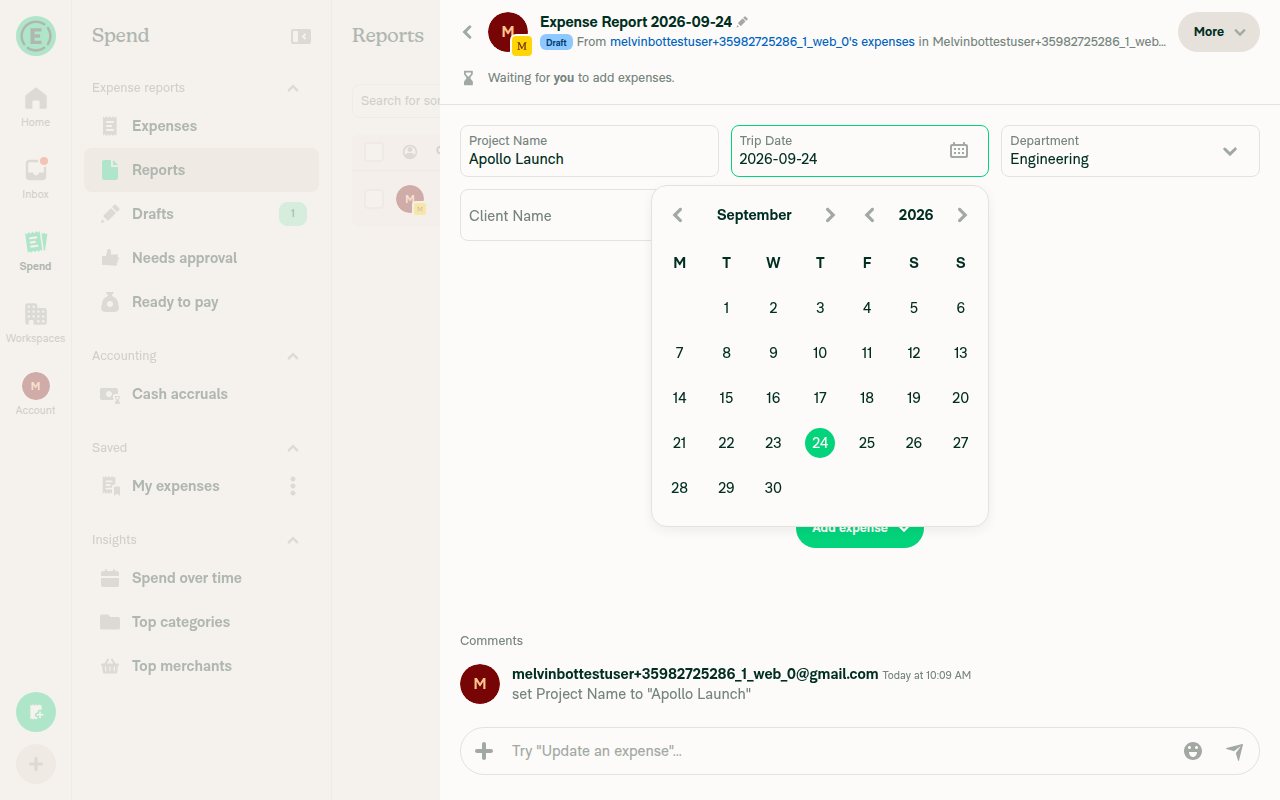
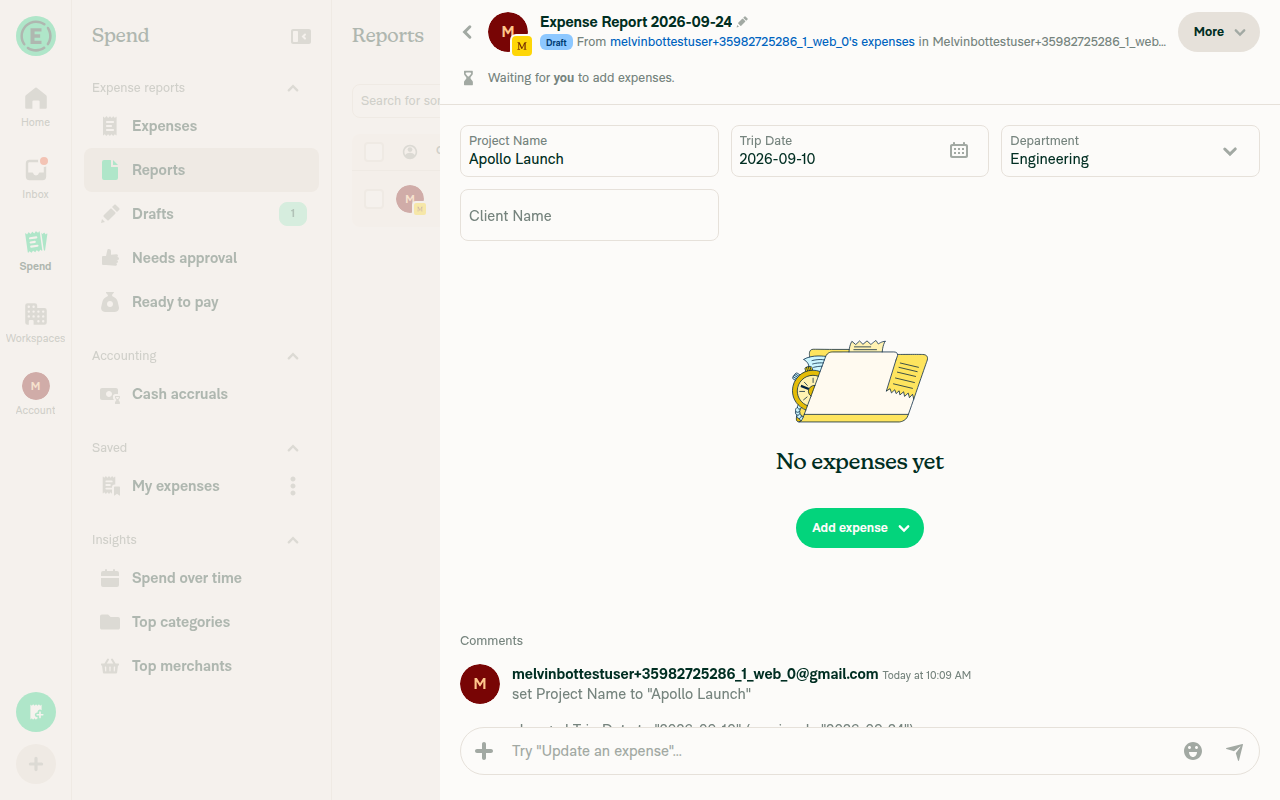
4. Date field opens a calendar over the report and saves the picked dateClicking Trip Date opened a calendar popover anchored to the field. Selecting Sept 10 closed the picker, set the field to 2026-09-10 and added a history entry.
Calendar popover open over the report on the Trip Date field
Trip Date updated to 2026-09-10 after picking a date
✅
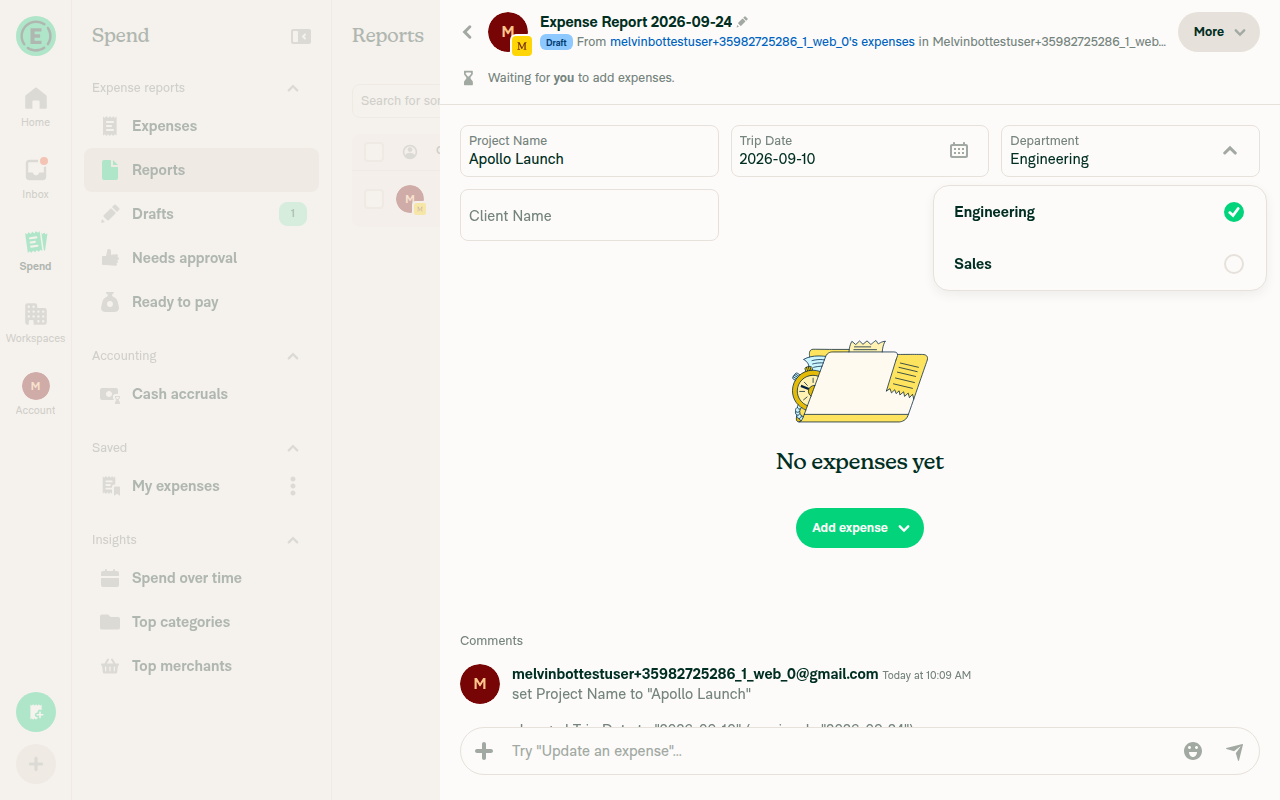
5. Dropdown field opens a selection modal and saves the chosen optionClicking Department opened a selection popover listing Engineering (checked) and Sales. Selecting Sales closed it, updated the field and added a history entry. With only two configured options no search box rendered — the app only shows one above a list-length threshold — so the searchable UI itself was not exercised, but selection and save worked.
Department dropdown selection popover listing Engineering and Sales
Department field updated to Sales
✅
6. Narrow browser width drops the fields to one per rowAt a 375px viewport, all four fields stacked to one full-width field per row.
Report fields stacked one per row at a 375px mobile width
✅
7. No JS console errors during the flowNo error dialogs or toasts appeared during any interaction, and every relevant API call in the session network log (Report_SetFields, CreatePolicyReportField, CreateAppReport, OpenReport) returned 200. Caveat: the web tester has no browser console-log capture, so this rests on the absence of visible error UI and clean network responses rather than a direct console read.
✅

The PR body says it deliberately restores the reverted code unchanged so the known regressions can be listed against it. Neither this web pass nor the earlier Android pass reproduced a regression on the derived steps, so the regressions you want captured are probably in a flow these checks do not reach — a specific field type, a violation or required-field case, an offline or pending state, or a particular field count. Tell me which flow to drive and I will rerun against it.


view run · view recording

@daledah

daledah commented Sep 24, 2026

Copy link
Copy Markdown
Contributor

@MelvinBot please open this PR

@MelvinBot
MelvinBot marked this pull request as ready for review September 24, 2026 11:01
@MelvinBot
MelvinBot requested review from a team as code owners September 24, 2026 11:01
@melvin-bot

melvin-bot Bot commented Sep 24, 2026

Copy link
Copy Markdown

@daledah Please copy/paste the Reviewer Checklist from here into a new comment on this PR and complete it. If you have the K2 extension, you can simply click: [this button]

@melvin-bot
melvin-bot Bot removed request for a team September 24, 2026 11:01
@MelvinBot

Copy link
Copy Markdown
Contributor Author

Done — this PR is out of draft and open for review.

Two things to know before a reviewer picks it up:

  • The Tests and QA Steps sections are still the // TODO placeholder, and the author checklist is unchecked. The PR Author Checklist check will fail until you fill those in.
  • The PR restores the reverted code unchanged, so the known regressions from Show up to three report fields per row and edit them inline are still present by design. My Android pass on the phone layout didn't surface any of them, so if the regressions you want listed are wide-layout or three-per-row specific, they need a web run. The Melvin-Test-Web label is already on this PR — reply with @MelvinBot run the test steps on web and I'll do that pass.

view run

@daledah

daledah commented Sep 24, 2026

Copy link
Copy Markdown
Contributor

@MelvinBot please look at Blocker list above and fix issue 1, issue 4

@chatgpt-codex-connector chatgpt-codex-connector Bot left a comment

Copy link
Copy Markdown

Choose a reason for hiding this comment

The reason will be displayed to describe this comment to others. Learn more.

💡 Codex Review

Here are some automated review suggestions for this pull request.

Reviewed commit: 1d42b70101

ℹ️ About Codex in GitHub

Codex has been enabled to automatically review pull requests in this repo. Reviews are triggered when you

  • Open a pull request for review
  • Mark a draft as ready
  • Comment "@codex review".

If Codex has suggestions, it will comment; otherwise it will react with 👍.

When you sign up for Codex through ChatGPT, Codex can also answer questions or update the PR, like "@codex address that feedback".

Comment on lines +216 to +217
it('shows up to three fields per row on a wide layout', async () => {
await renderReportFields(7);

Copy link
Copy Markdown

Choose a reason for hiding this comment

The reason will be displayed to describe this comment to others. Learn more.

P1 Badge Add Given/When/Then documentation to every added test

The newly added test cases use ad-hoc comments (or none) instead of the required // Given, // When, and // Then sections explaining why each scenario matters. Add all three sections to every case in this test file (and the other newly added/modified tests) so the test intent remains maintainable.

AGENTS.md reference: AGENTS.md:L3-L3

Useful? React with 👍 / 👎.

Comment on lines +92 to +94
if (trimmedValue === lastSavedValue.trim()) {
setValidationError('');
return;

Copy link
Copy Markdown

Choose a reason for hiding this comment

The reason will be displayed to describe this comment to others. Learn more.

P2 Badge Restore the displayed value when a trimmed edit is skipped

For an existing non-empty text field, entering only leading or trailing whitespace (for example, changing Value to Value) takes this equality branch and intentionally skips the update, but leaves draftValue as the unsaved text. Since the value prop does not change when no update is sent, the inline field continues displaying a value that will disappear after remount or refresh; reset the draft to the saved value before returning.

Useful? React with 👍 / 👎.

);

return (
// No `popoverWidth`, so the dropdown falls back to `CONST.POPOVER_DROPDOWN_WIDTH` — the same width every

Copy link
Copy Markdown
Contributor

Choose a reason for hiding this comment

The reason will be displayed to describe this comment to others. Learn more.

❌ CONSISTENCY-15 (docs)

The comment uses an em dash in its own sentence ("...falls back to CONST.POPOVER_DROPDOWN_WIDTH — the same width every Spend filter dropdown uses..."). Comments should read as plain sentences without em/en dashes.

Split the thought into separate sentences or use a comma instead:

// No `popoverWidth`, so the dropdown falls back to `CONST.POPOVER_DROPDOWN_WIDTH`, the same width every
// Spend filter dropdown uses. Matching the field's own width instead made narrow fields open odd, cramped
// popovers and wide ones open oversized.

Reviewed at: 1d42b70 | Please rate this suggestion with 👍 or 👎 to help us improve! Reactions are used to monitor reviewer efficiency.

Copy link
Copy Markdown
Contributor Author

Choose a reason for hiding this comment

The reason will be displayed to describe this comment to others. Learn more.

Fixed in 15561fa. The em dash is now a comma.


view run

errorText={violationError}
inputStyle={styles.pointerEventsNone}
icon={icons.DownArrow}
// `pr0` makes the icon container's padding asymmetric, so it has to flip in place —

Copy link
Copy Markdown
Contributor

Choose a reason for hiding this comment

The reason will be displayed to describe this comment to others. Learn more.

❌ CONSISTENCY-15 (docs)

The comment ends with an em dash joining two sentences ("...so it has to flip in place — flipUpsideDown would rotate..."). Write the two thoughts as separate sentences.

// `pr0` makes the icon container's padding asymmetric, so it has to flip in place.
// `flipUpsideDown` would rotate that padding too and shift the caret left when open.

Reviewed at: 1d42b70 | Please rate this suggestion with 👍 or 👎 to help us improve! Reactions are used to monitor reviewer efficiency.

Copy link
Copy Markdown
Contributor Author

Choose a reason for hiding this comment

The reason will be displayed to describe this comment to others. Learn more.

Fixed in 15561fa. Split into two sentences.


view run

const {sortedPolicyReportFields, fieldValues, fieldsByName} = useMemo(() => {
const {fieldValues: values, fieldsByName: byName} = getReportFieldMaps(report, policy?.fieldList ?? {}, reportNameValuePairs);
const sorted = Object.values(byName)
// Only used to decide whether the report field block is worth rendering — `MoneyRequestViewReportFields` builds and

Copy link
Copy Markdown
Contributor

Choose a reason for hiding this comment

The reason will be displayed to describe this comment to others. Learn more.

❌ CONSISTENCY-15 (docs)

The comment uses an em dash in its own sentence ("...whether the report field block is worth rendering — MoneyRequestViewReportFields builds and resolves..."). Replace the em dash with a period and a new sentence.

// Only used to decide whether the report field block is worth rendering.
// `MoneyRequestViewReportFields` builds and resolves the fields it displays itself.

Reviewed at: 1d42b70 | Please rate this suggestion with 👍 or 👎 to help us improve! Reactions are used to monitor reviewer efficiency.

Copy link
Copy Markdown
Contributor Author

Choose a reason for hiding this comment

The reason will be displayed to describe this comment to others. Learn more.

Fixed in 15561fa. Split into two sentences.


view run

onSubmit: (form: Record<string, string>) => void;

/** Whether the search input is shown. Callers with a short list hide it, since there is little to search through. */
shouldShowTextInput?: boolean;

Copy link
Copy Markdown
Contributor

Choose a reason for hiding this comment

The reason will be displayed to describe this comment to others. Learn more.

❌ CLEAN-REACT-PATTERNS-1 (docs)

This change adds five new boolean configuration flags at once (shouldShowTextInput, shouldShowRecentlyUsedOptions, shouldPinSelectedOption, shouldShowSectionTitles, shouldUseCompactRows), each of which drives an if/ternary branch inside the component to toggle the presence of the search input, the recently-used section, section titles, selection pinning, and row height. Controlling feature presence and layout via boolean flags couples the component to each consumer and grows its API every time a caller needs a new variant.

Prefer composition: expose these as composable behaviors the caller opts into (e.g. <EditReportFieldDropdown.Search />, <EditReportFieldDropdown.RecentlyUsed />) or pass the already-computed section data / list config in, so the component body stays stable rather than branching on each flag. At minimum, consolidate the presentation variants (compact vs. page rows, titles on/off) rather than threading each as an independent boolean.


Reviewed at: 1d42b70 | Please rate this suggestion with 👍 or 👎 to help us improve! Reactions are used to monitor reviewer efficiency.

Copy link
Copy Markdown
Contributor Author

Choose a reason for hiding this comment

The reason will be displayed to describe this comment to others. Learn more.

Not changed. daledah, let me know if you want this refactor anyway.

  • EditReportFieldDropdown is a thin wrapper around SelectionListWithSections. The rule exempts wrappers around list components.
  • Four of the five flags do not branch the render. shouldShowTextInput goes straight to the list's own prop. shouldShowRecentlyUsedOptions, shouldPinSelectedOption and shouldShowSectionTitles only change the section data built by getReportFieldOptionsSection.
  • shouldUseCompactRows only changes row height.
  • A compound-component refactor would also change the RHP caller in DynamicEditReportFieldPage. That is a lot of scope for a restore PR that is working through a blocker list.

view run

Comment thread src/pages/EditReportFieldDropdown.tsx Outdated
// Same override the Spend single-select dropdowns use to shorten the default 64px option row. It also makes
// the rows match the 52px `getSelectionListPopoverHeight` already assumes, so the popover stops being sized
// for less content than it holds.
style={shouldUseCompactRows ? {listItemWrapperStyle: {minHeight: variables.optionRowHeightCompact}} : undefined}

Copy link
Copy Markdown
Contributor

Choose a reason for hiding this comment

The reason will be displayed to describe this comment to others. Learn more.

❌ UI-3 (docs)

This passes an inline style object literal ({minHeight: variables.optionRowHeightCompact}) into the list's listItemWrapperStyle. Inline style objects allocate a new object on every render and duplicate a value that belongs in the style system. Since variables.optionRowHeightCompact is static, define a named style helper and reference it instead.

// in styles
compactOptionRow: {minHeight: variables.optionRowHeightCompact},

// usage
style={shouldUseCompactRows ? {listItemWrapperStyle: styles.compactOptionRow} : undefined}

Reviewed at: 1d42b70 | Please rate this suggestion with 👍 or 👎 to help us improve! Reactions are used to monitor reviewer efficiency.

Copy link
Copy Markdown
Contributor Author

Choose a reason for hiding this comment

The reason will be displayed to describe this comment to others. Learn more.

Fixed in 15561fa. Added a named optionRowCompactMinHeight style in src/styles/index.ts and used it here. I did not reuse optionRowCompact, because it also sets 12px vertical padding, which would change the row layout.


view run

@daledah

daledah commented Sep 24, 2026

Copy link
Copy Markdown
Contributor

@MelvinBot please check the comments from codex above

@daledah

daledah commented Oct 12, 2026

Copy link
Copy Markdown
Contributor

@AndrewGable i updated, please check again

@AndrewGable
AndrewGable merged commit 9cd995d into main Oct 12, 2026
43 of 44 checks passed
@AndrewGable
AndrewGable deleted the claude-reportFieldsGridInlineEditing-restore branch October 12, 2026 16:20
@OSBotify

Copy link
Copy Markdown
Contributor

✋ This PR was not deployed to staging yet because QA is ongoing. It will be automatically deployed to staging after the next production release.

@github-actions

Copy link
Copy Markdown
Contributor

🚧 AndrewGable has triggered a test Expensify/App build. You can view the workflow run here.

@OSBotify

Copy link
Copy Markdown
Contributor

🚀 Deployed to staging by https://github.com/AndrewGable in version: 9.5.8-0 🚀

platform result
🕸 web 🕸 success ✅
🤖 android 🤖 success ✅
🍎 iOS 🍎 success ✅

@MelvinBot

Copy link
Copy Markdown
Contributor Author

No help site update is needed. The help site has no step that tells members to open a report field on a page to edit it. This PR moves that editing inline, but it doesn't make any existing sentence wrong. Enable Report Fields only covers how admins set up and delete fields in workspace settings, and that flow is unchanged.


view run

@nlemma

nlemma commented Oct 13, 2026

Copy link
Copy Markdown

Deploy Blocker #103860 was identified to be related to this PR.

@nlemma

nlemma commented Oct 13, 2026

Copy link
Copy Markdown

Deploy Blocker #103909 was identified to be related to this PR.

@lanitochka17

Copy link
Copy Markdown

Deploy Blocker #103913 was identified to be related to this PR.

@nlemma

nlemma commented Oct 13, 2026

Copy link
Copy Markdown

Deploy Blocker #103917 was identified to be related to this PR.

@nlemma

nlemma commented Oct 13, 2026

Copy link
Copy Markdown

Deploy Blocker #103918 was identified to be related to this PR.

@lanitochka17

Copy link
Copy Markdown

Deploy Blocker #103922 was identified to be related to this PR.

@nlemma

nlemma commented Oct 13, 2026

Copy link
Copy Markdown

Deploy Blocker #103926 was identified to be related to this PR.

@AndrewGable

Copy link
Copy Markdown
Contributor

Working on the revert for all the blockers.

@OSBotify

Copy link
Copy Markdown
Contributor

🚀 Deployed to production by https://github.com/cristipaval in version: 9.5.8-5 🚀

platform result
🕸 web 🕸 success ✅
🤖 android 🤖 success ✅
🍎 iOS 🍎 success ✅

Bundle Size Analysis (Sentry):

Sign up for free to join this conversation on GitHub. Already have an account? Sign in to comment

Labels

Melvin-Test-Android Melvin-Test-Web Triggers Melvin to run the testing steps of the PR on web

Projects

None yet

Development

Successfully merging this pull request may close these issues.

10 participants