Skip to content

Show up to three report fields per row and edit them inline - #100735

Merged
Gonals merged 18 commits into
mainfrom
claude-reportFieldsGridInlineEditing
Sep 21, 2026
Merged

Gonals merged 18 commits into
mainfrom
claude-reportFieldsGridInlineEditing

Conversation

@MelvinBot

Copy link
Copy Markdown
Contributor

Explanation of Change

Report fields used to render as a vertical stack of full-width rows, each one navigating to the report field editor page to change a value. With nine report fields that filled the whole screen and pushed the expense list out of view, and every edit cost a navigation.

This changes both halves of that, per the approved proposal:

Up to three fields per row. MoneyRequestViewReportFields now chunks the sorted fields into rows of CONST.REPORT_FIELDS_PER_ROW (3) and lays each row out as a flexRow of equal-width cells. A partly filled last row is padded with empty cells so its fields keep the same width as the rows above. On a narrow layout the column count drops to 1. Both existing call sites — the report list header and the empty report view — render the same component, so they both pick this up.

Inline editing. The new ReportFieldInlineInput renders each field as one of our regular 52px inputs instead of a row that navigates away:

Type Control
text TextInput, saved on blur and on submit, skipped when unchanged
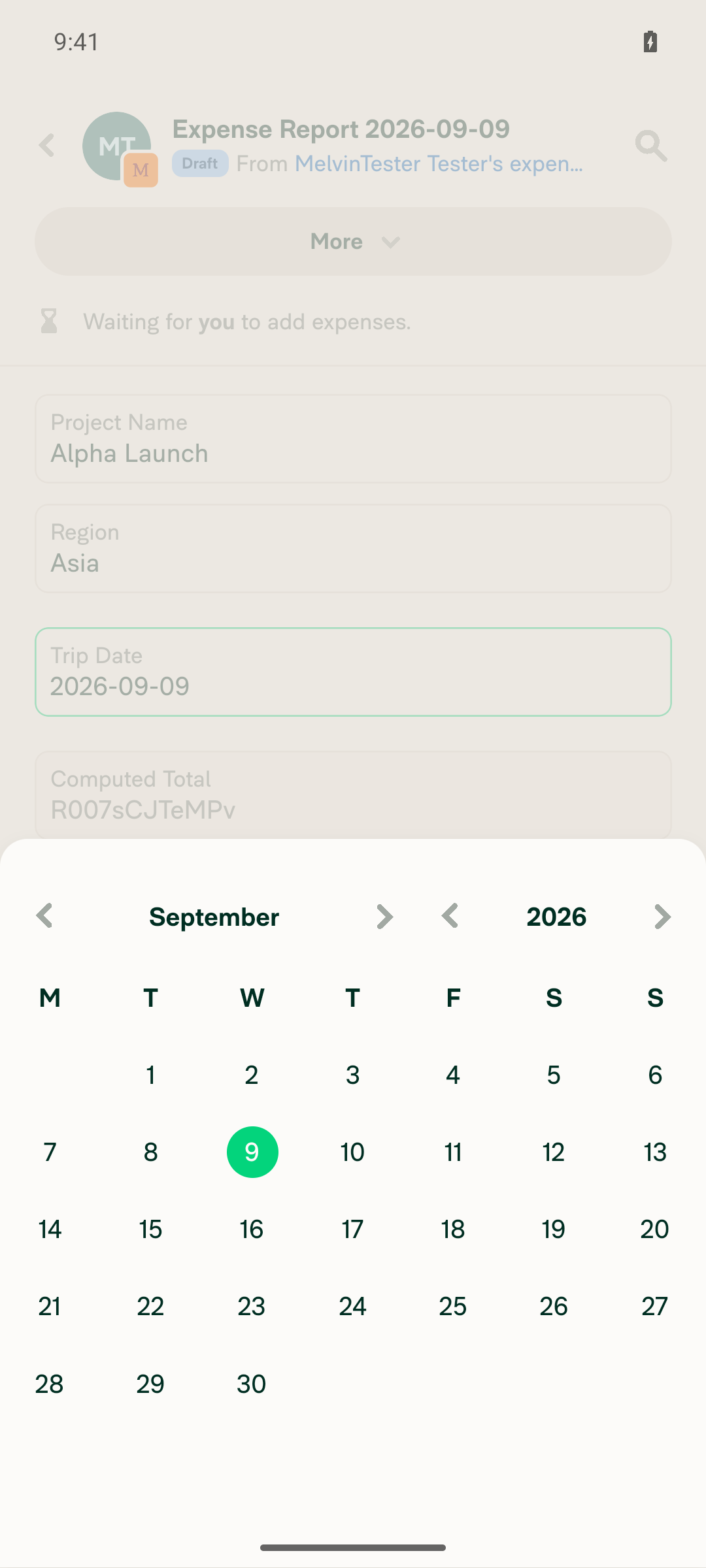
date DatePicker — the calendar opens over the report
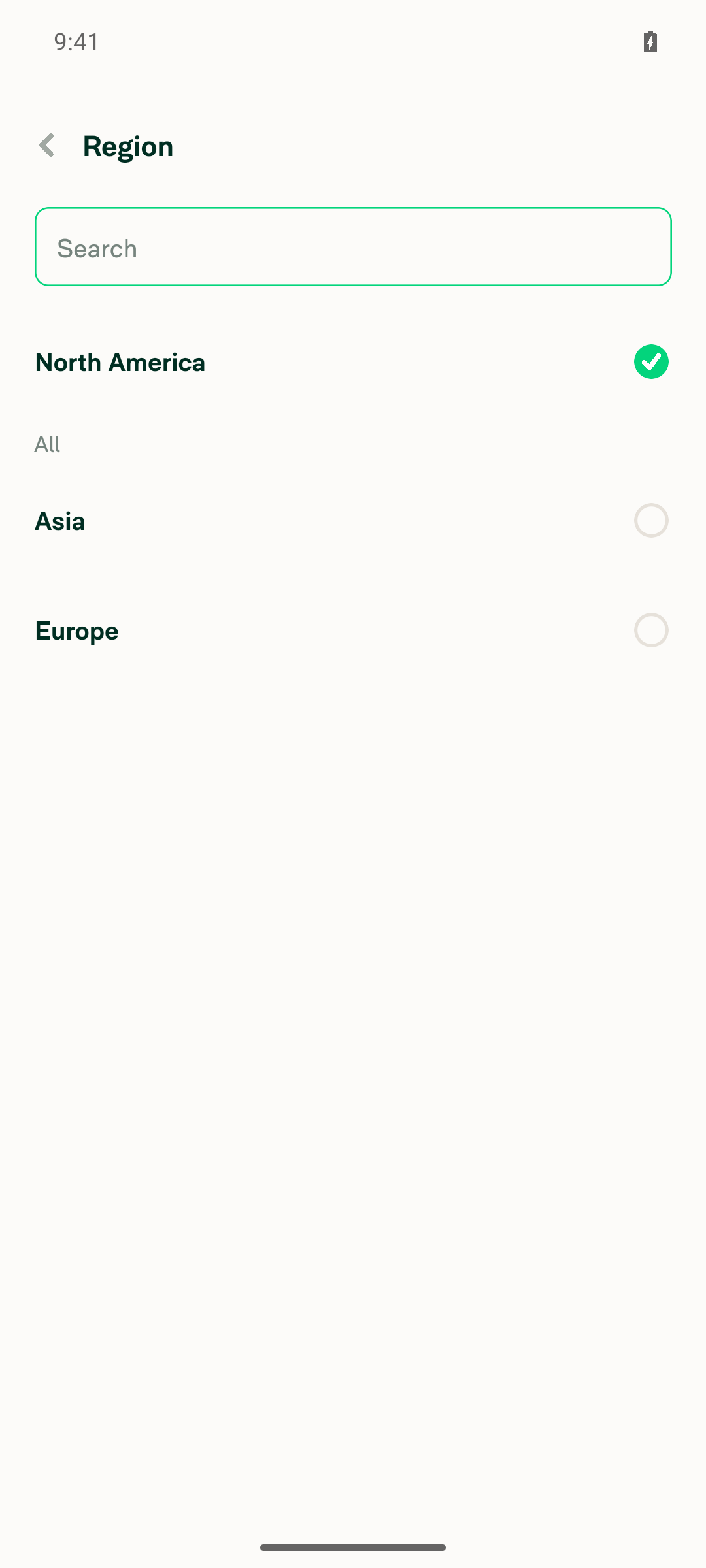
dropdown Press-to-open modal reusing EditReportFieldDropdown, so search and recently-used values are preserved
formula Read-only input, matching the previous disabled behavior

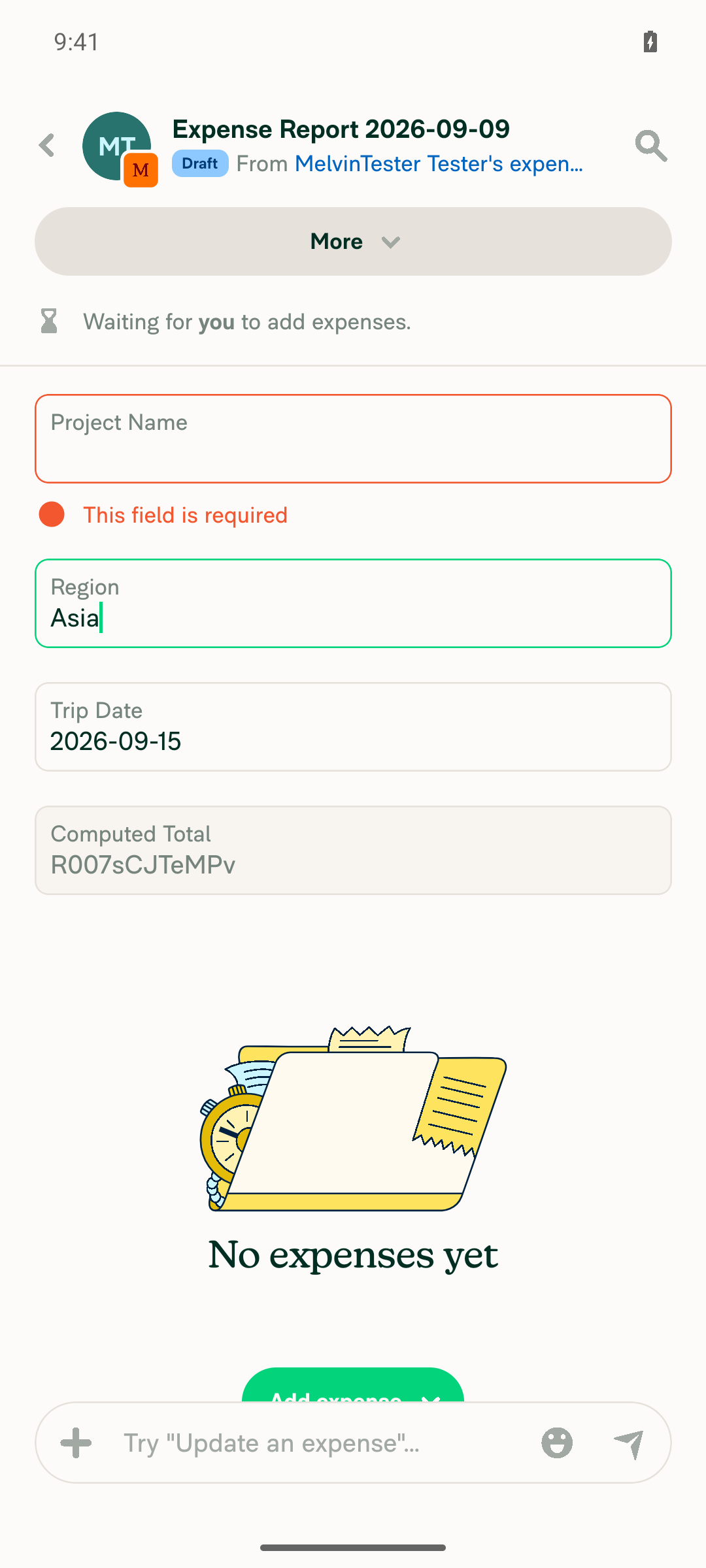
Text values keep the validation the editor page applied: required fields reject an empty value with common.error.fieldRequired, and a value that makes a formula refer to itself is rejected with workspace.reportFields.circularReferenceError. OfflineWithFeedback, the per-field pending state and the field violation message all work as before.

Shared save path. The save logic that lived inline in DynamicEditReportFieldPage moved into useSaveReportField. Both the editor page and the inline inputs call it, so the violation, ASAP-submit and recently-used handling only exists in one place. updateReportField's policy parameter was widened to OnyxEntry<Policy> to match how it already uses the value (policy?.), which removed the unsafe cast every caller needed.

The editor page is unchanged from the user's point of view — it still handles deep links and remains the narrow-layout path for the report title.

Fixed Issues

$ #100259
PROPOSAL: #100259 (comment)

Tests

// TODO: The human co-author must fill out the tests you ran before marking this PR as "ready for review".
// Please describe what tests you performed that validate your change worked.

  • Verify that no errors appear in the JS console

Offline tests

QA Steps

// TODO: These must be filled out, or the issue title must include "[No QA]."

  • Verify that no errors appear in the JS console

AI Tests

Automated checks run locally on this branch:

Check Result
npm run typecheck ✅ passed
npm run lint-changed ✅ passed
npm run react-compiler-compliance-check check (changed files) ✅ passed
npm run spell-changed ✅ passed
npm test -- tests/ui/MoneyRequestViewReportFieldsTest.tsx (new, 5 tests) ✅ passed
npm test -- tests/ui/MoneyReportViewTest.tsx tests/actions/ReportFieldTest.ts tests/ui/DynamicReportDetailsPageTest.tsx ✅ passed (31 tests)
npm test -- tests/ui/MoneyRequestReportViewTest.tsx tests/ui/MoneyRequestReportTransactionsNavigationTest.tsx ✅ passed (7 tests)
npm run lint (full repo) ⚠️ not completed — exceeded the local 10 minute command limit; lint-changed covers every file in this diff
Browser verification of the grid and inline editing ❌ not completed — see below

Browser verification could not be completed. The pinned web session went to a blank, unresponsive page after the dev server hot-reloaded these components, and reloading the tab is not permitted for this tester (it drops auth). The dev server log shows all four changed files rebuilt successfully with no compile error, and no console error or exception was captured, so there is no evidence of a runtime failure — but the three-per-row layout, inline saving and the narrow-layout single column are unverified in a browser and need a human pass.

New unit tests cover: three fields per row on a wide layout, one per row on a narrow layout, each field rendering as an input holding its value, a typed value saving through updateReportField, and an unchanged value not saving.

PR Author Checklist

  • I linked the correct issue in the ### Fixed Issues section above
  • I wrote clear testing steps that cover the changes made in this PR
    • I added steps for local testing in the Tests section
    • I added steps for the expected offline behavior in the Offline steps section
    • I added steps for Staging and/or Production testing in the QA steps section
    • I added steps to cover failure scenarios (i.e. verify an input displays the correct error message if the entered data is not correct)
    • I turned off my network connection and tested it while offline to ensure it matches the expected behavior (i.e. verify the default avatar icon is displayed if app is offline)
    • I tested this PR with a High Traffic account against the staging or production API to ensure there are no regressions (e.g. long loading states that impact usability).
  • I included screenshots or videos for tests on all platforms
  • I ran the tests on all platforms & verified they passed on:
    • Android: Native
    • Android: mWeb Chrome
    • iOS: Native
    • iOS: mWeb Safari
    • MacOS: Chrome / Safari
  • I verified there are no console errors (if there's a console error not related to the PR, report it or open an issue for it to be fixed)
  • I followed proper code patterns (see Reviewing the code)
    • I verified that comments were added to code that is not self explanatory
    • I verified that any new or modified comments were clear, correct English, and explained "why" the code was doing something instead of only explaining "what" the code was doing.
    • I verified any copy / text that was added to the app is grammatically correct in English. It adheres to proper capitalization guidelines (note: only the first word of header/labels should be capitalized), and is either coming verbatim from figma or has been approved by marketing (in order to get marketing approval, ask the Bug Zero team member to add the Waiting for copy label to the issue)
  • If a new code pattern is added I verified it was agreed to be used by multiple Expensify engineers
  • I followed the guidelines as stated in the Review Guidelines
  • I tested other components that can be impacted by my changes (i.e. if the PR modifies a shared library or component like Avatar, I verified the components using Avatar are working as expected)
  • If a new CSS style is added I verified that:
    • A similar style doesn't already exist
    • The style can't be created with an existing StyleUtils function (i.e. StyleUtils.getBackgroundAndBorderStyle(theme.componentBG))
  • If new assets were added or existing ones were modified, I verified that:
    • The assets are optimized and compressed (for SVG files, run npm run compress-svg)
    • The assets load correctly across all supported platforms.
  • If the PR modifies code that runs when editing or sending messages, I tested and verified there is no unexpected behavior for all supported markdown - URLs, single line code, code blocks, quotes, headings, bold, strikethrough, and italic.
  • If the PR modifies a generic component, I tested and verified that those changes do not break usages of that component in the rest of the App (i.e. if a shared library or component like Avatar is modified, I verified that Avatar is working as expected in all cases)
  • If the PR modifies a component related to any of the existing Storybook stories, I tested and verified all stories for that component are still working as expected.
  • If the PR modifies a component or page that can be accessed by a direct deeplink, I verified that the code functions as expected when the deeplink is used - from a logged in and logged out account.
  • If the PR modifies the UI (e.g. new buttons, new UI components, changing the padding/spacing/sizing, moving components, etc) or modifies the form input styles:
    • I verified that all the inputs inside a form are aligned with each other.
    • I added Design label and/or tagged @Expensify/design so the design team can review the changes.
  • I added unit tests for any new feature or bug fix in this PR to help automatically prevent regressions in this user flow.
  • If the main branch was merged into this PR after a review, I tested again and verified the outcome was still expected according to the Test steps.

Screenshots/Videos

Android: Native
Android: mWeb Chrome
iOS: Native
iOS: mWeb Safari
MacOS: Chrome / Safari

Co-authored-by: daledah <daledah@users.noreply.github.com>
@MelvinBot
MelvinBot requested a review from a team September 9, 2026 18:25
@melvin-bot melvin-bot Bot added Melvin-Test-Android Melvin-Test-Web Triggers Melvin to run the testing steps of the PR on web labels Sep 9, 2026
@MelvinBot

Copy link
Copy Markdown
Contributor Author

I created this PR from an upstream branch since I don't have push access to your fork.

To take ownership of this branch and be able to push updates, run:

git remote add upstream https://github.com/Expensify/App.git
git fetch upstream claude-reportFieldsGridInlineEditing
git checkout -b claude-reportFieldsGridInlineEditing upstream/claude-reportFieldsGridInlineEditing
git push -u origin claude-reportFieldsGridInlineEditing

Then you can close this PR and open a new one from your fork.

@codecov

codecov Bot commented Sep 9, 2026 •

Copy link
Copy Markdown

Codecov Report

❌ Looks like you've decreased code coverage for some files. Please write tests to increase, or at least maintain, the existing level of code coverage. See our documentation here for how to interpret this table.

Files with missing lines Coverage Δ
src/CONST/index.ts 91.52% <ø> (ø)
src/components/DatePicker/index.tsx 50.89% <100.00%> (ø)
...equestReportView/MoneyRequestReportActionsList.tsx 86.54% <ø> (-0.08%) ⬇️
...estReportView/MoneyRequestReportEmptyStateView.tsx 100.00% <100.00%> (ø)
...rc/components/ReportActionItem/MoneyReportView.tsx 100.00% <100.00%> (+3.94%) ⬆️
src/libs/ReportFieldOptionsListUtils.ts 100.00% <100.00%> (+3.84%) ⬆️
src/libs/actions/Report/index.ts 72.11% <ø> (ø)
src/pages/EditReportFieldDropdown.tsx 100.00% <100.00%> (+100.00%) ⬆️
src/styles/index.ts 64.53% <ø> (+0.49%) ⬆️
...RequestReportView/MoneyRequestViewReportFields.tsx 97.36% <93.33%> (+63.08%) ⬆️
... and 3 more
... and 10 files with indirect coverage changes

@MelvinBot

MelvinBot commented Sep 9, 2026 •

Copy link
Copy Markdown
Contributor Author

🤖 Web test steps verification results: ❌ fail

I could not verify any of this PR's behavior on Web. The browser session left the app during fixture setup and landed on the ExpensifyHelp site, which ends the run — the session cannot be re-opened without dropping auth into a magic-code wall this environment can't clear. No screenshots or recordings of the report fields grid or inline editing exist, because the test never reached that screen.

Two things also blocked me before the session was lost, and they need your input:

1. This PR has no documented testing steps. The Tests and QA Steps sections are still the template TODO placeholders (// TODO: **The human co-author** must fill out the tests you ran...). I derived 11 verification steps from the linked issue's Solution section and your Explanation of Change, but those are my inference, not your documented steps. Please fill in the Tests section so a re-run checks what you actually intend.

2. The fixture is expensive. Report fields only exist on a Control workspace, so verifying this needs a new workspace upgraded to Control, Report fields enabled, and at least four fields created across the text, dropdown, date, and formula types before any assertion can run. The session was lost partway through that setup.

Note that the PR body already states browser verification was not completed on the authoring run either, so the grid layout, inline saving, and narrow-layout single column remain unverified in a browser by anyone.

Step Status
Environment usable to drive the test (workspace + Report Fields setup, then verifications)Session navigated off the Expensify App to the ExpensifyHelp landing page during workspace setup. App chrome (Home/Inbox/Spend/Workspaces) was gone; only the help site's own nav remained. Re-opening is not available on this run.
Browser session left the Expensify App and landed on the ExpensifyHelp site, ending the test run
❌
1. Wide layout renders up to 3 report fields per row, not one full-width row per fieldNot reached — session lost during fixture setup.
❌
2. Partly filled last row keeps the same field width as full rows aboveNot reached — session lost during fixture setup.
❌
3. Each field renders as a ~52px input in place, instead of a row with a chevron that navigates awayNot reached — session lost during fixture setup.
❌
4. A text field edits inline — type, blur, value persists without navigatingNot reached — session lost during fixture setup.
❌
5. Blurring a text field without changing the value does not trigger a saveNot reached — session lost during fixture setup.
❌
6. A dropdown field opens a modal with search and list values, and the selection savesNot reached — session lost during fixture setup.
❌
7. A date field opens a calendar over the report and the picked date savesNot reached — session lost during fixture setup.
❌
8. A formula field renders read-only and cannot be editedNot reached — session lost during fixture setup.
❌
9. Clearing a required text field shows "This field is required" and does not save emptyNot reached — session lost during fixture setup.
❌
10. Narrow layout drops the grid to a single field per rowNot reached — session lost during fixture setup.
❌
11. No JavaScript console errors across the flowNot reached — session lost during fixture setup. No console errors were captured before the session was lost, which is not evidence of absence.
❌

To get this verified, fill in the Tests section and re-apply the Melvin-Test-Web label, and I'll run your documented steps.


view run · no recording available

…t, apply oxfmt

Co-authored-by: daledah <daledah@users.noreply.github.com>
@MelvinBot

Copy link
Copy Markdown
Contributor Author

Fixed the three failing checks in e0efa1c. All were caused by this PR's own changes.

Check Cause Fix
typecheck New test fixture was missing the required isTax property on PolicyReportField Added isTax: false to buildTextField
Oxfmt check useSaveReportField.ts had an import out of order and a line over the width limit Ran npm run fmt
Compare knip issues against main ReportFieldInlineInputProps was exported but never imported anywhere Removed the export type line
Details and local verification

typecheck — isTax is required on PolicyReportField, and the new fixture at tests/ui/MoneyRequestViewReportFieldsTest.tsx:62 omitted it.

Oxfmt — oxfmt moved the @selectors/Onboarding import below the react-native-onyx type import and wrapped the hasOtherViolations predicate in src/hooks/useSaveReportField.ts.

knip — nothing imports ReportFieldInlineInputProps; the type is only used inside ReportFieldInlineInput.tsx, so it no longer needs to be exported.

Verified locally after the fix:

Check Result
npm run typecheck ✅ passed
npm run fmt (no remaining diff) ✅ passed
npm run knip:full (no findings in this PR's files) ✅ passed
npm run react-compiler-compliance-check check (changed files) ✅ passed
npm test -- tests/ui/MoneyRequestViewReportFieldsTest.tsx ✅ 5 passed
npm test -- tests/ui/MoneyReportViewTest.tsx tests/actions/ReportFieldTest.ts tests/ui/DynamicReportDetailsPageTest.tsx ✅ 31 passed

Not fixed, and not a failure: raw eslint reports one @typescript-eslint/no-unsafe-type-assertion error at MoneyRequestViewReportFields.tsx:71. That assertion already exists on main — this PR only moved it to a different line — and the seatbelt ratchet allows exactly 1 for this file, which is still the count. npm run lint is unaffected.

Check independent approval is failing for a reason unrelated to the code and needs a human reviewer.

The browser verification gap called out in the PR description still stands — the grid layout and inline saving have not been confirmed in a browser and need a human pass.

@MelvinBot

MelvinBot commented Sep 9, 2026 •

Copy link
Copy Markdown
Contributor Author

🤖 Android test steps verification results: ✅ pass

On standalone Android NewDot, all four report field types (text, list/dropdown, date, formula) render one-per-row as inline editable inputs on a Control-workspace expense report. Inline text/list/date editing, no-op refocus/blur, formula read-only, and required-field validation all behaved correctly, with no crashes or red boxes. Two caveats worth reading before you treat this as full coverage — they are below the table.

Final report state with all four fields valid and no error UI

Step Status
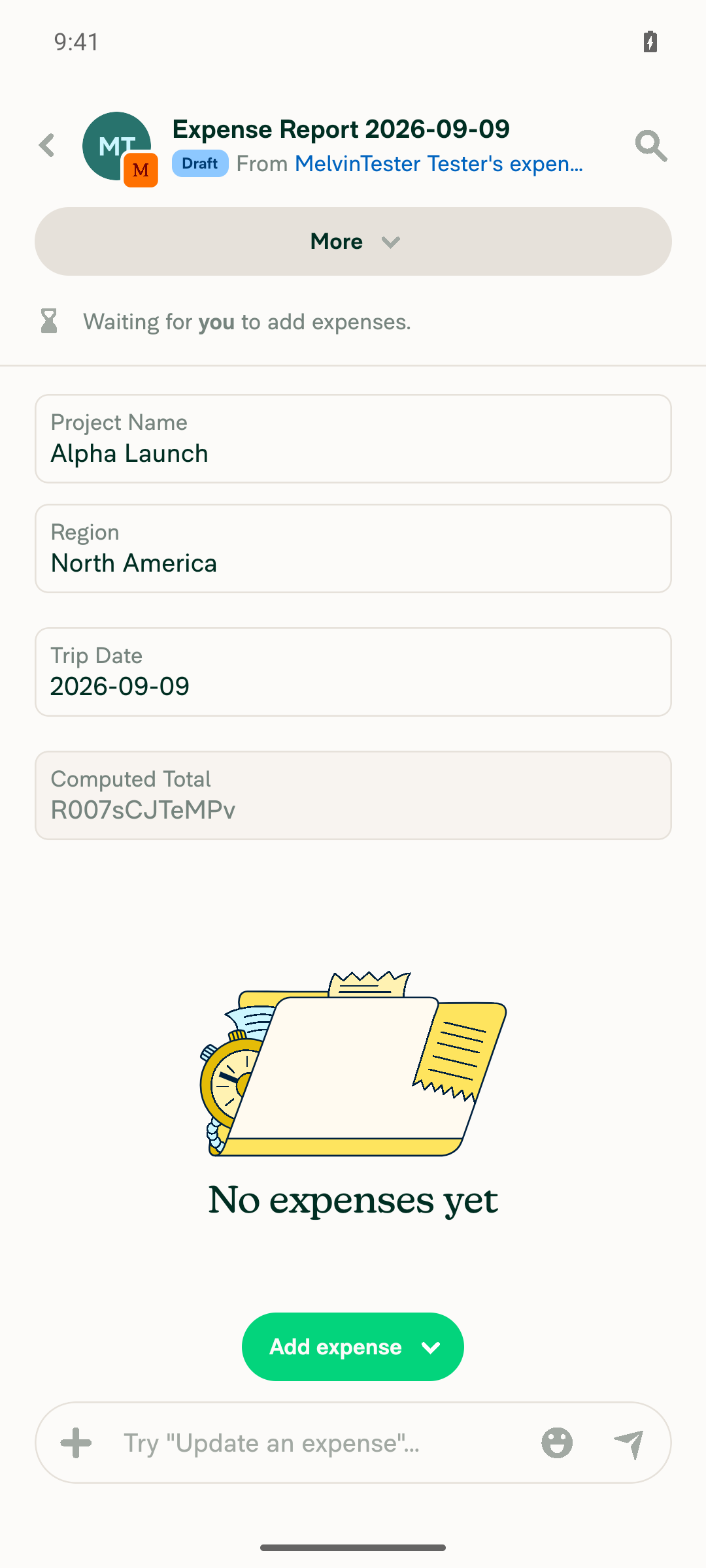
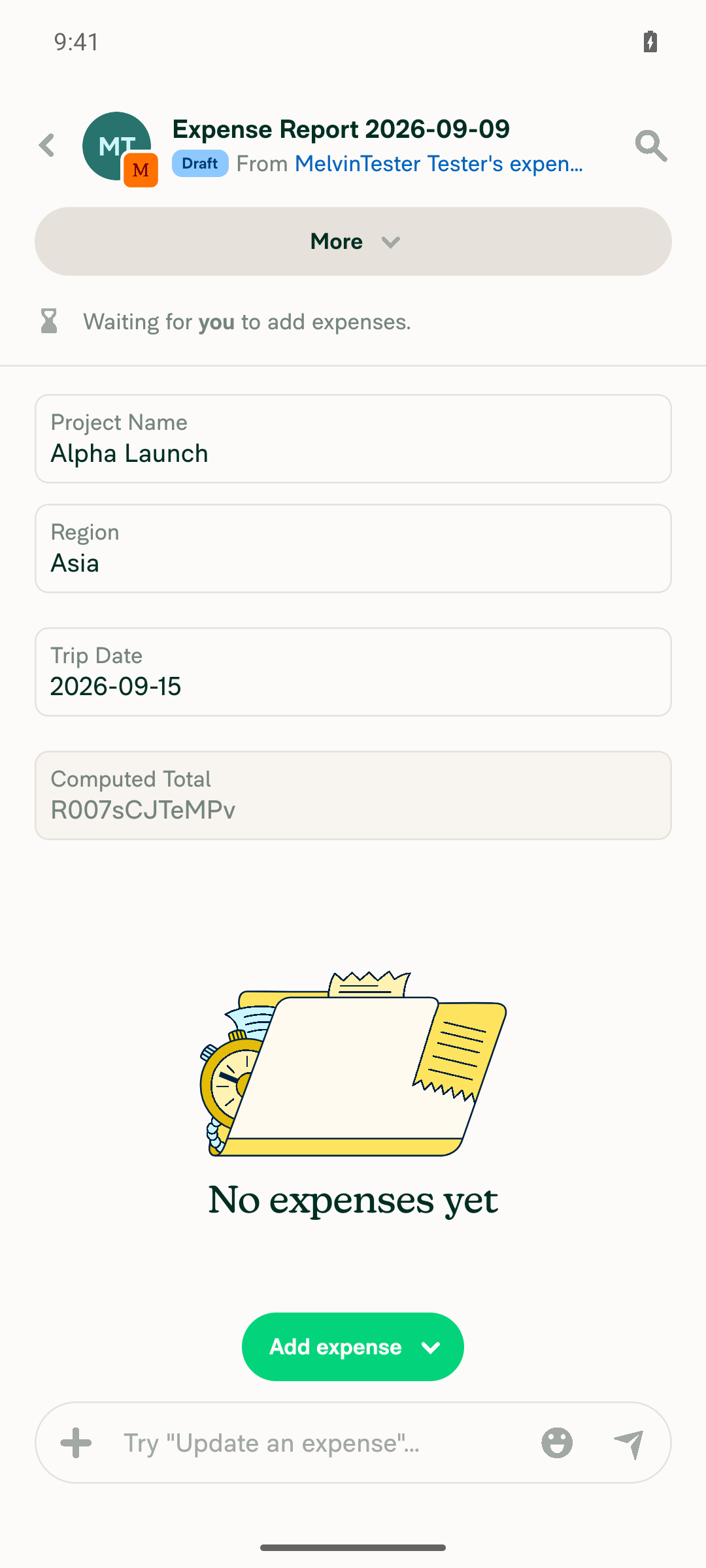
1. Report fields render one per row on the phone's narrow layoutProject Name, Region, Trip Date and Computed Total each occupy their own full-width row, stacked vertically, on the 1080x2400 emulator viewport.
All four report fields stacked one per row on the expense report
✅
2. Each field renders as an inline input showing its current value in place, not a chevron row to a separate editorEach field is a text-field/group control with the value directly visible (for example "North America", "2026-09-09") and no chevron affordance. Tapping opens an in-place modal or picker, or focuses the input, rather than navigating to a new screen.
All four report fields stacked one per row on the expense report
✅
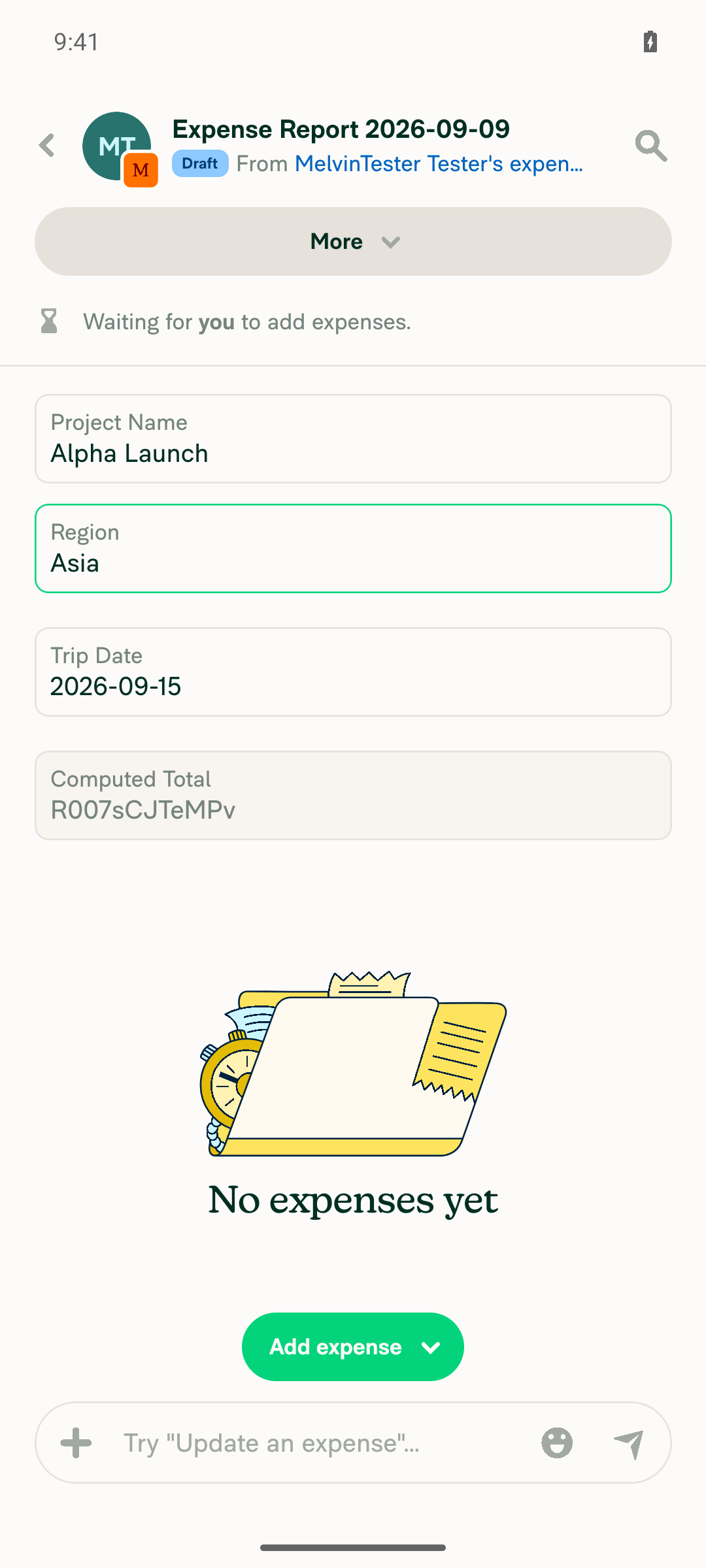
3. Text field edits inline — typing a new value and blurring persists it without navigationFilled Project Name with "Alpha Launch", navigated to Report Details and back to blur, and the value persisted in place on the same report screen with the prior required violation cleared.
Project Name shows Alpha Launch after inline edit and blur
✅
4. Refocusing a text field and blurring without changing the value triggers no new save or pending stateTapped into Project Name (confirmed focused in the accessibility snapshot) without altering the text, then blurred by tapping into Region. Project Name still reads "Alpha Launch" in normal steady-state styling with no offline/pending indicator.
Region inline input shows Asia after selection and Project Name unchanged after no-op refocus
✅
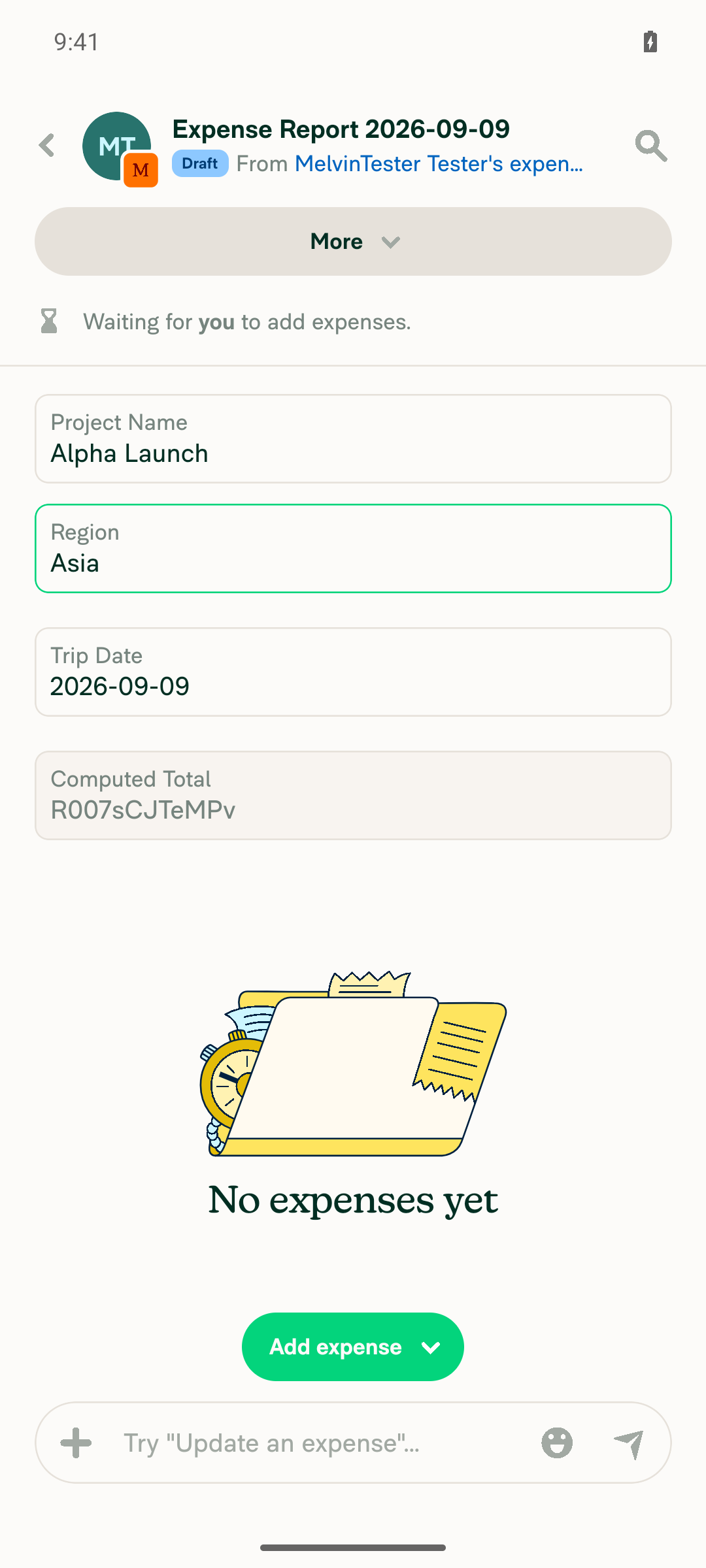
5. Dropdown field opens a modal with a search input and list values; selecting a value saves and shows it inlineTapping Region opened a right-docked modal titled "Region" with a Search field and radio options Asia / Europe / North America, with North America pre-checked. Selecting Asia closed the modal and the inline input updated to "Asia".
Region dropdown modal with search input and list values
Region inline input shows Asia after selection and Project Name unchanged after no-op refocus
✅
6. Date field opens a date picker; picking a date saves it into the inline inputTapping Trip Date opened an in-place calendar bottom sheet defaulted to September 2026 with 9 highlighted. Selecting 15 closed the picker and the inline input updated to "2026-09-15".
Date picker calendar opened in place for Trip Date
Trip Date inline input shows 2026-09-15 and Computed Total disabled
✅
7. Formula field renders read-only/disabled and cannot be editedCreated a Formula field ("Computed Total"). It renders as a text-field marked disabled showing the evaluated value. Attempting to fill it failed with an Android fill verification error, confirming the control rejects input.
Trip Date inline input shows 2026-09-15 and Computed Total disabled
✅
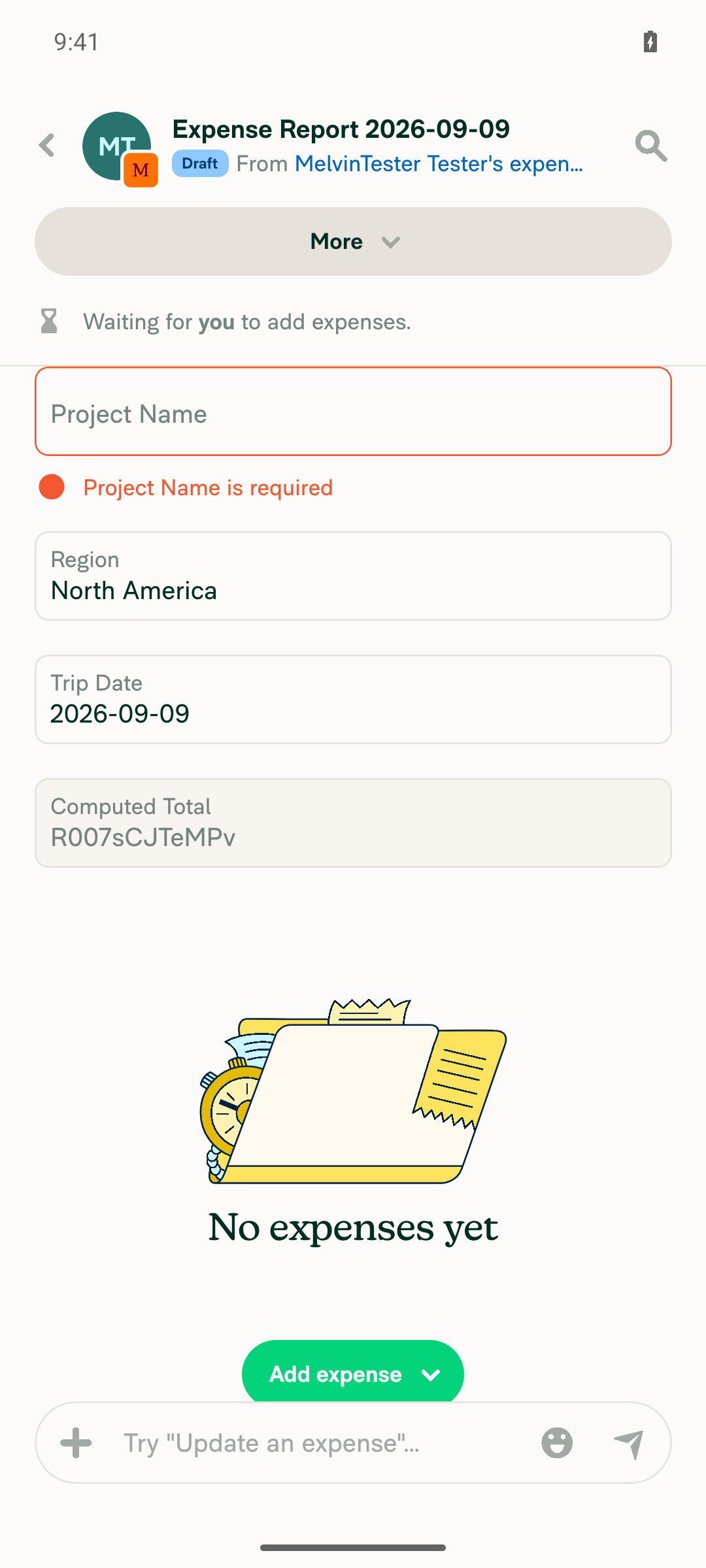
8. Clearing a required text field shows "This field is required" and does not save an empty valueProject Name is required. Cleared it to whitespace and blurred by navigating to Region and back. The inline validation error "This field is required" appeared under the field and the field stayed empty, so the empty value was rejected. Note the field was cleared to whitespace rather than a true empty string.
Project Name empty with This field is required validation error
✅
9. No crashes, red boxes, or JavaScript errors throughout the flowNo red-box or crash dialogs appeared across the 13 screenshots covering workspace setup, field creation and every inline-editing interaction. Caveat: the app-log stream was not started for this session, so console/JS error text could not be grepped directly — this rests on the visual absence of error overlays, not on a clean log.
Final report state with all four fields valid and no error UI
✅

Two caveats:

  1. The three-per-row grid is still unverified by anyone. On a phone the layout intentionally collapses to a single column — shouldUseNarrowLayout ? 1 : CONST.REPORT_FIELDS_PER_ROW at MoneyRequestViewReportFields.tsx:131 — so one-per-row is the correct Android result, not the three-per-row behavior the linked issue asks for. That path needs a wide viewport, and my Web run on this PR failed before reaching it. The padded partly-filled last row is unverified for the same reason.

  2. These are still not your documented steps. The Tests and QA Steps sections of this PR are unchanged template TODOs, so I derived these 9 assertions from the linked issue's Solution section and your Explanation of Change. If you fill in Tests, I can re-run against what you actually intend.

Setup for reproducibility: created a Control-plan workspace, enabled Report fields, and added a text field ("Project Name", required), a list field ("Region" with Asia/Europe/North America), a date field ("Trip Date") and a formula field ("Computed Total") before creating the test expense report.


view run · view recording

@daledah

daledah commented Sep 10, 2026

Copy link
Copy Markdown
Contributor

@MelvinBot The 3-per-row grid doesn't render. Every field still takes a full row on a wide screen.

Root cause: MoneyRequestViewReportFields reads shouldUseNarrowLayout from useResponsiveLayout, which returns true for any screen inside the RHP regardless of pane width. The report view is a RightModalNavigator screen (SCREENS.RIGHT_MODAL.EXPENSE_REPORT / SEARCH_MONEY_REQUEST_REPORT) shown as a wide RHP, so columnCount is always 1.

Please use useResponsiveLayoutOnWideRHP instead

…eal pane width

Co-authored-by: daledah <daledah@users.noreply.github.com>
@daledah

daledah commented Sep 10, 2026

Copy link
Copy Markdown
Contributor

@MelvinBot The date fields render with no calendar icon, so they don't match the mock.

DatePicker hides the calendar icon as soon as the field has a value, because the icon shares the right-hand slot with the clear button (BaseTextInput renders them as siblings in the same area):

ReportFieldInlineInput passes shouldHideClearButton, so the clear button is gone too and the slot ends up empty on every date field that has a value.

Fix it in src/components/DatePicker/index.tsx, tie the icon to whether the slot is actually taken:

-                    icon={selectedDate ? null : icons.Calendar}
+                    icon={selectedDate && !shouldHideClearButton ? null : icons.Calendar}

@MelvinBot

MelvinBot commented Sep 10, 2026 •

Copy link
Copy Markdown
Contributor Author

No code fix is needed — every code check on this PR passes.

34 of 35 checks pass. The one failure is Check independent approval, which is the Verify peer review workflow. It fails because this PR has no approving review yet (reviewDecision: REVIEW_REQUIRED, zero reviews, still a draft). It is a process gate, not a code problem, so pushing a commit cannot clear it — it goes green once a reviewer other than the author approves.

All code-quality and test checks are green: typecheck, ESLint check, Oxfmt check, spellcheck, all 8 test jobs, Bun tests, Storybook tests, React Compiler Compliance, Check for unused styles, Compare knip issues against main, and both Android/iOS builds.

Two things still blocking this PR that a human needs to do:

  1. Fill in the Tests and QA Steps sections. Both still contain the // TODO: placeholder. I can't fill these out on your behalf.
  2. Get a reviewer to approve, then mark the PR ready for review.

Also worth flagging from the PR body: browser verification of the grid layout and inline editing was never completed, so the three-per-row layout, inline saving, and the narrow-layout single-column fallback are still unverified in a real browser.


view run · no recording available

@MelvinBot

Copy link
Copy Markdown
Contributor Author

Confirmed and fixed in c193348.

Both report screens are in SUPER_WIDE_RIGHT_MODALS, so useResponsiveLayout returned isInNarrowPaneModal: true at every width and pinned columnCount to 1. Switched to useResponsiveLayoutOnWideRHP, which cancels that for a wide/super-wide RHP on a non-small screen — the same hook every sibling in MoneyRequestReportView already uses.

Change and test details
  • MoneyRequestViewReportFields.tsx:90 now reads shouldUseNarrowLayout from useResponsiveLayoutOnWideRHP.
  • The unit test mocked @hooks/useResponsiveLayout, so it would have kept passing against the broken code path. It now mocks @hooks/useResponsiveLayoutOnWideRHP directly, matching what the component calls.
  • Native is unaffected — useResponsiveLayoutOnWideRHP/index.native.ts passes shouldUseNarrowLayout straight through, so mobile still gets one field per row.
Check Result
npm test -- tests/ui/MoneyRequestViewReportFieldsTest.tsx ✅ 5 passed
npm run typecheck ✅ passed
npx eslint on both changed files ✅ only the pre-existing no-unsafe-type-assertion already grandfathered in eslint.seatbelt.tsv
npm run react-compiler-compliance-check check ✅ passed
npm run spell-changed ✅ passed
Browser verification ❌ blocked again — see below

Browser verification is still not done. The pinned web session's Chrome process was relaunched on a fresh profile mid-run, which dropped auth, and the replacement page never rendered the app (0 accessibility nodes, blank frame, all waits timed out). The dev server was healthy and rebuilt the changed file with no errors, so there's no evidence of a runtime problem — but the three-per-row grid, inline saving and the narrow-layout fallback are still only covered by unit tests and need a human browser pass.

Co-authored-by: daledah <daledah@users.noreply.github.com>
@MelvinBot

MelvinBot commented Sep 10, 2026 •

Copy link
Copy Markdown
Contributor Author

Re-checked on the current head (49fd55e) — still nothing to fix in code.

All 34 code checks pass on 49fd55e, including the ones that re-ran after the two review fixes (c193348, 49fd55e): typecheck, ESLint check, Oxfmt check, spellcheck, all 8 test jobs, Bun tests, Storybook tests, React Compiler Compliance, Check for unused styles, Compare knip issues against main, and all four builds.

The single failure is still Check independent approval (Verify peer review), which is a process gate — it needs an approving review, and the PR currently has zero (REVIEW_REQUIRED, still a draft). No commit can clear it.

Same two human steps as before: fill in the Tests and QA Steps sections (both still hold the // TODO: placeholder), then mark the PR ready and get a reviewer to approve.


view run · view recording

@MelvinBot

Copy link
Copy Markdown
Contributor Author

Applied your fix in 49fd55e, and this time the browser verification went through — the calendar icon now stays on the date field after it holds a value.

Due Date inline field showing 2026-09-18 with the calendar icon still visible at the right edge

DatePicker/index.tsx:225-226 now reads icon={selectedDate && !shouldHideClearButton ? null : icons.Calendar}. ReportFieldInlineInput is the only DatePicker caller that passes shouldHideClearButton, so nothing else changes behavior.

Step Status
Report fields render three per row as inline inputsProject Code, Due Date and Client sit on one row; Cost Center wraps to a second row. No navigation rows.
Expense report with four report fields laid out three per row, all inline inputs
✅
Date field keeps its calendar icon while holding a valueIcon stays at the right edge with the field at 2026-09-10 and again after saving 2026-09-18.
Due Date inline field showing 2026-09-18 with the calendar icon still visible at the right edge
✅
Picking a date saves in place without navigating awayCalendar opens anchored under the field; picking Sep 18 keeps the same report and logs "changed 'Due Date' to '2026-09-18'".
Inline calendar picker open beneath the Due Date field
Due Date inline field showing 2026-09-18 with the calendar icon still visible at the right edge
✅

Checks: typecheck ✅, spell-changed ✅, CalendarPickerTest + MoneyRequestViewReportFieldsTest ✅ (38 tests). ESLint and the React Compiler check still report the same pre-existing DatePicker errors (react-hooks/refs, set-state-in-effect, no-unsafe-type-assertion) — I confirmed they're identical with my change stashed, and all three are already in eslint.seatbelt.tsv. I didn't add a unit test; there's no existing DatePicker component suite and asserting on the icon would mean mocking TextInput to capture props.

One thing outside your ask, flagged in case it matters: empty text report fields render the red "required" error immediately on report creation, before the user touches them.

@daledah

daledah commented Sep 10, 2026

Copy link
Copy Markdown
Contributor

@MelvinBot Two problems with the list-type fields.

1. No caret

The LIST branch renders its TextInput without an icon, so nothing signals that the field opens a picker. Add the caret the same way the date branch gets its calendar icon, and flip it while the dropdown is open. This is what CaretWrapper does for every other caret in the app:

+   icon={icons.DownArrow}
+   iconContainerStyle={[styles.pr0, isExpanded && styles.flipUpsideDown]}

2. It opens a page, not a dropdown

The branch mounts <Modal type={RIGHT_DOCKED}> + ScreenWrapper + HeaderWithBackButton, which is literally an RHP page sliding in. Rebuild it on src/components/Search/FilterDropdowns/FilterPopupButton.tsx:

  • It anchors a PopoverWithMeasuredContent under the field on wide screens and falls back to a bottom-docked sheet on isSmallScreenWidth, both for free.
  • renderButton keeps the 52px input as the trigger, and its isExpanded drives both accessibilityState and the caret flip, so they cannot drift from the real popover state.
  • It defers mounting the popover content until first open, which also resolves the review comment about every list field permanently mounting a modal subtree. The isOptionListVisible state goes away entirely.
  • Pass popoverWidth from an onLayout measurement of the trigger so the dropdown matches the field width instead of the 334px CONST.POPOVER_DROPDOWN_WIDTH default.

Keep EditReportFieldDropdown as the popover's content, wrapped in a styles.getPopoverMaxHeight(windowHeight, isInLandscapeMode) view, rather than swapping in SingleSelectPopup. The current list has a "recently used" section and a search box that SingleSelectPopup does not.

Verification

Both changes were implemented and checked locally

…of an RHP page

Co-authored-by: daledah <daledah@users.noreply.github.com>
@MelvinBot

Copy link
Copy Markdown
Contributor Author

⚠️ MelvinBot CI Fix Loop Detected

MelvinBot has made 5 consecutive commits trying to fix CI failures. Automatic CI fix dispatches are now paused for this PR.

Next steps: A human should review the recent commits and resolve the conflicting CI errors manually.

@MelvinBot

Copy link
Copy Markdown
Contributor Author

Both done in 424abaa. The Modal + ScreenWrapper + HeaderWithBackButton subtree is gone; list fields now render through FilterPopupButton.

  • Caret — ReportFieldInlineInput.tsx:186-187 adds icon={icons.DownArrow} with iconContainerStyle={[styles.pr0, isExpanded && styles.flipUpsideDown]}, driven by renderButton's isExpanded so it can't drift from the popover.
  • Dropdown — ReportFieldInlineInput.tsx:170-171. isOptionListVisible is deleted, EditReportFieldDropdown stays as the popover content, and popoverWidth comes from an onLayout measurement of the trigger.

One deviation: the popover wrapper uses styles.getSelectionListPopoverHeight instead of getPopoverMaxHeight. EditReportFieldDropdown renders a flex1 SelectionListWithSections, so a maxHeight-only parent collapses it to zero height. getSelectionListPopoverHeight returns a definite height and already caps at the same POPOVER_DROPDOWN_MAX_HEIGHT and window ratio that getPopoverMaxHeight applies. Say the word if you'd rather I switch it back.

Other details and checks
  • PopoverComponent is a named renderOptionsPopup const rather than an inline arrow — an inline PascalCase prop trips react/no-unstable-nested-components. Same shape SearchPageFooter uses.
  • Two new tests cover the list branch: a collapsed combobox that mounts no option rows up front (proving the deferred mount), and a press that opens the option list in place with expanded: true.
  • The test file now stubs useIsFocused from @react-navigation/core and useFocusEffect, which FilterPopupButton and useInitialSelection need outside a navigator.
Check Result
npm test -- tests/ui/MoneyRequestViewReportFieldsTest.tsx ✅ 7 passed
npm test on 4 related suites ✅ 34 passed
npm run typecheck ✅ passed
npx eslint on both changed files ✅ clean
npm run react-compiler-compliance-check check ✅ passed
npm run spell-changed ✅ passed
Browser verification ❌ blocked — see below

Browser verification failed again, and this time my own edits caused it. The pinned session was handed over healthy, but saving these files fired six HMR rebuilds of ReportFieldInlineInput.tsx before the tester's first command, and the page went to zero DOM nodes and never recovered. The dev server stayed healthy and logged no build error, so there's no evidence of a runtime failure — but the caret, the anchored dropdown, its width and the option-selection flow are unverified in a browser and still need a human pass.

@daledah

daledah commented Sep 10, 2026

Copy link
Copy Markdown
Contributor
Screenshot 2026-09-10 at 13 36 52

@MelvinBot, we don't have top padding on the search input, we can remove the recent section and hide the search input if the list has fewer than 8 items.

…nd hide search for short lists

Co-authored-by: daledah <daledah@users.noreply.github.com>
@MelvinBot

Copy link
Copy Markdown
Contributor Author

Done in 9a62cfa — all three.

Ask Change
Top padding on the search input textInputOptions.style = {containerStyle: styles.pt3} in EditReportFieldDropdown.tsx:75. Nothing renders above the input, so it needed the same pt3 every other selection page passes for this.
Remove the recent section New shouldShowRecentlyUsedOptions prop, set to false from the popover.
Hide search below 8 items New shouldShowTextInput prop, driven by enabledOptions.length >= CONST.REPORT_FIELD_LIST_SEARCH_THRESHOLD (8) in ReportFieldInlineInput.tsx:141.

Two things worth your call:

  1. Threshold. You said 8; the app-wide convention is CONST.STANDARD_LIST_ITEM_LIMIT, which is 12 and is what every other picker gates on. I added a separate constant at 8 as asked — say the word and I'll switch to the shared one.
  2. Scope. EditReportFieldDropdown is also the list editor on the RHP page. The two new props default to the old behavior, so the RHP page keeps its Recent section and always-on search. The top padding is the one change that lands on both, since the page was missing it too. Happy to apply the other two app-wide if you'd rather they match.
Also fixed, and test details

The popover height helper was reserving 64px for a search bar unconditionally via isSearchable: true. That's now isSearchable: shouldShowSearchInput, so a short list doesn't leave dead space where the input used to be.

New tests/ui/EditReportFieldDropdownTest.tsx covers both props — search input shown by default and hidden when opted out, and a recently used option appearing twice (Recent + full list) by default versus once when opted out.

Check Result
npm test -- tests/ui/EditReportFieldDropdownTest.tsx ✅ 4 passed (new)
npm test on the 4 existing report-field suites ✅ 29 passed
npm run typecheck ✅ passed
npx eslint on all changed files ✅ only the pre-existing no-unsafe-type-assertion in CONST/index.ts:8606, already grandfathered in eslint.seatbelt.tsv
npm run react-compiler-compliance-check check ✅ passed
npm run spell-changed ✅ passed
Browser verification ❌ blocked — see below

Browser verification is still blocked, for the second run in a row. The pinned web session's page drops to an empty DOM (blank frame, 0 accessibility nodes, every wait timing out) before the tester can issue its first command, and recovering needs a reload that would drop auth. The dev server serves the app shell fine and rsbuild rebuilt the changed files with no errors, so there's no evidence pointing at this code — but the padding, the hidden search input and the missing Recent section are unverified visually and need your eyes.

@daledah

daledah commented Sep 10, 2026

Copy link
Copy Markdown
Contributor

@MelvinBot please open this PR

@MelvinBot
MelvinBot marked this pull request as ready for review September 10, 2026 07:00
@MelvinBot
MelvinBot requested a review from a team as a code owner September 10, 2026 07:00
@OSBotify

Copy link
Copy Markdown
Contributor

🚀 Deployed to staging by https://github.com/Gonals in version: 9.4.91-0 🚀

platform result
🕸 web 🕸 success ✅
🤖 android 🤖 success ✅
🍎 iOS 🍎 success ✅

@MelvinBot

Copy link
Copy Markdown
Contributor Author

🤖 Yes — help site changes were required. Draft PR: Docs updates for E/A#100735 inline report field editing on reports (Expensify/App#101792)

This PR changed the member-facing flow: report fields on a report used to be full-width rows that opened the report field editor page, and they are now inputs on the report itself — up to three per row on a wide screen, one per row on a narrow screen or a single-expense report — with text, date and list values saved in place. The help site had nothing covering how a member fills out report fields on a report, so that behavior was undocumented.

What the docs PR does

  1. New article — docs/articles/new-expensify/reports-and-expenses/Fill-Out-Report-Fields-on-a-Report.md. Covers who can change values (Workspace Admins, the report owner, the report's approvers; admins only once a report is approved, closed, or paid), how to fill out each field type, the three-per-row layout and when it drops to one per row, the search box on a list of eight or more values, read-only Formula fields, saving with no separate save step, offline behavior, and the required-field errors.
  2. Updated — docs/articles/new-expensify/workspaces/Enable-Report-Fields.md. Added the cross-link to the new article, and fixed two pre-existing inaccuracies in it: the article sent admins to More Features > Report Fields, but the toggle is on the workspace's Reports page under the Report fields section, and the feature name was capitalized as "Report Fields" instead of the UI's Report fields.
Verification and scope notes
  • Every label was checked against the live web UI and src/languages/en.ts: Reports, Report fields, Add field, Name, Type, Text, Date, List, Formula, List values, Add value, plus the error copy This field is required and [Field name] is required.
  • Live-UI check confirmed the Report fields toggle is not on More features at all — it's a section on the workspace Reports page. This matches the navigation already used in Enable-Invoice-Fields.md and Configure-Sage-Intacct.md. The test account was on a Collect plan, so the field-management pages and a report with fields sat behind the Control-plan upgrade wall; those labels were confirmed from src/languages/en.ts instead of clicking through a real billing flow.
  • Behavior documented from MoneyRequestViewReportFields.tsx (rows of CONST.REPORT_FIELDS_PER_ROW, single column on narrow layouts), ReportFieldInlineInput.tsx (per-type controls, save on blur or submit, required and circular-reference validation), and isReportFieldDisabled / isReportFieldDisabledForUser in ReportUtils (who can edit, and read-only after approval, close, or payment).
  • The new article follows docs/TEMPLATE.md and docs/HELP_AUTHORING_GUIDELINES.md: one workflow, a single # title plus # FAQ, task-based ## headings, and one screenshot suggestion in a non-rendered comment.
  • Out of scope, intentionally: Enable-Report-Fields.md still has multiple # headings and three workflows in one article. Bringing it fully in line with the authoring guidelines means splitting it, which isn't related to this change.
  • No docs updates are needed for the rest of this PR — the shared save hook, the widened updateReportField policy type and the editor page refactor are all internal and don't change documented behavior.

@daledah, please review the linked help site PR and confirm it reflects the current behavior. Then mark the linked help site PR Ready for review

@IuliiaHerets

Copy link
Copy Markdown

Any QA steps here?

cc @Gonals @joekaufmanexpensify @daledah

@lanitochka17

Copy link
Copy Markdown

Deploy Blocker #101804 was identified to be related to this PR.

@lanitochka17

Copy link
Copy Markdown

Deploy Blocker #101805 was identified to be related to this PR.

@lanitochka17

Copy link
Copy Markdown

Deploy Blocker #101798 was identified to be related to this PR.

@lanitochka17

Copy link
Copy Markdown

Deploy Blocker #101799 was identified to be related to this PR.

@lanitochka17

Copy link
Copy Markdown

Deploy Blocker #101802 was identified to be related to this PR.

@applause-bot applause-bot Bot mentioned this pull request Sep 21, 2026
1 of 7 tasks
@lanitochka17

Copy link
Copy Markdown

Deploy Blocker #101806 was identified to be related to this PR.

@lanitochka17

Copy link
Copy Markdown

Deploy Blocker #101810 was identified to be related to this PR

@mitarachim

Copy link
Copy Markdown

Deploy Blocker #101823 was identified to be related to this PR

@mitarachim

Copy link
Copy Markdown

Deploy Blocker #101824 was identified to be related to this PR

@OSBotify

Copy link
Copy Markdown
Contributor

🚀 Deployed to production by https://github.com/lakchote in version: 9.4.91-3 🚀

platform result
🕸 web 🕸 success ✅
🤖 android 🤖 success ✅
🍎 iOS 🍎 success ✅

Bundle Size Analysis (Sentry):

Sign up for free to join this conversation on GitHub. Already have an account? Sign in to comment

Labels

Melvin-Test-Android Melvin-Test-Web Triggers Melvin to run the testing steps of the PR on web

Projects

None yet

Development

Successfully merging this pull request may close these issues.