Skip to content

[No QA] Docs updates for E/A#97108 Add Attendees to bulk Edit multiple expenses - #99962

Merged
twisterdotcom merged 4 commits into
mainfrom
claude-docsBulkEditAttendees
Sep 10, 2026
Merged

twisterdotcom merged 4 commits into
mainfrom
claude-docsBulkEditAttendees

Conversation

@MelvinBot

Copy link
Copy Markdown
Contributor

Explanation of Change

Docs-only follow-up to #97108, which added an Attendees field to the Edit multiple expenses panel. The help site described bulk edit without it, so members had no documented way to know the field exists, when it appears, or how it behaves differently from editing attendees on a single expense.

Three files changed:

docs/articles/new-expensify/reports-and-expenses/Edit-Expenses.md

  • New ## How to add attendees to multiple expenses at once section with the step-by-step flow.
  • Documents the gating condition: Attendees only appears when every selected expense belongs to a Control plan Workspace with Attendee tracking turned on.
  • Documents the two behaviors that differ from single-expense editing: the field opens empty (it does not preselect existing attendees), and the selection replaces the attendees already on each expense.
  • Documents the At least one attendee must be selected error.
  • Two new FAQ entries covering "why don't I see the field" and "does it keep my existing attendees".
  • One screenshot suggestion (as a non-rendered HTML comment, per the authoring guidelines).

docs/articles/new-expensify/workspaces/Workspace-Rules.md

  • Added Attendee tracking to the Expense Rule options list. The toggle exists in the product but was undocumented, which made the gating condition above unexplainable.

docs/articles/new-expensify/reports-and-expenses/Adding-Attendees.md

  • Short pointer to the bulk flow, so members who land on the single-expense article can find it.

UI labels verified against the running app (web): Spend > Expenses, the bulk-select button, Edit multiple, the Edit multiple expenses page title, and Workspaces > [workspace] > More features > Rules > Attendee tracking (Control plan only — a Collect plan Workspace shows an upgrade prompt).

Applied docs/HELPSITE_NAMING_CONVENTIONS.md, docs/HELP_AUTHORING_GUIDELINES.md, and docs/TEMPLATE.md: single # heading plus # FAQ, all sections ## and task-based, bolded UI labels in sentence case, relative cross-links with descriptive anchor text, and no links inside numbered steps.

Fixed Issues

$ #94313
PROPOSAL:

Tests

// TODO: The human co-author must fill out the tests you ran before marking this PR as "ready for review".
// Please describe what tests you performed that validate your change worked.

  • Verify that no errors appear in the JS console

Offline tests

N/A — documentation only, no app code changed.

QA Steps

// TODO: These must be filled out, or the issue title must include "[No QA]."

// TODO: The human co-author must fill out the QA tests before marking this PR as "ready for review".

  • Verify that no errors appear in the JS console

PR Author Checklist

  • I linked the correct issue in the ### Fixed Issues section above
  • I wrote clear testing steps that cover the changes made in this PR
    • I added steps for local testing in the Tests section
    • I added steps for the expected offline behavior in the Offline steps section
    • I added steps for Staging and/or Production testing in the QA steps section
    • I added steps to cover failure scenarios (i.e. verify an input displays the correct error message if the entered data is not correct)
    • I turned off my network connection and tested it while offline to ensure it matches the expected behavior (i.e. verify the default avatar icon is displayed if app is offline)
    • I tested this PR with a High Traffic account against the staging or production API to ensure there are no regressions (e.g. long loading states that impact usability).
  • I included screenshots or videos for tests on all platforms
  • I ran the tests on all platforms & verified they passed on:
    • Android: Native
    • Android: mWeb Chrome
    • iOS: Native
    • iOS: mWeb Safari
    • MacOS: Chrome / Safari
  • I verified there are no console errors (if there's a console error not related to the PR, report it or open an issue for it to be fixed)
  • I followed proper code patterns (see Reviewing the code)
    • I verified that comments were added to code that is not self explanatory
    • I verified that any new or modified comments were clear, correct English, and explained "why" the code was doing something instead of only explaining "what" the code was doing.
    • I verified any copy / text that was added to the app is grammatically correct in English. It adheres to proper capitalization guidelines (note: only the first word of header/labels should be capitalized), and is either coming verbatim from figma or has been approved by marketing (in order to get marketing approval, ask the Bug Zero team member to add the Waiting for copy label to the issue)
  • If a new code pattern is added I verified it was agreed to be used by multiple Expensify engineers
  • I followed the guidelines as stated in the Review Guidelines
  • I tested other components that can be impacted by my changes (i.e. if the PR modifies a shared library or component like Avatar, I verified the components using Avatar are working as expected)
  • If a new CSS style is added I verified that:
    • A similar style doesn't already exist
    • The style can't be created with an existing StyleUtils function (i.e. StyleUtils.getBackgroundAndBorderStyle(theme.componentBG))
  • If new assets were added or existing ones were modified, I verified that:
    • The assets are optimized and compressed (for SVG files, run npm run compress-svg)
    • The assets load correctly across all supported platforms.
  • If the PR modifies code that runs when editing or sending messages, I tested and verified there is no unexpected behavior for all supported markdown - URLs, single line code, code blocks, quotes, headings, bold, strikethrough, and italic.
  • If the PR modifies a generic component, I tested and verified that those changes do not break usages of that component in the rest of the App (i.e. if a shared library or component like Avatar is modified, I verified that Avatar is working as expected in all cases)
  • If the PR modifies a component related to any of the existing Storybook stories, I tested and verified all stories for that component are still working as expected.
  • If the PR modifies a component or page that can be accessed by a direct deeplink, I verified that the code functions as expected when the deeplink is used - from a logged in and logged out account.
  • If the PR modifies the UI (e.g. new buttons, new UI components, changing the padding/spacing/sizing, moving components, etc) or modifies the form input styles:
    • I verified that all the inputs inside a form are aligned with each other.
    • I added Design label and/or tagged @Expensify/design so the design team can review the changes.
  • I added unit tests for any new feature or bug fix in this PR to help automatically prevent regressions in this user flow.
  • If the main branch was merged into this PR after a review, I tested again and verified the outcome was still expected according to the Test steps.

Screenshots/Videos

Android: Native
Android: mWeb Chrome
iOS: Native
iOS: mWeb Safari
MacOS: Chrome / Safari

@samranahm, please review the files changed and confirm they reflect the current behavior. Then post a new comment saying @MelvinBot mark this PR as ready for review.

Co-authored-by: Samran Ahmed <samranahm@users.noreply.github.com>
@MelvinBot
MelvinBot requested a review from a team August 31, 2026 19:14
@MelvinBot MelvinBot added the HelpDot Apply this label if the issue relates to ExpensifyHelp label Aug 31, 2026
@stephanieelliott

Copy link
Copy Markdown
Contributor

@samranahm, please review the files changed and confirm they reflect the current behavior. Then post a new comment saying @MelvinBot mark this PR as ready for review.

@samranahm bump on this!

@MelvinBot

MelvinBot commented Sep 4, 2026

Copy link
Copy Markdown
Contributor Author

🤖 Web test steps verification results: ✅ pass

I drove the flow on web to check the docs in this PR against real behavior, so samranahm has something concrete to review against. All 9 claims held: Attendee tracking is Control-only (Collect shows an upgrade prompt), bulk-select surfaces Edit multiple expenses with an Attendees row only when all selected expenses are on a Control workspace with tracking on, the picker starts empty (never preselects existing attendees), accepts a typed name/email/phone, blocks saving with zero attendees via At least one attendee must be selected, and on save fully replaces (not merges) each expense's attendees while splitting the total evenly per attendee. Two caveats: I confirmed the picker's Recents section and typed entries but did not separately confirm a Contacts section, and I have not marked this ready for review because the Tests and QA Steps sections are still // TODO placeholders that the human co-author needs to fill in.

Edit multiple expenses panel with no Attendees row when tracking is off

Step Status
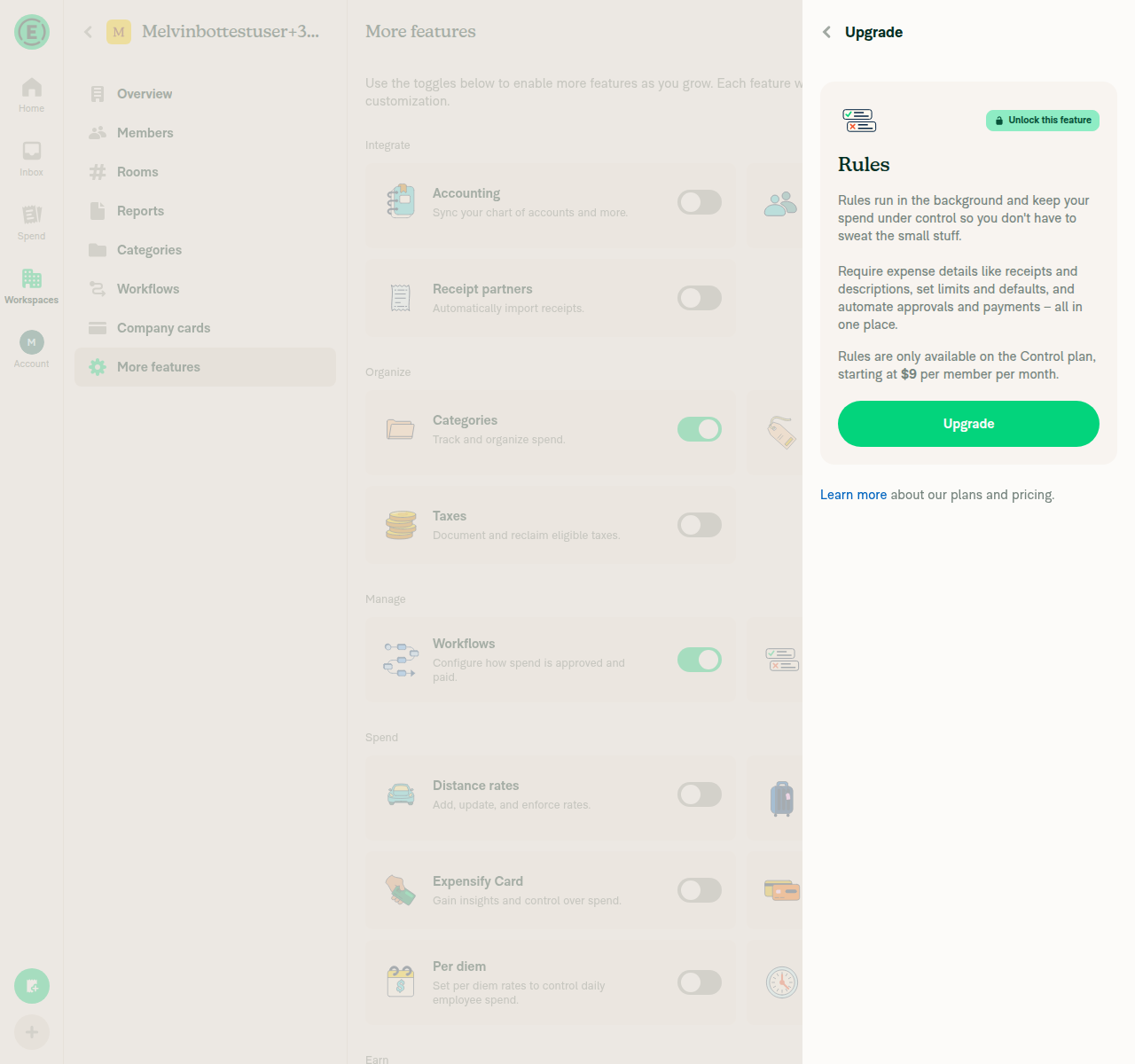
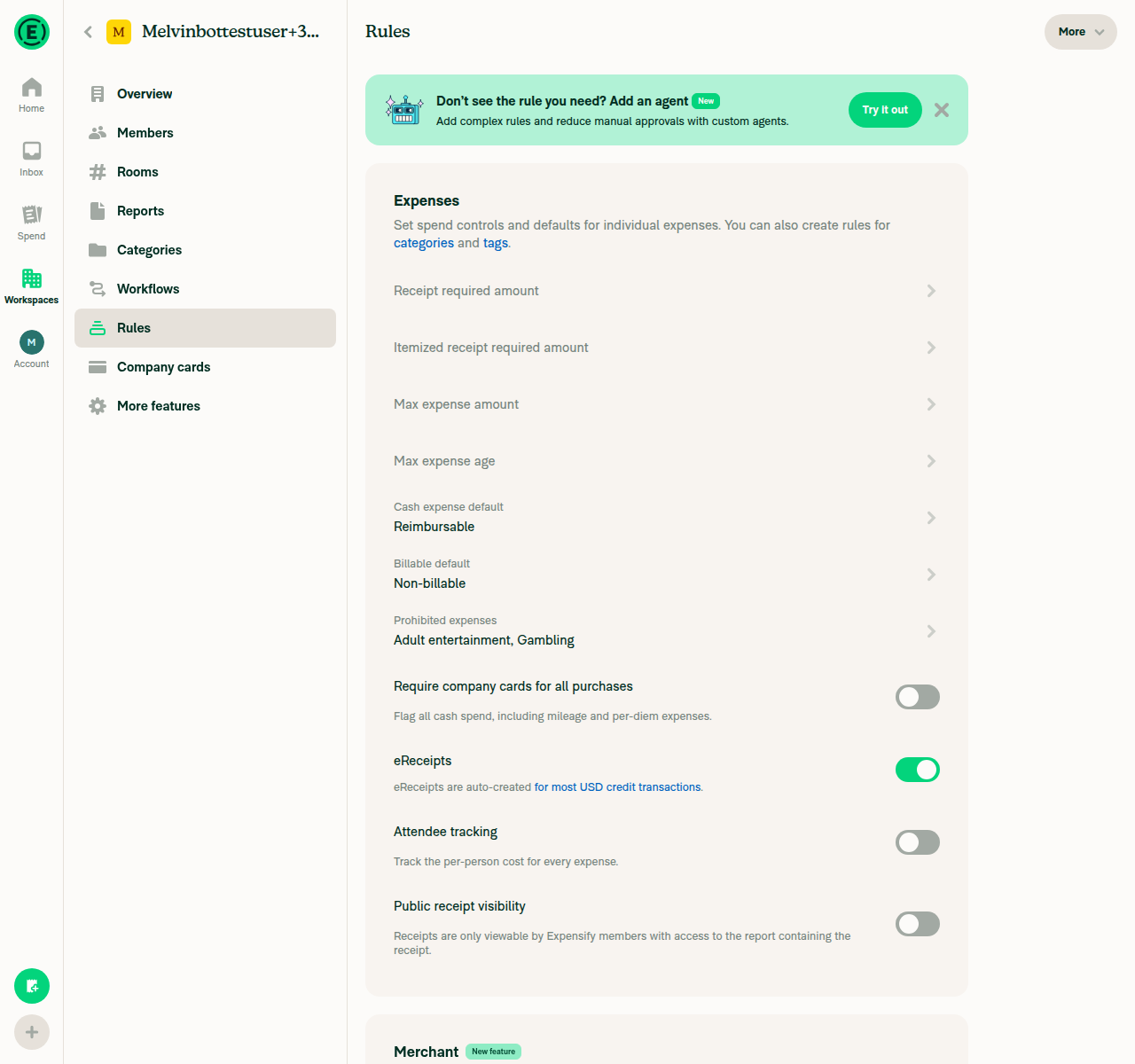
1. Workspace Rules has an Attendee tracking toggle, Control-plan only (Collect shows upgrade prompt)On a Collect-plan workspace, toggling Rules in More features opened an Upgrade panel: "Rules are only available on the Control plan, starting at $9 per member per month." After upgrading to Control, the Rules page showed a working Attendee tracking toggle ("Track the per-person cost for every expense").
Collect-plan Rules feature gated behind Control-plan upgrade prompt
Control-plan Rules page showing Attendee tracking toggle
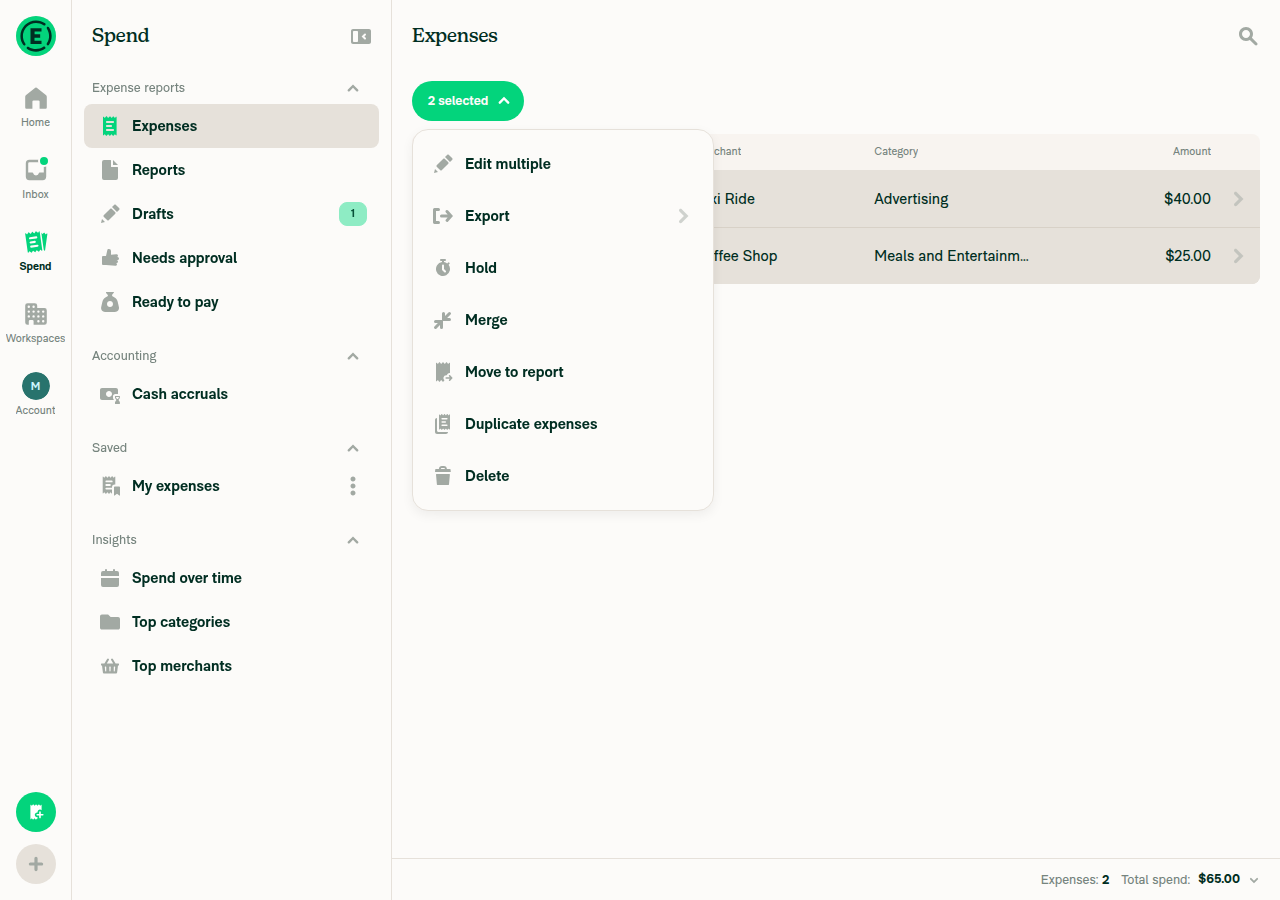
2. Selecting 2+ expenses via checkboxes and clicking Selected shows an Edit multiple optionSelected both draft expenses (Taxi Ride $40, Coffee Shop $25) on Spend > Expenses; the "2 selected" dropdown listed Edit multiple, Export, Hold, Merge, Move to report, Duplicate expenses, Delete.
'2 selected' dropdown showing Edit multiple option
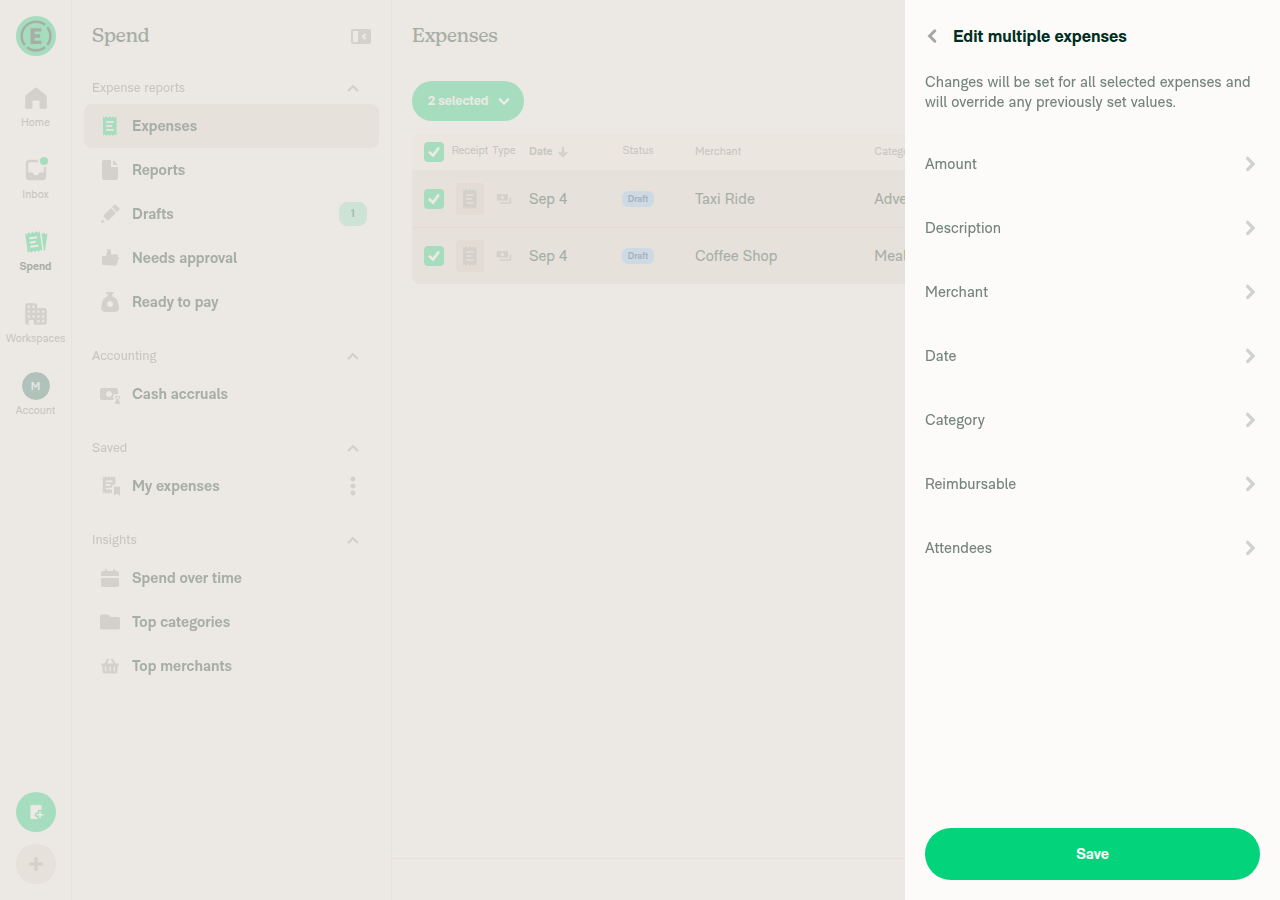
3 & 4. Resulting page titled Edit multiple expenses; Attendees row present when both expenses are on a Control workspace with Attendee tracking onClicking Edit multiple opened a panel titled "Edit multiple expenses" with rows: Amount, Description, Merchant, Date, Category, Reimbursable, Attendees.
Edit multiple expenses panel titled correctly with Attendees row
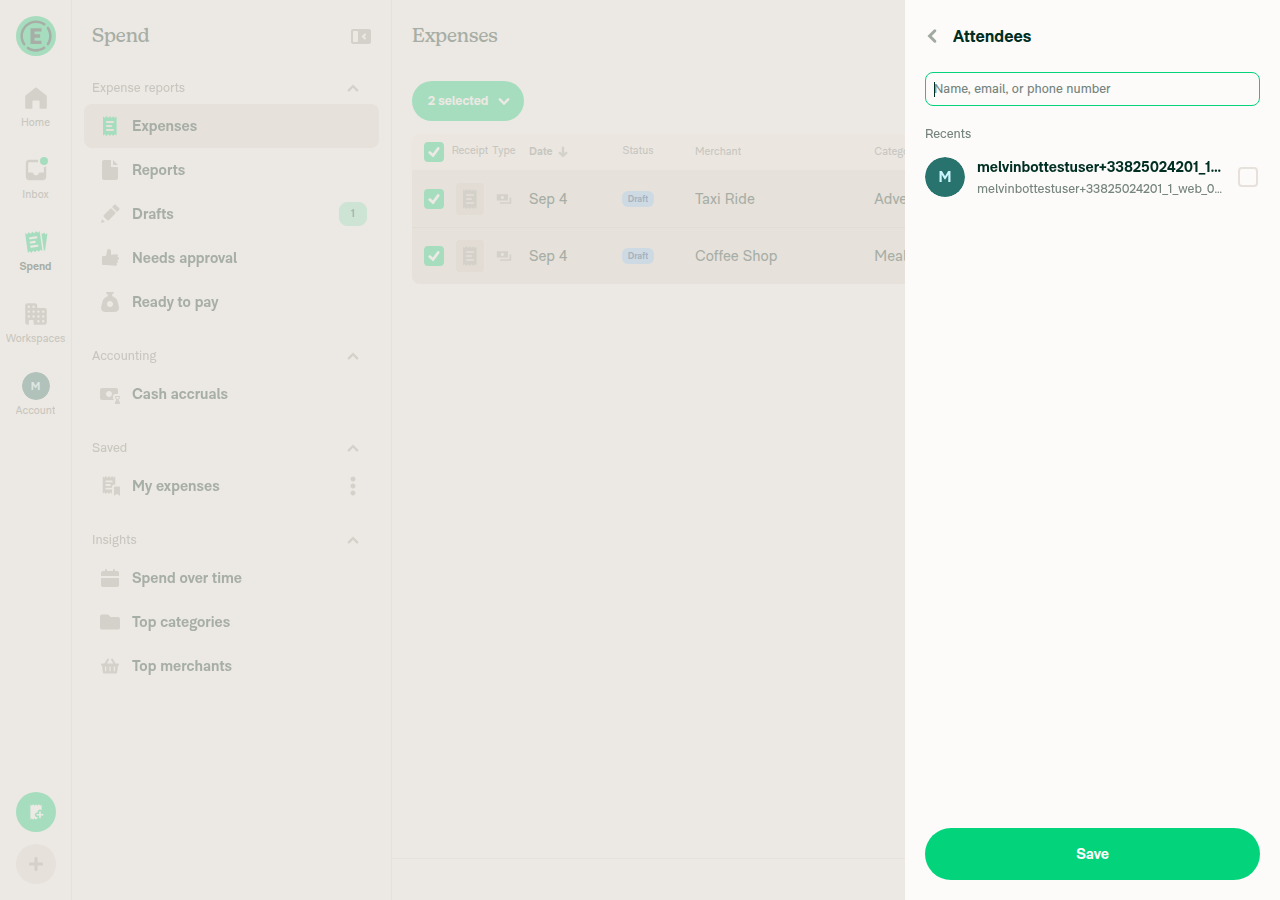
5. Opening Attendees shows empty selection even though both selected expenses already had attendeesBoth expenses already had the default self-attendee, but the Attendees picker opened with that recent contact shown unchecked (no pre-selection).
Attendee picker with no attendee pre-selected
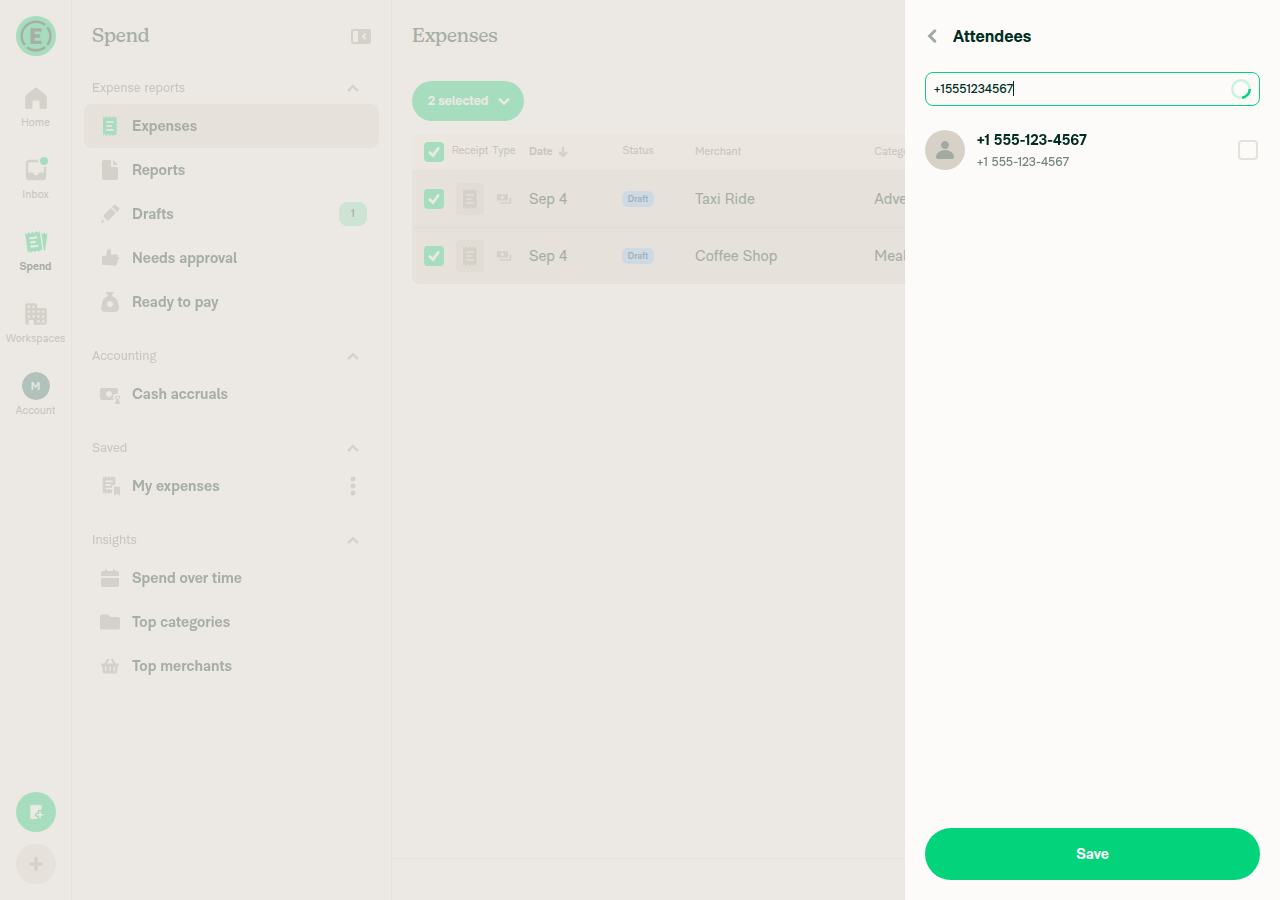
6. Attendee picker offers Recents and accepts typed name/email/phonePicker showed a Recents section, and typing "+15551234567" returned a selectable new-attendee row formatted as "+1 555-123-4567"; email and free-text entries were separately verified while creating/replacing attendees. A distinct Contacts section was not separately confirmed.
Typed phone number accepted as a new attendee candidate
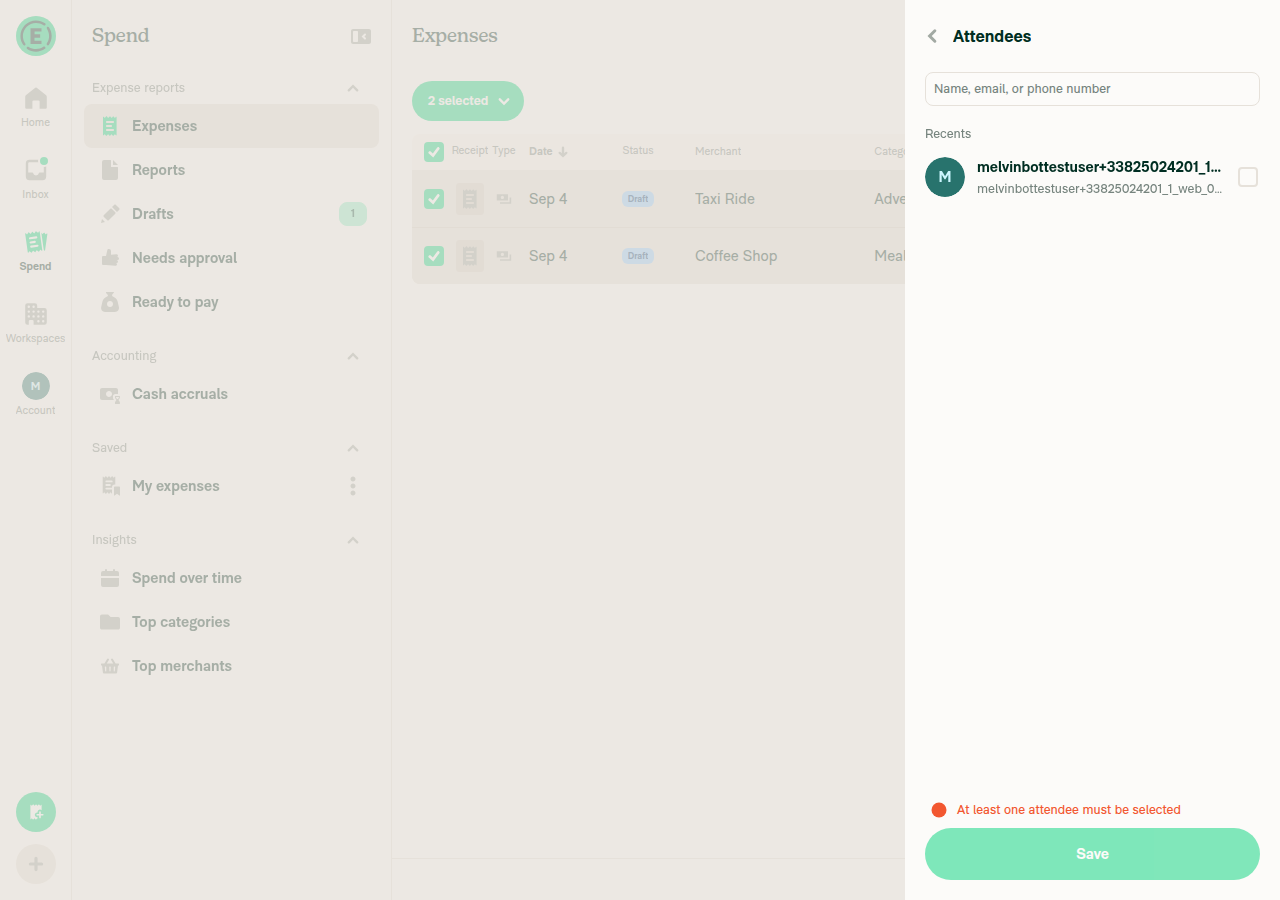
7. Saving with zero attendees selected shows the error "At least one attendee must be selected"Unchecked all attendees and pressed Save; the panel showed the red error text "At least one attendee must be selected" and did not save.
Zero-attendee validation error shown on Save
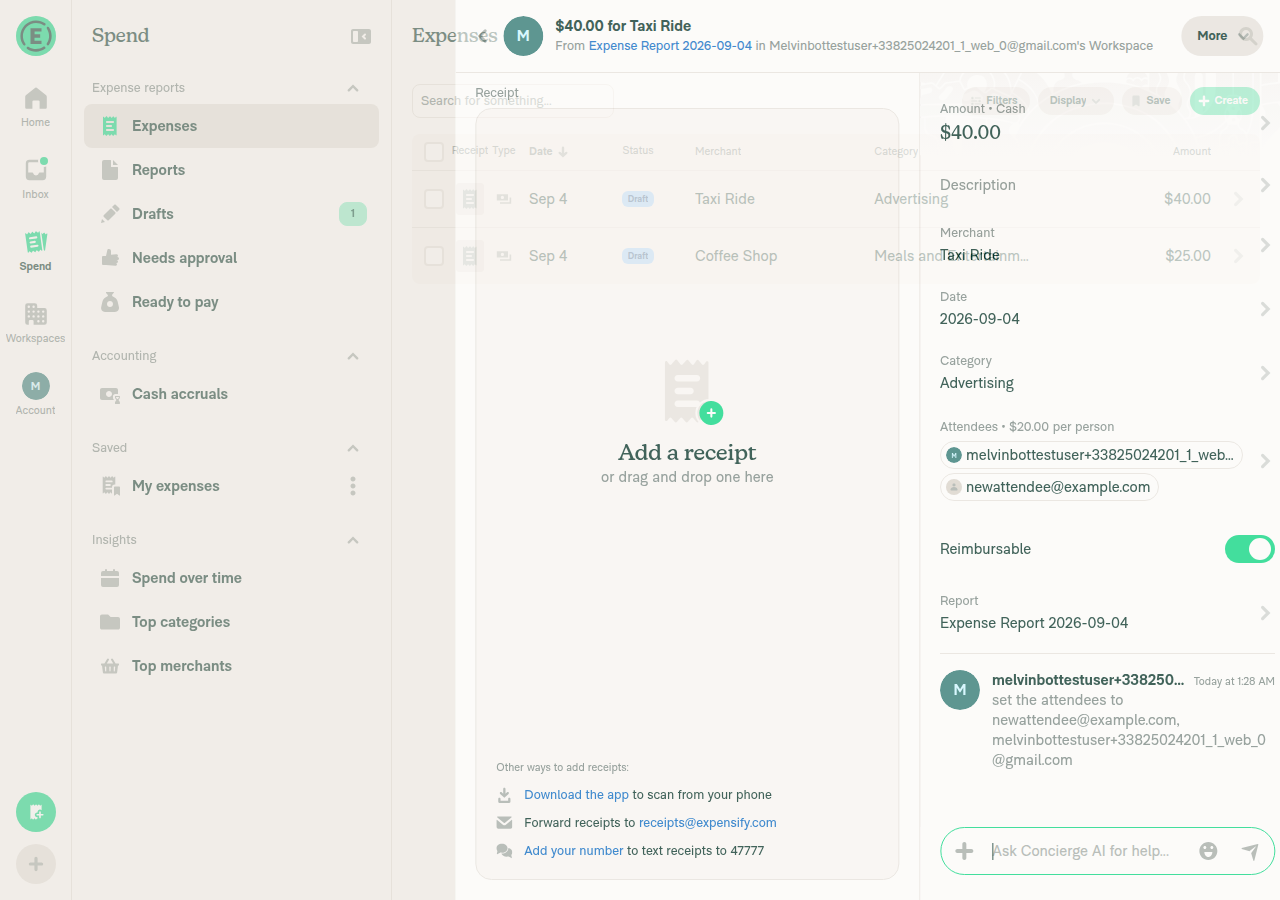
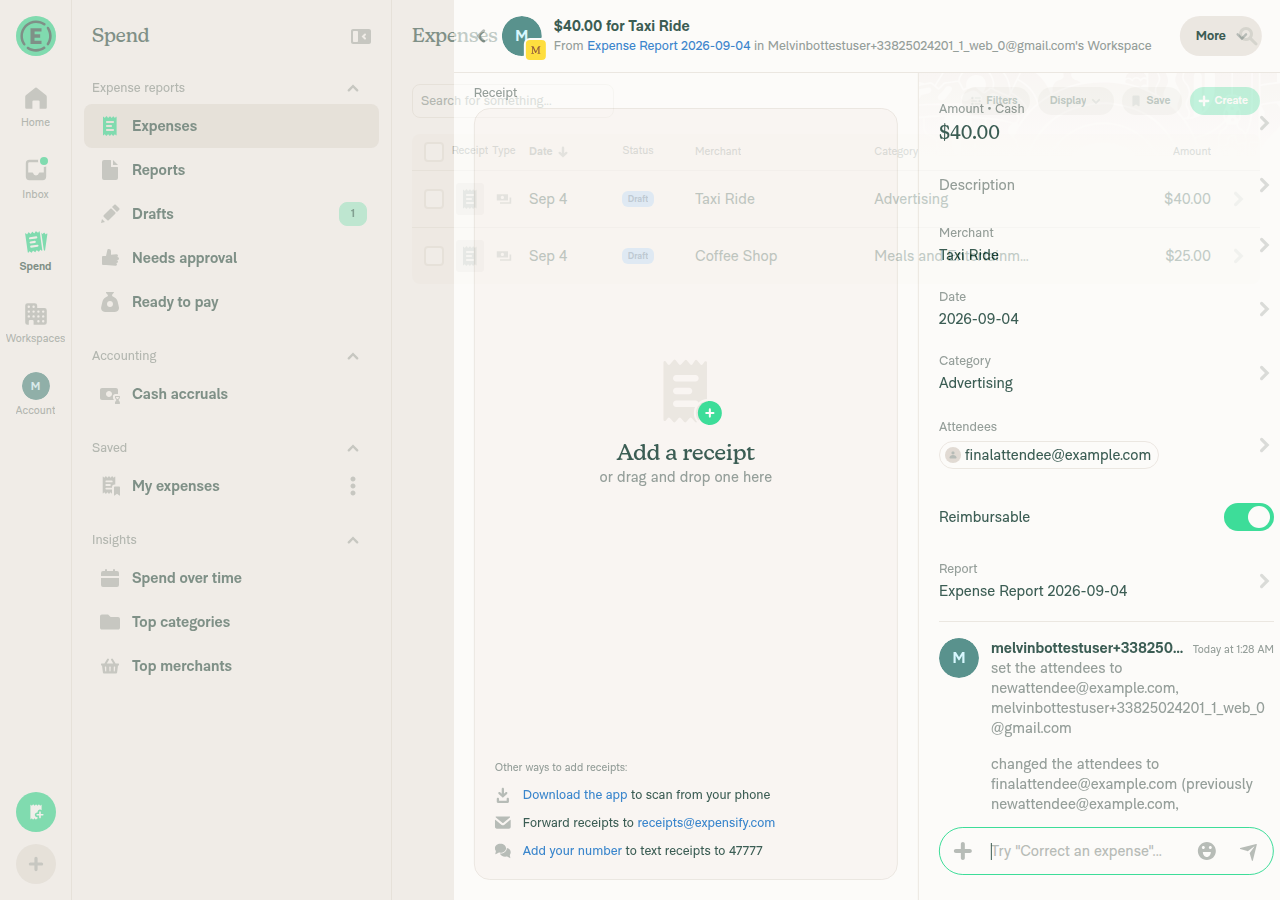
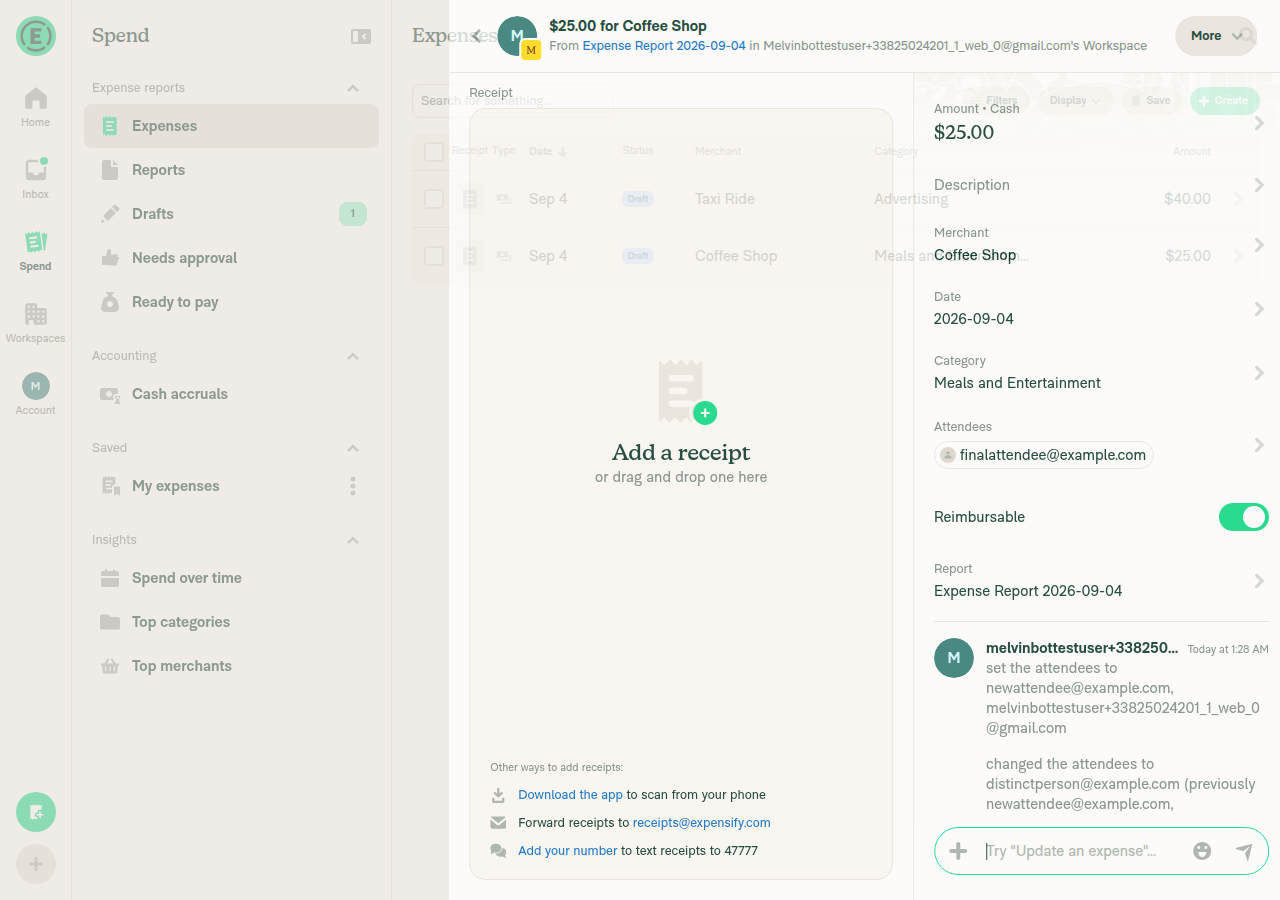
8. Saving replaces (not merges) attendees on each expense, and splits the amount evenlyFirst pass: selecting self + newattendee@example.com for both expenses produced "Attendees • $20.00 per person" (Taxi $40) and "$12.50 per person" (Coffee $25), i.e. amount / attendee-count. Replace test: set Coffee Shop to a non-overlapping attendee (distinctperson@example.com) via single-expense edit, then bulk-edited both expenses to a brand-new attendee (finalattendee@example.com) only. After save, both expenses showed only finalattendee@example.com — the prior attendees were gone, and each expense's history log read "changed the attendees to finalattendee@example.com (previously ...)", confirming a full replace rather than a merge.
Taxi Ride expense showing $20.00 per person split across 2 attendees
Taxi Ride attendees fully replaced by bulk edit, history confirms replace
Coffee Shop attendees fully replaced by bulk edit despite prior non-overlapping attendee
9. Attendees row absent when the workspace has Attendee tracking offDisabled Attendee tracking on the workspace's Rules page, then re-opened Edit multiple expenses for the same two selected expenses: the panel now only listed Amount, Description, Merchant, Date, Category, Reimbursable — no Attendees row.
Edit multiple expenses panel with no Attendees row when tracking is off

view run · no recording available

@samranahm

Copy link
Copy Markdown
Contributor

@stephanieelliott I will review it today.

Comment thread docs/articles/new-expensify/workspaces/Workspace-Rules.md Outdated

## How to add attendees to multiple expenses at once

**Attendees** appears in the **Edit multiple expenses** panel when every selected expense belongs to a Workspace on the Control plan that has **Attendee tracking** turned on. [Learn how to enable Workspace Rules](/articles/new-expensify/workspaces/Workspace-Rules).

@samranahm samranahm Sep 4, 2026

Copy link
Copy Markdown
Contributor

Choose a reason for hiding this comment

The reason will be displayed to describe this comment to others. Learn more.

@MelvinBot please change "turned on" to "enabled".

+ **Attendees** appears in the **Edit multiple expenses** panel when every selected expense belongs to a Workspace on the Control plan that has **Attendee tracking** enabled. [Learn how to enable Workspace Rules](/articles/new-expensify/workspaces/Workspace-Rules).

7. Click **Save**.
8. Click **Save** again to apply your changes to every selected expense.

The **Attendees** field starts empty, even when the selected expenses already have attendees. The attendees you select replace the attendees on each selected expense, and each expense total is split evenly across the new attendee list. [Learn how to add attendees to a single expense](/articles/new-expensify/reports-and-expenses/Adding-Attendees).

@samranahm samranahm Sep 4, 2026

Copy link
Copy Markdown
Contributor

Choose a reason for hiding this comment

The reason will be displayed to describe this comment to others. Learn more.

@MelvinBot please delete this whole paragraph.

- The **Attendees** field starts empty, even when the selected expenses already have attendees. The attendees you select replace the attendees on each selected expense, and each expense total is split evenly across the new attendee list. [Learn how to add attendees to a single expense](/articles/new-expensify/reports-and-expenses/Adding-Attendees).

Comment thread docs/articles/new-expensify/reports-and-expenses/Edit-Expenses.md Outdated

## Why don't I see the Attendees field in Edit multiple?

**Attendees** only appears when every expense you selected sits on a Workspace that is on the Control plan and has **Attendee tracking** turned on under **Rules**. It is not available for invoices or for personal expenses that aren't on a Workspace.

Copy link
Copy Markdown
Contributor

Choose a reason for hiding this comment

The reason will be displayed to describe this comment to others. Learn more.

@MelvinBot please change "turned on" to "enabled" here too.

Comment thread docs/articles/new-expensify/reports-and-expenses/Edit-Expenses.md Outdated
@samranahm

Copy link
Copy Markdown
Contributor

@MelvinBot Apply the inline review comments.

@samranahm

Copy link
Copy Markdown
Contributor

@stephanieelliott Looks like I don't have access to trigger MelvinBot. Could you take a look at the inline comments when you have a minute?

@stephanieelliott stephanieelliott self-assigned this Sep 4, 2026
@stephanieelliott

Copy link
Copy Markdown
Contributor

Yep, I'll get it -- thanks @samranahm!

@stephanieelliott

Copy link
Copy Markdown
Contributor

@MelvinBot why is samranahm not able to summon you on this PR?

@MelvinBot

MelvinBot commented Sep 4, 2026

Copy link
Copy Markdown
Contributor Author

samranahm isn't on MelvinBot's allowlist, so their @MelvinBot comment was dropped without any reply — which is why it looked like nothing happened.

Who can summon MelvinBot here: Expensify employees, plus members of the contributor-plus and external-expert-contributors GitHub teams. I checked — samranahm is on none of them (and isn't an org member), so mentions from them are ignored on this repo.

Note that PR write access isn't the gate. samranahm has read on Expensify/App, but membership in one of those teams is what grants MelvinBot access.

To fix it: add samranahm to the contributor-plus or external-expert-contributors team. The allowlist re-syncs from those teams once a day, so it takes effect the next day.

In the meantime I'll pick up the inline review comments from you.

Why there was no error message

The authorization check runs before MelvinBot even looks for the mention, and an unauthorized request exits silently — no comment, no reaction, no emoji. That's deliberate (it stops any comment on any Expensify repo from generating noise), but it does mean an unauthorized user gets zero feedback. Worth filing a follow-up if we want a one-time "you don't have access" reply.


view run · view recording

@github-actions github-actions Bot changed the title Docs updates for E/A#97108 Add Attendees to bulk Edit multiple expenses [No QA] Docs updates for E/A#97108 Add Attendees to bulk Edit multiple expenses Sep 4, 2026
@OSBotify

This comment has been minimized.

@stephanieelliott
stephanieelliott marked this pull request as ready for review September 4, 2026 20:57
@stephanieelliott
stephanieelliott self-requested a review as a code owner September 4, 2026 20:57
@melvin-bot

melvin-bot Bot commented Sep 4, 2026

Copy link
Copy Markdown

Concierge reviewer checklist:

  • I have verified the accuracy of the article
    • The article is within a hub that makes sense, and the navigation is correct
    • All processes, screenshots, and examples align with current product behavior.
    • All links within the doc have been verified for correct destination and functionality.
  • I have verified the readability of the article
    • The article's language is clear, concise, and free of jargon.
    • The grammar, spelling, and punctuation are correct.
    • The article contains at least one image, or that an image is not necessary
  • I have verified the formatting of the article
    • The article has consistent formatting (headings, bullet points, etc.) with other HelpDot articles and that aligns with the HelpDot formatting standards.
    • The article has proper text spacing and breaks for readability.
  • I have verified the article has the appropriate tone and style
    • The article's tone is professional, friendly, and suitable for the target audience.
    • The article's tone, terminology, and voice are consistent throughout.
  • I have verified the overall quality of the article
    • The article is not missing any information, nor does it contain redundant information.
    • The article fully addresses user needs.
  • I have verified that all requested improvements have been addressed

For more detailed instructions on completing this checklist, see How do I review a HelpDot PR as a Concierge Team member?

cc @twisterdotcom

@melvin-bot
melvin-bot Bot requested review from eh2077 and twisterdotcom September 4, 2026 20:57
@melvin-bot

melvin-bot Bot commented Sep 4, 2026

Copy link
Copy Markdown

@eh2077 @twisterdotcom One of you needs to copy/paste the Reviewer Checklist from here into a new comment on this PR and complete it. If you have the K2 extension, you can simply click: [this button]

@melvin-bot
melvin-bot Bot removed the request for review from a team September 4, 2026 20:57

The attendees you select are added to every selected expense.

Select 2 or more expenses, click **Selected**, and choose **Edit multiple** to set the same attendees on all of them in one step. Learn how to [edit multiple expenses at once](/articles/new-expensify/reports-and-expenses/Edit-Expenses).

Copy link
Copy Markdown
Contributor

Choose a reason for hiding this comment

The reason will be displayed to describe this comment to others. Learn more.

Readability / redundancy: This paragraph restates the numbered steps directly above it (lines 34-38), duplicating the same instructions and diluting scannability (HELP_AUTHORING_GUIDELINES.md §1 "concise and actionable"). Keep only the cross-link sentence, e.g. "To set the same attendees on several expenses in one step, learn how to edit multiple expenses at once." and drop the step restatement.


1. From the navigation tabs (on the left on web, and at the bottom on mobile), select **Spend > Expenses**.
2. Select 2 or more expenses.
3. Choose **Selected**, then select **Edit multiple**.

Copy link
Copy Markdown
Contributor

Choose a reason for hiding this comment

The reason will be displayed to describe this comment to others. Learn more.

Naming / deterministic writing: "Choose Selected" here is inconsistent with how the same UI element is referenced elsewhere (Edit-Expenses.md uses "Click Selected"). Per HELPSITE_NAMING_CONVENTIONS.md (Deterministic Writing Rule), use one consistent verb for the same control across articles.


## How to add attendees to multiple expenses at once

**Attendees** appears in the **Edit multiple expenses** panel when every selected expense belongs to a Workspace on the Control plan that has **Attendee tracking** enabled. [Learn how to enable Workspace Rules](/articles/new-expensify/workspaces/Workspace-Rules).

Copy link
Copy Markdown
Contributor

Choose a reason for hiding this comment

The reason will be displayed to describe this comment to others. Learn more.

Naming violation: "Edit multiple expenses panel" doesn't match the UI label used everywhere else in this article ("Edit multiple", e.g. lines 41 and 87). Per HELPSITE_NAMING_CONVENTIONS.md (use the exact UI text, no paraphrasing), reference it as the "Edit multiple panel".

## Does editing attendees in bulk keep the attendees already on my expenses?

No. The attendees you select replace the ones already on selected expense.

Copy link
Copy Markdown
Contributor

Choose a reason for hiding this comment

The reason will be displayed to describe this comment to others. Learn more.

Readability / grammar: "replace the ones already on selected expense" is ungrammatical. Use "replace the ones already on the selected expenses." (HELP_AUTHORING_GUIDELINES.md §1 clarity).


---

## How to add attendees to multiple expenses at once

Copy link
Copy Markdown
Contributor

Choose a reason for hiding this comment

The reason will be displayed to describe this comment to others. Learn more.

AI readiness / scope duplication: This section largely repeats the existing "How to edit multiple expenses at once" steps (lines 34-44) and the new bulk-attendees section in Adding-Attendees.md. Per HELP_AUTHORING_GUIDELINES.md §6 (avoid multi-feature/duplicated coverage) and §1 (one workflow), consider consolidating the bulk-attendees steps into the existing "edit multiple" section rather than adding a near-identical parallel section.

@OSBotify

OSBotify commented Sep 4, 2026

Copy link
Copy Markdown
Contributor

@github-actions

github-actions Bot commented Sep 4, 2026

Copy link
Copy Markdown
Contributor

HelpDot Documentation Review

Overall Assessment
This PR documents a new Attendee tracking Workspace rule and the ability to add attendees to multiple expenses at once. It touches three files: a new bulk-attendee section in Adding-Attendees.md, a new bulk-attendee section plus two FAQs and updated metadata in Edit-Expenses.md, and a single new rule bullet in Workspace-Rules.md. The changes are generally well-aligned with the governance standards: task-based headings, exact bolded UI labels, unified web/mobile navigation phrasing, relative cross-links with descriptive anchor text, and updated internalScope and keywords. A few readability and grammar issues, plus a redundant paragraph, keep this from being fully clean.

Scores Summary

  • Readability: 7/10 - Steps are clear and sequential, but Adding-Attendees.md includes a redundant paragraph that repeats the steps, and Edit-Expenses.md has a grammar error (on selected expense).
  • AI Readiness: 9/10 - New How to headings are task-based, searchable, and feature-specific; metadata and keywords were updated to reflect real search intent (bulk edit attendees). Heading hierarchy stays at H1 and H2 only.
  • Style Compliance: 8/10 - UI labels (Selected, Edit multiple, Attendees, Attendee tracking, Rules) are bolded and match conventions; navigation phrasing follows the unified web/mobile pattern. Minor inconsistency in action verbs (select/choose/click) and one non-bolded UI reference in an FAQ heading.

Key Findings

  • Positive: New sections use compliant task-based How to headings and correctly bolded, UI-exact labels.
  • Positive: Cross-links use relative paths and descriptive anchor text (Learn how to enable Workspace Rules, edit multiple expenses at once), and the Edit-Expenses.md metadata (keywords and internalScope) was properly expanded to cover bulk attendees.
  • Positive: The Workspace-Rules.md addition is concise, correctly formatted, and consistent with surrounding bullets.
  • Issue (Readability): In Adding-Attendees.md, the paragraph beginning Select 2 or more expenses, click Selected, and choose Edit multiple duplicates the numbered steps directly above it. Trim it to just the cross-link sentence.
  • Issue (Grammar): In Edit-Expenses.md, the attendees you select replace the ones already on selected expense should read: on your selected expenses.
  • Issue (Consistency): Action verbs vary across the two new sections (Adding-Attendees uses select Spend then Expenses and Choose Selected; Edit-Expenses uses go to Spend then Expenses and Click Selected). Align phrasing for a deterministic feel.
  • Minor: The new FAQ heading about not seeing the Attendees field in Edit multiple leaves Attendees and Edit multiple unbolded; consider bolding UI labels for consistency (FAQ headings are exempt from task-based rules but UI naming still applies in body).

Recommendations

  • Priority: Fix the grammar error in the bulk-attendees FAQ answer in Edit-Expenses.md.
  • Priority: Remove the redundant step-repeating paragraph in Adding-Attendees.md, keeping only the cross-link to editing multiple expenses.
  • Standardize action verbs and the Spend then Expenses navigation phrasing across both new sections.
  • Optionally bold UI labels referenced in the new FAQ headings and answers for full naming compliance.

Files Reviewed

  • docs/articles/new-expensify/reports-and-expenses/Adding-Attendees.md - New bulk-attendee section; compliant heading, but redundant paragraph to trim.
  • docs/articles/new-expensify/reports-and-expenses/Edit-Expenses.md - New section, two FAQs, and updated metadata; strong, one grammar fix needed.
  • docs/articles/new-expensify/workspaces/Workspace-Rules.md - Single new rule bullet; clean and compliant.

Note: Detailed line-by-line feedback has been provided as inline comments.

@chatgpt-codex-connector chatgpt-codex-connector Bot left a comment

Copy link
Copy Markdown

Choose a reason for hiding this comment

The reason will be displayed to describe this comment to others. Learn more.

💡 Codex Review

Here are some automated review suggestions for this pull request.

Reviewed commit: 7bbb7ce379

ℹ️ About Codex in GitHub

Codex has been enabled to automatically review pull requests in this repo. Reviews are triggered when you

  • Open a pull request for review
  • Mark a draft as ready
  • Comment "@codex review".

If Codex has suggestions, it will comment; otherwise it will react with 👍.

When you sign up for Codex through ChatGPT, Codex can also answer questions or update the PR, like "@codex address that feedback".

4. Select **Attendees**, choose the attendees, and select **Save**.
5. Select **Save** again to apply your changes to every selected expense.

The attendees you select are added to every selected expense.

Copy link
Copy Markdown

Choose a reason for hiding this comment

The reason will be displayed to describe this comment to others. Learn more.

P2 Badge Describe bulk attendee updates as replacements

When any selected expense already has attendees, the bulk action replaces its entire attendee list rather than appending to it: updateMultipleMoneyRequests assigns changes.attendees directly to transactionChanges.attendees, and the new FAQ in this same commit also says the existing attendees are replaced. Saying the selected attendees are “added” can therefore lead members to unintentionally remove existing attendees; state explicitly here that the selected list replaces the current list.

Useful? React with 👍 / 👎.


## Why don't I see the Attendees field in Edit multiple?

**Attendees** only appears when every expense you selected sits on a Workspace that is on the Control plan and has **Attendee tracking** enabled under **Rules**. It is not available for invoices or for personal expenses that aren't on a Workspace.

Copy link
Copy Markdown

Choose a reason for hiding this comment

The reason will be displayed to describe this comment to others. Learn more.

P2 Badge Account for unreported expenses in attendee availability

When unreported expenses are selected while the active workspace is a Control workspace with attendee tracking enabled, the field does appear: isBulkEditAttendeeTrackingEnabled explicitly evaluates unreported transactions using the bulk-edit workspace policy. This sentence incorrectly tells members that expenses not yet on a workspace can never use the field, so document the active-workspace fallback instead of excluding all personal/unreported expenses.

Useful? React with 👍 / 👎.

Comment on lines +32 to +34
## How to add attendees to several expenses at once

1. From the navigation tabs (on the left on web, and at the bottom on mobile), select **Spend > Expenses**.

Copy link
Copy Markdown

Choose a reason for hiding this comment

The reason will be displayed to describe this comment to others. Learn more.

P2 Badge State attendee eligibility before the bulk-edit steps

For a Collect workspace or a Control workspace with attendee tracking disabled, users following this newly added procedure cannot complete step 4 because the Attendees row is absent. The prerequisite is mentioned only in the separate article linked after these steps, so readers who land directly on this attendee article are led through an unavailable flow; place the applicable plan and attendee-tracking requirements before the procedure.

Useful? React with 👍 / 👎.

@twisterdotcom

Copy link
Copy Markdown
Contributor

@stephanieelliott do you care about Codex's comments here or not?

@twisterdotcom
twisterdotcom merged commit dba098e into main Sep 10, 2026
23 of 27 checks passed
@twisterdotcom
twisterdotcom deleted the claude-docsBulkEditAttendees branch September 10, 2026 23:59
@OSBotify

Copy link
Copy Markdown
Contributor

🚀 Deployed to staging by https://github.com/twisterdotcom in version: 9.4.77-0 🚀

platform result
🕸 web 🕸 success ✅
🤖 android 🤖 success ✅
🍎 iOS 🍎 success ✅

@OSBotify

Copy link
Copy Markdown
Contributor

🚀 Deployed to production by https://github.com/luacmartins in version: 9.4.77-4 🚀

platform result
🕸 web 🕸 success ✅
🤖 android 🤖 success ✅
🍎 iOS 🍎 success ✅

Bundle Size Analysis (Sentry):

Sign up for free to join this conversation on GitHub. Already have an account? Sign in to comment

Labels

HelpDot Apply this label if the issue relates to ExpensifyHelp

Projects

None yet

Development

Successfully merging this pull request may close these issues.

5 participants