Skip to content

feat: Add Attendees to Edit multiple in expenses - #97108

Merged
youssef-lr merged 14 commits into
Expensify:mainfrom
samranahm:94313/bulk-edit-Attendees
Aug 29, 2026
Merged

youssef-lr merged 14 commits into
Expensify:mainfrom
samranahm:94313/bulk-edit-Attendees

Conversation

@samranahm

@samranahm samranahm commented Jul 27, 2026

Copy link
Copy Markdown
Contributor

Explanation of Change

Fixed Issues

$ #94313
PROPOSAL: #94313 (comment)

Tests

Precondition:

  • User has Attendees tracking enabled in Workspace Rules
  • User is on the Control plan
  1. Create some expenses and navigate to Spend > Reports.
  2. Open a report that contains multiple expenses.
  3. Select multiple expenses and click the green selected button.
  4. Choose "Edit multiple" from the pop-up menu.
  5. Verify that the "Attendees" field is present.
  6. Open the Attendees page and verify no attendees is preselected.
  7. Select some attendees, click Save, and verify that all selected attendees are shown in the "Attendees" field on the "Edit multiple expenses" page.
  8. Click Save again and verify that the attendees are applied to all expenses selected in step 3.
  9. Select multiple expenses again, open the "Edit multiple expenses" page, update other fields (such as Category, Merchant, and Description), then open the "Attendees" field again and select some attendees.
  10. Click Save and verify that all selected expenses are updated with the values you chose.
  11. Open Attendees page again and press save without selecting any attendees and verify “At least one attendee must be selected” error appear.
  • Verify that no errors appear in the JS console

Offline tests

QA Steps

Same as test

// TODO: These must be filled out, or the issue title must include "[No QA]."

  • Verify that no errors appear in the JS console

PR Author Checklist

  • I linked the correct issue in the ### Fixed Issues section above
  • I wrote clear testing steps that cover the changes made in this PR
    • I added steps for local testing in the Tests section
    • I added steps for the expected offline behavior in the Offline steps section
    • I added steps for Staging and/or Production testing in the QA steps section
    • I added steps to cover failure scenarios (i.e. verify an input displays the correct error message if the entered data is not correct)
    • I turned off my network connection and tested it while offline to ensure it matches the expected behavior (i.e. verify the default avatar icon is displayed if app is offline)
    • I tested this PR with a High Traffic account against the staging or production API to ensure there are no regressions (e.g. long loading states that impact usability).
  • I included screenshots or videos for tests on all platforms
  • I ran the tests on all platforms & verified they passed on:
    • Android: Native
    • Android: mWeb Chrome
    • iOS: Native
    • iOS: mWeb Safari
    • MacOS: Chrome / Safari
  • I verified there are no console errors (if there's a console error not related to the PR, report it or open an issue for it to be fixed)
  • I followed proper code patterns (see Reviewing the code)
    • I verified that comments were added to code that is not self explanatory
    • I verified that any new or modified comments were clear, correct English, and explained "why" the code was doing something instead of only explaining "what" the code was doing.
    • I verified any copy / text that was added to the app is grammatically correct in English. It adheres to proper capitalization guidelines (note: only the first word of header/labels should be capitalized), and is either coming verbatim from figma or has been approved by marketing (in order to get marketing approval, ask the Bug Zero team member to add the Waiting for copy label to the issue)
  • If a new code pattern is added I verified it was agreed to be used by multiple Expensify engineers
  • I followed the guidelines as stated in the Review Guidelines
  • I tested other components that can be impacted by my changes (i.e. if the PR modifies a shared library or component like Avatar, I verified the components using Avatar are working as expected)
  • If a new CSS style is added I verified that:
    • A similar style doesn't already exist
    • The style can't be created with an existing StyleUtils function (i.e. StyleUtils.getBackgroundAndBorderStyle(theme.componentBG))
  • If new assets were added or existing ones were modified, I verified that:
    • The assets are optimized and compressed (for SVG files, run npm run compress-svg)
    • The assets load correctly across all supported platforms.
  • If the PR modifies code that runs when editing or sending messages, I tested and verified there is no unexpected behavior for all supported markdown - URLs, single line code, code blocks, quotes, headings, bold, strikethrough, and italic.
  • If the PR modifies a generic component, I tested and verified that those changes do not break usages of that component in the rest of the App (i.e. if a shared library or component like Avatar is modified, I verified that Avatar is working as expected in all cases)
  • If the PR modifies a component related to any of the existing Storybook stories, I tested and verified all stories for that component are still working as expected.
  • If the PR modifies a component or page that can be accessed by a direct deeplink, I verified that the code functions as expected when the deeplink is used - from a logged in and logged out account.
  • If the PR modifies the UI (e.g. new buttons, new UI components, changing the padding/spacing/sizing, moving components, etc) or modifies the form input styles:
    • I verified that all the inputs inside a form are aligned with each other.
    • I added Design label and/or tagged @Expensify/design so the design team can review the changes.
  • I added unit tests for any new feature or bug fix in this PR to help automatically prevent regressions in this user flow.
  • If the main branch was merged into this PR after a review, I tested again and verified the outcome was still expected according to the Test steps.

Screenshots/Videos

Android: Native
Android: mWeb Chrome
Android.mWeb.Chrome.mp4
iOS: Native
IOS.Native.mp4
iOS: mWeb Safari
IOS.mWeb.Safari.mp4
MacOS: Chrome / Safari
macOS.Chrome.mp4

@samranahm
samranahm requested a review from a team as a code owner July 27, 2026 14:42
Copilot AI review requested due to automatic review settings July 27, 2026 14:42
@samranahm
samranahm requested a review from a team as a code owner July 27, 2026 14:42
@melvin-bot

melvin-bot Bot commented Jul 27, 2026

Copy link
Copy Markdown

@eh2077 Please copy/paste the Reviewer Checklist from here into a new comment on this PR and complete it. If you have the K2 extension, you can simply click: [this button]

@chatgpt-codex-connector chatgpt-codex-connector Bot left a comment

Copy link
Copy Markdown

Choose a reason for hiding this comment

The reason will be displayed to describe this comment to others. Learn more.

💡 Codex Review

Here are some automated review suggestions for this pull request.

Reviewed commit: fefa84706e

ℹ️ About Codex in GitHub

Codex has been enabled to automatically review pull requests in this repo. Reviews are triggered when you

  • Open a pull request for review
  • Mark a draft as ready
  • Comment "@codex review".

If Codex has suggestions, it will comment; otherwise it will react with 👍.

When you sign up for Codex through ChatGPT, Codex can also answer questions or update the PR, like "@codex address that feedback".

Comment thread src/libs/actions/IOU/BulkEdit.ts Outdated
Comment on lines +755 to +759
writeBulkEditMoneyRequestAttendees({
transactionID,
reportID: iouReport?.reportID,
attendees: serializedAttendees,
});

Copy link
Copy Markdown

Choose a reason for hiding this comment

The reason will be displayed to describe this comment to others. Learn more.

P1 Badge Give the attendee request its own rollback data

When a bulk edit changes attendees together with another field, all optimistic, success, and failure data is attached only to the generic request, while this independently failing attendee request receives none. If the generic request succeeds first, it clears the attendee pending state before this request finishes; if this request then fails, the optimistic attendees remain displayed without an error or retry indication even though the backend did not save them. Conversely, a generic failure can roll back attendees that this request subsequently saves. Split the Onyx data by command so each request owns only its fields and rollback state.

Useful? React with 👍 / 👎.

Copy link
Copy Markdown
Contributor Author

Choose a reason for hiding this comment

The reason will be displayed to describe this comment to others. Learn more.

Yes, We don’t need to send reportActionID for a locally-only thread, since UpdateMoneyRequestAttendees doesn’t create threads.

Copy link
Copy Markdown
Contributor

Choose a reason for hiding this comment

The reason will be displayed to describe this comment to others. Learn more.

@samranahm not sure I'm following here, the comment is about splitting onyxData per command and I think we should address this, each write should have its own rollback state.

Copy link
Copy Markdown
Contributor Author

Choose a reason for hiding this comment

The reason will be displayed to describe this comment to others. Learn more.

My bad, my earlier reply was about the reportActionID line and missed the actual point.
Addressed now, pendingFields/errorFields are split per command and UpdateMoneyRequest payloads no longer carry or revert attendee fields, and UpdateMoneyRequestAttendees has its own optimistic value, success clear and failure revert (with an error so it can be retried). The attendees-only path is unchanged since it still carries the shared report/thread updates.

@codecov

codecov Bot commented Jul 27, 2026

Copy link
Copy Markdown

Codecov Report

❌ Looks like you've decreased code coverage for some files. Please write tests to increase, or at least maintain, the existing level of code coverage. See our documentation here for how to interpret this table.

Files with missing lines Coverage Δ
src/CONST/index.ts 92.66% <ø> (ø)
src/ROUTES.ts 26.91% <ø> (ø)
src/SCREENS.ts 100.00% <ø> (ø)
src/libs/Navigation/linkingConfig/config.ts 71.42% <ø> (ø)
src/libs/ReportUtils.ts 87.36% <ø> (ø)
...gation/AppNavigator/ModalStackNavigators/index.tsx 6.27% <0.00%> (-0.01%) ⬇️
...arch/SearchEditMultiple/SearchEditMultiplePage.tsx 0.00% <0.00%> (ø)
...pages/iou/request/MoneyRequestAttendeeSelector.tsx 0.00% <0.00%> (ø)
...arch/SearchEditMultiple/SearchEditMultipleUtils.ts 44.30% <0.00%> (-4.31%) ⬇️
...chEditMultiple/SearchEditMultipleAttendeesPage.tsx 0.00% <0.00%> (ø)
... and 1 more
... and 8 files with indirect coverage changes

Copilot AI left a comment

Copy link
Copy Markdown
Contributor

Choose a reason for hiding this comment

The reason will be displayed to describe this comment to others. Learn more.

Pull request overview

Adds bulk-edit support for Attendees when using Spend > Reports > select multiple expenses > Edit multiple, including navigation/route wiring and persistence via a dedicated API command.

Changes:

  • Add “Attendees” as an editable field in the Search “Edit multiple” flow, including a new RHP page for selecting attendees.
  • Update bulk-edit persistence to write attendees via UpdateMoneyRequestAttendees, including optimistic transaction updates and recent-attendee tracking.
  • Add/extend unit tests to cover attendees-only updates and mixed (generic + attendees) updates.

Reviewed changes

Copilot reviewed 12 out of 12 changed files in this pull request and generated 2 comments.

Show a summary per file
File Description
tests/actions/IOUTest/BulkEditTest.ts Adds tests validating attendees persistence command selection and optimistic updates.
src/SCREENS.ts Introduces a new Search bulk-edit attendees RHP screen constant.
src/ROUTES.ts Adds the route for the Search bulk-edit attendees RHP page.
src/pages/Search/SearchEditMultiple/SearchEditMultipleUtils.ts Adds selection-level gating to determine when attendees bulk edit is enabled.
src/pages/Search/SearchEditMultiple/SearchEditMultiplePage.tsx Surfaces the Attendees field in the bulk-edit field list and includes it in save payload.
src/pages/Search/SearchEditMultiple/SearchEditMultipleAttendeesPage.tsx New RHP page for choosing attendees and writing to the bulk-edit draft transaction.
src/pages/iou/request/MoneyRequestAttendeeSelector.tsx Adjusts error-message behavior to avoid showing it during loading/transition.
src/libs/ReportUtils.ts Allows bulk-editing the ATTENDEES edit-request field.
src/libs/Navigation/linkingConfig/config.ts Wires deep linking config for the new attendees RHP screen/route.
src/libs/Navigation/AppNavigator/ModalStackNavigators/index.tsx Registers the attendees RHP page in the Search modal stack navigator.
src/libs/actions/IOU/BulkEdit.ts Implements attendees bulk-edit persistence (including optimistic updates and API command splitting).
src/CONST/index.ts Adds ATTENDEES to EDIT_REQUEST_FIELD constants.

💡 Add Copilot custom instructions for smarter, more guided reviews. Learn how to get started.

Comment thread src/libs/actions/IOU/BulkEdit.ts Outdated
Comment thread src/libs/actions/IOU/BulkEdit.ts
Comment thread src/libs/actions/IOU/BulkEdit.ts Outdated
Comment thread src/libs/actions/IOU/BulkEdit.ts

@joekaufmanexpensify joekaufmanexpensify left a comment

Copy link
Copy Markdown
Contributor

Choose a reason for hiding this comment

The reason will be displayed to describe this comment to others. Learn more.

Good for product.

@eh2077

eh2077 commented Jul 28, 2026

Copy link
Copy Markdown
Contributor

Bug: One attendee selected shown from bulk edit when both transactions have two same attendees

I think the expected behavior should show no attendee selected, just like other field selectors. So bulk edit has consistent behavior for all fields - there's no default values and merged values until selecting some.

@joekaufmanexpensify do you agree?

Screen.Recording.2026-07-28.at.4.34.31.PM.mov

@joekaufmanexpensify

Copy link
Copy Markdown
Contributor

Yep, I think that works. One note: an expense must always have one attendee. I assume we'll throw if the user tries to proceed without selecting at least one attendee? If so, good with me. 👍

@eh2077

eh2077 commented Jul 29, 2026

Copy link
Copy Markdown
Contributor

I assume we'll throw if the user tries to proceed without selecting at least one attendee?

yes, you're right we can't proceed if no attendee is selected.

Screen.Recording.2026-07-29.at.9.38.21.PM.mov

@joekaufmanexpensify

Copy link
Copy Markdown
Contributor

Sounds good. This is good with me then. 👍

@eh2077

eh2077 commented Jul 30, 2026

Copy link
Copy Markdown
Contributor

@samranahm gentle bump on #97108 (comment) and #97108 (comment)

@samranahm

Copy link
Copy Markdown
Contributor Author

Ahh, missed this one. Looking into it.

@samranahm

samranahm commented Jul 30, 2026

Copy link
Copy Markdown
Contributor Author

I think the expected behavior should show no attendee selected, just like other field selectors. So bulk edit has consistent behavior for all fields - there's no default values and merged values until selecting some.

Agreed. We'll show the current user as the default attendee only for expenses that haven't been updated yet. Once an expense or all selected expenses has been updated, no attendee will be selected by default unless all the selected expenses have the same one attendee, and the user won't be able to save without selecting at least one attendee.

@samranahm

Copy link
Copy Markdown
Contributor Author

@eh2077 All yours, please take a look.

@samranahm

Copy link
Copy Markdown
Contributor Author

Test steps updated.

@eh2077

eh2077 commented Aug 3, 2026

Copy link
Copy Markdown
Contributor

Reviewer Checklist

  • I have verified the author checklist is complete (all boxes are checked off).
  • I verified the correct issue is linked in the ### Fixed Issues section above
  • I verified testing steps are clear and they cover the changes made in this PR
    • I verified the steps for local testing are in the Tests section
    • I verified the steps for Staging and/or Production testing are in the QA steps section
    • I verified the steps cover any possible failure scenarios (i.e. verify an input displays the correct error message if the entered data is not correct)
    • I turned off my network connection and tested it while offline to ensure it matches the expected behavior (i.e. verify the default avatar icon is displayed if app is offline)
  • I checked that screenshots or videos are included for tests on all platforms
  • I included screenshots or videos for tests on all platforms
  • I verified that the composer does not automatically focus or open the keyboard on mobile unless explicitly intended. This includes checking that returning the app from the background does not unexpectedly open the keyboard.
  • I verified tests pass on all platforms & I tested again on:
    • Android: HybridApp
    • Android: mWeb Chrome
    • iOS: HybridApp
    • iOS: mWeb Safari
    • MacOS: Chrome / Safari
  • If there are any errors in the console that are unrelated to this PR, I either fixed them (preferred) or linked to where I reported them in Slack
  • I verified proper code patterns were followed (see Reviewing the code)
    • I verified that comments were added to code that is not self explanatory
    • I verified that any new or modified comments were clear, correct English, and explained "why" the code was doing something instead of only explaining "what" the code was doing.
    • I verified any copy / text that was added to the app is grammatically correct in English. It adheres to proper capitalization guidelines (note: only the first word of header/labels should be capitalized), and is either coming verbatim from figma or has been approved by marketing (in order to get marketing approval, ask the Bug Zero team member to add the Waiting for copy label to the issue)
  • If a new code pattern is added I verified it was agreed to be used by multiple Expensify engineers
  • I verified that this PR follows the guidelines as stated in the Review Guidelines
  • I verified other components that can be impacted by these changes have been tested, and I retested again (i.e. if the PR modifies a shared library or component like Avatar, I verified the components using Avatar have been tested & I retested again)
  • If a new component is created I verified that:
    • A similar component doesn't exist in the codebase
    • All props are defined accurately
    • The component has a clear name that is non-ambiguous and the purpose of the component can be inferred from the name alone
    • The only data being stored in the state is data necessary for rendering and nothing else
    • The component has the minimum amount of code necessary for its purpose, and it is broken down into smaller components in order to separate concerns and functions
  • If a new CSS style is added I verified that:
    • A similar style doesn't already exist
    • The style can't be created with an existing StyleUtils function (i.e. StyleUtils.getBackgroundAndBorderStyle(theme.componentBG)
  • If the PR modifies code that runs when editing or sending messages, I tested and verified there is no unexpected behavior for all supported markdown - URLs, single line code, code blocks, quotes, headings, bold, strikethrough, and italic.
  • If the PR modifies a generic component, I tested and verified that those changes do not break usages of that component in the rest of the App (i.e. if a shared library or component like Avatar is modified, I verified that Avatar is working as expected in all cases)
  • If the PR modifies a component related to any of the existing Storybook stories, I tested and verified all stories for that component are still working as expected.
  • If the PR modifies a component or page that can be accessed by a direct deeplink, I verified that the code functions as expected when the deeplink is used - from a logged in and logged out account.
  • If the PR modifies the UI (e.g. new buttons, new UI components, changing the padding/spacing/sizing, moving components, etc) or modifies the form input styles:
    • I verified that all the inputs inside a form are aligned with each other.
    • I added Design label and/or tagged @Expensify/design so the design team can review the changes.
  • For any bug fix or new feature in this PR, I verified that sufficient unit tests are included to prevent regressions in this flow.
  • If the main branch was merged into this PR after a review, I tested again and verified the outcome was still expected according to the Test steps.
  • I have checked off every checkbox in the PR reviewer checklist, including those that don't apply to this PR.

Screenshots/Videos

Android: HybridApp
Screen.Recording.2026-08-05.at.11.42.09.PM.mov
Android: mWeb Chrome
Screen.Recording.2026-08-05.at.11.39.38.PM.mov
iOS: HybridApp
Screen.Recording.2026-08-05.at.11.20.34.PM.mov
iOS: mWeb Safari
Screen.Recording.2026-08-05.at.11.15.45.PM.mov
MacOS: Chrome / Safari
Screen.Recording.2026-08-05.at.11.09.43.PM.mov

@samranahm

Copy link
Copy Markdown
Contributor Author

Resolving merge conflicts.

@eh2077

eh2077 commented Aug 4, 2026

Copy link
Copy Markdown
Contributor

review & test ongoing, aim to sort it out by tmr

@eh2077 eh2077 left a comment

Copy link
Copy Markdown
Contributor

Choose a reason for hiding this comment

The reason will be displayed to describe this comment to others. Learn more.

works well!

@melvin-bot
melvin-bot Bot requested a review from youssef-lr August 5, 2026 15:44
@samranahm

Copy link
Copy Markdown
Contributor Author

@youssef-lr Gentle bump.

@youssef-lr

Copy link
Copy Markdown
Contributor

Sorry guys I wasn't feeling well last week. Will review today.

@samranahm

Copy link
Copy Markdown
Contributor Author

@youssef-lr Gentle bump to review the PR when you get a moment please.

@eh2077

eh2077 commented Aug 25, 2026

Copy link
Copy Markdown
Contributor

@youssef-lr gentle bump, thx!

@youssef-lr

Copy link
Copy Markdown
Contributor

Let's address this #97108 (comment)

@samranahm

Copy link
Copy Markdown
Contributor Author

On it.

…API command owns only its fields and rollback state.
@samranahm
samranahm requested a review from youssef-lr August 29, 2026 04:52
@samranahm

Copy link
Copy Markdown
Contributor Author

@youssef-lr all yours! PR ready for another round of review.

@youssef-lr
youssef-lr merged commit f380fa1 into Expensify:main Aug 29, 2026
34 of 35 checks passed
@github-actions

Copy link
Copy Markdown
Contributor

🚧 youssef-lr has triggered a test Expensify/App build. You can view the workflow run here.

@OSBotify

Copy link
Copy Markdown
Contributor

🚀 Deployed to staging by https://github.com/youssef-lr in version: 9.4.65-0 🚀

platform result
🕸 web 🕸 success ✅
🤖 android 🤖 success ✅
🍎 iOS 🍎 success ✅

@MelvinBot

Copy link
Copy Markdown
Contributor

Yes — help site changes were required. Draft PR: #99962

This PR adds Attendees to the Edit multiple expenses panel, but the help site described bulk edit without it, and the Attendee tracking rule that gates it wasn't documented anywhere.

What changed on the help site

File Change
docs/articles/new-expensify/reports-and-expenses/Edit-Expenses.md New ## How to add attendees to multiple expenses at once section, plus two FAQ entries
docs/articles/new-expensify/workspaces/Workspace-Rules.md Added Attendee tracking to the Expense Rule options list
docs/articles/new-expensify/reports-and-expenses/Adding-Attendees.md Pointer to the bulk flow

The three behaviors I documented, drawn from the diff:

  • Attendees only appears when every selected expense sits on a Control plan Workspace with Attendee tracking on, and never for invoices or personal (non-Workspace) expenses — from isBulkEditAttendeeTrackingEnabled.
  • The field opens empty and the selection replaces existing attendees, unlike editing a single expense.
  • Saving with nothing selected surfaces At least one attendee must be selected — from the shouldDeferEmptySelectionError behavior in MoneyRequestAttendeeSelector.

UI verification

I drove the running web app to confirm the labels rather than guessing them: Spend > Expenses, the bulk-select button, Edit multiple, the Edit multiple expenses page title, and Workspaces > [workspace] > More features > Rules > Attendee tracking.

Result: pass — all five checks confirmed.

Step Status Observation
Nav path to expenses list pass Spend tab has Expenses and Reports sub-tabs
Bulk-select button label pass Reads 2 selected with a dropdown chevron
Bulk-edit menu option pass Edit multiple, alongside Export, Merge, Move to report, Duplicate expenses, Delete
Edit multiple page title and rows pass Title Edit multiple expenses; rows Amount, Description, Merchant, Date, Billable, Reimbursable. No Attendees row on a non-Control account — which matches the gating
Attendee tracking label and path pass Workspaces > [workspace] > More features > Rules > Attendee tracking ("Track the per-person cost for every expense."). Collect plan shows an upgrade prompt, confirming Control-only
Evidence (2)

Edit multiple expenses page with Amount, Description, Merchant, Date, Billable, Reimbursable rows
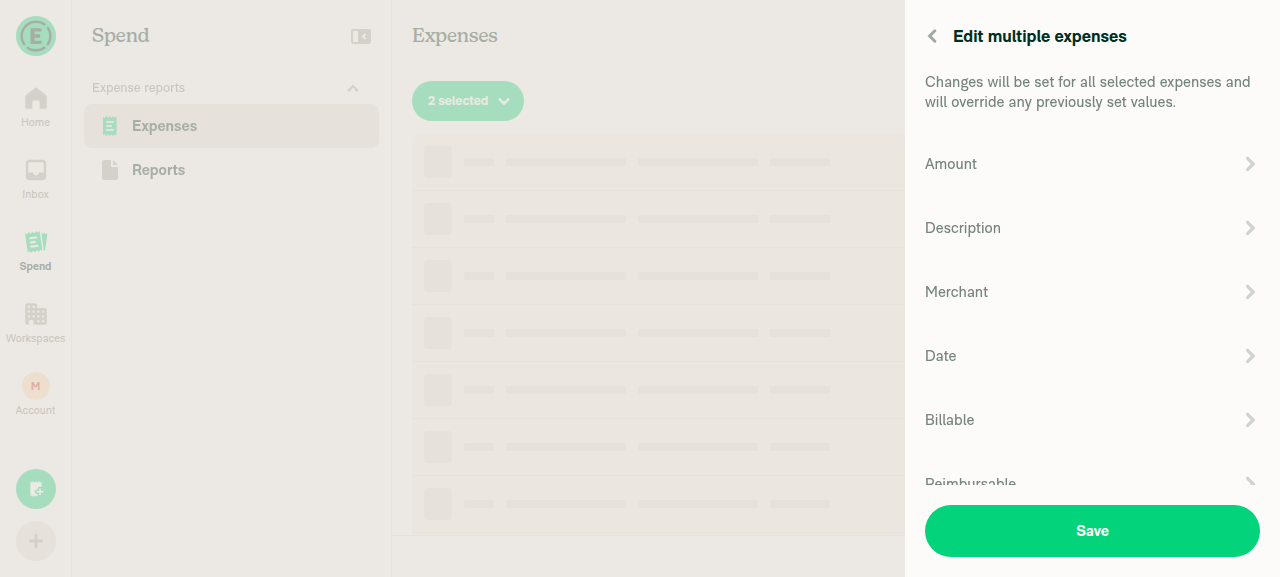
Edit multiple expenses page with Amount, Description, Merchant, Date, Billable, Reimbursable rows

Workspace Rules page showing the Attendee tracking toggle under Expenses

Workspace Rules page showing the Attendee tracking toggle under Expenses

I applied docs/HELPSITE_NAMING_CONVENTIONS.md, docs/HELP_AUTHORING_GUIDELINES.md, and docs/TEMPLATE.md: one # heading plus # FAQ, all sections ## and task-based, bolded UI labels in sentence case, relative cross-links with descriptive anchor text, and no links inside numbered steps.

One thing I couldn't do: GitHub rejected both assigning you to the docs PR and requesting you as a reviewer — samranahm has read access on Expensify/App, so the API returns "Reviews may only be requested from collaborators." The HelpDot label is applied and you're tagged in the PR body instead.

@samranahm, please review the linked help site PR and confirm it reflects the current behavior. Then mark the linked help site PR Ready for review


view run

@OSBotify

OSBotify commented Sep 2, 2026

Copy link
Copy Markdown
Contributor

🚀 Deployed to production by https://github.com/francoisl in version: 9.4.65-3 🚀

platform result
🕸 web 🕸 success ✅
🤖 android 🤖 success ✅
🍎 iOS 🍎 success ✅

Bundle Size Analysis (Sentry):

Sign up for free to join this conversation on GitHub. Already have an account? Sign in to comment

Labels

None yet

Projects

None yet

Development

Successfully merging this pull request may close these issues.

7 participants