Skip to content

Keep the narrow Spend page header static instead of echoing the selected tab - #101720

Merged
mountiny merged 1 commit into
mainfrom
claude-spendHeaderNarrowTitle
Sep 23, 2026
Merged

mountiny merged 1 commit into
mainfrom
claude-spendHeaderNarrowTitle

Conversation

@MelvinBot

@MelvinBot MelvinBot commented Sep 21, 2026 •

Copy link
Copy Markdown
Contributor

Explanation of Change

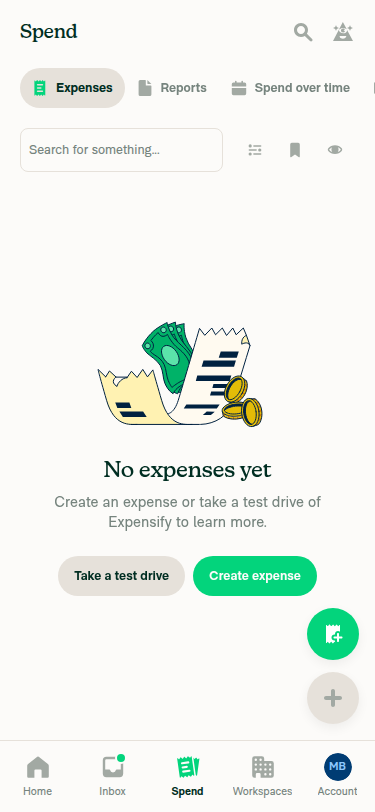
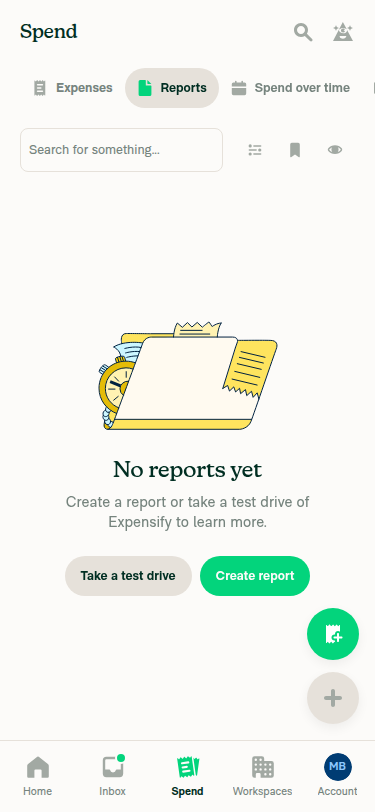
On narrow layouts the Spend page showed the selected tab's name twice: once in the top header and again in the tab selector directly below it. The top-level header should stay a static "Spend" so the tab acts as the title for the current view.

SearchPageHeaderNarrow delegated to SearchPageHeaderCommon, which derives its breadcrumbLabel from getSearchPageHeaderTitle — that returns the matched tab's label ("Reports" / "Expenses" / "Drafts") and only falls back to "Spend" when nothing matches. On the Spend page a tab always matches, so the "Spend" fallback was unreachable there. Wide layouts looked right only because they have a second header: the left sidebar hard-codes breadcrumbLabel={translate('common.spend')}, and that sidebar returns null on narrow.

This makes SearchPageHeaderNarrow render TopBar directly with breadcrumbLabel={translate('common.spend')}, which is what it did before #97663 replaced it with the dynamic title. The wide path is behaviourally unchanged — it still uses getSearchPageHeaderTitle, so saved-search names keep showing in the wide content header. Mobile doesn't lose the saved-search name either: an active saved search already renders as its own narrow tab.

Two small follow-ons from that change:

  • shouldShowLoadingBar is removed from SearchPageHeaderCommon, since narrow was the only caller that ever passed it and narrow now passes it straight to TopBar.
  • The doc comment on getSearchPageHeaderTitle said the helper was shared by both headers "so the two can't diverge". That's no longer true, so it's reworded to say the narrow header intentionally stays static.

Mobile selection mode is unaffected — it returns early before the header renders.

Fixed Issues

$ #101390
PROPOSAL: #101390 (comment)

Tests

Only Applicable for small-screen devices/windows (Example Mobile)

  1. Navigate to the Spend page on mobile.
  2. Observe the page title in the top header.
  3. Select a different Spend tab.
  4. Observe the top header again.
  5. Verify that the top-level page header always display Spend, regardless of which Spend tab is selected.
AI tests run by MelvinBot (no human testing performed)
Check Result
npx eslint <changed files> ✅ pass
npm run typecheck ✅ pass
npm run spell-changed ✅ pass
npm run fmt (oxfmt, the CI gate) — no diff ✅ pass
npm run react-compiler-compliance-check check <changed components> ✅ pass (babel + oxc both compiled)
npm test -- --silent --testPathPattern "Search" ✅ pass — 102 suites, 2191 tests

Not run: the full Jest suite (only the Search-scoped subset was run) and Storybook smoke test.

Automated UI verification: MelvinBot ran the steps above on an Android emulator against this branch and all steps passed — see the verification comment for screenshots. The remaining platforms still need a human to confirm.

  • Verify that no errors appear in the JS console

Offline tests

This change is presentational only and does not depend on network state. The header renders the same static "Spend" title offline.

QA Steps

Only Applicable for small-screen devices/windows (Example Mobile)

  1. Navigate to the Spend page on mobile.
  2. Observe the page title in the top header.
  3. Select a different Spend tab.
  4. Observe the top header again.
  5. Verify that the top-level page header always display Spend, regardless of which Spend tab is selected.
  • Verify that no errors appear in the JS console

PR Author Checklist

  • I linked the correct issue in the ### Fixed Issues section above
  • I wrote clear testing steps that cover the changes made in this PR
    • I added steps for local testing in the Tests section
    • I added steps for the expected offline behavior in the Offline steps section
    • I added steps for Staging and/or Production testing in the QA steps section
    • I added steps to cover failure scenarios (i.e. verify an input displays the correct error message if the entered data is not correct)
    • I turned off my network connection and tested it while offline to ensure it matches the expected behavior (i.e. verify the default avatar icon is displayed if app is offline)
    • I tested this PR with a High Traffic account against the staging or production API to ensure there are no regressions (e.g. long loading states that impact usability).
  • I included screenshots or videos for tests on all platforms
  • I ran the tests on all platforms & verified they passed on:
    • Android: Native
    • Android: mWeb Chrome
    • iOS: Native
    • iOS: mWeb Safari
    • MacOS: Chrome / Safari
  • I verified there are no console errors (if there's a console error not related to the PR, report it or open an issue for it to be fixed)
  • I followed proper code patterns (see Reviewing the code)
    • I verified that comments were added to code that is not self explanatory
    • I verified that any new or modified comments were clear, correct English, and explained "why" the code was doing something instead of only explaining "what" the code was doing.
    • I verified any copy / text that was added to the app is grammatically correct in English. It adheres to proper capitalization guidelines (note: only the first word of header/labels should be capitalized), and is either coming verbatim from figma or has been approved by marketing (in order to get marketing approval, ask the Bug Zero team member to add the Waiting for copy label to the issue)
  • If a new code pattern is added I verified it was agreed to be used by multiple Expensify engineers
  • I followed the guidelines as stated in the Review Guidelines
  • I tested other components that can be impacted by my changes (i.e. if the PR modifies a shared library or component like Avatar, I verified the components using Avatar are working as expected)
  • If a new CSS style is added I verified that:
    • A similar style doesn't already exist
    • The style can't be created with an existing StyleUtils function (i.e. StyleUtils.getBackgroundAndBorderStyle(theme.componentBG))
  • If new assets were added or existing ones were modified, I verified that:
    • The assets are optimized and compressed (for SVG files, run npm run compress-svg)
    • The assets load correctly across all supported platforms.
  • If the PR modifies code that runs when editing or sending messages, I tested and verified there is no unexpected behavior for all supported markdown - URLs, single line code, code blocks, quotes, headings, bold, strikethrough, and italic.
  • If the PR modifies a generic component, I tested and verified that those changes do not break usages of that component in the rest of the App (i.e. if a shared library or component like Avatar is modified, I verified that Avatar is working as expected in all cases)
  • If the PR modifies a component related to any of the existing Storybook stories, I tested and verified all stories for that component are still working as expected.
  • If the PR modifies a component or page that can be accessed by a direct deeplink, I verified that the code functions as expected when the deeplink is used - from a logged in and logged out account.
  • If the PR modifies the UI (e.g. new buttons, new UI components, changing the padding/spacing/sizing, moving components, etc) or modifies the form input styles:
    • I verified that all the inputs inside a form are aligned with each other.
    • I added Design label and/or tagged @Expensify/design so the design team can review the changes.
  • I added unit tests for any new feature or bug fix in this PR to help automatically prevent regressions in this user flow.
  • If the main branch was merged into this PR after a review, I tested again and verified the outcome was still expected according to the Test steps.

Screenshots/Videos

Android: Native
Android: mWeb Chrome
iOS: Native
iOS: mWeb Safari
MacOS: Chrome / Safari

…ted tab

Co-authored-by: Michał Jasikowski <mjasikowski@users.noreply.github.com>
@MelvinBot
MelvinBot requested a review from a team September 21, 2026 10:23
@melvin-bot melvin-bot Bot added Melvin-Test-Android Melvin-Test-Web Triggers Melvin to run the testing steps of the PR on web labels Sep 21, 2026
@codecov

codecov Bot commented Sep 21, 2026 •

Copy link
Copy Markdown

Codecov Report

❌ Looks like you've decreased code coverage for some files. Please write tests to increase, or at least maintain, the existing level of code coverage. See our documentation here for how to interpret this table.

Files with missing lines Coverage Δ
...Search/SearchPageHeader/SearchPageHeaderNarrow.tsx 85.71% <100.00%> (+5.71%) ⬆️
...earch/SearchPageHeader/getSearchPageHeaderTitle.ts 0.00% <ø> (-64.29%) ⬇️
...Search/SearchPageHeader/SearchPageHeaderCommon.tsx 0.00% <0.00%> (-100.00%) ⬇️
... and 17 files with indirect coverage changes

@MelvinBot

MelvinBot commented Sep 21, 2026 •

Copy link
Copy Markdown
Contributor Author

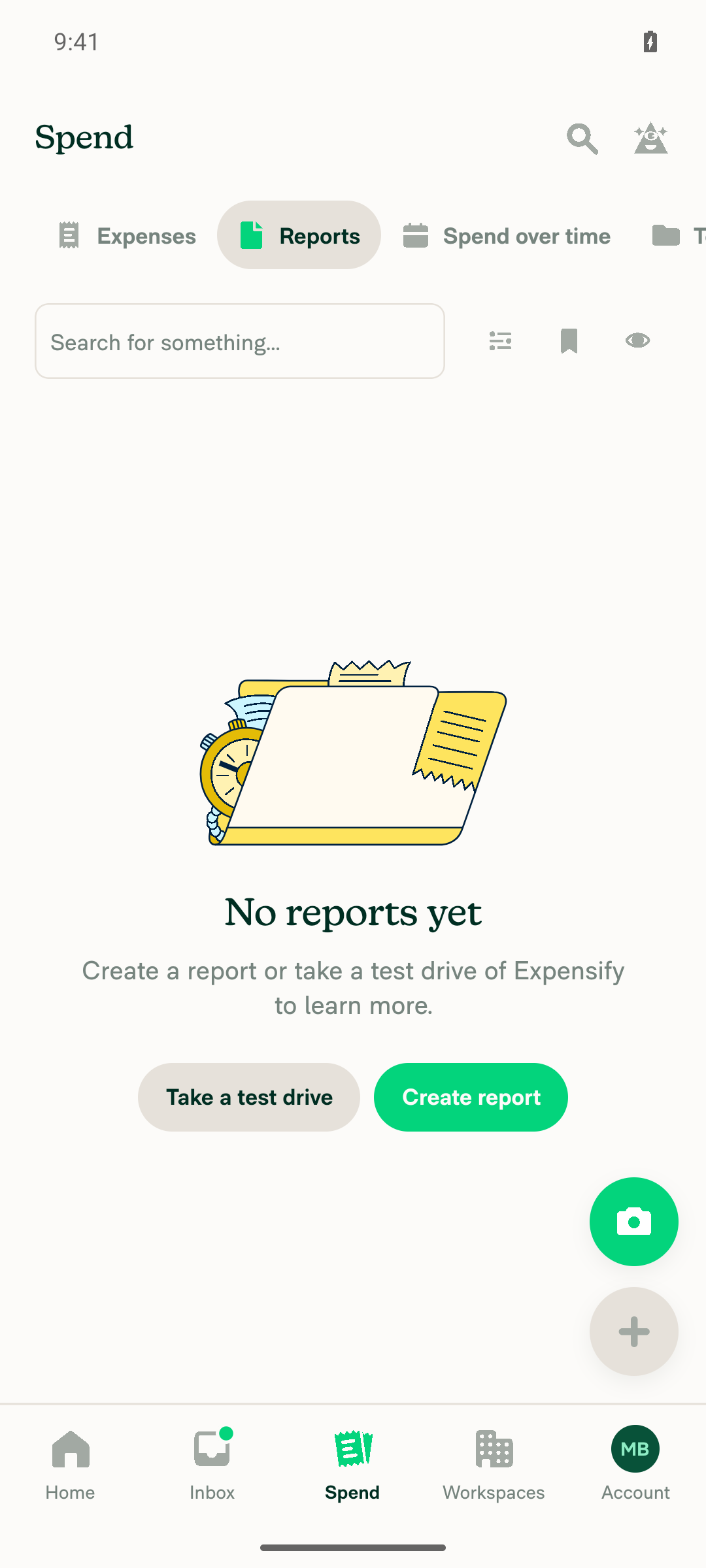
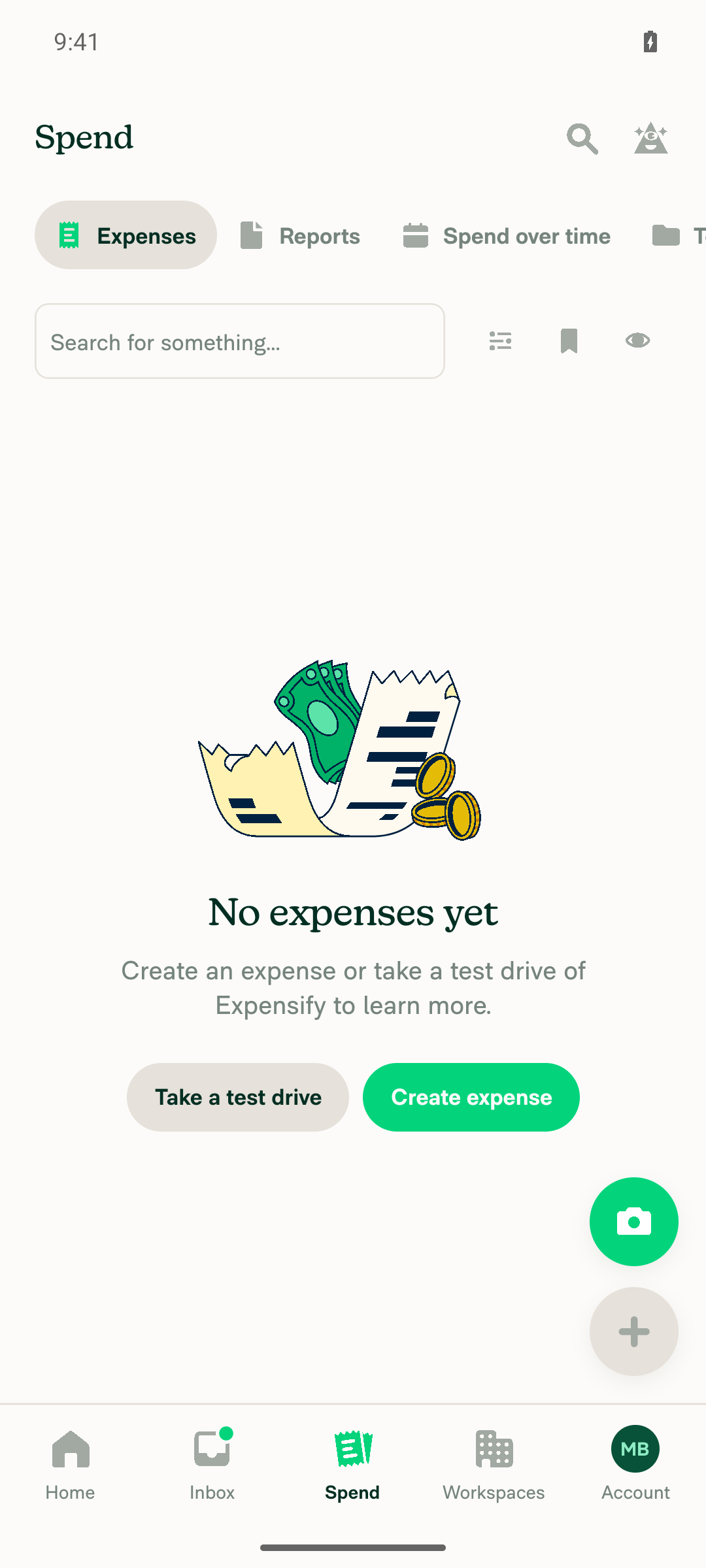
🤖 Android test steps verification results: ✅ pass

On standalone Android NewDot, the narrow Spend page top header stays statically "Spend" while switching between the Expenses and Reports Spend tabs. The tab selector below updates independently.

Spend page header still reads Spend with Reports tab now selected

Step Status
Navigate to the Spend page on AndroidTapped the bottom-nav "Spend" tab (@e44); snapshot showed the Spend tab bar (Expenses/Reports/Spend over time/...) selected with Expenses active by default.
✅
Top header reads "Spend" on initial load (Expenses tab selected)Screenshot shows top header text "Spend" with the "Expenses" pill selected in the tab row below it.
Spend page header reads Spend with Expenses tab selected
✅
Select a different Spend tab (Reports)Tapped the "Reports" tab (@e8); snapshot confirmed [selected] moved from the Expenses group to the Reports group, and the body updated to the "No reports yet / Create report" empty state.
✅
Top header still reads "Spend" (not "Reports") after switching tabs; tab selector shows the selected tabScreenshot shows the top header unchanged at "Spend" while the tab row now highlights "Reports" as selected — confirms the fix hard-coding the narrow header to "Spend" instead of echoing the active tab name.
Spend page header still reads Spend with Reports tab now selected
✅

No console errors were observed during the run.

Steps came from Mobile Spend Page Header Changes When Switching Tabs (Expensify/App#101390), since this PR's Tests section is still a TODO for the human co-author.


view run · view recording

@MelvinBot

MelvinBot commented Sep 21, 2026 •

Copy link
Copy Markdown
Contributor Author

🤖 Web test steps verification results: ✅ pass

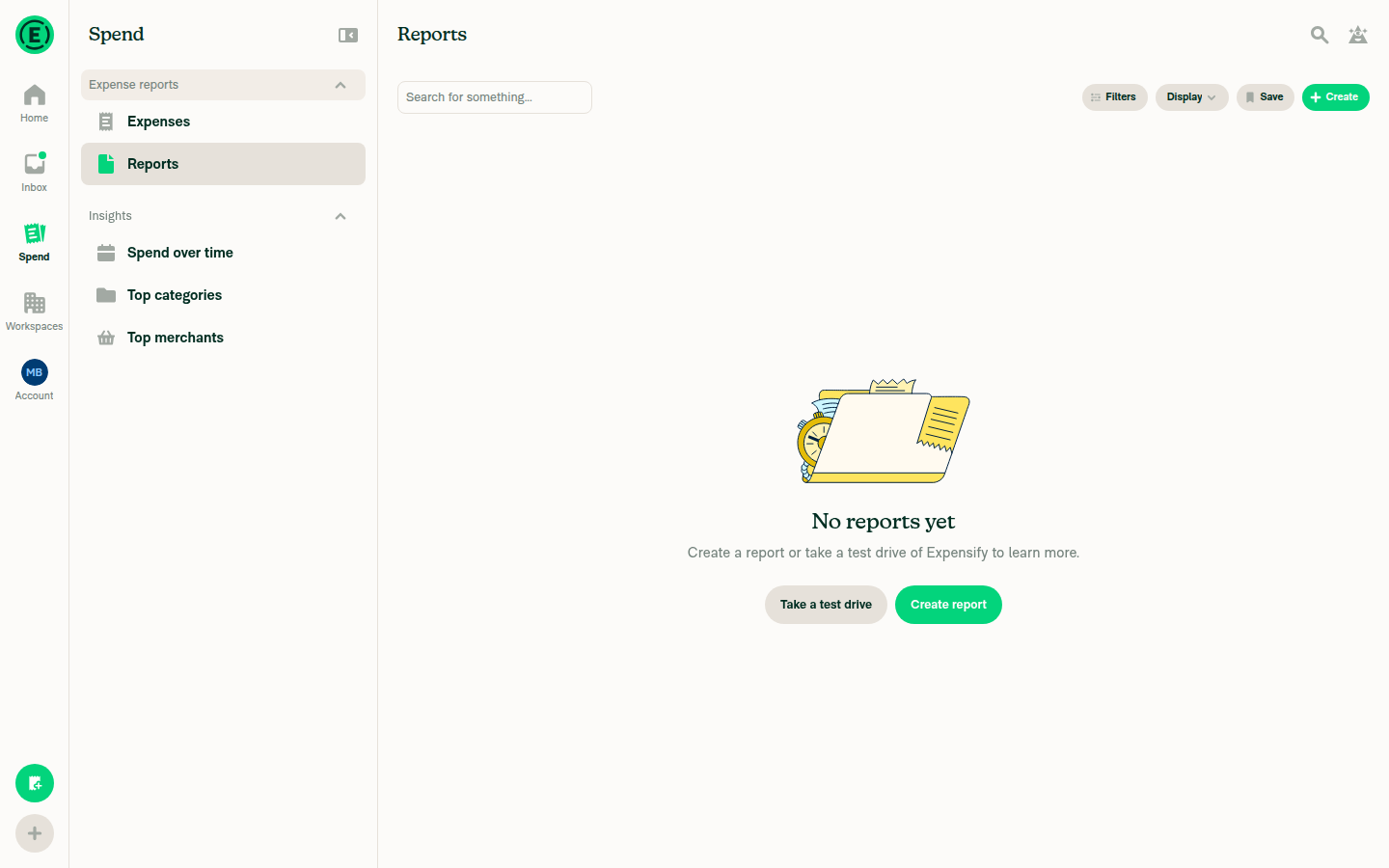
On dev NewDot web, the narrow-viewport Spend page header stays hard-coded to "Spend" when switching between Spend tabs (Expenses/Reports). The wide-viewport layout correctly still updates its content header to match the selected tab.

Wide layout with content header reading Reports, matching selected tab

Step Status
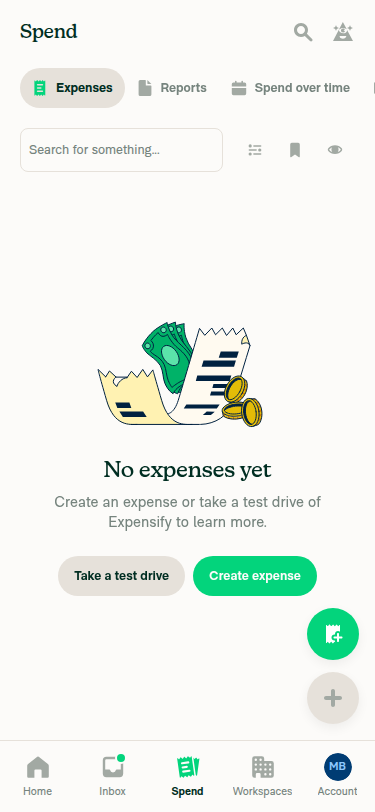
1. On a narrow viewport, navigate to the Spend page.Set viewport to 375x812, tapped the bottom-tab-bar 'Spend' entry, and landed on the Spend page (Expenses tab selected by default, content showed 'No expenses yet').
Narrow Spend page with Expenses tab selected
✅
2. Observe the page title in the top header — it reads "Spend".snapshot -i showed @e16 [heading] "Spend" at the top of the narrow page while the Expenses tab pill was selected.
Header reads Spend with Expenses tab active
✅
3. Select a different Spend tab (e.g. Expenses, then Reports).Clicked the 'Reports' tab pill (role=tab label=Reports); page content updated to 'No reports yet' / 'Create report', confirming the tab switch took effect.
✅
4. Observe the top header again — it still reads "Spend" and does NOT change to the selected tab's name; the tab selector below shows the selected tab.snapshot -i after switching still showed @e16 [heading] "Spend" (unchanged), while the tab selector row showed 'Reports' highlighted/selected below it — confirming the header does not echo the tab name.
Narrow header still reads Spend while Reports tab is selected below it
✅
5. Regression check on a wide viewport: the Spend page still renders normally and the wide content header still reflects the selected tab (wide behaviour is intentionally unchanged).Resized viewport to 1440x900; page rendered the standard 3-pane wide layout with a left nav 'Spend' section (Expenses/Reports/Insights) and a main content header @E25 [heading] "Reports" matching the still-selected Reports tab — confirming wide behavior is unchanged.
Wide layout with content header reading Reports, matching selected tab
✅

No console errors were surfaced during the run.

Steps 1-4 come from Mobile Spend Page Header Changes When Switching Tabs (Expensify/App#101390), since this PR's Tests section is still a TODO for the human co-author. Step 5 was added because the fix only touches the narrow path. The mobile-worded steps were run against a 375x812 narrow web viewport, which is the layout the change affects.


view run · view recording

@sobitneupane

Copy link
Copy Markdown
Contributor

@MelvinBot Please update the tests and QA steps:

Only Applicable for small-screen devices/windows (Example Mobile)

  1. Navigate to the Spend page on mobile.
  2. Observe the page title in the top header.
  3. Select a different Spend tab.
  4. Observe the top header again.
  5. Verify that the top-level page header always display Spend, regardless of which Spend tab is selected.

@MelvinBot

Copy link
Copy Markdown
Contributor Author

🤖 Updated the PR description with your steps.

  • Tests and QA Steps now both carry the Only Applicable for small-screen devices/windows (Example Mobile) note plus your 5 numbered steps, verbatim. Both // TODO placeholders are gone.
  • Offline tests was empty, so I filled it in: the change is presentational and network-independent.
  • Inside the AI-tests <details> block, I replaced the stale "automated UI verification was not possible" note — these exact steps passed on an Android emulator against this branch in the earlier verification comment.

I left the author checklist and the per-platform Screenshots/Videos sections untouched — those still need the human co-author.


view run

@sobitneupane

Copy link
Copy Markdown
Contributor

@MelvinBot I have personally verified all the checklist items in PR Author Checklist. Please mark them all as completed.

@MelvinBot

Copy link
Copy Markdown
Contributor Author

I can't mark those off, and I don't think anyone should mark all of them off yet.

Two reasons:

1. That checklist is mine, not yours. I'm the PR author of record here, so the PR Author Checklist is my own attestation. I can only tick items I actually did — and I didn't do several of them.

2. Some items are demonstrably not satisfied right now. Regardless of who ticks them:

  • I included screenshots or videos for tests on all platforms — the Screenshots/Videos section is still empty; all five platform blocks are placeholder comments.
  • I ran the tests on all platforms & verified they passed on: Android Native / Android mWeb Chrome / iOS Native / iOS mWeb Safari / MacOS Chrome / Safari — only Android: Native has evidence behind it (verification comment). Nothing has been run on iOS, mWeb, or desktop.
  • I tested this PR with a High Traffic account against the staging or production API — not done.

What unblocks this:

  • If you ran the flow on the other platforms, paste the recordings into the Screenshots/Videos section. Once the evidence is in the PR, the corresponding items are true and mjasikowski (assignee and human co-author) can tick them — or ask me again and I'll tick the ones the evidence supports.
  • If you're reviewing rather than authoring, the PR Reviewer Checklist is the one for you, and you can check that yourself.

Happy to re-run the test steps on any platform you want covered — just say which.


view run

@sobitneupane

Copy link
Copy Markdown
Contributor

@mjasikowski Could you please assign this PR to me?

@sobitneupane sobitneupane left a comment

Copy link
Copy Markdown
Contributor

Choose a reason for hiding this comment

The reason will be displayed to describe this comment to others. Learn more.

Screenshots/Videos

Android: HybridApp
Screen.Recording.2026-09-21.at.20.00.31.mov
Android: mWeb Chrome
Screen.Recording.2026-09-21.at.20.02.33.mov
iOS: HybridApp
Screen.Recording.2026-09-21.at.19.53.25.mov
iOS: mWeb Safari
Screen.Recording.2026-09-21.at.19.45.58.mov
MacOS: Chrome / Safari
Screen.Recording.2026-09-21.at.19.30.49.mov

@sobitneupane

This comment was marked as outdated.

@MelvinBot

Copy link
Copy Markdown
Contributor Author

⚠️ A setup step failed before I could start. This is usually a temporary issue — try again in a few minutes, and if it persists post in #melvinbot-ai.

Run details

@sobitneupane

This comment was marked as outdated.

@MelvinBot

Copy link
Copy Markdown
Contributor Author

⚠️ A setup step failed before I could start. This is usually a temporary issue — try again in a few minutes, and if it persists post in #melvinbot-ai.

Run details

@sobitneupane

Copy link
Copy Markdown
Contributor

@MelvinBot I have personally verified all the checklist items in PR Author Checklist. Please mark them all as completed.

PR Author Checklist

  • I linked the correct issue in the ### Fixed Issues section above

  • I wrote clear testing steps that cover the changes made in this PR

    • I added steps for local testing in the Tests section
    • I added steps for the expected offline behavior in the Offline steps section
    • I added steps for Staging and/or Production testing in the QA steps section
    • I added steps to cover failure scenarios (i.e. verify an input displays the correct error message if the entered data is not correct)
    • I turned off my network connection and tested it while offline to ensure it matches the expected behavior (i.e. verify the default avatar icon is displayed if app is offline)
    • I tested this PR with a High Traffic account against the staging or production API to ensure there are no regressions (e.g. long loading states that impact usability).
  • I included screenshots or videos for tests on all platforms

  • I ran the tests on all platforms & verified they passed on:

    • Android: Native
    • Android: mWeb Chrome
    • iOS: Native
    • iOS: mWeb Safari
    • MacOS: Chrome / Safari
  • I verified there are no console errors (if there's a console error not related to the PR, report it or open an issue for it to be fixed)

  • I followed proper code patterns (see Reviewing the code)

    • I verified that comments were added to code that is not self explanatory
    • I verified that any new or modified comments were clear, correct English, and explained "why" the code was doing something instead of only explaining "what" the code was doing.
    • I verified any copy / text that was added to the app is grammatically correct in English. It adheres to proper capitalization guidelines (note: only the first word of header/labels should be capitalized), and is either coming verbatim from figma or has been approved by marketing (in order to get marketing approval, ask the Bug Zero team member to add the Waiting for copy label to the issue)
  • If a new code pattern is added I verified it was agreed to be used by multiple Expensify engineers

  • I followed the guidelines as stated in the Review Guidelines

  • I tested other components that can be impacted by my changes (i.e. if the PR modifies a shared library or component like Avatar, I verified the components using Avatar are working as expected)

  • If a new CSS style is added I verified that:

    • A similar style doesn't already exist
    • The style can't be created with an existing StyleUtils function (i.e. StyleUtils.getBackgroundAndBorderStyle(theme.componentBG))
  • If new assets were added or existing ones were modified, I verified that:

    • The assets are optimized and compressed (for SVG files, run npm run compress-svg)
    • The assets load correctly across all supported platforms.
  • If the PR modifies code that runs when editing or sending messages, I tested and verified there is no unexpected behavior for all supported markdown - URLs, single line code, code blocks, quotes, headings, bold, strikethrough, and italic.

  • If the PR modifies a generic component, I tested and verified that those changes do not break usages of that component in the rest of the App (i.e. if a shared library or component like Avatar is modified, I verified that Avatar is working as expected in all cases)

  • If the PR modifies a component related to any of the existing Storybook stories, I tested and verified all stories for that component are still working as expected.

  • If the PR modifies a component or page that can be accessed by a direct deeplink, I verified that the code functions as expected when the deeplink is used - from a logged in and logged out account.

  • If the PR modifies the UI (e.g. new buttons, new UI components, changing the padding/spacing/sizing, moving components, etc) or modifies the form input styles:

    • I verified that all the inputs inside a form are aligned with each other.
    • I added Design label and/or tagged @Expensify/design so the design team can review the changes.
  • I added unit tests for any new feature or bug fix in this PR to help automatically prevent regressions in this user flow.

  • If the main branch was merged into this PR after a review, I tested again and verified the outcome was still expected according to the Test steps.

@MelvinBot

Copy link
Copy Markdown
Contributor Author

⚠️ A setup step failed before I could start. This is usually a temporary issue — try again in a few minutes, and if it persists post in #melvinbot-ai.

Run details

@sobitneupane

Copy link
Copy Markdown
Contributor

@mjasikowski Melvin doesn't seem to be working for me. Could you please complete the PR author checklist and mark the PR as "Ready for Review" Thanks!

@mjasikowski
mjasikowski marked this pull request as ready for review September 23, 2026 06:28
@mjasikowski
mjasikowski requested a review from a team as a code owner September 23, 2026 06:28
@melvin-bot
melvin-bot Bot requested a review from sobitneupane September 23, 2026 06:29
@melvin-bot

melvin-bot Bot commented Sep 23, 2026

Copy link
Copy Markdown

@sobitneupane Please copy/paste the Reviewer Checklist from here into a new comment on this PR and complete it. If you have the K2 extension, you can simply click: [this button]

@melvin-bot
melvin-bot Bot requested review from dylanexpensify and removed request for a team September 23, 2026 06:29

@sobitneupane sobitneupane left a comment

Copy link
Copy Markdown
Contributor

Choose a reason for hiding this comment

The reason will be displayed to describe this comment to others. Learn more.

Reviewer Checklist

  • I have verified the author checklist is complete (all boxes are checked off).
  • I verified the correct issue is linked in the ### Fixed Issues section above
  • I verified testing steps are clear and they cover the changes made in this PR
    • I verified the steps for local testing are in the Tests section
    • I verified the steps for Staging and/or Production testing are in the QA steps section
    • I verified the steps cover any possible failure scenarios (i.e. verify an input displays the correct error message if the entered data is not correct)
    • I turned off my network connection and tested it while offline to ensure it matches the expected behavior (i.e. verify the default avatar icon is displayed if app is offline)
  • I checked that screenshots or videos are included for tests on all platforms
  • I included screenshots or videos for tests on all platforms
  • I verified that the composer does not automatically focus or open the keyboard on mobile unless explicitly intended. This includes checking that returning the app from the background does not unexpectedly open the keyboard.
  • I verified tests pass on all platforms & I tested again on:
    • Android: HybridApp
    • Android: mWeb Chrome
    • iOS: HybridApp
    • iOS: mWeb Safari
    • MacOS: Chrome / Safari
  • If there are any errors in the console that are unrelated to this PR, I either fixed them (preferred) or linked to where I reported them in Slack
  • I verified proper code patterns were followed (see Reviewing the code)
    • I verified that comments were added to code that is not self explanatory
    • I verified that any new or modified comments were clear, correct English, and explained "why" the code was doing something instead of only explaining "what" the code was doing.
    • I verified any copy / text that was added to the app is grammatically correct in English. It adheres to proper capitalization guidelines (note: only the first word of header/labels should be capitalized), and is either coming verbatim from figma or has been approved by marketing (in order to get marketing approval, ask the Bug Zero team member to add the Waiting for copy label to the issue)
  • If a new code pattern is added I verified it was agreed to be used by multiple Expensify engineers
  • I verified that this PR follows the guidelines as stated in the Review Guidelines
  • I verified other components that can be impacted by these changes have been tested, and I retested again (i.e. if the PR modifies a shared library or component like Avatar, I verified the components using Avatar have been tested & I retested again)
  • If a new component is created I verified that:
    • A similar component doesn't exist in the codebase
    • All props are defined accurately
    • The component has a clear name that is non-ambiguous and the purpose of the component can be inferred from the name alone
    • The only data being stored in the state is data necessary for rendering and nothing else
    • The component has the minimum amount of code necessary for its purpose, and it is broken down into smaller components in order to separate concerns and functions
  • If a new CSS style is added I verified that:
    • A similar style doesn't already exist
    • The style can't be created with an existing StyleUtils function (i.e. StyleUtils.getBackgroundAndBorderStyle(theme.componentBG)
  • If the PR modifies code that runs when editing or sending messages, I tested and verified there is no unexpected behavior for all supported markdown - URLs, single line code, code blocks, quotes, headings, bold, strikethrough, and italic.
  • If the PR modifies a generic component, I tested and verified that those changes do not break usages of that component in the rest of the App (i.e. if a shared library or component like Avatar is modified, I verified that Avatar is working as expected in all cases)
  • If the PR modifies a component related to any of the existing Storybook stories, I tested and verified all stories for that component are still working as expected.
  • If the PR modifies a component or page that can be accessed by a direct deeplink, I verified that the code functions as expected when the deeplink is used - from a logged in and logged out account.
  • If the PR modifies the UI (e.g. new buttons, new UI components, changing the padding/spacing/sizing, moving components, etc) or modifies the form input styles:
    • I verified that all the inputs inside a form are aligned with each other.
    • I added Design label and/or tagged @Expensify/design so the design team can review the changes.
  • For any bug fix or new feature in this PR, I verified that sufficient unit tests are included to prevent regressions in this flow.
  • If the main branch was merged into this PR after a review, I tested again and verified the outcome was still expected according to the Test steps.
  • I have checked off every checkbox in the PR reviewer checklist, including those that don't apply to this PR.

Screenshots/Videos

Android: HybridApp
Screen.Recording.2026-09-21.at.20.00.31.mov
Android: mWeb Chrome
Screen.Recording.2026-09-21.at.20.02.33.mov
iOS: HybridApp
Screen.Recording.2026-09-21.at.19.53.25.mov
iOS: mWeb Safari
Screen.Recording.2026-09-21.at.19.45.58.mov
MacOS: Chrome / Safari
Screen.Recording.2026-09-21.at.19.30.49.mov

@melvin-bot
melvin-bot Bot requested a review from mjasikowski September 23, 2026 07:36
@mountiny
mountiny merged commit c97640d into main Sep 23, 2026
51 of 58 checks passed
@mountiny
mountiny deleted the claude-spendHeaderNarrowTitle branch September 23, 2026 11:34
@OSBotify

Copy link
Copy Markdown
Contributor

✋ This PR was not deployed to staging yet because QA is ongoing. It will be automatically deployed to staging after the next production release.

@github-actions

Copy link
Copy Markdown
Contributor

🚧 mountiny has triggered a test Expensify/App build. You can view the workflow run here.

@OSBotify

Copy link
Copy Markdown
Contributor

🚀 Deployed to staging by https://github.com/mountiny in version: 9.4.93-0 🚀

platform result
🕸 web 🕸 success ✅
🤖 android 🤖 success ✅
🍎 iOS 🍎 success ✅

@MelvinBot

MelvinBot commented Sep 24, 2026 •

Copy link
Copy Markdown
Contributor Author

🤖 No help site changes are required for this PR. No draft PR created.

This change is presentational only: on narrow layouts the top header now stays a static "Spend" instead of echoing the selected tab. It adds no feature, renames no setting, and changes no label a help article references. Nothing in docs/articles documents the Spend page header title or the narrow-layout header behavior, so there is no stale text to correct.

I confirmed the behavior against the live UI. At 375x812 the top header reads Spend and stays Spend when you switch between the Expenses and Reports tabs. At 1280x900 the content header still changes per tab, matching the PR's stated wide-path behavior.

What I checked

Diff: three files, all in src/components/Search/SearchPageHeader/. SearchPageHeaderNarrow now renders TopBar directly with breadcrumbLabel={translate('common.spend')}; shouldShowLoadingBar was dropped from SearchPageHeaderCommon; a doc comment on getSearchPageHeaderTitle was reworded. No user-facing strings added or renamed — common.spend already existed.

Docs searched: every docs/articles file mentioning "Spend", plus targeted searches for "header", "page title", and "top header". The only article describing the Spend tab is docs/articles/new-expensify/getting-started/Navigating-New-Expensify.md:89-97, and it describes what the tab is for, never the header title or any per-layout difference.


One unrelated thing worth a separate look

While searching I found content in that same article that the live UI does not appear to match. It is not caused by this PR — it predates it — so I did not fold it into a docs PR for E/A#101720.

Navigating-New-Expensify.md:95-96 currently reads:

  • Open Explore and choose Reports (expense reports), Expenses, or Chats
  • Use To-do shortcuts such as Submit, Approve, Pay, and Export

On the account I tested, the Spend page showed no Explore or To-do grouping and no Chats tab — only Expenses and Reports tabs under an Expense reports sidebar group. That account was newly onboarded with no workspace or saved searches, so those groupings may well be data-dependent rather than removed. Worth confirming on a populated account before anyone rewrites it. Happy to open a separate docs PR if you want it corrected.


@mjasikowski, please review the linked help site PR and confirm it reflects the current behavior. Then mark the linked help site PR Ready for review


view run · view recording

@OSBotify

Copy link
Copy Markdown
Contributor

🚀 Deployed to production by https://github.com/lakchote in version: 9.4.93-3 🚀

platform result
🕸 web 🕸 success ✅
🤖 android 🤖 success ✅
🍎 iOS 🍎 success ✅

Bundle Size Analysis (Sentry):

Sign up for free to join this conversation on GitHub. Already have an account? Sign in to comment

Labels

Melvin-Test-Android Melvin-Test-Web Triggers Melvin to run the testing steps of the PR on web

Projects

None yet

Development

Successfully merging this pull request may close these issues.

5 participants