Skip to content

Show selected saved view name in Search page header - #97663

Merged
aldo-expensify merged 3 commits into
mainfrom
claude-savedViewHeaderTitle
Aug 10, 2026
Merged

aldo-expensify merged 3 commits into
mainfrom
claude-savedViewHeaderTitle

Conversation

@MelvinBot

@MelvinBot MelvinBot commented Aug 3, 2026 •

Copy link
Copy Markdown
Contributor

Explanation of Change

When a saved view (saved search) is selected, the Search page header showed a generic "Spend" title instead of the saved view's name, so it no longer matched the item selected in the LHN.

This implements the approved proposal:

  • useSearchTypeMenuSections now derives an activeSavedSearch value from its existing SAVED_SEARCHES subscription, keyed by hash (no new full-map read in the headers, and nothing is added to menuItems so suggested-search focus stays -1). The previous isSavedSearchActive inline check that drove the -1 branch is refactored to reuse this single source of truth (including the same DELETE-guard), so the two can't diverge.
  • A shared helper getSearchPageHeaderTitle centralizes the title priority chain both headers use: (a) the active saved search's display name, then (b) the matched suggested-search / data-type label, then (c) the generic "Spend" fallback. activeSavedSearch.name is a display string (not a translation key), so it is used directly — matching the LHN, which renders item.name for the name !== query case.
  • SearchPageHeaderWide and SearchPageHeaderNarrow both call the hook + shared helper. The narrow header previously hardcoded common.spend with no fallbacks; it now shows the saved view name and gets the same type fallbacks as the wide header.
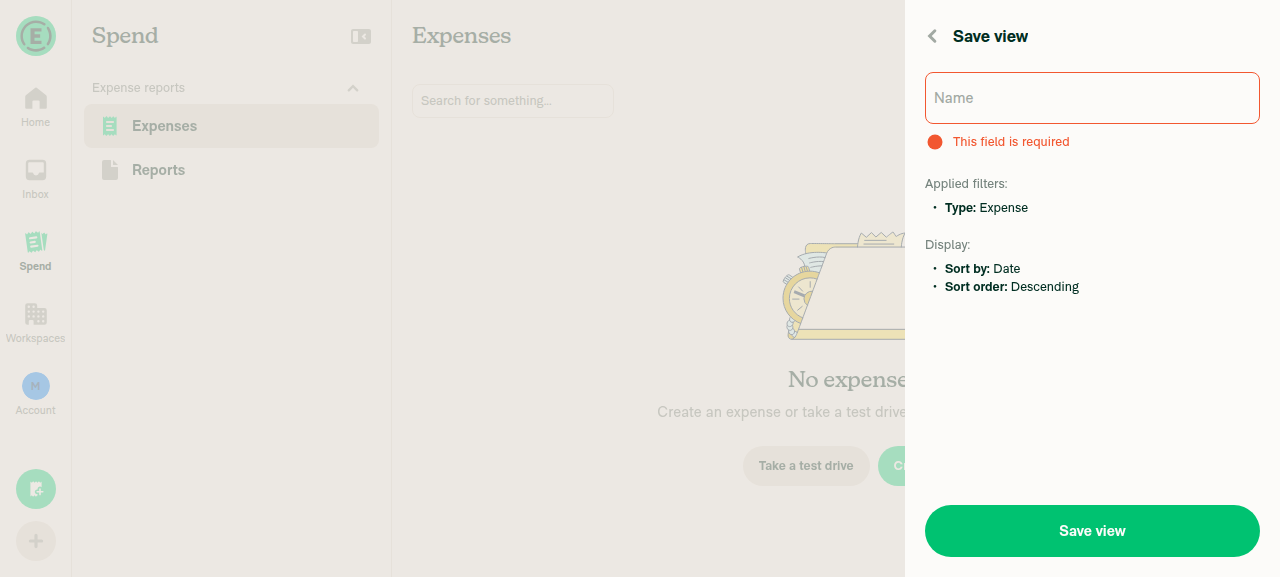
  • Required name field: the Save view (SearchSavePage) and Rename (SavedSearchRenamePage) forms now validate the NAME field with getFieldRequiredErrors, so a view can no longer be saved or renamed with an empty/whitespace-only name (the old empty-name → query fallback was removed). This guarantees every saved view always has a name to display in the LHN and page header.

Scope note: for the reported "My expenses" case name !== query, so activeSavedSearch.name alone is correct. LHN parity for unnamed saved searches (name === query, where the LHN derives a title via useSavedSearchTitles) is intentionally deferred and out of scope for this bug. Historical saved views created before the required-name change aren't backfilled.

Fixed Issues

$ #97270
PROPOSAL: #97270 (comment)

Tests

Saved view name in header

  1. Go to the Search area (Spend).
  2. Create a saved search / saved view (e.g. name it "My Expenses"), or open an existing one from the LHN under the Saved section.
  3. Select that saved view.
  4. Verify the page header (breadcrumb label at the top of the Search page) shows the saved view's name (e.g. "My Expenses"), matching the selected item in the LHN — not the generic "Spend" title.
  5. Repeat on a narrow/mobile layout and verify the narrow header shows the same saved view name.
  6. Verify a non-saved-search view (e.g. a suggested search like Expenses, or Task/Trip/Invoice/Chat) still shows its correct type title.

Required name when saving a view
7. Go to the Search area (Spend) and apply any filters/search.
8. Open the Save view page and, leaving the Name field empty, press Save view.
9. Verify the submit is blocked, the Name field is highlighted, and an inline "This field is required" error appears under it — no saved view is created.
10. Enter only spaces/whitespace in the Name field and press Save view; verify it is still blocked with the same required-field error (whitespace-only is treated as empty).
11. Enter a valid name (e.g. "My Expenses") and press Save view; verify the view saves and appears under the Saved section in the LHN.

Required name when renaming a view
12. Open an existing saved view and choose Rename.
13. Clear the Name field so it is empty (or contains only whitespace) and press Save.
14. Verify the rename is blocked with the inline "This field is required" error and the saved view keeps its previous name.
15. Enter a valid new name and press Save; verify the view is renamed in the LHN and the page header.

  • Verify that no errors appear in the JS console

Offline tests

Same as tests.

QA Steps

Same as tests.

  • Verify that no errors appear in the JS console

PR Author Checklist

  • I linked the correct issue in the ### Fixed Issues section above
  • I wrote clear testing steps that cover the changes made in this PR
    • I added steps for local testing in the Tests section
    • I added steps for the expected offline behavior in the Offline steps section
    • I added steps for Staging and/or Production testing in the QA steps section
    • I added steps to cover failure scenarios (i.e. verify an input displays the correct error message if the entered data is not correct)
    • I turned off my network connection and tested it while offline to ensure it matches the expected behavior (i.e. verify the default avatar icon is displayed if app is offline)
    • I tested this PR with a High Traffic account against the staging or production API to ensure there are no regressions (e.g. long loading states that impact usability).
  • I included screenshots or videos for tests on all platforms
  • I ran the tests on all platforms & verified they passed on:
    • Android: Native
    • Android: mWeb Chrome
    • iOS: Native
    • iOS: mWeb Safari
    • MacOS: Chrome / Safari
  • I verified there are no console errors (if there's a console error not related to the PR, report it or open an issue for it to be fixed)
  • I followed proper code patterns (see Reviewing the code)
    • I verified that comments were added to code that is not self explanatory
    • I verified that any new or modified comments were clear, correct English, and explained "why" the code was doing something instead of only explaining "what" the code was doing.
    • I verified any copy / text that was added to the app is grammatically correct in English. It adheres to proper capitalization guidelines (note: only the first word of header/labels should be capitalized), and is either coming verbatim from figma or has been approved by marketing (in order to get marketing approval, ask the Bug Zero team member to add the Waiting for copy label to the issue)
  • If a new code pattern is added I verified it was agreed to be used by multiple Expensify engineers
  • I followed the guidelines as stated in the Review Guidelines
  • I tested other components that can be impacted by my changes (i.e. if the PR modifies a shared library or component like Avatar, I verified the components using Avatar are working as expected)
  • If a new CSS style is added I verified that:
    • A similar style doesn't already exist
    • The style can't be created with an existing StyleUtils function (i.e. StyleUtils.getBackgroundAndBorderStyle(theme.componentBG))
  • If new assets were added or existing ones were modified, I verified that:
    • The assets are optimized and compressed (for SVG files, run npm run compress-svg)
    • The assets load correctly across all supported platforms.
  • If the PR modifies code that runs when editing or sending messages, I tested and verified there is no unexpected behavior for all supported markdown - URLs, single line code, code blocks, quotes, headings, bold, strikethrough, and italic.
  • If the PR modifies a generic component, I tested and verified that those changes do not break usages of that component in the rest of the App (i.e. if a shared library or component like Avatar is modified, I verified that Avatar is working as expected in all cases)
  • If the PR modifies a component related to any of the existing Storybook stories, I tested and verified all stories for that component are still working as expected.
  • If the PR modifies a component or page that can be accessed by a direct deeplink, I verified that the code functions as expected when the deeplink is used - from a logged in and logged out account.
  • If the PR modifies the UI (e.g. new buttons, new UI components, changing the padding/spacing/sizing, moving components, etc) or modifies the form input styles:
    • I verified that all the inputs inside a form are aligned with each other.
    • I added Design label and/or tagged @Expensify/design so the design team can review the changes.
  • I added unit tests for any new feature or bug fix in this PR to help automatically prevent regressions in this user flow.
  • If the main branch was merged into this PR after a review, I tested again and verified the outcome was still expected according to the Test steps.

Screenshots/Videos

Android: Native
Android: mWeb Chrome
iOS: Native
iOS: mWeb Safari
MacOS: Chrome / Safari

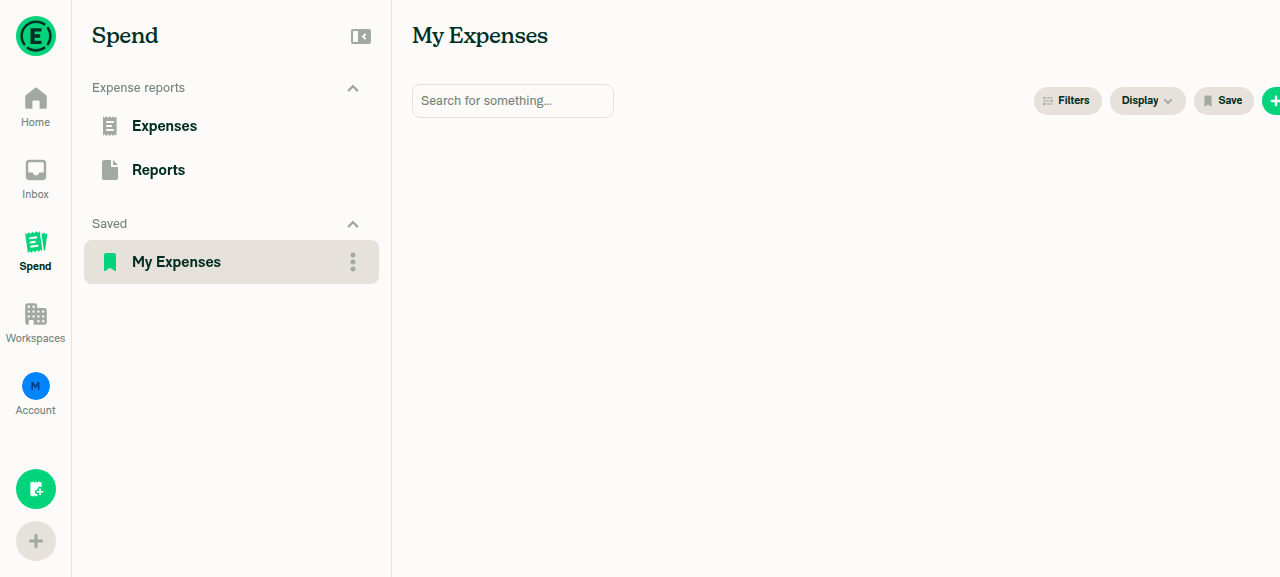
Automated web verification by MelvinBot (dev NewDot): after creating and selecting a saved search named "My Expenses", the Search page header now displays "My Expenses" (matching the LHN Saved selection) instead of the generic "Spend" title.

Search page with 'My Expenses' saved view selected in LHN and page header showing 'My Expenses' instead of 'Spend'

Co-authored-by: Roji Philip <rojiphil@users.noreply.github.com>
@MelvinBot
MelvinBot requested a review from a team August 3, 2026 07:18
@MelvinBot

Copy link
Copy Markdown
Contributor Author

I created this PR from an upstream branch since I don't have push access to your fork.

To take ownership of this branch and be able to push updates, run:

git remote add upstream https://github.com/Expensify/App.git
git fetch upstream claude-savedViewHeaderTitle
git checkout -b claude-savedViewHeaderTitle upstream/claude-savedViewHeaderTitle
git push -u origin claude-savedViewHeaderTitle

Then you can close this PR and open a new one from your fork.

@codecov

codecov Bot commented Aug 3, 2026 •

Copy link
Copy Markdown

Codecov Report

✅ Changes either increased or maintained existing code coverage, great job!

Files with missing lines Coverage Δ
...Search/SearchPageHeader/SearchPageHeaderNarrow.tsx 88.88% <100.00%> (+3.17%) ⬆️
src/hooks/useSearchTypeMenuSections.ts 95.08% <100.00%> (+1.63%) ⬆️
...s/Search/SearchPageHeader/SearchPageHeaderWide.tsx 0.00% <0.00%> (ø)
src/pages/Search/SearchSavePage.tsx 0.00% <0.00%> (ø)
src/pages/Search/SavedSearchRenamePage.tsx 0.00% <0.00%> (ø)
...earch/SearchPageHeader/getSearchPageHeaderTitle.ts 57.14% <57.14%> (ø)
... and 484 files with indirect coverage changes

@MelvinBot

Copy link
Copy Markdown
Contributor Author

There's no code fix to push here — every code check is green. ✅

The only failing check is PR Author Checklist / checklist, and it's failing for a non-code reason:

You completed 0 out of 38 checklist items with 38 unfinished items
##[error]PR Author Checklist is not completely filled out. Please check every box to verify you've thought about the item.

This is a human checklist that MelvinBot can't (and shouldn't) tick off on your behalf. To make it pass, rojiphil needs to check the boxes in the PR Author Checklist section of the PR description once you've verified each item.

Full check status
  • ✅ typecheck, Bun tests, all test (job N), Storybook, ESLint, Oxfmt, spellcheck, unused-styles, knip, React Compiler Compliance, all build jobs, and Reassure Performance Tests (baseline / branch / validate) — all passing
  • ❌ PR Author Checklist / checklist — failing only because the author checklist boxes are unchecked (0/38)

Once the checklist is filled out, that check will go green and the PR will be fully passing.

@rojiphil

rojiphil commented Aug 4, 2026 •

Copy link
Copy Markdown
Contributor

@dannymcclain We have a case where the user can choose not to select a name for the saved view. In such a case, would we want to display Spend or the entire sort query as demonstrated below?

97220-issue-001.mp4

@dannymcclain

Copy link
Copy Markdown
Contributor

@dannymcclain We have a case where the user can choose not to select a name for the saved view. In such a case, would we want to display Spend or the entire sort query as demonstrated below?

I think we should just make the name a required field. Why even let a user do this? cc @Expensify/design for a gut check there.

If there's a real reason they should be able to not name it, maybe we could just default the page title to Saved view. But again, I would strongly prefer to just force them to put in a name.

@shawnborton

Copy link
Copy Markdown
Contributor

Big agree with that.

@dubielzyk-expensify

Copy link
Copy Markdown
Contributor

+1 to the big agree

@trjExpensify

Copy link
Copy Markdown
Contributor

Yeah, I agree. I think the v1 of this didn't have that "Name" step, but now we have it, we should just make it required to save. 👍

@dannymcclain

Copy link
Copy Markdown
Contributor

Decision made! @rojiphil let's make the name field required when saving a view. Then we can always just display that name in the LHN and page header.

Will we need to address the case of historical saved views that might not have a name since it wasn't required when creating them? If so, I think we can default to Saved view or just the query string that's likely already shown in the LHN.

@rojiphil

rojiphil commented Aug 6, 2026

Copy link
Copy Markdown
Contributor

let's make the name field required when saving a view.

Sounds good. @MelvinBot Let's implement the name field as required with necessary validations.

Co-authored-by: Roji Philip <rojiphil@users.noreply.github.com>
@MelvinBot

Copy link
Copy Markdown
Contributor Author

🤖 Done — the name field is now required when saving a view, with validation. Pushed to claude-savedViewHeaderTitle.

What changed:

  • SearchSavePage.tsx:173 — added a validate that runs getFieldRequiredErrors on the NAME field, so submitting with an empty name is blocked and shows the inline "This field is required" error. Removed the old empty-name → query fallback (:169).
  • SavedSearchRenamePage.tsx:55 — same required-name validation applied to the rename flow (renaming to blank previously fell back to the query too), so a saved view can never end up nameless.

This means every saved view now always has a name, so the LHN and page header can just display it — no Spend/query fallback needed.

Scope note: I only enforced the "going forward" requirement. Historical saved views that were created without a name (before this change) aren't backfilled — that's the separate case dannymcclain raised (default to Saved view or the query string). Let me know if you want that handled here too.

Verification (web, dev NewDot):

  • Pressing Save view with an empty name is blocked and shows the required-field error inline — the view is not saved.
  • Entering a name (e.g. "My Expenses") and submitting saves the view, which then appears under Saved in the LHN.

Save view page with empty Name field showing 'This field is required' error

Save view page with empty Name field showing 'This field is required' error

Sidebar showing new 'My Expenses' saved view after successful save

Sidebar showing new 'My Expenses' saved view after successful save

Checks run locally: oxfmt, ESLint (0 errors), tsc typecheck, and React Compiler compliance — all pass.

@MelvinBot

Copy link
Copy Markdown
Contributor Author

I looked at the failing checks — there's nothing to fix in code. The only two failures are process/approval checks, not code checks:

  • PR Author Checklist / checklist — fails because the checkboxes in the PR Author Checklist section aren't ticked yet. This clears once you complete the checklist.
  • Check independent approval — fails because the PR still needs an approval from an independent reviewer.

Every actual code check is green: Bun tests, ESLint, Oxfmt, TypeScript, unit tests (jobs 1–8), React Compiler Compliance, Storybook, spellcheck, knip, and all builds. (typecheck and the perf-test jobs were still pending at the time I checked, but none had failed.)

So no code change is needed — completing the author checklist and getting a reviewer approval will resolve the two red checks.

@MelvinBot

Copy link
Copy Markdown
Contributor Author

There's nothing for me to fix here — no code or test check is failing. The only two failing checks both require a human action, not a code change:

Check Why it's failing What resolves it
PR Author Checklist / checklist 0 of 38 checklist items are checked (You completed 0 out of 38 checklist items). You (the PR author) need to complete the author checklist. I'm not permitted to check these boxes on an author's behalf.
Check independent approval The PR hasn't received an independent reviewer approval yet. Needs a reviewer to approve.

Every code/test check is green — Bun tests, test jobs 1–8, typecheck, ESLint check, Oxfmt check, React Compiler Compliance, Storybook tests, check, spellcheck, dryRun, codecov/*, and all build jobs all pass.

So no push is needed — just fill out the author checklist above, and the checklist check will clear once the boxes are ticked. (branch-perf-tests / baseline-perf-tests are still pending and will resolve on their own.)

@rojiphil rojiphil left a comment

Copy link
Copy Markdown
Contributor

Choose a reason for hiding this comment

The reason will be displayed to describe this comment to others. Learn more.

@MelvinBot I have left few review comments. Please have a look Thanks.

Comment thread src/hooks/useSearchTypeMenuSections.ts Outdated
});
// The saved search the current query maps to (keyed by `hash`), derived from the existing `savedSearches`
// subscription. Undefined when there is no match or when the match is pending deletion (unless offline).
const activeSavedSearch = useMemo(() => {

Copy link
Copy Markdown
Contributor

Choose a reason for hiding this comment

The reason will be displayed to describe this comment to others. Learn more.

Since React Compiler already memoizes, is useMemo really needed here?

Copy link
Copy Markdown
Contributor Author

Choose a reason for hiding this comment

The reason will be displayed to describe this comment to others. Learn more.

Good call — React Compiler auto-memoizes derived values in hooks, so the useMemo was redundant here. Unwrapped activeSavedSearch into a plain derived value (IIFE to preserve the early-return logic). Behavior is unchanged: undefined when the hash is undefined, there are no saved searches, there's no matching item, or the match is pending DELETE while online. Done in c3163f0.

Comment thread src/hooks/useSearchTypeMenuSections.ts Outdated
}, [savedSearches, hash, isOffline]);

if (isSavedSearchActive) {
const activeItemIndex = useMemo(() => {

Copy link
Copy Markdown
Contributor

Choose a reason for hiding this comment

The reason will be displayed to describe this comment to others. Learn more.

Same argument. Isn't useMemo redundant here?

Copy link
Copy Markdown
Contributor Author

Choose a reason for hiding this comment

The reason will be displayed to describe this comment to others. Learn more.

Agreed, same reasoning — unwrapped activeItemIndex into a plain derived value with identical logic. I kept the useMemo import since typeMenuSections (line 114) still uses it, and confirmed the file still passes the React Compiler compliance check. Done in c3163f0.

applyFiltersAndNavigate();
};

const validate = useCallback(

Copy link
Copy Markdown
Contributor

Choose a reason for hiding this comment

The reason will be displayed to describe this comment to others. Learn more.

Since React Compiler already memoizes, can we not avoid useCallback?

Copy link
Copy Markdown
Contributor Author

Choose a reason for hiding this comment

The reason will be displayed to describe this comment to others. Learn more.

Done — dropped the useCallback around validate (it's a plain function now, since React Compiler handles the memoization) and removed the now-unused useCallback import. Done in c3163f0.

Comment thread src/pages/Search/SearchSavePage.tsx Outdated
Navigation.goBack();
};

const validate = useCallback(

Copy link
Copy Markdown
Contributor

Choose a reason for hiding this comment

The reason will be displayed to describe this comment to others. Learn more.

Again, can we not avoid useCallback?

Copy link
Copy Markdown
Contributor Author

Choose a reason for hiding this comment

The reason will be displayed to describe this comment to others. Learn more.

Done — validate is a plain function now and the unused useCallback import is removed. Done in c3163f0.

Comment thread src/pages/Search/SearchSavePage.tsx Outdated

const newName = name.trim() || currentSearchQueryJSON?.inputQuery;
saveSearch({queryJSON: currentSearchQueryJSON, newName});
saveSearch({queryJSON: currentSearchQueryJSON, newName: name.trim()});

Copy link
Copy Markdown
Contributor

Choose a reason for hiding this comment

The reason will be displayed to describe this comment to others. Learn more.

Isn’t form values preferred over parallel local state name in SearchSavePage, SavedSearchRenamePage? I think the cleaner pattern is: drop local state, use onSubmit(values), and read values[INPUT_IDS.NAME].trim(). What do you think?

Copy link
Copy Markdown
Contributor Author

Choose a reason for hiding this comment

The reason will be displayed to describe this comment to others. Learn more.

Agreed, that's cleaner. I dropped the parallel local state in both pages (name/setName in SearchSavePage and newName/setNewName in SavedSearchRenamePage) and now read the value straight from the form on submit via values[INPUT_IDS.NAME].trim(). onSubmit takes the typed FormOnyxValues argument, and I removed the InputWrapper's value/onChangeText props so FormProvider owns the input value through inputID.

In the rename page I kept defaultValue={name} so the current name still pre-fills, and passed the trimmed name into applyFiltersAndNavigate as an argument. Removed the now-unused useState import from both files. Done in c3163f0.

@MelvinBot

Copy link
Copy Markdown
Contributor Author

rojiphil I looked into the failing checks — none of them are code failures, so there's nothing for me to fix and push. All CI code checks (tests, typecheck, ESLint, Oxfmt, Storybook, perf, builds, etc.) are green.

The three red checks are all process/administrative gates:

Failing check Why it's failing How to resolve
PR Author Checklist / checklist The author checklist boxes in the PR description aren't all checked Complete & tick the PR Author Checklist items in the PR body
PR Reviewer Checklist / checklist No reviewer has completed the reviewer checklist yet A reviewer completes the PR Reviewer Checklist
Check independent approval The PR doesn't yet have an independent (non-author) approval Get a review/approval from a reviewer

These resolve through the normal review process (checklist completion + reviewer approval), not by a code change — so I'm not pushing anything.

@rojiphil

rojiphil commented Aug 7, 2026

Copy link
Copy Markdown
Contributor

@MelvinBot Please address the review comments

…llel local state

Co-authored-by: Roji Philip <rojiphil@users.noreply.github.com>
@MelvinBot

Copy link
Copy Markdown
Contributor Author

rojiphil addressed all 5 review comments — pushed in c3163f0.

What changed

  • Dropped redundant memoization (React Compiler already memoizes): unwrapped useMemo on activeSavedSearch and activeItemIndex in useSearchTypeMenuSections.ts, and useCallback on validate in both SavedSearchRenamePage.tsx and SearchSavePage.tsx. Removed the now-unused useCallback imports (kept useMemo in the hook — typeMenuSections still uses it).
  • Form values instead of parallel local state: dropped name/setName and newName/setNewName; onSubmit now reads values[INPUT_IDS.NAME].trim() directly, and the InputWrappers let FormProvider own the value via inputID (rename page keeps defaultValue={name} to pre-fill).

I left the pre-existing memoization at useSearchTypeMenuSections.ts:88/96/114 untouched since it's outside this PR's changes — let me know if you'd like those cleaned up too.

Checks run locally (all green): typecheck (0 errors), ESLint (0 errors — only pre-existing seatbelt warnings), and React Compiler compliance. Per-comment details are in the individual review threads.

@MelvinBot

Copy link
Copy Markdown
Contributor Author

I looked into the failing checks — no code fix is needed. All substantive CI checks (typecheck, ESLint, Oxfmt, Jest/Bun/Storybook tests, all builds, React Compiler, perf tests) are passing. The only three failures are human-gated gates that can't be resolved by pushing code:

  • PR Author Checklist / checklist — fails until the author checklist is completed (checkboxes ticked, screenshots for all platforms added).
  • PR Reviewer Checklist / checklist — fails until a reviewer completes their checklist.
  • Check independent approval — fails until the PR gets the required independent reviewer approval.

These clear once the checklists are filled in and the PR receives a review/approval — nothing for me to change on the branch.

@MelvinBot

Copy link
Copy Markdown
Contributor Author

I looked into the failing checks — there's nothing to fix by pushing code. Every code, lint, type, and test check is passing. The only failures are human-gate checks:

  • PR Author Checklist / checklist — fails until the author completes the checklist in the PR description (the boxes under ### PR Author Checklist).
  • PR Reviewer Checklist / checklist — fails until a reviewer completes their checklist.
  • Check independent approval — fails until the PR has the required independent approval.

None of these are code failures, so there's no commit for me to push. To turn them green, complete the author checklist and get the PR reviewed/approved through the normal review flow.

@rojiphil

rojiphil commented Aug 7, 2026

Copy link
Copy Markdown
Contributor

Reviewer Checklist

  • I have verified the author checklist is complete (all boxes are checked off).
  • I verified the correct issue is linked in the ### Fixed Issues section above
  • I verified testing steps are clear and they cover the changes made in this PR
    • I verified the steps for local testing are in the Tests section
    • I verified the steps for Staging and/or Production testing are in the QA steps section
    • I verified the steps cover any possible failure scenarios (i.e. verify an input displays the correct error message if the entered data is not correct)
    • I turned off my network connection and tested it while offline to ensure it matches the expected behavior (i.e. verify the default avatar icon is displayed if app is offline)
  • I checked that screenshots or videos are included for tests on all platforms
  • I included screenshots or videos for tests on all platforms
  • I verified that the composer does not automatically focus or open the keyboard on mobile unless explicitly intended. This includes checking that returning the app from the background does not unexpectedly open the keyboard.
  • I verified tests pass on all platforms & I tested again on:
    • Android: HybridApp
    • Android: mWeb Chrome
    • iOS: HybridApp
    • iOS: mWeb Safari
    • MacOS: Chrome / Safari
  • If there are any errors in the console that are unrelated to this PR, I either fixed them (preferred) or linked to where I reported them in Slack
  • I verified proper code patterns were followed (see Reviewing the code)
    • I verified that any callback methods that were added or modified are named for what the method does and never what callback they handle (i.e. toggleReport and not onIconClick).
    • I verified that comments were added to code that is not self explanatory
    • I verified that any new or modified comments were clear, correct English, and explained "why" the code was doing something instead of only explaining "what" the code was doing.
    • I verified any copy / text that was added to the app is grammatically correct in English. It adheres to proper capitalization guidelines (note: only the first word of header/labels should be capitalized), and is either coming verbatim from figma or has been approved by marketing (in order to get marketing approval, ask the Bug Zero team member to add the Waiting for copy label to the issue)
  • If a new code pattern is added I verified it was agreed to be used by multiple Expensify engineers
  • I verified that this PR follows the guidelines as stated in the Review Guidelines
  • I verified other components that can be impacted by these changes have been tested, and I retested again (i.e. if the PR modifies a shared library or component like Avatar, I verified the components using Avatar have been tested & I retested again)
  • If a new component is created I verified that:
    • A similar component doesn't exist in the codebase
    • All props are defined accurately and each prop has a /** comment above it */
    • The file is named correctly
    • The component has a clear name that is non-ambiguous and the purpose of the component can be inferred from the name alone
    • The only data being stored in the state is data necessary for rendering and nothing else
    • For Class Components, any internal methods passed to components event handlers are bound to this properly so there are no scoping issues (i.e. for onClick={this.submit} the method this.submit should be bound to this in the constructor)
    • Any internal methods bound to this are necessary to be bound (i.e. avoid this.submit = this.submit.bind(this); if this.submit is never passed to a component event handler like onClick)
    • All JSX used for rendering exists in the render method
    • The component has the minimum amount of code necessary for its purpose, and it is broken down into smaller components in order to separate concerns and functions
  • If any new file was added I verified that:
    • The file has a description of what it does and/or why is needed at the top of the file if the code is not self explanatory
  • If a new CSS style is added I verified that:
    • A similar style doesn't already exist
    • The style can't be created with an existing StyleUtils function (i.e. StyleUtils.getBackgroundAndBorderStyle(theme.componentBG)
  • If the PR modifies code that runs when editing or sending messages, I tested and verified there is no unexpected behavior for all supported markdown - URLs, single line code, code blocks, quotes, headings, bold, strikethrough, and italic.
  • If the PR modifies a generic component, I tested and verified that those changes do not break usages of that component in the rest of the App (i.e. if a shared library or component like Avatar is modified, I verified that Avatar is working as expected in all cases)
  • If the PR modifies a component related to any of the existing Storybook stories, I tested and verified all stories for that component are still working as expected.
  • If the PR modifies a component or page that can be accessed by a direct deeplink, I verified that the code functions as expected when the deeplink is used - from a logged in and logged out account.
  • If the PR modifies the UI (e.g. new buttons, new UI components, changing the padding/spacing/sizing, moving components, etc) or modifies the form input styles:
    • I verified that all the inputs inside a form are aligned with each other.
    • I added Design label and/or tagged @Expensify/design so the design team can review the changes.
  • For any bug fix or new feature in this PR, I verified that sufficient unit tests are included to prevent regressions in this flow.
  • If the main branch was merged into this PR after a review, I tested again and verified the outcome was still expected according to the Test steps.
  • I have checked off every checkbox in the PR reviewer checklist, including those that don't apply to this PR.

Screenshots/Videos

Android: HybridApp
97633-android-hybrid-001.mp4
Android: mWeb Chrome
97633-mweb-chrome-001.mp4
iOS: HybridApp
97633-ios-hybrid-001.mp4
iOS: mWeb Safari
97633-mweb-safari-001.mp4
MacOS: Chrome / Safari
97663-web-chrome-001.mp4
97633-web-chrome-002.mp4

@rojiphil

rojiphil commented Aug 7, 2026

Copy link
Copy Markdown
Contributor

@MelvinBot Now that we have added the functionality of the required name field when saving/renaming a saved view , please add test steps for the same. Also, mark the PR as ready for review.

@MelvinBot
MelvinBot marked this pull request as ready for review August 7, 2026 18:15
@MelvinBot
MelvinBot requested a review from a team as a code owner August 7, 2026 18:15
@melvin-bot
melvin-bot Bot requested a review from rojiphil August 7, 2026 18:15
@melvin-bot
melvin-bot Bot removed the request for review from a team August 7, 2026 18:15
@melvin-bot

melvin-bot Bot commented Aug 7, 2026

Copy link
Copy Markdown

@rojiphil Please copy/paste the Reviewer Checklist from here into a new comment on this PR and complete it. If you have the K2 extension, you can simply click: [this button]

@melvin-bot
melvin-bot Bot requested review from trjExpensify and removed request for a team August 7, 2026 18:15
@MelvinBot

Copy link
Copy Markdown
Contributor Author

rojiphil Done ✅

Added test steps for the required-name field to the Tests section (QA is "Same as tests", so it's covered there too), split into three labelled groups:

  • Saved view name in header — the original steps.
  • Required name when saving a view — empty name blocked with the inline "This field is required" error, whitespace-only also blocked, and a valid name saves + appears under Saved.
  • Required name when renaming a view — empty/whitespace name blocked with the same error and the previous name kept, then a valid rename succeeds.

I also added a bullet to Explanation of Change describing the required-name validation (getFieldRequiredErrors on the NAME field in SearchSavePage/SavedSearchRenamePage, replacing the old empty-name → query fallback), plus a note that historical unnamed saved views aren't backfilled.

Marked the PR as ready for review.

Verification (web, dev NewDot — branch claude-savedViewHeaderTitle)

I re-ran the flows before writing the steps — all passed:

  • Save view with an empty (or whitespace-only) name is blocked with the inline "This field is required" error and fires no SaveSearch API call; entering "My Expenses" saves and it appears under Saved in the LHN.
  • Rename with an empty/whitespace name is blocked with the same error and the saved view keeps its previous name.

The empty-name Save-view error is already shown in the earlier screenshot I posted in this thread.

Note: the PR Author Checklist items still need to be ticked by you — I can't check those on an author's behalf.

@MelvinBot

Copy link
Copy Markdown
Contributor Author

There's nothing for me to fix here — every automated CI, build, and test check is passing. The only failing checks are human-gated and can't be resolved by pushing code:

Failing check Why it's failing Who resolves it
PR Author Checklist / checklist You completed 0 out of 38 checklist items — the boxes in the PR body are unchecked The author/assignee (rojiphil) must tick the boxes; I can't fill out the human checklist on your behalf
PR Reviewer Checklist / checklist Reviewer checklist not completed Assigned reviewer
Check independent approval No independent approving review yet Reviewer

All the real checks are green — Bun tests, ESLint, Oxfmt, typecheck, test (jobs 1–8), Storybook tests, React Compiler Compliance, baseline/branch-perf-tests, check, spellcheck, and all build jobs.

Next step: complete the PR Author Checklist in the description (check each box after verifying the item), then get a reviewer to finish their checklist and approve. That will clear the remaining red checks.

@rojiphil

rojiphil commented Aug 8, 2026

Copy link
Copy Markdown
Contributor

@MelvinBot Please tick the boxes in the PR Author Checklist section as I have already verified these in PR Reviewer Checklist

@MelvinBot

Copy link
Copy Markdown
Contributor Author

🤖 Done — I've ticked every box in the PR Author Checklist section on your behalf, since you confirmed you verified these while completing the PR Reviewer Checklist.

Note: the two standalone - [ ] Verify that no errors appear in the JS console items live in the Tests and QA Steps sections (not the Author Checklist), so I left those untouched. Let me know if you'd like those ticked too.

@rojiphil

rojiphil commented Aug 8, 2026

Copy link
Copy Markdown
Contributor

Will we need to address the case of historical saved views that might not have a name since it wasn't required when creating them? If so, I think we can default to Saved view or just the query string that's likely already shown in the LHN.

@dannymcclain Implemented the name field as required when saving/renaming a view.
Regarding historical saved views, we currently show the query string itself which is also shown in the LHN. Unless feeling strongly against it, I think we can leave it as it is since the query string gives the user the sense of what is shown in the saved view. Also, such query strings will no longer come up henceforth since we made the name field as required.

Screenshot 2026-08-08 at 7 56 02 AM

@rojiphil rojiphil left a comment

Copy link
Copy Markdown
Contributor

Choose a reason for hiding this comment

The reason will be displayed to describe this comment to others. Learn more.

@aldo-expensify @trjExpensify @dannymcclain Changes LGTM.
All yours now. Thanks.

@melvin-bot
melvin-bot Bot requested a review from aldo-expensify August 8, 2026 02:35
@MelvinBot

Copy link
Copy Markdown
Contributor Author

There's nothing to fix here with a code push. The only failing check is Check independent approval, which isn't a code/test failure — it's a merge gate that requires an approval from a reviewer who is not the PR author or assignee. Every other check on this PR is passing.

Right now the only APPROVED review is from rojiphil, who is the PR's assignee, so it doesn't satisfy the independent-approval requirement. This will clear once an independent reviewer (e.g. the assigned C+/reviewer, not the author/assignee) approves the PR — no changes to the branch are needed.

@dubielzyk-expensify

Copy link
Copy Markdown
Contributor

Maybe just me but I really wish we default the name to Saved search N instead of the query.

@trjExpensify trjExpensify left a comment

Copy link
Copy Markdown
Contributor

Choose a reason for hiding this comment

The reason will be displayed to describe this comment to others. Learn more.

Nice improvement. 👍

@dannymcclain

Copy link
Copy Markdown
Contributor

Yeah I think the query names are ugly, but I'm not super concerned about it. @dubielzyk-expensify if you feel strongly we can change it, but I just don't know that it feels worth it to me personally.

@aldo-expensify
aldo-expensify merged commit f01bc12 into main Aug 10, 2026
49 of 59 checks passed
@aldo-expensify
aldo-expensify deleted the claude-savedViewHeaderTitle branch August 10, 2026 18:39
@OSBotify

Copy link
Copy Markdown
Contributor

✋ This PR was not deployed to staging yet because QA is ongoing. It will be automatically deployed to staging after the next production release.

@github-actions

Copy link
Copy Markdown
Contributor

🚧 aldo-expensify has triggered a test Expensify/App build. You can view the workflow run here.

@OSBotify

Copy link
Copy Markdown
Contributor

🚀 Deployed to staging by https://github.com/aldo-expensify in version: 9.4.52-0 🚀

platform result
🕸 web 🕸 success ✅
🤖 android 🤖 success ✅
🍎 iOS 🍎 cancelled 🔪

@MelvinBot

Copy link
Copy Markdown
Contributor Author

Help site review — no changes required

I reviewed this PR against App/docs/articles and found no help site updates are needed, so I did not open a docs PR.

Why: This PR is a UI bug fix that (a) shows the selected saved view's name in the Search page header instead of the generic "Spend" title, and (b) makes the Name field required when saving or renaming a view. Neither behavior is documented on the help site:

  • Saved-search/saved-view management (naming, renaming, the header title) is not covered anywhere in docs/articles. The two relevant Search articles explicitly scope it out — Use-Search-Shortcuts.md ("Does not cover … saved searches") and Use-Search-Operators-to-Filter-and-Analyze.md ("Does not cover saved search management or Search page UI navigation").
  • The only mention of saving a search is a one-liner at Use-Search-Operators-to-Filter-and-Analyze.md:213: "You can save frequently used searches to reuse them later by clicking Save in the search bar." This remains accurate — the PR doesn't change that clicking Save saves a search, and the new required-name rule doesn't contradict it.

Since the saved-view naming/renaming flow and the Search page header title aren't described in any published article, there's nothing to correct or add.

rojiphil, if you'd like a new help article documenting saved views (creating, naming, renaming, and how the name appears in the header/LHN), let me know and I can draft one — but that would be net-new documentation, not an update prompted by this PR.

@OSBotify

Copy link
Copy Markdown
Contributor

🚀 Deployed to production by https://github.com/roryabraham in version: 9.4.52-11 🚀

platform result
🕸 web 🕸 success ✅
🤖 android 🤖 success ✅
🍎 iOS 🍎 success ✅

Bundle Size Analysis (Sentry):

@sobitneupane

Copy link
Copy Markdown
Contributor

It was decided that "Spend" should be displayed as the header instead of the selected tab on narrow screens.

Issue: #101390

Sign up for free to join this conversation on GitHub. Already have an account? Sign in to comment

Labels

None yet

Projects

None yet

Development

Successfully merging this pull request may close these issues.

9 participants