Skip to content

Keep Search bulk exports tracked across narrow/wide layout changes - #99883

Closed
MelvinBot wants to merge 3 commits into
mainfrom
claude-liftSearchExportDownloadStatus
Closed

MelvinBot wants to merge 3 commits into
mainfrom
claude-liftSearchExportDownloadStatus

Conversation

@MelvinBot

Copy link
Copy Markdown
Contributor

Explanation of Change

Bulk-exporting from Search (for example Spend > Reports > x selected > Download as PDF) stopped delivering the file if the browser crossed the narrow/wide layout breakpoint while the export was still preparing.

The backend export was never actually cancelled. trackExport is a useState setter inside useExportDownloadStatusModal, and that hook was called from useSearchBulkActions — i.e. from inside SearchBulkActionsButton, which lives below the shouldUseNarrowLayout ? <SearchPageNarrow/> : <SearchPageWide/> ternary in SearchPage. Crossing 800px swaps those two branches, unmounting the button and destroying activeExportID. The ExportDownloadStatusModal that owns the "download when ready" effect went with it, so when the backend flipped EXPORT_DOWNLOAD_<exportID> to READY nothing was left watching, and the file was never downloaded.

This is the "lift the state" solution approved on the issue. The fix reuses the pattern the codebase already had for exactly this failure — ExportDownloadStatusProvider, which exists so the money report header's export modal "survives orientation / layout changes that remount the header actions subtree":

  • SearchPage now wraps the narrow/wide ternary in ExportDownloadStatusProvider, so the tracking state and the status modal live above both branches and are unaffected by the layout swap.
  • ExportDownloadStatusProvider takes an optional onCleanup prop so Search can keep its own post-export cleanup (selectAllMatchingItems(false) + clearSelectedTransactions(undefined, true)); the default behaviour for the money report header is unchanged.
  • useSearchBulkActions now reads trackExport from that shared context instead of owning its own useExportDownloadStatusModal instance, and SearchBulkActionsButton no longer renders the modal itself.

shouldUseNarrowLayout is isSmallScreenWidth || isInNarrowPaneModal, so this also covers tablet rotation, browser zoom, and window snapping — not just deliberate resizing.

Note: MoneyRequestReportView/SelectionToolbar still owns its own instance and is fragile the same way. It was called out as out of scope on the issue and is left unchanged here.

Fixed Issues

$ #97483
PROPOSAL: #97483 (comment)

AI Tests

Run locally by MelvinBot on the changed files:

  • npm run lint-changed — passed
  • npm run typecheck — passed
  • npm test -- --silent tests/unit/Search tests/unit/hooks/useSearchBulkActions tests/unit/hooks/useExport tests/unit/hooks/useSelectedTransactionsActions — 60 suites / 1588 tests passed
  • npm test -- --silent tests/unit/MoneyReport tests/ui — 235 suites / 1909 tests passed
  • npm run spell-changed -- <changed files> — 0 issues
  • npm run react-compiler-compliance-check check <changed src files> — no regression. src/hooks/useSearchBulkActions.ts fails on both compilers, but it fails identically on origin/main (9 babel / 8 oxc errors, same causes), so this PR introduces no new failure and no new divergence. The other three changed source files pass.

New unit test tests/unit/Search/ExportDownloadStatusProviderTest.tsx covers the regression directly: it swaps between two distinct branch component types (as SearchPageNarrow/SearchPageWide do) and asserts the status modal survives when the provider owns the state, and is lost when a branch owns it.

Not run: browser verification. The web test session came up with a blank page (0 DOM nodes, no network activity) even though the dev server responded correctly to a direct HTTP check, so the resize flow could not be exercised end to end in this run.

Tests

// TODO: The human co-author must fill out the tests you ran before marking this PR as "ready for review"
// Please describe what tests you performed that validates your changed worked.

Suggested starting point (from the issue's reproduction steps):

  1. Go to Spend > Reports in a browser window wider than 800px.
  2. Bulk select several reports, open the x selected menu and choose Download as PDF.
  3. While the export status modal is still preparing, resize the browser below 800px.
  4. Verify the export status modal stays visible and the PDF still downloads when it is ready.
  5. Repeat, resizing back above 800px, and verify the same.
  • Verify that no errors appear in the JS console

Offline tests

The bulk export actions already show the offline modal and do not queue an export while offline; this PR does not change that path.

QA Steps

// TODO: These must be filled out, or the issue title must include "[No QA]."
// TODO: The human co-author must fill out the QA tests you ran before marking this PR as "ready for review".
// Please describe what QA needs to do to validate your changes and what areas do they need to test for regressions.

  • Verify that no errors appear in the JS console

PR Author Checklist

  • I linked the correct issue in the ### Fixed Issues section above
  • I wrote clear testing steps that cover the changes made in this PR
    • I added steps for local testing in the Tests section
    • I added steps for the expected offline behavior in the Offline steps section
    • I added steps for Staging and/or Production testing in the QA steps section
    • I added steps to cover failure scenarios (i.e. verify an input displays the correct error message if the entered data is not correct)
    • I turned off my network connection and tested it while offline to ensure it matches the expected behavior (i.e. verify the default avatar icon is displayed if app is offline)
    • I tested this PR with a High Traffic account against the staging or production API to ensure there are no regressions (e.g. long loading states that impact usability).
  • I included screenshots or videos for tests on all platforms
  • I ran the tests on all platforms & verified they passed on:
    • Android: Native
    • Android: mWeb Chrome
    • iOS: Native
    • iOS: mWeb Safari
    • MacOS: Chrome / Safari
  • I verified there are no console errors (if there's a console error not related to the PR, report it or open an issue for it to be fixed)
  • I followed proper code patterns (see Reviewing the code)
    • I verified that comments were added to code that is not self explanatory
    • I verified that any new or modified comments were clear, correct English, and explained "why" the code was doing something instead of only explaining "what" the code was doing.
    • I verified any copy / text that was added to the app is grammatically correct in English. It adheres to proper capitalization guidelines (note: only the first word of header/labels should be capitalized), and is either coming verbatim from figma or has been approved by marketing (in order to get marketing approval, ask the Bug Zero team member to add the Waiting for copy label to the issue)
  • If a new code pattern is added I verified it was agreed to be used by multiple Expensify engineers
  • I followed the guidelines as stated in the Review Guidelines
  • I tested other components that can be impacted by my changes (i.e. if the PR modifies a shared library or component like Avatar, I verified the components using Avatar are working as expected)
  • If a new CSS style is added I verified that:
    • A similar style doesn't already exist
    • The style can't be created with an existing StyleUtils function (i.e. StyleUtils.getBackgroundAndBorderStyle(theme.componentBG))
  • If new assets were added or existing ones were modified, I verified that:
    • The assets are optimized and compressed (for SVG files, run npm run compress-svg)
    • The assets load correctly across all supported platforms.
  • If the PR modifies code that runs when editing or sending messages, I tested and verified there is no unexpected behavior for all supported markdown - URLs, single line code, code blocks, quotes, headings, bold, strikethrough, and italic.
  • If the PR modifies a generic component, I tested and verified that those changes do not break usages of that component in the rest of the App (i.e. if a shared library or component like Avatar is modified, I verified that Avatar is working as expected in all cases)
  • If the PR modifies a component related to any of the existing Storybook stories, I tested and verified all stories for that component are still working as expected.
  • If the PR modifies a component or page that can be accessed by a direct deeplink, I verified that the code functions as expected when the deeplink is used - from a logged in and logged out account.
  • If the PR modifies the UI (e.g. new buttons, new UI components, changing the padding/spacing/sizing, moving components, etc) or modifies the form input styles:
    • I verified that all the inputs inside a form are aligned with each other.
    • I added Design label and/or tagged @Expensify/design so the design team can review the changes.
  • I added unit tests for any new feature or bug fix in this PR to help automatically prevent regressions in this user flow.
  • If the main branch was merged into this PR after a review, I tested again and verified the outcome was still expected according to the Test steps.

Screenshots/Videos

Android: Native
Android: mWeb Chrome
iOS: Native
iOS: mWeb Safari
MacOS: Chrome / Safari

MelvinBot and others added 3 commits August 31, 2026 05:02
…nches

Co-authored-by: Joe Ph <gijoe0295@users.noreply.github.com>
@MelvinBot
MelvinBot requested a review from a team August 31, 2026 05:16
@melvin-bot melvin-bot Bot added Melvin-Test-Android Melvin-Test-Web Triggers Melvin to run the testing steps of the PR on web labels Aug 31, 2026
@MelvinBot

Copy link
Copy Markdown
Contributor Author

I created this PR from an upstream branch since I don't have push access to your fork.

To take ownership of this branch and be able to push updates, run:

git remote add upstream https://github.com/Expensify/App.git
git fetch upstream claude-liftSearchExportDownloadStatus
git checkout -b claude-liftSearchExportDownloadStatus upstream/claude-liftSearchExportDownloadStatus
git push -u origin claude-liftSearchExportDownloadStatus

Then you can close this PR and open a new one from your fork.

@MelvinBot

Copy link
Copy Markdown
Contributor Author

Android test result: partial — the export status modal survived both rotations while the export was preparing, which is the behavior this PR fixes. Two things I could not confirm: whether rotation actually crossed the narrow/wide breakpoint on a phone-sized emulator, and final PDF delivery (the backend export never left preparing in ~2.5 minutes).

Android native has no browser resize, so I substituted device rotation for the resize step. The test account started with zero reports, so I created two (one Done €25.00 / 1 expense, one Draft €75.00 / 2 expenses) before running the flow.

Step Status Observation
Navigate to Spend > Reports pass Reached Home via onboarding, tapped the Spend bottom-nav tab, then the Reports sub-tab.
Seed test data (account was empty) pass Created 2 reports via Create report / Create expense: Expense Report 2026-08-31 Done €25.00 (1 expense) and Expense Report 2026-08-31 Draft €75.00 (2 expenses).
Bulk select several reports and open the "x selected" menu pass Long-pressed a report row to enter Select multiple, checked both reports, header showed "2 selected"; the menu offered Export > Download as PDF and Duplicate reports.
Choose "Download as PDF", export status modal appears while preparing pass ExportReportsToPDF fired (logcat: [API] Called API write - {"command":"ExportReportsToPDF",...}) and the "Preparing download…" modal rendered with the "Send me the file when it's ready" button.
Rotate portrait → landscape mid-export; modal stays visible, export completes partial The "Preparing download…" modal stayed fully visible and interactive over the still-selected "2 selected" list. Caveat: the underlying screen looked identical to portrait (single-column Select multiple page) even at 2400x1080, so the shouldUseNarrowLayout boundary may not have been crossed on this phone-sized emulator. The backend also never progressed past preparing (nvp_exportDownload_<id> merged {state: 'preparing'}, jsonCode 200), so file delivery could not be confirmed.
Rotate landscape → portrait; verify the same partial Modal remained visible and intact with the "2 selected" state preserved underneath. Same two caveats apply.
No JS/console errors pass No console.error / LogBox / Warning: entries tied to ReactNativeJS in the session logcat. Only a benign native UIManagerHelper: Unhandled SoftException — Fabric View [-1] does not have SurfaceId from react-native-keyboard-controller, which fired on every Modal show/hide throughout the session including before the export flow.

What this does and doesn't prove. The modal surviving an orientation change with selection state intact is consistent with the fix working — before the lift, the modal lived under the narrow/wide ternary and would have been destroyed. But because the emulator stayed visually narrow in both orientations, I can't claim the specific unmount path from the issue was exercised on Android. The strongest verification for this change is still the web resize across 800px in the PR's own test steps, plus tests/unit/Search/ExportDownloadStatusProviderTest.tsx.

Evidence (4)

Spend > Reports list showing the 2 seeded reports (Draft EUR75.00 / Done EUR25.00)
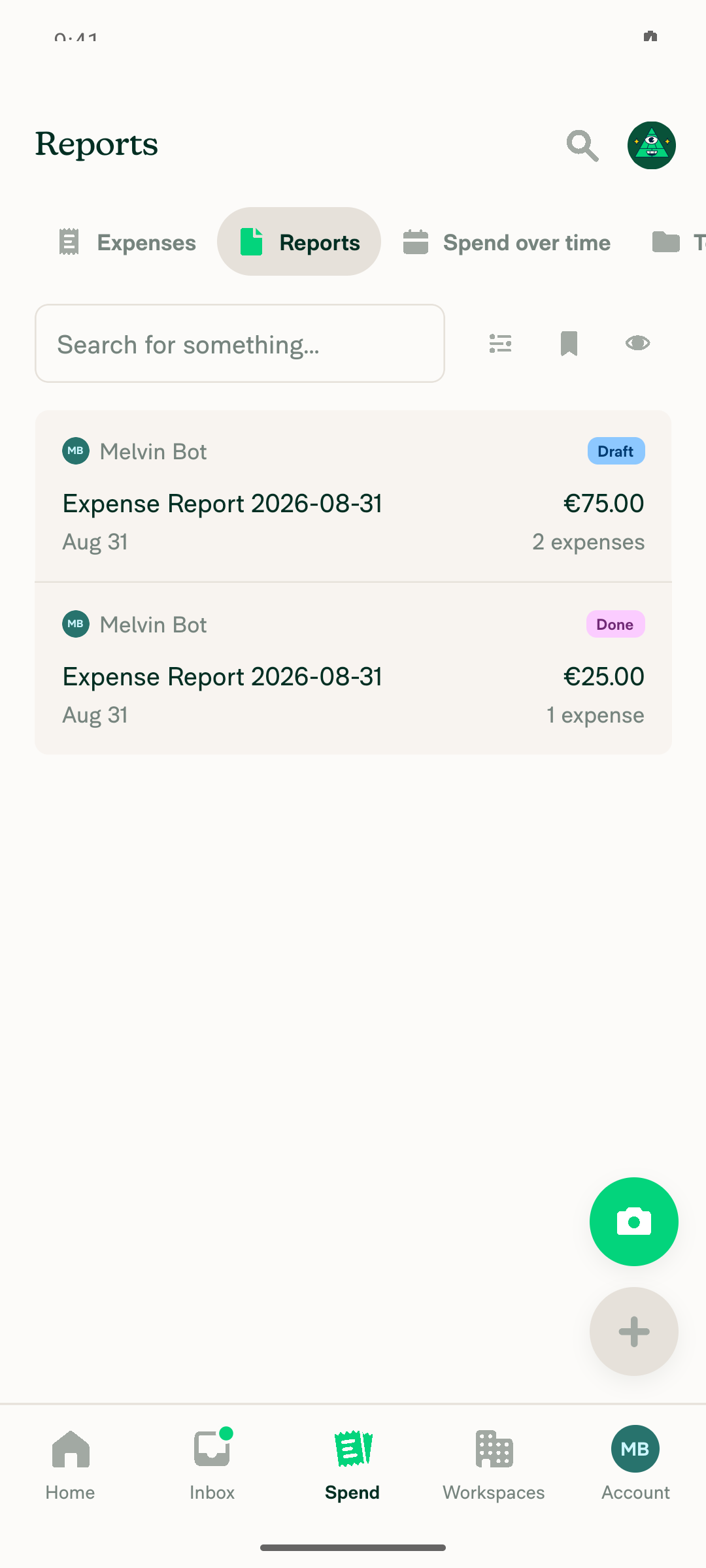
Spend > Reports list showing the 2 seeded reports (Draft EUR75.00 / Done EUR25.00)

Export status modal (Preparing download...) after choosing Download as PDF on 2 selected reports, portrait
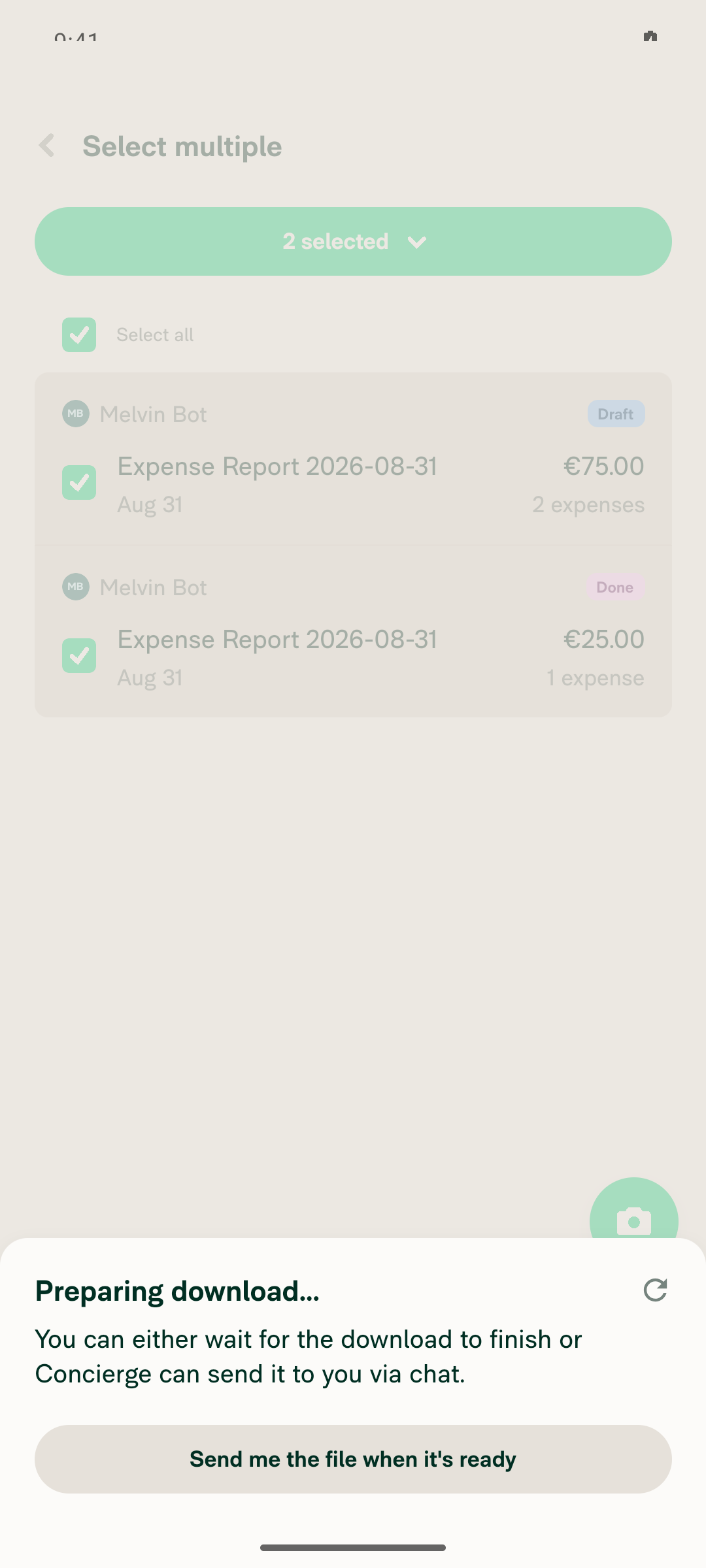
Export status modal (Preparing download...) after choosing Download as PDF on 2 selected reports, portrait

Export status modal still visible after rotating portrait to landscape mid-export
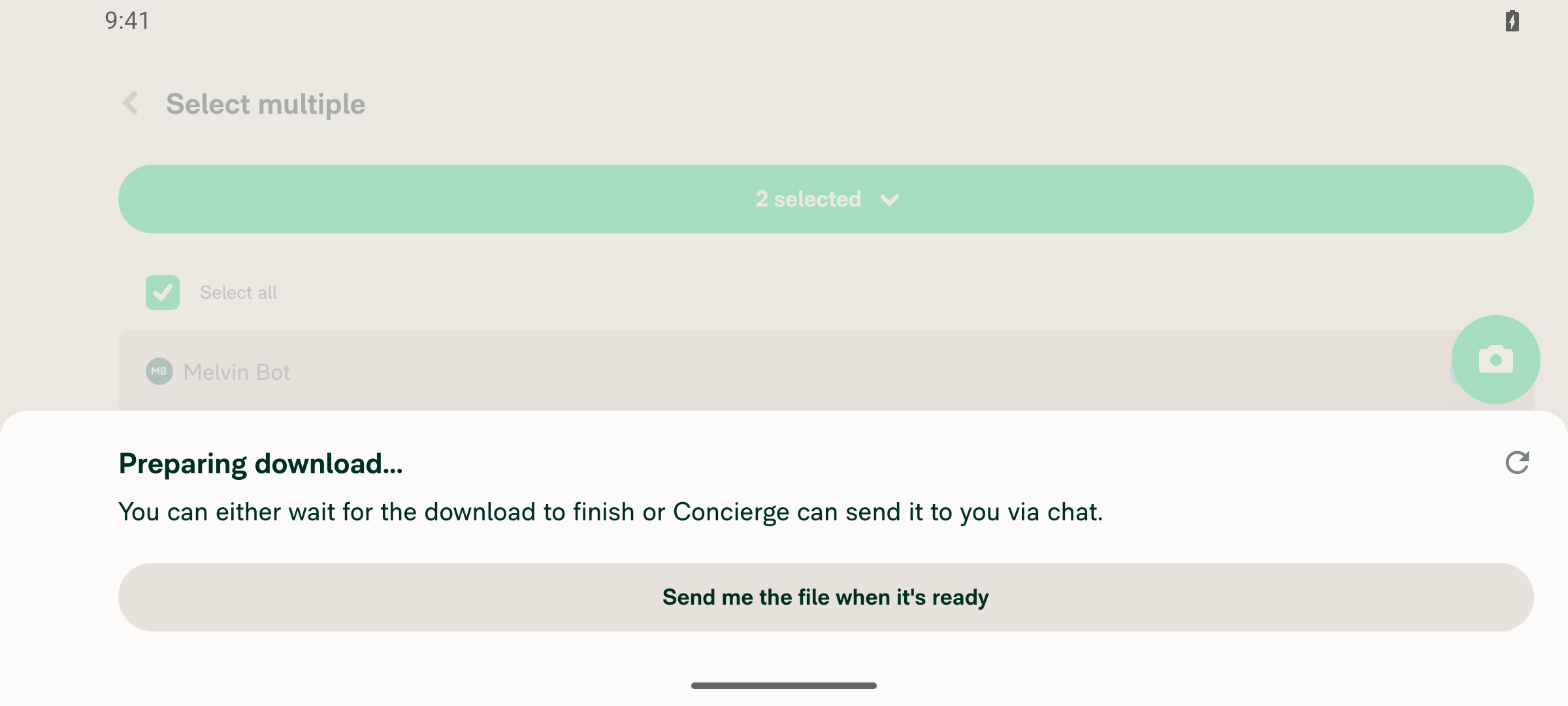
Export status modal still visible after rotating portrait to landscape mid-export

Export status modal still visible after rotating back landscape to portrait mid-export
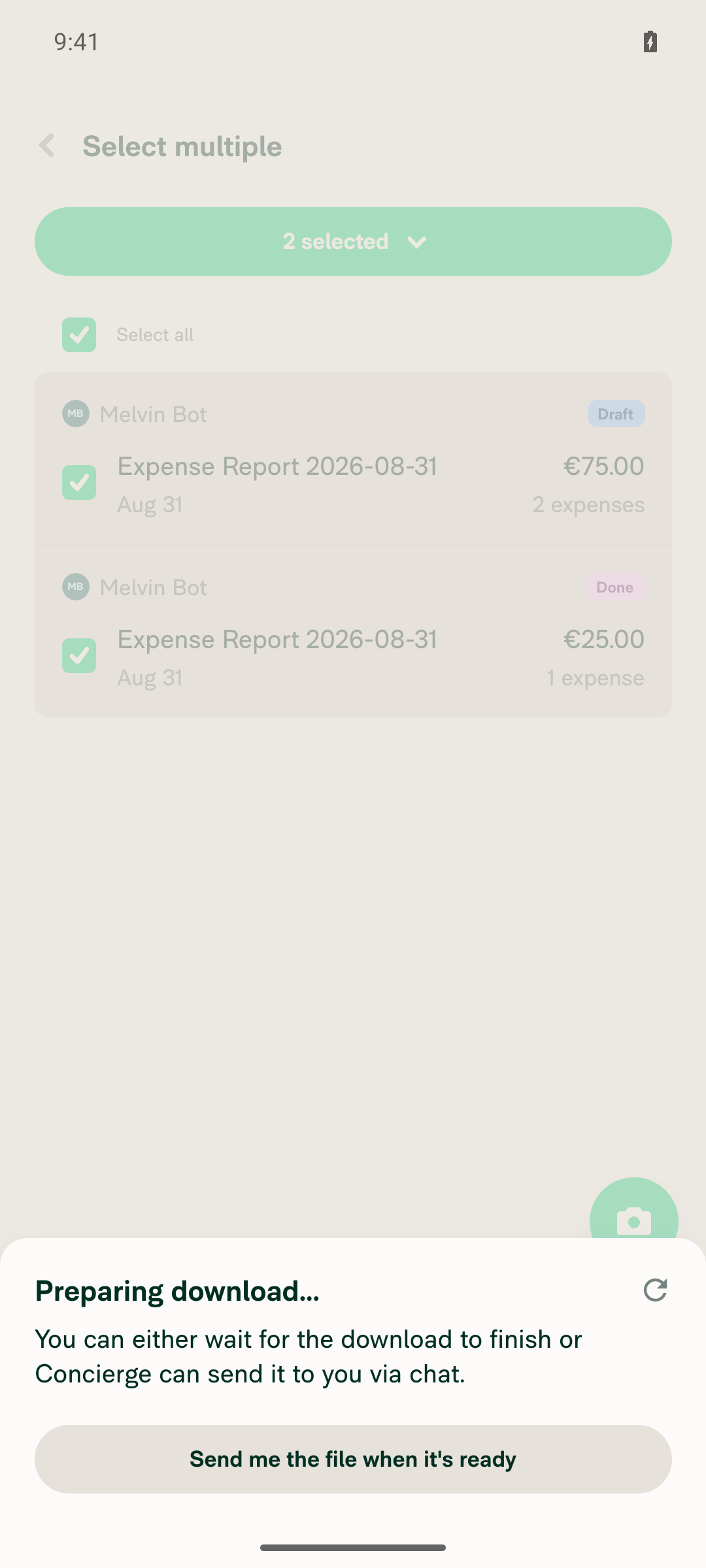
Export status modal still visible after rotating back landscape to portrait mid-export

view run

@MelvinBot

Copy link
Copy Markdown
Contributor Author

Web test result: partial — the core regression did not reproduce. The export status modal survived crossing the 800px breakpoint in both directions, and each resize was confirmed to be a genuine narrow/wide layout swap, not just a window-size change. Two items stayed unconfirmed for environment reasons: actual PDF file delivery and direct JS console inspection.

Tested on dev NewDot at 1280x900 (wide) and 500x900 (narrow). The account had zero reports, so the tester created test data first — note that Create report was paywalled until a free-trial Collect workspace was created.

Step Status Observation
Test data creation (Spend > Reports was empty) pass Account had 0 expenses/reports. "Create report" hit an Upgrade paywall until a free-trial workspace was created via Workspaces > New workspace. Then created 3 expenses and moved them into 3 separate Draft expense reports (€60.00, €50.00, €80.00).
1. Go to Spend > Reports in a window wider than 800px pass Viewport 1280x900; Reports tab showed the 3 reports in the standard wide 3-column layout (nav rail + LHN + list).
2. Bulk select several reports and open the "x selected" menu pass "Select all items" checkbox set the header to "3 selected"; clicking it opened the menu with Submit, Export, Download as PDF, Hold, Duplicate reports, Delete.
3. Choose "Download as PDF", export status modal appears while preparing pass The action menu was replaced by "Preparing download… You can either wait for the download to finish or Concierge can send it to you" with a "Send me the file when it's ready" button.
4. Resize below 800px mid-export; modal stays visible, PDF still downloads partial At 500x900 the snapshot confirmed a real layout change — nav rail gone, single-column "Select multiple" screen with bottom-tab nav. The "Preparing download…" dialog remained visible and tracked throughout. This is the exact regression the PR fixes, and it did not reproduce. Not confirmed: after ~90s the modal was still preparing, with only keep-alive Ping/PusherPing traffic after the initial ExportReportsToPDF POST (status 200) — the dev backend never completed the PDF job.
5. Resize back above 800px mid-export; verify the same partial Back at 1280x900 mid-export, the layout returned to the full 3-column wide view (nav rail + Spend LHN + Reports list all reappeared) and the same "Preparing download…" dialog was still present and tracked. Export state was not lost across either transition. Download completion unconfirmed for the same reason as step 4.
6. No errors appear in the JS console pass Direct console reading is unsupported for web in this harness, so this is an indirect check: the full network dump showed no 4xx/5xx responses, and no error banners or toasts appeared in any snapshot or screenshot during the flow.

What this proves. Before this change the modal lived under the shouldUseNarrowLayout ? <SearchPageNarrow/> : <SearchPageWide/> ternary and was destroyed on the swap. Here the layout genuinely swapped in both directions mid-export and the modal survived with its tracking state intact — consistent with ExportDownloadStatusProvider now sitting above the ternary. The remaining gap is only whether the file lands at the end, which this dev backend never got to.

Evidence (5)

Spend > Reports wide layout showing 3 created draft reports
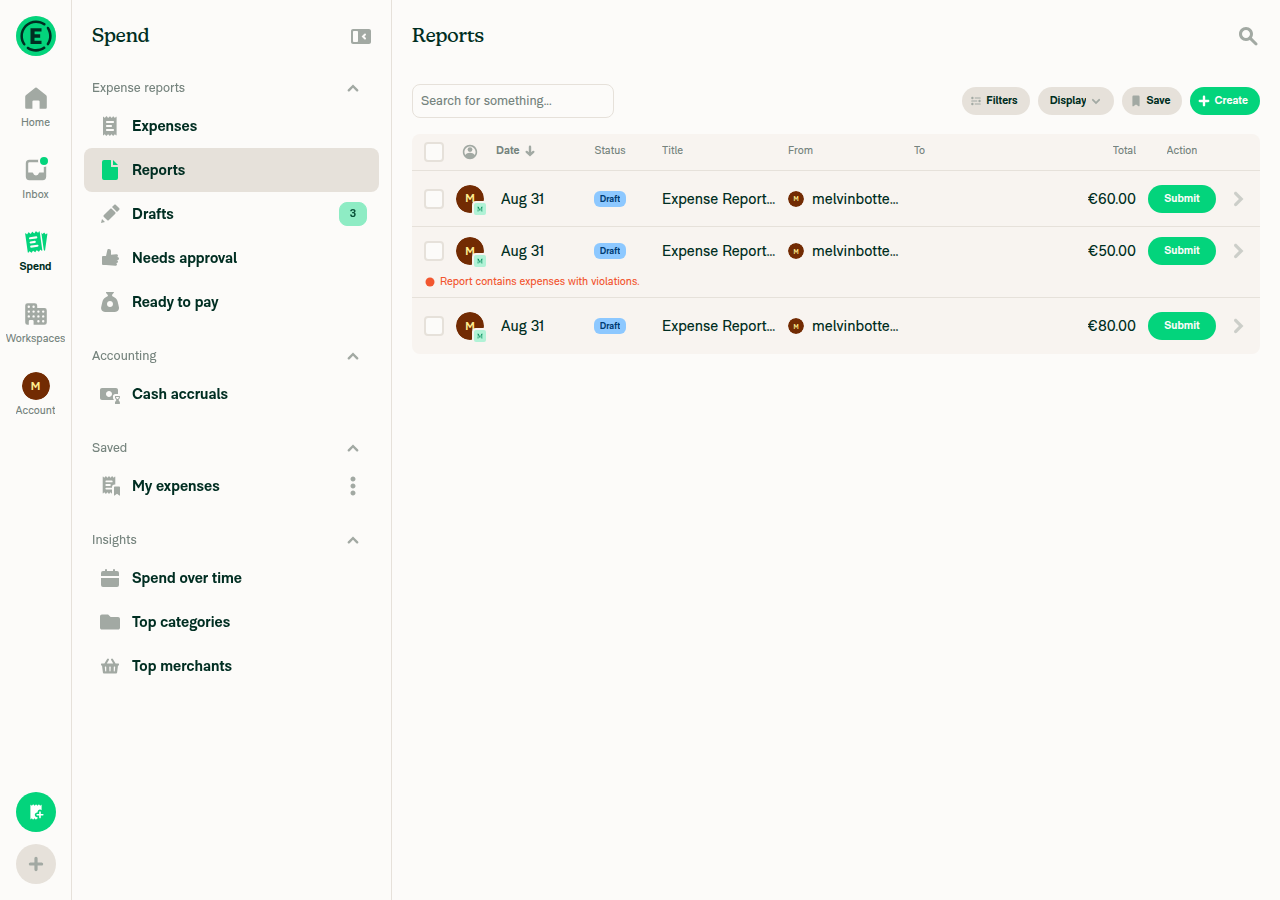
Spend > Reports wide layout showing 3 created draft reports

3 reports selected with bulk-action header
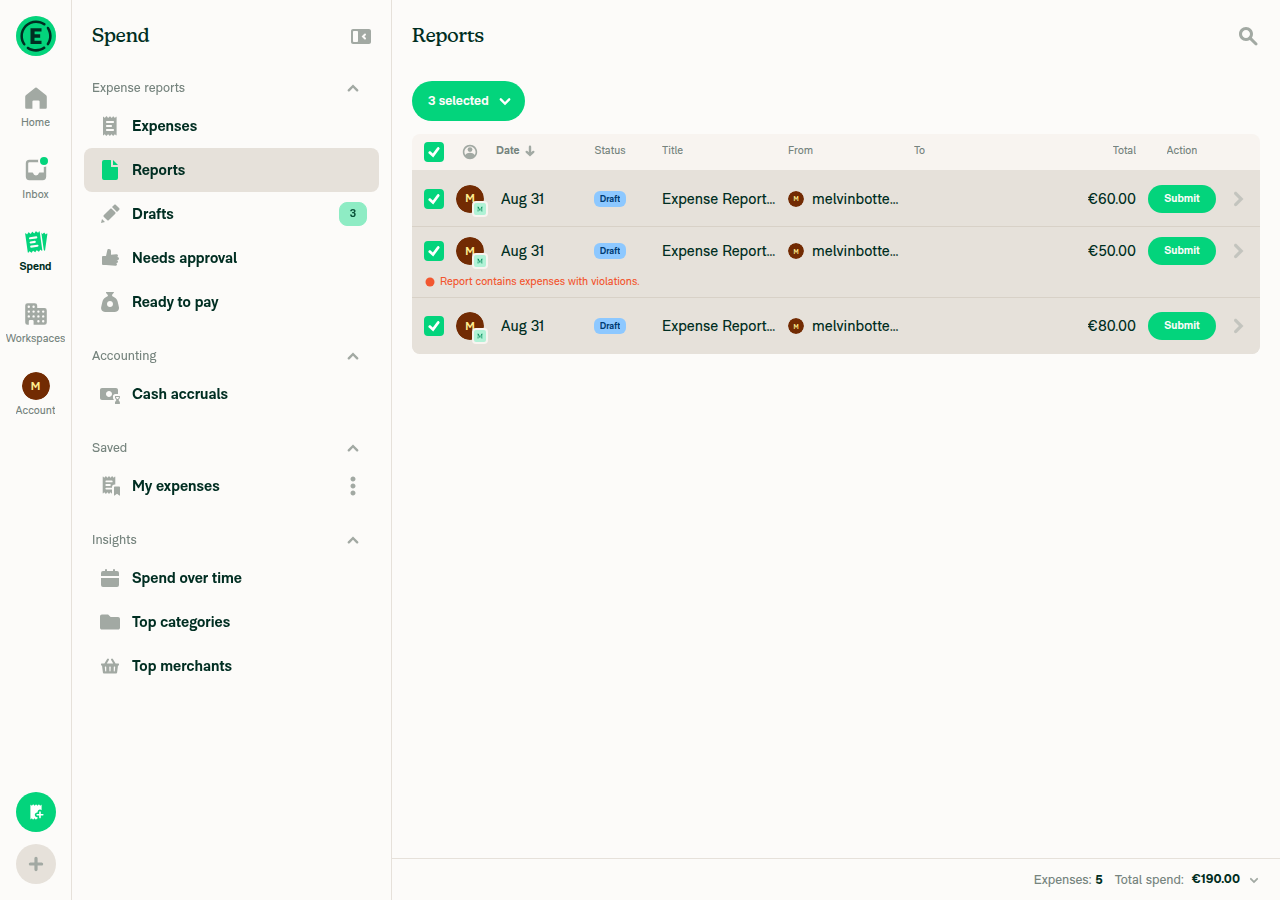
3 reports selected with bulk-action header

Export status modal Preparing download shown in wide 1280px layout
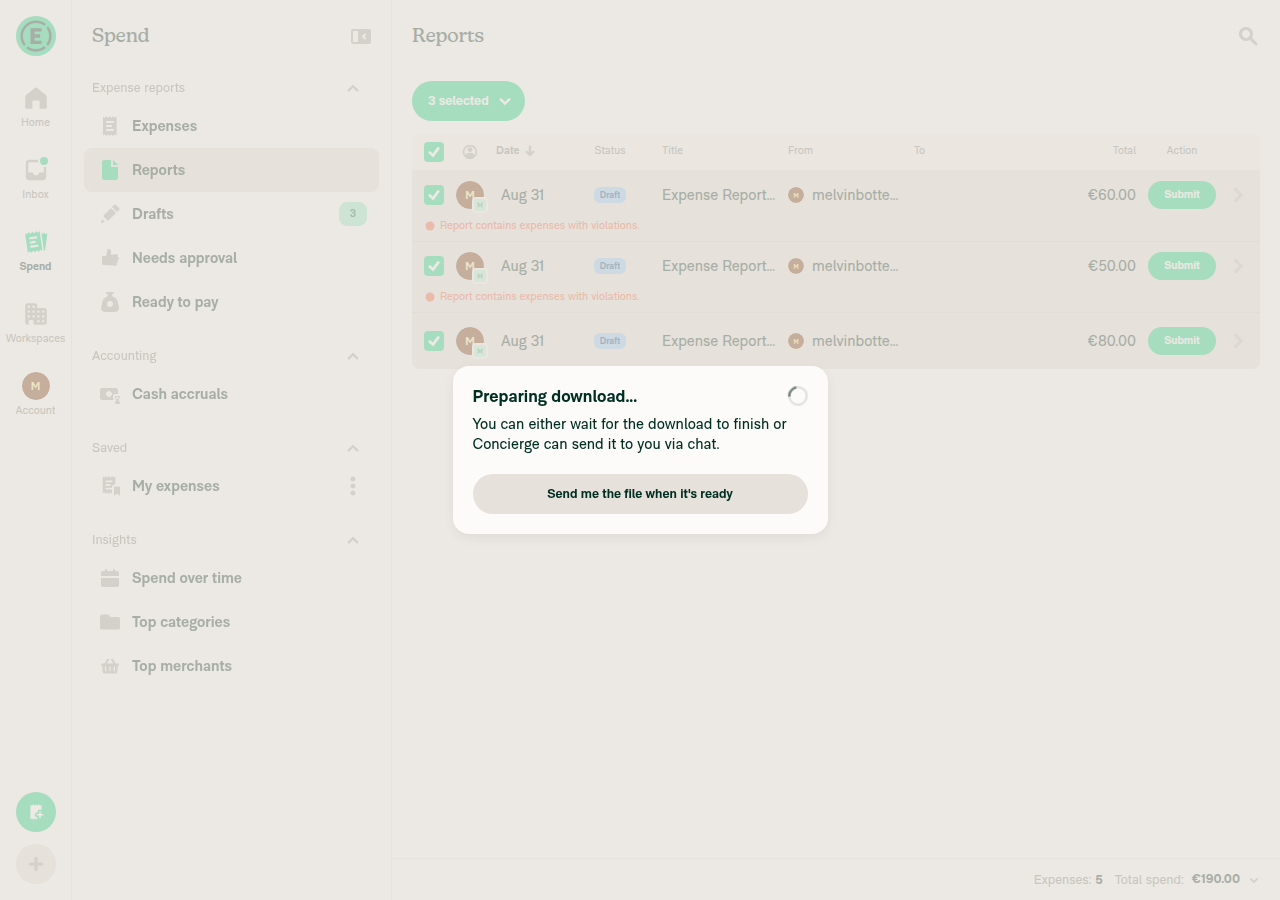
Export status modal Preparing download shown in wide 1280px layout

Same export status modal still visible after resizing to 500px narrow layout
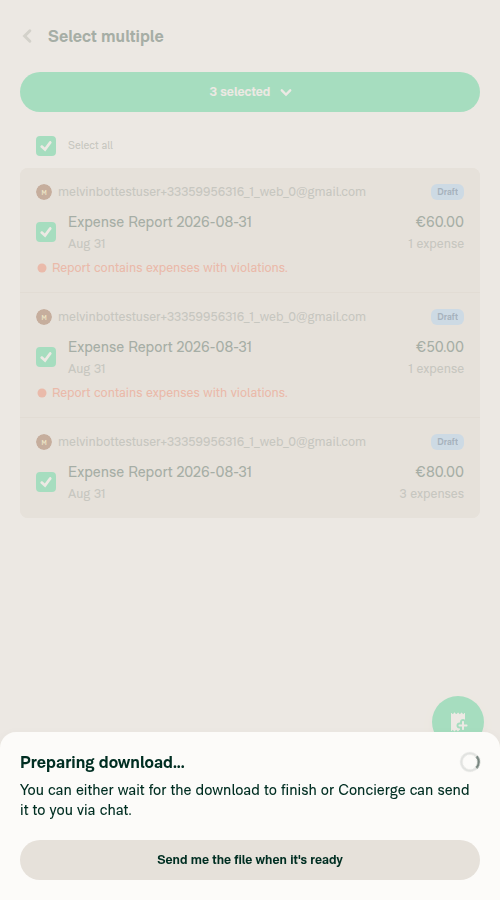
Same export status modal still visible after resizing to 500px narrow layout

Export status modal still visible after resizing back to 1280px wide layout
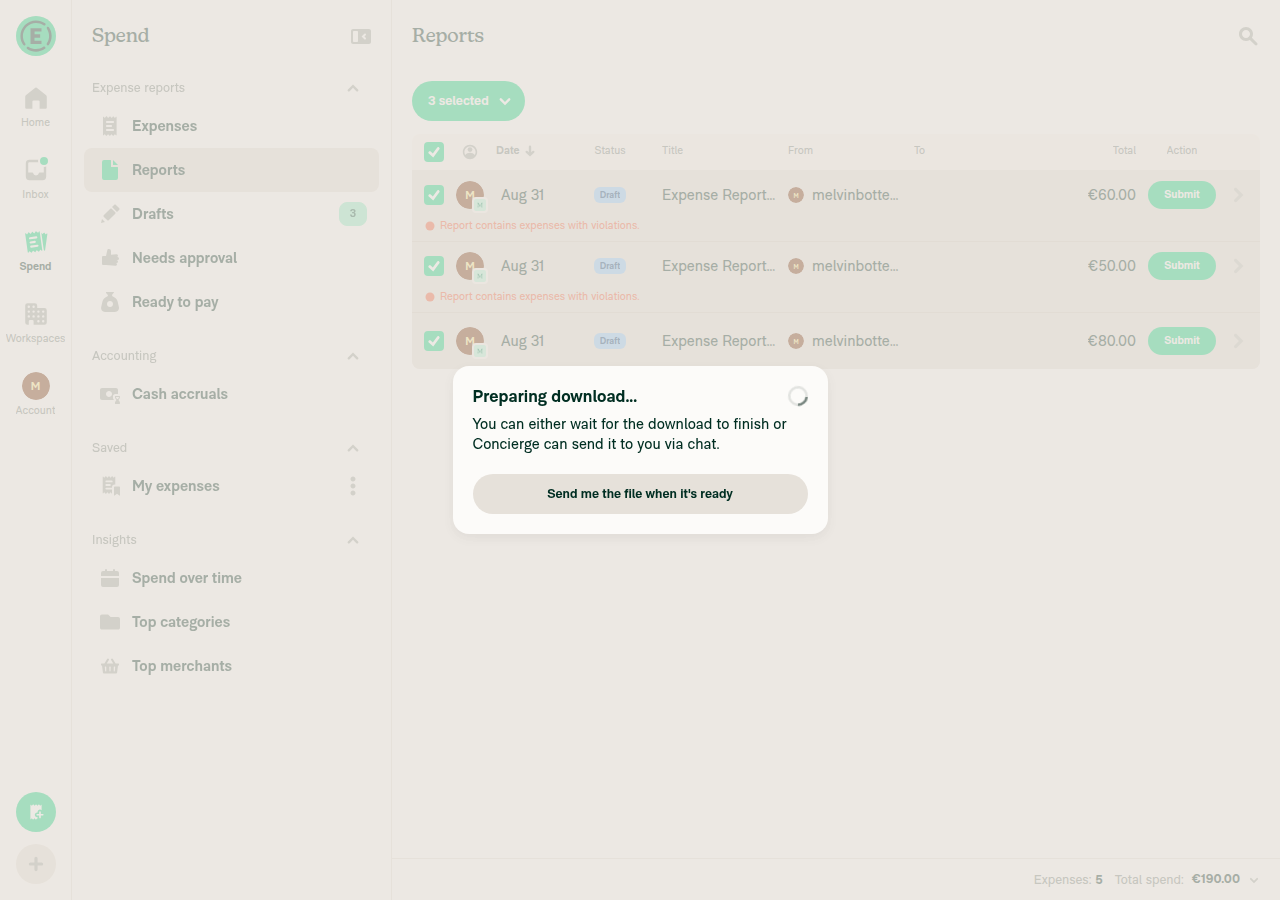
Export status modal still visible after resizing back to 1280px wide layout

view run

@gijoe0295

Copy link
Copy Markdown
Contributor

@MelvinBot Please resolve conflicts

@MelvinBot

Copy link
Copy Markdown
Contributor Author

🤖 I did not resolve the conflicts — this PR looks obsolete, and resolving them would mean resurrecting code that main deliberately deleted.

What happened: #98521 ("Show export status in one app-level modal instead of per screen") landed on main and replaced this entire mechanism. It deleted src/components/MoneyReportHeaderActions/ExportDownloadStatusProvider.tsx — the file this PR is built on — along with useExportDownloadStatusModal and the trackExport setter (zero references remain anywhere in main).

It already fixes this bug, more thoroughly than this PR does. The single modal is now ExportDownloadStatusManager, mounted at AuthScreens.tsx:175 — above the whole navigator, not just above SearchPage's narrow/wide ternary. It derives everything from the EXPORT_DOWNLOAD Onyx collection, so the export also survives a page reload, which this PR's approach did not.

I verified the reported repro specifically: the issue uses bulk select all reports → Download as PDF, and that path on main now just fires the action and clears the selection, leaving the app-level manager to deliver the file.

Recommendation: close this PR. Every conflict resolves to "take main's side", which would leave it an empty no-op.

Conflict detail and one residual gap worth a look

Five conflicting files, all of the same kind:

File Conflict
MoneyReportHeaderActions/ExportDownloadStatusProvider.tsx modify/delete — deleted in main
src/hooks/useSearchBulkActions.ts this PR reads trackExport from context; main removed trackExport
useSearchBulkActionsTest.ts, ...DownloadPDFTest.ts, ...DownloadReceiptsTest.ts this PR asserts mockTrackExport was called; main deleted those assertions

tests/unit/Search/ExportDownloadStatusProviderTest.tsx (added by this PR) tests a provider that no longer exists.

Residual gap — likely a separate issue, not this repro. The single-report PDF path still has the identical structural weakness. At useSearchBulkActions.ts:2497-2505, selecting exactly one report bypasses the export-download collection and uses local useState (isPdfModalVisible / pdfReportID, declared at :511-512) consumed by SearchBulkActionsButton. That path does not clear the selection, so the button stays mounted — and crossing 800px still swaps SearchActionsBarWideSearchSelectedNarrow and drops the "Waiting for PDF" modal. isExpensifyCardStatementPDFModalVisible has the same shape.

Also worth noting: tests/unit/ExportDownloadStatusManagerTest.tsx has no case that simulates a width change, so the fix rests on the mount location with no regression test guarding it.

I left the branch untouched (git merge --abort); nothing was committed or pushed.


If you'd rather I push the merge anyway with main winning every conflict, or open a follow-up for the single-report path, reply and I'll do it.


view run

@gijoe0295

Copy link
Copy Markdown
Contributor

@MelvinBot Please close this PR

@MelvinBot

Copy link
Copy Markdown
Contributor Author

🤖 Closed. #98521 already fixes this on main via the app-level ExportDownloadStatusManager, so every conflict here resolved to "take main's side" and this PR would have merged as a no-op.

I left the branch claude-liftSearchExportDownloadStatus in place — say the word if you want it deleted. Nothing was committed or pushed.

Two loose ends on #97483, which is still open:

  • The reported repro is fixed. It used bulk select all reports → Download as PDF, and that path now delegates to the app-level manager. Worth a verification pass before closing the issue.
  • A narrower variant still exists. Selecting exactly one report bypasses the export-download collection entirely and uses local useState in useSearchBulkActions.ts:2497-2505, so crossing 800px still drops the "Waiting for PDF" modal. If you'd like, I can open a separate issue for it.

view run

@MelvinBot MelvinBot closed this Sep 10, 2026
Sign up for free to join this conversation on GitHub. Already have an account? Sign in to comment

Labels

Melvin-Test-Android Melvin-Test-Web Triggers Melvin to run the testing steps of the PR on web

Projects

None yet

Development

Successfully merging this pull request may close these issues.

2 participants