Add Send to my employer option to expense More menu - #99247
Conversation


|
@ikevin127 Please copy/paste the Reviewer Checklist from here into a new comment on this PR and complete it. If you have the K2 extension, you can simply click: [this button] |

This comment has been minimized.
This comment has been minimized.

Codecov Report❌ Looks like you've decreased code coverage for some files. Please write tests to increase, or at least maintain, the existing level of code coverage. See our documentation here for how to interpret this table.
|
![chatgpt-codex-connector[bot]](https://avatars.githubusercontent.com/in/1144995?s=60&v=4)

There was a problem hiding this comment.
💡 Codex Review
Here are some automated review suggestions for this pull request.
Reviewed commit: e4d68e3c6a
ℹ️ About Codex in GitHub
Codex has been enabled to automatically review pull requests in this repo. Reviews are triggered when you
- Open a pull request for review
- Mark a draft as ready
- Comment "@codex review".
If Codex has suggestions, it will comment; otherwise it will react with 👍.
When you sign up for Codex through ChatGPT, Codex can also answer questions or update the PR, like "@codex address that feedback".
| firstPolicyID: filteredPoliciesInfo?.firstPolicyID, | ||
| ...sendTrackedExpenseParams, | ||
| submitDestination: CONST.IOU.SUBMIT_DESTINATION.EMPLOYER, | ||
| defaultWorkspaceName: generateDefaultWorkspaceName(currentUserLogin ?? '', lastWorkspaceNumber, translate, currentUserDisplayName), |
There was a problem hiding this comment.

When the session is available but the current user's PERSONAL_DETAILS_LIST entry has not loaded, CurrentUserPersonalDetailsProvider still supplies email while login is undefined. In that state this call generates an empty workspace name, and sendTrackedExpenseParams also passes an empty currentUserEmail and a policy count computed from the missing login; selecting this option can therefore create a duplicate workspace with malformed optimistic owner/member data instead of using an existing workspace. Read email from useCurrentUserPersonalDetails() and use it as the fallback for the count and employer-flow parameters, as the Inbox and report-details implementations do.
Useful? React with 👍 / 👎.
There was a problem hiding this comment.
🔴 Confirmed, this needs fixing before merge!
The premise holds: CurrentUserPersonalDetailsProvider.tsx:23-31 sources email from SESSION but spreads login from PERSONAL_DETAILS_LIST, so there is a real window where the user is signed in, email is set, and login is still undefined.
In that window generateDefaultWorkspaceName(currentUserLogin ?? '', ...) hits the emailParts?.length !== 2 guard at Policy.ts:2450 and returns '', and currentUserEmail: currentUserLogin ?? '' flows through createDraftWorkspace into an optimistic policy with name: '', owner: '', approver: '' and employeeList: {'': {...}} (Policy.ts:3306+). That is a malformed workspace that gets sent to the server, not just a cosmetic blank.
The reason this belongs in this PR rather than a follow-up, even though two of the three currentUserLogin uses are pre-existing: ReportUtils.ts:12174 gates the workspace-creation branch on submitDestination === EMPLOYER, and Send to someone leaves it at the FRIEND default. Nothing in this component could reach createDraftWorkspaceAndNavigateToConfirmationScreen before. Adding Send to my employer is what makes the path reachable, so the latent inconsistency becomes a live bug in this diff.
generateDefaultWorkspaceName has ten call sites and MoneyRequestHeaderSecondaryActions.tsx:678 is the only one passing login. DynamicReportDetailsPage.tsx:245,568,575 runs this exact employer flow on email with the same four-argument shape, so switching to email just matches existing precedent.
One correction on the report: the policy-count part is overstated. getPolicyRole returns policy.role before it ever checks login (PolicyUtils.ts:632-634), so for policies where the server populated role the count is still correct. The count only collapses for policies falling through to the employeeList lookup. The malformed-data outcome is the unconditional one and is what makes this worth blocking on.
useLastWorkspaceNumber() needs no change, it already falls back to the session email internally.
There was a problem hiding this comment.
Confirmed and fixed in 02c61cc. The employer flow now reads email from useCurrentUserPersonalDetails() (which always comes from SESSION) instead of login, so generateDefaultWorkspaceName and currentUserEmail no longer collapse to '' during the window where login is still undefined. I also switched createFilteredPoliciesInfoSelector to email to match the Inbox/report-details precedent. Left useLastWorkspaceNumber() untouched since it already falls back to the session email internally. Thanks for the getPolicyRole correction on the count — agreed the malformed-workspace outcome was the real blocker.


| if ( | ||
| isTrackExpenseReportNew(transactionThreadReport, parentReport, reportAction) && | ||
| (!isSelfDMExpenseSplit || hasWorkspaceToSubmitTo) && | ||
| canUserPerformWriteActionReportUtils(parentReport, isChatReportArchived) | ||
| ) { | ||
| options.push(CONST.REPORT.TRANSACTION_SECONDARY_ACTIONS.SEND_TO_SOMEONE); | ||
| options.push(CONST.REPORT.TRANSACTION_SECONDARY_ACTIONS.SEND_TO_EMPLOYER); | ||
| } |
There was a problem hiding this comment.
🟠 src/libs/ReportSecondaryActionUtils.ts:1261-1268: SEND_TO_SOMEONE should not share the employer gate for splits
The PR claims parity with the Inbox Concierge flow. It does not have parity for one case, and the new comment now asserts the divergent behavior is intentional.
Here is what Inbox actually does (src/pages/inbox/report/actionContents/ChatActionableButtons.tsx:225-256):
const isSplitExpense = isSplitChildTransaction(trackExpenseTransaction);
const shouldShowSubmitButtons = !isSplitExpense || !!hasWorkspaceToSubmitTo;

{shouldShowSubmitButtons && (
    <>
        {!isSplitExpense && (
            <Button onPress={() => submit(CONST.IOU.SUBMIT_DESTINATION.FRIEND)}>…</Button>
        )}
        <Button onPress={() => submit(CONST.IOU.SUBMIT_DESTINATION.EMPLOYER)}>…</Button>
    </>
)}
Note the extra {!isSplitExpense && …} guard on the friend button. Inbox hides Submit to a friend for a split unconditionally, workspace or not.
The More menu pushes both under one gate:
if (
    isTrackExpenseReportNew(transactionThreadReport, parentReport, reportAction) &&
    (!isSelfDMExpenseSplit || hasWorkspaceToSubmitTo) &&
    canUserPerformWriteActionReportUtils(parentReport, isChatReportArchived)
) {
    options.push(CONST.REPORT.TRANSACTION_SECONDARY_ACTIONS.SEND_TO_SOMEONE);
    options.push(CONST.REPORT.TRANSACTION_SECONDARY_ACTIONS.SEND_TO_EMPLOYER);
}| case | Inbox friend | Inbox employer | More menu SEND_TO_SOMEONE |
More menu SEND_TO_EMPLOYER |
|---|---|---|---|---|
| not a split | shown | shown | shown | shown |
| split, has workspace | hidden | shown | shown | shown |
| split, no workspace | hidden | hidden | hidden | hidden |
The employer column matches exactly, which is the part this PR added, so the new code is right. The mismatch is on SEND_TO_SOMEONE, and it is pre-existing from #97883 rather than introduced here.
Two reasons I am still raising it on this PR:
- The comment rewrite actively codifies it as correct: "for a split we still surface both rows when the user has a workspace (the participant selector routes the split into it)". That is a new claim, and
ChatActionableButtonssays the opposite for the friend destination. - The original gate reads as the employer rule applied to the friend row.
"A self-DM split can only go to a workspace, so hide it for a split unless the user has one"is the reasoning for a workspace destination. Now thatSEND_TO_EMPLOYERexists to cover the split case properly, the friend row no longer needs to borrow it.
Suggested split of the two conditions:
const {isExpenseSplit: isSelfDMExpenseSplit} = getOriginalTransactionWithSplitInfo(reportTransaction, originalTransaction);
const canConvertFromTrack = isTrackExpenseReportNew(transactionThreadReport, parentReport, reportAction) && canUserPerformWriteActionReportUtils(parentReport, isChatReportArchived);

if (canConvertFromTrack) {
    // A self-DM split has no personal destination, so it can never go to a friend (matches ChatActionableButtons).
    if (!isSelfDMExpenseSplit) {
        options.push(CONST.REPORT.TRANSACTION_SECONDARY_ACTIONS.SEND_TO_SOMEONE);
    }
    // A split can still go to a workspace, but only one that already exists: the create-a-workspace
    // fallback in createDraftTransactionAndNavigateToParticipantSelector is not wired for splits.
    if (!isSelfDMExpenseSplit || hasWorkspaceToSubmitTo) {
        options.push(CONST.REPORT.TRANSACTION_SECONDARY_ACTIONS.SEND_TO_EMPLOYER);
    }
}
Bug this causes today: a user with a self-DM split expense and at least one workspace opens More and sees Send to someone. Tapping it runs createDraftTransactionAndNavigateToParticipantSelector with submitDestination defaulting to FRIEND, which skips the employer branch at ReportUtils.ts:12174 and opens the people picker.
Inbox deliberately never offers that path for a split. Either the More menu is wrong or Inbox is, and right now they disagree.
If the issue / PR owner decides the current behavior is deliberate, please say so in the comment with the reason rather than the participant selector routes the split into it phrasing, because that is the claim I could not confirm anywhere in the flow.
There was a problem hiding this comment.
Fixed in 02c61cc. You're right — I could not confirm the "participant selector routes the split into it" claim either, and the FRIEND default just opens the people picker. Split the gate into two conditions: SEND_TO_SOMEONE now pushes only when !isSelfDMExpenseSplit (friend hidden for all splits, matching ChatActionableButtons), while SEND_TO_EMPLOYER keeps !isSelfDMExpenseSplit || hasWorkspaceToSubmitTo. Rewrote the comment to state the real reasons and dropped the incorrect claim.
| const isTrackIntentUser = isTrackOnboardingChoice(introSelected?.choice); | ||
|
|
||
| const activePolicy = useActivePolicy(); | ||
| const lastWorkspaceNumber = useLastWorkspaceNumber(); |
There was a problem hiding this comment.
🟠 src/components/MoneyRequestHeaderSecondaryActions.tsx:191: useLastWorkspaceNumber() puts a whole-POLICY-collection regex scan on every expense header render
This component is not lazy. MoneyRequestHeaderActions.tsx:50 renders it inline in the header for every expense, not on menu open. So the hook runs whenever an expense header renders.
What the hook costs (src/hooks/useLastWorkspaceNumber.ts):
function useLastWorkspaceNumber(email?: string) {
    const [sessionEmail] = useOnyx(ONYXKEYS.SESSION, {selector: emailSelector});
    const lastWorkspaceNumberSelectorWithEmail = (policies: OnyxCollection<Policy>) => lastWorkspaceNumberSelector(policies, email ?? sessionEmail ?? '');
    const [lastWorkspaceNumber] = useOnyx(ONYXKEYS.COLLECTION.POLICY, {selector: lastWorkspaceNumberSelectorWithEmail});
    return lastWorkspaceNumber;
}
and what the selector does (src/selectors/Policy.ts:330-348):
const workspaceRegex = isSMSDomain ? new RegExp(…) : new RegExp(`^(?=.*${escapedName})(?:.*(?:${WORKSPACE_TRANSLATIONS})\\s*(\\d+)?)`, 'i');
const workspaceNumbers = Object.values(policies ?? {})
    .map((policy) => workspaceRegex.exec(policy?.name ?? ''))
    …
So this constructs a RegExp and executes it against every policy name in the account. Two things make it worse here:
-
lastWorkspaceNumberSelectorWithEmailis an inline arrow recreated on every render, so the selector identity is never stable. This same file already shows the right pattern eleven lines below:const filteredPoliciesInfoSelector = useMemo(() => createFilteredPoliciesInfoSelector(currentUserLogin), [currentUserLogin]); const [filteredPoliciesInfo] = useOnyx(ONYXKEYS.COLLECTION.POLICY, {selector: filteredPoliciesInfoSelector});
-
This is now the third
COLLECTION.POLICYsubscription in one component, alongsideuseActivePolicy()andfilteredPoliciesInfo.
The value is consumed in exactly one place, and only matters when the user has zero workspaces:
defaultWorkspaceName: generateDefaultWorkspaceName(currentUserLogin ?? '', lastWorkspaceNumber, translate, currentUserDisplayName),ReportUtils.ts:12176 only reads defaultWorkspaceName inside if (filteredPoliciesCount === 0). So for every user who already has a workspace, this whole scan is computed on every header render and then thrown away.
ChatActionableButtons calls the hook the same way, but that component only mounts for a track-expense whisper. The expense header is a much hotter surface, and this is the area the INP work has been focused on.
Minimum fix, memoize the selector inside the hook so at least it only re-runs on POLICY changes rather than on every render:
function useLastWorkspaceNumber(email?: string) {
    const [sessionEmail] = useOnyx(ONYXKEYS.SESSION, {selector: emailSelector});
    const resolvedEmail = email ?? sessionEmail ?? '';
    const selector = useMemo(() => (policies: OnyxCollection<Policy>) => lastWorkspaceNumberSelector(policies, resolvedEmail), [resolvedEmail]);
    const [lastWorkspaceNumber] = useOnyx(ONYXKEYS.COLLECTION.POLICY, {selector});
    return lastWorkspaceNumber;
}
Better, skip the subscription entirely when it cannot be used, since you already have the count in this component:
const hasNoAccessibleWorkspace = (filteredPoliciesInfo?.filteredPoliciesCount ?? 0) === 0;
const lastWorkspaceNumber = useLastWorkspaceNumber(hasNoAccessibleWorkspace ? undefined : SKIP);
That needs a hook change, so the memoization fix alone is a reasonable scope for this PR with a follow-up for the rest.
Bug this causes: no functional bug, but on a high-traffic account with many workspaces every expense header render pays a regex pass over the full policy collection for a value most users never consume.
The PR checklist item "I tested this PR with a High Traffic account against the staging or production API" is unchecked, and this is exactly what it would surface.
There was a problem hiding this comment.
Fixed in 02c61cc with the memoization approach — the selector is now useMemo'd on resolvedEmail inside useLastWorkspaceNumber, so the POLICY-collection regex scan only re-runs when the email changes rather than on every render of every consumer (including the expense header). Kept the "skip the subscription entirely when the user already has a workspace" variant out of scope since it needs a hook API change — happy to do that as a follow-up.
| it('includes SEND_TO_EMPLOYER for an unreported self-tracked expense that is not a split', () => { | ||
| expect(getSendToSomeoneResult(false, false)).toContain(CONST.REPORT.TRANSACTION_SECONDARY_ACTIONS.SEND_TO_EMPLOYER); | ||
| }); | ||
|
|
||
| it('hides SEND_TO_EMPLOYER for a self-DM split expense when the user has no workspace to submit to', () => { | ||
| expect(getSendToSomeoneResult(true, false)).not.toContain(CONST.REPORT.TRANSACTION_SECONDARY_ACTIONS.SEND_TO_EMPLOYER); | ||
| }); | ||
|
|
||
| it('includes SEND_TO_EMPLOYER for a self-DM split expense when the user has a workspace to submit to', () => { | ||
| expect(getSendToSomeoneResult(true, true)).toContain(CONST.REPORT.TRANSACTION_SECONDARY_ACTIONS.SEND_TO_EMPLOYER); | ||
| }); | ||
|
|
||
| it('hides SEND_TO_EMPLOYER on an archived self-DM (no write access)', () => { | ||
| expect(getSendToSomeoneResult(false, false, true)).not.toContain(CONST.REPORT.TRANSACTION_SECONDARY_ACTIONS.SEND_TO_EMPLOYER); | ||
| }); |
There was a problem hiding this comment.
🟡 tests/unit/ReportSecondaryActionUtilsTest.ts:5002-5016: The new tests cannot fail on the thing most likely to be wrong
The four new tests are exact mirrors of the four existing SEND_TO_SOMEONE tests, asserted through the same helper. That is expected given both options are pushed under one condition, but it means the suite asserts the shared gate rather than checking the two options can diverge. If the fix in the first finding lands, these tests keep passing while the friend row silently keeps appearing for splits.
The test that would earn its place is the negative one:
it('hides SEND_TO_SOMEONE for a self-DM split expense even when the user has a workspace, since a split has no personal destination', () => {
    expect(getSendToSomeoneResult(true, true)).not.toContain(CONST.REPORT.TRANSACTION_SECONDARY_ACTIONS.SEND_TO_SOMEONE);
});
Also, getSendToSomeoneResult (line 4962) is now driving employer assertions too, and its inline comment still reads "mirror that so the write-action guard on SEND_TO_SOMEONE is exercised".
Worth renaming to getSelfDMConvertActionsResult or similar and updating the comment, otherwise the next person reading getSendToSomeoneResult(true, true)).toContain(SEND_TO_EMPLOYER) has to go read the helper to understand what is being set up.
There was a problem hiding this comment.
Fixed in 02c61cc. Renamed the helper to getSelfDMConvertActionsResult and updated its comment (it now drives both options, so the SEND_TO_SOMEONE-specific wording was misleading). Replaced the split+workspace "includes SEND_TO_SOMEONE" case with the negative assertion you suggested: hides SEND_TO_SOMEONE for a self-DM split expense even when the user has a workspace, since a split has no personal destination. That test now fails if the friend row ever starts sharing the employer gate again.
| expect(getSendToSomeoneResult(false, false, true)).not.toContain(CONST.REPORT.TRANSACTION_SECONDARY_ACTIONS.SEND_TO_EMPLOYER); | ||
| }); | ||
| }); | ||
|
|
There was a problem hiding this comment.
🟡 No coverage for anything in MoneyRequestHeaderSecondaryActions.tsx or PopoverMenuSections.ts
All four new tests sit on the gating util. Untested:
- that
SEND_TO_EMPLOYER'sonSelectedpassessubmitDestination: EMPLOYERand a non-emptydefaultWorkspaceName - that
SEND_TO_SOMEONE'sonSelectedstill passes neither, so it keeps defaulting toFRIEND - that both rows land in the top section of
TRANSACTION_MORE_MENU_SECTIONSwith the divider beneath - that the delegate guard fires on the new row
The params object is the part a future refactor is most likely to break, since it is now shared between two callers and spread with an override. A small assertion on the spread would be cheap:
it('passes the employer destination and a generated workspace name, and leaves Send to someone on the default friend destination', () => {
    // assert createDraftTransactionAndNavigateToParticipantSelector was called with
    // {submitDestination: 'employer', defaultWorkspaceName: expect.any(String)} for the employer row,
    // and with submitDestination undefined for the friend row
});
Bug this prevents: if someone later reorders the spread to {submitDestination: EMPLOYER, ...sendTrackedExpenseParams}, the override is silently dropped and Send to my employer quietly behaves as Send to someone. Nothing in the current suite catches that.
There was a problem hiding this comment.
Partially addressed in 02c61cc, with a follow-up proposed for the rest.
Added a TRANSACTION_MORE_MENU_SECTIONS test in PopoverMenuSectionsTest.ts asserting both rows sort into the top section together, in order, with no divider between them and a divider before the next section.
For the onSelected params + delegate-guard assertions: there is no existing render harness for MoneyRequestHeaderSecondaryActions, and standing one up (mocking ~20 Onyx keys + navigation + opening the dropdown) is a disproportionate lift for this PR. I'd like to handle that as a follow-up so the params-spread regression you flagged gets a real render test. Does that work for you? If so I'll open a follow-up issue and link it here.
| enableWallet: 'Enable wallet', | ||
| hold: 'Hold', | ||
| sendToSomeone: 'Send to someone', | ||
| sendToEmployer: 'Send to my employer', |
There was a problem hiding this comment.
🟡 Copy differs from the Inbox flow it mirrors, and the Design label is unchecked
en.ts:9741-9742 already has the Inbox strings:
actionableMentionTrackExpense: {
    submitToFriend: 'Submit to a friend',
    submitToEmployer: 'Submit to my employer',
This PR adds iou.sendToEmployer: 'Send to my employer'. The PR body itself calls the Inbox action "Submit to my employer", so the same action is Submit in one surface and Send in another.
Send is internally consistent with Send to someone in this menu, so this is probably deliberate since it matches sendToSomeone: 'Send to someone', but it is new user-facing copy and the checklist item "I added Design label and/or tagged @Expensify/design" is unchecked. Worth getting an explicit ack rather than assuming.
The ten translations themselves all read correctly and are placed in the right iou block in each file. No missing locale, no punctuation issues, no placeholder left behind ✅
There was a problem hiding this comment.
Changed to Submit to my employer in 02c61cc. Renamed the key iou.sendToEmployer -> iou.submitToEmployer and reused each locale's already-established actionableMentionTrackExpense.submitToEmployer copy, so the menu now matches the Inbox wording exactly rather than introducing new copy. (Shawn confirmed this direction over keeping "Send to my employer".)

|
@shawnborton Dropped (5) code review comments that should be addressed before moving forward to manual testing - including this comment from Codex which is a real blocker 🔴 |

|
Thanks @ikevin127 ! |
…loyer gate, memoize workspace-number selector, expand tests, use Submit copy
🦜 Polyglot Parrot! 🦜Squawk! Looks like you added some shiny new English strings. Allow me to parrot them back to you in other tongues: View the translation diffdiff --git a/src/languages/de.ts b/src/languages/de.ts
index cc90feff..940cacff 100644
--- a/src/languages/de.ts
+++ b/src/languages/de.ts
@@ -1551,7 +1551,7 @@ const translations: TranslationDeepObject<typeof en> = {
enableWallet: 'Wallet aktivieren',
hold: 'Warteschleife',
sendToSomeone: 'An jemanden senden',
- submitToEmployer: 'An meinen Arbeitgeber senden',
+ submitToEmployer: 'Bei meinem Arbeitgeber einreichen',
unhold: 'Zurückhalten aufheben',
holdExpense: () => ({
one: 'Ausgabe zurückhalten',
diff --git a/src/languages/es.ts b/src/languages/es.ts
index e9469f20..2d4584f4 100644
--- a/src/languages/es.ts
+++ b/src/languages/es.ts
@@ -1603,7 +1603,7 @@ const translations: TranslationDeepObject<typeof en> = {
approveOnly: 'Solo aprobar',
hold: 'Retener',
sendToSomeone: 'Enviar a alguien',
- submitToEmployer: 'Enviar a mi empleador',
+ submitToEmployer: 'Enviar a mi empresa',
unhold: 'Desbloquear',
holdEducationalTitle: '¿Deberías retener este gasto?',
whatIsHoldExplain: 'Retener es como presionar "pausa" en un gasto hasta que estés listo para enviarlo.',
diff --git a/src/languages/ja.ts b/src/languages/ja.ts
index a939e2e7..8a2ca8c2 100644
--- a/src/languages/ja.ts
+++ b/src/languages/ja.ts
@@ -1531,7 +1531,7 @@ const translations: TranslationDeepObject<typeof en> = {
enableWallet: 'ウォレットを有効にする',
hold: '保留',
sendToSomeone: '誰かに送る',
- submitToEmployer: '勤務先に送信する',
+ submitToEmployer: '雇用主に提出する',
unhold: '保留を解除',
holdExpense: () => ({
one: '経費を保留',
diff --git a/src/languages/pl.ts b/src/languages/pl.ts
index 05fbab11..ed190703 100644
--- a/src/languages/pl.ts
+++ b/src/languages/pl.ts
@@ -1541,7 +1541,7 @@ const translations: TranslationDeepObject<typeof en> = {
enableWallet: 'Włącz portfel',
hold: 'Wstrzymaj',
sendToSomeone: 'Wyślij do kogoś',
- submitToEmployer: 'Prześlij do mojego pracodawcy',
+ submitToEmployer: 'Wyślij do mojego pracodawcy',
unhold: 'Usuń blokadę',
holdExpense: () => ({
one: 'Wstrzymaj wydatek',
Note You can apply these changes to your branch by copying the patch to your clipboard, then running |
Reviewer Checklist
Screenshots/VideosScreen.Recording.2026-08-24.at.15.38.19.mov |
Re-review of #99247 at
|
|
@MelvinBot please implement the feedback here |

|
Done — updated the PR body so the test steps match the shipped copy. The The other item — the PR Author Checklist boxes / failing Note: the PR title still reads "Add Send to my employer option…" — I left it as-is since it wasn't flagged, but let me know if you'd like it renamed to match too. |
 ikevin127
left a comment
ikevin127
left a comment
ikevin127
left a comment
There was a problem hiding this comment.
🟢 LGTM - PR tests well, all review-comments were addressed
|
@francoisl Please copy/paste the Reviewer Checklist from here into a new comment on this PR and complete it. If you have the K2 extension, you can simply click: [this button] |


|
🚧 francoisl has triggered a test Expensify/App build. You can view the workflow run here. |
|
✋ This PR was not deployed to staging yet because QA is ongoing. It will be automatically deployed to staging after the next production release. |
|
🧪🧪 Use the links below to test this adhoc build on Android, iOS, and Web. Happy testing! 🧪🧪
|


|
🚀 Deployed to staging by https://github.com/francoisl in version: 9.4.61-0 🚀
|
Help site review — changes required ✅This PR adds a Submit to my employer option (alongside Send to someone) to a tracked/personal expense's More menu — a new entry point to a user-facing flow. The help site's Track Expenses article enumerates what you can do with a tracked expense but didn't mention this menu, so it's now out of date. Draft help site PR: #99480 — updates the What you can do with tracked expenses section of Label verificationExact labels taken from the source of truth in
Note: the Inbox Concierge whisper on a tracked expense uses a separate, pre-existing set of labels ( UI verification (web)Overall: partial — a self-tracked personal expense was created and its actions menu inspected on dev NewDot web. Submit to my employer appears verbatim.
Evidence (2)Tracked expense More menu showing Submit to my employer option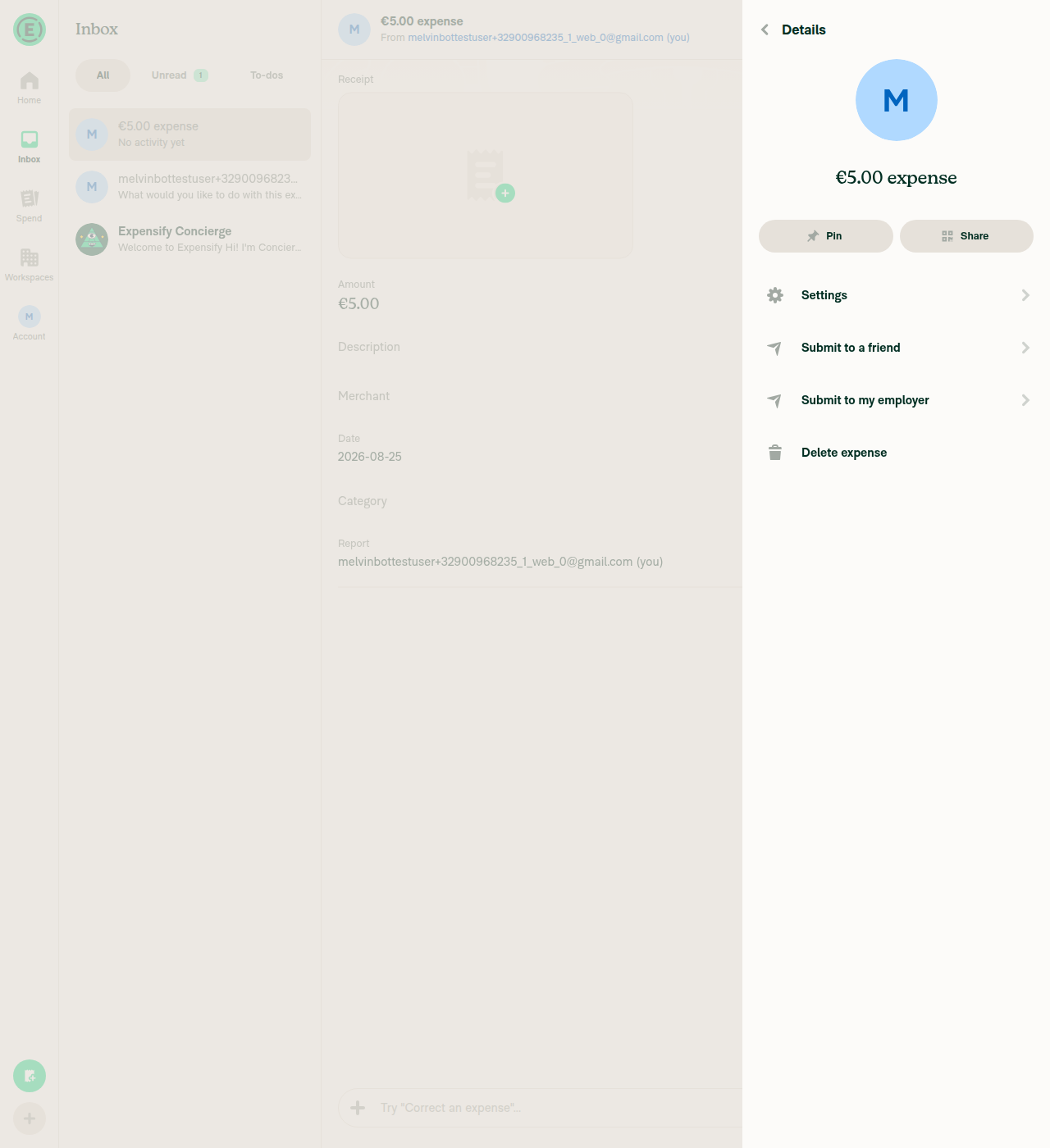
Tracked expense More menu default view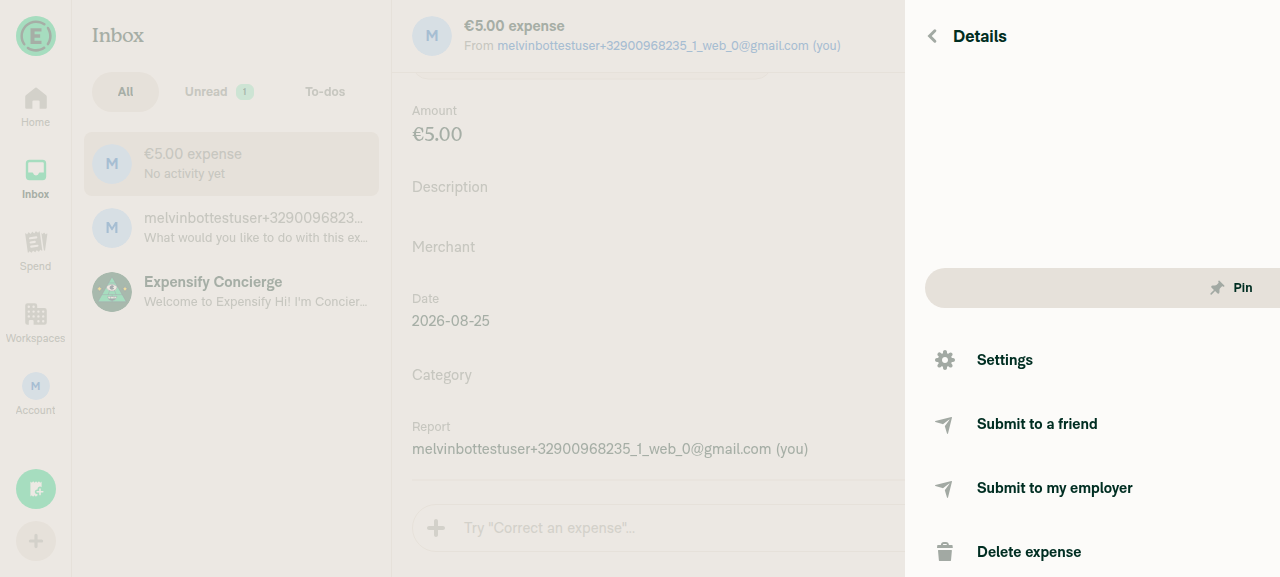
@shawnborton, please review the linked help site PR and confirm it reflects the current behavior. Then mark the linked help site PR |
|
🚀 Deployed to production by https://github.com/AndrewGable in version: 9.4.61-4 🚀
Bundle Size Analysis (Sentry): |
5 participants


Explanation of Change
When a "Looking Around" user (someone who chose the "Something else" onboarding intent) creates an expense, they land on the Spend page. Opening the expense and its More menu previously offered only Send to someone — but the personal-space Concierge in Inbox offers two options: Send to someone and Submit to my employer.
This PR adds a Submit to my employer option to the expense More menu, reusing the exact same flow as the Inbox Concierge "Submit to my employer" action. Both call
createDraftTransactionAndNavigateToParticipantSelectorwithactionName: SUBMITandsubmitDestination: EMPLOYER, so the destination resolves identically:The new row is gated on the same condition as "Send to someone" (an unreported self-tracked expense in personal space, with write access), and sits in the same top section of the menu.
Fixed Issues
$ #97881
PROPOSAL:
Tests
Offline tests
QA Steps
Same as tests.
PR Author Checklist
### Fixed Issuessection aboveTestssectionOffline stepssectionQA stepssectionAvatar, I verified the components usingAvatarare working as expected)StyleUtils.getBackgroundAndBorderStyle(theme.componentBG))npm run compress-svg)Avataris modified, I verified thatAvataris working as expected in all cases)Designlabel and/or tagged@Expensify/designso the design team can review the changes.mainbranch was merged into this PR after a review, I tested again and verified the outcome was still expected according to theTeststeps.Screenshots/Videos
Android: Native
Android: mWeb Chrome
iOS: Native
iOS: mWeb Safari
MacOS: Chrome / Safari