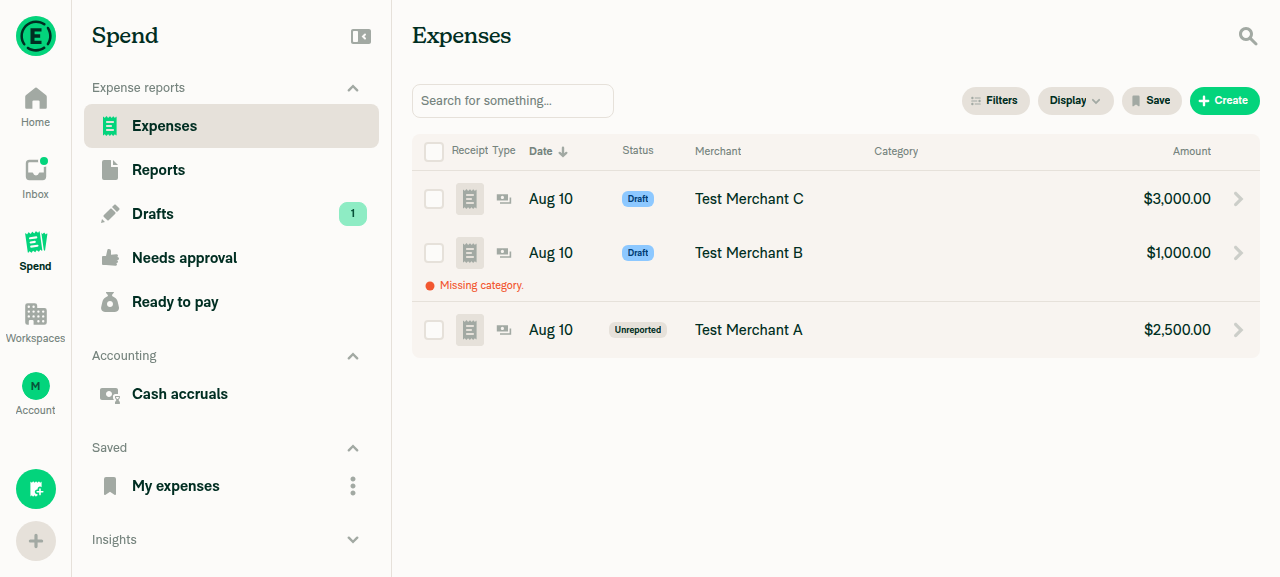
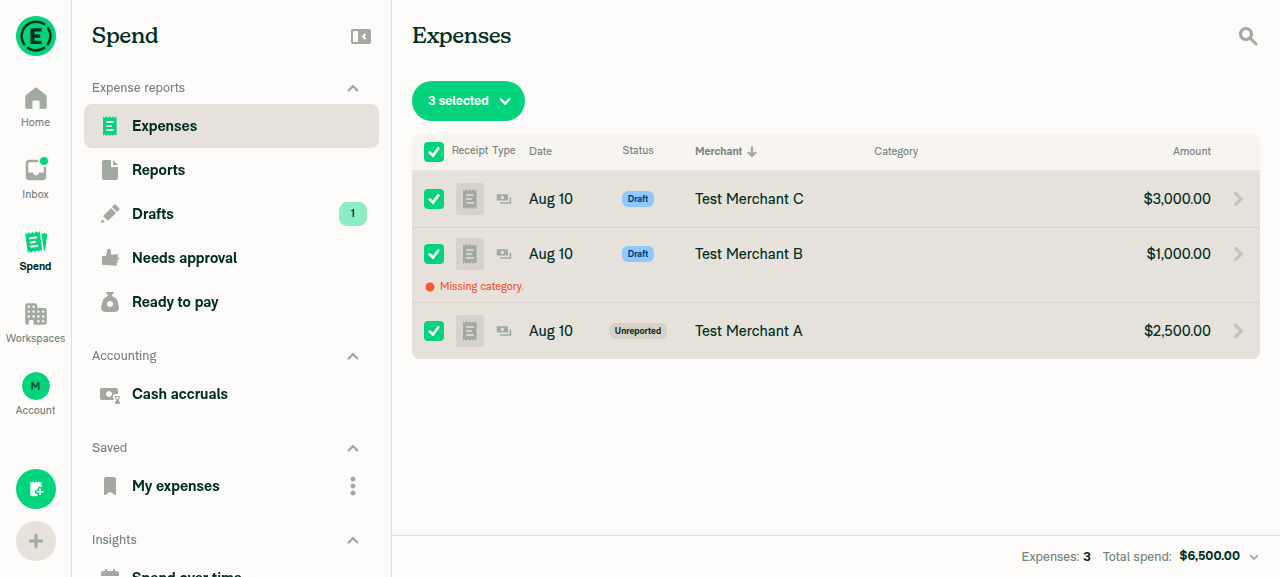
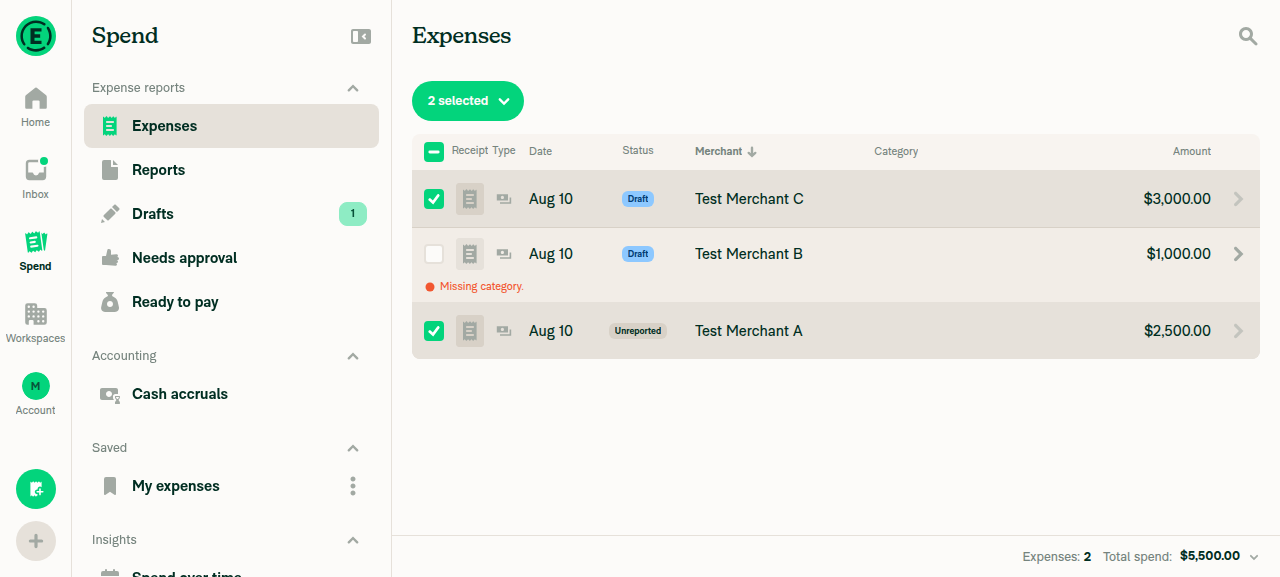
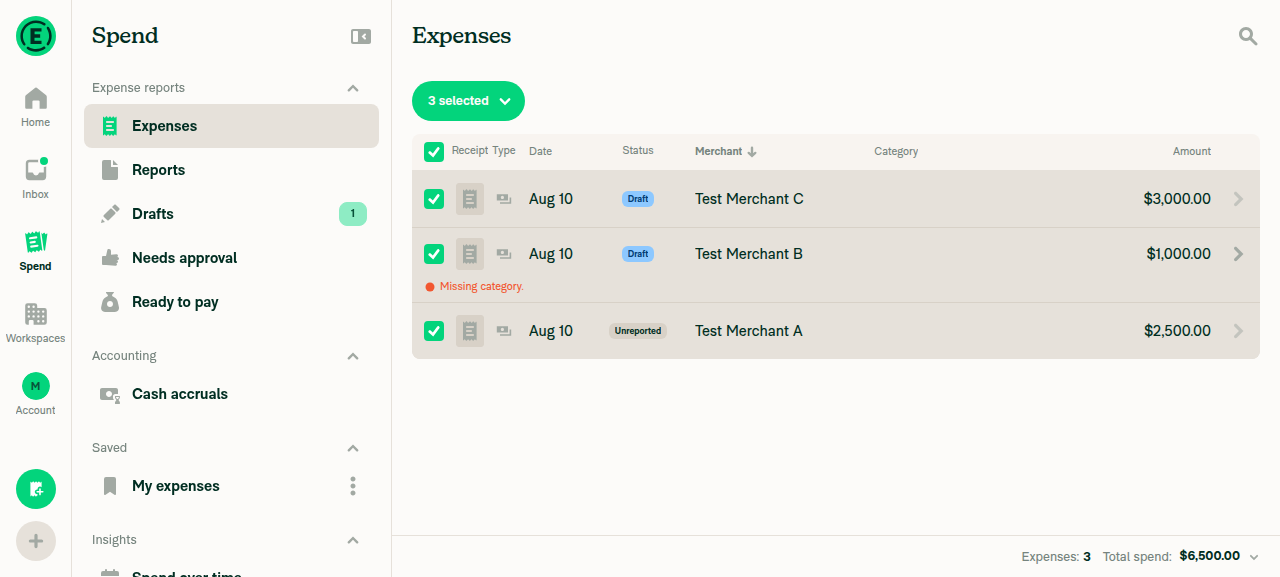
Skip to content

fix: Preserve all matching selection after deselecting an expense - #95902

Merged
Valforte merged 35 commits into
Expensify:mainfrom
emkhalid:fix/preserve-all-matching-selection
Aug 11, 2026
Merged

Valforte merged 35 commits into
Expensify:mainfrom
emkhalid:fix/preserve-all-matching-selection

Conversation

@emkhalid

@emkhalid emkhalid commented Jul 11, 2026

Copy link
Copy Markdown
Contributor

Explanation of Change

This PR preserves the “all matching items” selection when individual expenses are unchecked.

It:

  • Tracks unchecked expenses as explicit exclusions while keeping all-matching selection active.
  • Automatically selects newly loaded matching expenses while preserving exclusions.
  • Shows the total matching count minus excluded expenses.
  • Keeps the count and selection stable while loading additional pages or opening and closing expenses.
  • Calculates totals on demand without advancing pagination or recalculating totals for every page.
  • Passes excluded transaction IDs to supported basic/current-view CSV exports.

Fixed Issues

$ #94143
PROPOSAL: #94143 (comment)

Tests

Precondition: Use an account with more than 50 expenses.

  1. Select all matching expenses and Exclude one expense

    1. Navigate to Spend > Expenses.
    2. Open the bulk-selection menu and choose Select all.
    3. Verify the button displays “All matching items selected”.
    4. After selecting all matching expenses, uncheck one expense.
    5. Verify only that expense becomes unchecked.
    6. Verify the button displays the total matching count minus one.
    7. Verify all other matching expenses remain selected.
  2. Preserve selection during pagination

    1. Exclude one expense after selecting all matching expenses.
    2. Scroll to the bottom and load the next page.
    3. Verify newly loaded expenses are automatically checked.
    4. Verify the excluded expense remains unchecked.
    5. Verify the selected count does not increase when the next page loads.
  3. Avoid recalculating totals during pagination

    1. Select all matching expenses and wait for the total to load.
    2. Scroll to load another page.
    3. Verify the pagination Search request uses shouldCalculateTotals: false.
    4. Verify the request loads only the next page.
  4. Recheck an excluded expense

    1. Select all matching expenses.
    2. Uncheck one expense.
    3. Recheck the same expense.
    4. Verify it is selected again.
    5. Verify the button returns to “All matching items selected” when no exclusions remain.
  5. Exclude multiple expenses

    1. Select all matching expenses.
    2. Uncheck multiple expenses across loaded pages.
    3. Verify every unchecked expense remains excluded.
    4. Verify the selected count decreases once for each excluded expense.
    5. Recheck the expenses and verify the count increases correctly.
  6. Verify grouped and expense-report selection

    1. Open a grouped expense or expense-report search.
    2. Select all matching items.
    3. Exclude one selection unit.
    4. Verify the excluded row is displayed as unchecked.
    5. Verify the parent group/report is not displayed as fully selected when one of its expenses is excluded.
    6. Verify newly loaded matching rows remain selected.
  7. Verify the selection footer

    1. Select all matching expenses and wait for the count and total.
    2. Exclude one expense.
    3. Verify the footer count subtracts the excluded expense.
    4. Verify the footer total subtracts the excluded expense amount.
    5. Recheck the expense and verify its count and amount are restored.
  • Verify that no errors appear in the JS console

Offline tests

N/A

QA Steps

Same as Tests

// TODO: These must be filled out, or the issue title must include "[No QA]."

  • Verify that no errors appear in the JS console

PR Author Checklist

  • I linked the correct issue in the ### Fixed Issues section above
  • I wrote clear testing steps that cover the changes made in this PR
    • I added steps for local testing in the Tests section
    • I added steps for the expected offline behavior in the Offline steps section
    • I added steps for Staging and/or Production testing in the QA steps section
    • I added steps to cover failure scenarios (i.e. verify an input displays the correct error message if the entered data is not correct)
    • I turned off my network connection and tested it while offline to ensure it matches the expected behavior (i.e. verify the default avatar icon is displayed if app is offline)
    • I tested this PR with a High Traffic account against the staging or production API to ensure there are no regressions (e.g. long loading states that impact usability).
  • I included screenshots or videos for tests on all platforms
  • I ran the tests on all platforms & verified they passed on:
    • Android: Native
    • Android: mWeb Chrome
    • iOS: Native
    • iOS: mWeb Safari
    • MacOS: Chrome / Safari
  • I verified there are no console errors (if there's a console error not related to the PR, report it or open an issue for it to be fixed)
  • I followed proper code patterns (see Reviewing the code)
    • I verified that comments were added to code that is not self explanatory
    • I verified that any new or modified comments were clear, correct English, and explained "why" the code was doing something instead of only explaining "what" the code was doing.
    • I verified any copy / text that was added to the app is grammatically correct in English. It adheres to proper capitalization guidelines (note: only the first word of header/labels should be capitalized), and is either coming verbatim from figma or has been approved by marketing (in order to get marketing approval, ask the Bug Zero team member to add the Waiting for copy label to the issue)
  • If a new code pattern is added I verified it was agreed to be used by multiple Expensify engineers
  • I followed the guidelines as stated in the Review Guidelines
  • I tested other components that can be impacted by my changes (i.e. if the PR modifies a shared library or component like Avatar, I verified the components using Avatar are working as expected)
  • If a new CSS style is added I verified that:
    • A similar style doesn't already exist
    • The style can't be created with an existing StyleUtils function (i.e. StyleUtils.getBackgroundAndBorderStyle(theme.componentBG))
  • If new assets were added or existing ones were modified, I verified that:
    • The assets are optimized and compressed (for SVG files, run npm run compress-svg)
    • The assets load correctly across all supported platforms.
  • If the PR modifies code that runs when editing or sending messages, I tested and verified there is no unexpected behavior for all supported markdown - URLs, single line code, code blocks, quotes, headings, bold, strikethrough, and italic.
  • If the PR modifies a generic component, I tested and verified that those changes do not break usages of that component in the rest of the App (i.e. if a shared library or component like Avatar is modified, I verified that Avatar is working as expected in all cases)
  • If the PR modifies a component related to any of the existing Storybook stories, I tested and verified all stories for that component are still working as expected.
  • If the PR modifies a component or page that can be accessed by a direct deeplink, I verified that the code functions as expected when the deeplink is used - from a logged in and logged out account.
  • If the PR modifies the UI (e.g. new buttons, new UI components, changing the padding/spacing/sizing, moving components, etc) or modifies the form input styles:
    • I verified that all the inputs inside a form are aligned with each other.
    • I added Design label and/or tagged @Expensify/design so the design team can review the changes.
  • I added unit tests for any new feature or bug fix in this PR to help automatically prevent regressions in this user flow.
  • If the main branch was merged into this PR after a review, I tested again and verified the outcome was still expected according to the Test steps.

Screenshots/Videos

Android: Native
  1. Select all matching expenses and Exclude one expense
android-native-Select.all.matching.expenses.and.Exclude.one.expense.mov
  1. Preserve selection during pagination
android-native-Preserve.selection.during.pagination.mp4
  1. Avoid recalculating totals during pagination

Not applicable.

  1. Recheck an excluded expense
android-native-Recheck.an.excluded.expense.mov
  1. Exclude multiple expenses
android-native-Exclude.multiple.expenses.mov
  1. Verify grouped and expense-report selection
android-native-Verify.grouped.and.expense-report.selection.mp4
  1. Verify the selection footer
andoir-native-Verify.the.selection.footer.mov
Android: mWeb Chrome
  1. Select all matching expenses and Exclude one expense
android-web-Select.all.matching.expenses.and.Exclude.one.expense.mov
  1. Preserve selection during pagination
android-web-Preserve.selection.during.pagination.mp4
  1. Avoid recalculating totals during pagination

Not applicable.

  1. Recheck an excluded expense
android-web-Recheck.an.excluded.expense.mov
  1. Exclude multiple expenses
android-web-Exclude.multiple.expenses.mov
  1. Verify grouped and expense-report selection
android-web-Verify.grouped.and.expense-report.selection.mp4
  1. Verify the selection footer
andoir-web-Verify.the.selection.footer.mov
iOS: Native
  1. Select all matching expenses and Exclude one expense
ios-native-Select.all.matching.expenses.and.Exclude.one.expense.mov
  1. Preserve selection during pagination
ios-native-Preserve.selection.during.pagination.mp4
  1. Avoid recalculating totals during pagination

Not applicable.

  1. Recheck an excluded expense
ios-native-Recheck.an.excluded.expense.mov
  1. Exclude multiple expenses
ios-native-Exclude.multiple.expenses.mov
  1. Verify grouped and expense-report selection
ios-native-Verify.grouped.and.expense-report.selection.mov
  1. Verify the selection footer
ios-native-Verify.the.selection.footer.mov
iOS: mWeb Safari
  1. Select all matching expenses and Exclude one expense
ios-web-Select.all.matching.expenses.and.Exclude.one.expense.mov
  1. Preserve selection during pagination
ios-web-Preserve.selection.during.pagination.mp4
  1. Avoid recalculating totals during pagination

Not applicable.

  1. Recheck an excluded expense
ios-web-Recheck.an.excluded.expense.mov
  1. Exclude multiple expenses
ios-web-Exclude.multiple.expenses.mov
  1. Verify grouped and expense-report selection
ios-web-Verify.grouped.and.expense-report.selection.mov
  1. Verify the selection footer
ios-web-Verify.the.selection.footer.mov
MacOS: Chrome / Safari
  1. Select all matching expenses and Exclude one expense
Select.all.matching.expenses.and.Exclude.one.expense.mov
  1. Preserve selection during pagination
Preserve.selection.during.pagination.mov
  1. Avoid recalculating totals during pagination
Avoid.recalculating.totals.during.pagination.mp4
  1. Recheck an excluded expense
Recheck.an.excluded.expense.mov
  1. Exclude multiple expenses
Exclude.multiple.expenses.mov
  1. Verify grouped and expense-report selection
Verify.grouped.and.expense-report.selection.webm
  1. Verify the selection footer
Verify.the.selection.footer.mov

@codecov

codecov Bot commented Jul 11, 2026

Copy link
Copy Markdown

Codecov Report

❌ Looks like you've decreased code coverage for some files. Please write tests to increase, or at least maintain, the existing level of code coverage. See our documentation here for how to interpret this table.

Files with missing lines Coverage Δ
src/components/Search/SearchContextDefinitions.ts 53.57% <ø> (ø)
src/components/Search/SearchList/ListItem/types.ts 100.00% <ø> (ø)
src/hooks/useSearchShouldCalculateTotals.ts 100.00% <100.00%> (ø)
src/libs/actions/Search.ts 47.60% <100.00%> (+2.81%) ⬆️
.../TransactionListItem/TransactionListItemNarrow.tsx 0.00% <0.00%> (ø)
...em/TransactionListItem/TransactionListItemWide.tsx 0.00% <0.00%> (ø)
src/hooks/useSearchBulkActions.ts 58.59% <97.43%> (+2.71%) ⬆️
src/components/Search/SearchBulkActionsButton.tsx 90.47% <90.47%> (+89.17%) ⬆️
...h/SearchList/ListItem/TransactionGroupListItem.tsx 76.58% <50.00%> (-0.35%) ⬇️
...s/Search/SearchPageHeader/SearchActionsBarWide.tsx 11.11% <0.00%> (-1.39%) ⬇️
... and 4 more
... and 11 files with indirect coverage changes

@emkhalid
emkhalid marked this pull request as ready for review July 12, 2026 19:55
@emkhalid
emkhalid requested review from a team as code owners July 12, 2026 19:55
@melvin-bot
melvin-bot Bot requested review from flaviadefaria and mkhutornyi July 12, 2026 19:55
@melvin-bot

melvin-bot Bot commented Jul 12, 2026

Copy link
Copy Markdown

@mkhutornyi Please copy/paste the Reviewer Checklist from here into a new comment on this PR and complete it. If you have the K2 extension, you can simply click: [this button]

@melvin-bot
melvin-bot Bot removed request for a team July 12, 2026 19:55

@chatgpt-codex-connector chatgpt-codex-connector Bot left a comment

Copy link
Copy Markdown

Choose a reason for hiding this comment

The reason will be displayed to describe this comment to others. Learn more.

💡 Codex Review

Here are some automated review suggestions for this pull request.

Reviewed commit: dc68c95a59

ℹ️ About Codex in GitHub

Your team has set up Codex to review pull requests in this repo. Reviews are triggered when you

  • Open a pull request for review
  • Mark a draft as ready
  • Comment "@codex review".

If Codex has suggestions, it will comment; otherwise it will react with 👍.

Codex can also answer questions or update the PR. Try commenting "@codex address that feedback".

Comment thread src/components/Search/SearchSelectionProvider.tsx Outdated
@mkhutornyi

Copy link
Copy Markdown
Contributor

@codex review

@mkhutornyi mkhutornyi mentioned this pull request Jul 14, 2026
@MelvinBot

Copy link
Copy Markdown
Contributor

🤖 Reviewed the exclusion-tracking approach. The core design — keeping areAllMatchingItemsSelected active and recording unchecked rows as excludedTransactions — is sound, the reconciliation in applySelection (add removed keys, drop re-added keys) reads correctly, and the lifecycle resets (clear / turn-off / re-select-all all wipe exclusions) look complete. Test coverage is good. A few things worth confirming before merge:

1. Count vs. total may disagree for partially-excluded expense reports — worth confirming
In expense-report view the excluded count collapses to unique reportIDs (SearchSelectionFooter.tsx:66, same in SearchBulkActionsButton.tsx:133), but the total subtracts every excluded transaction's amount (SearchSelectionFooter.tsx:72). If a report can ever be partially excluded (some of its transactions unchecked, not all), the count would drop by a whole report while the total only drops by those transactions. This is fine as long as unchecking in expense-report view is always report-granular — please confirm that's guaranteed.

2. Pagination offset reset is the highest-risk change — please QA carefully
index.tsx:186-193 adds a setTimeout(() => setOffset(...)) that can move offset backward (Math.min(offset, serverOffset)) when the all-matching count is missing, plus the new guard clauses around index.tsx:416. This is the most intricate part of the PR. Suggest an explicit test: load several pages, then hit Select all, and verify the list doesn't jump/scroll-reset and that no duplicate/extra Search request fires.

3. Negative-amount (refund/credit) rows — low priority
getTransactionTotal always adds Math.abs(amount), so excluding a refund still reduces the remaining total. This mirrors the pre-existing client-total convention, so it's likely intentional — just confirm the server total uses the same absolute-value convention so the subtraction at SearchSelectionFooter.tsx:72 stays correct.

4. Confirm the backend honors excludedTransactionIDList
The new param is now sent on the CSV export command. Make sure the export backend actually reads and filters on it — otherwise excluded rows will still appear in the downloaded CSV even though the UI count/total exclude them.

None of these are blockers on their own, but 1 and 2 are the ones I'd verify with a manual pass before merging.

@MelvinBot

Copy link
Copy Markdown
Contributor

🤖 Code-quality pass (separate from the correctness notes above — this is about readability/maintainability, not bugs). The PR is generally clean: types are documented, the deps-omission comments were kept in sync, and the new unit tests are well-structured. A few things worth tightening:

1. Duplicated — and subtly divergent — selection-count logic (worth consolidating)
The "count selection units, expanding groups and de-duping expense-report rows" logic now exists twice with different implementations:

Two counters that are supposed to agree on the same selection can drift apart. Extracting one shared helper (e.g. in SearchUIUtils) would remove the duplication and guarantee the button and footer report the same number.

2. Pagination/totals orchestration in index.tsx is hard to follow
The new flow spreads across the render body and two effects: searchRequestOffset at index.tsx:186 plus the didJustFinishAllMatchingTotalsRequest / didEnableAllMatchingTotalsWithExistingCount guard booleans around index.tsx:416. This is a lot of stateful branching in an already-large component. Pulling it into a dedicated hook (e.g. useAllMatchingTotalsPagination) with a clear contract would make it far easier to reason about and unit-test in isolation.

3. setTimeout(() => setOffset(...), 0) needs a "why" comment
index.tsx:192 defers a state update via a zero-delay timeout. That's an unusual pattern and reads as a workaround — a one-line comment explaining what it's avoiding (render-phase set-state / effect ordering) would save the next reader a lot of guessing.

4. Redundant per-consumer default for excludedTransactions
excludedTransactions = getEmptyObject<SelectedTransactions>() is repeated in ~6 consumers (e.g. SearchBulkActionsButton.tsx:52), but the context already defaults it to {} in SearchContextDefinitions. The fallbacks are dead defensiveness — dropping them (or relying solely on the context default) removes the repetition.

5. Minor: naming drift
excludedTransactionIDs, excludedTransactionIDList, and excludedTransactionsKeys all appear for closely related things. Not worth churning on its own, but aligning them would reduce friction.

Items 1 and 2 are the ones with real maintenance value; the rest are polish.

@chatgpt-codex-connector chatgpt-codex-connector Bot left a comment

Copy link
Copy Markdown

Choose a reason for hiding this comment

The reason will be displayed to describe this comment to others. Learn more.

💡 Codex Review

Here are some automated review suggestions for this pull request.

Reviewed commit: f0b00c16ff

ℹ️ About Codex in GitHub

Codex has been enabled to automatically review pull requests in this repo. Reviews are triggered when you

  • Open a pull request for review
  • Mark a draft as ready
  • Comment "@codex review".

If Codex has suggestions, it will comment; otherwise it will react with 👍.

When you sign up for Codex through ChatGPT, Codex can also answer questions or update the PR, like "@codex address that feedback".

Comment thread src/components/Search/SearchList/ListItem/TransactionGroupListItem.tsx Outdated

@mkhutornyi mkhutornyi left a comment

Copy link
Copy Markdown
Contributor

Choose a reason for hiding this comment

The reason will be displayed to describe this comment to others. Learn more.

Please address AI review comments above

@MelvinBot

Copy link
Copy Markdown
Contributor

🤖 Regression hunt on this diff. Most of the change is correctly gated behind the new all-matching/exclusion state, so ordinary selection and pagination are largely untouched. The risks below are the spots where existing behavior changes:

R1 — Group / expense-report rows now derive their checked state purely from child isSelected, dropping the previous fallback (highest risk)
ExpenseReportListItem.tsx:108 and TransactionGroupListItem.tsx:226 both dropped the || liveRowSelected fallback for non-empty rows. A parent row is now checked only when every one of its currently-loaded children has isSelected === true (isSelectAllChecked / areAllReportTransactionsSelected). Previously the row was also checked whenever the row itself was covered by select-all.

Normal per-item selection is fine — for non-empty groups/reports selection is keyed by child transaction ID, so liveRowSelected(rowKey) was already effectively dead there (see the code comment). The risk is specifically Select all matching in grouped and expense-report views: if reconcile hasn't yet marked every child isSelected (timing, or a group whose child rows aren't all loaded/reconciled), the parent row can render unchecked or indeterminate even with zero exclusions.
→ Verify: Select all in a grouped view (by category/merchant) and in expense-report view → every group/report shows fully checked immediately, not indeterminate.

R2 — useSearchShouldCalculateTotals no longer forces totals for all-matching after pagination
useSearchShouldCalculateTotals.ts:25 changed the all-matching branch from return true to return enabled. This is the intended optimization, but it's a semantics change to a shared hook: previously all-matching always requested server totals regardless of offset.
→ Verify count/total still populate correctly when the user loads several pages before hitting Select all (the case the old return true specifically protected).

R3 — Pagination offset can be pushed backward under all-matching
index.tsx:186-193 adds a setTimeout(() => setOffset(Math.min(offset, serverOffset))) when the all-matching count is missing, plus early-return guards near index.tsx:416. Gated behind all-matching, so plain pagination is unaffected, but within all-matching this can reposition the list / re-fire a request. → QA: paginate deep, then Select all, and watch for a scroll jump or duplicate Search request.

R4 — SearchActionsBarWide broadened its subscription
SearchActionsBarWide.tsx:29 swapped the narrow useSelectionCounts() read for the full useSearchSelectionContext(), so it now re-renders on any selection-context change (the rest of this module deliberately uses narrow subscriptions). Minor perf regression. useSelectionCounts is still exported — worth confirming the narrow-layout bulk bar uses the same hasSelectedTransactions gate so wide and narrow don't diverge for all-matching.

R1 is the one I'd verify first, since it touches the existing select-all display and isn't behind the exclusion flag.

@MelvinBot

Copy link
Copy Markdown
Contributor

🤖 Regression scan of PR #95902. These are behaviors that worked before and could break — none are confirmed at runtime (logic-derived), so I've ranked by likelihood and flagged what to test.

1. Group/report header checkbox can show unchecked under "Select all matching" (medium)
The header selected-state no longer trusts the global all-matching flag — it now requires every child transaction's isSelected to be populated:

Previously both fell back to liveRowSelected, which is true for every row while all-matching is active. Now, immediately after tapping Select all (before useReconcileSelectionWithData populates each child's isSelected), or for a group whose children aren't loaded/reconciled, isSelectAllChecked/areAllReportTransactionsSelected is false → the header renders unchecked or indeterminate even though the row is fully covered by the selection. Test: grouped + expense-report views — tap Select all and watch for headers that flash (or stay) unchecked, and scroll new groups into view.

2. Pagination offset can be pulled backward (medium)
index.tsx:186-194 schedules setOffset(Math.min(offset, serverOffset)) whenever the all-matching count is missing. If local offset is ahead of the server's last-responded offset when Select all fires, this rewrites pagination state backward. The three guard clauses added around index.tsx:416 suggest request-loop edge cases were already hit here. Test: load several pages, then Select all (on an ad-hoc query whose count wasn't precomputed), and verify the list doesn't shrink/scroll-jump and no duplicate Search requests fire.

3. Count/total no longer refreshed while paginating under all-matching (low)
useSearchShouldCalculateTotals.ts:25 changed all-matching from always-true to return enabled, so pagination requests (offset > 0, count present) skip totals. This is the intended perf win, but the displayed count/total is now fetched once and reused — if underlying data changes mid-session it can go stale. Low impact; noting for awareness.

4. Bulk-actions bar stays visible when all loaded rows are excluded (low)
SearchActionsBarWide.tsx:29 now gates on hasSelectedTransactions, which is true whenever areAllMatchingItemsSelected is set — even if the user unchecks every currently-loaded row. The bar (and its count) will still render. Likely acceptable since "all matching" is conceptually still on, but confirm the displayed count/label reads sensibly in that state.

Item 1 is the one I'd verify first — it touches the most visible everyday flow (Select all in grouped/report views).

@emkhalid

Copy link
Copy Markdown
Contributor Author

@mkhutornyi I found an additional issue while testing this PR:

  • Expenses: The selected count works correctly.
  • Reports: There are 58 report rows containing 320 expenses. After selecting all reports and unchecking one, the button shows 319 selected instead of 57 selected.

The backend returns search.count: 320 for the expense-report search, so the frontend does not know the total number of report rows before all pages are loaded.

Should we address this in the current PR? It appears the backend may need to return the total report count, possibly as a separate field.

staging.mp4

@mkhutornyi

Copy link
Copy Markdown
Contributor

The original scope is Spend > Expenses tab.
If that bug happens in production, let's fix this separately.

@emkhalid

emkhalid commented Aug 5, 2026

Copy link
Copy Markdown
Contributor Author

Review

The approach is sound and the test coverage is strong. The excludedTransactions model correctly fixes the reported bug (unchecking one row while "all matching" is active no longer collapses the selection to the visible page). I have one correctness gap worth fixing before merge, one lower-confidence edge case, and one behavior to confirm. I verified the trickiest parts — the amount/groupAmount sign math, the inFlightSearchRequests Set→Map change with pendingTotalsRequest, and the return enabled gating — and those are all correct.

1. excludedTransactions is a write-once snapshot that's never reconciled against live data ⚠️

Unlike selectedTransactions — which useReconcileSelectionWithData rebuilds from live data on every push — excludedTransactions is only ever added to / deleted from in applySelection. It's never pruned when an excluded row leaves the result set, and its stored amount/transaction is never refreshed. The footer then consumes these frozen entries at SearchSelectionFooter.tsx:509 and :148.

Two reachable failures:

  • Excluded row removed from results: select-all → exclude expense X → footer shows count − 1. X is then deleted/filtered out. metadataCount drops by 1, but excludedExpenseCount still counts X, so the footer now shows count − 2 and the total over-subtracts X's amount. The excluded entry lingers indefinitely.
  • Excluded row edited: exclude a $30 expense, then inline-edit that still-visible row to $50. metadataTotal reflects $50, but the excluded subtraction still uses the frozen $30 (getTransactionTotal), so the footer total is off by $20. Because the freshness check for excluded rows compares against the frozen snapshot itself, the stale converted amount is never refetched either.

A reconcile/prune pass for excludedTransactions (drop keys no longer present in loaded data, refresh amounts for still-loaded ones) would close this.

2. Exclude a collapsed group, then expand and re-select one child → over-subtracts (lower confidence)

A collapsed group with no loaded children is stored under its group key. Toggling it off puts the group key into excludedTransactions, so excludedExpenseCount subtracts the whole group. If the user then expands it and re-selects a single child, the child's own key is added to selectedTransactions, but the un-exclude loop only deletes an exact key match (SearchSelectionProvider.tsx:111-115) — it doesn't remove the child from the group-level exclusion. The group stays fully subtracted, and useRowSelection still treats the child as excluded (via parentGroupKey) even though its selectedTransactions entry is isSelected: true. Worth a manual check of the group + partial re-select flow.

3. setOffset(searchRequestOffset) can rewind an in-flight "load more" (confirm intended)

index.tsx:189-196: while the all-matching totals request is in flight (count missing) and the user triggers pagination, searchRequestOffset = min(offset, serverOffset) briefly collapses to the server's echoed offset and rewinds offset, discarding the page the user just tried to load. It's self-correcting (idempotent, no oscillation; the optimistic search.offset write closes the window quickly) and reads as intentional ("don't paginate until totals resolve"), so it's not a blocker — just confirm a fast user on a slow network having a "load more" silently rewound is acceptable.

Verified correct (not bugs)

  • Sign mathgetEntrySource/getTransactionTotal treat sources as expense-signed negative (groupAmount ?? -Math.abs(amount)), so getTransactionTotal returns a positive magnitude; metadataTotal and the converted total are positive, so metadataTotal − excludedTotal correctly reduces the total. No sign error.
  • inFlightSearchRequests Map + pendingTotalsRequest — the dedupe key is deleted before pendingTotalsRequest?.() fires in .finally, so the re-fired totals request isn't self-deduped; single-threaded execution means no drop/double-fire; the !inFlightRequest.shouldCalculateTotals guard prevents recursion. Returning the promise from .finally is harmless (finally ignores the return value for resolution, and the inner search() never rejects).
  • return enabled — for expense all-matching the OR in index.tsx makes shouldCalculateTotals = shouldCalculateExpenseTotals; for non-expense all-matching the OR term forces true, preserving the old always-recompute behavior. Checked all 12 call sites.
  • Exclusion set is cleared on hash change, on re-select-all, and whenever areAllMatchingItemsSelected becomes false; deselecting every loaded row when hasMoreResults === false/offline clears all-matching + exclusions, so you can't reach "all-matching with everything excluded." No cross-query leak; reconcile reads a fresh closure each render so no effect loop.

I focused on code correctness rather than a live run, since the flow requires the >50-expense precondition from the linked issue. Findings #1 and #2 aren't covered by the added unit tests — a case for an excluded row that later leaves the result set (or is edited) would guard #1.

Thanks! The selection issue is addressed: expanding an excluded group keeps it unchecked, and rechecking one child no longer reselects the whole group.

Grouped CSVs still omit that partial group because the backend exports aggregate rows and does not aggregate standalone transaction IDs. This also occurs on main, so it should be handled separately.

@emkhalid

emkhalid commented Aug 5, 2026

Copy link
Copy Markdown
Contributor Author

@mkhutorny, the latest comments have been addressed. Could you please review the updates when you have a chance?
Thanks!

@emkhalid

emkhalid commented Aug 8, 2026

Copy link
Copy Markdown
Contributor Author

@mkhutornyi kindly bump, thanks.

@mkhutornyi

Copy link
Copy Markdown
Contributor

Please fix conflict

@emkhalid

Copy link
Copy Markdown
Contributor Author

Please fix conflict

@mkhutornyi Done, thanks!

@mkhutornyi

Copy link
Copy Markdown
Contributor

I did regression test as many cases as possible.
Hopefully no deploy blockers

@melvin-bot
melvin-bot Bot requested a review from Valforte August 10, 2026 21:10
@MelvinBot

Copy link
Copy Markdown
Contributor

Regression check — web

No regressions found in the paths I could exercise, but the core new behavior of this PR ("select all matching" at scale, with exclusions) could not be tested — the provisioned web test account had 0 expenses/reports, and even after seeding a few, the dataset never crosses the pagination threshold that triggers the server-side "All matching items selected" mode. So this is a partial pass, not a clean bill of health.

What passed (seeded a workspace + 3 expenses, flat Expenses search, selection mode):

  • Select all → all rows checked, count/footer correct (3 selected, $6,500.00).
  • Uncheck one → only that row unchecks, others stay checked, count drops by exactly 1, header goes indeterminate, footer recalculates. ✅ (this is the local-selection path of the exclusion logic)
  • Recheck it → returns to full selection.
  • Uncheck all one-by-one → count steps 3→2→1→0, selection mode exits cleanly, no crash/stuck state.

What I could NOT verify (needs a High‑Traffic / 50+ expense account — same precondition as your Tests section):

  • The actual "All matching items selected" server‑side mode and its exclusion count (total − excluded).
  • Pagination: newly-loaded pages auto-selecting while exclusions persist, and the count not jumping.
  • The shouldCalculateTotals: false pagination request (your test step 3).
  • Grouped / expense-report select-all with an excluded unit.
  • JS console errorsagent-device's log capture is native-only, so I couldn't monitor the console on web (no on-screen errors/crashes were observed).

Given that, I'd treat the manual videos in the PR description as the primary evidence for the at-scale flow.

Code areas worth a manual re-check (unverified — flagged from reading the diff, not confirmed bugs)
  • Offline / all-loaded exit conditionSearchWriteActionsProvider.tsx:465 & :541: all-matching mode is cleared when empty only if isOffline || hasMoreResults === false. Worth confirming that with more results still on the server, unchecking down to zero loaded rows behaves as intended (doesn't leave a "0 selected but all-matching" state).
  • Pagination offset side-effectSearch/index.tsx:195 drives setOffset from a setTimeout effect, plus new guards like didJustFinishAllMatchingTotalsRequest. This is the highest-risk area for duplicate/extra Search requests or a request loop while all-matching is active on an expense search — worth watching the network tab during pagination.
  • Group header selected-stateTransactionGroupListItem.tsx:236: a group row with loaded children now derives its highlighted/selected state from the children instead of the group key. Confirm grouped expense views still show the correct header checkbox state when a whole group is selected vs. partially excluded.

Evidence

3 seeded expenses

3 seeded expenses in the flat Expenses list

Select all → 3 selected

Select all -> 3 selected, all rows checked

Uncheck one → 2 selected, others stay checked

Uncheck one expense only -> 2 selected, others still checked

Recheck → back to 3 selected

Recheck the expense -> back to 3 selected

Uncheck all → cleared, stable

All expenses unchecked -> selection cleared, stable

@emkhalid

Copy link
Copy Markdown
Contributor Author

I did regression test as many cases as possible. Hopefully no deploy blockers

Thanks for the thorough review! I also tested as many different flows and edge cases as possible and found no regressions. Melvin’s review did not identify any confirmed issues either.

@emkhalid

Copy link
Copy Markdown
Contributor Author

@Valforte Done from our side and all yours, thanks!

@Valforte Valforte left a comment

Copy link
Copy Markdown
Contributor

Choose a reason for hiding this comment

The reason will be displayed to describe this comment to others. Learn more.

Code looks good and concise

@Valforte
Valforte merged commit 0380d56 into Expensify:main Aug 11, 2026
36 of 38 checks passed
@OSBotify

Copy link
Copy Markdown
Contributor

✋ This PR was not deployed to staging yet because QA is ongoing. It will be automatically deployed to staging after the next production release.

@github-actions

Copy link
Copy Markdown
Contributor

🚧 Valforte has triggered a test Expensify/App build. You can view the workflow run here.

@OSBotify

Copy link
Copy Markdown
Contributor

🚀 Deployed to staging by https://github.com/Valforte in version: 9.4.53-0 🚀

platform result
🕸 web 🕸 success ✅
🤖 android 🤖 success ✅
🍎 iOS 🍎 success ✅

@MelvinBot

Copy link
Copy Markdown
Contributor

🤖 Help site review: no changes required.

I reviewed the changes in this PR against Expensify's help site articles under docs/articles and no updates are needed.

Why: This is an internal bug fix, not a change to documented user-facing behavior. It restores the expected behavior on the Spend page: after using Select all (which shows "All matching items selected"), unchecking a single expense now excludes only that expense instead of clearing every non-visible selection — matching what the linked issue #94143 describes as the expected result.

The help articles that touch bulk selection only describe it at a high level and remain accurate as written:

None of these document the deselect-one-item exclusion nuance, so nothing becomes inaccurate. The fixed behavior is the intuitive one a user already expects, so it doesn't warrant new documentation.

Since no changes are required, I did not create a help site draft PR — there's nothing to review. If you'd like the "select all / exclude individual items" behavior explicitly documented as a feature anyway, let me know and I'll draft that PR.

@OSBotify

Copy link
Copy Markdown
Contributor

🚀 Deployed to production by https://github.com/roryabraham in version: 9.4.53-10 🚀

platform result
🕸 web 🕸 success ✅
🤖 android 🤖 success ✅
🍎 iOS 🍎 success ✅

Bundle Size Analysis (Sentry):

Sign up for free to join this conversation on GitHub. Already have an account? Sign in to comment

Labels

None yet

Projects

None yet

Development

Successfully merging this pull request may close these issues.

5 participants