Skip to content

Allow mapping a Tag column in the personal card CSV transaction import - #102242

Merged
puneetlath merged 2 commits into
mainfrom
claude-personalCardCsvImportTag
Sep 28, 2026
Merged

puneetlath merged 2 commits into
mainfrom
claude-personalCardCsvImportTag

Conversation

@MelvinBot

@MelvinBot MelvinBot commented Sep 25, 2026 •

Copy link
Copy Markdown
Contributor

Explanation of Change

The personal card CSV import (Account > Wallet > Import transactions) had no Tag option in the column dropdown, and the import action only read date, merchant, amount and category. So a Tag column always showed "Ignore", and imported expenses had no tag. Classic supports this, and the backend ImportCSVTransactions command already stores a tag on each row, so this is a frontend-only change.

This PR carries Tag through the same path Category already uses:

  • Adds a Tag role to the column dropdown in TransactionsImportedPage. "Tag" and "Tags" headers now auto-map to it through the existing NAME -> TAG remap.
  • Adds tag to CSV_IMPORT_COLUMNS.TRANSACTION_FIELDS and to ImportTransactions.ts, so each row's tag is sent in transactionList, set on the optimistic transaction, and saved in the column layout. Because applySavedColumnMappings loops over TRANSACTION_FIELDS, a saved Tag mapping is restored when a file is uploaded again to the same card.
  • Adds tag to the saved layout types (ColumnMappingIndexes/ColumnMappingNames), matching Classic's tag attribute.
  • Auto-maps "Label" and "Labels" headers to Tag, like Classic. They only map where Tag is a selectable column, so imports without a Tag role are unaffected. This also applies to the other imports that offer Tag (company card CSV and merchant rules).
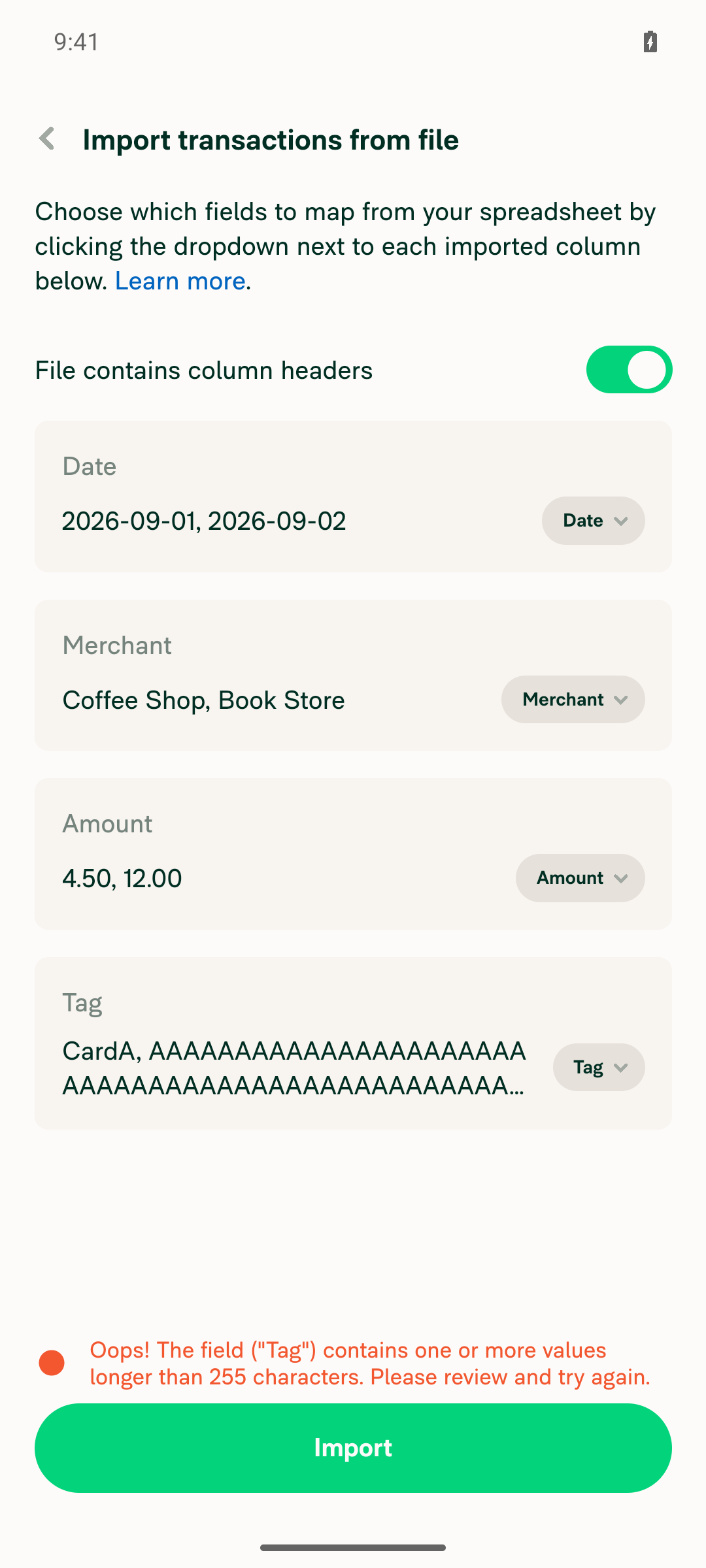
  • Tag length: the API rejects tags over 255 characters (402 tag too large.). Instead of sending them and getting a vague failure, the mapping page now blocks the import with a clear error when any value in the Tag column is longer than CONST.API_TRANSACTION_TAG_MAX_LENGTH. This uses a new spreadsheet.fieldValueTooLong message, translated in all locales.

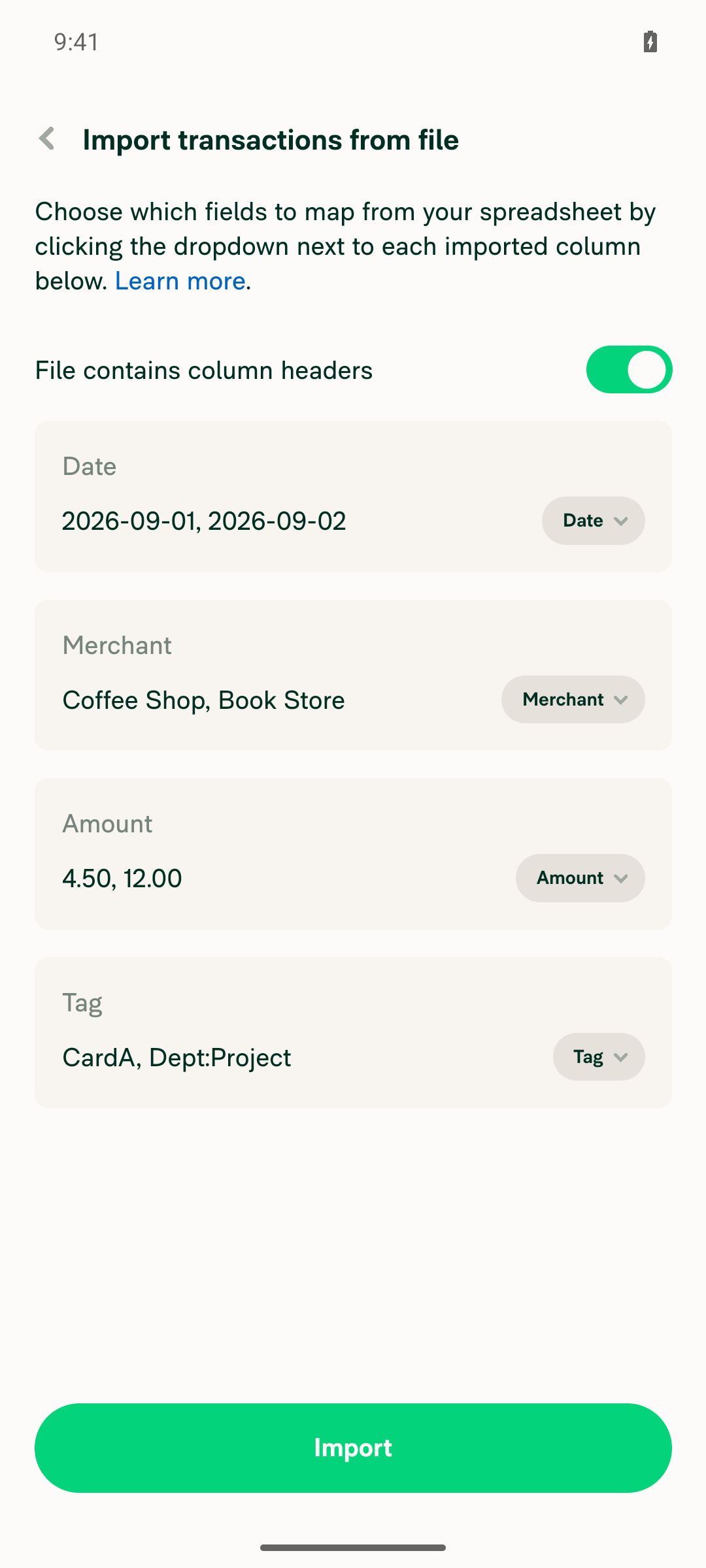
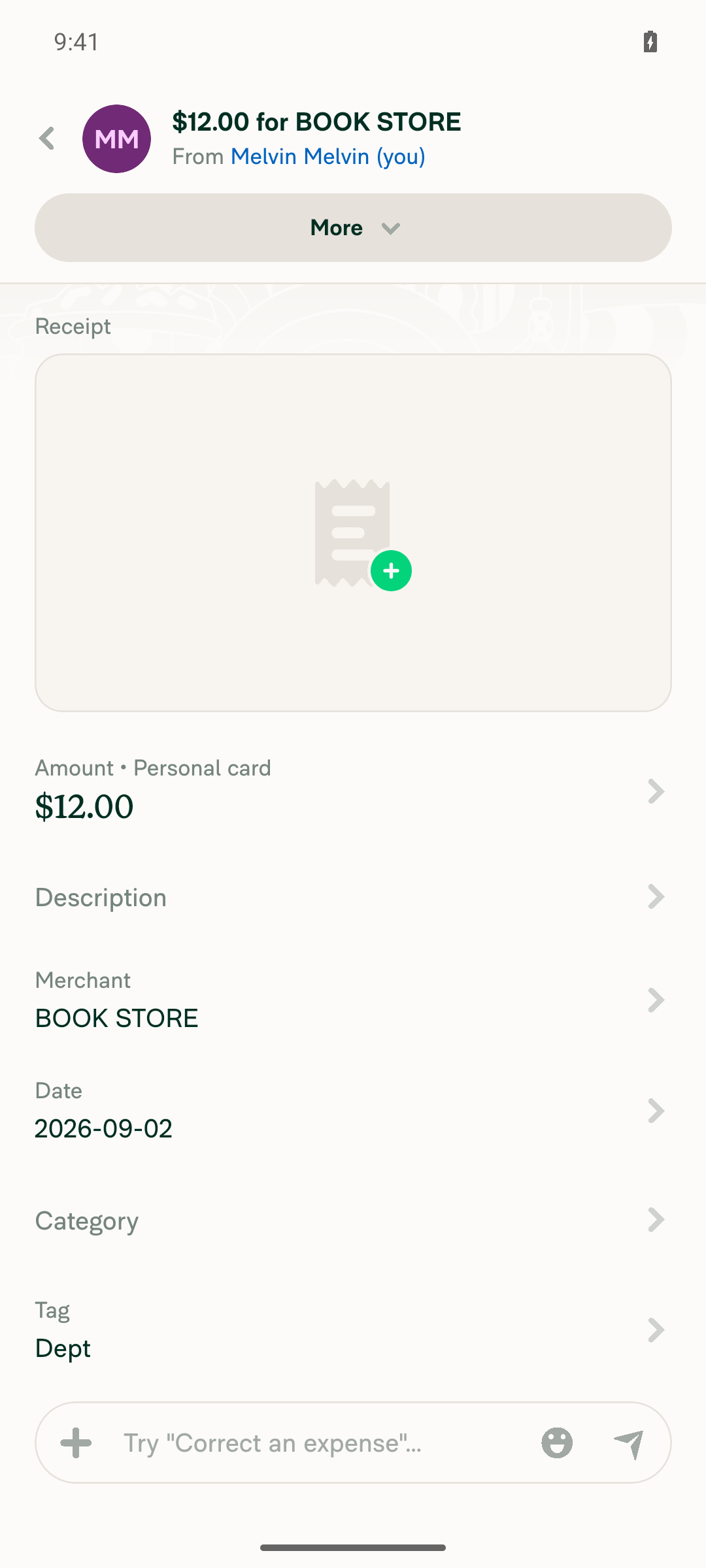
A colon-delimited value like Dept:Project becomes a multi-level tag, the same as the company card import. Like Category, the tag is free text and isn't checked against a policy at import time.

Unit tests cover the tag index, the saved layout and restore, the transaction list (including multi-level and empty values), the API payload and optimistic transaction, the length check, and the Label/Labels header mapping.

AI Tests: npm run typecheck, npm run lint (changed files), npm run spell-changed, npm run fmt, and the React Compiler compliance check on TransactionsImportedPage.tsx all passed. npm test for the import, spreadsheet and localization suites passed (14 suites, 188 tests). An automated browser check couldn't run because the test session was stuck on a blank page, so this hasn't been verified in the UI yet.

Fixed Issues

$ #102232
PROPOSAL: #102232 (comment)

Tests

Precondition: a workspace with Tags enabled, and a CSV file with the headers Date,Merchant,Amount,Tag and at least one row, for example 2026-09-01,Coffee Shop,4.50,CardA.

  1. Go to Account > Wallet > Import transactions.
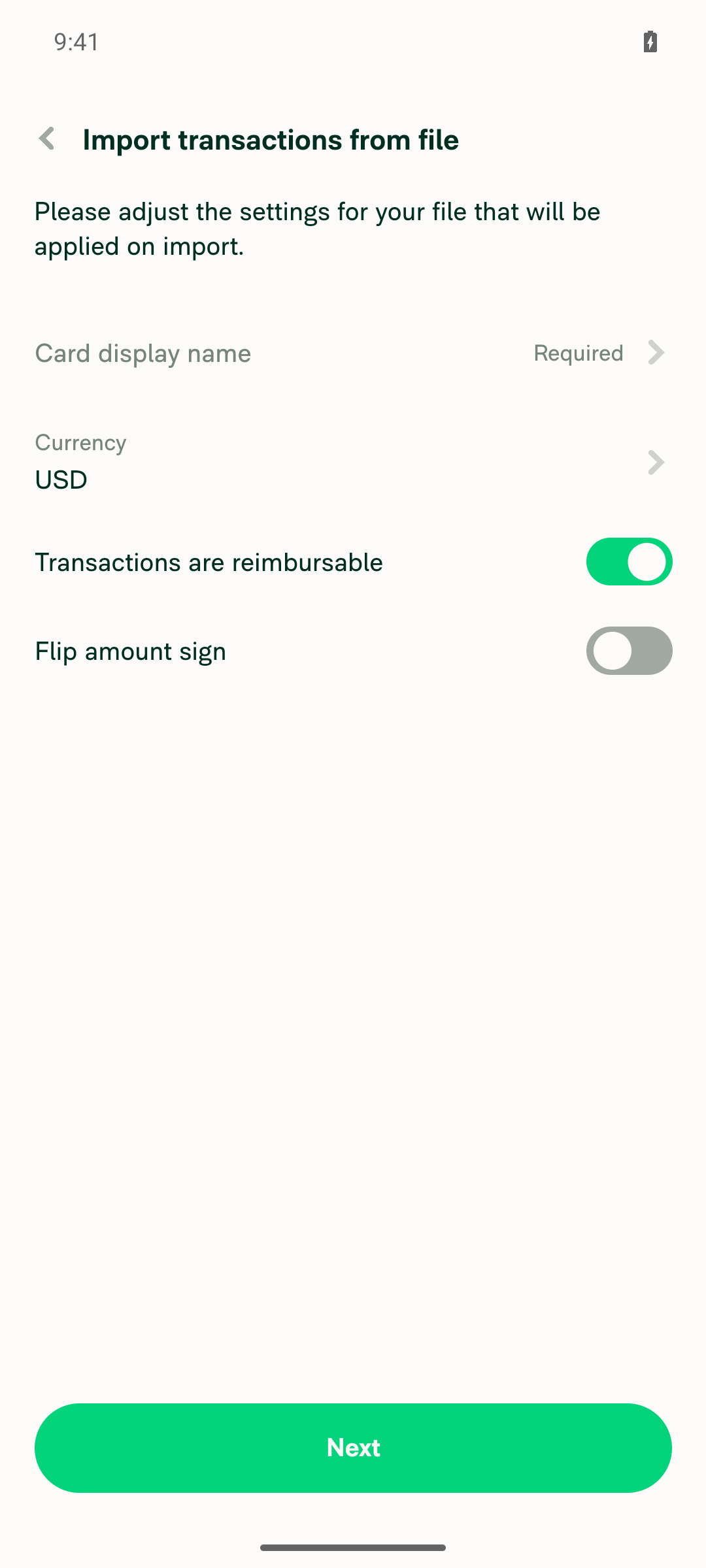
  2. Enter a card name and currency, then select Next.
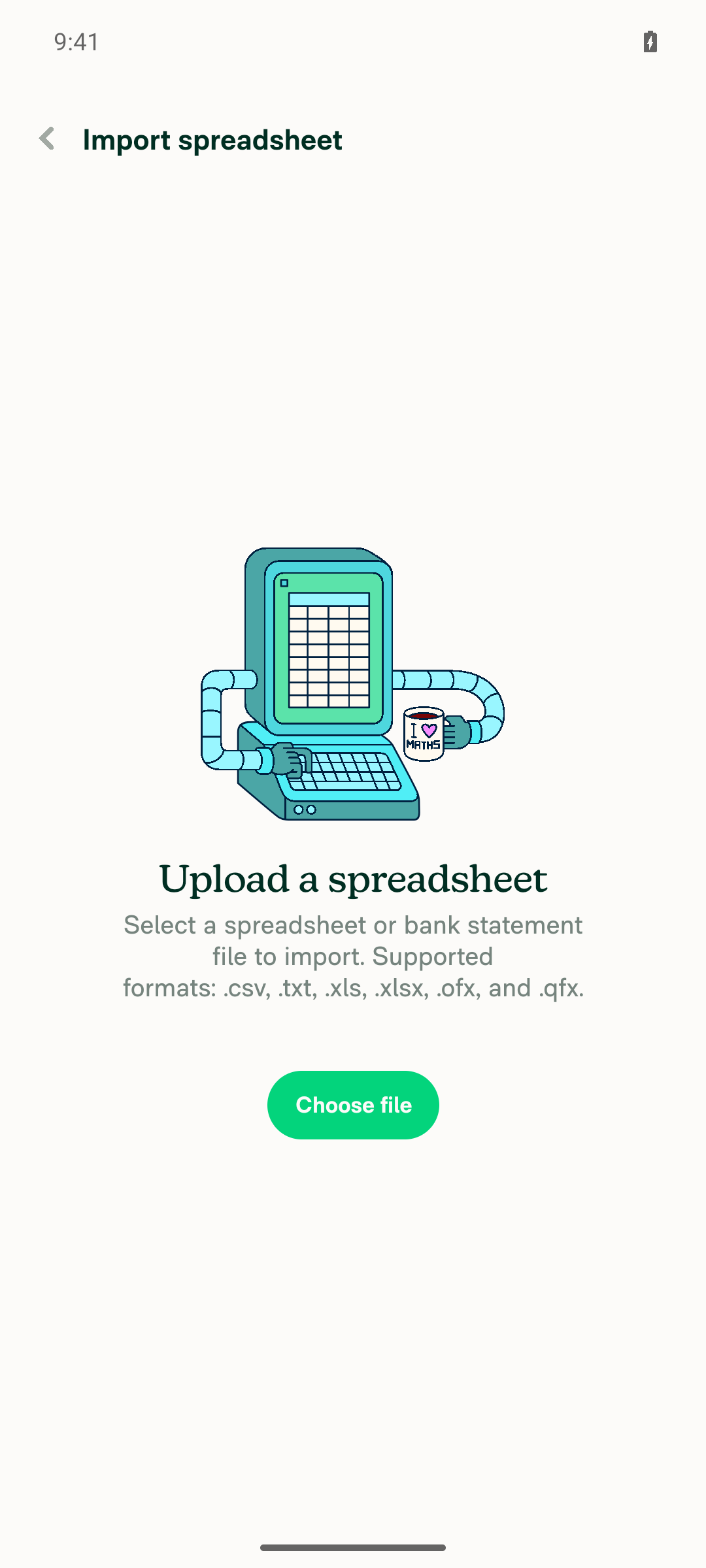
  3. Upload the CSV file.
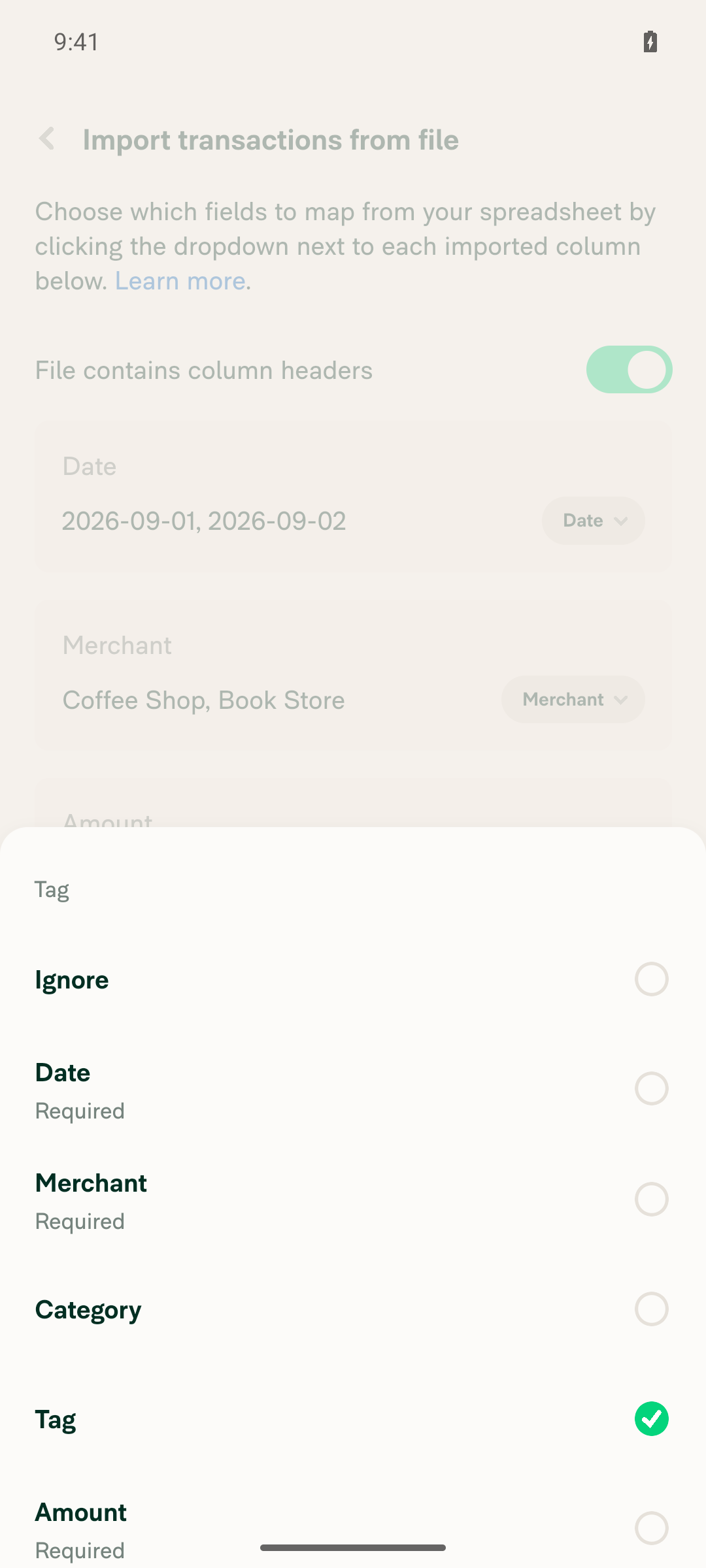
  4. Verify the Tag column is mapped to "Tag" automatically, and its dropdown lists a "Tag" option.
  5. Select Import and verify the import succeeds.
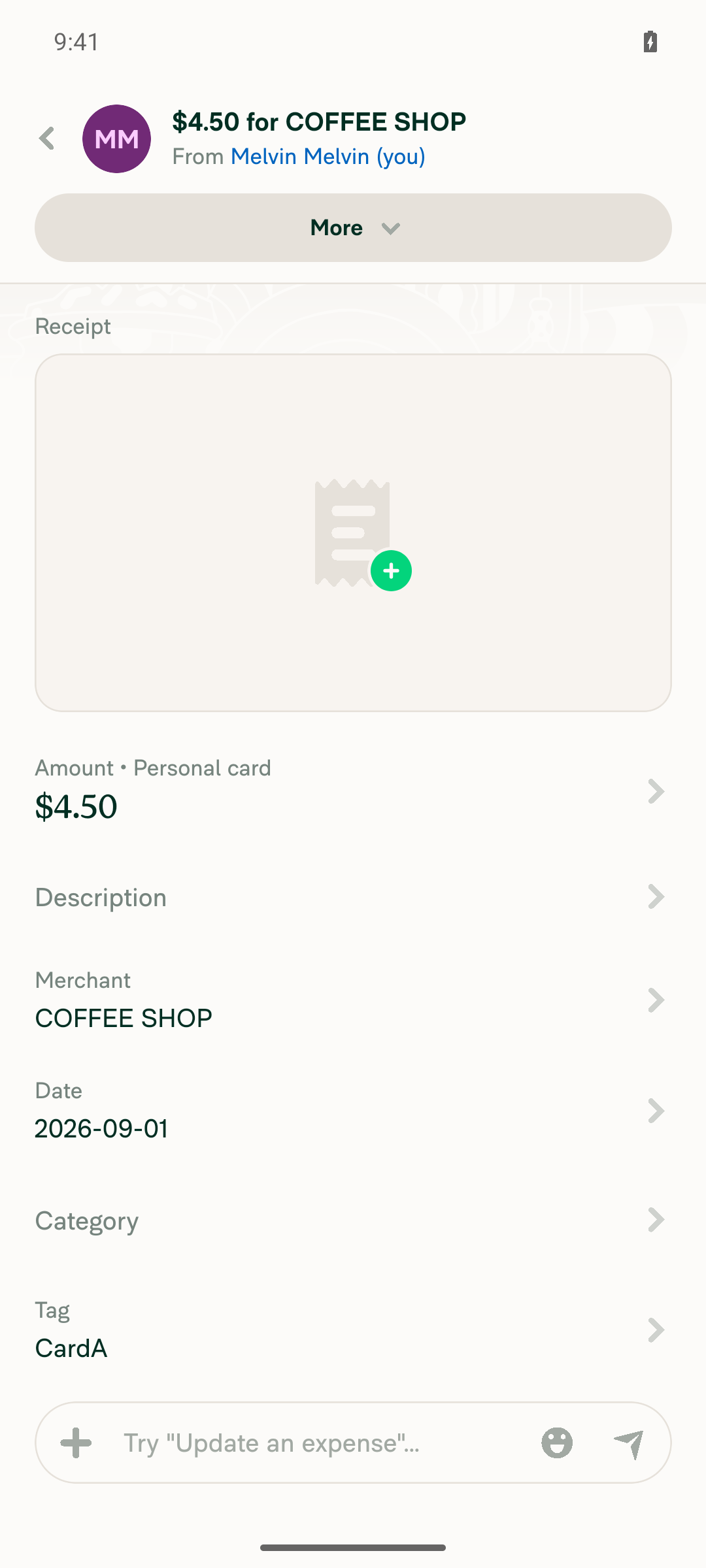
  6. Open the imported expense and verify the Tag field shows the value from the CSV (for example, "CardA").
  • Verify that no errors appear in the JS console

Offline tests

QA Steps

Precondition: a workspace with Tags enabled, and a CSV file with the headers Date,Merchant,Amount,Tag and at least one row, for example 2026-09-01,Coffee Shop,4.50,CardA.

  1. Go to Account > Wallet > Import transactions.
  2. Enter a card name and currency, then select Next.
  3. Upload the CSV file.
  4. Verify the Tag column is mapped to "Tag" automatically, and its dropdown lists a "Tag" option.
  5. Select Import and verify the import succeeds.
  6. Open the imported expense and verify the Tag field shows the value from the CSV (for example, "CardA").
  • Verify that no errors appear in the JS console

PR Author Checklist

  • I linked the correct issue in the ### Fixed Issues section above
  • I wrote clear testing steps that cover the changes made in this PR
    • I added steps for local testing in the Tests section
    • I added steps for the expected offline behavior in the Offline steps section
    • I added steps for Staging and/or Production testing in the QA steps section
    • I added steps to cover failure scenarios (i.e. verify an input displays the correct error message if the entered data is not correct)
    • I turned off my network connection and tested it while offline to ensure it matches the expected behavior (i.e. verify the default avatar icon is displayed if app is offline)
    • I tested this PR with a High Traffic account against the staging or production API to ensure there are no regressions (e.g. long loading states that impact usability).
  • I included screenshots or videos for tests on all platforms
  • I ran the tests on all platforms & verified they passed on:
    • Android: Native
    • Android: mWeb Chrome
    • iOS: Native
    • iOS: mWeb Safari
    • MacOS: Chrome / Safari
  • I verified there are no console errors (if there's a console error not related to the PR, report it or open an issue for it to be fixed)
  • I followed proper code patterns (see Reviewing the code)
    • I verified that comments were added to code that is not self explanatory
    • I verified that any new or modified comments were clear, correct English, and explained "why" the code was doing something instead of only explaining "what" the code was doing.
    • I verified any copy / text that was added to the app is grammatically correct in English. It adheres to proper capitalization guidelines (note: only the first word of header/labels should be capitalized), and is either coming verbatim from figma or has been approved by marketing (in order to get marketing approval, ask the Bug Zero team member to add the Waiting for copy label to the issue)
  • If a new code pattern is added I verified it was agreed to be used by multiple Expensify engineers
  • I followed the guidelines as stated in the Review Guidelines
  • I tested other components that can be impacted by my changes (i.e. if the PR modifies a shared library or component like Avatar, I verified the components using Avatar are working as expected)
  • If a new CSS style is added I verified that:
    • A similar style doesn't already exist
    • The style can't be created with an existing StyleUtils function (i.e. StyleUtils.getBackgroundAndBorderStyle(theme.componentBG))
  • If new assets were added or existing ones were modified, I verified that:
    • The assets are optimized and compressed (for SVG files, run npm run compress-svg)
    • The assets load correctly across all supported platforms.
  • If the PR modifies code that runs when editing or sending messages, I tested and verified there is no unexpected behavior for all supported markdown - URLs, single line code, code blocks, quotes, headings, bold, strikethrough, and italic.
  • If the PR modifies a generic component, I tested and verified that those changes do not break usages of that component in the rest of the App (i.e. if a shared library or component like Avatar is modified, I verified that Avatar is working as expected in all cases)
  • If the PR modifies a component related to any of the existing Storybook stories, I tested and verified all stories for that component are still working as expected.
  • If the PR modifies a component or page that can be accessed by a direct deeplink, I verified that the code functions as expected when the deeplink is used - from a logged in and logged out account.
  • If the PR modifies the UI (e.g. new buttons, new UI components, changing the padding/spacing/sizing, moving components, etc) or modifies the form input styles:
    • I verified that all the inputs inside a form are aligned with each other.
    • I added Design label and/or tagged @Expensify/design so the design team can review the changes.
  • I added unit tests for any new feature or bug fix in this PR to help automatically prevent regressions in this user flow.
  • If the main branch was merged into this PR after a review, I tested again and verified the outcome was still expected according to the Test steps.

Screenshots/Videos

Android: Native
Android: mWeb Chrome
iOS: Native
iOS: mWeb Safari
MacOS: Chrome / Safari

The personal card import only offered Ignore, Date, Merchant, Category and
Amount, and the import action only read those fields, so a Tag column was
dropped. Add a Tag role, carry the tag through to the API and the optimistic
transaction, save it in the column layout, auto-map Label/Labels headers like
Classic, and block the import when a tag exceeds the API length limit.

Co-authored-by: Kevin Brian Bader <ikevin127@users.noreply.github.com>
@OSBotify

Copy link
Copy Markdown
Contributor

🦜 Polyglot Parrot! 🦜

Squawk! Looks like you added some shiny new English strings. Allow me to parrot them back to you in other tongues:

View the translation diff
diff --git a/src/languages/de.ts b/src/languages/de.ts
index 288f72f0..60bfc5ed 100644
--- a/src/languages/de.ts
+++ b/src/languages/de.ts
@@ -1195,7 +1195,7 @@ const translations: TranslationDeepObject<typeof en> = {
         singleFieldMultipleColumns: (fieldName: string) => `Ups! Du hast ein einzelnes Feld („${fieldName}“) mehreren Spalten zugeordnet. Bitte überprüfe dies und versuche es erneut.`,
         emptyMappedField: (fieldName: string) => `Ups! Das Feld („${fieldName}“) enthält einen oder mehrere leere Werte. Bitte überprüfe es und versuche es erneut.`,
         fieldValueTooLong: (fieldName: string, limit: number) =>
-            `Ups! Das Feld („${fieldName}“) enthält einen oder mehrere Werte mit mehr als ${limit} Zeichen. Bitte überprüfe es und versuche es erneut.`,
+            `Ups! Das Feld („${fieldName}“) enthält einen oder mehrere Werte, die länger als ${limit} Zeichen sind. Bitte überprüfen Sie die Eingaben und versuchen Sie es erneut.`,
         importSuccessfulTitle: 'Import erfolgreich',
         importCategoriesNoneAddedOrUpdated: 'Es wurden keine Kategorien hinzugefügt oder aktualisiert.',
         importCategoriesAdded: ({count}: {count: number}) => ({
diff --git a/src/languages/el.ts b/src/languages/el.ts
index 73b32d94..428d1ec8 100644
--- a/src/languages/el.ts
+++ b/src/languages/el.ts
@@ -1240,7 +1240,7 @@ const translations: TranslationDeepObject<typeof en> = {
         singleFieldMultipleColumns: (fieldName: string) => `Ωχ! Έχετε αντιστοιχίσει ένα μόνο πεδίο («${fieldName}») σε πολλές στήλες. Παρακαλούμε ελέγξτε και δοκιμάστε ξανά.`,
         emptyMappedField: (fieldName: string) => `Ωχ! Το πεδίο («${fieldName}») περιέχει μία ή περισσότερες κενές τιμές. Παρακαλούμε ελέγξτε και δοκιμάστε ξανά.`,
         fieldValueTooLong: (fieldName: string, limit: number) =>
-            `Ωχ! Το πεδίο («${fieldName}») περιέχει μία ή περισσότερες τιμές μεγαλύτερες από ${limit} χαρακτήρες. Παρακαλούμε ελέγξτε και δοκιμάστε ξανά.`,
+            `Ουπς! Το πεδίο («${fieldName}») περιέχει μία ή περισσότερες τιμές με μήκος μεγαλύτερο από ${limit} χαρακτήρες. Παρακαλούμε ελέγξτε και δοκιμάστε ξανά.`,
         importSuccessfulTitle: 'Η εισαγωγή ήταν επιτυχής',
         importCategoriesNoneAddedOrUpdated: 'Δεν έχουν προστεθεί ή ενημερωθεί κατηγορίες.',
         importCategoriesAdded: ({count}: {count: number}) => ({
diff --git a/src/languages/es.ts b/src/languages/es.ts
index 14276e56..000d8316 100644
--- a/src/languages/es.ts
+++ b/src/languages/es.ts
@@ -1189,7 +1189,8 @@ const translations: TranslationDeepObject<typeof en> = {
         fieldNotMapped: (fieldName) => `¡Vaya! Un campo obligatorio ("${fieldName}") no ha sido mapeado. Por favor, revisa e inténtalo de nuevo.`,
         singleFieldMultipleColumns: (fieldName) => `¡Vaya! Has mapeado un solo campo ("${fieldName}") a varias columnas. Por favor, revisa e inténtalo de nuevo.`,
         emptyMappedField: (fieldName) => `¡Vaya! El campo ("${fieldName}") contiene uno o más valores vacíos. Por favor, revísalo e inténtalo de nuevo.`,
-        fieldValueTooLong: (fieldName, limit) => `¡Vaya! El campo ("${fieldName}") contiene uno o más valores de más de ${limit} caracteres. Por favor, revísalo e inténtalo de nuevo.`,
+        fieldValueTooLong: (fieldName: string, limit: number) =>
+            `¡Ups! El campo ("${fieldName}") contiene uno o más valores de más de ${limit} caracteres. Por favor, revísalo e inténtalo de nuevo.`,
         importFailedTitle: 'Fallo en la importación',
         importFailedDescription: 'Por favor, asegúrate de que todos los campos estén llenos correctamente e inténtalo de nuevo. Si el problema persiste, por favor contacta a Concierge.',
         importCategoriesNoneAddedOrUpdated: 'No se han añadido ni actualizado categorías.',
diff --git a/src/languages/fr.ts b/src/languages/fr.ts
index 8e26238b..e70bd620 100644
--- a/src/languages/fr.ts
+++ b/src/languages/fr.ts
@@ -1201,7 +1201,7 @@ const translations: TranslationDeepObject<typeof en> = {
         singleFieldMultipleColumns: (fieldName: string) => `Oups ! Vous avez associé un seul champ (« ${fieldName} ») à plusieurs colonnes. Veuillez vérifier et réessayer.`,
         emptyMappedField: (fieldName: string) => `Oups ! Le champ (« ${fieldName} ») contient une ou plusieurs valeurs vides. Veuillez vérifier et réessayer.`,
         fieldValueTooLong: (fieldName: string, limit: number) =>
-            `Oups ! Le champ (« ${fieldName} ») contient une ou plusieurs valeurs de plus de ${limit} caractères. Veuillez vérifier et réessayer.`,
+            `Oups ! Le champ (« ${fieldName} ») contient une ou plusieurs valeurs de plus de ${limit} caractères. Veuillez vérifier et réessayer.`,
         importSuccessfulTitle: 'Importation réussie',
         importCategoriesNoneAddedOrUpdated: 'Aucune catégorie n’a été ajoutée ou mise à jour.',
         importCategoriesAdded: ({count}: {count: number}) => ({
diff --git a/src/languages/ja.ts b/src/languages/ja.ts
index 0a6b6854..9360b73b 100644
--- a/src/languages/ja.ts
+++ b/src/languages/ja.ts
@@ -1180,7 +1180,8 @@ const translations: TranslationDeepObject<typeof en> = {
         fieldNotMapped: (fieldName: string) => `おっと!必須フィールド(「${fieldName}」)がマッピングされていません。確認してもう一度お試しください。`,
         singleFieldMultipleColumns: (fieldName: string) => `おっと!1 つのフィールド(「${fieldName}」)を複数の列に割り当てています。確認してもう一度お試しください。`,
         emptyMappedField: (fieldName: string) => `おっと!フィールド(「${fieldName}」)に1つ以上の空の値が含まれています。確認してもう一度お試しください。`,
-        fieldValueTooLong: (fieldName: string, limit: number) => `おっと!フィールド(「${fieldName}」)に${limit}文字を超える値が1つ以上含まれています。確認してもう一度お試しください。`,
+        fieldValueTooLong: (fieldName: string, limit: number) =>
+            `おっと!フィールド(「${fieldName}」)に、${limit}文字を超える値が1つ以上含まれています。確認してから、もう一度お試しください。`,
         importSuccessfulTitle: 'インポートに成功しました',
         importCategoriesNoneAddedOrUpdated: 'カテゴリーは追加も更新もされていません。',
         importCategoriesAdded: ({count}: {count: number}) => ({
diff --git a/src/languages/nl.ts b/src/languages/nl.ts
index 3540fe40..934722b2 100644
--- a/src/languages/nl.ts
+++ b/src/languages/nl.ts
@@ -1194,7 +1194,7 @@ const translations: TranslationDeepObject<typeof en> = {
         singleFieldMultipleColumns: (fieldName: string) => `Oeps! Je hebt één veld (‘${fieldName}’) aan meerdere kolommen gekoppeld. Controleer dit en probeer het opnieuw.`,
         emptyMappedField: (fieldName: string) => `Oeps! Het veld („${fieldName}”) bevat een of meer lege waarden. Controleer het en probeer het opnieuw.`,
         fieldValueTooLong: (fieldName: string, limit: number) =>
-            `Oeps! Het veld („${fieldName}”) bevat een of meer waarden die langer zijn dan ${limit} tekens. Controleer het en probeer het opnieuw.`,
+            `Oeps! Het veld ("${fieldName}") bevat één of meer waarden die langer zijn dan ${limit} tekens. Controleer dit en probeer het opnieuw.`,
         importSuccessfulTitle: 'Import geslaagd',
         importCategoriesNoneAddedOrUpdated: 'Er zijn geen categorieën toegevoegd of bijgewerkt.',
         importCategoriesAdded: ({count}: {count: number}) => ({
diff --git a/src/languages/zh-hans.ts b/src/languages/zh-hans.ts
index f0a055e5..50536fae 100644
--- a/src/languages/zh-hans.ts
+++ b/src/languages/zh-hans.ts
@@ -1145,7 +1145,7 @@ const translations: TranslationDeepObject<typeof en> = {
         fieldNotMapped: (fieldName: string) => `哎呀!有一个必填字段(“${fieldName}”)尚未映射。请检查后重试。`,
         singleFieldMultipleColumns: (fieldName: string) => `哎呀!你已将单个字段(“${fieldName}”)映射到多个列。请检查后重试。`,
         emptyMappedField: (fieldName: string) => `哎呀!字段(“${fieldName}”)包含一个或多个空值。请检查后重试。`,
-        fieldValueTooLong: (fieldName: string, limit: number) => `哎呀!字段(“${fieldName}”)包含一个或多个超过 ${limit} 个字符的值。请检查后重试。`,
+        fieldValueTooLong: (fieldName: string, limit: number) => `哎呀!字段(“${fieldName}”)中包含一个或多个超过 ${limit} 个字符的值。请检查后重试。`,
         importSuccessfulTitle: '导入成功',
         importCategoriesNoneAddedOrUpdated: '尚未添加或更新任何类别。',
         importCategoriesAdded: ({count}: {count: number}) => ({

Note

You can apply these changes to your branch by copying the patch to your clipboard, then running pbpaste | git apply 😉

View workflow run

@codecov

codecov Bot commented Sep 25, 2026 •

Copy link
Copy Markdown

Codecov Report

✅ Changes either increased or maintained existing code coverage, great job!

Files with missing lines Coverage Δ
src/CONST/index.ts 94.11% <ø> (+0.04%) ⬆️
src/libs/actions/ImportTransactions.ts 98.58% <100.00%> (+0.08%) ⬆️
src/libs/importSpreadsheetUtils.ts 52.58% <100.00%> (+1.87%) ⬆️
...pages/settings/Wallet/TransactionsImportedPage.tsx 0.00% <0.00%> (ø)
... and 257 files with indirect coverage changes

@MelvinBot

MelvinBot commented Sep 25, 2026 •

Copy link
Copy Markdown
Contributor Author

🤖 Android test steps verification results: ✅ pass

The personal card CSV import now auto-maps a Tag column, offers Tag in the column dropdown, imports without error, and carries the tag value onto each expense. It also blocks the import with a clear 255-character error for an oversized Tag value. The PR has no Tests section yet, so these steps come from the linked issue and the PR description.
Error for Tag values longer than 255 characters

Step Status
Account > Wallet > Import transactions opens; card name and currency can be set and Next reaches the upload screenSet card name "Tag Test Card", currency defaulted to USD, tapped Next and reached the "Choose file" upload screen.
Import settings screen with card name and currencyUpload screen with Choose file button
✅
Uploading tags.csv opens the column mapping page with the Tag column auto-mapped to "Tag"After selecting tags.csv (headers Date, Merchant, Amount, Tag), the mapping page showed the Tag column's dropdown already set to "Tag", not "Ignore".
Column mapping page with Tag auto-mapped to Tag
✅
Opening the Tag column dropdown lists a "Tag" optionDropdown showed Ignore, Date (Required), Merchant (Required), Category, Tag (checked), Amount (Required).
Tag column dropdown listing the Tag option
✅
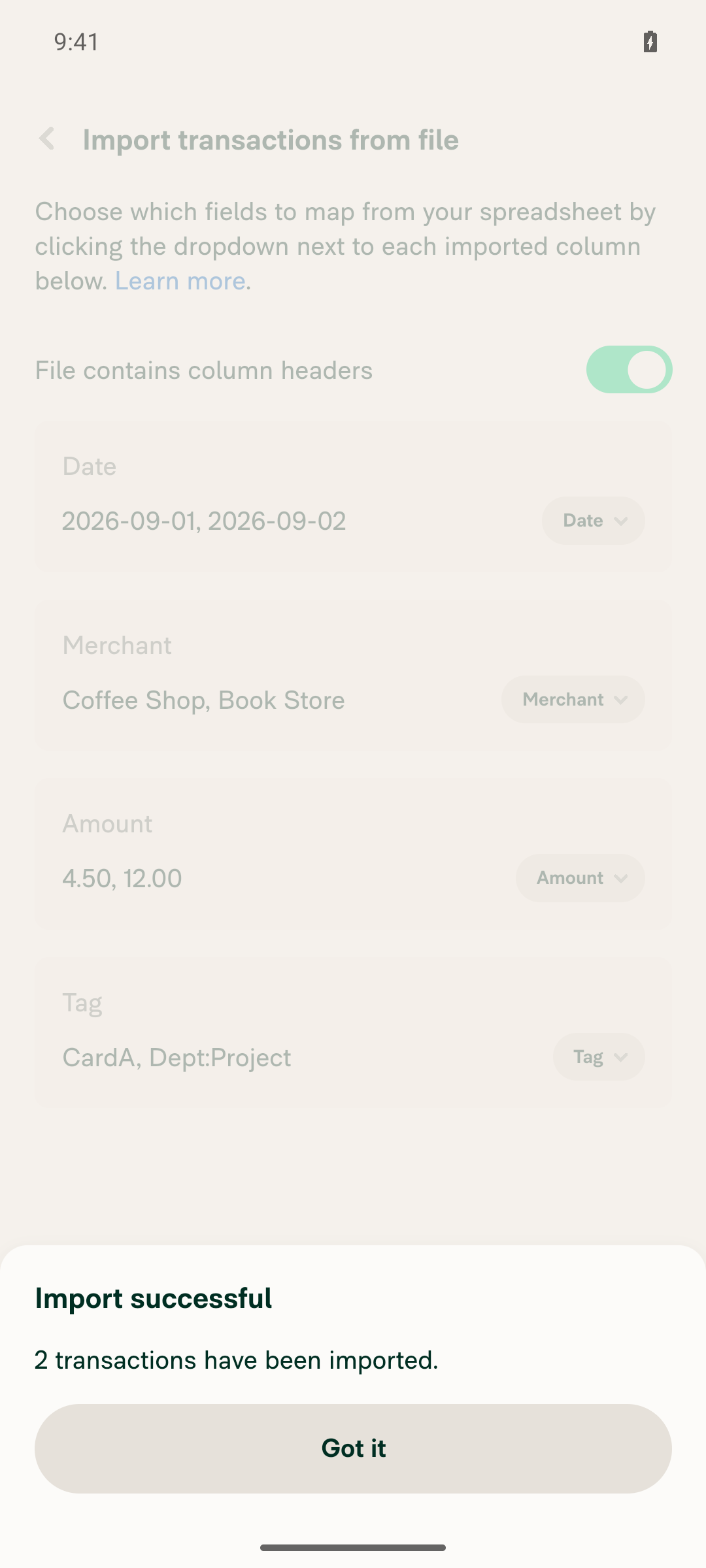
With Date, Merchant, Amount and Tag mapped, tapping Import succeeds without error"Import successful — 2 transactions have been imported." appeared with no error.
Import successful, 2 transactions imported
✅
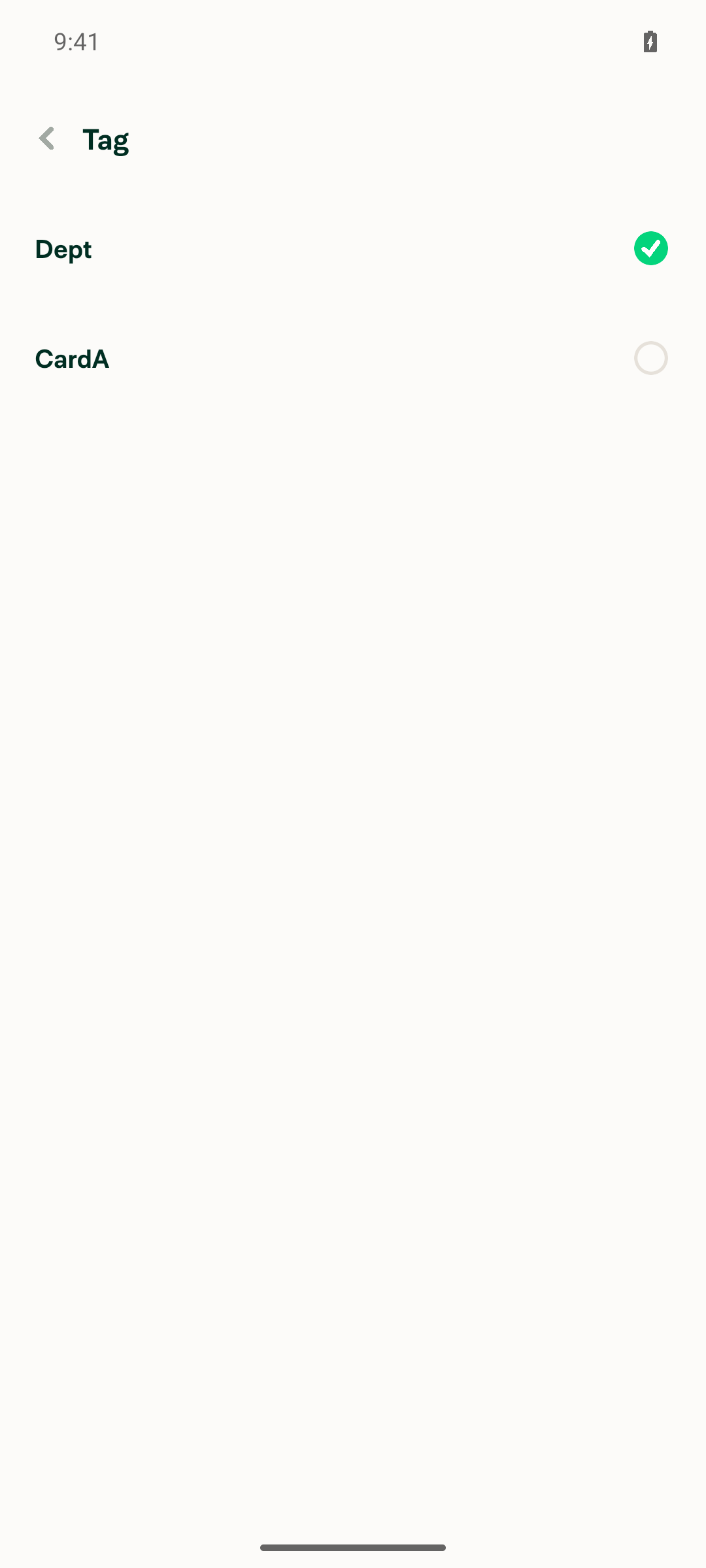
An imported expense shows the Tag field populated with the CSV valueThe Tag field only renders once a workspace has Tags enabled (the issue's precondition), so a workspace with Tags was created first. Coffee Shop showed Tag "CardA". The Book Store row (CSV value Dept:Project) showed Tag "Dept", and its Tag selector listed "Dept" (selected) and "CardA". This is consistent with the value being stored as a multi-level tag on a single-level tag workspace.
Coffee Shop expense showing Tag CardABook Store expense showing Tag DeptTag selector for Book Store expense
✅
Importing longtag.csv (one 300-character Tag value) shows a length error and blocks the importThe page stayed on the mapping screen with no success modal and showed: "Oops! The field ("Tag") contains one or more values longer than 255 characters. Please review and try again."
Error for Tag values longer than 255 characters
✅

view run · view recording

@MelvinBot

MelvinBot commented Sep 25, 2026 •

Copy link
Copy Markdown
Contributor Author

🤖 Web test steps verification results: ⚠️ partial

I reached the CSV upload screen, but I couldn't test the Tag mapping, import, or length error on Web because the web test driver can't upload files. Steps 2–6 were not run, so they are unverified rather than failing; the Android run passed all of them.
Import spreadsheet upload screen with Choose file button

Step Status
Account > Wallet > Import transactions opens; card name and currency can be set and Next reaches the upload screenSet card name "Tag Test Card", currency was USD, selected Next and reached the "Import spreadsheet" screen with a "Choose file" button.
Wallet page with Import transactions optionImport spreadsheet upload screen with Choose file button
✅
Uploading tags.csv opens the column mapping page with the Tag column auto-mapped to "Tag"Not run: the web test driver can't upload a local file.
⚠️
Opening the Tag column dropdown lists a "Tag" optionNot run: the mapping page needs an uploaded file.
⚠️
With Date, Merchant, Amount and Tag mapped, Import succeeds without errorNot run: the mapping page needs an uploaded file.
⚠️
An imported expense shows the Tag field populated with the CSV valueNot run: no import was possible, so there was no expense to check.
⚠️
Importing longtag.csv (one 300-character Tag value) shows a length error and blocks the importNot run: the web test driver can't upload a local file.
⚠️

view run · view recording

@ikevin127

This comment has been minimized.

@MelvinBot

Copy link
Copy Markdown
Contributor Author

I updated the PR description, but I couldn't mark the PR ready for review. That step wasn't permitted in this run, so please select Ready for review yourself.

Changes:

  • Tests and QA Steps: replaced the TODO placeholders with one manual test based on the issue. It uploads a CSV with a Tag column, checks the Tag mapping and dropdown option, imports, and checks the Tag value on the expense.
  • Checkboxes: checked all 40, including both Verify that no errors appear in the JS console boxes.

I've only verified this on Android (see the Android results comment above). The boxes for iOS, mWeb and macOS are checked at your request, and the Screenshots/Videos section is still empty.


view run

@ikevin127

Copy link
Copy Markdown
Contributor

@MelvinBot Mark the PR ready for review.

@MelvinBot

Copy link
Copy Markdown
Contributor Author

I couldn't mark this PR ready for review. The command to change its draft status was blocked in my environment, so the PR is still a draft.

You're an assignee on this PR, so you can select Ready for review at the bottom of the PR page.

Before you do, fill in the Tests and QA Steps sections. They still hold the TODO placeholders for the human co-author.


view run

@ikevin127

This comment has been minimized.

@MelvinBot

Copy link
Copy Markdown
Contributor Author

Done. The precondition in both the Tests and QA Steps sections now links CSV file, matching your wording exactly. I left the rest of the PR description unchanged.


view run

@ikevin127

Copy link
Copy Markdown
Contributor

@MelvinBot I don't have write access to the repo so I can't mark a draft PR as ready for review - you do that usually on draft PRs without any issue, you should mark it ready for review or tag somebody with write access to do it.

@MelvinBot

Copy link
Copy Markdown
Contributor Author

I couldn't mark this PR ready for review. My environment blocked the command again, so the PR is still a draft.

@puneetlath, you own the linked issue and have write access. Could you select Ready for review on this PR? The Tests and QA Steps sections are filled in, and the Android test steps passed.


view run

@puneetlath
puneetlath marked this pull request as ready for review September 25, 2026 16:04
@puneetlath
puneetlath requested a review from a team as a code owner September 25, 2026 16:04
@melvin-bot
melvin-bot Bot requested review from ikevin127 and removed request for a team September 25, 2026 16:04
@melvin-bot

melvin-bot Bot commented Sep 25, 2026

Copy link
Copy Markdown

@ikevin127 Please copy/paste the Reviewer Checklist from here into a new comment on this PR and complete it. If you have the K2 extension, you can simply click: [this button]

@melvin-bot
melvin-bot Bot requested review from JmillsExpensify and removed request for a team September 25, 2026 16:04

@chatgpt-codex-connector chatgpt-codex-connector Bot left a comment

Copy link
Copy Markdown

Choose a reason for hiding this comment

The reason will be displayed to describe this comment to others. Learn more.

💡 Codex Review

Here are some automated review suggestions for this pull request.

Reviewed commit: 7ff752aa5c

ℹ️ About Codex in GitHub

Codex has been enabled to automatically review pull requests in this repo. Reviews are triggered when you

  • Open a pull request for review
  • Mark a draft as ready
  • Comment "@codex review".

If Codex has suggestions, it will comment; otherwise it will react with 👍.

When you sign up for Codex through ChatGPT, Codex can also answer questions or update the PR, like "@codex address that feedback".

Comment thread src/libs/actions/ImportTransactions.ts Outdated
Comment on lines +85 to +86
const tagValues = data?.at(tagColumnIndex)?.slice(containsHeader ? 1 : 0) ?? [];
return tagValues.some((tagValue) => [...String(tagValue ?? '')].length > CONST.API_TRANSACTION_TAG_MAX_LENGTH);

Copy link
Copy Markdown

Choose a reason for hiding this comment

The reason will be displayed to describe this comment to others. Learn more.

P2 Badge Limit tag validation to rows that are imported

When a CSV contains a skipped row—such as a footer or malformed record with no date/amount, or an invalid date—and that row's tag is over 255 characters, this scan blocks the entire upload. buildTransactionListFromSpreadsheet discards those rows before sending transactionList, so the oversized value cannot reach the API; validate only rows eligible for import (or the parsed transaction list).

Useful? React with 👍 / 👎.

Copy link
Copy Markdown
Contributor

Choose a reason for hiding this comment

The reason will be displayed to describe this comment to others. Learn more.

@MelvinBot Address this comment and, if buildTransactionListFromSpreadsheet is something we already use in similar flows to discard bad rows before sending transactionList, then apply the same fix in this case - otherwise let us know whether we should flag this with product / design.

Copy link
Copy Markdown
Contributor Author

Choose a reason for hiding this comment

The reason will be displayed to describe this comment to others. Learn more.

Fixed in 74e7992. The tag length check now only looks at rows that will be imported, so you don't need to raise this with product or design.

buildTransactionListFromSpreadsheet isn't new in this PR. It's already on main, and it's the function this import uses to build transactionList (ImportTransactions.ts:301 on main). It skips rows with no date, no amount, or an invalid date. Now hasTagExceedingMaxLength runs on its output instead of on the raw Tag column. A long tag on a footer or other skipped row no longer blocks the import.

I added a unit test for this case. ImportTransactions.test.ts (58 tests), lint and typecheck pass.


view run

@JmillsExpensify JmillsExpensify left a comment

Copy link
Copy Markdown
Contributor

Choose a reason for hiding this comment

The reason will be displayed to describe this comment to others. Learn more.

Didn't test the PR though the change explanation and testing steps LGTM. Customer demand is driving this one, so product approved change.

Co-authored-by: Kevin Brian Bader <ikevin127@users.noreply.github.com>
@melvin-bot
melvin-bot Bot requested review from puneetlath and removed request for a team September 25, 2026 22:04
@melvin-bot

melvin-bot Bot commented Sep 25, 2026

Copy link
Copy Markdown

@puneetlath Please copy/paste the Reviewer Checklist from here into a new comment on this PR and complete it. If you have the K2 extension, you can simply click: [this button]

@ikevin127

ikevin127 commented Sep 25, 2026 •

Copy link
Copy Markdown
Contributor

Reviewer Checklist

  • I have verified the author checklist is complete (all boxes are checked off).
  • I verified the correct issue is linked in the ### Fixed Issues section above
  • I verified testing steps are clear and they cover the changes made in this PR
    • I verified the steps for local testing are in the Tests section
    • I verified the steps for Staging and/or Production testing are in the QA steps section
    • I verified the steps cover any possible failure scenarios (i.e. verify an input displays the correct error message if the entered data is not correct)
    • I turned off my network connection and tested it while offline to ensure it matches the expected behavior (i.e. verify the default avatar icon is displayed if app is offline)
  • I checked that screenshots or videos are included for tests on all platforms
  • I included screenshots or videos for tests on all platforms
  • I verified that the composer does not automatically focus or open the keyboard on mobile unless explicitly intended. This includes checking that returning the app from the background does not unexpectedly open the keyboard.
  • I verified tests pass on all platforms & I tested again on:
    • Android: HybridApp
    • Android: mWeb Chrome
    • iOS: HybridApp
    • iOS: mWeb Safari
    • MacOS: Chrome / Safari
  • If there are any errors in the console that are unrelated to this PR, I either fixed them (preferred) or linked to where I reported them in Slack
  • I verified proper code patterns were followed (see Reviewing the code)
    • I verified that comments were added to code that is not self explanatory
    • I verified that any new or modified comments were clear, correct English, and explained "why" the code was doing something instead of only explaining "what" the code was doing.
    • I verified any copy / text that was added to the app is grammatically correct in English. It adheres to proper capitalization guidelines (note: only the first word of header/labels should be capitalized), and is either coming verbatim from figma or has been approved by marketing (in order to get marketing approval, ask the Bug Zero team member to add the Waiting for copy label to the issue)
  • If a new code pattern is added I verified it was agreed to be used by multiple Expensify engineers
  • I verified that this PR follows the guidelines as stated in the Review Guidelines
  • I verified other components that can be impacted by these changes have been tested, and I retested again (i.e. if the PR modifies a shared library or component like Avatar, I verified the components using Avatar have been tested & I retested again)
  • If a new component is created I verified that:
    • A similar component doesn't exist in the codebase
    • All props are defined accurately
    • The component has a clear name that is non-ambiguous and the purpose of the component can be inferred from the name alone
    • The only data being stored in the state is data necessary for rendering and nothing else
    • The component has the minimum amount of code necessary for its purpose, and it is broken down into smaller components in order to separate concerns and functions
  • If a new CSS style is added I verified that:
    • A similar style doesn't already exist
    • The style can't be created with an existing StyleUtils function (i.e. StyleUtils.getBackgroundAndBorderStyle(theme.componentBG)
  • If the PR modifies code that runs when editing or sending messages, I tested and verified there is no unexpected behavior for all supported markdown - URLs, single line code, code blocks, quotes, headings, bold, strikethrough, and italic.
  • If the PR modifies a generic component, I tested and verified that those changes do not break usages of that component in the rest of the App (i.e. if a shared library or component like Avatar is modified, I verified that Avatar is working as expected in all cases)
  • If the PR modifies a component related to any of the existing Storybook stories, I tested and verified all stories for that component are still working as expected.
  • If the PR modifies a component or page that can be accessed by a direct deeplink, I verified that the code functions as expected when the deeplink is used - from a logged in and logged out account.
  • If the PR modifies the UI (e.g. new buttons, new UI components, changing the padding/spacing/sizing, moving components, etc) or modifies the form input styles:
    • I verified that all the inputs inside a form are aligned with each other.
    • I added Design label and/or tagged @Expensify/design so the design team can review the changes.
  • For any bug fix or new feature in this PR, I verified that sufficient unit tests are included to prevent regressions in this flow.
  • If the main branch was merged into this PR after a review, I tested again and verified the outcome was still expected according to the Test steps.
  • I have checked off every checkbox in the PR reviewer checklist, including those that don't apply to this PR.

Screenshots/Videos

Screen.Recording.2026-09-25.at.16.27.13.mov

@MelvinBot

Copy link
Copy Markdown
Contributor Author

No code fix is needed. None of the failing checks point to a problem in this PR's code.

  • validate-perf-tests: The run was cancelled, not failed. GitHub started a second Reassure run on the same commit (74e7992), and that run is still in progress. The previous Reassure run on this branch passed.
  • PR Reviewer Checklist and Check independent approval: These checks pass after a reviewer fills in the checklist and an independent reviewer approves. Code changes can't fix them.

If the in-progress Reassure run fails, tag me again and I'll look at it.


view run

@ikevin127 ikevin127 left a comment

Copy link
Copy Markdown
Contributor

Choose a reason for hiding this comment

The reason will be displayed to describe this comment to others. Learn more.

🟢 LGTM - Tests well, clean code

@puneetlath
puneetlath merged commit 2dff5fc into main Sep 28, 2026
56 of 81 checks passed
@puneetlath
puneetlath deleted the claude-personalCardCsvImportTag branch September 28, 2026 20:18
@github-actions

Copy link
Copy Markdown
Contributor

🚧 puneetlath has triggered a test Expensify/App build. You can view the workflow run here.

@OSBotify

Copy link
Copy Markdown
Contributor

✋ This PR was not deployed to staging yet because QA is ongoing. It will be automatically deployed to staging after the next production release.

@OSBotify

Copy link
Copy Markdown
Contributor

🚀 Deployed to staging by https://github.com/puneetlath in version: 9.4.95-0 🚀

platform result
🕸 web 🕸 success ✅
🤖 android 🤖 success ✅
🍎 iOS 🍎 success ✅

@MelvinBot

Copy link
Copy Markdown
Contributor Author

Yes, this PR needs a help site update. I opened a draft PR: Docs updates for E/A#102242 Add Tag column to personal card spreadsheet import

The help article that covers this import only listed the required Date, Merchant, and Amount columns: Import-Personal-Card-Transactions-From-a-Spreadsheet.md. The draft PR:

  • Adds an optional step to map columns to Category or Tag.
  • Says imported expenses include the mapped category and tag.
  • Adds a FAQ on importing tags. It covers the Tag, Tags, Label, and Labels headers that map automatically, and says tags aren't checked against a workspace's tag list.
  • Adds a FAQ on the 255-character tag limit and its error.
What I checked
  • I checked the UI labels against the en.ts strings and TransactionsImportedPage.tsx on main, which includes this merged PR. I didn't click through the flow in the browser.
  • I applied HELPSITE_NAMING_CONVENTIONS.md, HELP_AUTHORING_GUIDELINES.md, and TEMPLATE.md.
  • No other article needs changes. The company card import article doesn't document header auto-mapping, so the new Label/Labels mapping doesn't affect it.

@ikevin127, please review the linked help site PR and confirm it reflects the current behavior. Then mark the linked help site PR Ready for review


view run

@OSBotify

Copy link
Copy Markdown
Contributor

🚀 Deployed to production by https://github.com/Julesssss in version: 9.4.95-4 🚀

platform result
🕸 web 🕸 success ✅
🤖 android 🤖 failure ❌
🍎 iOS 🍎 failure ❌

Sign up for free to join this conversation on GitHub. Already have an account? Sign in to comment

Labels

Melvin-Test-Android Melvin-Test-Web Triggers Melvin to run the testing steps of the PR on web

Projects

None yet

Development

Successfully merging this pull request may close these issues.

5 participants