Skip to content

Show the Upgrade step when copying rules to a Collect workspace - #101710

Merged
marcochavezf merged 3 commits into
mainfrom
claude-copySettingsRulesUpgradeStep
Sep 23, 2026
Merged

marcochavezf merged 3 commits into
mainfrom
claude-copySettingsRulesUpgradeStep

Conversation

@MelvinBot

@MelvinBot MelvinBot commented Sep 21, 2026 •

Copy link
Copy Markdown
Contributor

Explanation of Change

Copying the Rules feature from a Control workspace to a Collect workspace ended in a copy failure instead of showing the Upgrade step.

shouldShowCopyPolicySettingsUpgradeStep delegates the whole decision to canPolicyAccessFeature, which returns true for Rules on a Collect policy. So rules was filtered out of the Control-only set, the Select settings step skipped Upgrade and went straight to Confirm, and the copy fired — and the backend rejected it.

That behaviour changed in Remove rulesRevamp beta.: isCollectPolicy(policy) && isRulesRevampEnabled (false in production, so Rules was treated as Control-only and the Upgrade step did show) became an unconditional isCollectPolicy(policy).

The fix: gate rules and codingRules inside getControlOnlySelectedParts rather than changing canPolicyAccessFeature. The two questions are different:

  • Can this workspace turn Rules on? — yes, Collect can enable the subset it supports. That's what canPolicyAccessFeature answers, and its three other consumers (More Features page, workspace menu items) depend on that answer.
  • Can this workspace receive a Control workspace's Rules configuration? — no. The rules part copies ~17 policy fields at once (maxExpenseAmount, eReceipts, preventSelfApproval, glCodes, …), most of them Control-only. codingRules (Merchant rules) maps to the same feature, so it has the same hole.

With the gate in place, Select settings routes to the existing Upgrade step (route, page and copy already exist) before anything is sent.

This also flips the assertion added by Expensify/App#98662 in CopyPolicySettingsUtilsTest.ts, which locked in the broken behaviour — that test is updated, and coverage is added for codingRules and for the Control-target case.

Full analysis: the approved proposal on the issue.

AI Tests run by Melvin
Check Result
npm test tests/unit/CopyPolicySettingsUtilsTest.ts ✅ 67 passed
npm test (all 6 copy-settings suites) ✅ 86 passed
ESLint on both changed files ✅ clean
npm run typecheck ✅ passed
npm run spell-changed ✅ 0 issues
Browser verification ❌ not run — the CI browser session was handed over broken (blank page, 0 nodes) and could not be recovered read-only. Unrelated to this change.

Fixed Issues

$ #101456
PROPOSAL: #101456 (comment)

Tests

Preconditions — sign in as an admin of two paid workspaces:

  • Workspace A — Control. Under More features enable Rules, then set at least one workspace rule (for example Expenses → Max expense amount) so the Rules row appears in the copy flow. To also cover merchant rules, add at least one merchant rule so the Merchant rules row appears.
  • Workspace B — Collect (Team).

1. Rules → Collect target shows the Upgrade step (the bug)

  1. Go to Settings → Workspaces.
  2. Click the ⋮ menu on Workspace A (Control) and select Copy settings.
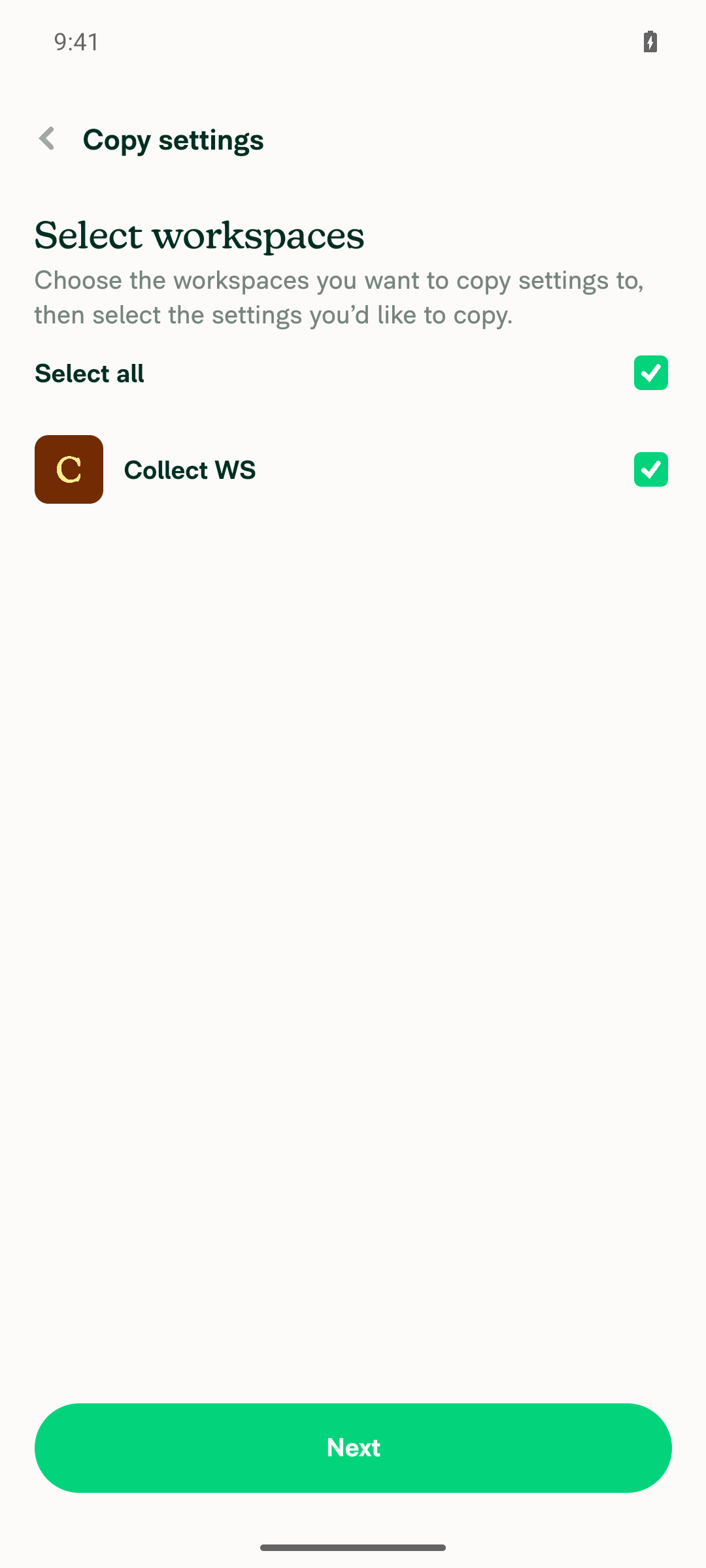
  3. On Select workspaces, select Workspace B (Collect) and click Next.
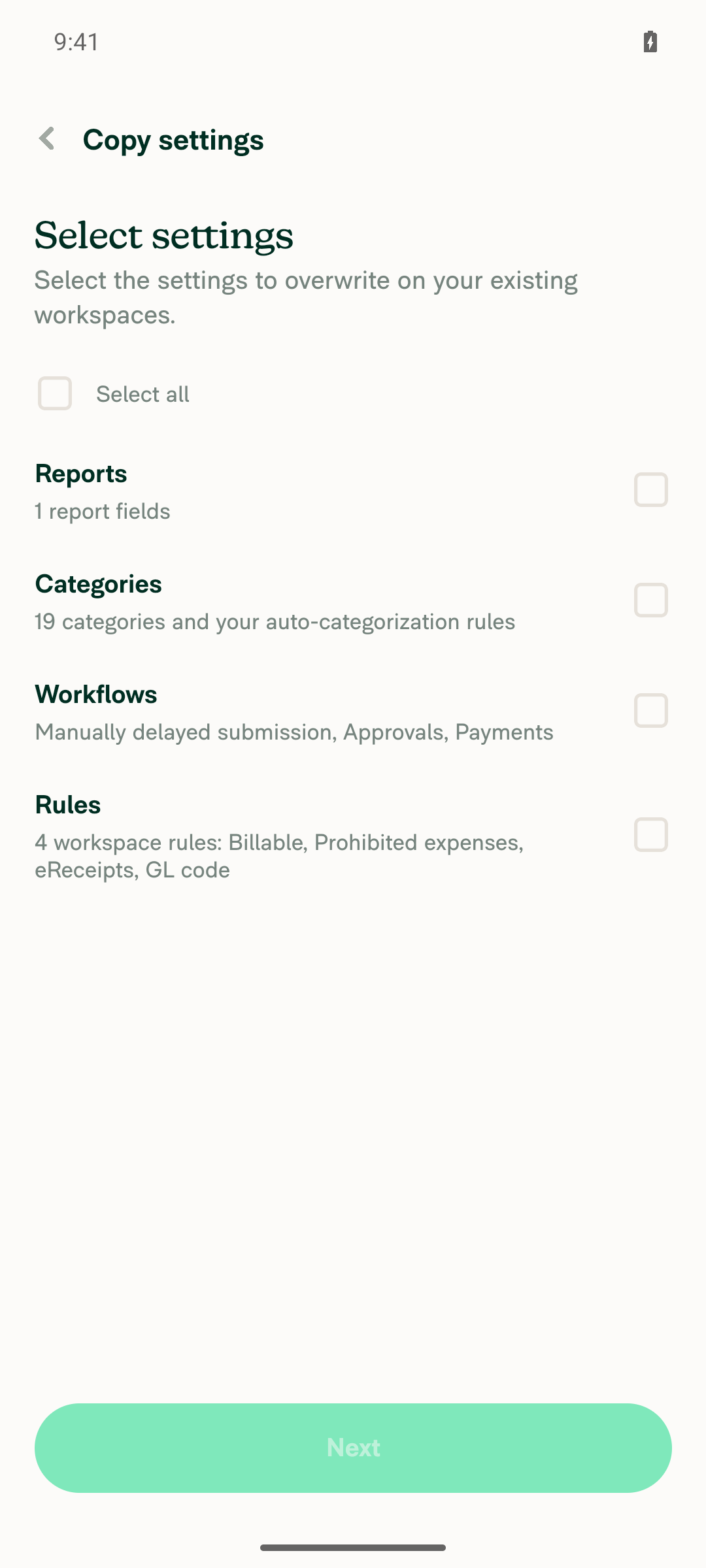
  4. On Select settings, tick Rules and click Next.
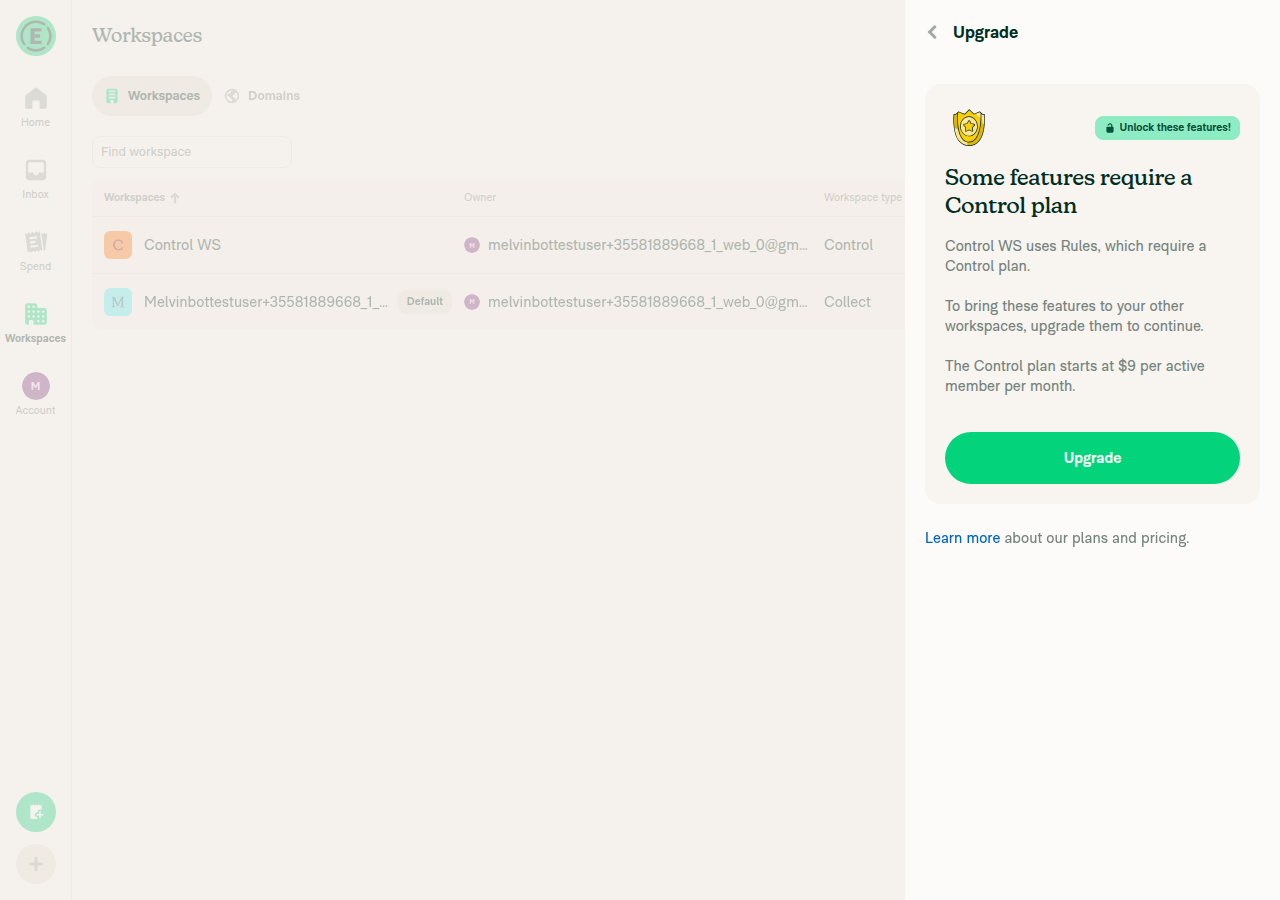
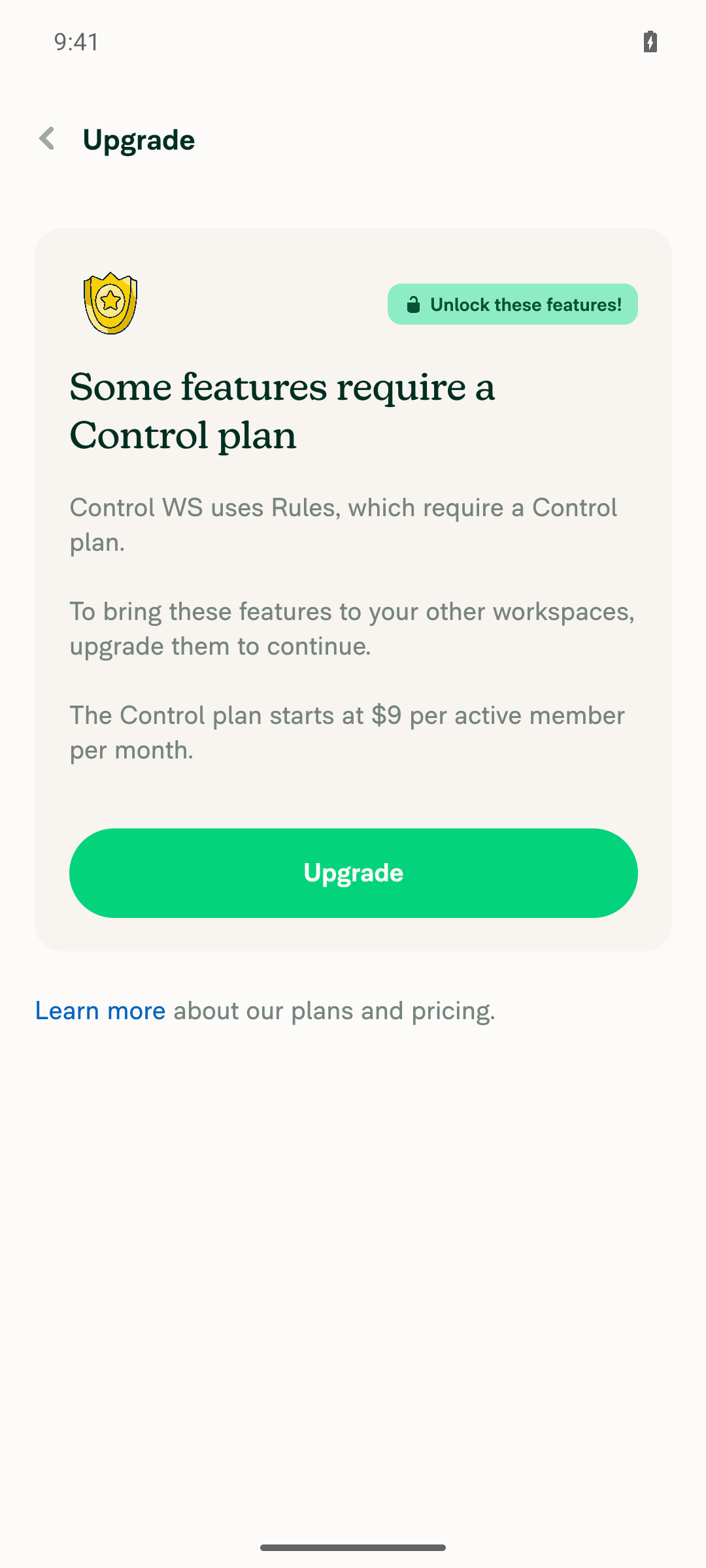
  5. Verify the Upgrade step is displayed, with the heading "Some features require a Control plan", a description naming Workspace A and listing Rules, and an Upgrade button.
  6. Verify no copy was started — there is no "Copy in progress…" or "Copy failed" modal on the Workspaces list. (Before this fix, step 4 went straight to Confirm and the copy failed here.)
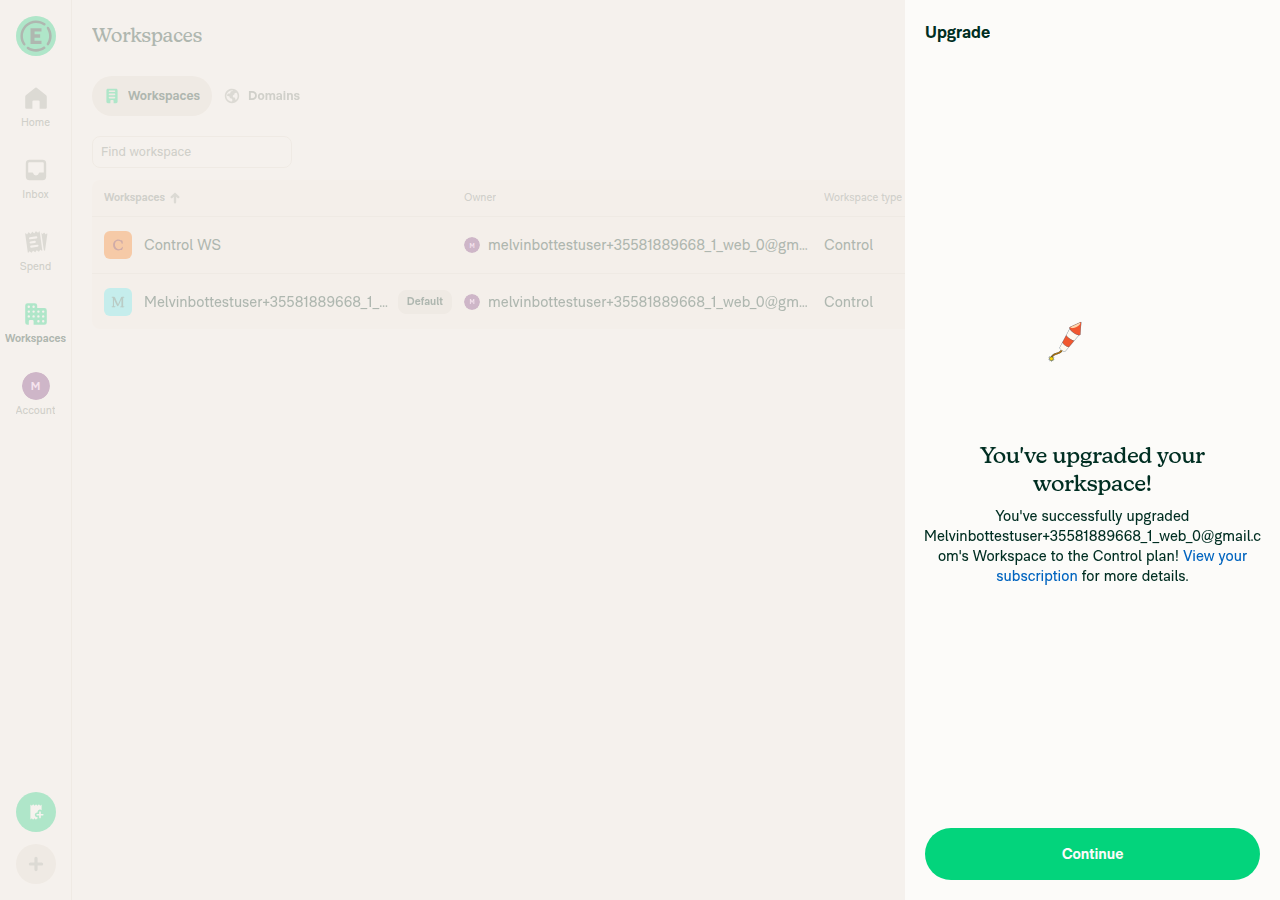
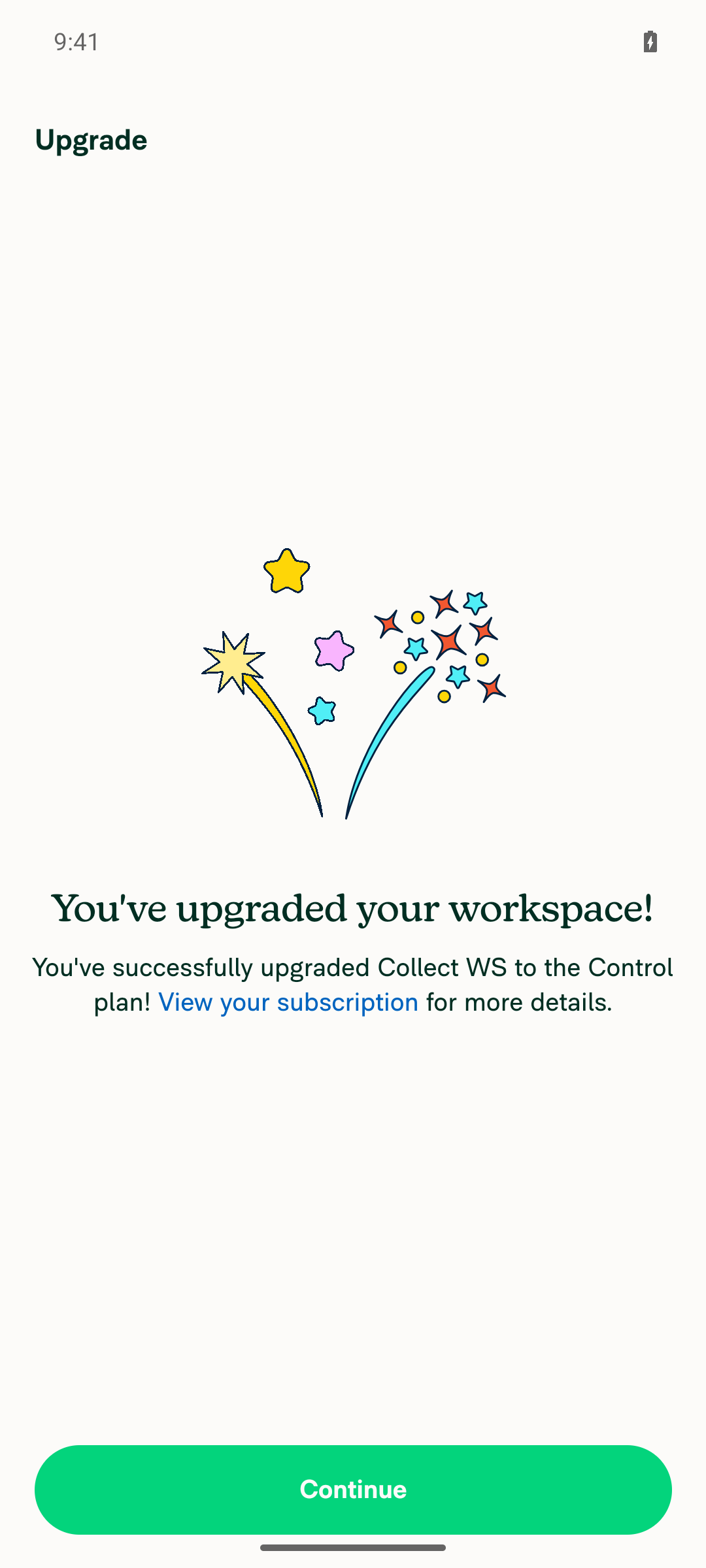
  7. Click Upgrade. Verify the success view "You've upgraded your workspace!" appears with a Continue button.
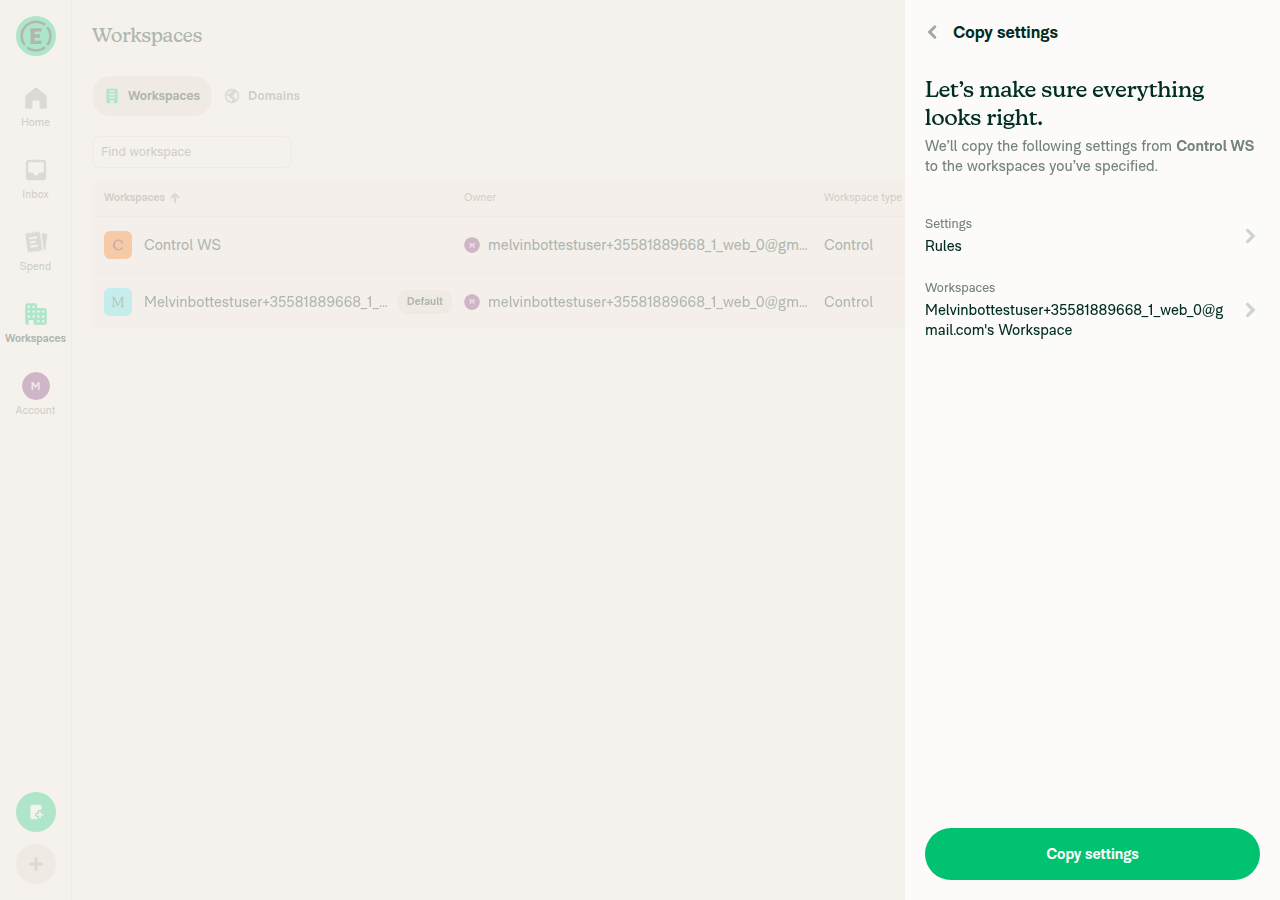
  8. Click Continue. Verify you land on "Let's make sure everything looks right." with Settings showing Rules and Workspaces showing Workspace B.
  9. Click Copy settings. Verify the copy completes successfully and no "Copy failed" modal appears.

2. Merchant rules behaves the same

  1. Reset Workspace B to a Collect workspace (or use another Collect workspace).
  2. Repeat steps 2–5 above, ticking Merchant rules instead of Rules.
  3. Verify the Upgrade step is displayed and lists Merchant rules.

3. Regression — Upgrade must still be skipped when it isn't needed

  1. Repeat steps 2–4 but select a Control workspace as the target instead of a Collect one. Verify the flow goes straight to Confirm — no Upgrade step — and the copy succeeds.
  2. Repeat steps 2–4 with a Collect target but tick only Categories (no Rules, no Merchant rules). Verify the flow goes straight to Confirm and the copy succeeds.
  3. Repeat steps 2–4 with a Collect target and tick Rules together with Categories. Verify the Upgrade step is shown, and after upgrading and continuing, both settings are copied.

4. Regression — the Rules toggle on Collect is unchanged

  1. Open a Collect workspace → More features.
  2. Verify Rules can still be toggled on directly, and that the Rules menu item still appears in the workspace sidebar after enabling it. (This PR deliberately does not change canPolicyAccessFeature, which drives that toggle.)
  • Verify that no errors appear in the JS console

Offline tests

  1. Start the copy flow from Workspace A (Control) with Workspace B (Collect) selected, tick Rules, and go offline before pressing Next.
  2. Press Next. Verify the Upgrade step still appears — the decision is computed locally from Onyx data, so it does not need the network.
  3. Verify the Upgrade button is disabled while offline.
  4. Go back online. Verify the Upgrade button becomes enabled, the upgrade completes, and Continue takes you to the Confirm step.

QA Steps

Preconditions — on staging, use an Expensifail account that is an admin of two paid workspaces:

  • Workspace A — Control, with Rules enabled and at least one workspace rule set (for example Expenses → Max expense amount).
  • Workspace B — Collect (Team).
  1. Open https://staging.new.expensify.com/ and sign in.
  2. Go to Settings → Workspaces.
  3. Click the ⋮ menu on Workspace A (Control) and select Copy settings.
  4. Select Workspace B (Collect) and click Next.
  5. On Select settings, tick Rules and click Next.
  6. Verify the Upgrade step is displayed — heading "Some features require a Control plan", description naming Workspace A and listing Rules.
  7. Verify no copy was started and no "Copy failed" error appears.
  8. Click Upgrade, then verify the success view "You've upgraded your workspace!" appears with a Continue button.
  9. Click Continue and verify the Confirm step shows Settings: Rules and Workspaces: Workspace B.
  10. Click Copy settings and verify the copy completes successfully.
  11. Regression: repeat steps 3–5 with a Control target — verify the flow goes straight to Confirm with no Upgrade step.
  12. Regression: repeat steps 3–5 with a Collect target but tick only Categories — verify the flow goes straight to Confirm with no Upgrade step.
  13. Regression: open a Collect workspace → More features and verify Rules can still be toggled on directly.
  • Verify that no errors appear in the JS console

PR Author Checklist

  • I linked the correct issue in the ### Fixed Issues section above
  • I wrote clear testing steps that cover the changes made in this PR
    • I added steps for local testing in the Tests section
    • I added steps for the expected offline behavior in the Offline steps section
    • I added steps for Staging and/or Production testing in the QA steps section
    • I added steps to cover failure scenarios (i.e. verify an input displays the correct error message if the entered data is not correct)
    • I turned off my network connection and tested it while offline to ensure it matches the expected behavior (i.e. verify the default avatar icon is displayed if app is offline)
    • I tested this PR with a High Traffic account against the staging or production API to ensure there are no regressions (e.g. long loading states that impact usability).
  • I included screenshots or videos for tests on all platforms
  • I ran the tests on all platforms & verified they passed on:
    • Android: Native
    • Android: mWeb Chrome
    • iOS: Native
    • iOS: mWeb Safari
    • MacOS: Chrome / Safari
  • I verified there are no console errors (if there's a console error not related to the PR, report it or open an issue for it to be fixed)
  • I followed proper code patterns (see Reviewing the code)
    • I verified that comments were added to code that is not self explanatory
    • I verified that any new or modified comments were clear, correct English, and explained "why" the code was doing something instead of only explaining "what" the code was doing.
    • I verified any copy / text that was added to the app is grammatically correct in English. It adheres to proper capitalization guidelines (note: only the first word of header/labels should be capitalized), and is either coming verbatim from figma or has been approved by marketing (in order to get marketing approval, ask the Bug Zero team member to add the Waiting for copy label to the issue)
  • If a new code pattern is added I verified it was agreed to be used by multiple Expensify engineers
  • I followed the guidelines as stated in the Review Guidelines
  • I tested other components that can be impacted by my changes (i.e. if the PR modifies a shared library or component like Avatar, I verified the components using Avatar are working as expected)
  • If a new CSS style is added I verified that:
    • A similar style doesn't already exist
    • The style can't be created with an existing StyleUtils function (i.e. StyleUtils.getBackgroundAndBorderStyle(theme.componentBG))
  • If new assets were added or existing ones were modified, I verified that:
    • The assets are optimized and compressed (for SVG files, run npm run compress-svg)
    • The assets load correctly across all supported platforms.
  • If the PR modifies code that runs when editing or sending messages, I tested and verified there is no unexpected behavior for all supported markdown - URLs, single line code, code blocks, quotes, headings, bold, strikethrough, and italic.
  • If the PR modifies a generic component, I tested and verified that those changes do not break usages of that component in the rest of the App (i.e. if a shared library or component like Avatar is modified, I verified that Avatar is working as expected in all cases)
  • If the PR modifies a component related to any of the existing Storybook stories, I tested and verified all stories for that component are still working as expected.
  • If the PR modifies a component or page that can be accessed by a direct deeplink, I verified that the code functions as expected when the deeplink is used - from a logged in and logged out account.
  • If the PR modifies the UI (e.g. new buttons, new UI components, changing the padding/spacing/sizing, moving components, etc) or modifies the form input styles:
    • I verified that all the inputs inside a form are aligned with each other.
    • I added Design label and/or tagged @Expensify/design so the design team can review the changes.
  • I added unit tests for any new feature or bug fix in this PR to help automatically prevent regressions in this user flow.
  • If the main branch was merged into this PR after a review, I tested again and verified the outcome was still expected according to the Test steps.

Screenshots/Videos

Android: Native
Android: mWeb Chrome
iOS: Native
iOS: mWeb Safari
MacOS: Chrome / Safari

Copying the rules or codingRules parts writes Control-only policy fields, so a Collect target must be upgraded first. Gate those parts in the copy flow instead of deferring to canPolicyAccessFeature, which correctly reports that Collect can enable Rules on its own.

Co-authored-by: daledah <daledah@users.noreply.github.com>
@MelvinBot

MelvinBot commented Sep 21, 2026 •

Copy link
Copy Markdown
Contributor Author

🤖 Web test steps verification results: ✅ pass

Copying Rules from a Control workspace to a Collect workspace now routes through the Upgrade step ("Some features require a Control plan"), the upgrade completes with a success view, and no copy-failure error appears anywhere in the flow. Steps came from the linked issue Auto - Workspace - Unable to "Copy settings" from Control to Collect workspace, since this PR's Tests section is still an unfilled TODO.

Copy in progress modal later, still no error banner

Step Status
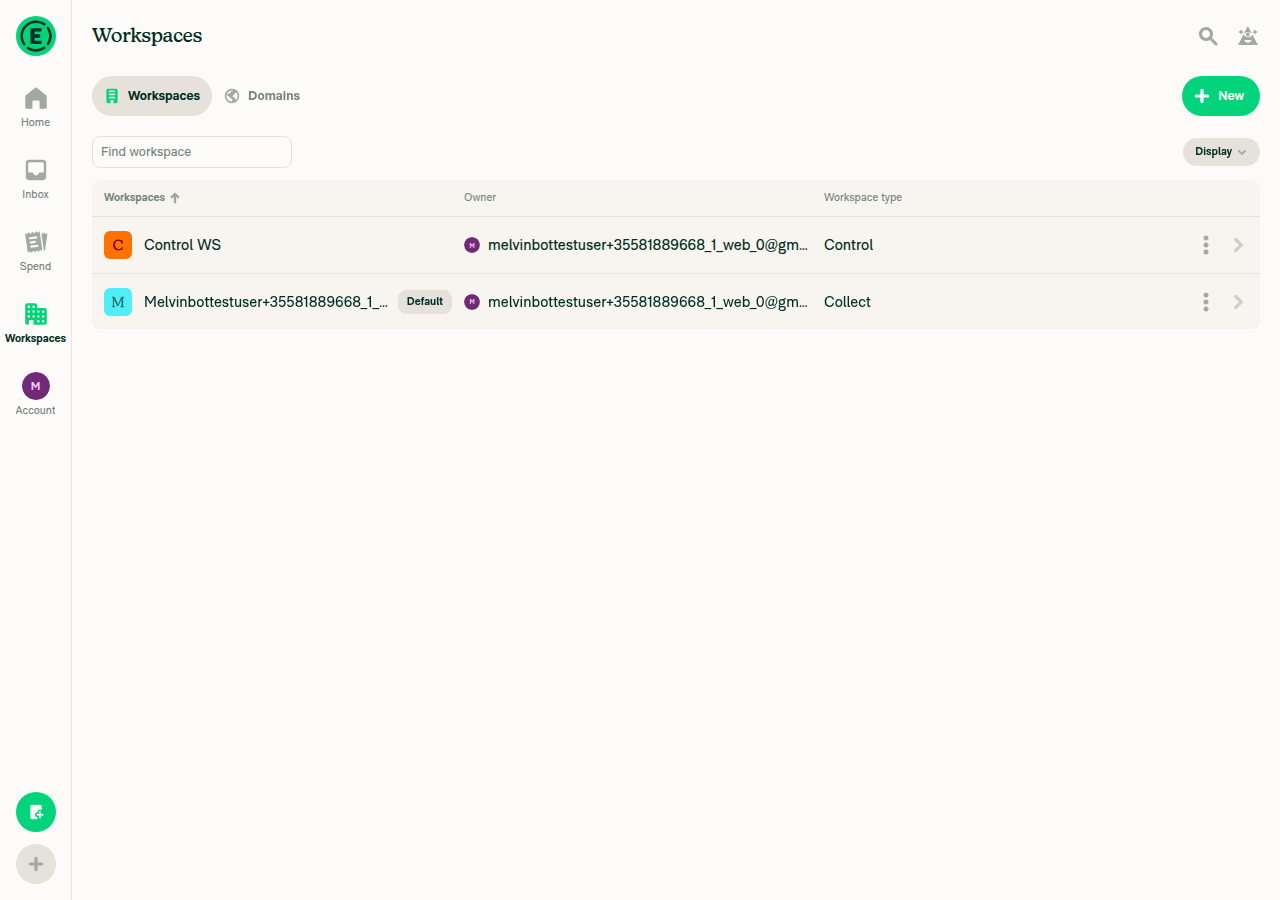
Workspace list opens and shows both a Control workspace and a Collect workspaceSetup: created workspace "Control WS", switched Plan type to Control, enabled the Rules feature and set Billable expenses → Billable. List rows read "Control WS … Workspace type: Control" and the default workspace as Collect.
Workspaces list with Control WS (Control) and the default workspace (Collect)
✅
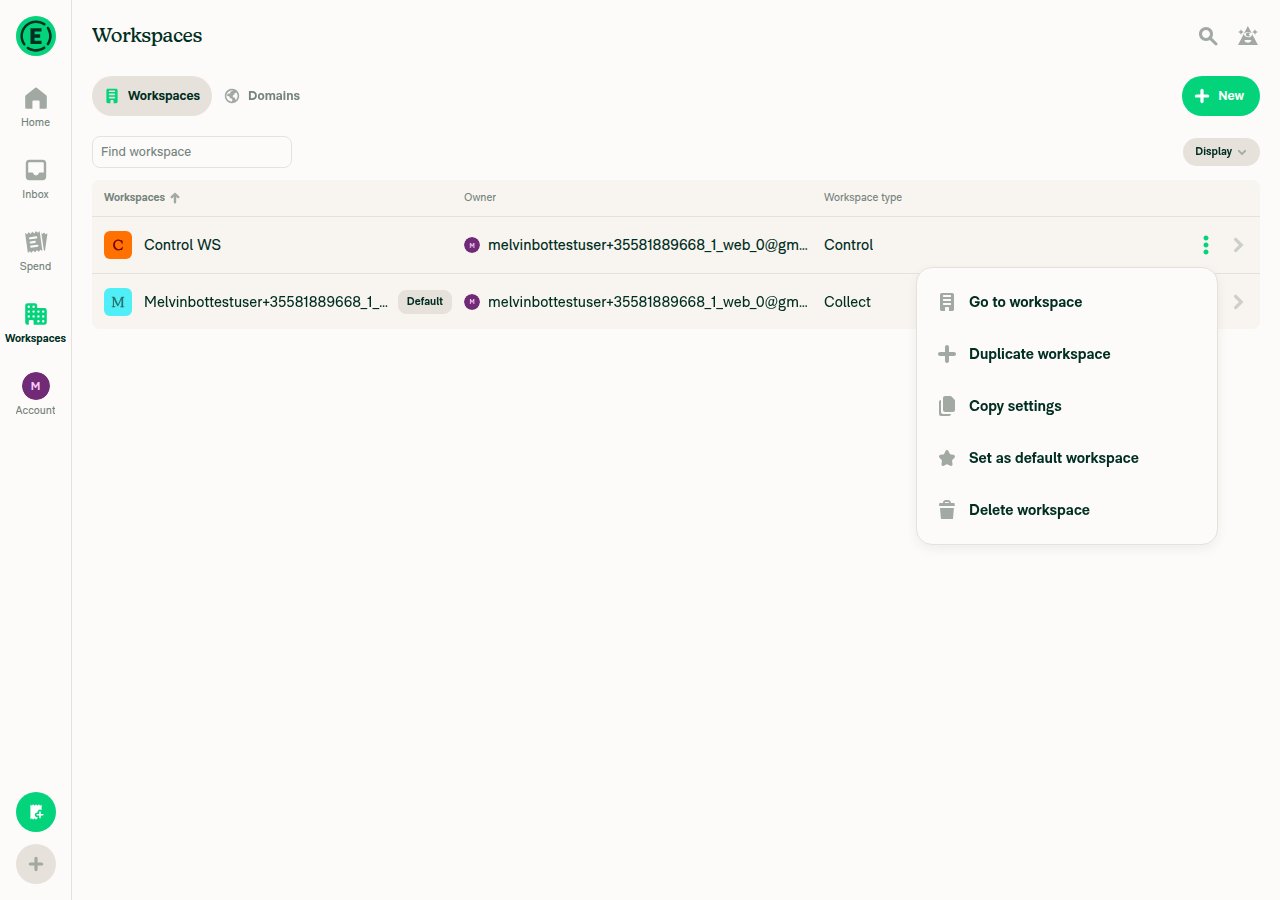
Three-dot menu on the Control workspace shows a "Copy settings" optionThe row overflow button opened a dialog with Go to workspace / Duplicate workspace / Copy settings / Set as default workspace / Delete workspace.
Three-dot menu on Control WS showing the Copy settings option
✅
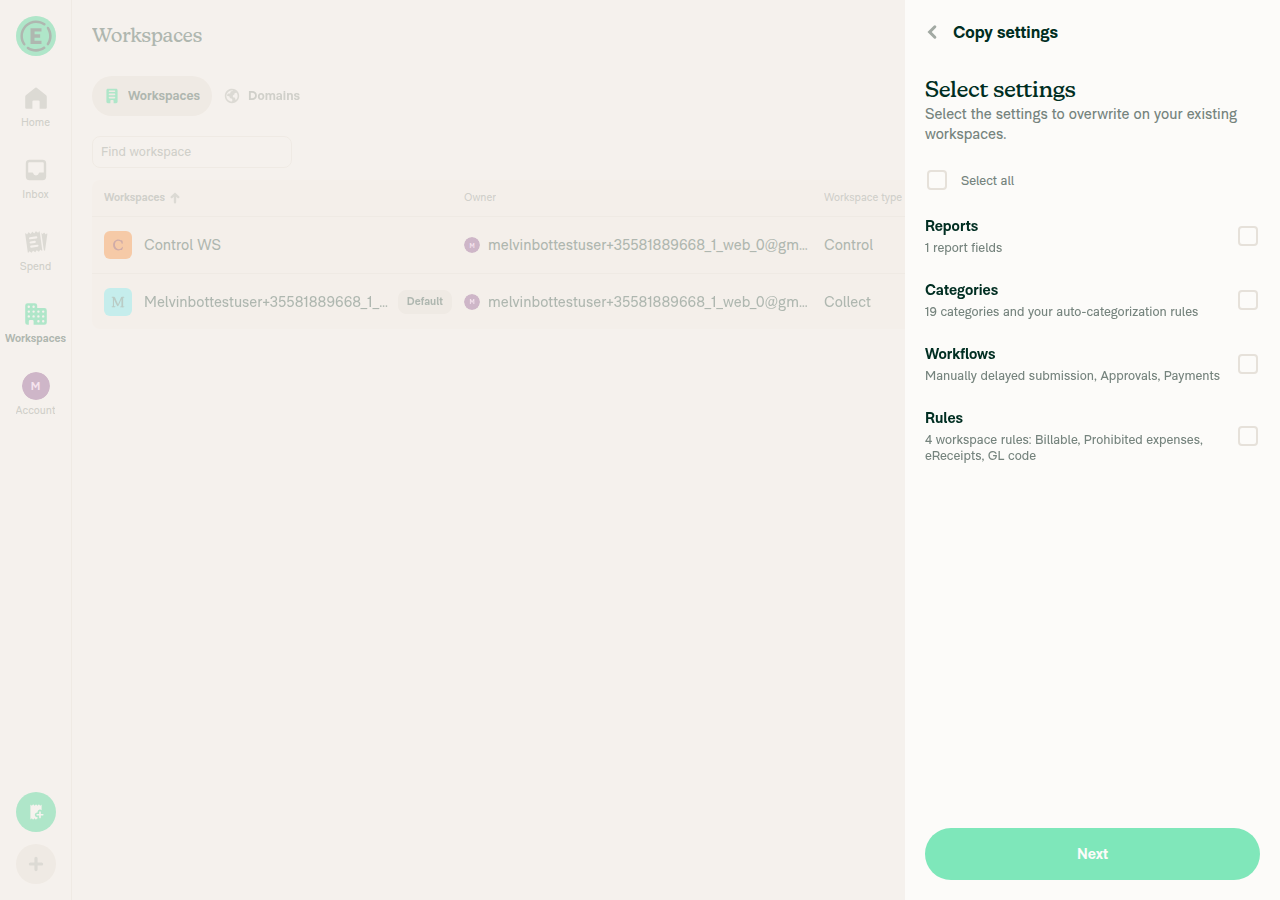
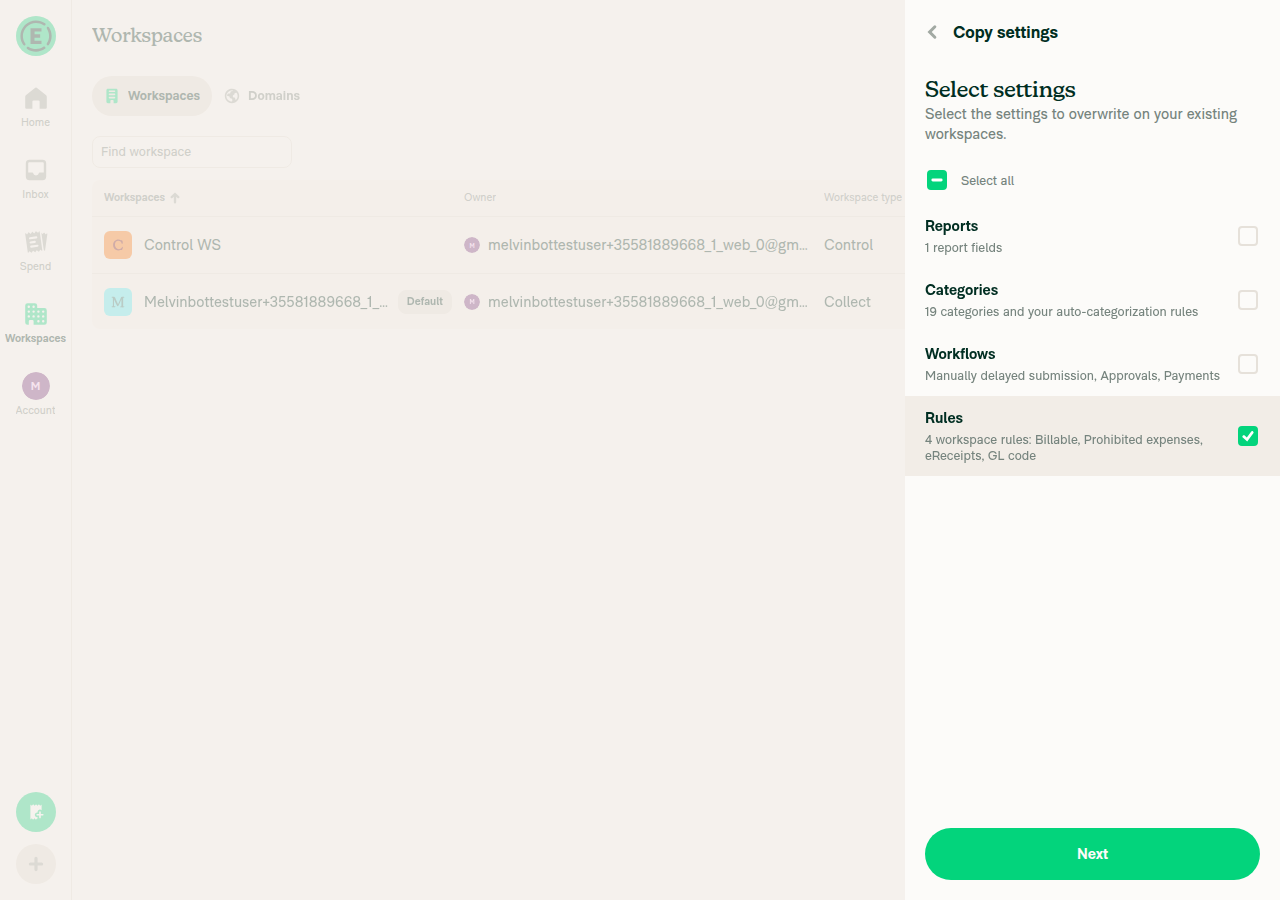
Selecting the Collect workspace as destination and clicking "Next" advances to "Select settings"Checked the Collect workspace (Next became enabled), clicked Next; the Select settings step listed Reports, Categories, Workflows, and "Rules, 4 workspace rules: Billable, Prohibited expenses, eReceipts, GL code".
Select settings step listing Reports, Categories, Workflows and Rules
✅
Selecting "Rules" and clicking "Next" shows the Upgrade step naming the Control-only features and the source workspaceWith only Rules checked, Next led to the Upgrade step reading "Some features require a Control plan" / "Control WS uses Rules, which require a Control plan." — the Control-only feature and the source workspace name. No copy was attempted at this point.
Select settings step with only Rules checked
Upgrade step: Some features require a Control plan
✅
Clicking "Upgrade" completes and shows the success view with a "Continue" buttonUpgradeToCorporate returned 200; the step changed to "You've upgraded your workspace!" with a Continue button, and the destination row flipped from Collect to Control.
Upgrade success view with Continue button
✅
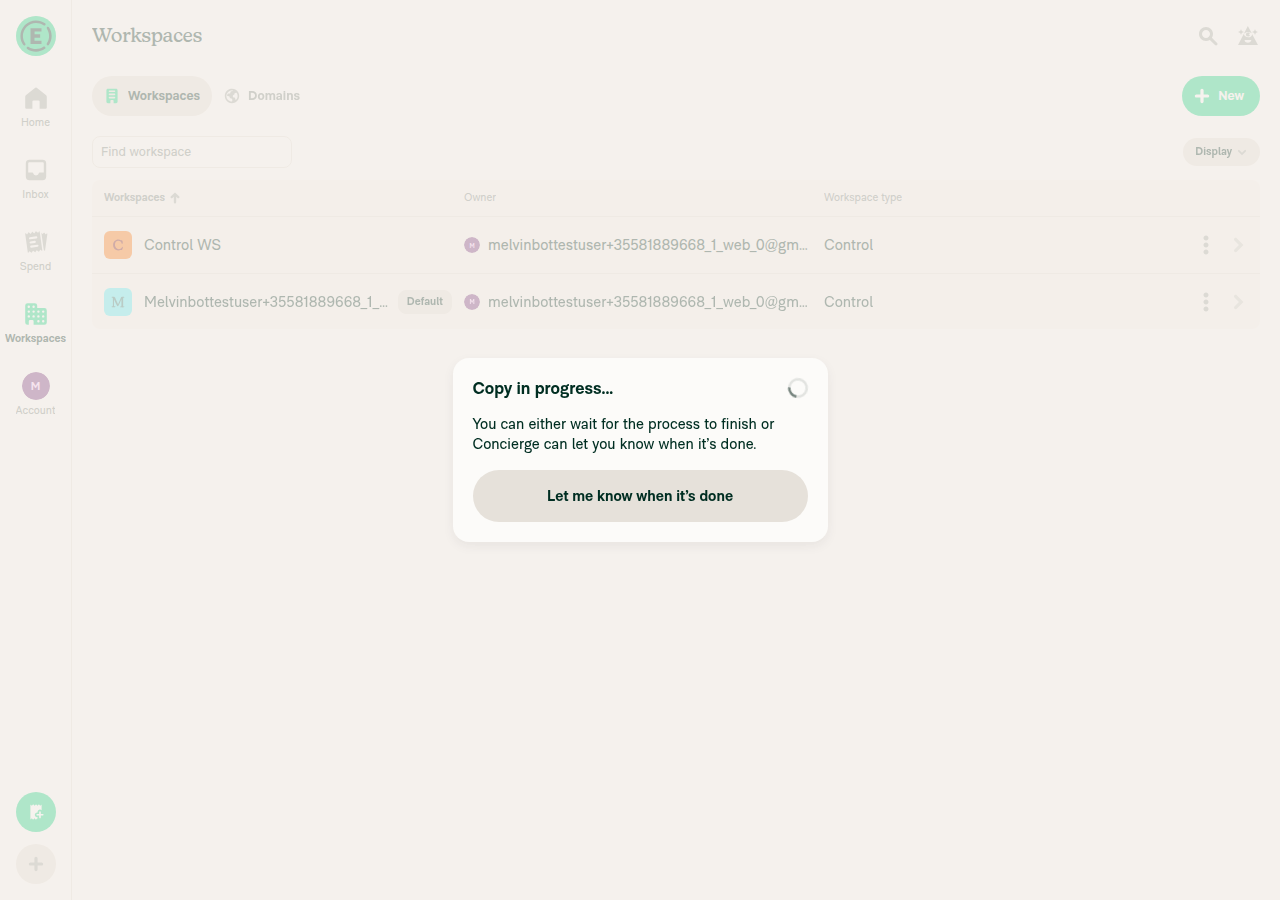
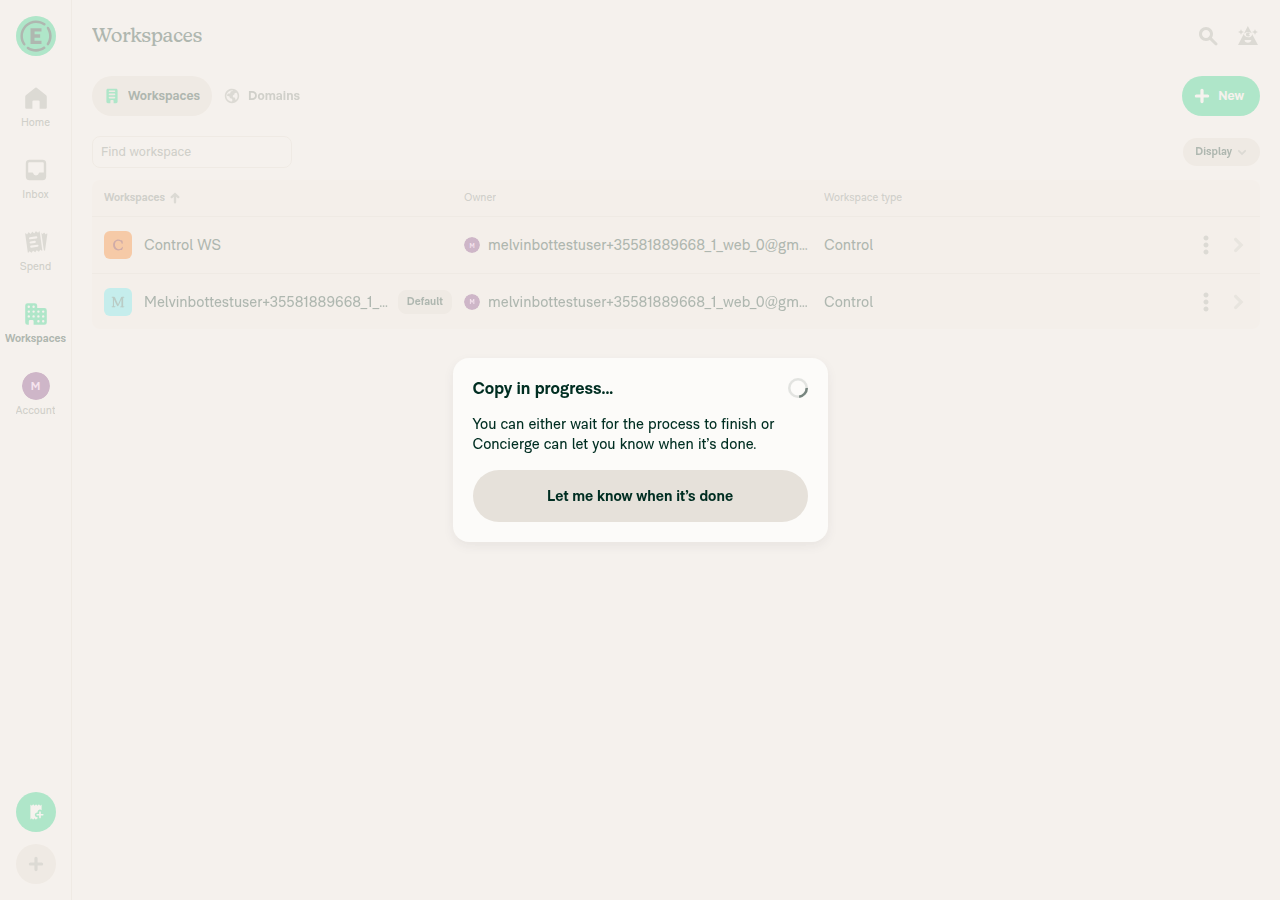
No copy-failure error appears at any pointContinue advanced to the confirm step; clicking "Copy settings" produced the "Copy in progress…" modal with no error banner. Network shows POST /api/CopyPolicySettings 200 and UpgradeToCorporate 200, no 4xx/5xx, and no console errors. Out of scope: the progress modal still read "Copy in progress…" ~2.5 minutes later — completion is signalled asynchronously by Concierge and wasn't observed within the run, but nothing errored.
Confirm step summarising Settings: Rules and the destination workspace
Copy in progress modal immediately after starting the copy, no error
Copy in progress modal later, still no error banner
✅

view run · view recording

@MelvinBot

MelvinBot commented Sep 21, 2026 •

Copy link
Copy Markdown
Contributor Author

🤖 Android test steps verification results: ✅ pass

Copying the Control-only "Rules" setting from a Control workspace to a Collect workspace now routes through the Upgrade step, the upgrade succeeds, and the copy completes with no failure error. Steps came from the linked issue Auto - Workspace - Unable to "Copy settings" from Control to Collect workspace, since this PR's Tests section is still an unfilled TODO.

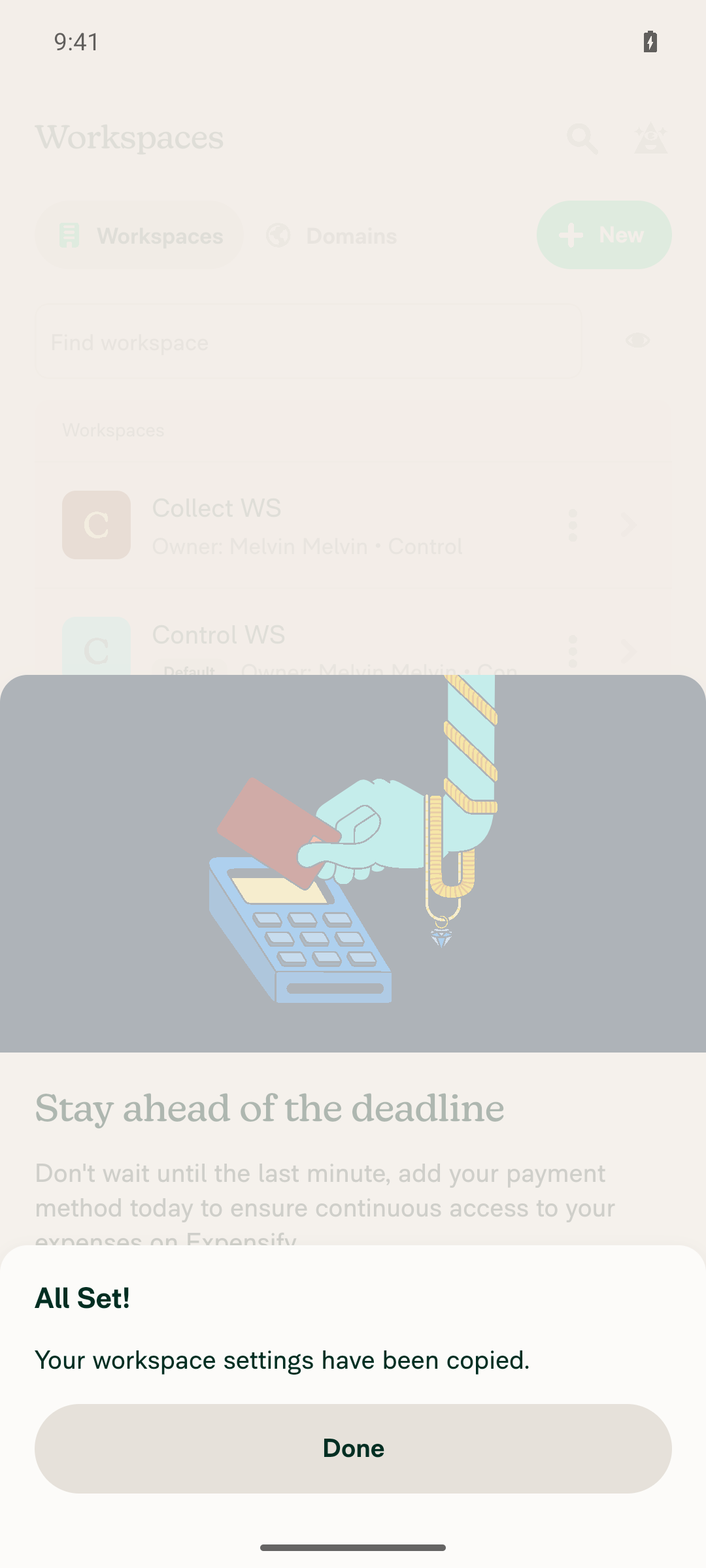
All Set! Your workspace settings have been copied - no failure error

Step Status
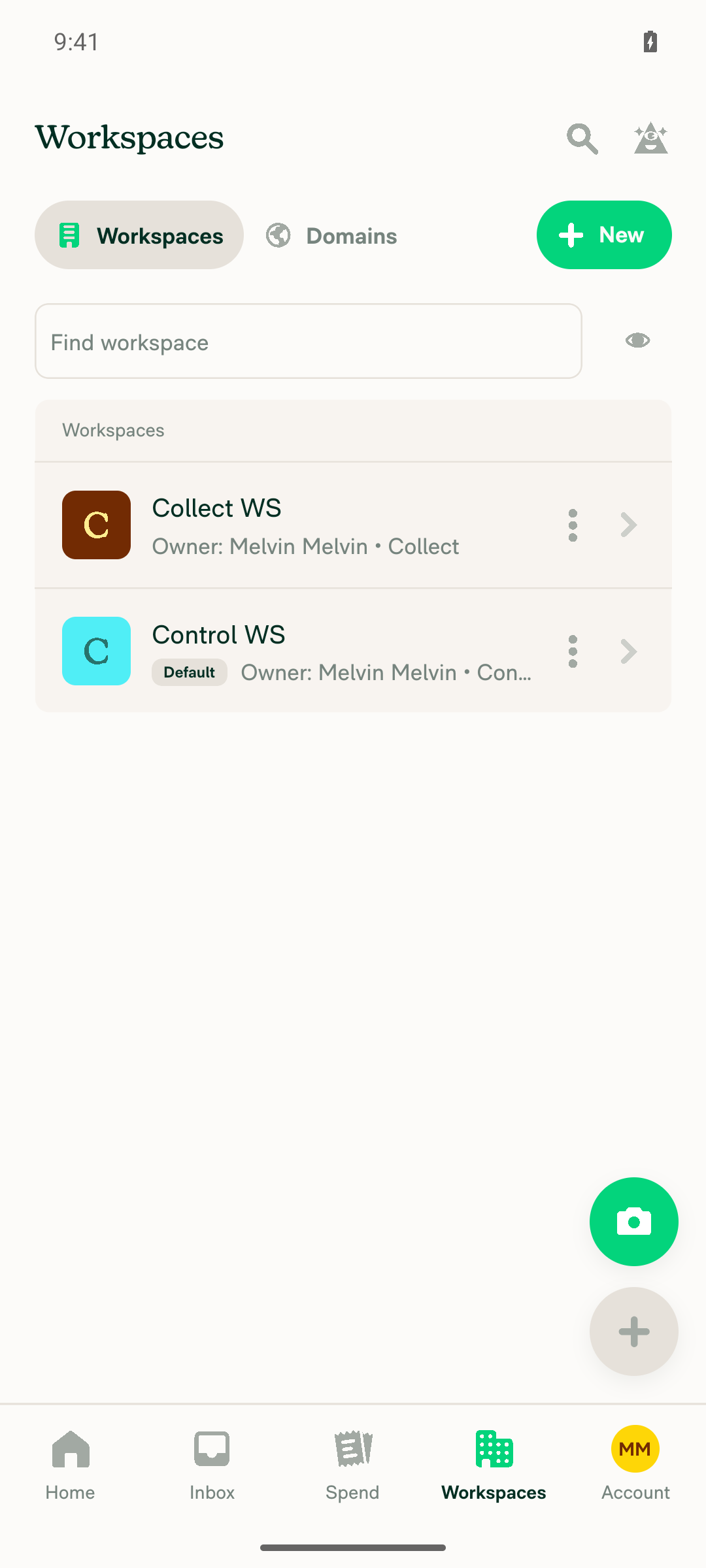
Workspace list opens and shows both a Control workspace and a Collect workspaceSetup: created "Control WS" (upgraded to Control, Rules enabled, Billable expenses set to "Cash and credit card billable") and "Collect WS" (downgraded to Collect). List rows read "Owner: Melvin Melvin • Control" and "Owner: Melvin Melvin • Collect".
Workspaces list showing Collect WS (Collect plan) and Control WS (Control plan)
✅
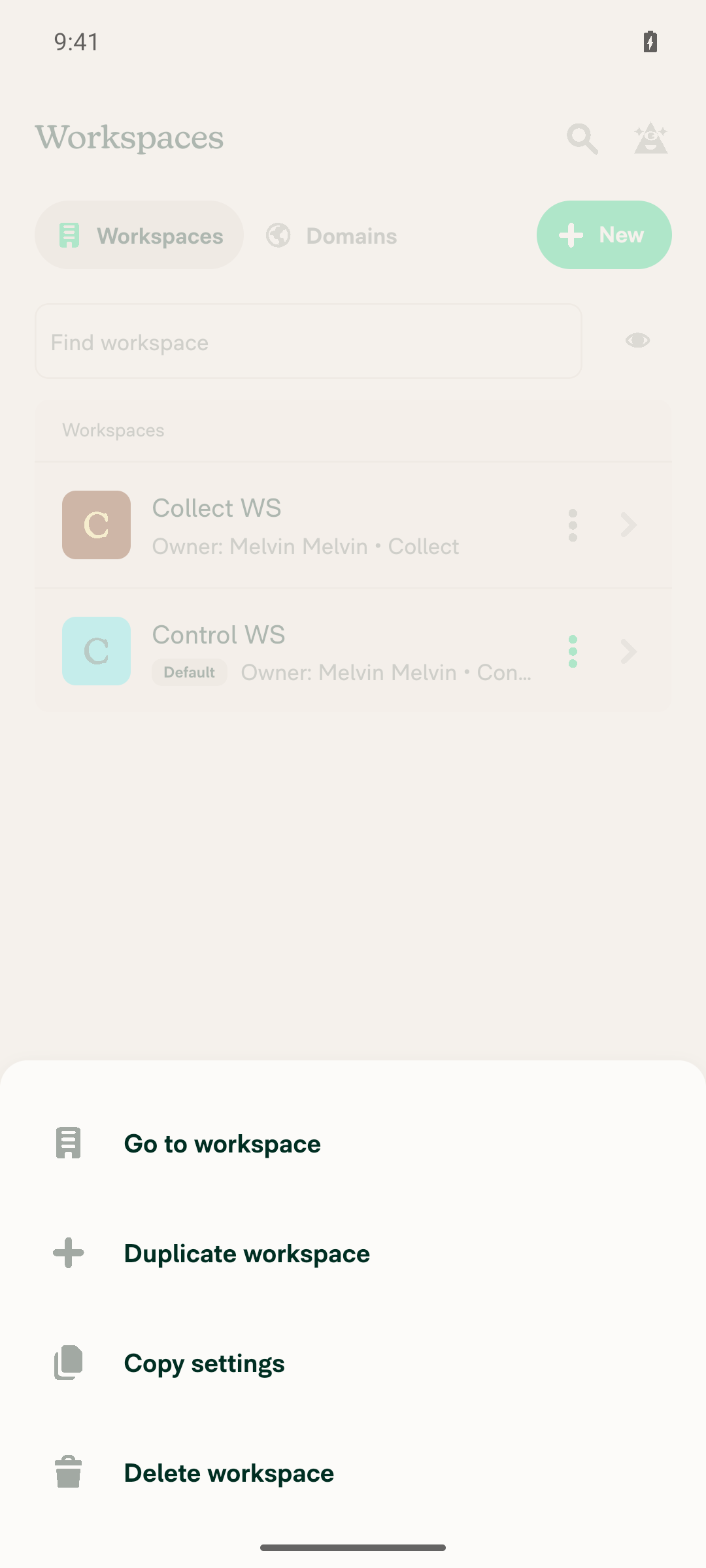
Overflow menu on the Control workspace shows a "Copy settings" optionThe overflow button on the Control WS row opened a popover with Go to workspace / Duplicate workspace / Copy settings / Delete workspace.
Overflow menu on Control WS listing Copy settings
✅
Selecting the Collect workspace as destination and tapping "Next" advances to "Select settings"Checking Collect WS enabled Next; the following screen showed "Select settings" — "Select the settings to overwrite on your existing workspaces." — with Reports, Categories, Workflows and Rules ("4 workspace rules: Billable, Prohibited expenses, eReceipts, GL code").
Collect WS selected as the copy destination with Next enabled
Select settings step listing Reports, Categories, Workflows and Rules
✅
Selecting "Rules" and tapping "Next" shows the Upgrade step naming the Control-only features and the source workspaceCopyPolicySettingsUpgradePage rendered with badge "Unlock these features!", heading "Some features require a Control plan", and body "Control WS uses Rules, which require a Control plan. To bring these features to your other workspaces, upgrade them to continue." — the Control-only feature (Rules) and the source workspace (Control WS) are both named.
Upgrade step: Some features require a Control plan, Control WS uses Rules
✅
Tapping "Upgrade" completes and shows the success view with a "Continue" button"You've upgraded your workspace!" / "You've successfully upgraded Collect WS to the Control plan!" with a Continue button; Continue advanced to the confirm step (Settings: Rules, Workspaces: Collect WS).
Upgrade success view for Collect WS with Continue button
✅
No copy-failure error appears at any pointNo error banner or failure text on any step (select workspaces, select settings, upgrade, confirm). Completing the flow ended in "All Set! / Your workspace settings have been copied." with a Done button. No console errors.
All Set! Your workspace settings have been copied - no failure error
✅

view run · view recording

@daledah

daledah commented Sep 23, 2026

Copy link
Copy Markdown
Contributor

@MelvinBot please merge main

@daledah

daledah commented Sep 23, 2026 •

Copy link
Copy Markdown
Contributor

@MelvinBot please open this PR

…lesUpgradeStep

Co-authored-by: daledah <daledah@users.noreply.github.com>
@MelvinBot

Copy link
Copy Markdown
Contributor Author

🤖 Merged main into claude-copySettingsRulesUpgradeStep — no conflicts.

Merge commit: 3571add (main at 8c11276).

Neither of this PR's two files — src/libs/CopyPolicySettingsUtils.ts and tests/unit/CopyPolicySettingsUtilsTest.ts — was touched on main since the branch point, so the merge brought in no changes to this PR's logic.

I could not re-run the unit tests or verify in a browser in this run: the test command was blocked by the sandbox and the web session was unavailable. CI on this push will run the suites.

@MelvinBot
MelvinBot marked this pull request as ready for review September 23, 2026 08:34
@MelvinBot
MelvinBot requested a review from a team as a code owner September 23, 2026 08:34
@melvin-bot
melvin-bot Bot requested review from JmillsExpensify and daledah and removed request for a team September 23, 2026 08:34
@melvin-bot

melvin-bot Bot commented Sep 23, 2026

Copy link
Copy Markdown

@daledah Please copy/paste the Reviewer Checklist from here into a new comment on this PR and complete it. If you have the K2 extension, you can simply click: [this button]

@melvin-bot
melvin-bot Bot removed the request for review from a team September 23, 2026 08:34
@MelvinBot

Copy link
Copy Markdown
Contributor Author

🤖 Done — the PR is out of draft and open for review.

main was already fully merged: the remote main tip is still 8c11276, which is already a parent of the merge commit 3571add I pushed earlier. Nothing new to merge, no conflicts. mergeable: MERGEABLE.

Two things still need a human before review can finish:

  • The Tests and QA Steps sections in the PR body are still // TODO placeholders. I can't fill those out on your behalf.
  • The PR Author Checklist is unchecked, so the PR Author Checklist / checklist job will keep the merge state blocked until you complete it.

I could not verify the change in a browser in this run — the web session was unavailable. CI will run the unit suites on the pushed commit.

@daledah

daledah commented Sep 23, 2026 •

Copy link
Copy Markdown
Contributor

Reviewer Checklist

  • I have verified the author checklist is complete (all boxes are checked off).
  • I verified the correct issue is linked in the ### Fixed Issues section above
  • I verified testing steps are clear and they cover the changes made in this PR
    • I verified the steps for local testing are in the Tests section
    • I verified the steps for Staging and/or Production testing are in the QA steps section
    • I verified the steps cover any possible failure scenarios (i.e. verify an input displays the correct error message if the entered data is not correct)
    • I turned off my network connection and tested it while offline to ensure it matches the expected behavior (i.e. verify the default avatar icon is displayed if app is offline)
  • I checked that screenshots or videos are included for tests on all platforms
  • I included screenshots or videos for tests on all platforms
  • I verified that the composer does not automatically focus or open the keyboard on mobile unless explicitly intended. This includes checking that returning the app from the background does not unexpectedly open the keyboard.
  • I verified tests pass on all platforms & I tested again on:
    • Android: HybridApp
    • Android: mWeb Chrome
    • iOS: HybridApp
    • iOS: mWeb Safari
    • MacOS: Chrome / Safari
  • If there are any errors in the console that are unrelated to this PR, I either fixed them (preferred) or linked to where I reported them in Slack
  • I verified proper code patterns were followed (see Reviewing the code)
    • I verified that comments were added to code that is not self explanatory
    • I verified that any new or modified comments were clear, correct English, and explained "why" the code was doing something instead of only explaining "what" the code was doing.
    • I verified any copy / text that was added to the app is grammatically correct in English. It adheres to proper capitalization guidelines (note: only the first word of header/labels should be capitalized), and is either coming verbatim from figma or has been approved by marketing (in order to get marketing approval, ask the Bug Zero team member to add the Waiting for copy label to the issue)
  • If a new code pattern is added I verified it was agreed to be used by multiple Expensify engineers
  • I verified that this PR follows the guidelines as stated in the Review Guidelines
  • I verified other components that can be impacted by these changes have been tested, and I retested again (i.e. if the PR modifies a shared library or component like Avatar, I verified the components using Avatar have been tested & I retested again)
  • If a new component is created I verified that:
    • A similar component doesn't exist in the codebase
    • All props are defined accurately
    • The component has a clear name that is non-ambiguous and the purpose of the component can be inferred from the name alone
    • The only data being stored in the state is data necessary for rendering and nothing else
    • The component has the minimum amount of code necessary for its purpose, and it is broken down into smaller components in order to separate concerns and functions
  • If a new CSS style is added I verified that:
    • A similar style doesn't already exist
    • The style can't be created with an existing StyleUtils function (i.e. StyleUtils.getBackgroundAndBorderStyle(theme.componentBG)
  • If the PR modifies code that runs when editing or sending messages, I tested and verified there is no unexpected behavior for all supported markdown - URLs, single line code, code blocks, quotes, headings, bold, strikethrough, and italic.
  • If the PR modifies a generic component, I tested and verified that those changes do not break usages of that component in the rest of the App (i.e. if a shared library or component like Avatar is modified, I verified that Avatar is working as expected in all cases)
  • If the PR modifies a component related to any of the existing Storybook stories, I tested and verified all stories for that component are still working as expected.
  • If the PR modifies a component or page that can be accessed by a direct deeplink, I verified that the code functions as expected when the deeplink is used - from a logged in and logged out account.
  • If the PR modifies the UI (e.g. new buttons, new UI components, changing the padding/spacing/sizing, moving components, etc) or modifies the form input styles:
    • I verified that all the inputs inside a form are aligned with each other.
    • I added Design label and/or tagged @Expensify/design so the design team can review the changes.
  • For any bug fix or new feature in this PR, I verified that sufficient unit tests are included to prevent regressions in this flow.
  • If the main branch was merged into this PR after a review, I tested again and verified the outcome was still expected according to the Test steps.
  • I have checked off every checkbox in the PR reviewer checklist, including those that don't apply to this PR.

Screenshots/Videos

Android: HybridApp
android.mov
Android: mWeb Chrome
Screen.Recording.2026-09-23.at.15.46.53.mov
iOS: HybridApp
ios.mov
iOS: mWeb Safari
ios-mweb.mov
MacOS: Chrome / Safari
web.mov

Comment thread src/libs/CopyPolicySettingsUtils.ts Outdated
/**
* The selected parts that the Collect (Team) targets can't receive on their current plan. Most parts
* defer to `canPolicyAccessFeature` (the single source of truth for which features require a Control
* plan); `CONTROL_ONLY_COPY_PARTS` covers the parts that need Control to be copied even when the

Copy link
Copy Markdown
Contributor

Choose a reason for hiding this comment

The reason will be displayed to describe this comment to others. Learn more.

❌ CONSISTENCY-15 (docs)

This JSDoc block joins two independent sentences with a semicolon (...require a Control plan); \CONTROL_ONLY_COPY_PARTS` covers the parts...`). Comments should read as plain sentences, so use two separate sentences instead of a semicolon.

Suggested fix:

/**
 * The selected parts that the Collect (Team) targets can't receive on their current plan. Most parts
 * defer to `canPolicyAccessFeature` (the single source of truth for which features require a Control
 * plan). `CONTROL_ONLY_COPY_PARTS` covers the parts that need Control to be copied even when the
 * target could enable the feature itself. Returns empty when there are no Collect targets.
 */

Reviewed at: 3571add | Please rate this suggestion with 👍 or 👎 to help us improve! Reactions are used to monitor reviewer efficiency.

Copy link
Copy Markdown
Contributor

Choose a reason for hiding this comment

The reason will be displayed to describe this comment to others. Learn more.

@MelvinBot please check this comment

Copy link
Copy Markdown
Contributor Author

Choose a reason for hiding this comment

The reason will be displayed to describe this comment to others. Learn more.

🤖 Valid finding — fixed in 724104e.

The JSDoc did join two independent sentences with a semicolon, which CONSISTENCY-15 flags. I applied the suggested wording verbatim — plan); → plan). at src/libs/CopyPolicySettingsUtils.ts:321. Comment text only, one character; no logic, types, or tests touched.

I couldn't run lint/spellcheck locally in this run (the sandbox blocked the Node tooling) and browser verification wasn't available, but CI runs both on this push.

@MelvinBot

Copy link
Copy Markdown
Contributor Author

🤖 Nothing to fix — no check is failing on the code.

Every build, lint, type, and test check passed on the latest commit (3571add), including all 8 Jest shards, typecheck, ESLint, Oxfmt, Knip, spellcheck, Storybook, Bun tests, perf tests, and both Android and iOS builds.

The one red check is Check independent approval, which fails only because the PR has no approving review yet (reviewDecision: REVIEW_REQUIRED; the sole review on record is an automated COMMENTED one from github-actions). It's a process gate, not a code problem — it clears when a human reviewer approves, and no push from me can make it pass.

Check-by-check status
Check Result
test (jobs 1–8) ✅ pass
typecheck ✅ pass
ESLint check ✅ pass
Oxfmt check ✅ pass
Compare knip issues against main ✅ pass
spellcheck ✅ pass
Storybook tests / Bun tests ✅ pass
React Compiler Compliance ✅ pass
Check for unused styles ✅ pass
baseline-perf-tests / branch-perf-tests ✅ pass
build (Android + iOS, all variants) ✅ pass
codecov/patch, codecov/project ✅ pass
Check independent approval ❌ fail — needs a human approval

The failing job's only failed step is Verify peer review; every earlier step (token, checkout, npm install) succeeded, so it is not an infrastructure flake.

I could not verify anything in a browser on this run — the web session backend was unavailable — but no browser check was needed here, since nothing in the code is failing.


view run

Co-authored-by: daledah <daledah@users.noreply.github.com>
@MelvinBot
MelvinBot requested a review from a team as a code owner September 23, 2026 08:41
@melvin-bot
melvin-bot Bot requested review from marcochavezf and removed request for a team September 23, 2026 08:42
@melvin-bot

melvin-bot Bot commented Sep 23, 2026

Copy link
Copy Markdown

@marcochavezf Please copy/paste the Reviewer Checklist from here into a new comment on this PR and complete it. If you have the K2 extension, you can simply click: [this button]

@daledah daledah left a comment

Copy link
Copy Markdown
Contributor

Choose a reason for hiding this comment

The reason will be displayed to describe this comment to others. Learn more.

LGTM

@MelvinBot

Copy link
Copy Markdown
Contributor Author

🤖 Both red checks are stale process gates, not code failures. No code fix exists to push.

Every code check passes on the current head 724104e: all 8 Jest shards, typecheck, ESLint, Oxfmt, Knip, spellcheck, Storybook, Bun tests, perf tests, codecov, and both Android and iOS builds.

1. checklist (PR Reviewer Checklist) — stale, needs a re-run.

You posted the Reviewer Checklist at 08:36:36 with every box unchecked, the job ran at 08:42:03 and correctly reported You completed 0 out of 43 checklist items with 43 unfinished items, and you then checked all 43 boxes at 08:47:34 — five minutes after the job had already finished. The comment is complete now (43 checked, 0 unchecked), so the job will pass the moment it runs again.

It will not re-run on a push: the workflow triggers only on .github/workflows/reviewerChecklist.yml:3 — on: pull_request_review. To clear it, either re-run the failed job from the Actions UI, or submit any new review on the PR. I tried to re-run it myself, but the re-run command isn't permitted for me in this environment.

2. Check independent approval — needs a human approval.

reviewDecision is REVIEW_REQUIRED. The three reviews on record are all COMMENTED (from github-actions, daledah, and MelvinBot); none is an approval. Its only failed step is Verify peer review — token, checkout, and npm install all succeeded, so it isn't a flake. No push can make this pass.

Full check status on 724104e
Check Result
test (jobs 1–8) ✅ pass
typecheck ✅ pass
ESLint check ✅ pass
Oxfmt check ✅ pass
Compare knip issues against main ✅ pass
spellcheck ✅ pass
Storybook tests / Bun tests ✅ pass
React Compiler Compliance ✅ pass
Check for unused styles ✅ pass
baseline-perf-tests / branch-perf-tests / validate-perf-tests ✅ pass
build (Android + iOS, all variants) ✅ pass
codecov/patch, codecov/project ✅ pass
verifySignedCommits, CLA ✅ pass
checklist (PR Reviewer Checklist) ❌ stale — re-run it
Check independent approval ❌ needs a human approval

The only commit since my last comment is 724104e ("Split JSDoc semicolon into two sentences per CONSISTENCY-15"), touching only src/libs/CopyPolicySettingsUtils.ts — a comment-only change, and every code check passed on it.

I could not verify anything in a browser on this run — the web session backend was unavailable — but no browser check was needed here, since nothing in the code is failing.


view run

@daledah

daledah commented Sep 23, 2026

Copy link
Copy Markdown
Contributor

@MelvinBot i've completed my checklist, please complete the author checklist and fill the Test + QA Steps section

@MelvinBot

Copy link
Copy Markdown
Contributor Author

🤖 Filled in Tests, Offline tests, and QA Steps, and ticked the author checklist items I can stand behind.

The test steps follow the repro from Auto - Workspace - Unable to "Copy settings" from Control to Collect workspace and add the three regression cases this change could plausibly break: a Control target (must still skip Upgrade), a Collect target with only non-Control parts selected (must still skip Upgrade), and the Rules toggle on a Collect workspace's More features page (unchanged, because this PR gates the copy in getControlOnlySelectedParts rather than in canPolicyAccessFeature). Merchant rules gets its own pass since it hits the same gate.

Seven boxes are left for you — they all attest to testing I can't do or can't see evidence of:

  • I turned off my network connection and tested it while offline
  • I tested this PR with a High Traffic account
  • I included screenshots or videos for tests on all platforms — the Screenshots/Videos section is still empty
  • I ran the tests on all platforms (and its five per-platform sub-items)
  • I verified there are no console errors
  • If the main branch was merged into this PR after a review, I tested again — main was merged in 3571add, so tick this once you've re-run the steps on the merged branch

I could not verify any of this in a browser in this run — the web session was unavailable. Everything I ticked is backed by the diff, the unit tests, or static analysis of the flow.

@JmillsExpensify JmillsExpensify left a comment

Copy link
Copy Markdown
Contributor

Choose a reason for hiding this comment

The reason will be displayed to describe this comment to others. Learn more.

LGTM

@marcochavezf
marcochavezf merged commit f4c6820 into main Sep 23, 2026
45 of 48 checks passed
@marcochavezf
marcochavezf deleted the claude-copySettingsRulesUpgradeStep branch September 23, 2026 23:50
@github-actions

Copy link
Copy Markdown
Contributor

🚧 marcochavezf has triggered a test Expensify/App build. You can view the workflow run here.

@OSBotify

Copy link
Copy Markdown
Contributor

✋ This PR was not deployed to staging yet because QA is ongoing. It will be automatically deployed to staging after the next production release.

@OSBotify

Copy link
Copy Markdown
Contributor

🚀 Deployed to staging by https://github.com/marcochavezf in version: 9.4.93-0 🚀

platform result
🕸 web 🕸 success ✅
🤖 android 🤖 success ✅
🍎 iOS 🍎 success ✅

@MelvinBot

MelvinBot commented Sep 24, 2026 •

Copy link
Copy Markdown
Contributor Author

🤖 Yes, a help site change is required. Draft PR: Docs updates for E/A#101710 Rules copy requires a Control destination workspace

This PR changes user-visible behavior in the Copy settings flow: selecting Rules or Merchant rules with a Collect destination workspace now shows the Some features require a Control plan page instead of running a copy that fails.

docs/articles/new-expensify/workspaces/Copy-Workspace-Settings.md was the only affected article, and it only said "some settings require the destination workspaces to be on the Control plan" without naming any. Its numbered steps also went straight from Select settings to the summary, so a reader who hit the upgrade prompt had nothing to match it against.

What the docs PR changes (that one file, nothing else):

  • Names Rules and Merchant rules as the settings that need a Control destination workspace, and keeps the distinction that a Collect workspace can still turn Rules on by itself.
  • Adds the Some features require a Control plan page as step 5 of How to copy workspace settings.
  • Names Rules and Merchant rules in the existing "Why can't I copy certain settings?" FAQ.
  • Adds a "Why am I asked to upgrade when I copy Rules or Merchant rules?" FAQ.
Label verification and style compliance

Every UI label in the article was checked against the current app rather than written from memory:

Label Verified against
Copy settings, Select workspaces, Select settings Live web build — confirmed in the running app
Rules workspace.common.rules in src/languages/en.ts
Merchant rules workspace.duplicateWorkspace.merchantRules in src/languages/en.ts
Some features require a Control plan workspace.copyPolicySettings.upgrade.title in src/languages/en.ts
Upgrade, Continue common.upgrade / common.continue, as used by src/pages/workspace/copyPolicySettings/CopyPolicySettingsUpgradePage.tsx:135-137
More features workspace.common.moreFeatures in src/languages/en.ts

The Rules and Merchant rules rows could not be exercised in the live session, because the test account has no Control workspace with rules enabled. Those two labels were confirmed from the translation source instead.

Written against docs/HELPSITE_NAMING_CONVENTIONS.md, docs/HELP_AUTHORING_GUIDELINES.md, and docs/TEMPLATE.md: the article keeps a single # heading plus # FAQ, uses only ## sections, bolds every UI label in sentence case, adds no new cross-links, and adds no screenshots.


@daledah, please review the linked help site PR and confirm it reflects the current behavior. Then mark the linked help site PR Ready for review


view run · view recording

@lanitochka17

Copy link
Copy Markdown

Deploy Blocker #102184 was identified to be related to this PR.

@jponikarchuk

Copy link
Copy Markdown

Deploy Blocker #102210 was identified to be related to this PR.

@OSBotify

Copy link
Copy Markdown
Contributor

🚀 Deployed to production by https://github.com/lakchote in version: 9.4.93-3 🚀

platform result
🕸 web 🕸 success ✅
🤖 android 🤖 success ✅
🍎 iOS 🍎 success ✅

Bundle Size Analysis (Sentry):

Sign up for free to join this conversation on GitHub. Already have an account? Sign in to comment

Labels

Melvin-Test-Android Melvin-Test-Web Triggers Melvin to run the testing steps of the PR on web

Projects

None yet

Development

Successfully merging this pull request may close these issues.

7 participants