Skip to content

Fix Account tooltip no longer appears after rotating device - #101588

Merged
luacmartins merged 4 commits into
Expensify:mainfrom
software-mansion-labs:@GCyganek/landscape-mode/account-tooltip-disappears-on-rotation
Sep 30, 2026
Merged

luacmartins merged 4 commits into
Expensify:mainfrom
software-mansion-labs:@GCyganek/landscape-mode/account-tooltip-disappears-on-rotation

Conversation

@GCyganek

@GCyganek GCyganek commented Sep 18, 2026 •

Copy link
Copy Markdown
Contributor

Explanation of Change

The top bar account tooltip stopped appearing after rotation. BaseEducationalTooltip ran its scroll-overflow check for every tooltip; the account avatar sits at the screen's right edge, so after rotating the check read it as overflowing and hid it. It now runs only when shouldHideOnScroll is set.

Fixed Issues

$ #101380
$ #102061
PROPOSAL: N/A

Tests

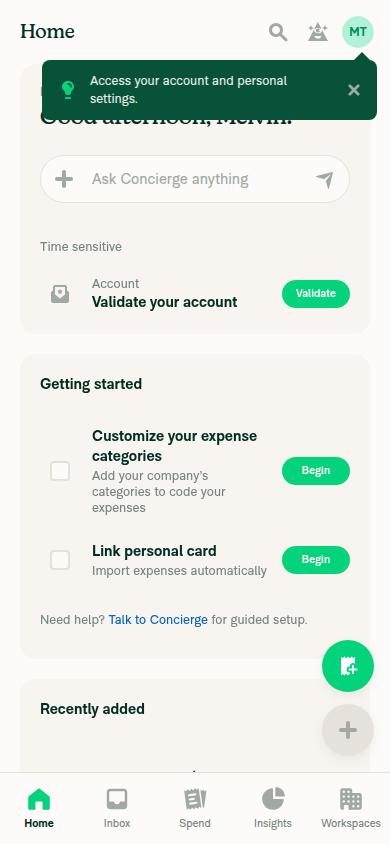
Account tooltip:

  1. Enable the insightsPage beta.
  2. Launch Expensify app.
  3. Rotate device to landscape.
  4. Rotate device to portrait.
  5. Verify Account tooltip will appear after rotating device.

Copilot tooltip:

Prerequisite: Account has been set as copilot by another user.

  1. Open the Expensify app.
  2. Navigate to "Account"
  3. Note that a "You can now copilot into another account!" tooltip appears below "Switch" button.
  4. Turn to landscape mode.
  5. Verify "You can now copilot into another account!" tooltip, should be visible while in landscape mode.
  • Verify that no errors appear in the JS console

Offline tests

N/A

QA Steps

Same as tests

  • Verify that no errors appear in the JS console

PR Author Checklist

  • I linked the correct issue in the ### Fixed Issues section above
  • I wrote clear testing steps that cover the changes made in this PR
    • I added steps for local testing in the Tests section
    • I added steps for the expected offline behavior in the Offline steps section
    • I added steps for Staging and/or Production testing in the QA steps section
    • I added steps to cover failure scenarios (i.e. verify an input displays the correct error message if the entered data is not correct)
    • I turned off my network connection and tested it while offline to ensure it matches the expected behavior (i.e. verify the default avatar icon is displayed if app is offline)
    • I tested this PR with a High Traffic account against the staging or production API to ensure there are no regressions (e.g. long loading states that impact usability).
  • I included screenshots or videos for tests on all platforms
  • I ran the tests on all platforms & verified they passed on:
    • Android: Native
    • Android: mWeb Chrome
    • iOS: Native
    • iOS: mWeb Safari
    • MacOS: Chrome / Safari
  • I verified there are no console errors (if there's a console error not related to the PR, report it or open an issue for it to be fixed)
  • I followed proper code patterns (see Reviewing the code)
    • I verified that comments were added to code that is not self explanatory
    • I verified that any new or modified comments were clear, correct English, and explained "why" the code was doing something instead of only explaining "what" the code was doing.
    • I verified any copy / text that was added to the app is grammatically correct in English. It adheres to proper capitalization guidelines (note: only the first word of header/labels should be capitalized), and is either coming verbatim from figma or has been approved by marketing (in order to get marketing approval, ask the Bug Zero team member to add the Waiting for copy label to the issue)
  • If a new code pattern is added I verified it was agreed to be used by multiple Expensify engineers
  • I followed the guidelines as stated in the Review Guidelines
  • I tested other components that can be impacted by my changes (i.e. if the PR modifies a shared library or component like Avatar, I verified the components using Avatar are working as expected)
  • If a new CSS style is added I verified that:
    • A similar style doesn't already exist
    • The style can't be created with an existing StyleUtils function (i.e. StyleUtils.getBackgroundAndBorderStyle(theme.componentBG))
  • If new assets were added or existing ones were modified, I verified that:
    • The assets are optimized and compressed (for SVG files, run npm run compress-svg)
    • The assets load correctly across all supported platforms.
  • If the PR modifies code that runs when editing or sending messages, I tested and verified there is no unexpected behavior for all supported markdown - URLs, single line code, code blocks, quotes, headings, bold, strikethrough, and italic.
  • If the PR modifies a generic component, I tested and verified that those changes do not break usages of that component in the rest of the App (i.e. if a shared library or component like Avatar is modified, I verified that Avatar is working as expected in all cases)
  • If the PR modifies a component or page that can be accessed by a direct deeplink, I verified that the code functions as expected when the deeplink is used - from a logged in and logged out account.
  • If the PR modifies the UI (e.g. new buttons, new UI components, changing the padding/spacing/sizing, moving components, etc) or modifies the form input styles:
    • I verified that all the inputs inside a form are aligned with each other.
    • I added Design label and/or tagged @Expensify/design so the design team can review the changes.
  • I added unit tests for any new feature or bug fix in this PR to help automatically prevent regressions in this user flow.
  • If the main branch was merged into this PR after a review, I tested again and verified the outcome was still expected according to the Test steps.

Screenshots/Videos

Android: Native
Screen.Recording.2026-09-18.at.14.26.17.mov
Screen.Recording.2026-09-28.at.12.58.52.mov
Android: mWeb Chrome
iOS: Native
Screen.Recording.2026-09-18.at.14.58.34.mov
iOS: mWeb Safari
MacOS: Chrome / Safari
Screen.Recording.2026-09-18.at.15.52.35.mov

@GCyganek

Copy link
Copy Markdown
Contributor Author

@codex please review

@GCyganek

Copy link
Copy Markdown
Contributor Author

@MelvinBot please review

@codecov

codecov Bot commented Sep 18, 2026 •

Copy link
Copy Markdown

Codecov Report

✅ Changes either increased or maintained existing code coverage, great job!

Files with missing lines Coverage Δ
...ltip/EducationalTooltip/BaseEducationalTooltip.tsx 95.34% <100.00%> (+0.11%) ⬆️
... and 24 files with indirect coverage changes

@MelvinBot

MelvinBot commented Sep 18, 2026 •

Copy link
Copy Markdown
Contributor

Review

The fix is correct and lands on the right component. AccountAvatarButton.tsx:63-73 never sets shouldHideOnScroll, so the new early return in BaseEducationalTooltip.tsx:67-70 does skip the bounds check for it, and updateTargetBounds still runs first so the position stays right after rotation. CI is green apart from Check independent approval.

Four things to address before merge — none are blockers on the approach.

1. Duplicate condition in the same component. shouldCenterTooltip at AccountSwitcher.tsx:161 is character-for-character the same expression as shouldStackHeader at AccountSwitcher.tsx:273, and InitialSettingsPage.tsx:108 already carries a comment saying it must stay in sync with AccountSwitcher. This PR makes that three copies. Hoist shouldStackHeader above line 161 and reuse it — they are the same concept (the header stacks, so the tooltip centers under the centered avatar), not two conditions that happen to match.

2. You deleted a "why" comment without replacing it. The removed lines explained why the tooltip is right-aligned (opens leftward into the sidebar per the mockup, instead of overflowing into the central pane). That branch still exists, so the rationale still applies. Keep it on the RIGHT side and add one line for the CENTER side. Same for the new early return in BaseEducationalTooltip — that file is densely commented with rotation-related "why" notes and this branch has none.

3. No unit test. tests/ui/EducationalTooltipRemeasureTest.tsx:162 already parameterizes shouldHideOnScroll, so a case asserting "shows after re-layout even when the anchor is outside the content bounds, when shouldHideOnScroll is not set" is a handful of lines. This area has now been patched for rotation at least three times; a test is cheap insurance.

4. The root cause in the description looks imprecise. You attribute it to the right-edge check. For a header-anchored element the vertical check is the one that fails unconditionally: BaseEducationalTooltip.tsx:84 computes availableHeightForTop = (y - insets.top) - (contentHeaderHeight - 10), and contentHeaderHeight is a layout constant, not a measurement. The avatar sits inside the header, so y - insets.top is always smaller than the header height and the result is negative. It only survives the first show because that path goes through measureTooltipCoordinate, which shows unconditionally; rotation is just the first event that routes through renderTooltip. Same fix either way, but the description should say the bounds check is wrong for header-anchored tooltips generally.

Two scope notes (no action needed, just be aware)
  • The gate changes behavior for every EducationalTooltip that doesn't opt into shouldHideOnScroll — ThreeDotsMenu, TabSelectorItem, TabSelectorBase, InboxTabSelector, GPSTooltip, ConfirmationFooterContent, and MenuItem by default. They lose their only viewport-bounds guard. Low risk, since the check only ever fired on resize/layout for them and they never hid on scroll anyway, but it is a global change riding along with a targeted fix.
  • The AccountSwitcher's own product-training tooltip still sets shouldHideOnScroll: true, so it keeps running the same bounds check. This PR only re-aligns it. If it also vanishes after rotation, that is not fixed here.

🤖 Web test steps verification results: ⚠️ partial

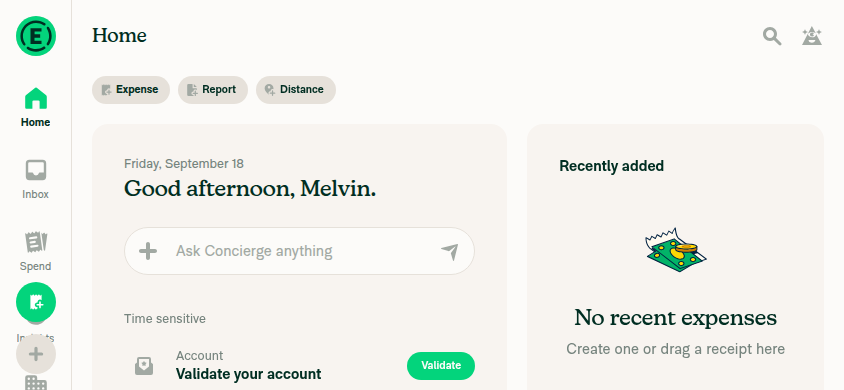
The web run confirms the tooltip survives a portrait → landscape → portrait viewport round-trip, but it does not cover the actual bug. On desktop web isInLandscapeMode returns false for non-mobile browsers, so at 844×390 the app rendered the wide layout and AccountAvatarButton was not mounted at all. The Android rotation path and the narrow-landscape centering change in AccountSwitcher are untested by this run — your Android and iOS recordings remain the real evidence.

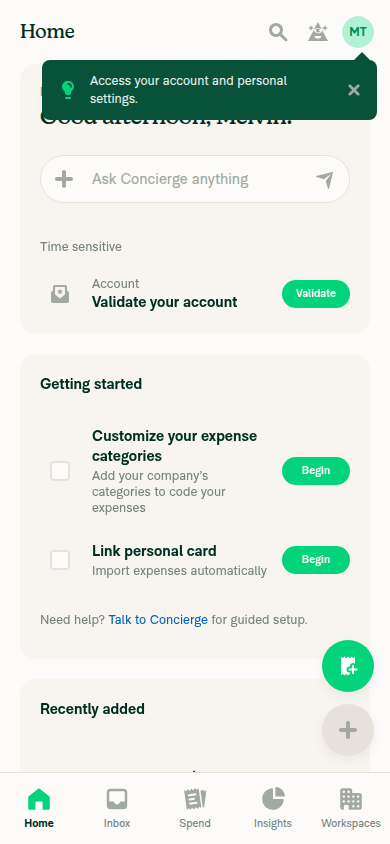
Back to 390x844 portrait - tooltip still visible

Step Status
Narrow portrait viewport (390x844) renders and Account/account-switcher area is reachableApp rendered fully at 390x844; top-bar account avatar reachable and visible.
Narrow portrait 390x844 - account avatar educational tooltip visible
✅
Enable insightsPage beta and confirm the tooltip is presentBeta was off by default; enabled via Account > Troubleshoot > Beta overrides (in-app dev tool, no code edited). The "Insights" tab appeared and the tooltip "Access your account and personal settings." rendered near the avatar.
Narrow portrait 390x844 - account avatar educational tooltip visible
✅
Resize 390x844 → 844x390 → 390x844: tooltip does not stay goneAt 844x390 the wide layout rendered, so no top-bar avatar or tooltip — this is the caveat above, not a narrow-landscape test. After resizing back to 390x844 the tooltip reappeared and was present in the accessibility snapshot.
844x390 landscape - wide layout, top-bar avatar not rendered
Back to 390x844 portrait - tooltip still visible
⚠️
JS console errors during the driveNo console/error entries in the session event log and no visible error banners. Note that console-log capture is not exposed for the web platform, so this is weaker than a real console check.
✅

view run · view recording

@GCyganek
GCyganek marked this pull request as ready for review September 28, 2026 10:44
@GCyganek
GCyganek requested review from a team as code owners September 28, 2026 10:44
@melvin-bot
melvin-bot Bot requested review from bernhardoj and garrettmknight and removed request for a team September 28, 2026 10:44
@melvin-bot

melvin-bot Bot commented Sep 28, 2026

Copy link
Copy Markdown

@bernhardoj Please copy/paste the Reviewer Checklist from here into a new comment on this PR and complete it. If you have the K2 extension, you can simply click: [this button]

@melvin-bot
melvin-bot Bot requested review from a team and removed request for a team September 28, 2026 10:44
@truph01

truph01 commented Sep 28, 2026

Copy link
Copy Markdown
Contributor

@GCyganek Can it fix #102061 as well?

@GCyganek

Copy link
Copy Markdown
Contributor Author

@truph01 checking...

@GCyganek

Copy link
Copy Markdown
Contributor Author

Yes, also fixes other tooltips with the same issue:

Screen.Recording.2026-09-28.at.12.58.52.mov

@GCyganek

Copy link
Copy Markdown
Contributor Author

I updated test steps and description to cover that issue

@truph01

truph01 commented Sep 28, 2026

Copy link
Copy Markdown
Contributor

@bernhardoj Should I review this PR since it comes from my PR #85229?

@garrettmknight garrettmknight left a comment

Copy link
Copy Markdown
Contributor

Choose a reason for hiding this comment

The reason will be displayed to describe this comment to others. Learn more.

Looks good from a product perspective.

@bernhardoj

Copy link
Copy Markdown
Contributor

@truph01 yeah, since it's a landscape issue, you can take over reviewing this

@cristipaval
cristipaval requested review from truph01 and removed request for bernhardoj September 29, 2026 17:48

@luacmartins luacmartins left a comment

Copy link
Copy Markdown
Contributor

Choose a reason for hiding this comment

The reason will be displayed to describe this comment to others. Learn more.

LGTM

@luacmartins

Copy link
Copy Markdown
Contributor

@truph01 all yours

@truph01

truph01 commented Sep 30, 2026

Copy link
Copy Markdown
Contributor

Reviewer Checklist

  • I have verified the author checklist is complete (all boxes are checked off).
  • I verified the correct issue is linked in the ### Fixed Issues section above
  • I verified testing steps are clear and they cover the changes made in this PR
    • I verified the steps for local testing are in the Tests section
    • I verified the steps for Staging and/or Production testing are in the QA steps section
    • I verified the steps cover any possible failure scenarios (i.e. verify an input displays the correct error message if the entered data is not correct)
    • I turned off my network connection and tested it while offline to ensure it matches the expected behavior (i.e. verify the default avatar icon is displayed if app is offline)
  • I checked that screenshots or videos are included for tests on all platforms
  • I included screenshots or videos for tests on all platforms
  • I verified that the composer does not automatically focus or open the keyboard on mobile unless explicitly intended. This includes checking that returning the app from the background does not unexpectedly open the keyboard.
  • I verified tests pass on all platforms & I tested again on:
    • Android: HybridApp
    • Android: mWeb Chrome
    • iOS: HybridApp
    • iOS: mWeb Safari
    • MacOS: Chrome / Safari
  • If there are any errors in the console that are unrelated to this PR, I either fixed them (preferred) or linked to where I reported them in Slack
  • I verified proper code patterns were followed (see Reviewing the code)
    • I verified that any callback methods that were added or modified are named for what the method does and never what callback they handle (i.e. toggleReport and not onIconClick).
    • I verified that comments were added to code that is not self explanatory
    • I verified that any new or modified comments were clear, correct English, and explained """"why"""" the code was doing something instead of only explaining """"what"""" the code was doing.
    • I verified any copy / text that was added to the app is grammatically correct in English. It adheres to proper capitalization guidelines (note: only the first word of header/labels should be capitalized), and is either coming verbatim from figma or has been approved by marketing (in order to get marketing approval, ask the Bug Zero team member to add the Waiting for copy label to the issue)
  • If a new code pattern is added I verified it was agreed to be used by multiple Expensify engineers
  • I verified that this PR follows the guidelines as stated in the Review Guidelines
  • I verified other components that can be impacted by these changes have been tested, and I retested again (i.e. if the PR modifies a shared library or component like Avatar, I verified the components using Avatar have been tested & I retested again)
  • If a new component is created I verified that:
    • A similar component doesn't exist in the codebase
    • All props are defined accurately and each prop has a /** comment above it */
    • The file is named correctly
    • The component has a clear name that is non-ambiguous and the purpose of the component can be inferred from the name alone
    • The only data being stored in the state is data necessary for rendering and nothing else
    • For Class Components, any internal methods passed to components event handlers are bound to this properly so there are no scoping issues (i.e. for onClick={this.submit} the method this.submit should be bound to this in the constructor)
    • Any internal methods bound to this are necessary to be bound (i.e. avoid this.submit = this.submit.bind(this); if this.submit is never passed to a component event handler like onClick)
    • All JSX used for rendering exists in the render method
    • The component has the minimum amount of code necessary for its purpose, and it is broken down into smaller components in order to separate concerns and functions
  • If any new file was added I verified that:
    • The file has a description of what it does and/or why is needed at the top of the file if the code is not self explanatory
  • If a new CSS style is added I verified that:
    • A similar style doesn't already exist
    • The style can't be created with an existing StyleUtils function (i.e. StyleUtils.getBackgroundAndBorderStyle(theme.componentBG)
  • If the PR modifies code that runs when editing or sending messages, I tested and verified there is no unexpected behavior for all supported markdown - URLs, single line code, code blocks, quotes, headings, bold, strikethrough, and italic.
  • If the PR modifies a generic component, I tested and verified that those changes do not break usages of that component in the rest of the App (i.e. if a shared library or component like Avatar is modified, I verified that Avatar is working as expected in all cases)
  • If the PR modifies a component related to any of the existing Storybook stories, I tested and verified all stories for that component are still working as expected.
  • If the PR modifies a component or page that can be accessed by a direct deeplink, I verified that the code functions as expected when the deeplink is used - from a logged in and logged out account.
  • If the PR modifies the UI (e.g. new buttons, new UI components, changing the padding/spacing/sizing, moving components, etc) or modifies the form input styles:
    • I verified that all the inputs inside a form are aligned with each other.
    • I added Design label and/or tagged @Expensify/design so the design team can review the changes.
  • For any bug fix or new feature in this PR, I verified that sufficient unit tests are included to prevent regressions in this flow.
  • If the main branch was merged into this PR after a review, I tested again and verified the outcome was still expected according to the Test steps.
  • I have checked off every checkbox in the PR reviewer checklist, including those that don't apply to this PR.

Screenshots/Videos

Android: HybridApp
Screen.Recording.2026-09-30.at.23.23.20.mov
Android: mWeb Chrome
Screen.Recording.2026-09-30.at.23.29.49.mov
iOS: HybridApp
iOS: mWeb Safari
MacOS: Chrome / Safari

@luacmartins
luacmartins merged commit ea6e334 into Expensify:main Sep 30, 2026
44 of 49 checks passed
@github-actions

Copy link
Copy Markdown
Contributor

🚧 luacmartins has triggered a test Expensify/App build. You can view the workflow run here.

@OSBotify

OSBotify commented Oct 1, 2026

Copy link
Copy Markdown
Contributor

🚀 Deployed to staging by https://github.com/luacmartins in version: 9.5.0-0 🚀

platform result
🕸 web 🕸 success ✅
🤖 android 🤖 success ✅
🍎 iOS 🍎 success ✅

@MelvinBot

Copy link
Copy Markdown
Contributor

No help site update is needed. This bug fix makes educational tooltips, like the Account and Copilot tooltips, appear again after you rotate the device, which is what users already expect.


view run

Sign up for free to join this conversation on GitHub. Already have an account? Sign in to comment

Labels

None yet

Projects

None yet

Development

Successfully merging this pull request may close these issues.

10 participants