Skip to content

Switch onboarding accounting step to a tile grid and add missing integrations - #101153

Closed
MelvinBot wants to merge 1 commit into
mainfrom
claude-onboardingAccountingTileGrid
Closed

MelvinBot wants to merge 1 commit into
mainfrom
claude-onboardingAccountingTileGrid

Conversation

@MelvinBot

Copy link
Copy Markdown
Contributor

Explanation of Change

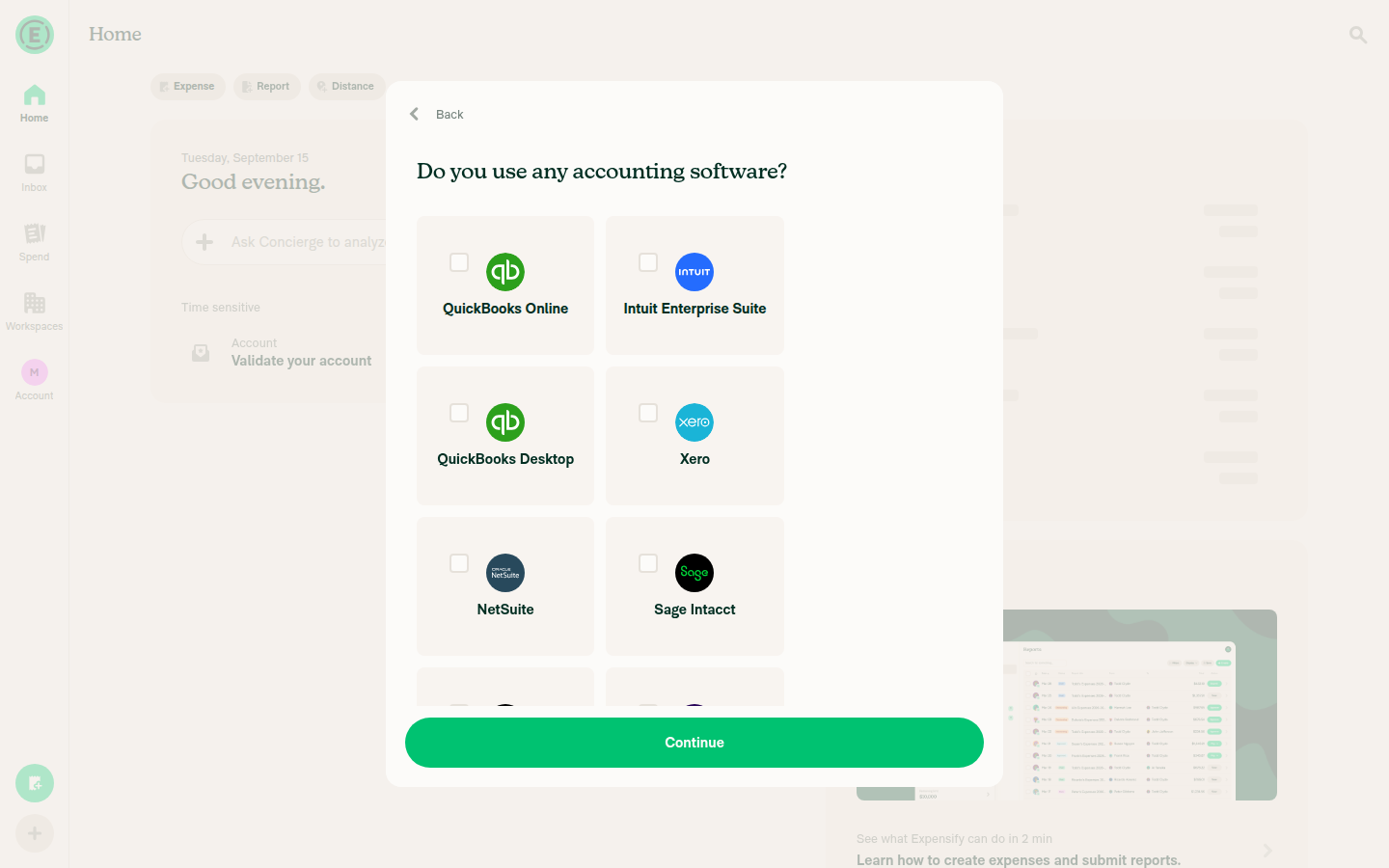
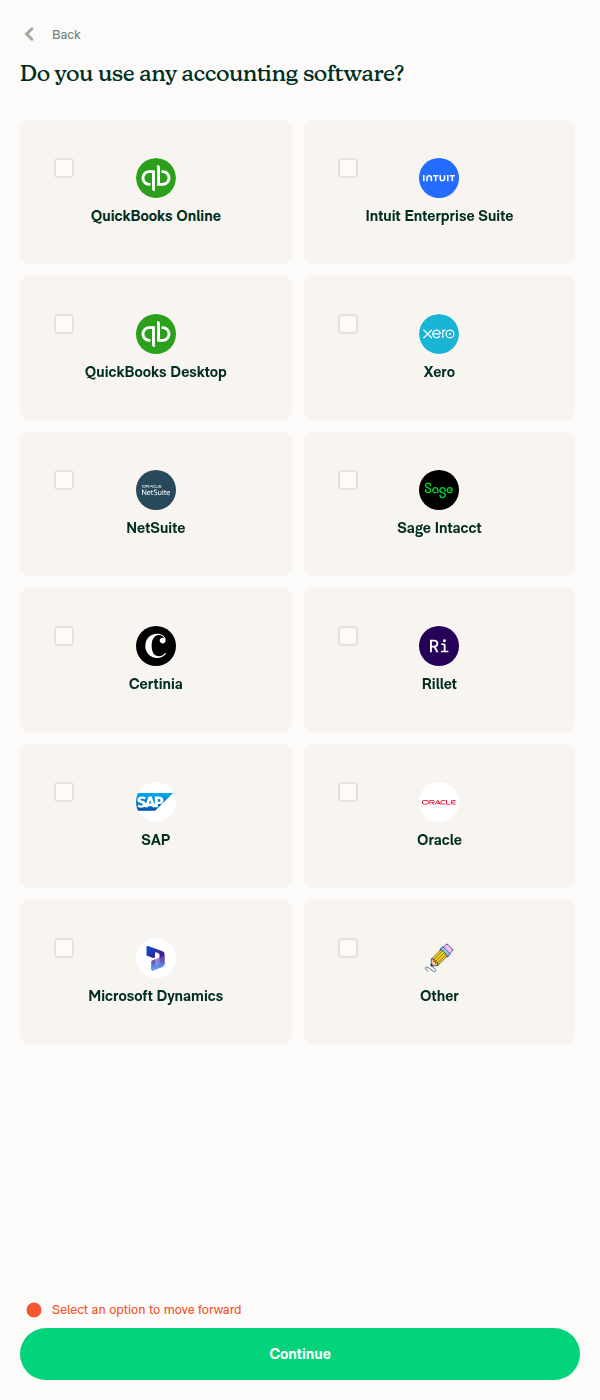
Rebuilds the onboarding "Do you use any accounting software?" step as the tile grid in the design mocks, and adds the accounting integrations that were missing from it.

Why it was stale: the option list was a second, disconnected source of truth. BaseOnboardingAccounting.tsx declared its own integrations array and its own iconName union, unlinked to CONST.POLICY.CONNECTIONS.ACCOUNTING_CONNECTION_NAMES. Adding a connection never touched this screen and nothing failed, so Intuit Enterprise Suite, Certinia and Rillet never appeared here.

What changed:

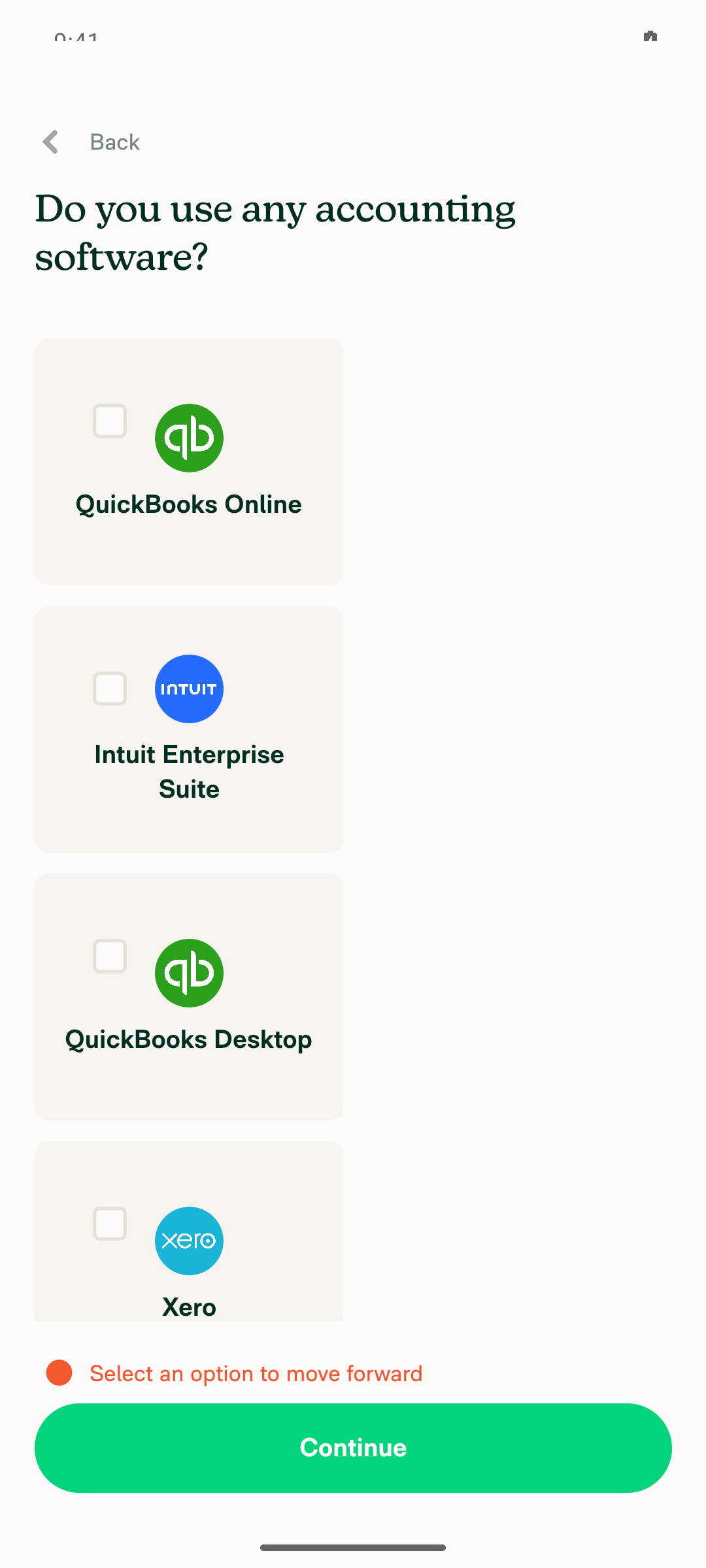
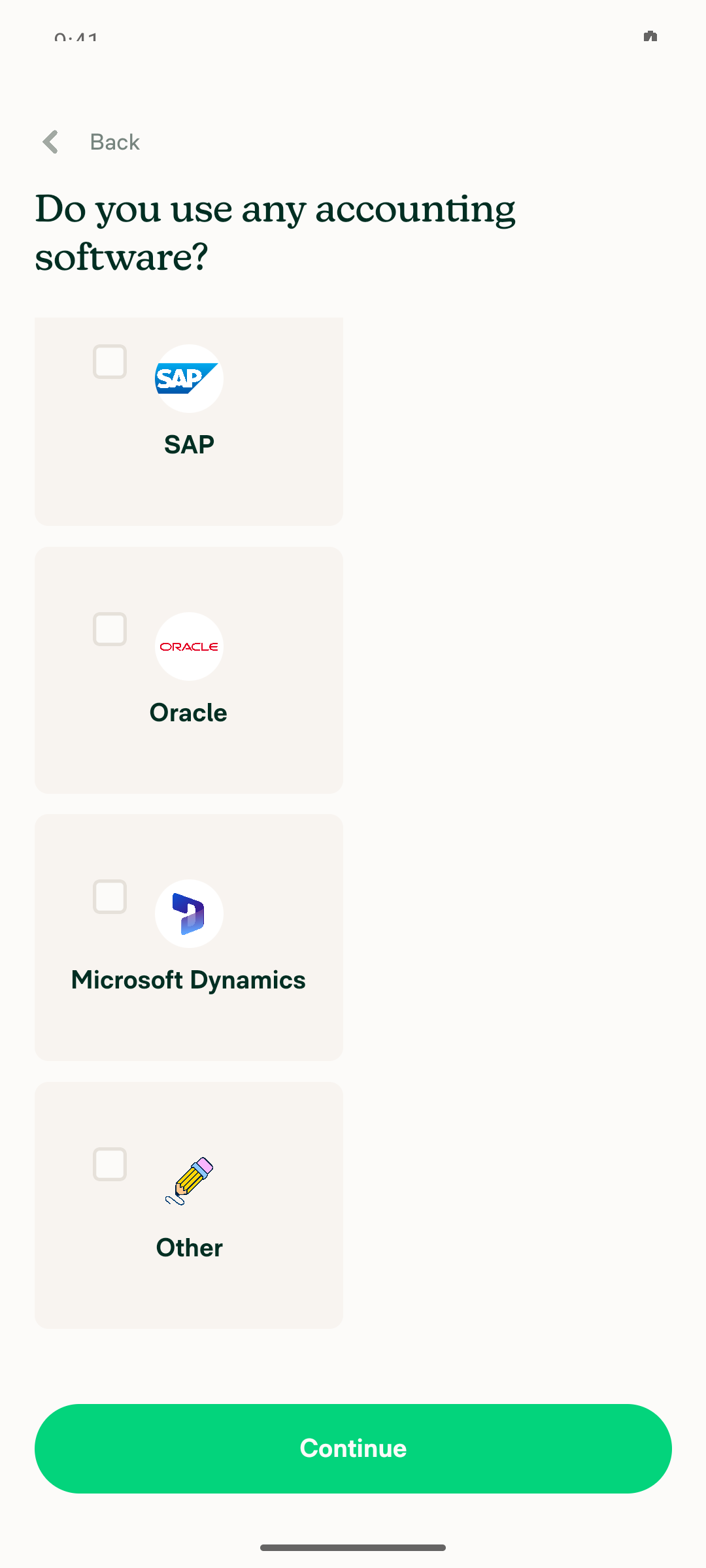
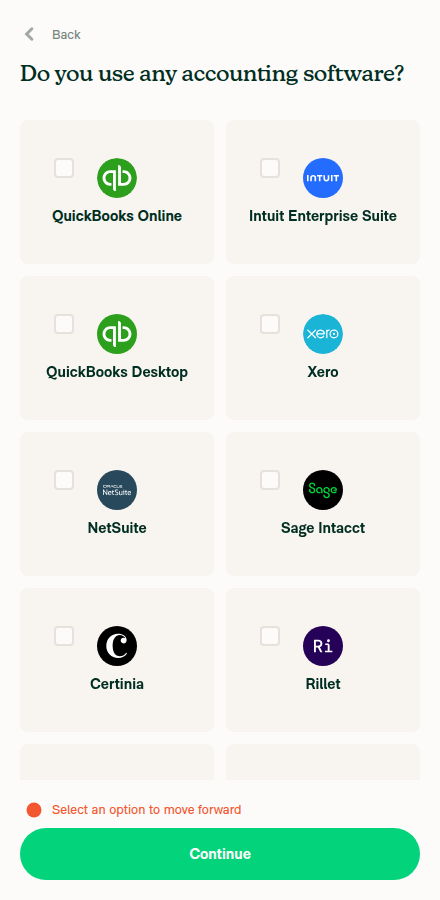
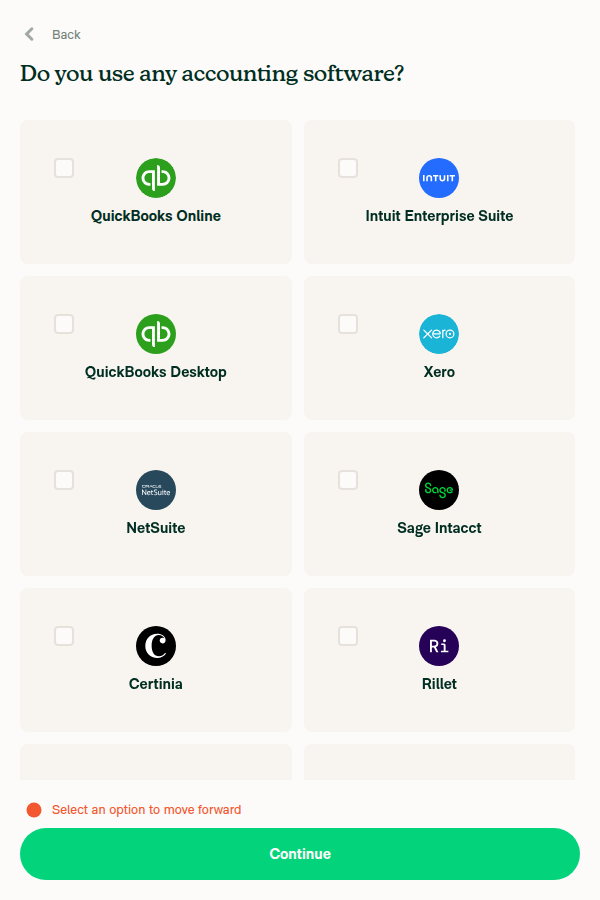
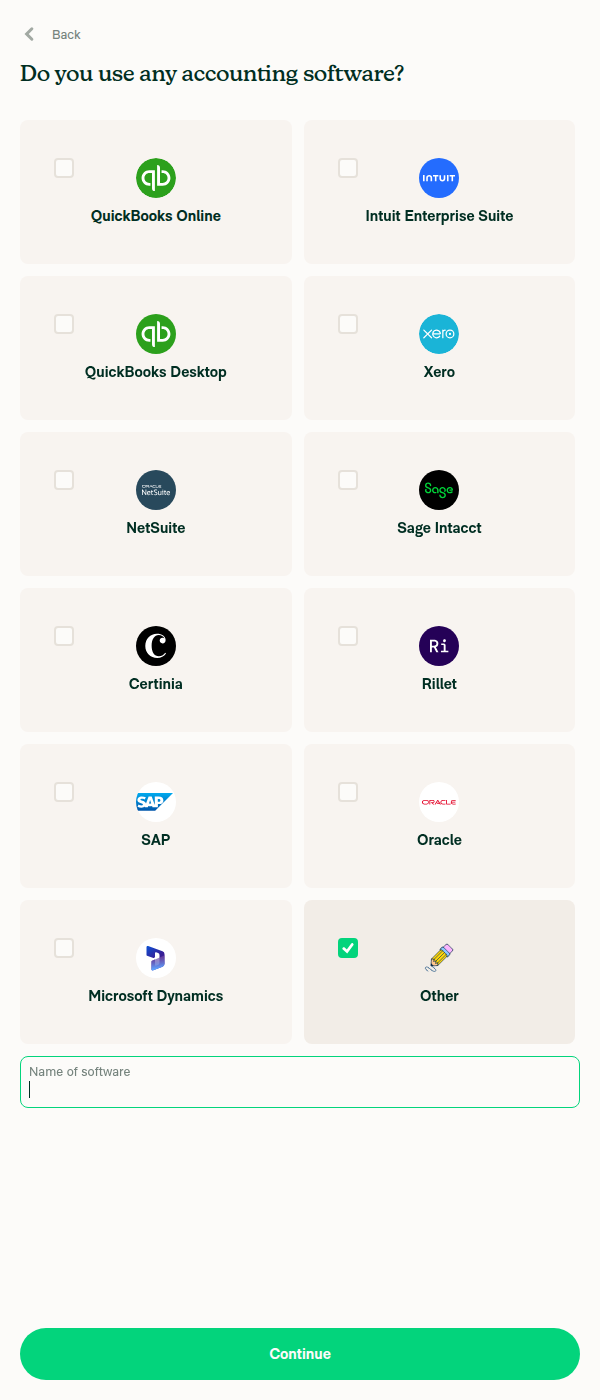
  1. Tile grid. The old layout wrapped a full-width RadioButtonWithLabel at flexBasis: '35%' — two columns on wide, one on narrow. It is now a tile (selection control top-left, logo centered, label underneath) at three columns wide and two narrow, matching the mocks. The transparent spacer View that kept Other from stretching is gone, since 12 tiles fill both grids exactly.

  2. Three integrations added, in the mocks' order: Intuit Enterprise Suite, Certinia and Rillet. No new brand strings were added to the 11 locale files — workspace.accounting.intuitEnterpriseSuite and workspace.accounting.rillet already existed, and Certinia reuses workspace.certinia.title from its connection page.

  3. Downstream mapping. ONBOARDING_ACCOUNTING_MAPPING now covers the new keys. Without this, picking Certinia would render the onboarding task as "Connect to financialforce" — ReportUtils falls back to the raw connection name.

  4. Copy. The Other input label changes from "Your accounting software" to "Name of software" per the mocks, and the dead onboarding.accounting.none string is removed from all 11 locales (None was removed from this screen earlier; a test already asserted it was absent).

Notes for the reviewer — three things worth a second opinion:

  • The title is unchanged. The issue's scope list says to update it because None is gone, but all four mocks keep "Do you use any accounting software?" verbatim. I treated the mocks as authoritative. Say the word if the scope list wins.
  • DualEntry and Campfire are not included. The scope list names DualEntry explicitly, but neither appears in the mocks. Adding them makes 14 tiles — an uneven row on wide and 7 rows on narrow. I'd rather add them in a follow-up once design confirms the grid should grow.
  • Control-plan gating is untouched. CONNECTIONS.CORPORATE and requiresControlPlan don't know the new options. UPGRADE_FEATURE_INTRO_MAPPING marks Intuit Enterprise Suite as requiredPlan: CORPORATE but marks Certinia and Rillet as not Control-gated, so IES probably belongs in both lists. That's a product call I didn't want to guess at, and requiresControlPlan is typed AllConnectionName[] while intuitEnterpriseSuite is an alias, not a connection name — so it needs a deliberate decision, not a cast.

Two smaller calls: the selected-tile fill uses the existing theme.reactionActiveBackground token (green100 light / green600 dark) because no "selected surface" green token exists — this needs checking against the Figma dark-mode frames, which I can't open. And the control is square like a checkbox to match the mocks but is announced as a radio, since only one option can be picked and userReportedIntegration is a single string.

The mocks render the labels as "Quickbooks Online", "Netsuite" and "Dynamics". I kept the shipped brand casing (QuickBooks Online, NetSuite, Microsoft Dynamics) and treated those as mock typos — let me know if Dynamics is a deliberate truncation for tile width.

I was not able to verify this visually in a browser: the test session handed to this run was already broken (the pre-start automation failed and the page rendered blank), so the screenshots below are empty and the UI still needs a human pass.

Fixed Issues

$ #100691
PROPOSAL: #100691 (comment)

Tests

// TODO: The human co-author must fill out the tests you ran before marking this PR as "ready for review"
// Please describe what tests you performed that validates your changed worked.

  • Verify that no errors appear in the JS console

Offline tests

QA Steps

// TODO: The human co-author must fill out the QA tests you ran before marking this PR as "ready for review".
// Please describe what QA needs to do to validate your changes and what areas do they need to test for regressions.

  • Verify that no errors appear in the JS console

PR Author Checklist

  • I linked the correct issue in the ### Fixed Issues section above
  • I wrote clear testing steps that cover the changes made in this PR
    • I added steps for local testing in the Tests section
    • I added steps for the expected offline behavior in the Offline steps section
    • I added steps for Staging and/or Production testing in the QA steps section
    • I added steps to cover failure scenarios (i.e. verify an input displays the correct error message if the entered data is not correct)
    • I turned off my network connection and tested it while offline to ensure it matches the expected behavior (i.e. verify the default avatar icon is displayed if app is offline)
    • I tested this PR with a High Traffic account against the staging or production API to ensure there are no regressions (e.g. long loading states that impact usability).
  • I included screenshots or videos for tests on all platforms
  • I ran the tests on all platforms & verified they passed on:
    • Android: Native
    • Android: mWeb Chrome
    • iOS: Native
    • iOS: mWeb Safari
    • MacOS: Chrome / Safari
  • I verified there are no console errors (if there's a console error not related to the PR, report it or open an issue for it to be fixed)
  • I followed proper code patterns (see Reviewing the code)
    • I verified that comments were added to code that is not self explanatory
    • I verified that any new or modified comments were clear, correct English, and explained "why" the code was doing something instead of only explaining "what" the code was doing.
    • I verified any copy / text that was added to the app is grammatically correct in English. It adheres to proper capitalization guidelines (note: only the first word of header/labels should be capitalized), and is either coming verbatim from figma or has been approved by marketing (in order to get marketing approval, ask the Bug Zero team member to add the Waiting for copy label to the issue)
  • If a new code pattern is added I verified it was agreed to be used by multiple Expensify engineers
  • I followed the guidelines as stated in the Review Guidelines
  • I tested other components that can be impacted by my changes (i.e. if the PR modifies a shared library or component like Avatar, I verified the components using Avatar are working as expected)
  • If a new CSS style is added I verified that:
    • A similar style doesn't already exist
    • The style can't be created with an existing StyleUtils function (i.e. StyleUtils.getBackgroundAndBorderStyle(theme.componentBG))
  • If new assets were added or existing ones were modified, I verified that:
    • The assets are optimized and compressed (for SVG files, run npm run compress-svg)
    • The assets load correctly across all supported platforms.
  • If the PR modifies code that runs when editing or sending messages, I tested and verified there is no unexpected behavior for all supported markdown - URLs, single line code, code blocks, quotes, headings, bold, strikethrough, and italic.
  • If the PR modifies a generic component, I tested and verified that those changes do not break usages of that component in the rest of the App (i.e. if a shared library or component like Avatar is modified, I verified that Avatar is working as expected in all cases)
  • If the PR modifies a component related to any of the existing Storybook stories, I tested and verified all stories for that component are still working as expected.
  • If the PR modifies a component or page that can be accessed by a direct deeplink, I verified that the code functions as expected when the deeplink is used - from a logged in and logged out account.
  • If the PR modifies the UI (e.g. new buttons, new UI components, changing the padding/spacing/sizing, moving components, etc) or modifies the form input styles:
    • I verified that all the inputs inside a form are aligned with each other.
    • I added Design label and/or tagged @Expensify/design so the design team can review the changes.
  • I added unit tests for any new feature or bug fix in this PR to help automatically prevent regressions in this user flow.
  • If the main branch was merged into this PR after a review, I tested again and verified the outcome was still expected according to the Test steps.

Screenshots/Videos

Android: Native
Android: mWeb Chrome
iOS: Native
iOS: mWeb Safari
MacOS: Chrome / Safari

…grations

Rebuild the accounting selection as a 3-column (2 on narrow) tile grid per the design mocks, and add the Intuit Enterprise Suite, Certinia and Rillet options that were missing from this screen.

Each tile keeps a square selection control for the mock's checkbox look but is announced as a radio, since only one option can be picked. Other now uses the Pencil illustration and still reveals its free-text input.

Also map the new keys in ONBOARDING_ACCOUNTING_MAPPING so the onboarding task renders 'Connect to Certinia' rather than the raw connection name, and drop the dead onboarding.accounting.none string.

Co-authored-by: mkhutornyi <mkhutornyi@users.noreply.github.com>
@OSBotify

Copy link
Copy Markdown
Contributor

🦜 Polyglot Parrot! 🦜

Squawk! Looks like you added some shiny new English strings. Allow me to parrot them back to you in other tongues:

View the translation diff
diff --git a/src/languages/de.ts b/src/languages/de.ts
index 955d61a1..0fde0ec7 100644
--- a/src/languages/de.ts
+++ b/src/languages/de.ts
@@ -3344,10 +3344,7 @@ ${amount} für ${merchant} – ${date}`,
             [CONST.ONBOARDING_COMPANY_SIZE.MEDIUM]: '101–1.000 Mitarbeitende',
             [CONST.ONBOARDING_COMPANY_SIZE.LARGE]: 'Mehr als 1.000 Mitarbeitende',
         },
-        accounting: {
-            title: 'Verwendest du eine Buchhaltungssoftware?',
-            otherAccountingSoftware: 'Name der Software',
-        },
+        accounting: {title: 'Verwendest du eine Buchhaltungssoftware?', otherAccountingSoftware: 'Name der Software'},
         interestedFeatures: {
             title: 'An welchen Funktionen bist du interessiert?',
             featuresAlreadyEnabled: 'Hier sind unsere beliebtesten Funktionen:',
diff --git a/src/languages/el.ts b/src/languages/el.ts
index 422a52f3..df5aafe3 100644
--- a/src/languages/el.ts
+++ b/src/languages/el.ts
@@ -3397,10 +3397,7 @@ ${amount} για ${merchant} - ${date}`,
             [CONST.ONBOARDING_COMPANY_SIZE.MEDIUM]: '101-1.000 εργαζόμενοι',
             [CONST.ONBOARDING_COMPANY_SIZE.LARGE]: 'Περισσότεροι από 1.000 εργαζόμενοι',
         },
-        accounting: {
-            title: 'Χρησιμοποιείτε κάποιο λογιστικό λογισμικό;',
-            otherAccountingSoftware: 'Όνομα λογισμικού',
-        },
+        accounting: {title: 'Χρησιμοποιείτε κάποιο λογιστικό λογισμικό;', otherAccountingSoftware: 'Όνομα λογισμικού'},
         interestedFeatures: {
             title: 'Σε ποιες δυνατότητες ενδιαφέρεστε;',
             featuresAlreadyEnabled: 'Αυτά είναι τα πιο δημοφιλή χαρακτηριστικά μας:',
diff --git a/src/languages/es.ts b/src/languages/es.ts
index 530be84f..59713f59 100644
--- a/src/languages/es.ts
+++ b/src/languages/es.ts
@@ -3252,10 +3252,7 @@ ${amount} para ${merchant} - ${date}`,
             [CONST.ONBOARDING_COMPANY_SIZE.MEDIUM]: '101-1,000 empleados',
             [CONST.ONBOARDING_COMPANY_SIZE.LARGE]: 'Más de 1,000 empleados',
         },
-        accounting: {
-            title: '¿Utilizas algún software de contabilidad?',
-            otherAccountingSoftware: 'Nombre del software',
-        },
+        accounting: {title: '¿Utilizas algún software de contabilidad?', otherAccountingSoftware: 'Nombre del software'},
         interestedFeatures: {
             title: '¿Qué funciones te interesan?',
             featuresAlreadyEnabled: 'Aquí están nuestras funciones más populares:',
diff --git a/src/languages/fr.ts b/src/languages/fr.ts
index 70bf85ce..503326ed 100644
--- a/src/languages/fr.ts
+++ b/src/languages/fr.ts
@@ -3352,10 +3352,7 @@ ${amount} pour ${merchant} - ${date}`,
             [CONST.ONBOARDING_COMPANY_SIZE.MEDIUM]: '101 à 1 000 employés',
             [CONST.ONBOARDING_COMPANY_SIZE.LARGE]: 'Plus de 1 000 employés',
         },
-        accounting: {
-            title: 'Utilisez-vous un logiciel de comptabilité ?',
-            otherAccountingSoftware: 'Nom du logiciel',
-        },
+        accounting: {title: 'Utilisez-vous un logiciel de comptabilité ?', otherAccountingSoftware: 'Nom du logiciel'},
         interestedFeatures: {
             title: 'Quelles fonctionnalités vous intéressent ?',
             featuresAlreadyEnabled: 'Voici nos fonctionnalités les plus populaires :',
diff --git a/src/languages/it.ts b/src/languages/it.ts
index 3ddfad9c..a2ef3073 100644
--- a/src/languages/it.ts
+++ b/src/languages/it.ts
@@ -3332,10 +3332,7 @@ ${amount} per ${merchant} - ${date}`,
             [CONST.ONBOARDING_COMPANY_SIZE.MEDIUM]: 'Da 101 a 1.000 dipendenti',
             [CONST.ONBOARDING_COMPANY_SIZE.LARGE]: 'Più di 1.000 dipendenti',
         },
-        accounting: {
-            title: 'Usi un software di contabilità?',
-            otherAccountingSoftware: 'Nome del software',
-        },
+        accounting: {title: 'Usi un software di contabilità?', otherAccountingSoftware: 'Nome del software'},
         interestedFeatures: {
             title: 'A quali funzionalità sei interessato?',
             featuresAlreadyEnabled: 'Ecco le nostre funzionalità più popolari:',
diff --git a/src/languages/ja.ts b/src/languages/ja.ts
index 9afe4766..e1bf39c0 100644
--- a/src/languages/ja.ts
+++ b/src/languages/ja.ts
@@ -3304,10 +3304,7 @@ ${date} の ${merchant} への ${amount}`,
             [CONST.ONBOARDING_COMPANY_SIZE.MEDIUM]: '101~1,000人の従業員',
             [CONST.ONBOARDING_COMPANY_SIZE.LARGE]: '1,000人超の従業員',
         },
-        accounting: {
-            title: '会計ソフトを利用していますか?',
-            otherAccountingSoftware: 'ソフトウェア名',
-        },
+        accounting: {title: '会計ソフトを利用していますか?', otherAccountingSoftware: 'ソフトウェア名'},
         interestedFeatures: {
             title: 'どの機能にご興味がありますか?',
             featuresAlreadyEnabled: '当社で最も人気のある機能はこちらです。',
diff --git a/src/languages/nl.ts b/src/languages/nl.ts
index eaa66601..e9150279 100644
--- a/src/languages/nl.ts
+++ b/src/languages/nl.ts
@@ -3334,10 +3334,7 @@ ${amount} voor ${merchant} - ${date}`,
             [CONST.ONBOARDING_COMPANY_SIZE.MEDIUM]: '101-1.000 werknemers',
             [CONST.ONBOARDING_COMPANY_SIZE.LARGE]: 'Meer dan 1.000 medewerkers',
         },
-        accounting: {
-            title: 'Gebruikt u een boekhoudprogramma?',
-            otherAccountingSoftware: 'Naam van de software',
-        },
+        accounting: {title: 'Gebruikt u een boekhoudprogramma?', otherAccountingSoftware: 'Naam van de software'},
         interestedFeatures: {
             title: 'In welke functies ben je geïnteresseerd?',
             featuresAlreadyEnabled: 'Hier zijn onze populairste functies:',
diff --git a/src/languages/pl.ts b/src/languages/pl.ts
index 2e936667..93bce0fe 100644
--- a/src/languages/pl.ts
+++ b/src/languages/pl.ts
@@ -3364,10 +3364,7 @@ ${amount} dla ${merchant} - ${date}`,
             [CONST.ONBOARDING_COMPANY_SIZE.MEDIUM]: '101–1 000 pracowników',
             [CONST.ONBOARDING_COMPANY_SIZE.LARGE]: 'Ponad 1000 pracowników',
         },
-        accounting: {
-            title: 'Czy korzystasz z jakiegoś oprogramowania księgowego?',
-            otherAccountingSoftware: 'Nazwa oprogramowania',
-        },
+        accounting: {title: 'Czy korzystasz z jakiegoś oprogramowania księgowego?', otherAccountingSoftware: 'Nazwa oprogramowania'},
         interestedFeatures: {
             title: 'Jakie funkcje Cię interesują?',
             featuresAlreadyEnabled: 'Oto nasze najpopularniejsze funkcje:',
diff --git a/src/languages/pt-BR.ts b/src/languages/pt-BR.ts
index bb25b9d5..87f6bef5 100644
--- a/src/languages/pt-BR.ts
+++ b/src/languages/pt-BR.ts
@@ -3323,10 +3323,7 @@ ${amount} para ${merchant} - ${date}`,
             [CONST.ONBOARDING_COMPANY_SIZE.MEDIUM]: '101–1.000 funcionários',
             [CONST.ONBOARDING_COMPANY_SIZE.LARGE]: 'Mais de 1.000 funcionários',
         },
-        accounting: {
-            title: 'Você usa algum software de contabilidade?',
-            otherAccountingSoftware: 'Nome do software',
-        },
+        accounting: {title: 'Você usa algum software de contabilidade?', otherAccountingSoftware: 'Nome do software'},
         interestedFeatures: {
             title: 'Em quais recursos você tem interesse?',
             featuresAlreadyEnabled: 'Aqui estão nossos recursos mais populares:',
diff --git a/src/languages/zh-hans.ts b/src/languages/zh-hans.ts
index 424eac3f..eb0e7dd9 100644
--- a/src/languages/zh-hans.ts
+++ b/src/languages/zh-hans.ts
@@ -3221,10 +3221,7 @@ ${amount},商户:${merchant} - 日期:${date}`,
             [CONST.ONBOARDING_COMPANY_SIZE.MEDIUM]: '101–1,000 名员工',
             [CONST.ONBOARDING_COMPANY_SIZE.LARGE]: '超过 1,000 名员工',
         },
-        accounting: {
-            title: '你是否使用任何会计软件?',
-            otherAccountingSoftware: '软件名称',
-        },
+        accounting: {title: '你是否使用任何会计软件?', otherAccountingSoftware: '软件名称'},
         interestedFeatures: {
             title: '你对哪些功能感兴趣?',
             featuresAlreadyEnabled: '以下是我们最受欢迎的功能:',

Note

You can apply these changes to your branch by copying the patch to your clipboard, then running pbpaste | git apply 😉

View workflow run

@MelvinBot

MelvinBot commented Sep 15, 2026 •

Copy link
Copy Markdown
Contributor Author

🤖 Android test steps verification results: ⚠️ partial

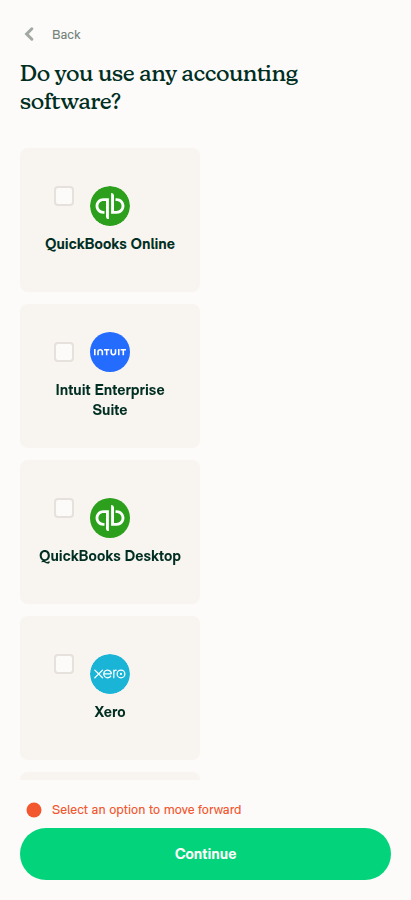
The PR's Tests section is still a TODO, so I ran the scope checklist from #100691 as the test steps on standalone Android NewDot. The content changes are all correct — 12 tiles with the right labels, right title, no None, correct single-select and Other behaviour — but the grid does not render as two columns on a narrow phone: every tile lays out one per row at ~48.5% width, leaving the right half of the screen empty. flexBasis: '48.5%' in src/styles/index.ts:5689-5692 doesn't account for the gap3 12dp column gap, so two tiles (360.3dp) plus the gap (12dp) come to 372.3dp against a 371.4dp container and flexWrap drops to one per row. Lower the narrow basis to ~48% or subtract the gap from it. The wide 32% variant has enough slack.

Continue with nothing selected shows 'Select an option to move forward' error

Step Status
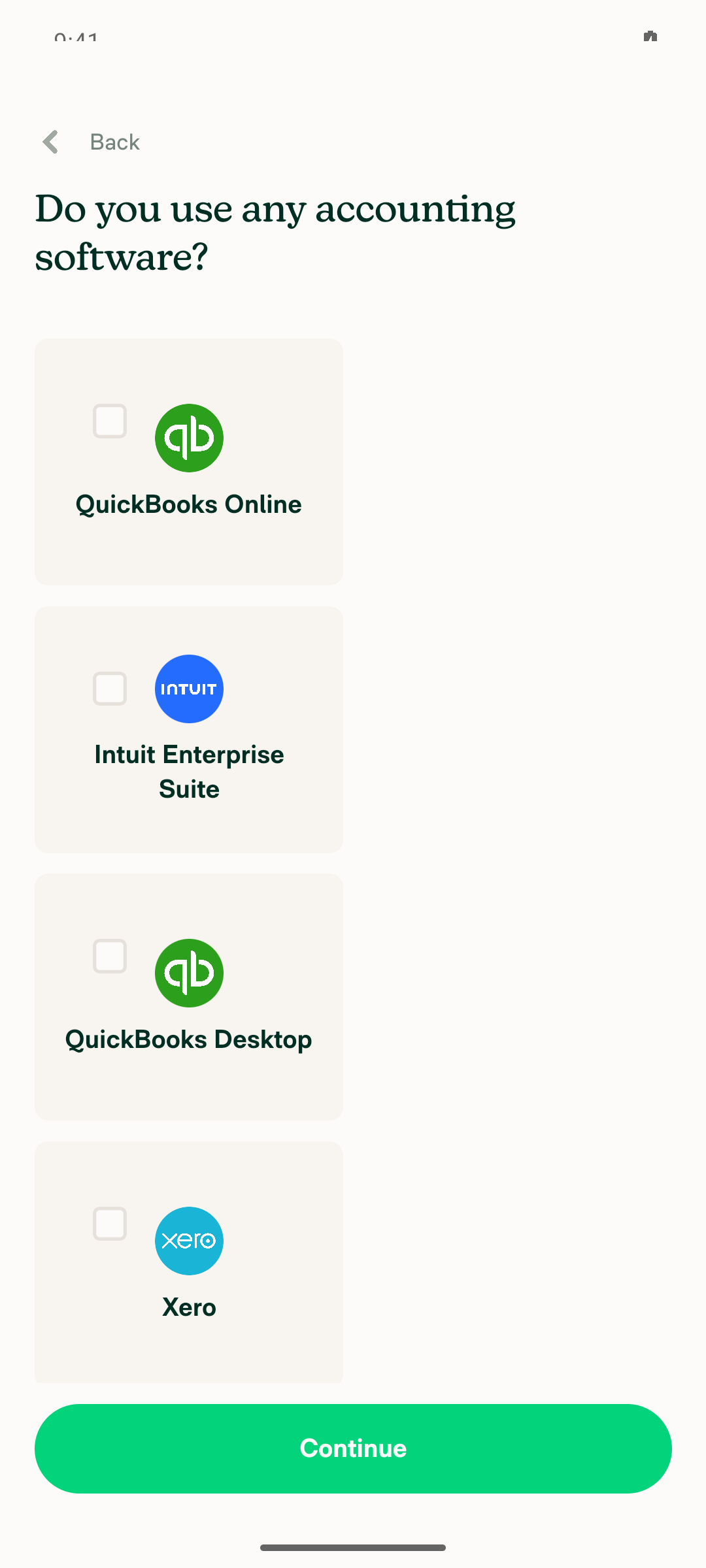
Tile grid renders 2 columns on narrow; control top-left, logo centered, label underneathTile internals are correct — square control pinned top-left, logo centered, bold label beneath. But layout is ONE column: every tile measures x=53, width=472 and stacks vertically (y=518, 928, 1337, 1747). Device 1080x2400 @ 420dpi = 411.4dp wide; container inner width 371.4dp after mh5. 2 × 48.5% = 360.3dp + 12dp gap = 372.3dp > 371.4dp, so it wraps.
Accounting step top: tiles render one per row at half width, right half of screen empty
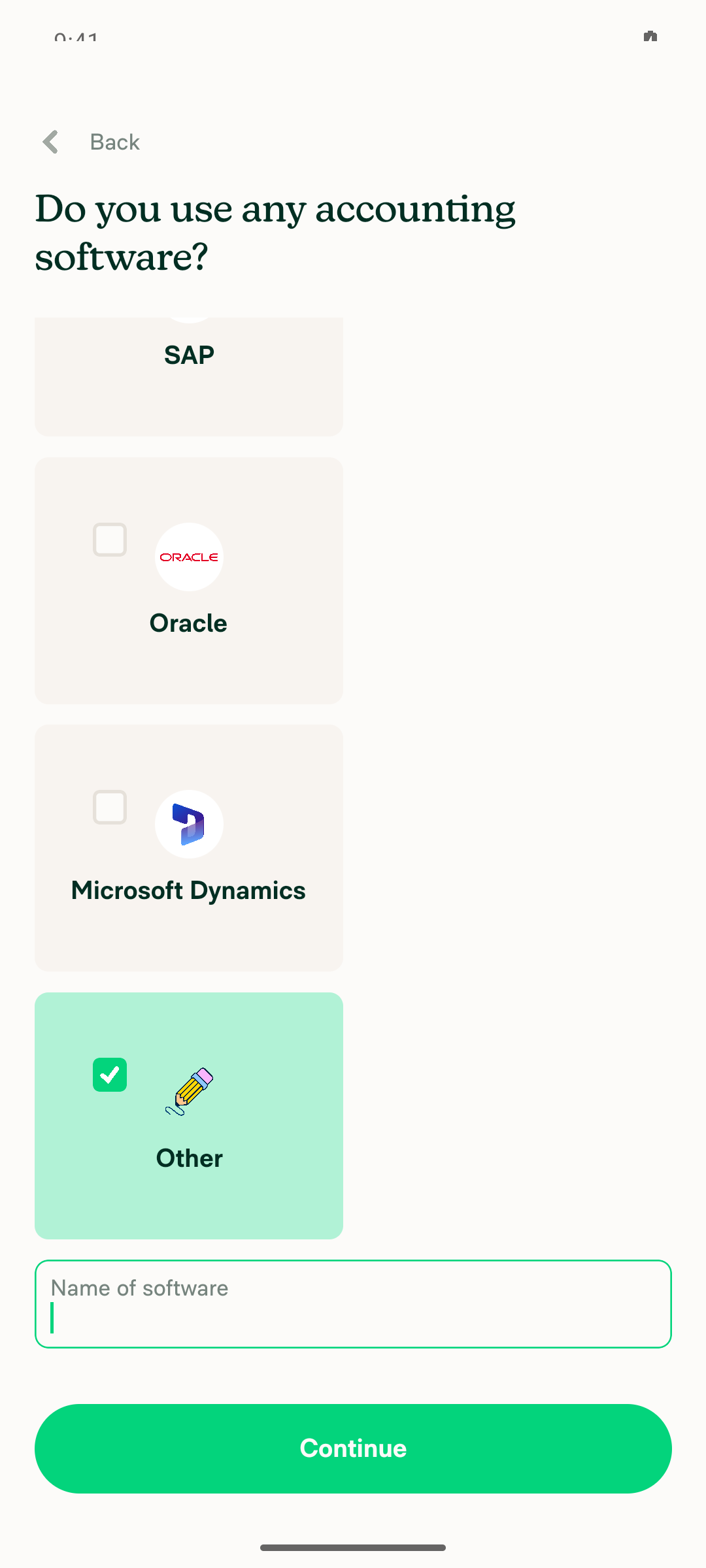
Other tile selected with focused 'Name of software' input
❌
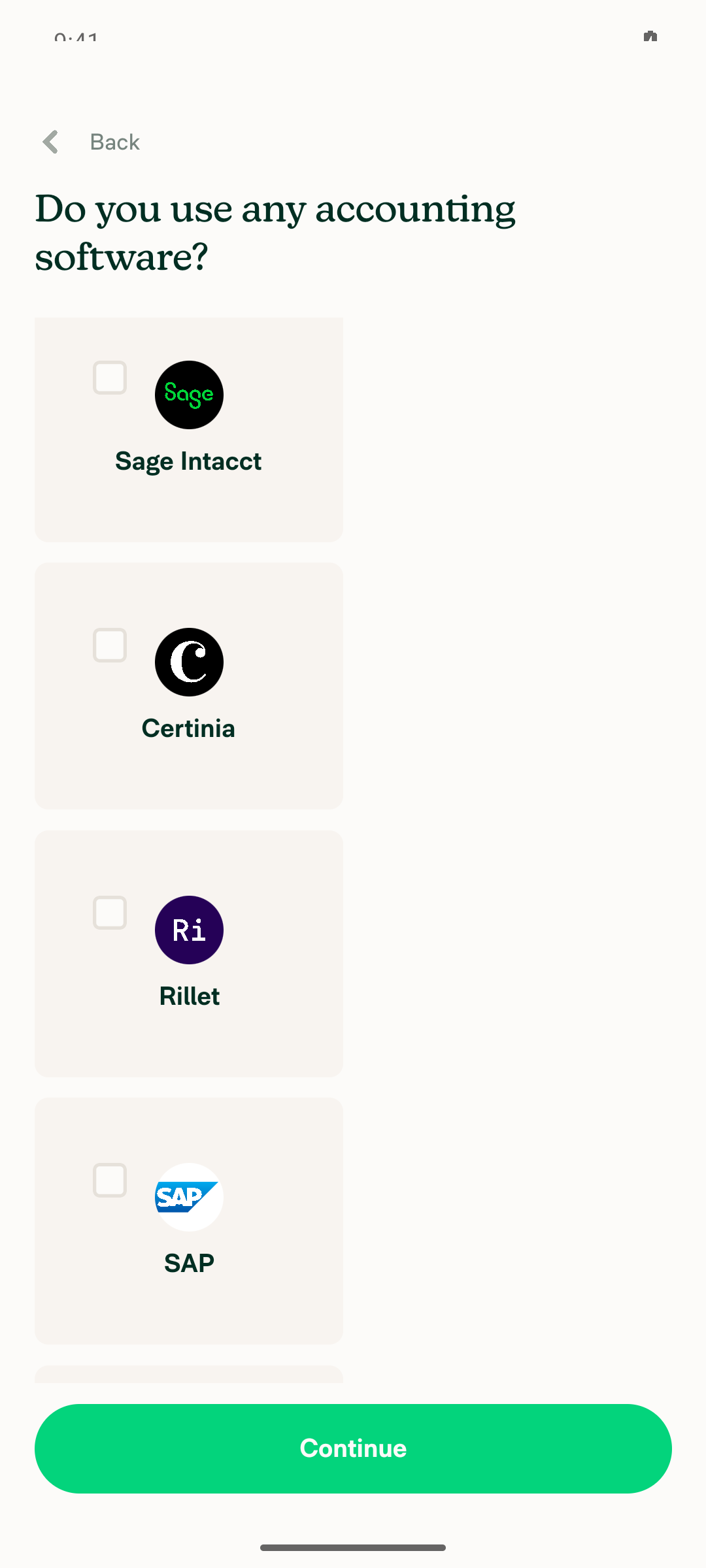
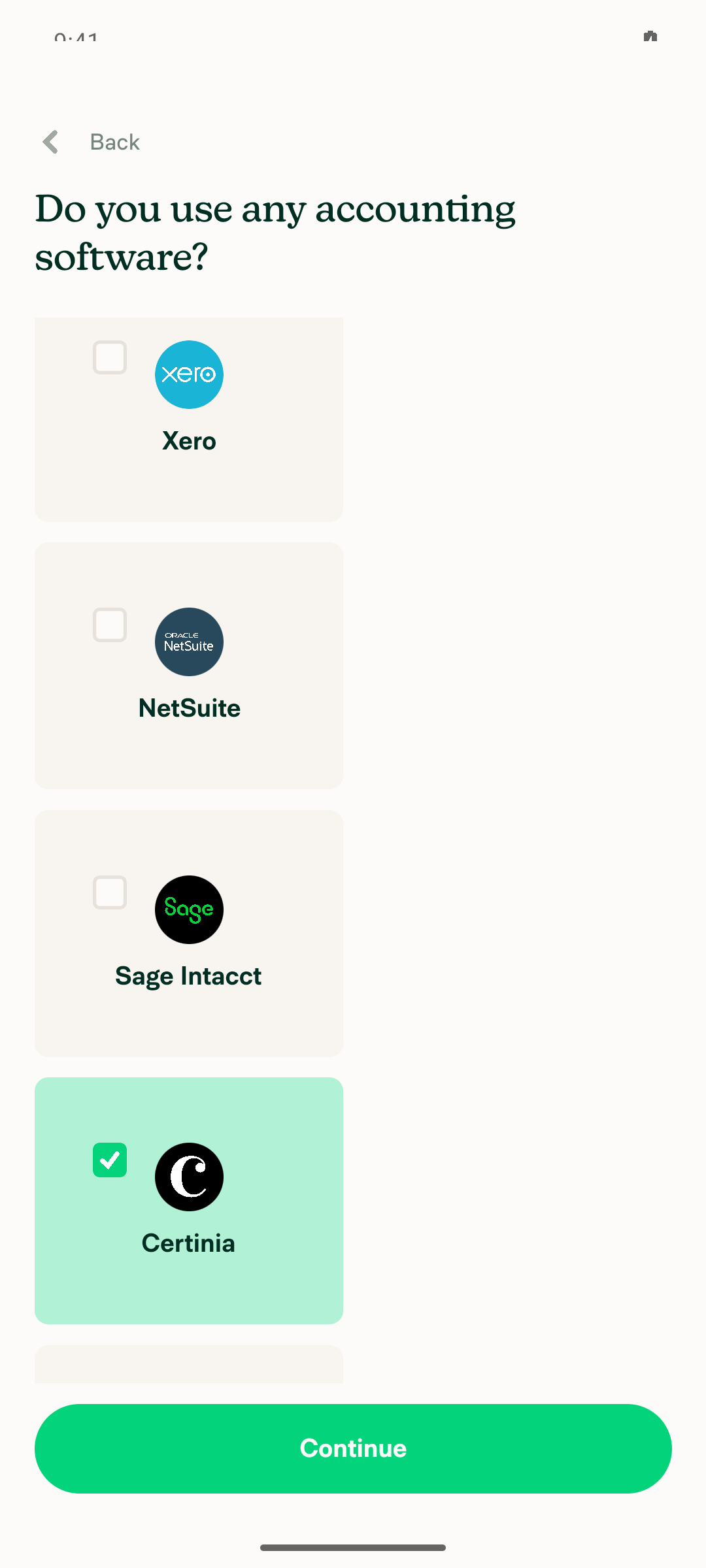
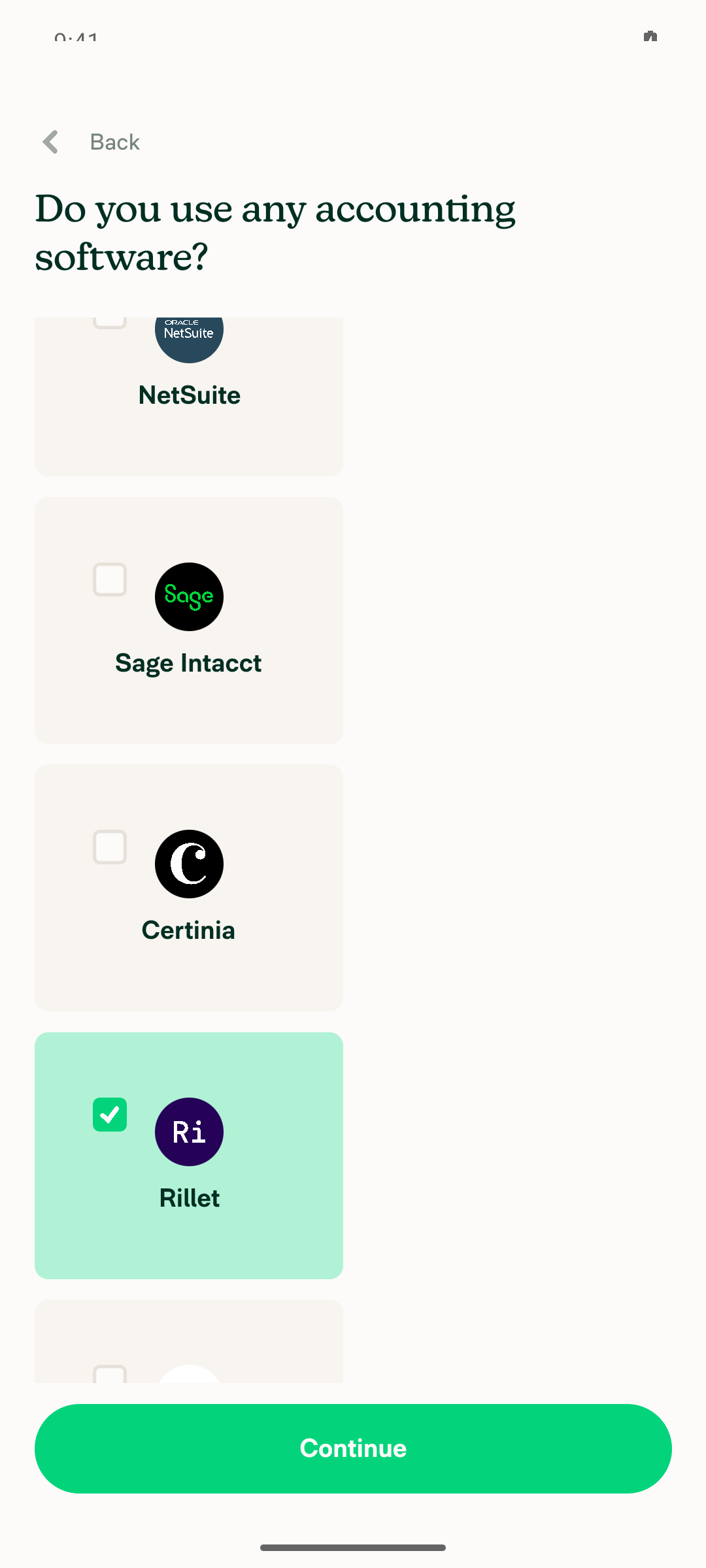
12 tiles present with expected labels, including Intuit Enterprise Suite, Certinia, RilletScrolled the whole grid. Exact labels top to bottom: QuickBooks Online, Intuit Enterprise Suite, QuickBooks Desktop, Xero, NetSuite, Sage Intacct, Certinia, Rillet, SAP, Oracle, Microsoft Dynamics, Other. All 12 present and correctly spelled.
Tiles 1-4
Middle of grid: Sage Intacct, Certinia, Rillet, SAP, Oracle
Bottom of grid
✅
No "None" option on the screenis visible 'label="None"' exited 1 and find None matched nothing at the bottom of the scrolled list. The 12 tiles contain no None entry.
List ends at Other with no None option
✅
Title reads "Do you use any accounting software?"Snapshot node: @e39 [group] "Do you use any accounting software?", rendered with accessibilityRole header. Unchanged from main, as the PR description says.
Title at top of step
✅
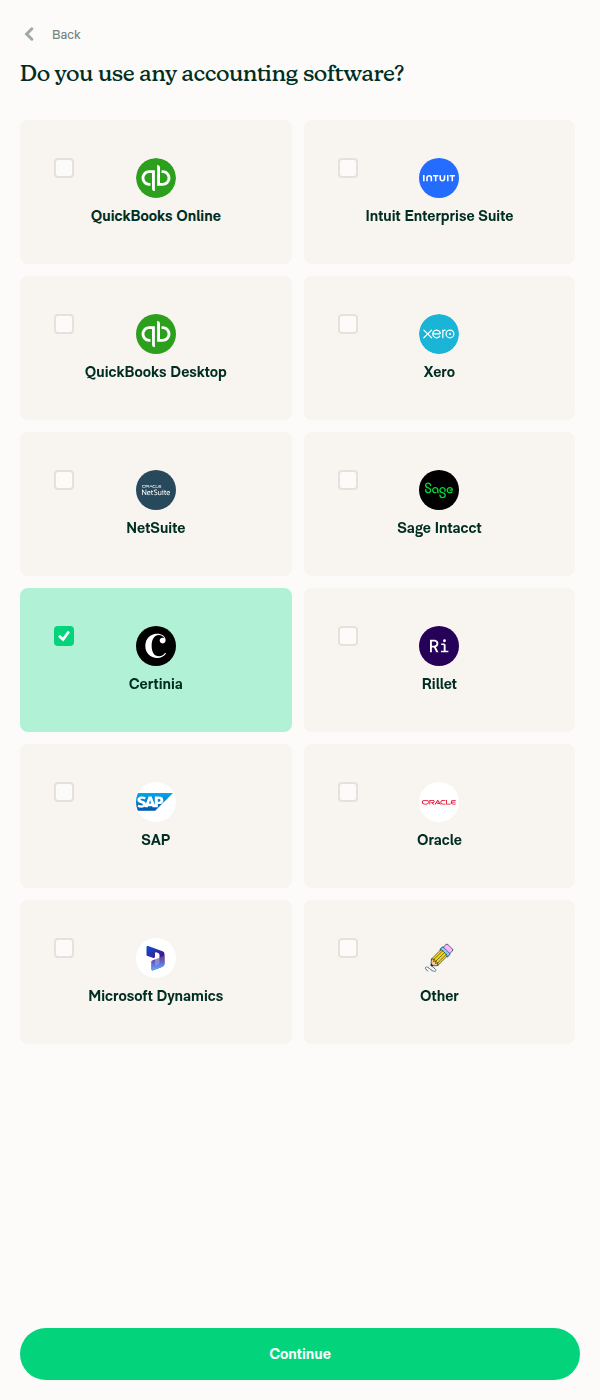
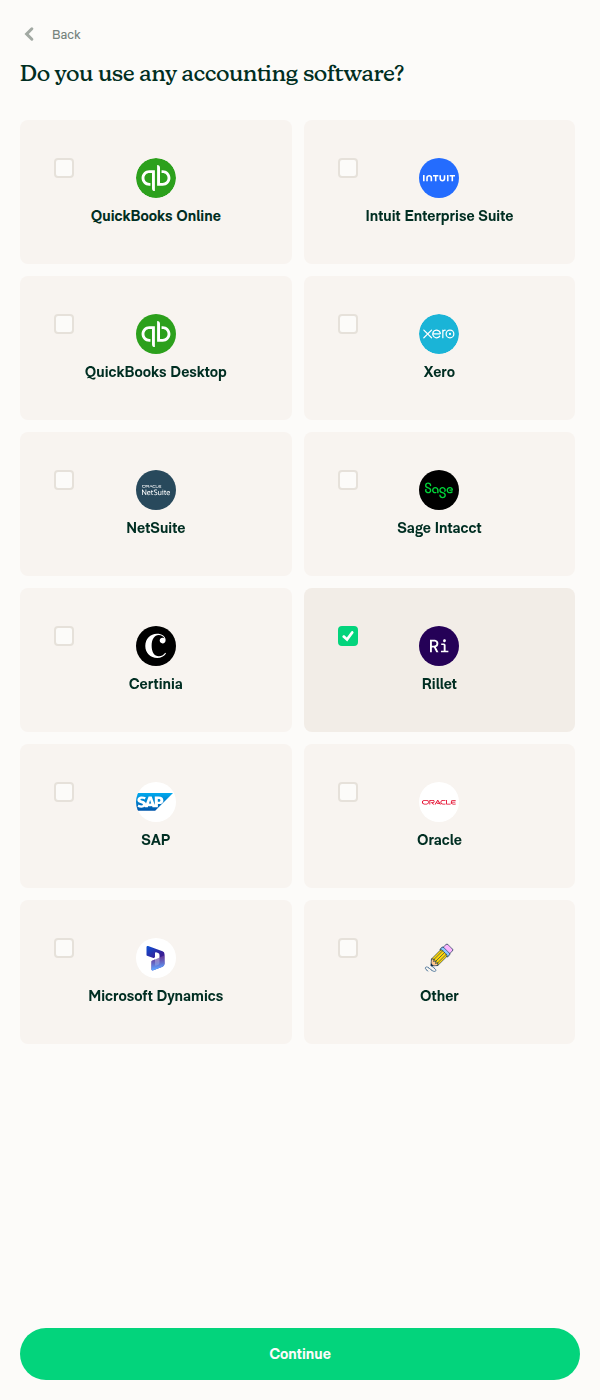
Single select: tapping Certinia then Rillet deselects CertiniaVerified by sampling rendered pixels at each measured rect: after tapping Rillet, Certinia returned to the unselected card colour RGB(248,244,240) while Rillet became RGB(177,242,214); the unrelated SAP tile stayed unselected. Note: neither the RadioButton nor the tile exposes a checked/selected accessibility attribute on Android, so selection is not machine-readable from a snapshot.
Certinia tile selected
Rillet selected and Certinia cleared
✅
"Other" reveals a free-text input labelled "Name of software"After tapping Other the snapshot gained @e15 [text-field] "Name of software" [focused] [editable]. The Other tile uses the Pencil illustration.
Other selected with 'Name of software' input
⚠️
Continuing with no selection still worksIt does not — Continue keeps you on the step and shows Select an option to move forward. Important: this is NOT a regression from this PR. The same early return exists on main at submitAccounting (if (!selectedIntegration) { setError(translate('onboarding.errorSelection')); return; }), so behaviour is unchanged. Flagging it because the issue's scope item assumes continuing without a selection works "as it does today", and it doesn't — with None gone, someone who uses no accounting software must pick a product they don't use or pick Other.
'Select an option to move forward' error
⚠️
No JS console / redbox errors during the flowNo redbox at any point. logcat across the whole accounting-step window — mount, tile selection, Other input, back/forward, empty submit — had no ReactNativeJS [error] lines, exceptions, or unhandled-navigation warnings.
✅

Two things I could not cover, so they still need a human pass:

  • Dark mode. The scope asks to verify light and dark against Figma, and the PR description flags the theme.reactionActiveBackground selected-tile fill as unchecked against the dark frames. I tested in light mode only.
  • Tile ordering. The rendered order puts Intuit Enterprise Suite 2nd and Certinia/Rillet right after Sage Intacct, which matches the integrations array but not the "in the mocks' order" reading of the PR description. Worth a glance against Figma.
Test environment and how I got there

Standalone Android NewDot, developmentDebug, com.expensify.chat.dev, emulator at 1080x2400 @ 420dpi, built from claude-onboardingAccountingTileGrid at db25925.

The CI pre-start sign-in failed before this run began (REPLAY_DIVERGENCE at step 2 of sign-in.ad: Android fill verification failed on the Phone or email field), so I re-drove the login form by hand. That flow's owner is App/.claude/skills/agent-device/flows/macros/sign-in.ad — the fill arm needs a fresh look, since pressing the field and filling it worked manually once the value was read back from a snapshot rather than trusted.

One dead end worth recording: on the first pass I tapped the Accounting checkbox on "What features are you interested in?", not realising it is pre-checked. That unchecked it, and BaseOnboardingInterestedFeatures.tsx only routes to ROUTES.ONBOARDING_ACCOUNTING when accounting is enabled — otherwise it completes onboarding and skips the screen entirely. The step is then unreachable on that account: AuthScreens.tsx:352 only mounts the onboarding navigator while onboarding is incomplete. I minted a second account to get a clean run.


view run · no recording available

@mkhutornyi

Copy link
Copy Markdown
Contributor

@MelvinBot close this PR

@MelvinBot

MelvinBot commented Sep 15, 2026 •

Copy link
Copy Markdown
Contributor Author

🤖 Web test steps verification results: ❌ fail

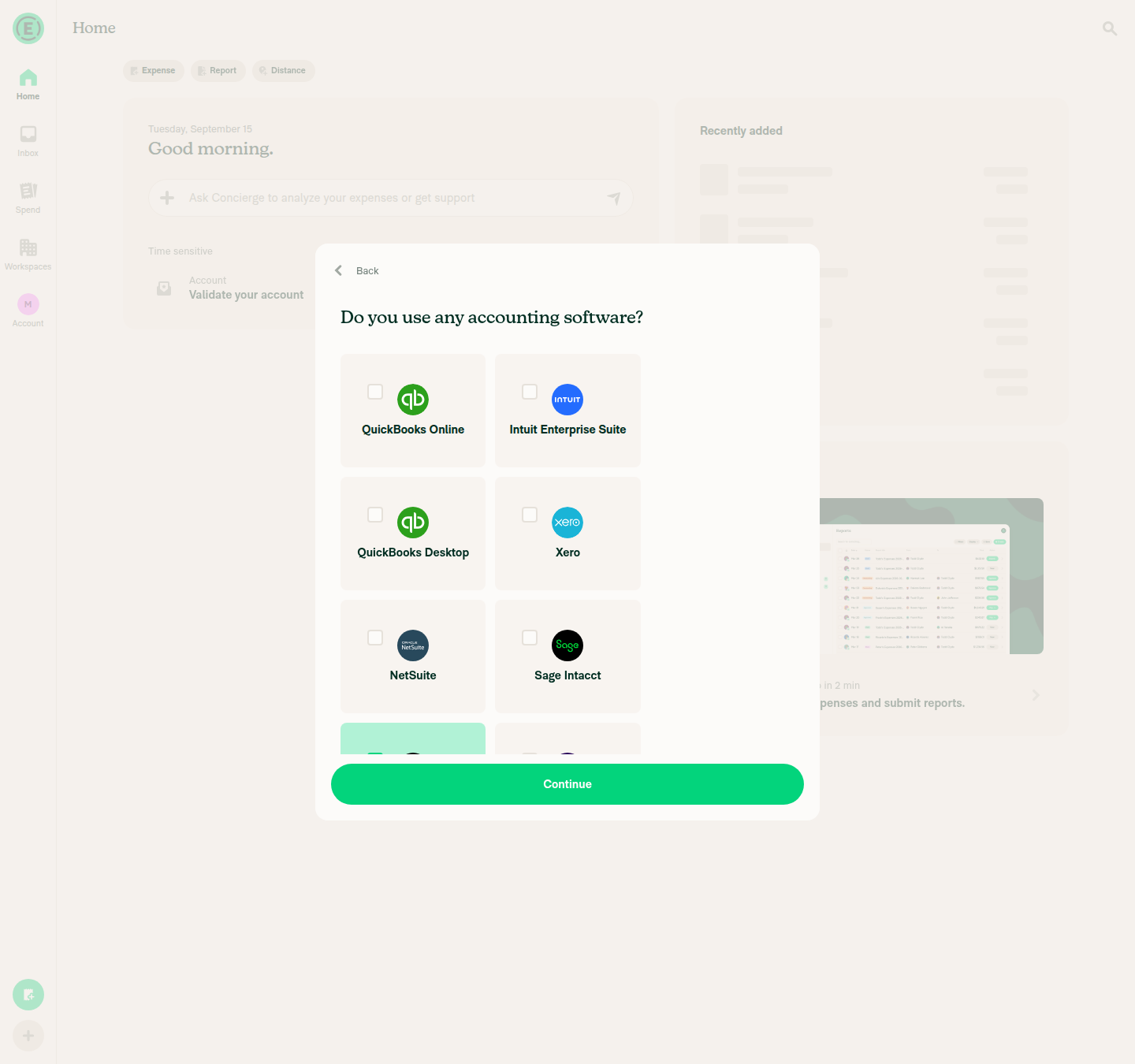
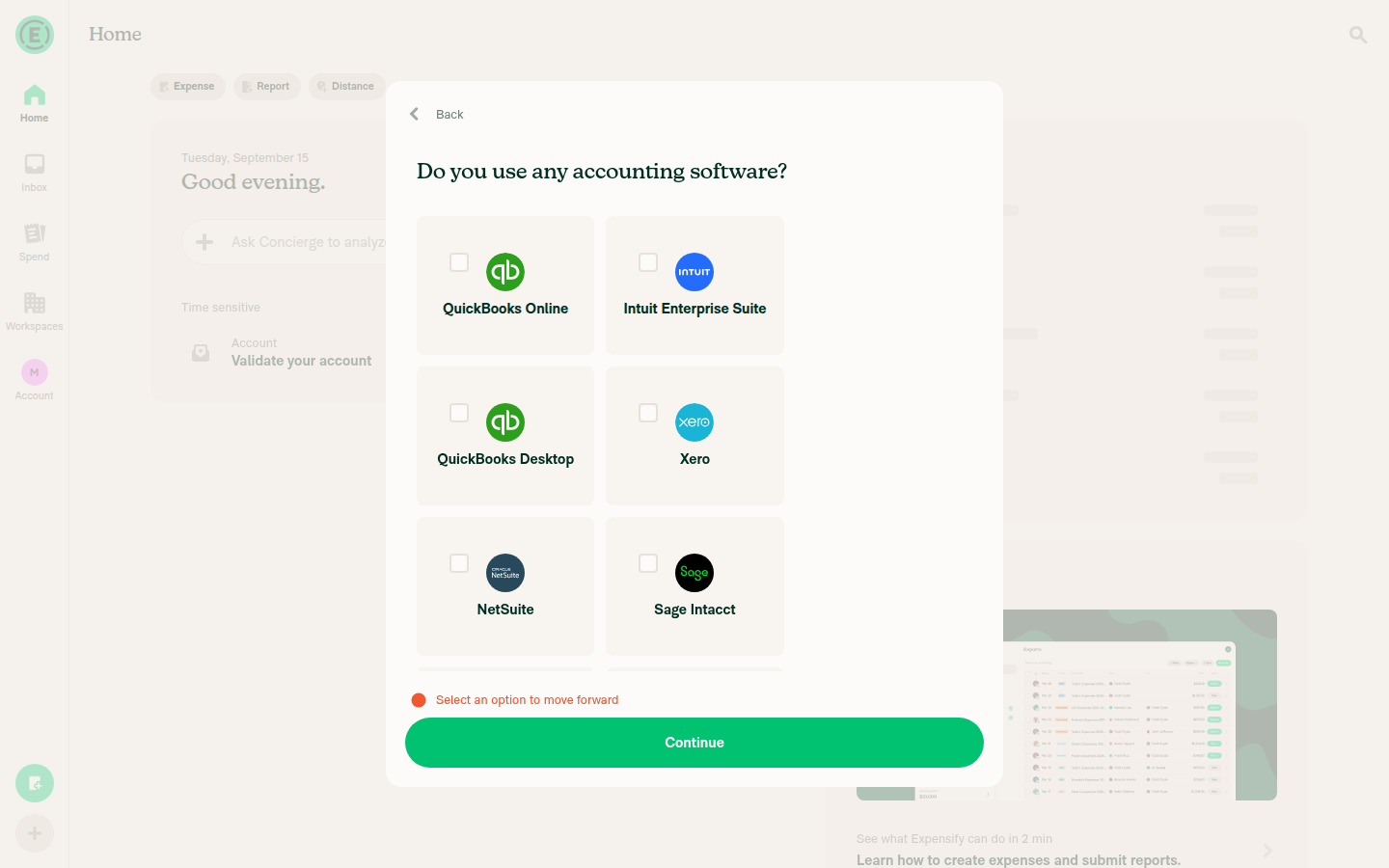
The PR's Tests section is still a TODO, so I ran the scope checklist from #100691 as the test steps. The content is right — 12 tiles with the correct labels, correct title, no None, correct single-select, and the Other input all check out. But the column math is broken at both breakpoints: the grid renders 2 columns at every desktop width (never 3), and falls back to 1 column on any viewport under 440px. Both percentage bases in src/styles/index.ts:5684-5692 overflow because the 12px gap3 is additive on top of the flexBasis percentage, so each row overshoots its container by about a pixel and wraps. This reproduces the 1-column wrap I reported on Android, and adds a wide-layout failure that Android couldn't reach.

Accounting step at 1440x1350: still 2 columns in the fixed 640px onboarding modal

Step Status
Wide desktop viewport renders a 3-column tile gridRenders 2 columns at 1440x900 and 1440x1350. Tiles measure 184.3px wide at x=432-615 and x=628-812, rows 144px tall with a 12px gap; the grid fills only 380.6px of the 576px content area. This is deterministic, not viewport-dependent: the onboarding modal is a fixed 640px (onboardingModalWidth at variables.ts:307) with mh8 32px side margins, so the row container is always 576px, while 3 x 32% + 2 x 12px gap needs 576.96px. 3 columns would require a >=600px container, which this modal never provides. Tile internals are correct — square control top-left, logo centered, bold label underneath.
Accounting step at 1440x900: 2-column grid with empty space on the right
Accounting step at 1440x1350: still 2 columns
❌
Narrow viewport renders 2 columnsWeb reproduces the Android wrap. At 411px the grid collapses to 1 column (tiles 180px at x=20-199). Narrow container = 411 - 2x20 mh5 = 371px, while 2 x 48.5% + 12px gap needs 371.9px. Measured breakpoint: 2 columns only appear at >=440px. Every common phone width — 360, 375, 390, 411, 414, 430 — renders 1 column.
411px viewport: single column
440px viewport: exactly 2 columns
600px viewport: 2 columns
❌
12 tiles present with expected labelsExactly 12, in this order: QuickBooks Online, Intuit Enterprise Suite, QuickBooks Desktop, Xero, NetSuite, Sage Intacct, Certinia, Rillet, SAP, Oracle, Microsoft Dynamics, Other. All expected integrations present. Worth noting: the array is ordered row-by-row for a 3-column layout, so with the actual 2-column rendering the rows pair up as QBO+Intuit Enterprise Suite, QuickBooks Desktop+Xero, and so on — the mock's intended row grouping is not what renders. Fixing the column math fixes this too.
All 12 accounting tiles
✅
No "None" option on the screenNo None tile in the accessibility snapshot (12 radios only) and none in the full-grid capture.
Full grid, no None option
✅
Title reads "Do you use any accounting software?"Snapshot node: @e5 [heading] "Do you use any accounting software?" — exact match, rendered as the H1 above the grid.
Screen title
✅
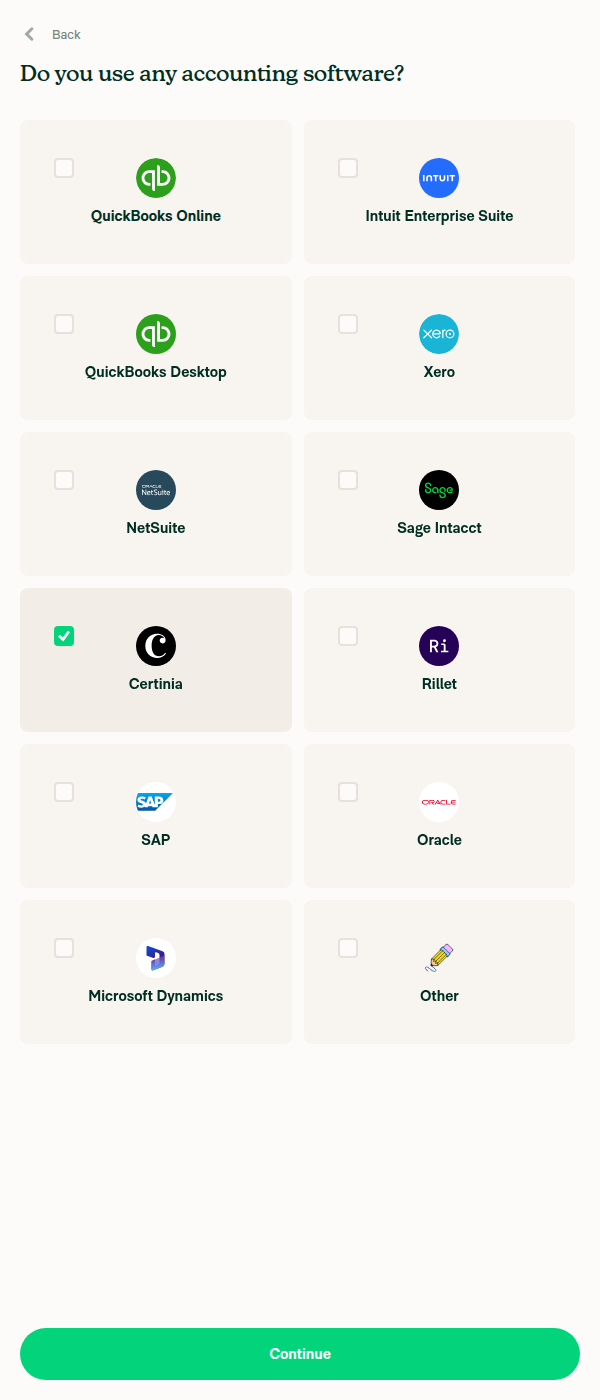
Single select: clicking Certinia then Rillet deselects CertiniaCertinia filled green rgb(177,242,214) = #B1F2D6 with a checked control; clicking Rillet moved the fill and reverted Certinia to #F8F4F0. Only one tile is ever filled. One thing to look at: the tile's hoverStyle (hoveredComponentBG #F2EDE7) paints OVER the selected background, so while the cursor rests on the tile you just clicked the green fill disappears and only the checkbox shows selection — compare the hovered and non-hovered shots below. Also note RN-Web doesn't expose aria-checked on these radios, so selection isn't machine-readable for automation.
Certinia selected, pointer away: green fill
Rillet selected, Certinia cleared
Certinia selected but hovered: green fill hidden by hover gray
⚠️
"Other" reveals a free-text input labelled "Name of software"Snapshot gained @e32 [text-field] "Name of software" [editable], auto-focused directly below the grid, with the Other tile selected.
Other selected with 'Name of software' input
✅
Dark mode: grid and selected-tile fill legible and correctNOT VERIFIED on screen — a tooling limit, not an app failure. There's no way to force a dark color scheme on web from the test harness, and the in-app theme preference sits behind Settings > Preferences, which can't be reached without abandoning the onboarding modal under test. Static read supports the author's concern: onboardingAccountingItemSelected uses theme.reactionActiveBackground, which is green100 #B1F2D6 in light but green600 #008C59 in dark, against a cardBG of #72419. So dark mode gets a saturated mid-green fill rather than a pale tint. Label contrast on that fill computes to 3.59:1 (below the 4.5:1 AA threshold for 15px bold text) versus 11.7:1 in light. This still needs a human pass against the dark Figma frames.
❌
Continue with no option selectedStays on the step and shows a red inline message, Select an option to move forward. No navigation and no network call. Not a regression — the same early return exists on main — but flagging it because the scope item assumes continuing without a selection works "as it does today", and it doesn't. With None gone, someone who uses no accounting software must pick a product they don't use or pick Other.
'Select an option to move forward' error
⚠️
No JS console errors during the flowNOT VERIFIED — console capture isn't available on the web harness. Weak proxy: every request during the flow returned 200 (OpenApp, AuthenticatePusher, SearchForTodos, UpdateAutomaticTimezone, Ping, Log, static assets), with no 4xx/5xx and no error UI beyond the intentional validation message.
❌

Suggested fix for the two layout failures. The gap is additive on top of the percentage basis, so both breakpoints overflow by about a pixel:

onboardingAccountingItemWide: {flexBasis: '32%', maxWidth: '32%'},      // 3 x 32% + 2 x 12px needs a >= 600px container; the modal gives 576px
onboardingAccountingItemNarrow: {flexBasis: '48.5%', maxWidth: '48.5%'}, // 2 x 48.5% + 12px needs a >= 400px container; a 411px viewport gives 371px

Either drop the percentages enough to leave room for the gap (roughly 31% and 47.5%), or compute the basis as (100% - 2*gap)/3 and (100% - gap)/2.

Test environment

Web build from claude-onboardingAccountingTileGrid at db25925, driven in a headless browser. Reached the accounting step through onboarding: work email skipped, "Manage my team's expenses", "11-50 employees", then the features step with Accounting left pre-checked.

One trap worth recording for future runs on this screen: Accounting is pre-checked on "What features are you interested in?". Unchecking it makes BaseOnboardingInterestedFeatures complete onboarding and skip the accounting step entirely, and the step is then unreachable on that account because the onboarding navigator only mounts while onboarding is incomplete.

The CI pre-start also failed before this run (REPLAY_DIVERGENCE on the onboarding replay: Unknown ref: e22 pressing Skip), so the onboarding screens were driven by hand.


view run · no recording available

@MelvinBot MelvinBot closed this Sep 15, 2026
@MelvinBot

MelvinBot commented Sep 15, 2026 •

Copy link
Copy Markdown
Contributor Author

🤖 Closed.

The branch claude-onboardingAccountingTileGrid is untouched, so this can be reopened if you want to pick it back up. #100691 is still open and is not linked for auto-close, so the work stays tracked there.

For whoever takes it next, the Android run on this PR found one real bug worth carrying over: the tile grid renders a single column on narrow layouts because flexBasis: '48.5%' doesn't leave room for the 12dp gap3 column gap. Details are in my earlier comment.


view run · no recording available

Sign up for free to join this conversation on GitHub. Already have an account? Sign in to comment

Labels

Melvin-Test-Android Melvin-Test-Web Triggers Melvin to run the testing steps of the PR on web

Projects

None yet

Development

Successfully merging this pull request may close these issues.

3 participants