Skip to content

Add DualEntry support for vendor matching - #100678

Merged
Beamanator merged 9 commits into
mainfrom
lucien/dualentry-vendor-matching
Sep 14, 2026
Merged

Beamanator merged 9 commits into
mainfrom
lucien/dualentry-vendor-matching

Conversation

@lakchote

@lakchote lakchote commented Sep 9, 2026

Copy link
Copy Markdown
Contributor

Explanation of Change

DualEntry now supports the expense vendor picker, Vendors page, merchant rules, and vendor-name lookup. These features use the same eligible vendors as export. DualEntry follows Rillet in the source order and requires the vendorMatching beta and a configured connection.

This PR extends the vendor-matching support from the merged Rillet PR #100542. Current main is merged into this branch.

Fixed Issues

$ https://github.com/Expensify/Expensify/issues/679020
PROPOSAL:

Tests

Prerequisite: Use a workspace with the vendorMatching beta enabled, DualEntry connected and configured, and at least one active vendor available to the selected company.

More Features page

  1. Go to Workspace Settings > More Features.
  2. Verify the "Vendors" row is displayed and enabled.

Manual vendor selection and search

  1. Open a non-reimbursable expense in workspace chat.
  2. Verify the "Vendor" row is displayed below Category.
  3. Tap "Vendor". Verify the DualEntry vendor list appears.
  4. Search for a vendor. Verify the list filters by name.
  5. Select a vendor. Verify the picker closes and the expense Vendor row is updated.
  6. Make the expense reimbursable. Verify the Vendor row is hidden.

Automatic vendor matching

  1. Create a non-reimbursable expense and then edit its merchant to a matching name.
  2. Open the transaction thread in chat.
  3. Verify Concierge adds the automatic match comment and sets the Vendor field on the transaction.

Inactive-vendor error

  1. On an expense with a selected DualEntry vendor, deactivate that vendor in DualEntry and sync the connection.
  2. Reopen the expense. Verify the Vendor row displays the brick-road indicator and an inactive-vendor error.
  3. Tap the Vendor row and select an active vendor or "None". Verify the error clears.
image

Credit Card Misc fallback on export

Prerequisite: a DualEntry workspace with no default vendor set under Accounting > Export, and no vendor named Credit Card Misc in DualEntry.

  1. Export a report with a positive non-reimbursable cash expense that has no vendor selected. Verify DualEntry now has one active Credit Card Misc vendor with no company set, and that the exported expense uses it. The workspace default vendor stays empty.
  2. Export a second report with no vendors selected. Verify its direct expenses use the same Credit Card Misc vendor and no second one gets created.
  • Verify that no errors appear in the JS console

Offline tests

NA

QA Steps

Same as tests.

  • Verify that no errors appear in the JS console

PR Author Checklist

  • I linked the correct issue in the ### Fixed Issues section above
  • I wrote clear testing steps that cover the changes made in this PR
    • I added steps for local testing in the Tests section
    • I added steps for the expected offline behavior in the Offline steps section
    • I added steps for Staging and/or Production testing in the QA steps section
    • I added steps to cover failure scenarios (i.e. verify an input displays the correct error message if the entered data is not correct)
    • I turned off my network connection and tested it while offline to ensure it matches the expected behavior (i.e. verify the default avatar icon is displayed if app is offline)
    • I tested this PR with a High Traffic account against the staging or production API to ensure there are no regressions (e.g. long loading states that impact usability).
  • I included screenshots or videos for tests on all platforms
  • I ran the tests on all platforms & verified they passed on:
    • Android / native
    • Android / Chrome
    • iOS / native
    • iOS / Safari
    • MacOS / Chrome / Safari
    • MacOS / Desktop
  • I verified there are no console errors (if there's a console error not related to the PR, report it or open an issue for it to be fixed)
  • I followed proper code patterns (see Reviewing the code)
    • I verified that any callback methods that were added or modified are named for what the method does and never what callback they handle (i.e. toggleReport and not onIconClick)
    • I verified that the left part of a conditional rendering a React component is a boolean and NOT a string, e.g. myBool && <MyComponent />.
    • I verified that comments were added to code that is not self explanatory
    • I verified that any new or modified comments were clear, correct English, and explained "why" the code was doing something instead of only explaining "what" the code was doing.
    • I verified any copy / text shown in the product is localized by adding it to src/languages/* files and using the translation method
      • If any non-english text was added/modified, I verified the translation was requested/reviewed in #expensify-open-source and it was approved by an internal Expensify engineer. Link to Slack message:
    • I verified all numbers, amounts, dates and phone numbers shown in the product are using the localization methods
    • I verified any copy / text that was added to the app is grammatically correct in English. It adheres to proper capitalization guidelines (note: only the first word of header/labels should be capitalized), and is approved by marketing by adding the Waiting for Copy label for a copy review on the original GH to get the correct copy.
    • I verified proper file naming conventions were followed for any new files or renamed files. All non-platform specific files are named after what they export and are not named "index.js". All platform-specific files are named for the platform the code supports as outlined in the README.
    • I verified the JSDocs style guidelines (in STYLE.md) were followed
  • If a new code pattern is added I verified it was agreed to be used by multiple Expensify engineers
  • I followed the guidelines as stated in the Review Guidelines
  • I tested other components that can be impacted by my changes (i.e. if the PR modifies a shared library or component like Avatar, I verified the components using Avatar are working as expected)
  • I verified all code is DRY (the PR doesn't include any logic written more than once, with the exception of tests)
  • I verified any variables that can be defined as constants (ie. in CONST.js or at the top of the file that uses the constant) are defined as such
  • I verified that if a function's arguments changed that all usages have also been updated correctly
  • If a new component is created I verified that:
    • A similar component doesn't exist in the codebase
    • All props are defined accurately and each prop has a /** comment above it */
    • The file is named correctly
    • The component has a clear name that is non-ambiguous and the purpose of the component can be inferred from the name alone
    • The only data being stored in the state is data necessary for rendering and nothing else
    • If we are not using the full Onyx data that we loaded, I've added the proper selector in order to ensure the component only re-renders when the data it is using changes
    • For Class Components, any internal methods passed to components event handlers are bound to this properly so there are no scoping issues (i.e. for onClick={this.submit} the method this.submit should be bound to this in the constructor)
    • Any internal methods bound to this are necessary to be bound (i.e. avoid this.submit = this.submit.bind(this); if this.submit is never passed to a component event handler like onClick)
    • All JSX used for rendering exists in the render method
    • The component has the minimum amount of code necessary for its purpose, and it is broken down into smaller components in order to separate concerns and functions
  • If any new file was added I verified that:
    • The file has a description of what it does and/or why is needed at the top of the file if the code is not self explanatory
  • If a new CSS style is added I verified that:
    • A similar style doesn't already exist
    • The style can't be created with an existing StyleUtils function (i.e. StyleUtils.getBackgroundAndBorderStyle(themeColors.componentBG))
  • If the PR modifies code that runs when editing or sending messages, I tested and verified there is no unexpected behavior for all supported markdown - URLs, single line code, code blocks, quotes, headings, bold, strikethrough, and italic.
  • If the PR modifies a generic component, I tested and verified that those changes do not break usages of that component in the rest of the App (i.e. if a shared library or component like Avatar is modified, I verified that Avatar is working as expected in all cases)
  • If the PR modifies a component related to any of the existing Storybook stories, I tested and verified all stories for that component are still working as expected.
  • If the PR modifies a component or page that can be accessed by a direct deeplink, I verified that the code functions as expected when the deeplink is used - from a logged in and logged out account.
  • If a new page is added, I verified it's using the ScrollView component to make it scrollable when more elements are added to the page.
  • If the main branch was merged into this PR after a review, I tested again and verified the outcome was still expected according to the Test steps.
  • I have checked off every checkbox in the PR author checklist, including those that don't apply to this PR.

Screenshots/Videos

Android: Native
Android: mWeb Chrome
iOS: Native
iOS: mWeb Safari
MacOS: Chrome / Safari

@lakchote lakchote changed the title Add DualEntry support for vendor matching [HOLD] Add DualEntry support for vendor matching Sep 9, 2026
@lakchote lakchote changed the title [HOLD] Add DualEntry support for vendor matching [HOLD BE] Add DualEntry support for vendor matching Sep 9, 2026
@codecov

codecov Bot commented Sep 10, 2026

Copy link
Copy Markdown

Codecov Report

✅ Changes either increased or maintained existing code coverage, great job!

Files with missing lines Coverage Δ
src/libs/PolicyUtils.ts 81.46% <100.00%> (+2.74%) ⬆️
...ages/workspace/WorkspaceMoreFeaturesPage/index.tsx 69.77% <100.00%> (ø)
...y/export/DualEntryDefaultCompanyCardVendorPage.tsx 0.00% <0.00%> (ø)
... and 361 files with indirect coverage changes

@lakchote lakchote changed the title [HOLD BE] Add DualEntry support for vendor matching Add DualEntry support for vendor matching Sep 11, 2026
@lakchote
lakchote marked this pull request as ready for review September 11, 2026 16:59
@lakchote
lakchote requested review from a team as code owners September 11, 2026 16:59
@melvin-bot
melvin-bot Bot requested a review from hoangzinh September 11, 2026 16:59
@melvin-bot

melvin-bot Bot commented Sep 11, 2026

Copy link
Copy Markdown

@hoangzinh Please copy/paste the Reviewer Checklist from here into a new comment on this PR and complete it. If you have the K2 extension, you can simply click: [this button]

@melvin-bot
melvin-bot Bot requested review from a team and dylanexpensify and removed request for a team September 11, 2026 16:59
@chatgpt-codex-connector

chatgpt-codex-connector Bot commented Sep 11, 2026

Copy link
Copy Markdown

Codex Review Summary

This comment shows the latest Codex review activity on this pull request.

Review Status Commit Review trigger
📝 Code Review Completed 2026-09-11T17:11:57.801657Z f27f58c Draft marked ready
ℹ️ About Codex in GitHub

Your team has set up Codex to review pull requests in this repo. Reviews are triggered when you

  • Open a pull request for review
  • Mark a draft as ready
  • Comment "@codex review" or "@codex security review".

Codex reacts with 👀 while any review is running, comments if it has suggestions, and reacts with 👍 once all reviews finish with no findings.

@lakchote

Copy link
Copy Markdown
Contributor Author

@Beamanator ready for review now!

@chatgpt-codex-connector chatgpt-codex-connector Bot left a comment

Copy link
Copy Markdown

Choose a reason for hiding this comment

The reason will be displayed to describe this comment to others. Learn more.

💡 Codex Review

Here are some automated review suggestions for this pull request.

Reviewed commit: f27f58c496

ℹ️ About Codex in GitHub

Your team has set up Codex to review pull requests in this repo. Reviews are triggered when you

  • Open a pull request for review
  • Mark a draft as ready
  • Comment "@codex review".

If Codex has suggestions, it will comment; otherwise it will react with 👍.

Codex can also answer questions or update the PR. Try commenting "@codex address that feedback".

Comment thread src/pages/workspace/WorkspaceMoreFeaturesPage/index.tsx Outdated
@Beamanator

Copy link
Copy Markdown
Contributor

hmm failing jest tests don't seem related, eh? I"ll retry them

@dylanexpensify dylanexpensify left a comment

Copy link
Copy Markdown
Contributor

Choose a reason for hiding this comment

The reason will be displayed to describe this comment to others. Learn more.

Looks good from Product 👍

@hoangzinh

Copy link
Copy Markdown
Contributor

@lakchote @Beamanator do you need C+ review for this PR?

@Beamanator Beamanator added the Melvin-Test-Web Triggers Melvin to run the testing steps of the PR on web label Sep 14, 2026
@Beamanator

Copy link
Copy Markdown
Contributor

@hoangzinh thank you but i think we're good here!

@Beamanator
Beamanator removed the request for review from hoangzinh September 14, 2026 14:47
@MelvinBot

MelvinBot commented Sep 14, 2026

Copy link
Copy Markdown
Contributor

🤖 Web test steps verification results: ⚠️ partial

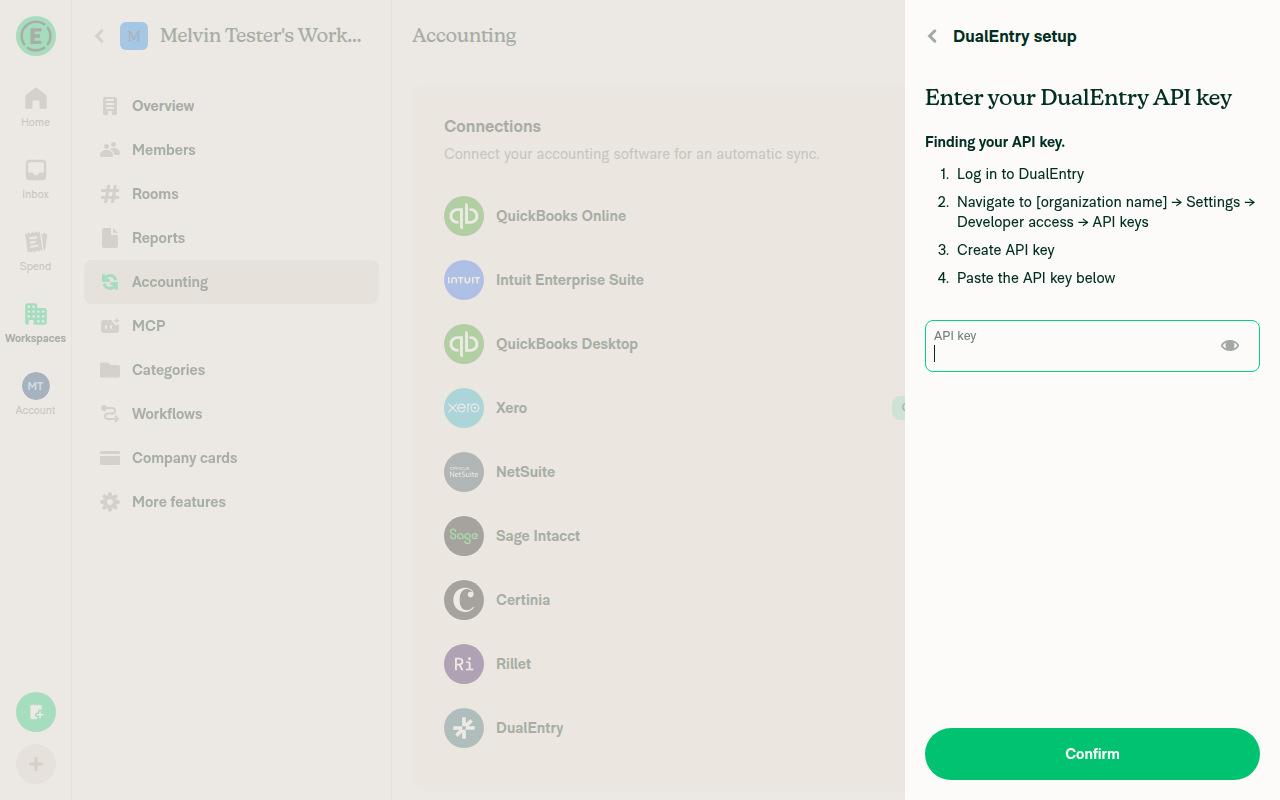
DualEntry vendor matching could not be fully tested: the feature requires a real DualEntry account API key that Melvin's test environment cannot obtain, even after enabling both required betas and upgrading the workspace to Control plan. Verified that the Vendors row and Vendor field correctly stay hidden without a live connection; all steps that require an active DualEntry connection are blocked, not passed.

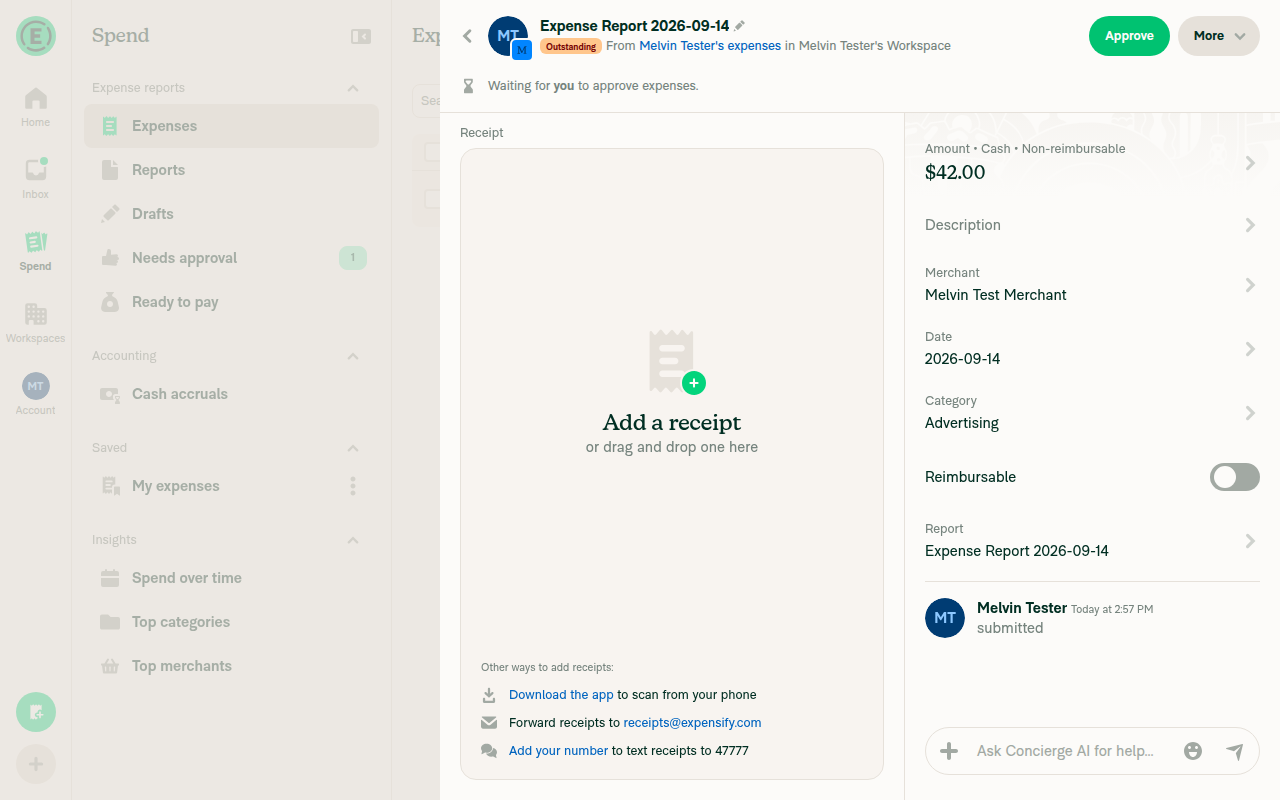
Submitted non-reimbursable expense detail panel with Category shown and no Vendor row

Step Status
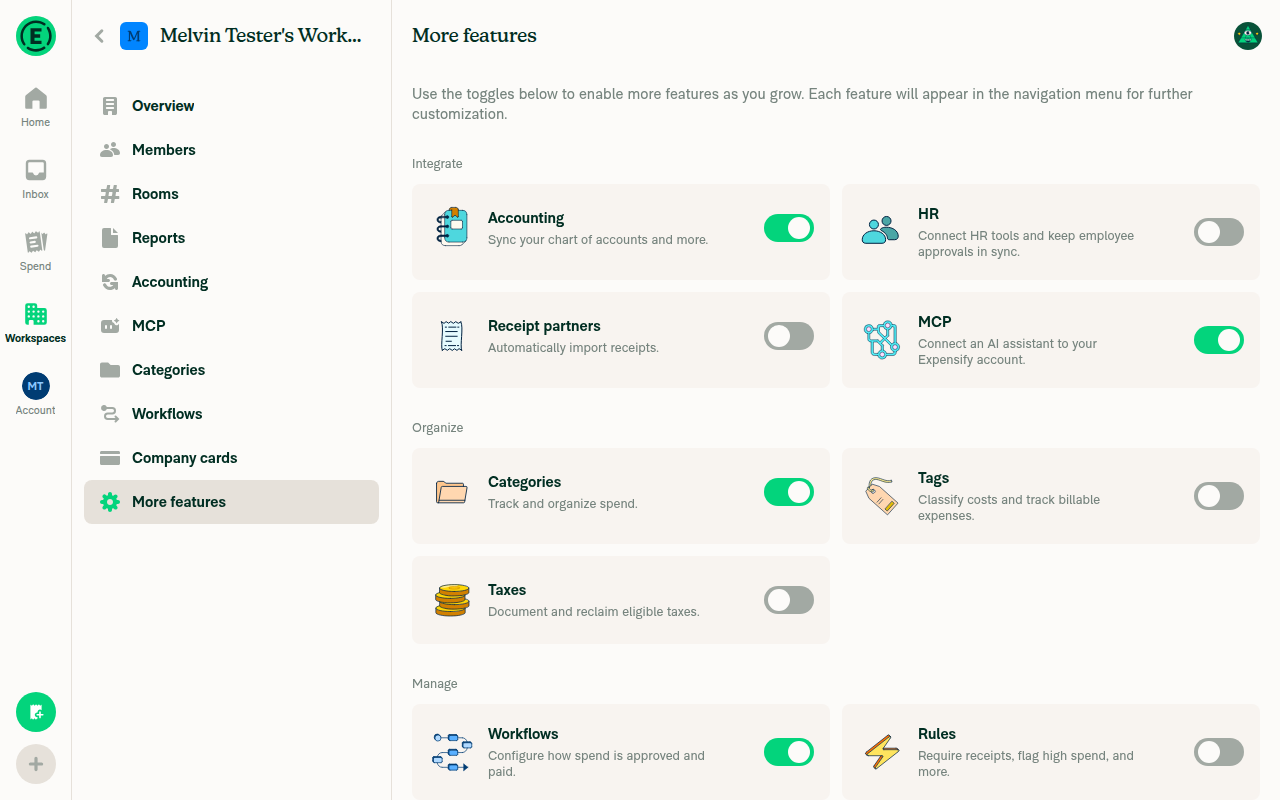
VERIFY 1: Workspace Settings > More Features shows a "Vendors" row and it is enabled.BLOCKED - prerequisite unreachable. Enabled vendorMatching beta (already on by default) and dualEntry beta override, enabled Accounting feature, and upgraded the workspace to Control plan - yet the Accounting > DualEntry "Connect" flow requires a real external DualEntry API key that Melvin has no way to obtain. With no connection ever established, the More Features page shows no "Vendors" row at all, confirming the negative/blocked state rather than the requested enabled state.
More Features page with Accounting enabled but no Vendors row present
DualEntry setup screen requiring a real DualEntry API key
VERIFY 2: Opening a non-reimbursable expense in workspace chat shows a "Vendor" row below Category.BLOCKED - same root cause. Created and submitted a $42 non-reimbursable Advertising expense to the workspace chat/report. The detail panel shows Amount, Description, Merchant, Date, Category, Reimbursable and Report rows, but no Vendor row, consistent with no vendor-matching connection being active.
Submitted non-reimbursable expense detail panel with Category shown and no Vendor row
VERIFY 3: Tapping "Vendor" opens the DualEntry vendor list.BLOCKED - unreachable, no Vendor row exists to tap (see VERIFY 1/2).
VERIFY 4: Searching in the vendor list filters vendors by name.BLOCKED - unreachable, vendor list screen never accessible without a live DualEntry connection.
VERIFY 5: Selecting a vendor closes the picker and updates the expense Vendor row.BLOCKED - unreachable for the same reason.
VERIFY 6: Making the expense reimbursable hides the Vendor row.BLOCKED - could not be exercised since no Vendor row ever appears in this environment (no active connection).
VERIFY 7: After editing a non-reimbursable expense's merchant to a matching name, the thread shows a Concierge automatic-match comment and Vendor is set.BLOCKED - automatic vendor matching requires an active DualEntry vendor list to match against, which requires the unreachable real-account connection.
VERIFY 8: On an expense whose selected DualEntry vendor was deactivated and synced, the Vendor row shows the brick-road indicator and an inactive-vendor error.BLOCKED - requires a real DualEntry vendor to deactivate and sync, unreachable without a live connection.
VERIFY 9: Selecting an active vendor or "None" on that row clears the inactive-vendor error.BLOCKED - depends on VERIFY 8 state, unreachable.
VERIFY 10: Exporting a report with a positive non-reimbursable cash expense and no vendor selected creates one active Credit Card Misc vendor in DualEntry with no company, uses it for export, and leaves the workspace default vendor empty.BLOCKED - export-to-DualEntry logic cannot run without a configured DualEntry connection, which requires the unreachable real API key.
VERIFY 11: Exporting a second report with no vendors selected reuses the same Credit Card Misc vendor rather than creating a duplicate.BLOCKED - same unreachable prerequisite as VERIFY 10.
VERIFY 12: No errors appear in the JS console during the flows above.agent-device's web surface has no direct JS-console read command. A network dump covering the whole session showed only status=200 responses for every app API call triggered (Search, OpenReport, RequestMoney, SubmitReport, UpgradeToCorporate, Ping, Log), and no error banners or toasts appeared on-screen during any step. Best-effort evidence given tooling limits, not a definitive console readout.

view run · no recording available

@Beamanator Beamanator left a comment

Copy link
Copy Markdown
Contributor

Choose a reason for hiding this comment

The reason will be displayed to describe this comment to others. Learn more.

This is testing well and looking great!

@Beamanator
Beamanator merged commit 2dae9fd into main Sep 14, 2026
42 of 44 checks passed
@Beamanator
Beamanator deleted the lucien/dualentry-vendor-matching branch September 14, 2026 15:05
@github-actions

Copy link
Copy Markdown
Contributor

🚧 Beamanator has triggered a test Expensify/App build. You can view the workflow run here.

@OSBotify

Copy link
Copy Markdown
Contributor

✋ This PR was not deployed to staging yet because QA is ongoing. It will be automatically deployed to staging after the next production release.

@OSBotify

Copy link
Copy Markdown
Contributor

🚀 Deployed to staging by https://github.com/Beamanator in version: 9.4.78-0 🚀

platform result
🕸 web 🕸 success ✅
🤖 android 🤖 success ✅
🍎 iOS 🍎 success ✅

@MelvinBot

Copy link
Copy Markdown
Contributor

🤖 Yes, help site changes are required. Draft PR: Expensify/App#101141

There was no help site coverage for DualEntry vendor matching. App/docs/articles already has Manage-Vendor-Matching-for-QuickBooks-Online.md and Manage-Vendor-Matching-for-Sage-Intacct.md, and the Rillet equivalent is in flight in Expensify/App#100899 — DualEntry was the gap.

What the docs PR does

  • Adds docs/articles/new-expensify/connections/dualentry/Manage-Vendor-Matching-for-DualEntry.md.
  • Adds one cross-link from Configure-DualEntry.md to the new article.

Behavior from this PR that the article documents

Change in this PR Documented as
isDualEntryVendorMatchingActive + beta gate in hasVendorFeature Requires a configured DualEntry connection; feature is rolling out gradually
getDualEntryVendors filters on isActive and companyID === subsidiaryID (or no company) Only active vendors assigned to the connection's selected Subsidiary, or to no subsidiary, are available — unique to DualEntry among the vendor sources
Same filter reused by findVendorByID, getVendorRuleDisplayValue, and the default vendor picker Applies to the expense Vendor field, merchant rules, and Default vendor for all company cards alike
DualEntry appended last in getActiveVendorMatchingIntegration DualEntry vendors scope the Vendor field only when QuickBooks Online, Sage Intacct, Xero, and Rillet aren't configured for matching
Credit Card Misc fallback from your test steps Export order: expense vendor → Default vendor for all company cards → auto-created Credit Card Misc, reused and never written back into the workspace default
workspace.dualEntry.noVendorsFound empty state "Why don't I see any vendors to choose from?" FAQ

On UI label verification

Labels came verbatim from src/languages/en.ts, and navigation labels were checked against the live web build. Two DualEntry-specific things worth confirming:

  • The export row label is Default vendor for all company cards, not Default company card vendor (which is Rillet's). The article and the existing Configure-DualEntry.md both use the DualEntry label.
  • The connection picker label is Subsidiary, so the article uses "subsidiary" rather than "company" even though the code filters on companyID.

I could not exercise these screens in the live UI — both the DualEntry connection and the Vendors row are beta-gated, so neither renders on a standard account. Everything above is read from the diff and en.ts rather than observed, so the subsidiary-scoping and Credit Card Misc sections are the two most worth your eyes.

The article is marked noindex: true / sitemap: false while the feature is beta-gated, matching the Rillet article. cspell and createDocsRoutes.sh both pass.


@lakchote, please review the linked help site PR and confirm it reflects the current behavior. Then mark the linked help site PR Ready for review

@IuliiaHerets

IuliiaHerets commented Sep 15, 2026

Copy link
Copy Markdown

Hi @lakchote. We have several questions:

  1. How to deactivate a vendor in DualEntry?
image
bandicam.2026-09-15.10-35-29-441.mp4
  1. How to delete Credit Card Misc in DualEntry?
image
delete.vendor.mp4

cc @dylanexpensify @Beamanator

@lakchote

Copy link
Copy Markdown
Contributor Author

@IuliiaHerets these changes are made in DualEntry, under Money Out > Vendors. The recordings show Expensify’s vendor list.

  1. To deactivate a vendor, open its ⋯ > Edit menu, scroll to Status, turn off Active, and click Save and Post. Then sync the DualEntry connection in Expensify.
  2. The menu has Archive for removing Credit Card Misc. For this fallback test, deactivating it is sufficient: export skips inactive vendors. Sync afterward and export an expense with no vendor selected and no active default vendor configured.

@kavimuru

Copy link
Copy Markdown

@lakchote we don't have access to Dual entry. When I go to vendor on the workspace settings they are not editable.

Can you help please?

@OSBotify

Copy link
Copy Markdown
Contributor

🚀 Deployed to production by https://github.com/luacmartins in version: 9.4.78-3 🚀

platform result
🕸 web 🕸 success ✅
🤖 android 🤖 success ✅
🍎 iOS 🍎 success ✅

Bundle Size Analysis (Sentry):

@lakchote

lakchote commented Sep 16, 2026

Copy link
Copy Markdown
Contributor Author

@kavimuru @IuliiaHerets the Vendors page in Expensify is read-only. Vendors are imported from DualEntry, so deactivating a vendor or changing Credit Card Misc must be done in DualEntry.

You should go there: https://app.dualentry.com/home/records/vendors

@m-natarajan

Copy link
Copy Markdown

@lakchote Actually we don't have account/credentials to login to https://app.dualentry.com/home/records/vendors. We have API key to connect the integration

@lakchote

Copy link
Copy Markdown
Contributor Author

@lakchote Actually we don't have account/credentials to login to https://app.dualentry.com/home/records/vendors. We have API key to connect the integration

@m-natarajan you should have access with applausetester+dualentry@applause.expensifail.com

Sign up for free to join this conversation on GitHub. Already have an account? Sign in to comment

Labels

Melvin-Test-Web Triggers Melvin to run the testing steps of the PR on web

Projects

None yet

Development

Successfully merging this pull request may close these issues.

9 participants