Repository navigation
[No QA] Docs updates for E/A#99644 document split Reimbursable follows locked workspace rule - #100224
Conversation


Co-authored-by: truph01 <truph01@users.noreply.github.com>
 MelvinBot
added
the
HelpDot
MelvinBot
added
the
HelpDot
 github-actions
Bot
changed the title
github-actions
Bot
changed the title

This comment has been minimized.
This comment has been minimized.

|
@MelvinBot Mark this PR as ready |

Concierge reviewer checklist:
For more detailed instructions on completing this checklist, see How do I review a HelpDot PR as a Concierge Team member? |

|
@hoangzinh @truph01 @kadiealexander One of you needs to copy/paste the Reviewer Checklist from here into a new comment on this PR and complete it. If you have the K2 extension, you can simply click: [this button] |

|
🤖 Done — this PR is now ready for review. Verified via the GitHub API: One thing to note: the Tests and QA Steps sections still contain the All checks are passing except |

HelpDot Documentation ReviewOverall AssessmentThis PR documents how the workspace Cash expense default rule determines the reimbursable status of each split, and expands the Cash expense default option description in Workspace Rules. The changes add a well-structured new section to Split-Expenses.md and a clarifying sentence to Workspace-Rules.md. Both changes are cohesive, accurate, and address a real support-confusion scenario (a missing Reimbursable toggle). Scores Summary
Key Findings
Recommendations
Files Reviewed
Note: This review reflects only the proposed changes in the diff. |
![chatgpt-codex-connector[bot]](https://avatars.githubusercontent.com/in/1144995?s=60&v=4)

There was a problem hiding this comment.
💡 Codex Review
Here are some automated review suggestions for this pull request.
Reviewed commit: ddc0ea68a6
ℹ️ About Codex in GitHub
Codex has been enabled to automatically review pull requests in this repo. Reviews are triggered when you
- Open a pull request for review
- Mark a draft as ready
- Comment "@codex review".
If Codex has suggestions, it will comment; otherwise it will react with 👍.
When you sign up for Codex through ChatGPT, Codex can also answer questions or update the PR, like "@codex address that feedback".
|
|
||
| ## How the Cash expense default rule sets Reimbursable on each split | ||
|
|
||
| Every split inherits its reimbursable status from the workspace **Cash expense default** rule rather than from the original expense: |
There was a problem hiding this comment.

For the editable Reimbursable and Non-reimbursable modes, this sentence states the opposite of the actual behavior and the next bullet: getSplitReimbursable() in src/libs/actions/IOU/SplitExpenseItems.ts returns the original expense's parentReimbursable value unless disabledFields.reimbursable is true. A reader splitting an expense whose value differs from the current unlocked default would therefore incorrectly expect the split to be reset; qualify this claim so it applies only to the two locked Always modes.
Useful? React with 👍 / 👎.
There was a problem hiding this comment.
Valid catch — fixed, though by deleting this section rather than qualifying the sentence.
You were right about the mechanism. getSplitReimbursable() only substitutes the policy default when disabledFields.reimbursable === true, and otherwise returns parentReimbursable. So the lead sentence's "rather than from the original expense" was wrong for the two unlocked modes.
While checking this I found that main already documents the locked case in the Why don't I see the Reimbursable toggle on a split? FAQ entry (added by f505e2a1fd after this PR branched), so the whole section was redundant. I removed it and added the unlocked-mode behavior to that existing answer instead:
Under the plain Reimbursable or Non-reimbursable options the value isn't fixed, so each split starts with the original expense's value and shows a Reimbursable toggle you can change.
Verified against the live dev UI both ways — locked shows no toggle, unlocked shows a changeable one.
![github-actions[bot]](https://avatars.githubusercontent.com/in/15368?s=60&v=4)
| - **Max expense amount** – Set a per-expense spending cap (supports decimals). | ||
| - **Max expense age (Days)** – Define how old an expense can be (whole numbers only). | ||
| - **Cash expense default** - Choose whether cash expenses are reimbursable by default. Note: [Workspace Merchant Rules](/articles/new-expensify/workspaces/Workspace-Merchant-Rules) can also set reimbursable status on a per-merchant basis. | ||
| - **Cash expense default** - Choose whether cash expenses are reimbursable by default. The four options are **Reimbursable**, **Non-reimbursable**, **Always reimbursable**, and **Always non-reimbursable**. **Reimbursable** and **Non-reimbursable** only set a starting value, so members can still change it on an individual expense. **Always reimbursable** and **Always non-reimbursable** lock the value, so the **Reimbursable** toggle is hidden on the expense and on every split created from it. Note: [Workspace Merchant Rules](/articles/new-expensify/workspaces/Workspace-Merchant-Rules) can also set reimbursable status on a per-merchant basis. |

There was a problem hiding this comment.
Readability / scannability: This bullet now packs the four option names, their locking behavior, and split behavior into a single dense run-on, which hurts scannability (HELP_AUTHORING_GUIDELINES.md — concise/scannable, Section 5 formatting clarity). Consider breaking the four options into a short nested list so each behavior is easy to scan — e.g. group **Reimbursable**/**Non-reimbursable** (sets a starting value only; member can change it) separately from **Always reimbursable**/**Always non-reimbursable** (locks the value; hides the Reimbursable toggle on the expense and every split created from it).
There was a problem hiding this comment.
Fixed by reverting this file entirely — the bullet is gone.
This whole list shouldn't have been here. main deleted it in 1e8f515919 when the Rules page was restructured into tabs, and the merge I did on Sep 16 reinstated it as a conflict-resolution artifact. It also used pre-restructure labels (Cash expense default, Billable default, Merchant-based automation) and duplicated bullets that now live under How to set basic rules on the General tab, plus it swallowed the blank line before the --- separator.
main's Cash expenses bullet already states the thing this PR set out to document: "When you select an Always option, the Reimbursable toggle is hidden on the expense and on every split created from it." So there was nothing left to add here.
I also confirmed on the live dev UI that the row label is Cash expenses, not Cash expense default — so the reinstated bullet was documenting a label that no longer ships.
|
|
||
| This applies even when the original expense was created before the rule was changed. For example, if a cash expense was created while the rule was **Reimbursable** and an Admin later switched the rule to **Always non-reimbursable**, splitting that expense produces non-reimbursable splits. | ||
|
|
||
| To review or change the rule, [learn how to configure Workspace Rules](/articles/new-expensify/workspaces/Workspace-Rules). |
There was a problem hiding this comment.
Scope / cross-linking: This new section largely explains how the workspace Cash expense default rule itself behaves, which is workspace-rule configuration detail owned by the Workspace Rules article (HELP_AUTHORING_GUIDELINES.md Section 1 & 6 — one workflow per article; avoid combining split behavior with workspace design). The relative cross-link and anchor text are good. Recommend keeping this section focused on the split-specific outcome (whether the Reimbursable toggle appears/locks on a split) and deferring the full rule explanation to the linked Workspace Rules article, to avoid duplicating content and diluting retrieval precision.
There was a problem hiding this comment.
Agreed — the section is removed.
Your scope call was right, and it turned out to be moot: main already covers this in the Why don't I see the Reimbursable toggle on a split? FAQ entry, added by f505e2a1fd after this PR branched. Keeping a second H2 explaining the same rule would have duplicated content and diluted retrieval exactly as you describe.
I kept only the two facts that FAQ answer was missing — the unlocked-mode behavior and that locked modes apply even to expenses created before the rule changed — and folded them into it. The full rule configuration detail now stays in the Workspace Rules article, and the cross-link points at its General tab section rather than the article root.
| - **Max expense amount** – Set a per-expense spending cap (supports decimals). | ||
| - **Max expense age (Days)** – Define how old an expense can be (whole numbers only). | ||
| - **Cash expense default** - Choose whether cash expenses are reimbursable by default. Note: [Workspace Merchant Rules](/articles/new-expensify/workspaces/Workspace-Merchant-Rules) can also set reimbursable status on a per-merchant basis. | ||
| - **Cash expense default** - Choose whether cash expenses are reimbursable by default. The four options are **Reimbursable**, **Non-reimbursable**, **Always reimbursable**, and **Always non-reimbursable**. **Reimbursable** and **Non-reimbursable** only set a starting value, so members can still change it on an individual expense. **Always reimbursable** and **Always non-reimbursable** lock the value, so the **Reimbursable** toggle is hidden on the expense and on every split created from it. Note: [Workspace Merchant Rules](/articles/new-expensify/workspaces/Workspace-Merchant-Rules) can also set reimbursable status on a per-merchant basis. |
There was a problem hiding this comment.
Readability / scannability: This bullet now packs the four option names, their locking behavior, and split behavior into a single dense run-on, which hurts scannability (HELP_AUTHORING_GUIDELINES.md — concise/scannable, Section 5 step/formatting clarity). Consider breaking the four options into a short sub-list (or a brief nested list) so each behavior is easy to scan, e.g. list **Reimbursable**/**Non-reimbursable** (starting value only, member can change) separately from **Always reimbursable**/**Always non-reimbursable** (locks the value; hides the Reimbursable toggle on the expense and its splits).
There was a problem hiding this comment.
Duplicate of the other comment on this line — resolved the same way: docs/articles/new-expensify/workspaces/Workspace-Rules.md is reverted entirely, so this bullet no longer exists. It was a merge artifact that reinstated a list main had already deleted in the tabbed Rules restructure.
|
|
||
| This applies even when the original expense was created before the rule was changed. For example, if a cash expense was created while the rule was **Reimbursable** and an Admin later switched the rule to **Always non-reimbursable**, splitting that expense produces non-reimbursable splits. | ||
|
|
||
| To review or change the rule, [learn how to configure Workspace Rules](/articles/new-expensify/workspaces/Workspace-Rules). |
There was a problem hiding this comment.
Scope / cross-linking: This section explains how the workspace Cash expense default rule behaves, which is workspace-rule configuration detail owned by the Workspace Rules article (HELP_AUTHORING_GUIDELINES.md Section 1 & 6 — one workflow per article; avoid combining split behavior with workspace design). The cross-link is good; keep this section focused on the split-specific outcome (whether the Reimbursable toggle appears on a split) and defer the full rule explanation to the linked Workspace Rules article to avoid duplicating/diluting retrieval.
There was a problem hiding this comment.
Duplicate of the other comment on this line — resolved the same way: the new H2 section is removed, and the two facts it added that main didn't already have are folded into the existing Why don't I see the Reimbursable toggle on a split? FAQ answer.


|
@hoangzinh we have a few suggestions and conflicts to address |

@truph01 Given you're assignee of this PR, can you ask MelvinBot to address those suggestions? |
|
Bump @truph01 |
1 similar comment
|
Bump @truph01 |

This comment has been minimized.
This comment has been minimized.
|
@truph01 is this PR ready for review again? |
|
@truph01 bump |
|
@MelvinBot Could you check all the above review comments? |
Review follow-up on #100224.

- Revert Workspace-Rules.md entirely. The bullet list it added was
  reinstated by the main merge after main had deleted it in the tabbed
  Rules restructure, and it used pre-restructure labels. Main's General
  tab 'Cash expenses' bullet already documents the Always-option locking
  and the hidden Reimbursable toggle on splits.
- Drop the new Split-Expenses.md H2 section. Main already answers this in
  the 'Why don't I see the Reimbursable toggle on a split?' FAQ entry, so
  the section duplicated workspace-rule config detail owned by the
  Workspace Rules article.
- Extend that FAQ entry with the two facts main lacked: the unlocked
  Reimbursable/Non-reimbursable modes seed each split from the original
  expense and show a changeable toggle, and the locked modes apply even
  to expenses created before the rule changed.
- Point the cross-link at the General tab section and add a 'cash
  expenses rule' keyword.

Co-authored-by: truph01 <truph01@users.noreply.github.com>
🤖 Review comments addressed — and this PR shrank a lotAll five review comments are resolved, and I replied in each thread. But the headline is that Pushed as What
|
| Commit | What it added |
|---|---|
f505e2a1fd |
The Why don't I see the Reimbursable toggle on a split? FAQ entry |
1e8f515919 |
The tabbed Rules restructure, whose Cash expenses bullet already says an Always option hides the Reimbursable toggle on the expense and every split created from it |
Two things worth your attention
1. The Sep 16 merge left an artifact. The earlier version of this PR added a flat bullet list to Workspace-Rules.md. main had deleted that list in the tabbed restructure, and the merge resolution put it back — 10 bullets using labels that no longer ship (Cash expense default, Billable default, Merchant-based automation), duplicating bullets that now live under the General tab, and swallowing the blank line before a --- separator. I reverted the file to main entirely.
2. The original PR documented the wrong label. It claimed the Rules row reads Cash expense default. It reads Cash expenses. Both strings exist in en.ts — cashExpenses and cashExpenseDefault — so the code alone is ambiguous. I verified on the live dev UI:
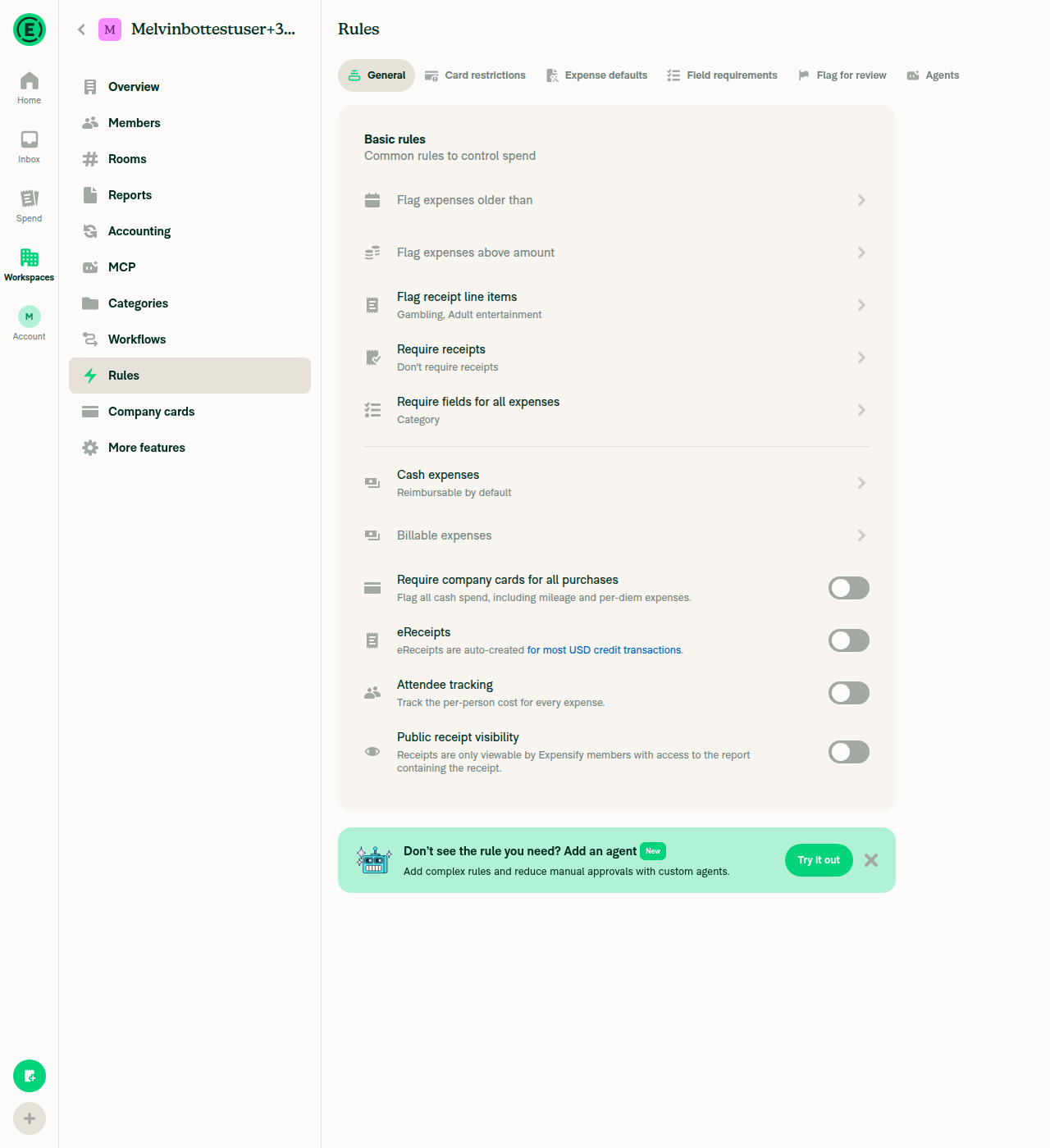
The remaining change
One file, extending main's existing FAQ answer with the two facts it didn't cover:
…the Reimbursable toggle is hidden — even if the original expense was created before an Admin changed the rule.
Under the plain Reimbursable or Non-reimbursable options the value isn't fixed, so each split starts with the original expense's value and shows a Reimbursable toggle you can change. Imported company card expenses are always non-reimbursable, so their splits don't show the toggle either.
Plus a cross-link now anchored to the General tab section instead of the article root, and a cash expenses rule keyword.
Per-comment resolution
| Comment | Resolution |
|---|---|
codex — Split-Expenses.md:77, policy inheritance claim wrong for unlocked modes |
Valid. getSplitReimbursable() only substitutes the policy default when disabledFields.reimbursable === true; otherwise it returns parentReimbursable. Fixed by deleting the section and stating the unlocked behavior correctly in the FAQ answer. |
github-actions — Workspace-Rules.md:39, dense run-on bullet |
File reverted to main; bullet no longer exists. |
github-actions — Split-Expenses.md:85, scope / duplicating workspace-rule detail |
Valid and moot. Section removed; rule configuration detail stays in the Workspace Rules article. |
github-actions — Workspace-Rules.md:39 (duplicate) |
Same as above. |
github-actions — Split-Expenses.md:85 (duplicate) |
Same as above. |
Verification and tests
Behavior re-confirmed on the live dev web UI both ways:
Rule set to Always non-reimbursable — split row shows only Description, Category, Date, Report:

Rule set to plain Reimbursable — split row gains a changeable Reimbursable toggle:

All four option labels:

Tests: I could not run npm run spell-changed locally — the command was blocked in this environment. CI's spellcheck job passed on aaac1f2, which is the same gate. No other local AI tests apply to a docs-only markdown change (no app code, shell scripts, or docs routing/config touched, and no files added or removed).
Checks: everything passes except Check independent approval, which is expected until a reviewer approves. The merge conflicts luacmartins mentioned are gone — mergeable is MERGEABLE.
One judgment call worth flagging: I deleted rather than rewrote. If you'd rather keep a dedicated H2 section in Split-Expenses.md for discoverability — even though it overlaps the FAQ entry — say so and I'll add a trimmed, split-scoped version back.
The Tests and QA Steps sections still have the // TODO placeholders for you to fill in. @truph01 @luacmartins @hoangzinh
|
A preview of your ExpensifyHelp changes have been deployed to https://bc9e2467.helpdot.pages.dev ⚡️ Updated articles: |


|
🚀 Deployed to staging by https://github.com/luacmartins in version: 9.4.92-0 🚀
|
|
🚀 Deployed to production by https://github.com/lakchote in version: 9.4.92-8 🚀
Bundle Size Analysis (Sentry): |
6 participants


Explanation of Change
Help site follow-up for #99644, which made split expenses follow the workspace cash-expense rule instead of copying
reimbursablefrom the parent expense.This PR is much smaller than it originally was. When it was opened, neither help article documented the behavior. Since then two commits landed on
mainthat cover most of it:f505e2a1fdadded theWhy don't I see the Reimbursable toggle on a split?FAQ entry toSplit-Expenses.md.1e8f515919restructuredWorkspace-Rules.mdfor the tabbed Rules page, and its Cash expenses bullet already states that an Always option hides the Reimbursable toggle on the expense and on every split created from it.So the remaining delta is one file:
docs/articles/new-expensify/reports-and-expenses/Split-Expenses.md— extends the existing FAQ answer with the two things it didn't cover: the unlocked Reimbursable / Non-reimbursable modes seed each split from the original expense and show a changeable toggle, and the locked modes apply even to expenses created before an Admin changed the rule. Also points the cross-link at the Workspace Rules General tab section and adds acash expenses rulekeyword.docs/articles/new-expensify/workspaces/Workspace-Rules.mdis now unchanged frommain. The earlier version of this PR added a flat bullet list there, which the Sep 16 merge reinstated aftermainhad deleted it in the tabbed restructure — a conflict-resolution artifact using labels that no longer ship.Every label was re-verified against the live dev UI rather than taken from the code. Note the correction: the Rules row reads Cash expenses, not Cash expense default as the first version of this PR claimed. The four options read Reimbursable, Non-reimbursable, Always reimbursable, Always non-reimbursable.
UI verification screenshots
Rules page, General tab — the row label is Cash expenses:
The four option labels:
Split row under Always non-reimbursable — no Reimbursable field:
Split row under plain Reimbursable — Reimbursable toggle present and changeable:
Fixed Issues
$ #99140
PROPOSAL:
Tests
// TODO: The human co-author must fill out the tests you ran before marking this PR as "ready for review"
// Please describe what tests you performed that validates your changed worked.
Offline tests
QA Steps
// TODO: The human co-author must fill out the QA tests you ran before marking this PR as "ready for review".
// Please describe what QA needs to do to validate your changes and what areas do they need to test for regressions.
PR Author Checklist
### Fixed Issuessection aboveTestssectionOffline stepssectionQA stepssectionAvatar, I verified the components usingAvatarare working as expected)StyleUtils.getBackgroundAndBorderStyle(theme.componentBG))npm run compress-svg)Avataris modified, I verified thatAvataris working as expected in all cases)Designlabel and/or tagged@Expensify/designso the design team can review the changes.mainbranch was merged into this PR after a review, I tested again and verified the outcome was still expected according to theTeststeps.Screenshots/Videos
Android: Native
Android: mWeb Chrome
iOS: Native
iOS: mWeb Safari
MacOS: Chrome / Safari
@truph01, please review the files changed and confirm they reflect the current behavior. Then post a new comment saying
@MelvinBot mark this PR as ready for review.