Repository navigation
Fix #25595: Locations details show all level - #25961
Conversation


|

| App Name | WordPress | |
| Configuration | Release-Alpha | |
| Build Number | 34092 | |
| Version | PR #25961 | |
| Bundle ID | org.wordpress.alpha | |
| Commit | 0d0bce0 | |
| Installation URL | 10mgqd810ts1g |
|

| App Name | Jetpack | |
| Configuration | Release-Alpha | |
| Build Number | 34092 | |
| Version | PR #25961 | |
| Bundle ID | com.jetpack.alpha | |
| Commit | 0d0bce0 | |
| Installation URL | 6d5gi5jn9631o |

|
Version |
|
Version |
The Show All screen rebuilt its view model from only the item and metric,
resetting the location level, device breakdown, and UTM grouping to their
defaults. Pass the card's options through so the screen loads the same
data the card was showing.

Fixes #25595
The screen and its CSV export now use Countries, Regions, or Cities as
the title instead of Locations, so the selected level is visible. Other
item types keep their item title.

0d0bce0 to
3a67b95
Compare

 jkmassel
left a comment
jkmassel
left a comment
There was a problem hiding this comment.
From Claude: the level fix works in the app: Show All for Regions now shows region rows under a "Regions" title. One problem it introduces is noted inline: on Show All, an unneeded country request can turn a loaded list into an error.
| self._viewModel = StateObject( | ||
| wrappedValue: TopListViewModel( | ||
| configuration: configuration, | ||
| options: selection.options, |
There was a problem hiding this comment.
Finding from Claude:
With Regions or Cities selected, the Show All screen can show an error even though the list it needs loaded fine.
What happens
- Now that Show All keeps the card's level, the view model also requests every country to build map data (
TopListViewModel.swift:180-186). - Only the card draws that map (
countriesMapDatais read only atTopListCard.swift:110), so on Show All this request is never needed. It also has no size limit there (fetchLimit: nil). - If that request fails, the
catchsetsdata = nil, and the regions list that did load is thrown away. - Before this PR, Show All always used Countries, so this extra request never happened there.
Who is affected
Anyone who opens Show All for Regions or Cities on a slow or flaky connection. Everyone else pays for an extra request with no size limit each time the screen loads (two with a comparison period).
What they see
The error state under a "Regions" title.
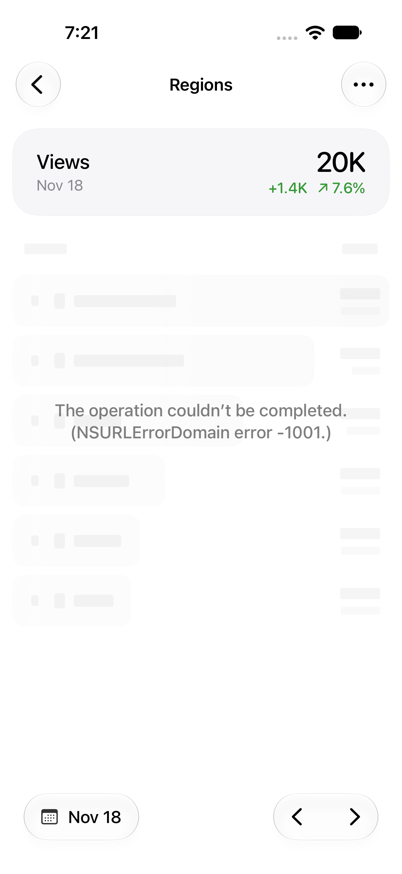
Steps to reproduce
- Open Stats → Traffic on a site with visitors from several regions (mobile.blog was used).
- On the Locations card, switch the level to Regions and wait for it to load.
- Tap Show All.
- Make the all-countries request fail. For the screenshot, a temporary local change in
StatsService.getTopListDatathrewURLError(.timedOut)for.locations+.countries+limit == nil. Only the Show All screen sends that combination, and the regions request was left untouched.
Suggested fix
Only fetch map data when the view model drives a card. For example, skip it when fetchLimit == nil, or pass an explicit flag. Making a failed map request leave data alone would also avoid the error state. Once that's in, the new test could assert the full request list ([.regions] on Show All) instead of .first, so a change to the map request gets caught.
How this was checked
- Jetpack Debug build of
3a67b951bfon an iOS 27.2 simulator, signed in to WordPress.com. Without the temporary change, Show All for Regions loads correctly (title "Regions", region rows). - With the temporary change: the screenshot above.
- A unit test against the same commit, using a fake service whose countries request throws: the requests were
[regions, countries]with limits[nil, nil], thendata == nilandloadingErrorwas set. The test is below and was not committed.
Unit test used
@Test("A failed map fetch hides the loaded regions list on Show All")
func mapFetchFailureHidesList() async throws {
    let service = RecordingStatsService(failCountries: true) // throws URLError(.timedOut) for .countries
    let calendar = Calendar.mock()
    let dateRange = StatsDateRange(
        interval: calendar.makeDateInterval(for: .today),
        component: .day,
        comparison: .off,
        calendar: calendar
    )
    let viewModel = TopListViewModel(
        configuration: TopListCardConfiguration(item: .locations, metric: .views),
        options: TopListItemOptions(locationLevel: .regions),
        dateRange: dateRange,
        service: service,
        fetchLimit: nil // as TopListScreenView passes it
    )
    viewModel.onAppear()
    try await waitUntil { !viewModel.isLoading }

    #expect(await service.requestedLocationLevels == [.regions, .countries]) // passes
    #expect(viewModel.data == nil)          // passes: the loaded regions list is discarded
    #expect(viewModel.loadingError != nil)  // passes
}
Output: levels=[regions, countries] limits=[nil, nil] data=nil error=NSURLErrorDomain Code=-1001
Only the Locations card draws the countries map. Show All now keeps the
card's Regions or Cities level, so it also sent an unlimited request for
all countries. If that request failed, the loaded list was replaced by an
error. The view model now loads map data only when its owner asks for it.


Description
Switch to "Regions" and view all: