A Retrieval-Augmented Generation (RAG) application that uses local Ollama models to answer questions based on your documents. This project demonstrates how to build a complete RAG pipeline with purely local, self-hosted components.
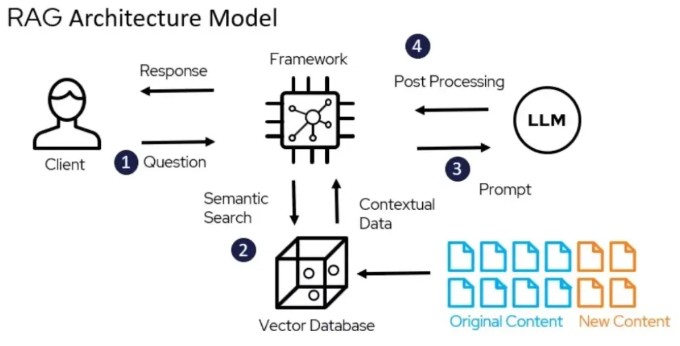
Source: https://www.deepchecks.com/glossary/rag-architecture/
The application consists of three main components:
- RAG Application - Python backend using llama-index for document processing and retrieval (runs as a local Python script)
- ChromaDB - Vector database for storing embeddings (runs in Docker)
- Ollama - Local LLM server providing embedding and text generation capabilities (runs as a local service)
- Docker (only for running ChromaDB)
- Python 3.13+
- Ollama installed locally
-
Clone the repository:
git clone https://github.com/yourusername/RAG-Ollama.git cd RAG-Ollama -
Install Python dependencies:
pip install -r requirements.txt
-
Install and start Ollama:
- Follow instructions at Ollama.com
- Pull required models:
ollama pull nomic-embed-text
ollama pull llama3.2
-
Start ChromaDB using Docker:
docker-compose up -d
-
Update the
.envfile to point to your local ChromaDB:CHROMA_DB_HOST=localhost -
Place your PDF documents in the
assetsfolder -
Run the application:
python src/app.py
Once running, the application will:
- Process any PDFs in the
assetsfolder - Create or update the vector database
- Start an interactive command line interface
You can then ask questions about your documents, and the application will use RAG to generate relevant answers.
Example:
How can I help you?
What is the main benefit of retrieval augmented generation?

Searching for answer...
Based on the documents, the main benefit of Retrieval-Augmented Generation (RAG) is that it helps reduce hallucinations in large language models by grounding responses in retrieved documents. This makes the system more accurate and trustworthy.
The application uses these Ollama models by default:
nomic-embed-textfor embeddingsllama3.2for text generation
To change models, modify the get_embedding_model() and get_llm() methods in src/engine/ChatEngine.py.
ChromaDB settings can be adjusted in the docker-compose.yml file.
RAG-Ollama/
├── assets/                  # Place your PDFs here
├── src/
│   ├── app.py               # Main application entry point
│   ├── engine/
│   │   └── ChatEngine.py    # Chat engine implementation
│   ├── utils/
│   │   └── file_reader.py   # Document processing utilities
│   └── vectorstore/
│       └── ingestion.py     # Vector database ingestion
├── chroma/                  # ChromaDB persistent storage (will be mounted by the docker-compose.yml)
├── docker-compose.yml       # Docker configuration for ChromaDB
└── requirements.txt         # Python dependencies
- 100% local and private RAG pipeline
- PDF document processing
- Interactive chat interface
- Persistent vector database storage