Repository navigation
fix(android): navigation chrome takes less of the screen - #20813
Conversation


The Android workspace spent a header row and two floating buttons on
navigation: a Settings gear in the list header, a Filter FAB stacked
over New thread, and a two-tab bottom bar.

Phones now carry Chats, PRs, and Settings in the bottom bar; Search and
Filter sit in the list header (Filter stays while searching) and New
thread is the only FAB, 16dp from the corner. Split view gets a 96dp
Material 3 wide navigation rail with the same three tabs, a menu button
that expands it as a modal with full labels, and New thread, so the
sidebar loses its own FAB. Settings opens the existing stack as a full
workspace page over Home alone, derived from the root navigation state
rather than a third reducer tab; nested pages keep Back and the root
page shows none. Tab switches use the Material fade-through. The PR
header gains a filter button that opens every filter and fills when any
filter, environment, or sort is active; Reset clears the environment
too, and the header matches the Chats toolbar height.

Co-authored-by: Pixel Perfect <me@pixp.cc>
Co-Authored-By: Claude Fable 5.1 <noreply@anthropic.com>
 github-actions
Bot
added
vouch:trusted
github-actions
Bot
added
vouch:trusted
 juliusmarminge
added
the
macroscope-review
juliusmarminge
added
the
macroscope-review
The collapsed rail labelled every destination under its icon. The labels
now appear only when the rail expands. The label grows from zero size on
the item's own spring so the circular indicator stretches into the
expanded pill without a jump, and the icon names the item for
accessibility while its label is hidden.

Co-Authored-By: Claude Opus 5.5 <noreply@anthropic.com>
7b09581 to
b4152a8
Compare
#21071 removed the split-view rail and added threads/PRs toggle buttons to
the sidebar headers. This branch keeps the wide rail, so the merge keeps
the rail in the layout, native module, colors, and hinge alignment, and
drops the sidebar header toggles the rail replaces. Everything else from
#21071 is kept: the root-state reset, the fitted brand title, the reading
width, and the split-view destination animation.

Co-Authored-By: Claude Opus 5.5 <noreply@anthropic.com>
github-actions
Bot
added
size:XXL

Thread transfer impact✅ Thread transfer remains within every enforced ceiling.
Baseline: Scenario and decoded snapshot size10 historical turns, 5 command tools per turn, 878.9 KiB retained MCP result per historical turn, and a 1.05 MiB retained result in the measured turn.
Updated in place by a trusted workflow. PR artifacts are strictly validated and never executed. |
…jumps

Material's ModalWideNavigationRail moves its destinations into a separate
dialog window when it expands. The icons vanished for a few frames while
that window attached, and the copy laid them out at a different height,
so they jumped. Its extended FAB also clipped its label as it collapsed.

The rail is now one Compose surface that widens over the list in place.
While it is open it spans the workspace to draw the scrim and widen; Back
and a tap outside close it. Destination icons stay on the same pixels
through the whole animation, and the indicator and New thread button
stretch from the collapsed shape into the expanded one. The collapsed
rail is 72dp instead of 96dp, which gives the thread list more room.

Every Android header now uses the list toolbar's height, so the rail's
menu button, the sidebar header, Settings, and the detail pane's title
sit on one line instead of 64dp app bars sitting lower.

Leaving Settings fades the sidebar in with the detail pane instead of
sliding it open from zero width; it stays mounted while Settings is open.

Co-Authored-By: Claude Opus 5.5 <noreply@anthropic.com>
Co-Authored-By: Claude Opus 5.5 <noreply@anthropic.com>
…ashing

Switching tabs faded the list and detail panes out to a blank screen and
then faded the new tab in, and the new tab remounted its list, so it
appeared empty and filled in a moment later. Opening a thread also
showed a native "Thread" bar for a few frames until the thread's own app
bar mounted.

Tabs now mount on first visit and stay mounted while hidden behind
React's Activity, so a switch swaps them in a single frame and the list
is already there. Settings swaps without a native fade, the sidebar
hides in the same commit as the Settings page instead of fading out
first, and the Thread route starts with the native header hidden on
Android.

Co-Authored-By: Claude Opus 5.5 <noreply@anthropic.com>
…rome

# Conflicts:
#	apps/mobile/src/features/pull-requests/PullRequestListFilters.tsx
Returning to the PR tab painted its header three ways before it settled: no
filter button, then the search button jumping right, then the title running
over it. The header was the Compose app bar with React Native views hosted
inside, and a hidden tab lays out at zero size, so Compose re-measured over
several frames each time the tab came back. Hiding the tab also ran the
filter menu's cleanup, which dropped the button until the list republished it.

The PR header now draws the same plain row as the threads header, so both tabs
line up exactly and switching between them leaves the header untouched. The
list publishes its filter menu in a layout effect and no longer clears it,
since the list and header always mount together.

The connection status delay is now shared across headers, so a header that
mounts mid-outage (a tab's first visit, or after folding) shows the status at
once instead of the brand for 800ms and then a fade.

Co-Authored-By: Claude Opus 5.5 <noreply@anthropic.com>
…rome

#21133 compiles the workspace layout with the React Compiler. The layout keeps
main's plain derivations with this branch's rail width, and the PR filter menu
drops its hand-written useMemo, which the compiler could not preserve.

Co-Authored-By: Claude Opus 5.5 <noreply@anthropic.com>

|
Batch The current body still records the split-view Settings transition defect: approximately 200 ms with a blank sidebar strip on entry and approximately 130 ms with Settings beside the sidebar on exit. Completing this responsibly requires a current-main Android build and recordings on compact and split/foldable layouts: Settings root/nested Back and tab return; rail open/close, scrim and hardware Back; keyboard/safe-area/hinge behavior; Chats/PR tab preservation; Search plus Filter and Reset (including environment); accessibility and large font scale. Native Compose timing cannot be verified by TypeScript tests or a web preview. Blocked for an Android-capable maintainer; keep the draft until the transition and device evidence are complete. |
…rome

# Conflicts:
#	apps/mobile/src/Stack.tsx
Each header subscribed to the connection state itself, and a hidden tab
drops its subscriptions. A status that changed while PRs was hidden
showed the old text for about 600ms after the tab came back. The status
and its show delay now live in one provider above the tabs; headers
read it from context, which still reaches hidden tabs.

The PR list also flashed Android's scrollbar on every return, since
Android awakens a scroll view's scrollbar whenever it becomes visible.
It now hides the indicator on Android, like the thread list.

Co-Authored-By: Claude Opus 5.5 <noreply@anthropic.com>
Opening Settings in split view went through four states: React hid the
sidebar and widened the old detail pane, react-native-screens attached
Settings a frame or more later, the old screen was drawn over it while
its 20ms "none" tween ran, and the Compose header measured last. Closing
showed Settings beside the restored sidebar, then the old pane laid out
at the wrong width.

Screens 5.0.0-t3.28 applies screen changes in the Fabric mount that made
them, clips out a screen leaving with no animation, and stops resizing a
screen it is about to detach. In the app, the sidebar leaves the row
under Settings at its size instead of going to display: none, the native
header on the Settings root is hidden from the first layout, and the
Compose app bar has a fixed height so pages lay out under it at once.

Co-Authored-By: Claude Opus 5.5 <noreply@anthropic.com>
Opening Settings showed its Compose app bar empty for a frame or two, then
the title and filter. Two things put the bar's content a frame late.

Screens 5.0.0-t3.28 attached a new screen partway through the Fabric
mount, so its Compose content composed before the rest of the mount had
set up its views. 5.0.0-t3.29 defers laying out the screens until the
mount's changes are applied, so new screens attach after the whole mount
and a leaving screen still keeps its size.

expo-modules-core laid out a Compose host only from a posted runnable,
which runs after the frame being prepared is drawn. The patch also lays
it out from a one-shot pre-draw listener, before that frame.

Co-Authored-By: Claude Opus 5.5 <noreply@anthropic.com>
…rome

# Conflicts:
#	apps/mobile/src/features/home/AndroidHomeFab.android.tsx
#	apps/mobile/src/features/home/ThreadListToolbar.tsx
#	apps/mobile/src/features/layout/AdaptiveWorkspaceLayout.tsx
#	pnpm-lock.yaml
![macroscopeapp[bot]](https://avatars.githubusercontent.com/in/900172?s=60&v=4)
| case "reset": | ||
| props.onChange(DEFAULT_PR_LIST_CONTROLS); | ||
| // The Android header menu also holds the environment, so its reset clears that too. | ||
| if (next === "environment") props.onEnvironmentChange(null); |

There was a problem hiding this comment.
🟡 Medium pull-requests/PullRequestListFilters.tsx:107
Resetting while a specific environment is selected switches to All environments and immediately reapplies the previously saved All-environments controls, so old filters or sorting remain active. onChange(DEFAULT_PR_LIST_CONTROLS) only resets the currently selected environment before onEnvironmentChange(null) switches destinations; reset the null-environment controls as well.
🚀 Reply "fix it for me" or copy this AI Prompt for your agent:
In file @apps/mobile/src/features/pull-requests/PullRequestListFilters.tsx around line 107:

Resetting while a specific environment is selected switches to All environments and immediately reapplies the previously saved All-environments controls, so old filters or sorting remain active. `onChange(DEFAULT_PR_LIST_CONTROLS)` only resets the currently selected environment before `onEnvironmentChange(null)` switches destinations; reset the null-environment controls as well.

ApprovabilityVerdict: Needs Human Approval Macroscope's review found this PR requires human approval — This PR substantially changes default Android navigation and workspace behavior, adding an expandable rail, a Settings destination, persistent tab panes, and shared native layout/dependency changes. An unresolved Medium finding also reports that reset can preserve stale all-environment filters or sorting. Needs human approval because:
Adjust the Minimum Blocking Severity for this repo — including turning it Off — in Settings. You can add or adjust custom eligibility rules. Learn more. |

|
No actionable comments were generated in the recent review. 🎉 ℹ️ Recent review info
📝 Walkthrough
Merge Risk: ⚪ Minimal · up to
|


| Check name | Status | Explanation |
|---|---|---|
| Title check |  |
The title clearly and concisely describes the main Android navigation change: reducing navigation chrome screen usage. |
| Description check | |
The description provides detailed problem context, implementation changes, scope, native dependency impact, screenshots, recordings, tests, emulator verification, and known limitations. It does not us… |
| Linked Issues check | |
Check skipped because no linked issues were found for this pull request. |
| Out of Scope Changes check | |
Check skipped because no linked issues were found for this pull request. |
Full details: Description check
-
Explanation
The description provides detailed problem context, implementation changes, scope, native dependency impact, screenshots, recordings, tests, emulator verification, and known limitations. It does not use the template headings exactly or provide a distinct approval reference, but it is substantially complete and directly relevant.
✨ Finishing Touches
-
📝 Generate docstrings
-
- Commit to this branch
- Create a new PR
🧪 Generate unit tests (beta)
-
- Commit to this branch
- Create a new PR
-
- Autofix · Keep fixing CodeRabbit findings and required CI, and resolving merge conflicts
Comment @coderabbitai help to get the list of available commands.
|
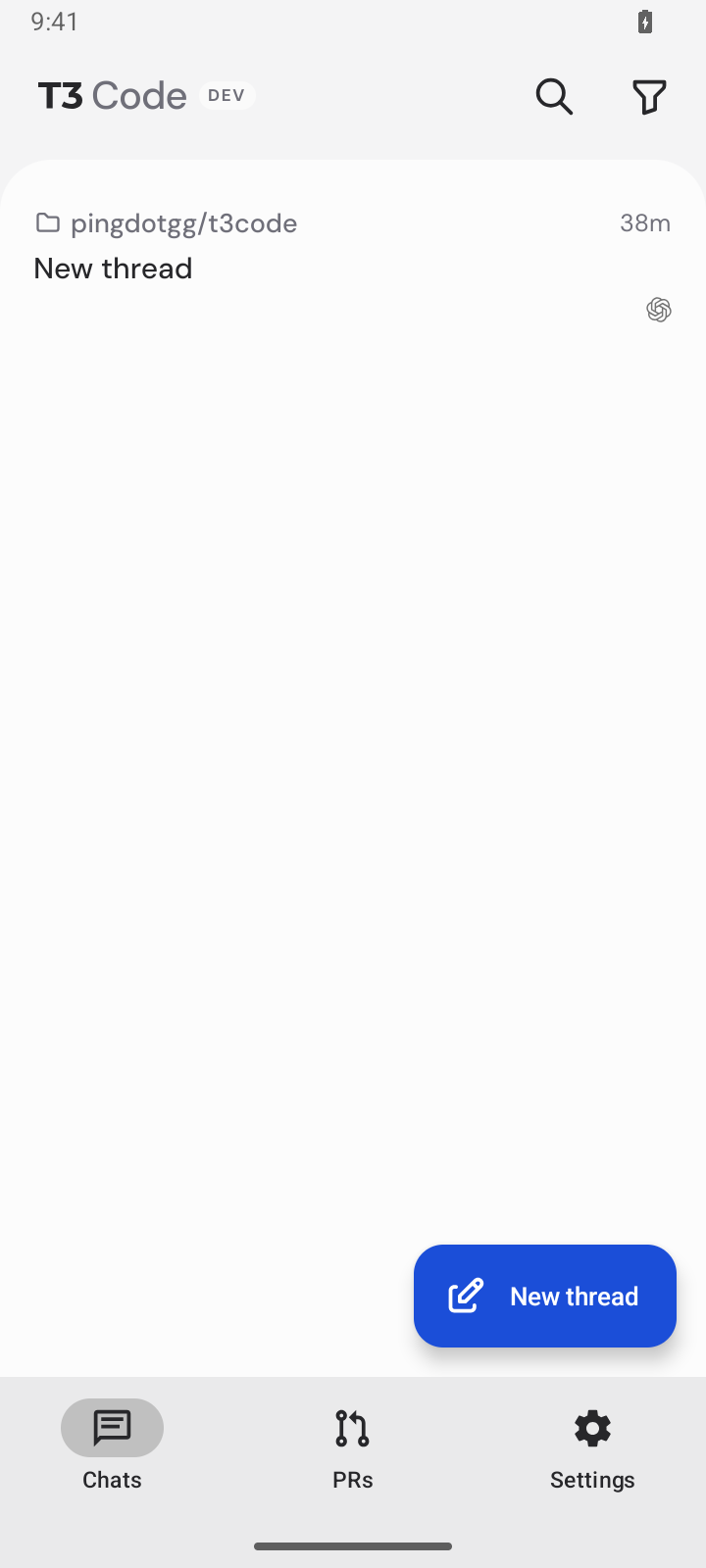
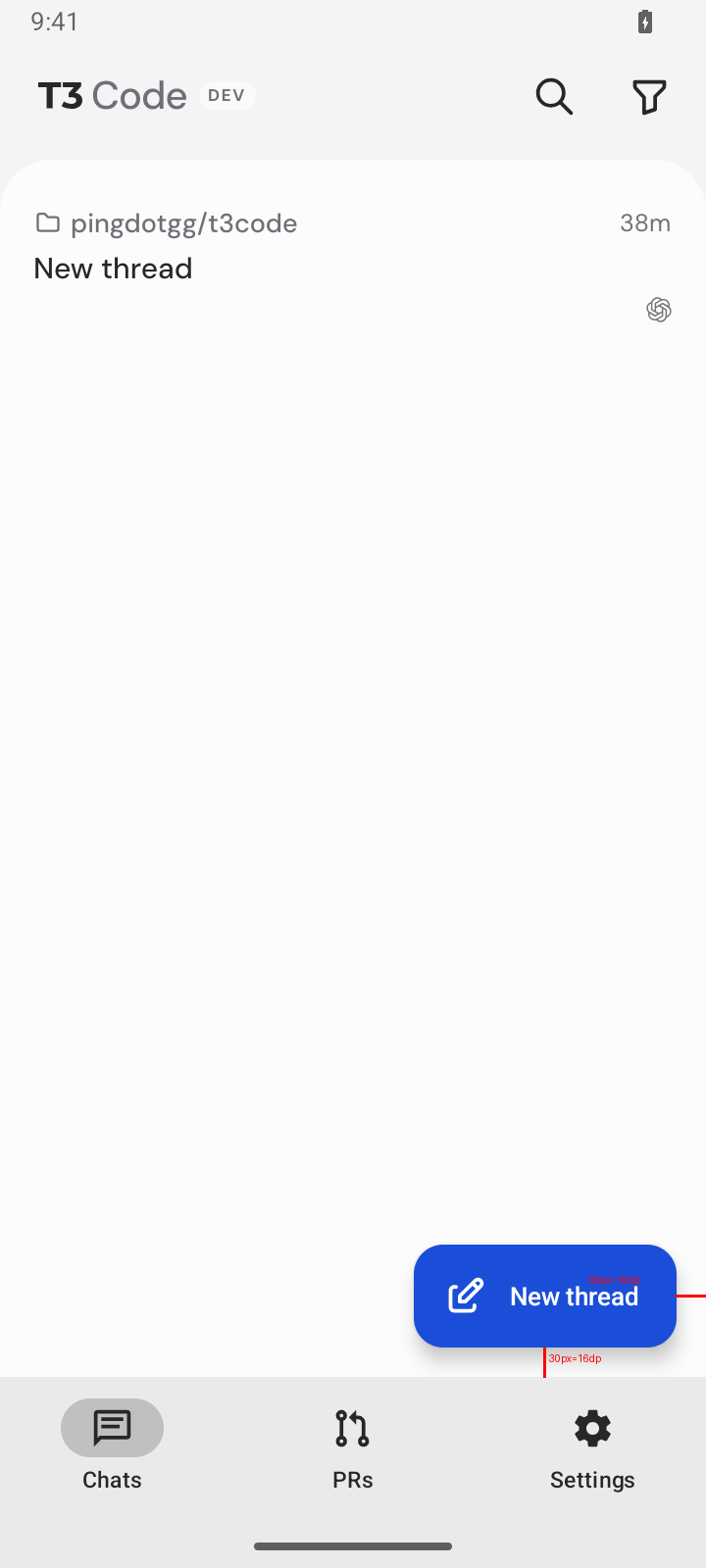
Device verification (Android emulator, EAS): PASS (phone layout, on main 8866e8f) — three bottom tabs Chats/PRs/Settings, Search and Filter in the list header, New thread as the only FAB at 16dp from the edge and tab bar (30px at density 300). Split-view rail not tested: EAS Android AVDs are phone-sized. Evidence: |

1 participant

Android's navigation chrome took a large share of the screen. On phones, a two-tab bottom bar sat under a floating Filter button stacked on a floating New thread button, all over the thread list. Settings was a header gear. In split view, #21071 replaced the old 80dp rail with threads/PRs toggle buttons in the sidebar header, which left one more button in a crowded 280dp header.
Phones: the bottom bar has three tabs: Chats, PRs, and Settings. Search and Filter sit in the list header, and Filter stays visible while searching. New thread is the only floating button, at Material's 16dp corner margin.
Split view: a 72dp navigation rail shows the same three tabs as icons, with a menu button and New thread at the top. It replaces #21071's sidebar header toggles, and the sidebar no longer has its own New thread button. The menu button widens the rail to 240dp over the list, with labels and a scrim, without reflowing the panes. Back or a tap outside closes it.
The rail is one Compose surface that widens in place. Material's
ModalWideNavigationRailmoves its destinations into a separate dialog window when it expands, which blanked them for a few frames and laid them out at a different height, so they jumped. Here the destination icons stay on the same pixels through the whole animation; the selection indicator and New thread button stretch from their collapsed shape into the expanded one, and the labels fade in once there is room. While a label is hidden, the item carries the destination's name for accessibility. The collapsed rail is 72dp rather than Material's 96dp, which leaves the thread list more room; items keep 48dp touch targets.Every Android header uses the list toolbar's height, so the rail's menu button, the sidebar header, Settings, and the detail pane's title sit on one line. The detail pane and Settings used to be 64dp app bars and sat lower.
Before, at normal speed: the icons blank out while the rail opens, shift as it closes, and the New thread label clips.
https://gh-file-drop-api-prod-mi5fy3sowv63ufte.pinglabs.workers.dev/f/b0c4b0a130ae3fe6/rail-before.mp4
After, at 5× animation scale:
https://gh-file-drop-api-prod-mi5fy3sowv63ufte.pinglabs.workers.dev/f/aab2031ada923c1d/rail-after-slow.mp4
Settings tab: opens Settings as a full workspace page from either surface. It drops stale chat and PR history, so Home is the only route underneath. Nested settings pages keep normal Back and keep Settings selected. Choosing a list tab returns to the list.
Tab switches swap in one frame. Chats and PRs each mount on first visit and then stay mounted while hidden, behind React's
Activity, so switching back shows the list as it was left instead of an empty list that fills in. Hidden tabs run no effects, so their search, Back, and keyboard handlers stay off. Settings swaps without an animation, also in one frame in split view (below). An earlier version used Material's fade-through here; with both the sidebar and the detail pane fading out to a blank screen and back, it read as a flash on every tap.Tab switches before, at normal speed:
https://gh-file-drop-api-prod-mi5fy3sowv63ufte.pinglabs.workers.dev/f/32f43516e9279f01/tabs-before.mp4
After, at normal speed:
https://gh-file-drop-api-prod-mi5fy3sowv63ufte.pinglabs.workers.dev/f/0006ffee00636c26/tabs-after.mp4
The PR header no longer shifts when its tab returns. It was the Compose app bar with React Native views hosted inside. A hidden tab lays out at zero size, so each time PRs came back Compose re-measured over several frames: the filter button was missing, Search jumped right, then the title ran over it, for about 330ms. Hiding the tab also ran the filter menu's cleanup, which dropped the button until the list republished it. The PR header now draws the same plain row as the Chats header, and the list publishes its menu in a layout effect without clearing it, so switching tabs leaves the sidebar header untouched.
The connection status's 800ms delay is now shared across headers. A header that mounts while the status already shows (a tab's first visit, or after folding) shows it at once, instead of the brand for 800ms and then a fade.
PR header before, at normal speed:
https://gh-file-drop-api-prod-mi5fy3sowv63ufte.pinglabs.workers.dev/f/73bb51f6c3a7edc8/pr-header-before.mp4
After, at normal speed:
https://gh-file-drop-api-prod-mi5fy3sowv63ufte.pinglabs.workers.dev/f/2cecd2e260561e93/pr-header-after.mp4
A returning tab shows the current connection status, with no scrollbar flash. Each header subscribed to the connection state itself, and a hidden tab drops its subscriptions. When the status changed while PRs was hidden (here, going offline), PRs came back showing the old status for 630ms. The status and its 800ms delay now come from one provider above the tabs, and headers read it from context, which still reaches a hidden tab. The PR list also flashed Android's scrollbar for about 1.7s on every return, because Android shows a scroll view's scrollbar whenever it becomes visible. It now hides the indicator on Android, like the thread list.
Before, at normal speed:
https://gh-file-drop-api-prod-mi5fy3sowv63ufte.pinglabs.workers.dev/f/963eb8e7474cf985/status-before.mp4
After, at normal speed:
https://gh-file-drop-api-prod-mi5fy3sowv63ufte.pinglabs.workers.dev/f/cde7272bf07428b9/status-after.mp4
Settings opens and closes in one frame in split view. Settings is a native screen over the workspace, so React and react-native-screens each did part of the switch, on different frames. Opening it, React hid the sidebar and widened the old detail pane; Screens attached Settings a frame or more later, kept the old screen drawn over it while its 20ms
nonetween ran, and the Compose header measured last. Closing it, the sidebar came back beside Settings, and then the old pane was laid out at the wide size for a frame.This needs react-native-screens 5.0.0-t3.29 and a patch to expo-modules-core, both native, so it needs a new build rather than an OTA. The legacy stack now applies screen changes in the Fabric mount that made them (3c7c3b1), draws a screen leaving with
nonethrough an empty clip so it is gone at once while its tween still finishes (c719481), and, when a mount both resizes a container and changes its screens, lays the screens out after the change, so a screen it detaches is never re-laid out at a size it is not shown at (cd2a327, e99a726; t3.28 applied the change early instead, which attached the new screen mid-mount and drew its Compose header a frame late). The expo-modules-core patch lays out a Compose host from a pre-draw listener as well as its posted runnable, so a header in a new screen is laid out before the frame it first appears in. In the app, the sidebar leaves the row under Settings at its own size instead of going todisplay: none, so its lists never lay out at zero size; the Settings root hides the native header from its first layout; and the Compose app bar has a fixed height, so a page lays out under it at once instead of first at the top.PR filters: the PR header's filter button opens the full filter menu. The button is filled while any filter, a non-default sort, or a selected environment is active, and "Reset filters" clears the environment too. The quick pills stay under the header, minus the pill that duplicated the header button. The PR header draws the same row as the Chats header, so the title, Search, and Filter stay in place when switching tabs.
iOS is unchanged, apart from the shared connection status delay: an iOS header that mounts during an outage also shows the status at once.
Split out of #19987 by @PixPMusic, and rebuilt. The original added Settings to the tab reducer and synced it from navigation state in a layout effect. Here, Settings is derived from the root stack: it's selected when its screen is on top. The original also published the PR filter menu through an app-root context that re-registered on every PR list render. The menu now comes from a context scoped to the PR surfaces, and the React Compiler memoizes it on the filter values. The original's rail was Material's
ModalWideNavigationRailplus glue to hide its dialog handoff; that is replaced by the single in-place surface described above.Hide-on-scroll from #19987 is not in this PR; it will follow separately.
Merged with main after #21071. That PR removed the rail; this branch keeps it, so the merge restores the rail in the layout, native module, navigation colors, and hinge alignment, and drops the sidebar header toggles. Everything else from #21071 stays: the root-state reset for sidebar taps before the first navigation, the fitted brand title, the 640dp reading width, and the no-slide detail swap in split view.
Tests: two tests in
android-workspace-navigation.test.tscover the Settings tab's navigation outcome. They check that opening Settings drops stale history and keeps Home's route key, that Back returns to Home, that Settings stays selected under a nested page, and that choosing a list tab returns to Home. They replace the original's five tests (three Settings tests, a reducer test that couldn't fail, and a per-table string helper test). Each was spot-checked to fail when the behavior is broken.Verification: these pass:
Checked on emulators (Pixel 10 Pro Fold folded as the phone, Pixel Tablet for split view, Android 17), against a backend seeded with real threads:
🤖 Generated with Claude Code