
wizard-workbench is a fixture collection and local harness for exercising PostHog Wizard workflows. It contains sample applications in deliberately varied integration states under apps/, run and evaluation utilities under services/, and a macOS phrocs stack that connects sibling Wizard, Context Mill, and PostHog checkouts.
A setup flow that works in one pristine app can still fail on the next framework or repository shape. The workbench keeps those cases repeatable enough to inspect the same failure twice.
Most application directories are forks or purpose-built fixtures. Their own READMEs describe those applications; this root guide covers how the workbench selects and runs them.
Fixture apps are organized by workflow under /apps/<workflow>/<framework>/<app-name>:
apps/
├── basic-integration/    # Default PostHog integration
│   ├── next-js/
│   │   ├── 15-app-router-saas
│   │   └── 15-pages-router-saas
│   ├── react-router/
│   ├── django/
│   └── ...
├── revenue/              # Revenue analytics (Stripe + PostHog)
│   └── stripe/
│       ├── stripe-next-js-saas-starter
│       └── stripe-saas-demo
└── misc/                 # Misc apps for skill runs
    └── quack-quack
To add a fixture for an existing workflow, create a directory under that workflow's folder in
apps/. To add a workflow, register its directory and command metadata in
apps/manifest.json; the runners derive their command registry from that
file.
Reviews are auto-requested via .github/CODEOWNERS — the
file is the source of truth; this table just mirrors it for readability.
team-wizard-docs is the default reviewer; the team-owned apps below route
review to their owning team instead.
| Path | Owning team |
|---|---|
* (everything else, including all other apps) |
@PostHog/team-wizard-docs |
/apps/basic-integration/ |
@PostHog/team-wizard-docs |
/apps/error-tracking-upload-source-maps/ |
@PostHog/team-error-tracking |
/apps/self-driving/ |
@PostHog/team-self-driving |
Ownership is by directory. Apps not listed above fall through the default and
are owned by team-wizard-docs. Today CODEOWNERS only auto-requests review —
approval is not a merge gate.
The services/ directory contains the runners and analysis tools that operate on fixtures:
services/
├── framework-detect/   # Run Wizard's deterministic project detectors
├── pr-evaluator/       # Evaluate a PR or local branch
├── wizard-benchmark/   # Repeat Wizard runs and retain measurements
├── wizard-ci/          # Run Wizard, create PRs, and optionally evaluate them
├── wizard-run/         # Select a workflow and fixture interactively
├── yara-scan/          # Inspect generated YARA reports
├── github/             # Shared GitHub and git utilities
└── wizard-commands.ts  # Runtime view derived from apps/manifest.json
services/wizard-commands.ts reads apps/manifest.json at runtime. Update the manifest instead
of maintaining a second command list.
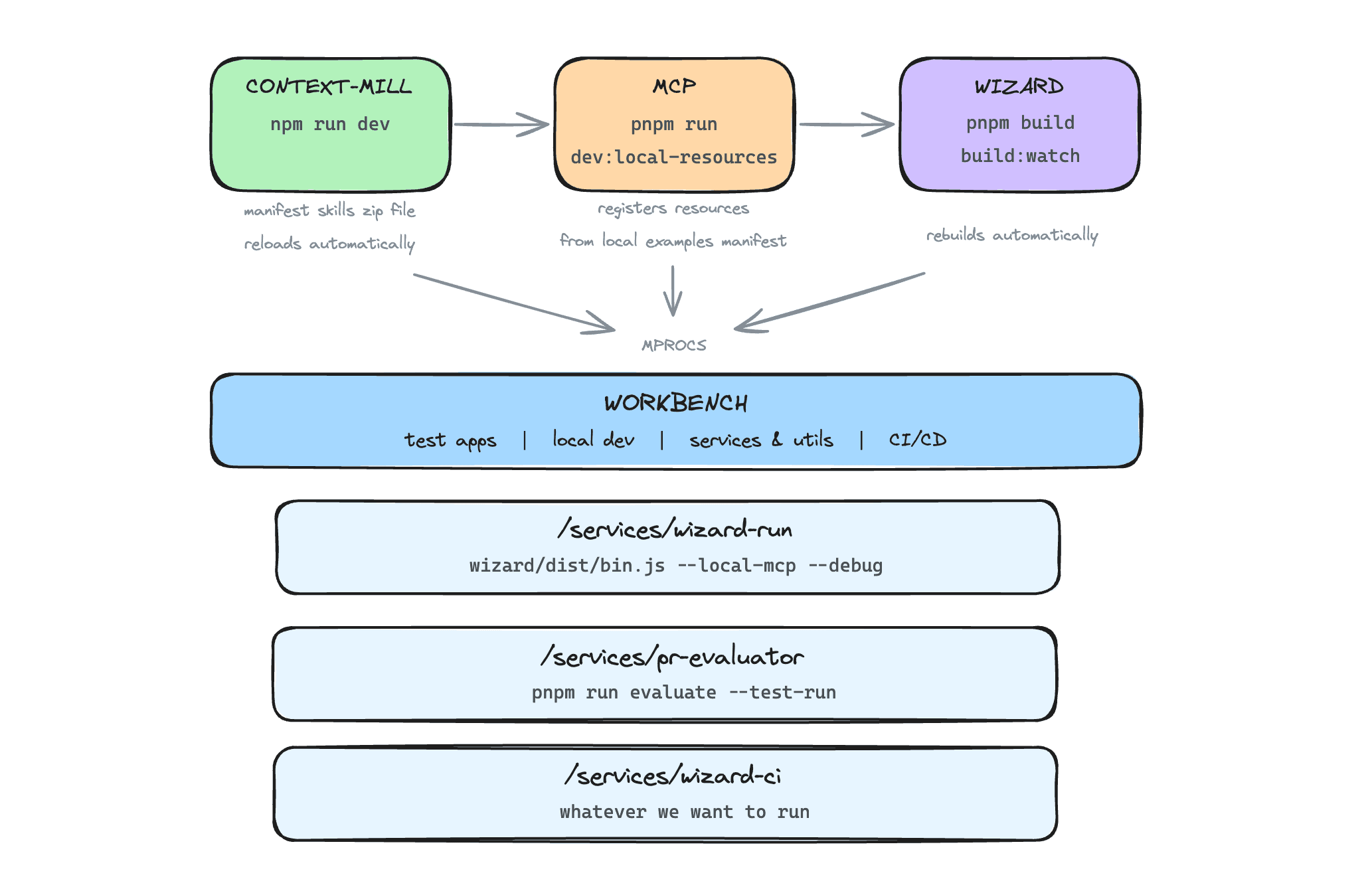
The workbench can run the entire Wizard stack in local development mode, with hot reload where supported. It uses phrocs to run all the repos defined in your .env file:
- Context Mill repo
- Wizard repo
- MCP repo (within PostHog monorepo)
Starting fresh? If you've just cloned wizard-workbench and don't already have the dependency repos (context-mill, wizard, posthog) cloned or their packages installed, run:
bash fresh-setupThis installs phrocs, clones context-mill, wizard, and posthog as siblings next to this repo (e.g. ../context-mill), writes your .env with the right paths, prompts for an optional PostHog API key, and runs pnpm install everywhere.
macOS only for now.
The setup script accepts three flags:
| Flag | Effect |
|---|---|
--force |
Overwrite an existing .env. |
--skip-posthog |
Skip the large PostHog monorepo clone. MCP processes remain unavailable until you provide MCP_PATH. |
--non-interactive |
Skip the API-key prompt and leave the placeholder in .env. |
Already have the repos / your own setup? You don't need
fresh-setup— it's for clean machines. Use the manual steps below to point.envat wherever your repos already live (any path works; they don't have to be siblings).fresh-setupis also safe to re-run: it skips repos that are already cloned and leaves an existing.envalone unless you pass--force.
Manual setup (if you'd rather do it yourself, or already have the repos)
Install phrocs: ``` brew tap posthog/tap && brew install phrocs ``` Install dependencies in this repo: ``` pnpm install ```Copy and edit .env with your repo paths and API key:
cp .env.example .env
| Variable | Required | Description |
|---|---|---|
CONTEXT_MILL_PATH |
Yes | Path to your local context-mill repo (e.g., ~/development/context-mill) |
MCP_PATH |
Yes | Path to MCP service (e.g., ~/development/posthog/services/mcp) |
WIZARD_PATH |
Yes | Path to your local wizard repo (e.g., ~/development/wizard) |
POSTHOG_PERSONAL_API_KEY |
For CI | PostHog personal API key for wizard CI mode and PR evaluator |
POSTHOG_REGION |
No | PostHog region (us or eu). Defaults to us. Can also be set via --region flag or workflow input. |
Make sure you've set up and installed dependencies for all required repos.
Enter phrocs to run the local dev stack:
phrocsUse keyboard shortcuts in phrocs: r to run/restart, s to stop, q to quit.
| Process | Port | Description |
|---|---|---|
context-mill |
8765 | Context Mill server with MCP resources ZIP |
mcp |
8787 | MCP server using local resources |
mcp-inspector |
6274 | MCP Inspector UI for debugging |
wizard-build |
- | Builds and watches Wizard for changes |
| Process | Description |
|---|---|
wizard-run |
Interactive picker: choose a Wizard command (wizard, wizard revenue-analytics, …) then a fixture |
wizard-tail-run |
Tail the wizard's verbose output (/tmp/posthog-wizard.log) |
wizard-ci-run |
Full CI flow: run wizard, create PR, evaluate |
wizard-ci-local-run |
CI flow with local evaluation (no PR) |
wizard-ci-create-pr |
Push branch and create PR only (skip wizard run) |
wizard-ci-evaluate-pr |
Evaluate an existing PR or local branch |
mitmproxy |
HTTPS-intercepting proxy on port 8888 |
wizard-run-proxy |
Run wizard with all fetch traffic routed through the proxy |
The workbench fixes two runner destinations, lets the MCP service configure one backend, and leaves the gateway override to direct Wizard invocations:
| Knob | Default | Configurable? |
|---|---|---|
| Wizard → MCP worker | localhost:8787 |
No — --local-mcp is always passed (services/wizard-ci/utils.ts) |
| Wizard → context-mill skills | localhost:8765 |
No — same flag |
| MCP worker → PostHog backend | Prod US/EU | Yes — $MCP_PATH/.dev.vars |
| Wizard → LLM gateway | Region-selected PostHog gateway | Not through workbench runners; direct wizard invocations accept --base-url |
In $MCP_PATH/.dev.vars, keep these commented out:
# POSTHOG_API_BASE_URL=http://localhost:8010
# POSTHOG_MCP_APPS_ANALYTICS_BASE_URL=http://localhost:8010
# POSTHOG_ANALYTICS_HOST=http://localhost:8010
Restart the mcp proc.
- Start a local PostHog Django on
:8010(./bin/startin theposthog/repo). - Uncomment the three lines above.
- Restart the
mcpproc.
The workbench runners always pass --local-mcp, but they do not expose Wizard's
--base-url option. To route a manual Wizard run through local PostHog and the local gateway,
start PostHog on :8010, start llm-gateway on :3308, install or link the sibling Wizard's
wizard executable, and run it directly against a fixture:
wizard --base-url http://localhost:8010 --local-mcp --install-dir /path/to/fixtureWizard derives http://localhost:3308/wizard from the local API host. No source edit or
development-mode rebuild is required.
Wizard CI runs PostHog Wizard against fixture apps, creates PRs with the changes, and evaluates the integration.
The wizard-ci service runs the Wizard on a test app and handles the full CI flow. It also uses the github service to checkout branches and open PRs in the remote repo for code diffs.
The evaluator rejects unknown command IDs before a model call and records that
outcome as rubric_mode: unknown-command when product analytics is configured.
Known commands without a dedicated rubric run in the explicit
generic-fallback mode.
# Run on a specific app
pnpm wizard-ci --app next-js/15-app-router-saas --evaluate
What it does:
- Resets the test app to a clean state
- Runs the Wizard to add PostHog integration
- Commits changes to a branch and creates a PR
- Optionally runs the PR evaluator to assess integration quality
The wizard-ci.yml workflow is a unified CI/CD pipeline that handles app discovery, parallel execution, PR creation, evaluation, and Slack notifications.
| Input | Default | Description |
|---|---|---|
app |
all |
all, directory (next-js), or app path (next-js/15-app-router-todo) |
evaluate |
true |
Run PR evaluator after wizard completes |
base_branch |
main |
Base branch for PR |
wizard_ref |
main |
Wizard repo branch/tag/sha |
context_mill_ref |
main |
Context Mill repo branch/tag/sha |
posthog_ref |
master |
PostHog repo branch/tag/sha (for MCP) |
posthog_region |
us |
PostHog region (us or eu) |
trigger_id |
auto-gen | Seven character ID |
notify_slack |
false |
Post notifications to Slack |
Each trigger is assigned a unique short ID that tracks the group of wizard CI runs it created.
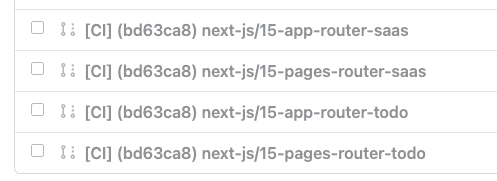
You can activate wizard-ci.yml in a few ways:
- Manual - Run from GitHub Actions UI
- Schedule - Runs on cron
- Dispatch - Webhook call via
repository_dispatchwith event typewizard-ci-trigger
To inspect network traffic, simulate outages, or throttle requests, you can run the Wizard through an HTTPS-intercepting proxy. All Node fetch traffic is routed through the proxy via undici's ProxyAgent.
Install mitmproxy:
brew install mitmproxyGenerate and trust the mitmproxy CA certificate:
./proxy/setup-mitmproxyThis generates the CA cert at ~/.mitmproxy/mitmproxy-ca-cert.pem and adds it to your macOS system keychain so Node trusts the proxy's SSL certificates.
In phrocs, start the mitmproxy process first, then start wizard-run-proxy. Traffic will appear in the mitmproxy TUI.
Alternatively, you can use Charles Proxy (GUI-based, paid license) on port 8888 instead of mitmproxy.