Cross-platform C++ library - universal neurobiology-based machine learning framework
Version 3.1.0


Interference NDK includes a cross-platform C++ library and tools for neural networks debugging. The library implements a neurobiology-based Interference architecture. Unlike traditional artificial neural networks, Interference models neural processing using spatial mathematics, where neurons works in multidimensional space and process signals through biologically-inspired components: synapses, receptors, and neurotransmitters.
This framework is highly scalable. It is suitable for both powerful computing clusters and embedded systems, including real-time systems.
- Spatial neuron modeling with multidimensional positioning
- Synaptic signal transmission with activation/deactivation neurotransmitters
- Pattern recognition through receptor position adaptation
- Multiple computation backends - native CPU (single-thread/multi-thread), OpenCL, Vulkan
- JSON-based network structure definition
- Support for learning and inference modes (including on embedded devices)
- Can be used to perform a variety of tasks: data classification, anomaly detection, image and sound recognition, NLP, etc
| x86 | aarch64 | armle.v7 | e2k | |
|---|---|---|---|---|
| Windows | + | + | ||
| Linux | + | + | + | + |
| QNX | + | + |
- Native CPU (single thread)
- Native CPU (multithread)
- OpenCL
- Vulkan (experimental)
- CMake 3.12 or newer
- g++ 8.3.0 or newer (MinGW under Windows)
A simple example of classifying signals. The two signals belong to the same class. This example demonstrates how to determine how closely the recognized signals match the one learned by the model.
#include <indk/neuralnet.h>

int main() {
    // create the neural net structure with two entries and one neuron (one class)
    INDK_STRUCTURE(structure, {
      "entries": ["E1", "E2"],
      "neurons": [
        {
          "name": "N1",
          "size": 100,
          "dimensions": 2,
          "input_signals": ["E1", "E2"],
          "ensemble": "A1",

          "synapses": [
            {
              "type": "cluster",
              "position": [50, 50],
              "radius": 10,
              "neurotransmitter": "activation",
              "k1": 10
            }
          ],

          "receptors": [
            {
              "type": "cluster",
              "position": [50, 50],
              "count": 4,
              "radius": 5
            }
          ]
        }
      ],
      "output_signals": ["N1"],
      "name": "classification net",
      "desc": "neural net structure for data classification example",
      "version": "1.0"
    });

    indk::NeuralNet net;

    // load the structure from string
    net.setStructure(structure);

    // learn the values
    // send two signals (with length 4) to two neural network entries (E1 and E2)
    net.doLearn({{4, 3, 2, 1}, {1, 2, 3, 4}});

    // recognise the same signals
    // doComparePatterns method will give a vector with one value (since we only have one neuron at the output)
    // this value is 0 (recognised signal completely coincides with the learned signal)
    net.doRecognise({{4, 3, 2, 1}, {1, 2, 3, 4}});
    std::cout << net.doComparePatterns()[0] << std::endl;

    // recognise the signals, one of them has changed
    // doComparePatterns method will return a non-zero value
    net.doRecognise({{4, 3, 2, 2}, {1, 2, 3, 4}});
    std::cout << net.doComparePatterns()[0] << std::endl;

    // recognise the signals, the signals are swapped
    // doComparePatterns method will give a non-zero value, the value is greater than last time
    net.doRecognise({{1, 2, 3, 4}, {4, 3, 2, 1}});
    std::cout << net.doComparePatterns()[0] << std::endl;

    return 0;
}
Output:
0
0.177792
0.236595
- Classification - the simplest example of binary classification
- Test - benchmark
- Vision - example of image recognition system
- Multimodal - example of multimodal (image+text) data processing
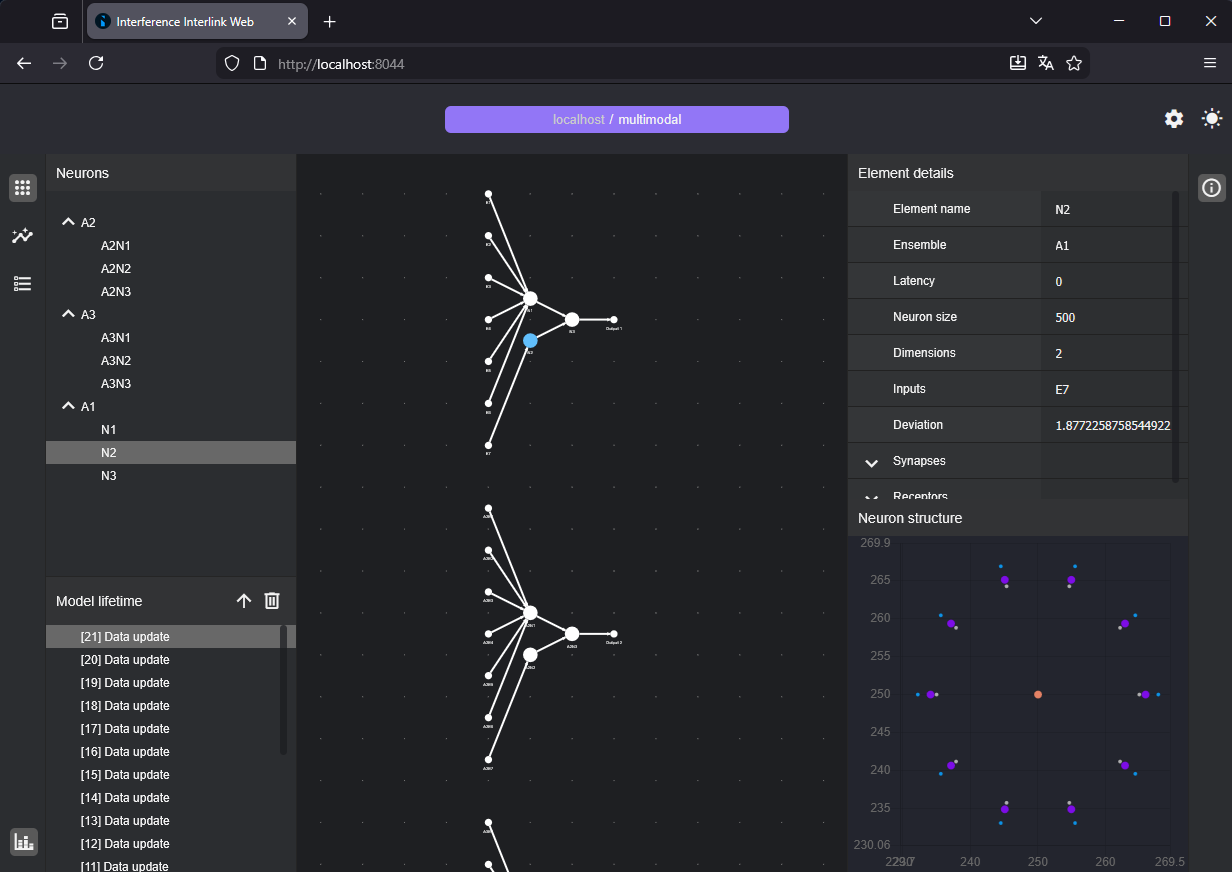
Interference library contains built-in tools for model profiling and debugging. Interlink Web provides a web interface that allows you to view the current model structure and parameters in runtime.
    // Call doInterlinkWebInit method from an object of the indk::NeuralNet class
    // Simply specify the path to the interlink-web ui directory and the port
    net -> doInterlinkWebInit("<library root dir>/dist/etc/interlink-web/ui/", 8044);

    // Open the web page in your browser (e.g. http://localhost:8044) to view model structure and data

    // Do your work with Interference

    // The doLearn and doRecognize methods automatically synchronize model data with Interlink
    // Call doInterlinkSyncData method to trigger the synchronization manually
Interlink Web UI
Interference library is distributed under the MIT Licence.
interference_vision example uses the part of COIL-100 dataset.
"Columbia Object Image Library (COIL-100)," S. A. Nene, S. K. Nayar and H. Murase, Technical Report CUCS-006-96, February 1996. http://www1.cs.columbia.edu/CAVE/software/softlib/coil-100.php
All files will be in dist directory.
Just run build.cmd script.
Just run build.sh script.