Repository navigation
[Scenario] Progress Bar Follow-ups #6700

Description

[Original issue: #3004] [Initial PR: #8055] [Display the progress in the tab: #8133]
This is a list of tasks, bugs, etc, related to the "taskbar progress indicator", as first implemented in #8055. While not all of them are immediately relevant for the taskbar indicator, they're all related to the showing of progress state in the Terminal.
| Sequence | Description |
|
|
Set progress state on Windows taskbar and tab. When `st` is:
|
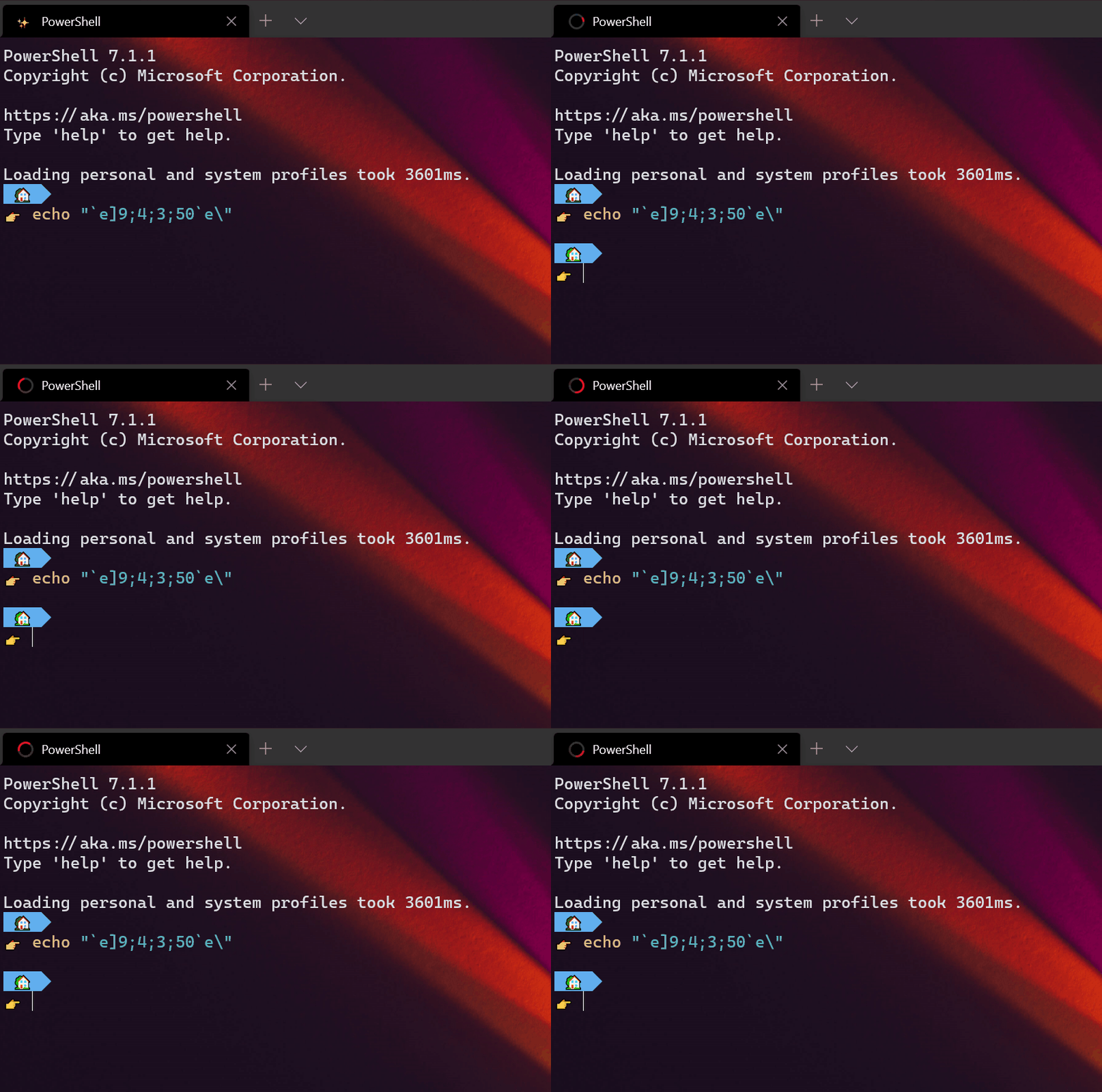
### Follow-up work
- [ ] #7955
- [ ] #1620
- [ ] #8449
- [ ] #9481
- [x] #8910
- [x] #10090
- [x] #9743
- [ ] #3991
"Auto-detect output, display in tab/taskbar" (#7955) and #1620 are very closely related
Bell notifications
These cover some of the same areas of the above, so I'm including them because I feel they deserve a mention here:
- Make terminal beeps highlight Windows Terminal in the taskbar, to get user attention when backgrounded Make terminal beeps highlight Windows Terminal in the taskbar, to get user attention when backgrounded #1608 -> added in Add a setting to flash the taskbar when the terminal emits BEL #8215
- show an indicator if there's a bell in the tab Feature Request: show an indicator if there's a bell in the tab #8106 -> added in #8637
- The bell should "fade out", like it does for browsers
- More elaborate visual belling -> added in Add a setting to flash the pane when BEL is emitted #9270
bellStyle: flash-> flash the window. (maybevisual)bellStyle: taskbar-> flash the taskbar (maybetaskbar)bellStyle: visual-> both? (maybevisual|taskbar)
Related?
Reacted by Matthew Gray, Mustafa Mohamad, Eric Tian, Uwe Keim, Chester Liu, WSLUser, Stéphane BARIZIEN, tech189, Marlon Macedo, Christian Brüggemann and 4 more
Reacted by Guiorgy and hello-smile6
Activity
[-]Reserved for future use [/-][+][Scenario] Progress Bar Follow-ups[/+]19 remaining items
sba923 commentedon Feb 8, 2021
On at least two of my systems
ESC ] 9 ; 4 ; 3 ; 100 BELdoes cause the rotating symbol on the Windows Terminal tab, but doesn't trigger the animation on the taskbar button. Shall I open a separate issue for that?sba923 commentedon Mar 4, 2021
Opened #9374
tringi commentedon Mar 5, 2021
A little off topic, but wouldn't it be trivial to add this also to Conhost? Just simply forward the command to ITaskbarList3?
Thinking about it... now that this is open, I might even try myself.
sba923 commentedon Mar 16, 2021
#9374 closed with solution by Dustin L. Howett (@DHowett): one must enable animations under Settings / Ease of Access / Display:
Without this, only
OSC9;4;x;ySTwith x=1,2,4 are fully functional.Add a setting to flash the pane when BEL is emitted (#9270)
Combine progress states in the tab, taskbar (#10755)
sba923 commentedon Sep 7, 2022
Here's the state of affairs on this issue:
This has been discussed in #9374 up to the point where I created https://aka.ms/AAehwy4, and from there no progress has been made.
aetonsi commentedon Mar 9, 2023
Hi, is there, anywhere, a clear documentation about all of these behaviors? If not, would it be possible to add a brief section in the Console Virtual Terminal Sequences page (if that's the correct location)?
I'm asking because i have a couple of quick questions but i can't find the answer anywhere, the information is pretty fragmented (it seems to me). I'm going to place them here in case anyone has an answer.
First question
It's possible to switch from "progress" (green taskbar) status to "error"/"warning" status (red/yellow) without altering and without even knowing the current progress percentage. This is possible by using
st=2/4(error/warning) combined withpr=For example, if the status bar is currently 33% in "progress" (green) status, using
st=2andpr=The question is: is it possible to do the same but in the opposite direction? meaning, for example, is it possible to go from 33% "error" status to the same percentage but in "progress" status?
I tried
st=1andpr=-1/0either do nothing or simply reset the taskbar (as ifstwas0)Second question
In #8055 it is said:
What it is meant with "paused state"? is it referring to conemu's "warning" state? or is it some additional/custom WindowsTerminal's feature?
thank you everyone
j4james commentedon Mar 9, 2023
No. The default percent value for an error state is the whatever current percent is (that's why you can change from st=1 to st=2 without setting the percent), but the default percent value for the progress state is 0. In other words, if you set st=1 with no percent, you're getting 0%, which is the same as disabling the progress.
Yes. At the time this feature was being developed, ConEmu had only documented states 0, 1, and 2. I think state 3 may already have been implemented, but not yet documented. State 4 was then proposed by Windows Terminal, but it was discussed with the Maximus5 first, who agreed to add matching functionality to ConEmu. The ConEmu documentation now includes all 5 states (see ConEmu specific OSC).
aetonsi commentedon Mar 10, 2023
Is this a Windows default?
Is there a system API to read the current progress percentage? Because if there is, it would nice if WindowsTerminal's behaviour was more consistent, maintaining the current percentage whenever
pr=st=2/4tost=1(by first reading the current "error"/"warning" percentage, then applying the "progress" state with that percentage).If you deem this to be too misleading, because it wouldn't match the OS' behaviour, i'd just like to know if a WT escape code/API/something to get the current percentage exists, so that i can use it in my utilities to achieve the aforementioned behaviour. Something like the
ESC[6nescape code which "returns" the cursor position in the stdin stream (even though i don't know how to read the returned value...)j4james commentedon Mar 10, 2023
No. That's the way it was defined by ConEmu. We're just following their specification.
No. The simplest option would be for you to keep track of the last percentage value yourself, since I'm assuming you're the one that set it. But if that's not an option for you, then I don't have any other ideas.
Add a tutorial for using the progress bar (#704)
Add a tutorial for using the progress bar (#704)