
A comprehensive workshop for exploring Microsoft AutoGen - the multi-agent conversational AI framework.
This workshop is designed to provide a deep dive into AutoGen, Microsoft's powerful framework for building multi-agent conversational AI systems. You'll learn how to create individual agents, build complex multi-agent systems, and integrate AutoGen with external tools and services.
- .NET 9.0 SDK or later
- Visual Studio Code or Visual Studio 2022
- Basic knowledge of C# programming
- OpenAI API key or Azure OpenAI Service access
- Git (for cloning repositories)
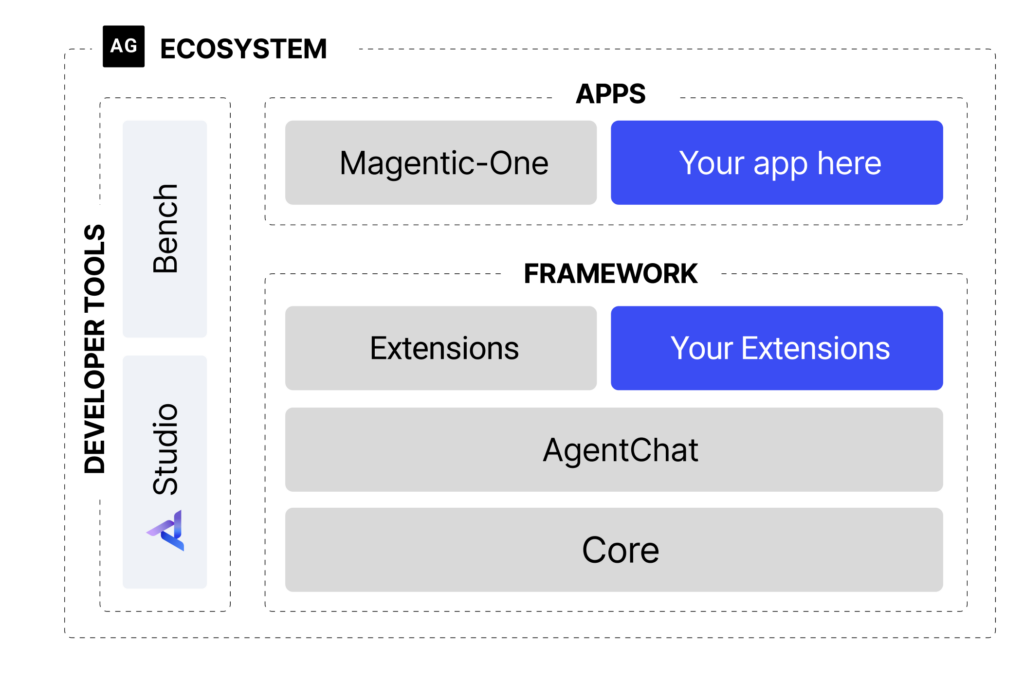
AutoGen is a open-source framework that enables the creation of applications using multiple AI agents that can converse with each other to solve tasks. It simplifies the orchestration of complex workflows by allowing agents to:
- Collaborate and communicate with each other
- Execute code and validate results
- Integrate with external tools and APIs
- Maintain conversation context and memory
- Support both chat-based and workflow-based interactions

- Multi-Agent Conversations: Create systems where multiple AI agents collaborate
- Code Execution: Built-in support for executing and validating code
- Human-in-the-Loop: Seamless integration of human feedback and oversight
- Extensible: Easy integration with external tools and APIs
- Flexible: Support for various LLM providers (OpenAI, Azure OpenAI, etc.)
Autogen enables the next-gen LLM applications with a generic multi-agent conversation framework. It offers customizable and conversable agents which integrate LLMs, tools, and humans. By automating chat among multiple capable agents, one can easily make them collectively perform tasks autonomously or with human feedback, including tasks that require using tools via code.
The figure below shows an example conversation flow with AutoGen.

Duration: 45 minutes
- Understanding AutoGen basics
- Creating your first AI agent
- Basic conversation patterns
- Agent configuration and customization
(NOT WORKING) Lab 02: WebBrowsing Agent Team
Duration: 45 minutes
- Building a team of web-browsing agents
- Implementing group chat
- Leveraging Playwright for web automation
- Web browsing and data extraction
(NOT WORKING) Lab 03: Multi-Agent Systems
Duration: 45 minutes
- Building multi-agent conversations
- Agent roles and responsibilities
- Conversation flow control
- Advanced agent interactions
Duration: 45 minutes
- Setting up AutoGen Studio
- Visual agent design
- No-code multi-agent workflows
- Studio configuration and customization
(NOT WORKING) Lab 05: AutoGen and MCP Integration
Duration: 45 minutes
- Understanding Model Context Protocol (MCP)
- Integrating AutoGen with GitHub MCP server
- Code-based MCP integration
- Studio-based MCP configuration
By the end of this workshop, you will be able to:
- Create and configure individual AutoGen agents
- Design and implement multi-agent conversational systems
- Use AutoGen Studio for visual agent development
- Integrate external tools and services using MCP
- Understand best practices for agent design and deployment
- Debug and troubleshoot agent interactions
- AutoGen: Enabling Next-Gen LLM Applications via Multi-Agent Conversation
- Multi-Agent Conversation Framework
git clone https://github.com/your-username/AgenticWorkshop-AutoGen.git
cd AgenticWorkshop-AutoGenDownload and install the latest .NET 8.0 SDK from dotnet.microsoft.com
Create a .env file in the root directory:
OPENAI_API_KEY=your_openai_api_key_here
AZURE_OPENAI_ENDPOINT=your_azure_openai_endpoint
AZURE_OPENAI_API_KEY=your_azure_openai_key
dotnet --version-
Navigate to Lab 01:
cd src/lab01 -
Restore dependencies:
dotnet restore
-
Run the first example:
dotnet run
- Start with Lab 01 to understand AutoGen fundamentals
- Progress to Lab 02 for multi-agent system development
- Explore Lab 03 for visual development with AutoGen Studio
- Complete Lab 04 for advanced integrations with MCP
Each lab builds upon the previous one, so it's recommended to follow the sequential order.
We welcome contributions to improve this workshop! Please:
- Fork the repository
- Create a feature branch
- Make your changes
- Submit a pull request
This workshop is licensed under the MIT License. See LICENSE for details.
If you encounter any issues during the workshop:
- Check the troubleshooting section in each lab's README
- Review the common issues in the FAQ
- Open an issue on GitHub
- Join the AutoGen Discord community for help
Special thanks to the Microsoft AutoGen team for creating this amazing framework and the community contributors who have helped improve this workshop.
Happy Learning! 🚀
Last updated: July 2025