
English | 简体中文(Simplified Chinese) | 繁體中文(Traditional Chinese)
https://jimyag.github.io/md2pdf/
Awesome Markdown to PDF!
- Online? Upload resume.md to stranger server?
+ Try Offline Web App!This repository is based on realdennis/md2pdf and adds:
- Local font selection: choose an installed local font for the editor preview and exported PDF in supported Chrome or Edge browsers.
- Image support: select a Markdown file and its local images together in the web app; relative image links are resolved for the preview and PDF. The CLI resolves images relative to the Markdown file automatically.
- Image workflow: select Markdown and local image files together, match relative image paths, add image titles/captions, center standalone images, lazy-load previews, and report missing image paths.
- Single-page PDF export: export the document as one long A4-width page from the web app or with
md2pdf --single-page. - PDF settings: configure A4/Letter/custom paper sizes, orientation, margins, scale, headers, footers, page numbers, table of contents, single-page output, background colors, and inline HTML from the Settings panel.
- Markdown compatibility: rendered by the open-source
markdown-itengine with CommonMark and common GFM syntax, including task lists, hard line breaks, automatic links, typographic punctuation, tables, footnotes, strikethrough, Emoji, definition lists, subscript, superscript, inserted/marked text, and manual page breaks. - Raw HTML: Markdown HTML is enabled by default for document layouts and resume-style formatting; unsafe tags, event handlers, dangerous URLs, and unsafe CSS declarations are filtered. Mermaid and PlantUML are intentionally not interpreted.
- Safer HTML: inline HTML remains available for document styling, while scripts, event handlers, dangerous URLs, and unsafe style declarations are removed.
- Command-line conversion: convert Markdown files directly with
md2pdf <input.md> [-o <output.pdf>], using the locally installed Chrome or Chromium. - Cross-platform binaries: tagged releases provide standalone binaries for Linux x64/arm64, macOS x64/arm64, and Windows x64.
- Container publishing: tagged releases publish multi-architecture Docker images to GitHub Container Registry.
- Web experience fixes: service-worker caching is disabled to avoid stale deployments, and leaving the page no longer triggers an unnecessary confirmation dialog.
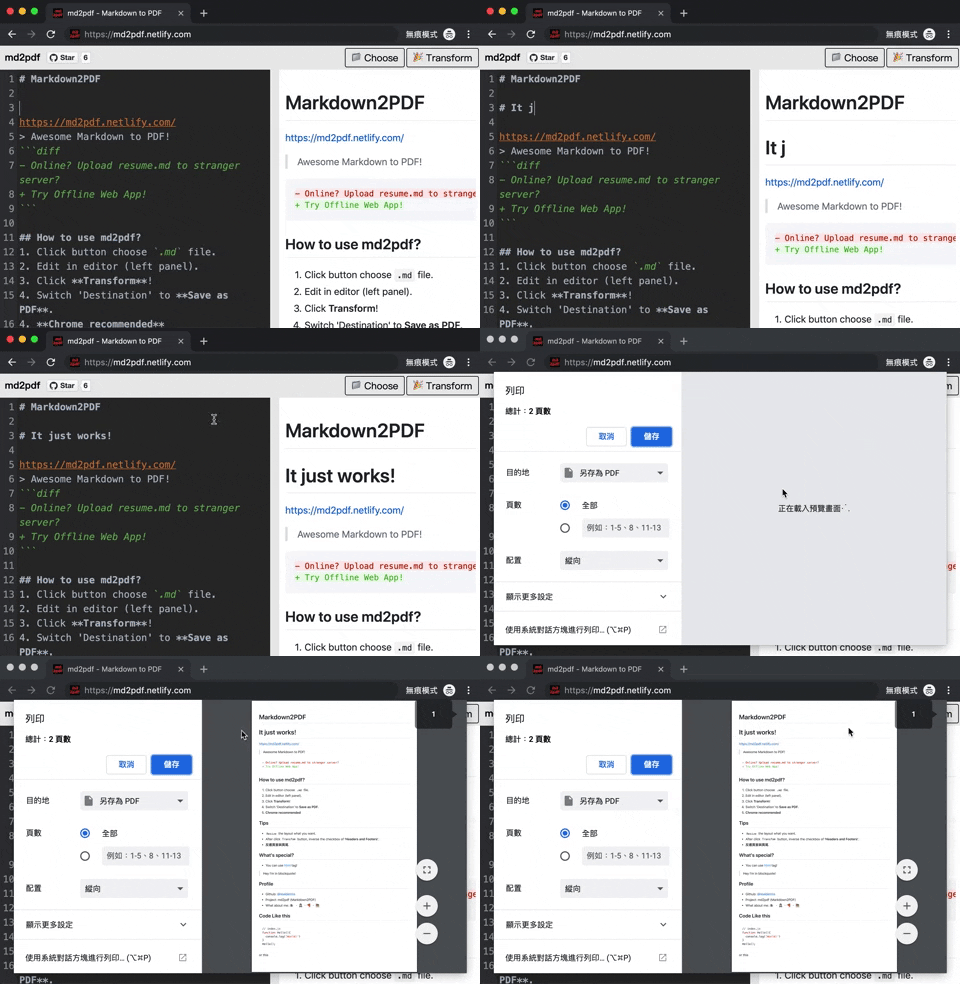
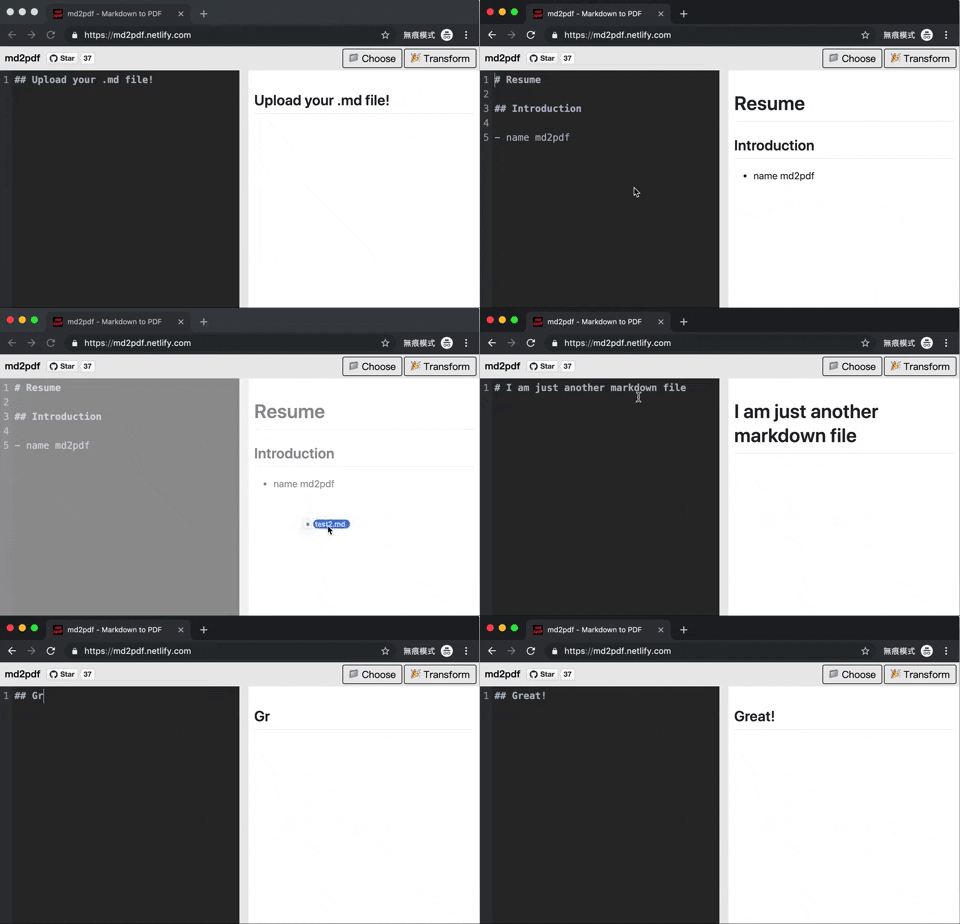
- Click the button to choose a
.mdfile. If it uses local images, select those image files at the same time. - Edit in editor (left panel).
- Click Transform!
- Switch 'Destination' to Save as PDF.
- Chrome recommended
Use relative Markdown image paths such as . Select the Markdown file and all referenced local images together, or drag image files into the page after loading the Markdown. If an image fails to load, the preview lists its path in a bilingual hint.
Use a Markdown image title for a caption and a standalone image will be centered automatically:
Use <!-- pagebreak --> or \pagebreak on its own line to request a manual page break. Enable Generate table of contents in Settings to add a linked contents block.
The Markdown text and selected local image data are restored after a page refresh in the same browser. Use Reset to clear the current document and image cache and reload the bundled example, or open the Resume menu to load one of the bundled resume templates (中文简历(无照片) / 中文简历(带照片)).
For resume images, use HTML when you need styles such as a circular avatar, fixed dimensions, or text wrapping:
<img src="avatar.jpg" width="96" height="96"
  style="float: right; border-radius: 50%; object-fit: cover;" />
The web app also supports <figure>/<figcaption> for captions. Disable Allow inline HTML and styles in Settings when importing Markdown that should render without source HTML.
- Install docker on your platform
- Clone the repository
cdintomd2pdf- Run
docker compose up -dinside the directory
The docker compose binds the web server to localhost:8080 by default. You can change this by finding the ports line in docker-compose.yaml.
Note: This docker compose uses the build directive, so your system will go build and optimize the code itself. The application is hosted locally through nginx which is what binds to port 8080.
Chrome or Chromium is required to generate the PDF.
Download the executable for your platform from GitHub Releases, or install it from the source checkout:
npm install -g .

# Writes document.pdf next to document.md
md2pdf document.md

# Choose the output path
md2pdf document.md -o output.pdf

# Use custom paper, scale, header/footer, page numbers, and a table of contents
md2pdf document.md --paper-size 210x297 --scale 95 --header "Project report" --footer "Internal" --page-numbers --toc

# Disable inline HTML and styles when converting untrusted input
md2pdf document.md --no-html
Set CHROME_PATH if Chrome cannot be detected automatically.
The bundled resume templates (.md sources with inline styles for a clean
print layout) live in public/example/ for reference.
Resizethe layout what you want.- After click
Transformbutton, inverse the checkbox of 'Headers and Footers'. - 反選頁首與頁尾.
- You can use html tag!
Hey I'm in blockquote!
LICENSE MIT © 2019 realdennis