
Web-based graphical interface to manage nftables firewall rules easily 🔥


nftables-gui is a web interface that allows you to configure Linux nftables firewall rules in a simple and visual way.
Instead of writing complex firewall commands, you can:
- Create rules visually 🧩
- Manage existing rules 📋
- Deploy firewall configurations safely 🔒
- 🌐 Web-based interface
- 🧠 Simple rule creation system
- 🔥 Integration with nftables backend
- ⚙️ Supports rule execution via parser
- 🧪 Testing with pytest + coverage support
- 🐧 Designed for Linux systems
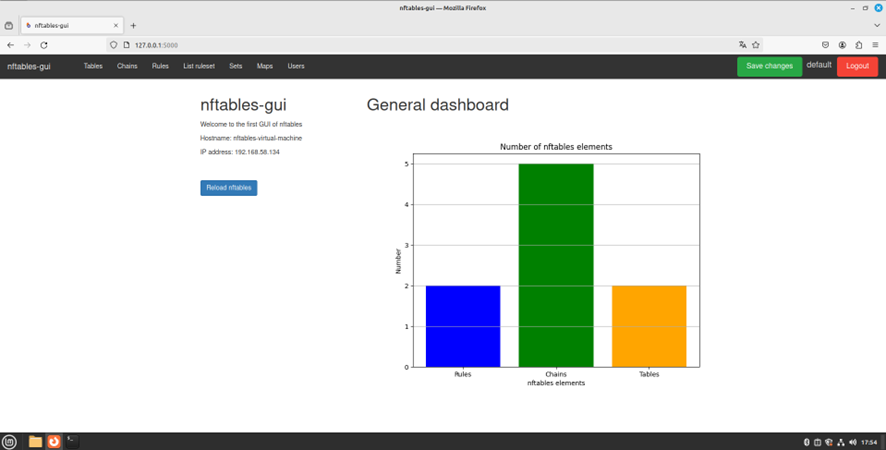
Example:
[ Add Rule ]  [ Delete Rule ]
IP: 192.168.1.1
Port: 80
Action: ALLOW
Make sure you have:
- Python 3.x
- python3-nftables
- python3-hug
- virtualenv
- Linux system (required for nftables)
# Clone the repository
git clone https://github.com/alegarsan11/nftables-gui.git
cd nftables-gui
# Create virtual environment
python3 -m venv venv
source venv/bin/activate# Install dependencies
pip install -r requirements.txtsudo chmod +x run.sh
sudo ./run.shThe default user credentials are as follows:
- Username: default
- Password: defaultpassword
sudo chmod +x build.sh
sudo ./build.sh
Server runs on: http://localhost:8080
sudo apt install gunicorn gevent

# Backend
cd nftables-frontend
gunicorn -w 4 -b 0.0.0.0:4000 --worker-class gevent app:app

# Parser
cd ../nftables-parser
sudo hug -f main.pypytest
pytest --cov
pytest --cov --cov-report=htmlnftables-gui/
│── nftables-frontend/ # Web interface
│── nftables-parser/ # Backend logic
│── run.sh
│── build.sh
│── README.md
We welcome contributions!
- Fix bugs 🐛
- Improve UI 🎨
- Add features ✨
- Improve documentation 📚
👉 See CONTRIBUTING.md for details.
This project interacts directly with system firewall rules.
- Use with caution
- Requires sudo privileges
- Do not expose to public networks without proper security
Built with ❤️ for Linux networking and firewall management.