

Impact Graph is a GraphQL server designed to enable rapid development of serverless impact project applications by managing the persistence and access of impact project data.
Impact Graph serves as the backend for Giveth's donation platform, providing a robust API for managing projects, donations, user accounts, and various features related to the Giveth ecosystem.
- Project Management: Create, update, and manage charitable projects
- User Authentication: Multiple authentication strategies including JWT and OAuth
- Donation Processing: Handle and verify donations on multiple blockchain networks
- Power Boosting: GIVpower allocation system for project ranking
- Quadratic Funding (QF): Support for QF rounds and matching calculations
- Admin Dashboard: AdminJS-based interface for platform management
- Social Verification: Integration with various social networks for verification
- Multi-Blockchain Support: Integration with Ethereum, Gnosis Chain, Polygon, Celo, Optimism, and more
- Production API: https://serve.giveth.io/graphql
- Staging API: https://staging.serve.giveth.io/graphql
- Frontend application: https://giveth.io
Impact Graph acts as a central API gateway that connects the frontend application with various backend services and data sources:
Frontend Application
       ↓ ↑
Impact Graph (GraphQL API)
       ↓ ↑
┌──────┴───────┬─────────────┬─────────────┬────────────┐
│              │             │             │            │
Database    Blockchain    External      Pinata       Redis
(Postgres)   Networks       APIs       (File Store)   Cache
- Server: Node.js with TypeScript
- API: GraphQL (Apollo Server)
- Database: PostgreSQL with TypeORM
- Authentication: JWT, OAuth, Web3 wallet authentication
- Caching: Redis
- Task Processing: Bull for job queues
- Admin Interface: AdminJS
- CI/CD: GitHub Actions
- Containerization: Docker
- Blockchain Integration: Web3.js, Ethers.js
- File Storage: Pinata IPFS
- Frontend applications consume the GraphQL API endpoints
- GraphQL resolvers process requests, applying business logic
- Data is persisted in PostgreSQL via TypeORM
- Blockchain transactions are verified using on-chain data
- Scheduled tasks run via cron jobs to sync data, process snapshots, etc.
- Redis is used for caching and task queues
- Notifications are sent to users through integrated notification services
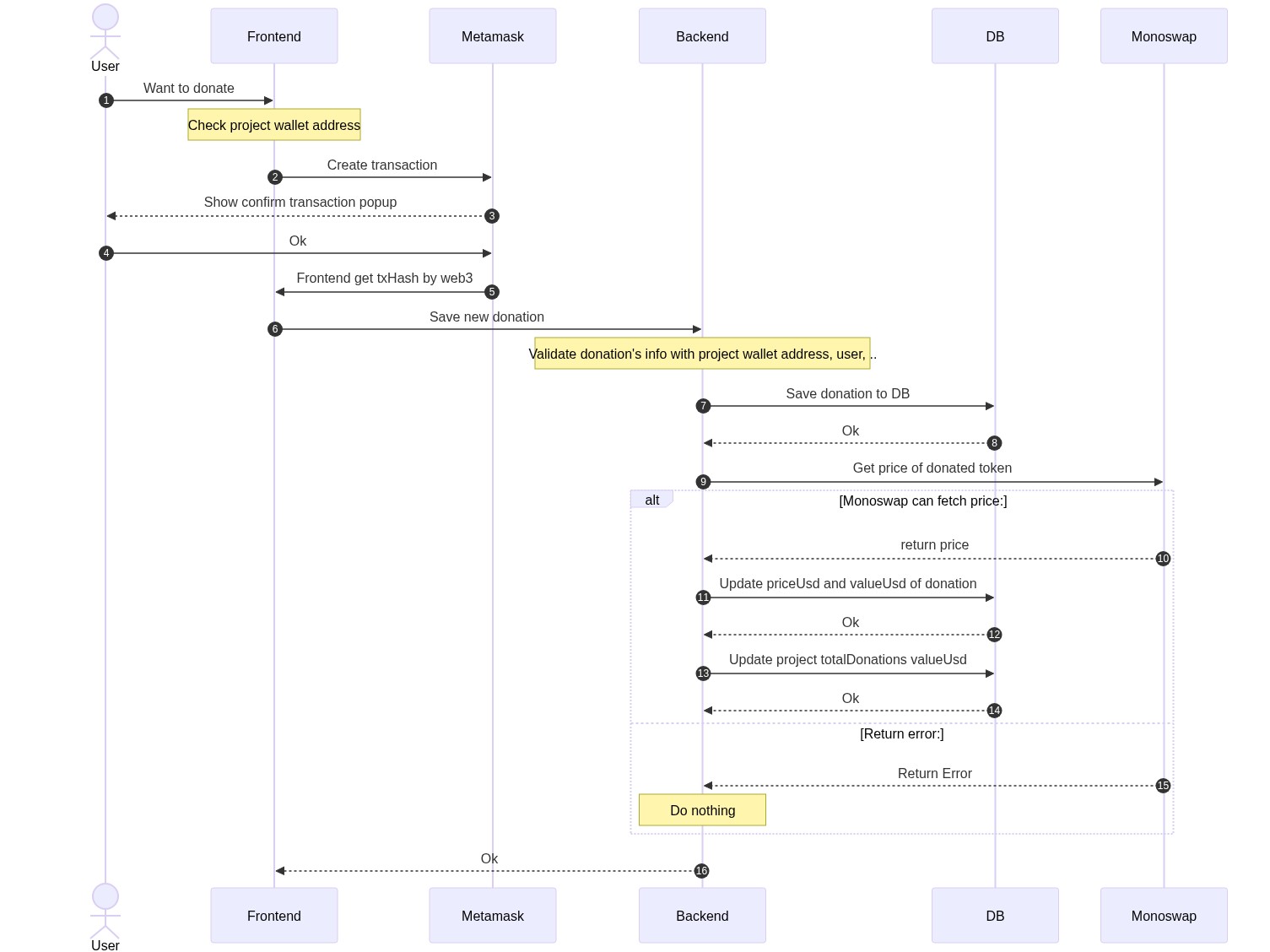
This diagram illustrates how donations are processed in the system:
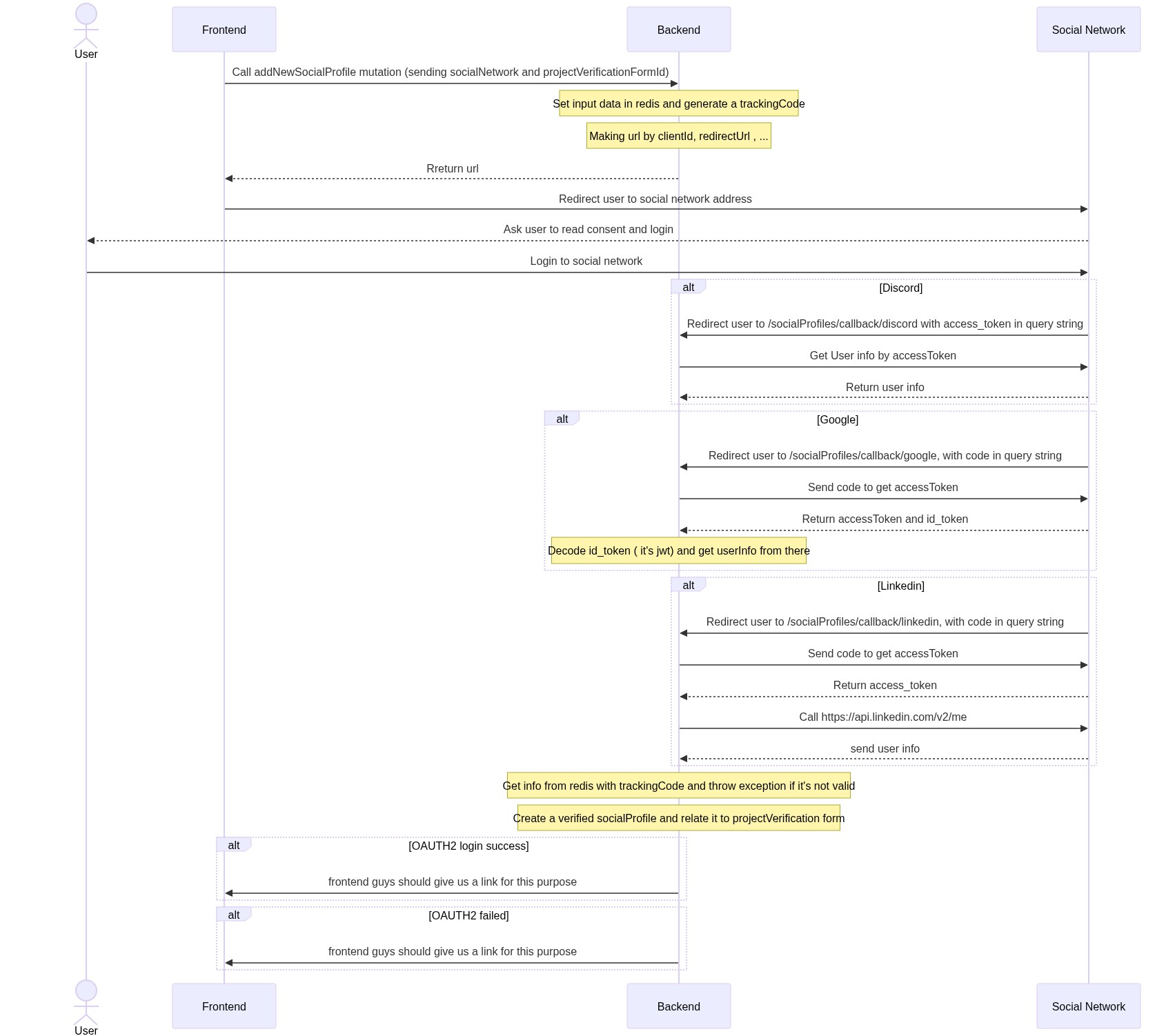
This diagram shows how project verification works through social network accounts:
- Node.js (v20.11.0 or later as specified in .nvmrc)
- PostgreSQL database
- Redis instance
- Various API keys for external services (detailed in environment variables)
-
Clone the repository:
git clone git@github.com:Giveth/impact-graph.git cd impact-graph -
Install dependencies:
nvm use # Uses version specified in .nvmrc npm i -
Configure environment:
cp config/example.env config/development.env -
Set up database:
- Either create a PostgreSQL database manually, or
- Use Docker Compose to spin up a local database:
docker-compose -f docker-compose-local-postgres-redis.yml up -d
-
Setup database schema and views:
npm run db:setup:devNote: We use
db:setup:devinstead ofdb:migrate:run:localbecause the migration system has 243+ conflicting migrations that fail on existing databases. Our setup script uses the proven working approach from the test environment. -
Start the development server:
npm start
- Node.js v20.11.0+ (check with
node --version) - Docker Desktop for Windows
- PowerShell 7+ (recommended)
- Git for Windows
Issue: Package.json scripts use bash syntax (NODE_ENV=development) which doesn't work in PowerShell.
Solution: Install cross-env for cross-platform environment variable support:
# Install cross-env globally or as dev dependency
npm install --save-dev cross-env
The package.json scripts have been updated to use cross-env:
{
  "scripts": {
    "start": "cross-env NODE_ENV=development ts-node-dev --project ./tsconfig.json --respawn ./src/index.ts",
    "db:migrate:run:local": "cross-env NODE_ENV=development npx typeorm-ts-node-commonjs migration:run -d ./src/ormconfig.ts"
  }
}-
Database Setup with Docker (Fix port conflicts):
# If Redis port 6379 is already in use, modify docker-compose-local-postgres-redis.yml
# Change Redis port from 6379 to 6383 in the file
docker-compose -f docker-compose-local-postgres-redis.yml up -d

# Verify containers are running
docker ps
-
Environment Configuration:
# Copy example environment file
Copy-Item config/example.env config/development.env
Critical: Edit
config/development.envand add ALL required variables:# Database Configuration TYPEORM_DATABASE_NAME=givethio TYPEORM_DATABASE_USER=postgres TYPEORM_DATABASE_PASSWORD=givethio TYPEORM_DATABASE_HOST=localhost TYPEORM_DATABASE_PORT=5442 # Redis Configuration (if port changed) REDIS_PORT=6383 SHARED_REDIS_PORT=6383 # Required API Keys (use dummy values for development) STRIPE_KEY=sk_test_dummy_key_for_development PINATA_API_KEY=dummy_pinata_key_for_development PINATA_SECRET_API_KEY=dummy_pinata_secret_for_development SERVER_ADMIN_EMAIL=admin@giveth.io HOSTNAME_WHITELIST=localhost,127.0.0.1 SENTRY_ID=dummy_sentry_id SENTRY_TOKEN=dummy_sentry_token NETLIFY_DEPLOY_HOOK=dummy_netlify_hook ENVIRONMENT=development WEBSITE_URL=http://localhost:3010 OUR_SECRET=dummy_our_secret TRACE_FILE_UPLOADER_PASSWORD=dummy_trace_password
-
Migration (Optional - Server can run without complete migration):
# Run from Impact-Graph directory
cd Impact-Graph
npm run db:migrate:run:local
-
Start Server:
# Ensure you're in Impact-Graph directory
cd Impact-Graph
npm start
-
Verification:
# Check server is running on port 4000
netstat -ano | findstr :4000

# Test health endpoint
Invoke-RestMethod -Uri http://localhost:4000/health
# Should return: "Hi every thing seems ok"

# Test GraphQL Playground: http://localhost:4000/graphql
Issue: 'NODE_ENV' is not recognized as an internal or external command
Solution: Use cross-env as shown above, or manually set environment variables:
$env:NODE_ENV="development"
npx ts-node --project ./tsconfig.json ./src/index.tsIssue: Docker port conflicts Solution: Modify docker-compose-local-postgres-redis.yml to use different ports:
services:
  redis:
    ports:
- "6383:6379" # Change from 6379:6379Issue: Migration fails with missing tables Solution: Server can run without complete migration. Individual tables will be created as needed.
Issue: CORS errors in logs
Solution: Ensure HOSTNAME_WHITELIST=localhost,127.0.0.1 is set in development.env
# Kill specific process by PID (if port conflicts)
Stop-Process -Id $PID -Force

# Find process using specific port
netstat -ano | findstr :4000

# Set environment variable for current session
$env:NODE_ENV="development"

# Test REST endpoint
Invoke-RestMethod -Uri http://localhost:4000/health

# View Docker containers
docker ps

# View Docker logs
docker logs [container_name]The application is configured via environment variables. Key configuration areas include:
-
Database Connection:
TYPEORM_DATABASE_TYPE=postgres TYPEORM_DATABASE_NAME=givethio TYPEORM_DATABASE_USER=postgres TYPEORM_DATABASE_PASSWORD=postgres TYPEORM_DATABASE_HOST=localhost TYPEORM_DATABASE_PORT=5442 -
Authentication:
JWT_SECRET=your_jwt_secret JWT_MAX_AGE=time_in_seconds BCRYPT_SALT=$2b$10$44gNUOnBXavOBMPOqzd48e -
Blockchain Providers:
XDAI_NODE_HTTP_URL=your_xdai_node_url INFURA_API_KEY=your_infura_key ETHERSCAN_API_KEY=your_etherscan_key -
External Services:
PINATA_API_KEY=your_pinata_key
PINATA_SECRET_API_KEY=your_pinata_secret
STRIPE_KEY=your_stripe_key
For a complete list of configuration options, refer to the config/example.env file.
Development mode:
npm start
Production mode:
npm run build
npm run production
Docker:
# Development
docker-compose -f docker-compose-local.yml up -d

# Production
docker-compose -f docker-compose-production.yml up -d
Run all tests:
npm test
Run specific test suites:
npm run test:userRepository
npm run test:projectResolver
npm run test:donationRepository
# See package.json for all test scripts
For running tests with necessary environment variables:
PINATA_API_KEY=0000000000000 PINATA_SECRET_API_KEY=00000000000000000000000000000000000000000000000000000000 ETHERSCAN_API_KEY=0000000000000000000000000000000000 XDAI_NODE_HTTP_URL=https://xxxxxx.xdai.quiknode.pro INFURA_API_KEY=0000000000000000000000000000000000 npm run test
Creating migrations:
npx typeorm-ts-node-commonjs migration:create ./migration/create_new_table
Running migrations:
npm run db:migrate:run:local  # For development
npm run db:migrate:run:production  # For production
Reverting migrations:
npm run db:migrate:revert:local
Admin Dashboard:
Access the admin dashboard at /admin with these default credentials (in development):
- Admin user: test-admin@giveth.io / admin
- Campaign manager: campaignManager@giveth.io / admin
- Reviewer: reviewer@giveth.io / admin
- Operator: operator@giveth.io / admin
Creating an admin user manually:
-- First generate the hash with bcrypt
const bcrypt = require('bcrypt');
bcrypt.hash(
  'yourPassword',
  Number('yourSalt'),
).then(hash => {console.log('hash',hash)}).catch(e=>{console.log("error", e)});

-- Then insert the user in the database
INSERT INTO public.user (email, "walletAddress", role, "loginType", name, "encryptedPassword") VALUES
('test@giveth.io', 'walletAddress', 'admin', 'wallet', 'test', 'aboveHash')| ID | Symbol | Name | Description | Who can change to |
|---|---|---|---|---|
| 1 | rejected | rejected | Project rejected by Giveth or platform owner | |
| 2 | pending | pending | Project created, pending approval | |
| 3 | clarification | clarification | Clarification requested by Giveth or platform owner | |
| 4 | verification | verification | Verification in progress (including KYC) | |
| 5 | activated | activated | Active project | project owner and admin |
| 6 | deactivated | deactivated | Deactivated by user or Giveth Admin | project owner and admin |
| 7 | cancelled | cancelled | Cancelled by Giveth Admin | admin |
| 8 | drafted | drafted | Project draft for a potential new project, can be discarded | project owner |
- If a project is cancelled, only admin can activate that
- If project is deactive, both admins and project owner can activate it
- Both admins and project owner can deactivate an active project
- Staging: Used for pre-release testing
- Production: Live environment for end users
- Changes are pushed to the appropriate branch (staging or master)
- GitHub Actions automatically runs tests and builds the application
- If all tests pass, the application is deployed to the corresponding environment
- Database migrations are automatically applied
The project uses GitHub Actions for continuous integration and deployment:
.github/workflows/staging-pipeline.yml: Deploys to staging environment.github/workflows/master-pipeline.yml: Deploys to production environment
Database Connection Issues:
- Verify database credentials in environment variables
- Check that the database server is running
- Ensure network connectivity between application and database
Authentication Failures:
- Check JWT_SECRET configuration
- Verify OAuth provider settings
Blockchain Integration Issues:
- Ensure node providers (Infura, etc.) are configured correctly
- Check API keys for blockchain explorers
PowerShell Environment Variable Issues:
# Error: 'NODE_ENV' is not recognized as an internal or external command
# This affects npm start, npm test, and all Node.js scripts

# Solution 1: Use cross-env (recommended - ALREADY INSTALLED)
# Fixed scripts in package.json:
# "start": "cross-env NODE_ENV=development ts-node-dev..."
# "test": "cross-env NODE_ENV=test mocha..."
# "db:migrate:run:local": "cross-env NODE_ENV=development npx typeorm..."

# Solution 2: Manual environment variable setting
$env:NODE_ENV="development"
npm start

# ✅ TESTING STATUS:
# npm test - WORKING: 8+ test suites pass, only 2 blockchain indexing tests fail (can ignore)
# Test environment: Database drop/recreate ✔, Redis clear ✔, Apollo server ✔
Port Conflicts:
# Find which process is using a port
netstat -ano | findstr :4000

# Kill specific process by PID (NOT all node processes)
Stop-Process -Id 12345 -Force

# NEVER use: Get-Process -Name node | Stop-Process -Force
Docker Issues on Windows:
# Check Docker Desktop is running
docker --version

# Restart Docker containers
docker-compose -f docker-compose-local-postgres-redis.yml down
docker-compose -f docker-compose-local-postgres-redis.yml up -d

# Check container logs
docker logs [container_name]
CORS Configuration Issues:
# Error in logs: CORS error { whitelistHostnames: ['localhost'], origin: 'http://127.0.0.1:4000' }
# Solution: Add to development.env
HOSTNAME_WHITELIST=localhost,127.0.0.1
Migration Failures:
# Error: Table "project" does not exist
# Solution: Server can run without complete migration
# Skip migration and start server directly:
npm start

# Optional: Reset database and retry
docker exec -it [postgres_container] psql -U postgres -c "DROP DATABASE IF EXISTS givethio;"
docker exec -it [postgres_container] psql -U postgres -c "CREATE DATABASE givethio;"
npm run db:migrate:run:local

**Running Tests**:
```powershell
# Run all tests (fixed for Windows PowerShell)
npm test

# Run specific test suites
npm run test:projectRepository
npm run test:donationRepository
npm run test:userRepository

# Test environment uses separate test database (port 5443)
# Tests automatically drop/recreate database, clear Redis cache
# Expected: 8+ test suites pass, 2 blockchain indexing tests may fail (ignorable)
Frontend-Backend Connection:
# 1. Start backend (from Impact-Graph directory)
cd Impact-Graph
npx ts-node --transpile-only src/index.ts

# 2. Start frontend (from project root)
cd ..
yarn dev

# 3. Access application
# - Frontend: http://localhost:3010
# - Backend API: http://localhost:4000/health
# - GraphQL Playground: http://localhost:4000/graphql

# ✅ STATUS: Full stack operational, empty database with graceful error handling
**Directory Path Issues**:
```powershell
# Error: Cannot find module './index.ts'
# Solution: ALWAYS run from Impact-Graph directory, not Give root
cd Impact-Graph  # Critical!
npm start
Viewing Logs:
# Install bunyan for formatted logs
npm i -g bunyan
tail -f logs/impact-graph.log | bunyan
Development Debugging:
- Use GraphQL playground at
/graphqlto test queries - Check server logs for detailed error information
- Use the AdminJS interface to inspect data
Impact Graph supports ranking projects based on power boosted by users. Users with GIVpower can boost a project by allocating a percentage of their GIVpower to that project. The system regularly takes snapshots of user GIVpower balance and boost percentages.
The Power Boosting system uses several key tables:
- power_boosting: Records when a user boosts a project
- power_round: Specifies the current round number
- power_snapshot: Records created on each snapshot interval
- power_boosting_snapshot: Stores boosting percentages at snapshot times
- power_balance_snapshot: Records user GIVpower balance at snapshot times
Snapshots are implemented using the pg_cron extension on Postgres, which calls a database procedure TAKE_POWER_BOOSTING_SNAPSHOT at regular intervals.
The system uses materialized views to efficiently calculate project boost values:
- user_project_power_view: Shows how much GIVpower each user has boosted to a project
- project_power_view: Calculates projects' total power and ranks them
- project_future_power_view: Shows what will be the rank of projects in the next round
For detailed information on the Power Boosting system, see Power Boosting Documentation.
Please run npm run prettify before committing your changes to ensure code style consistency.
This project is licensed under the terms included in the LICENSE file.