Skip to content

Gate workspace picker selection behind a Save button (a11y On Input, PR 11) - #99236

Merged
mountiny merged 8 commits into
mainfrom
claude-a11y-workspace-pickers-save
Sep 11, 2026
Merged

mountiny merged 8 commits into
mainfrom
claude-a11y-workspace-pickers-save

Conversation

@MelvinBot

@MelvinBot MelvinBot commented Aug 22, 2026

Copy link
Copy Markdown
Contributor

Explanation of Change

This addresses a WCAG 3.2.2 "On Input" accessibility violation, part of the batched plan in issue #74834 (PR 11). Three workspace-picker pages committed the selection (and navigated away) the instant a row was tapped, so the layout/context changed without the user explicitly confirming — disorienting for screen-reader and low-vision users.

All three pages now stage the tapped workspace in local state and only commit it when the user presses the Save button (via confirmButtonOptions on SelectionList), matching the pattern already shipped in PRs 3–8. The staged row is highlighted via selectedPolicyIDs, and the Save button is disabled until the staged selection differs from the current value:

  • DomainGroupPreferredWorkspacePage — plain preferred-workspace write, committed on Save.
  • SetDefaultWorkspacePage — the areCategoriesEnabled branch (navigate onward vs. goBack) and the navigateTo guard are preserved by having Save call the existing selectPolicy.
  • DynamicReportChangeWorkspacePage — the billing RESTRICTED_ACTION early-return, the commuter-exclusion distance guard, and the per-report-type API calls (moveIOUReportToPolicy… / changeReportPolicyAndInviteSubmitter / changeReportPolicy) are all preserved by having Save call the existing selectPolicy.

🤖 Generated by MelvinBot. Checks run locally: lint-changed ✅, typecheck-tsgo ✅. React Compiler compliance check couldn't run in this environment (base-ref resolution); no manual memoization was added, so CI will validate. Full npm test / storybook smoke deferred to CI.

Fixed Issues

$ #74834
PROPOSAL: #74834 (comment)

Tests

All three pickers behave identically, so steps 3-5 are the assertion set reused below.

  1. Sign in as a user who belongs to 2 or more group workspaces and has no default workspace set.
  2. FAB > Track expense > enter an amount > on the confirmation screen tap Category. The workspace picker opens.
  3. Tap a workspace row. Verify the checkmark moves to that row, the list does not reorder, the page does not navigate, and nothing is saved yet.
  4. Verify Save is disabled until the tapped row differs from the one already selected.
  5. Tap Save. Verify the workspace is applied and you leave the picker.
  6. Repeat 3-5 on the report picker: open an expense report > ... menu > Change workspace.
  7. Repeat 3-5 on the domain picker, as a domain admin: Settings > Workspaces > Domains > a domain > Groups > a group > turn Preferred workspace on > tap the Preferred workspace row.
  8. Regression, this picker is intentionally unchanged: on the Groups list tap New group > toggle Preferred workspace on > tap the row > tap a workspace. Verify it commits immediately and closes, with no Save button.
  • Verify that no errors appear in the JS console

Offline tests

QA Steps

Same as Tests.

  • Verify that no errors appear in the JS console

PR Author Checklist

  • I linked the correct issue in the ### Fixed Issues section above
  • I wrote clear testing steps that cover the changes made in this PR
    • I added steps for local testing in the Tests section
    • I added steps for the expected offline behavior in the Offline steps section
    • I added steps for Staging and/or Production testing in the QA steps section
    • I added steps to cover failure scenarios (i.e. verify an input displays the correct error message if the entered data is not correct)
    • I turned off my network connection and tested it while offline to ensure it matches the expected behavior (i.e. verify the default avatar icon is displayed if app is offline)
    • I tested this PR with a High Traffic account against the staging or production API to ensure there are no regressions (e.g. long loading states that impact usability).
  • I included screenshots or videos for tests on all platforms
  • I ran the tests on all platforms & verified they passed on:
    • Android: Native
    • Android: mWeb Chrome
    • iOS: Native
    • iOS: mWeb Safari
    • MacOS: Chrome / Safari
  • I verified there are no console errors (if there's a console error not related to the PR, report it or open an issue for it to be fixed)
  • I followed proper code patterns (see Reviewing the code)
    • I verified that comments were added to code that is not self explanatory
    • I verified that any new or modified comments were clear, correct English, and explained "why" the code was doing something instead of only explaining "what" the code was doing.
    • I verified any copy / text that was added to the app is grammatically correct in English. It adheres to proper capitalization guidelines (note: only the first word of header/labels should be capitalized), and is either coming verbatim from figma or has been approved by marketing (in order to get marketing approval, ask the Bug Zero team member to add the Waiting for copy label to the issue)
  • If a new code pattern is added I verified it was agreed to be used by multiple Expensify engineers
  • I followed the guidelines as stated in the Review Guidelines
  • I tested other components that can be impacted by my changes (i.e. if the PR modifies a shared library or component like Avatar, I verified the components using Avatar are working as expected)
  • If a new CSS style is added I verified that:
    • A similar style doesn't already exist
    • The style can't be created with an existing StyleUtils function (i.e. StyleUtils.getBackgroundAndBorderStyle(theme.componentBG))
  • If new assets were added or existing ones were modified, I verified that:
    • The assets are optimized and compressed (for SVG files, run npm run compress-svg)
    • The assets load correctly across all supported platforms.
  • If the PR modifies code that runs when editing or sending messages, I tested and verified there is no unexpected behavior for all supported markdown - URLs, single line code, code blocks, quotes, headings, bold, strikethrough, and italic.
  • If the PR modifies a generic component, I tested and verified that those changes do not break usages of that component in the rest of the App (i.e. if a shared library or component like Avatar is modified, I verified that Avatar is working as expected in all cases)
  • If the PR modifies a component related to any of the existing Storybook stories, I tested and verified all stories for that component are still working as expected.
  • If the PR modifies a component or page that can be accessed by a direct deeplink, I verified that the code functions as expected when the deeplink is used - from a logged in and logged out account.
  • If the PR modifies the UI (e.g. new buttons, new UI components, changing the padding/spacing/sizing, moving components, etc) or modifies the form input styles:
    • I verified that all the inputs inside a form are aligned with each other.
    • I added Design label and/or tagged @Expensify/design so the design team can review the changes.
  • I added unit tests for any new feature or bug fix in this PR to help automatically prevent regressions in this user flow.
  • If the main branch was merged into this PR after a review, I tested again and verified the outcome was still expected according to the Test steps.

Screenshots/Videos

Android: Native
Android: mWeb Chrome
iOS: Native
iOS: mWeb Safari
MacOS: Chrome / Safari

…PR 11)

Co-authored-by: truph01 <truph01@users.noreply.github.com>
@MelvinBot
MelvinBot requested a review from a team August 22, 2026 03:57
@melvin-bot melvin-bot Bot added Melvin-Test-Android Melvin-Test-Web Triggers Melvin to run the testing steps of the PR on web labels Aug 22, 2026
@codecov

codecov Bot commented Aug 22, 2026

Copy link
Copy Markdown

Codecov Report

❌ Looks like you've decreased code coverage for some files. Please write tests to increase, or at least maintain, the existing level of code coverage. See our documentation here for how to interpret this table.

Files with missing lines Coverage Δ
...omain/Groups/DomainGroupPreferredWorkspacePage.tsx 87.50% <ø> (ø)
...n/Groups/BaseDomainGroupPreferredWorkspacePage.tsx 93.10% <85.71%> (-2.55%) ⬇️
src/hooks/useWorkspaceList.ts 81.48% <0.00%> (-3.14%) ⬇️
src/pages/SetDefaultWorkspacePage.tsx 0.00% <0.00%> (ø)
src/pages/DynamicReportChangeWorkspacePage.tsx 0.00% <0.00%> (ø)
... and 27 files with indirect coverage changes

@MelvinBot

Copy link
Copy Markdown
Contributor Author

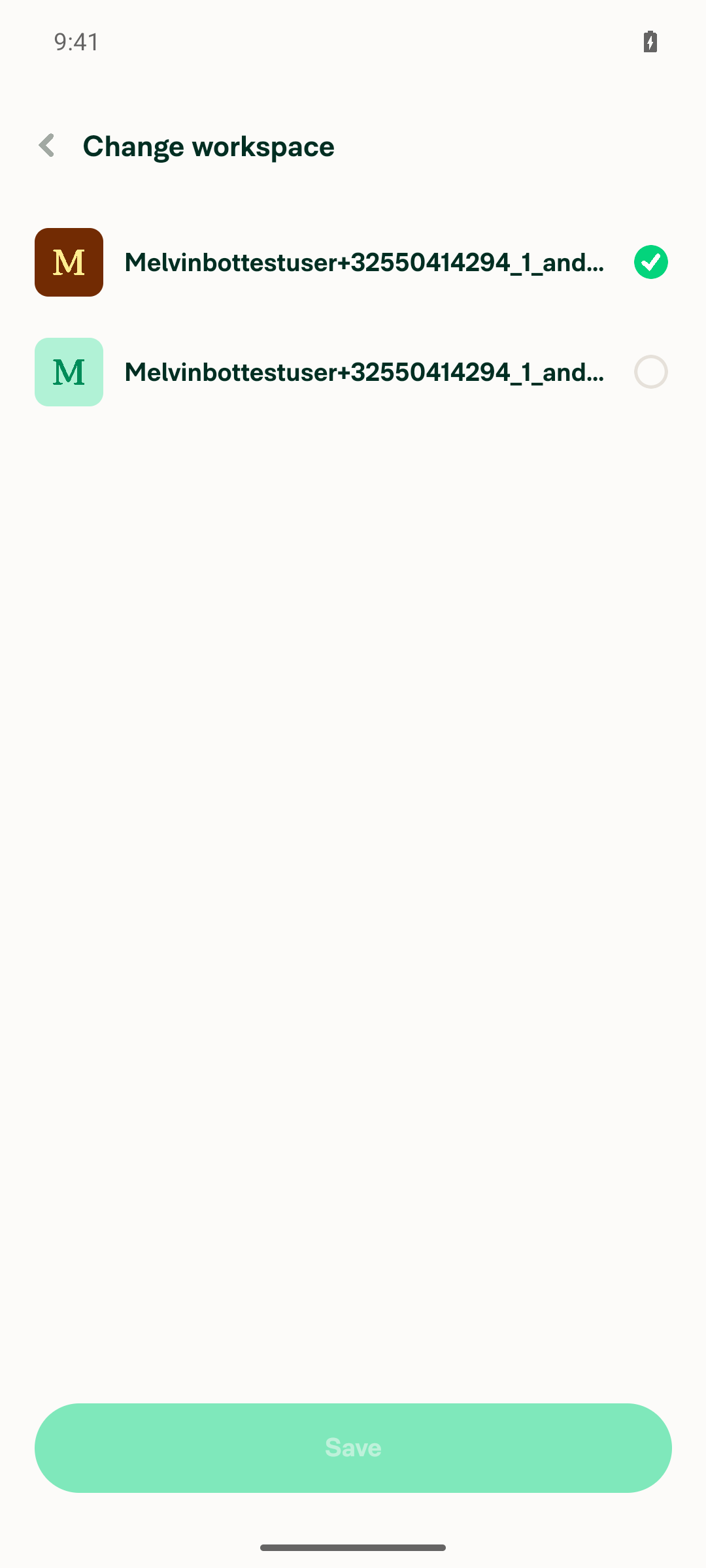
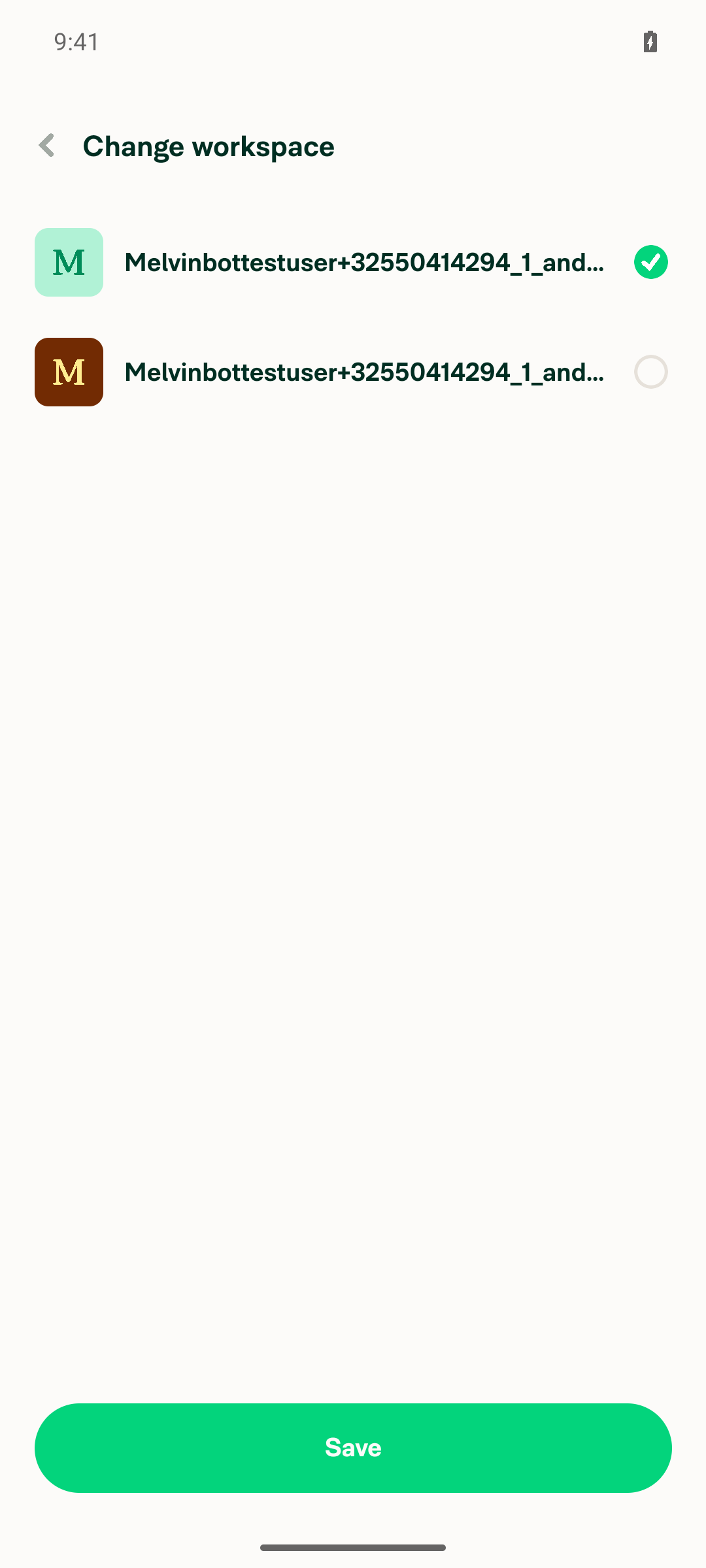
🤖 Ran the testing steps on Web (dev NewDot). Result: ✅ pass — tapping a workspace row now stages the selection (highlights it and enables Save) instead of committing and navigating away; the change only commits when Save is pressed.

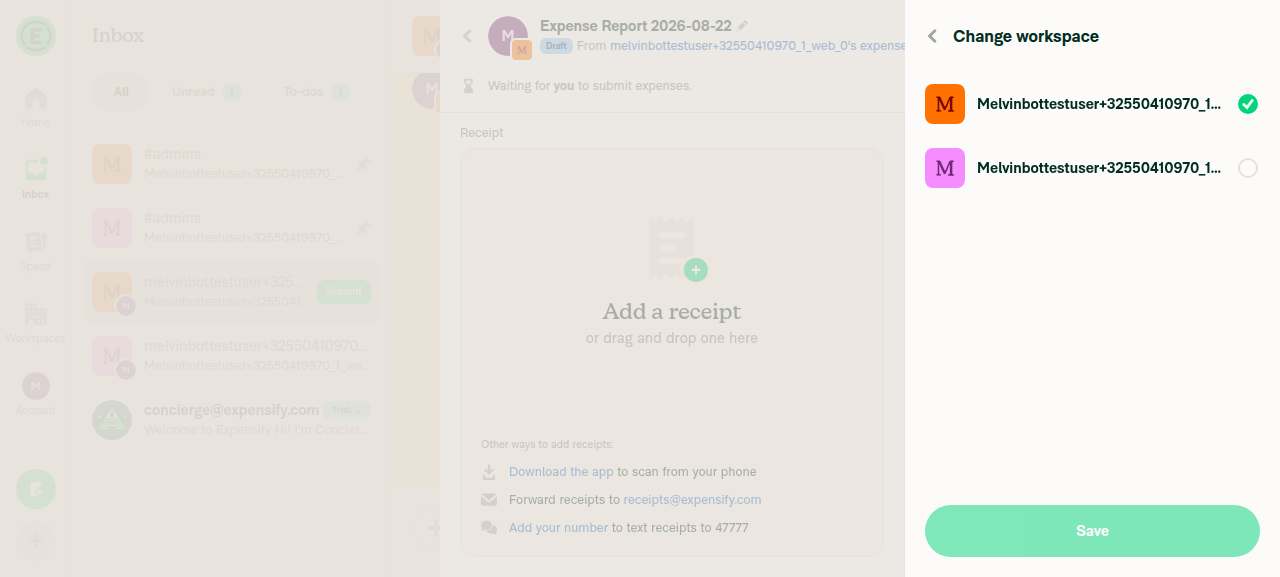
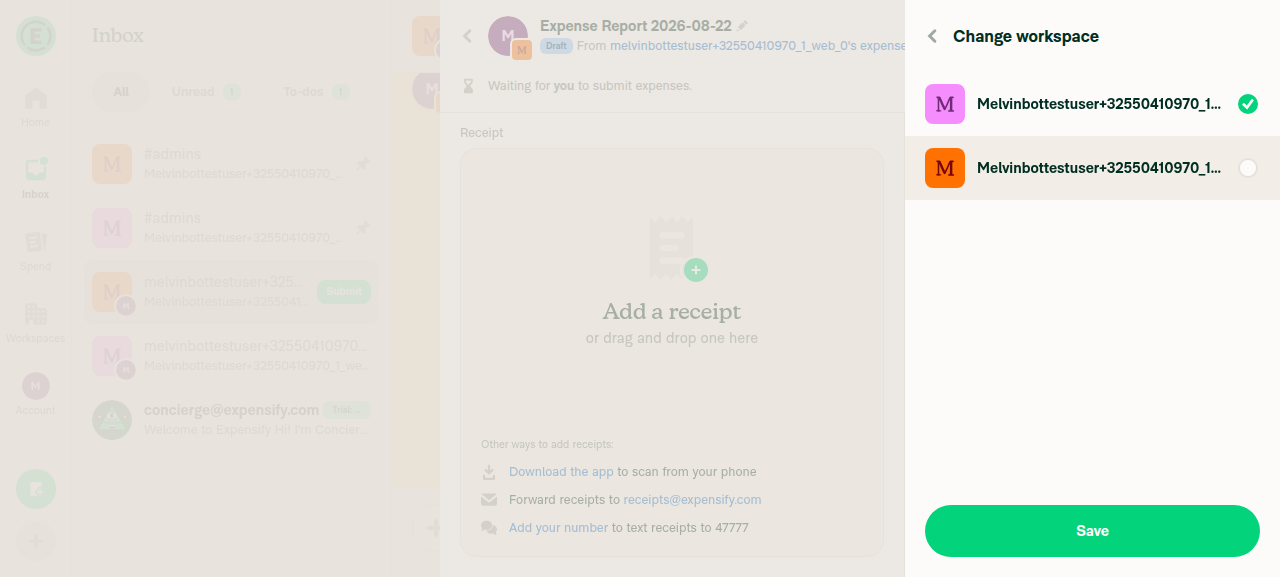
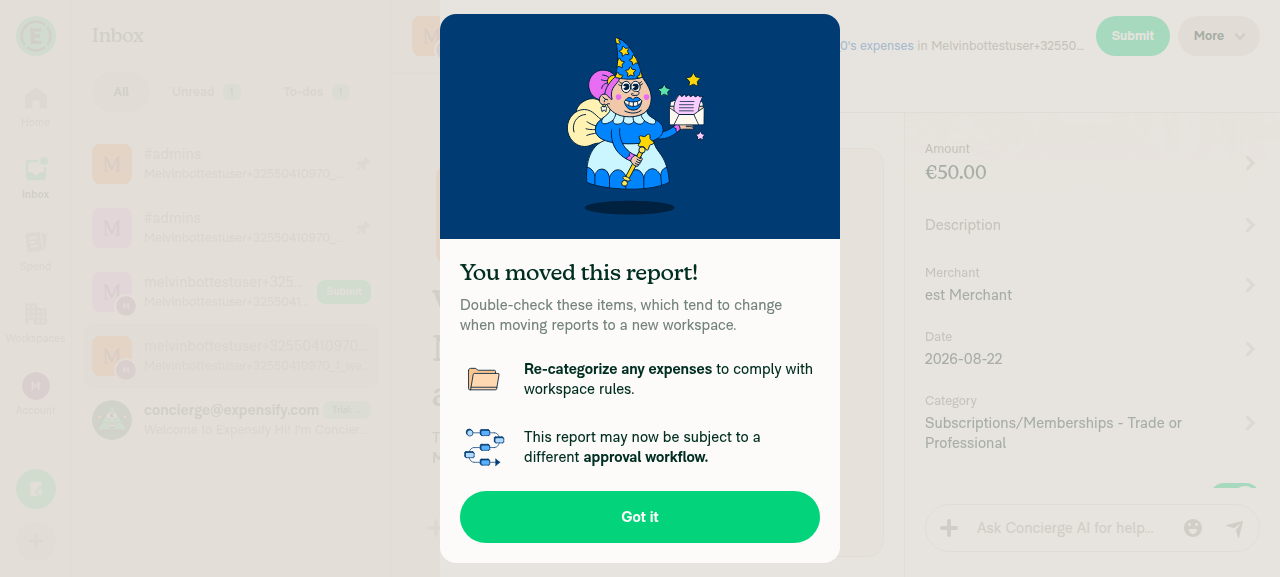
Change workspace on an expense report (DynamicReportChangeWorkspacePage) — verified live:

  1. Opened the picker from the report's More → Change workspace: the current workspace is checked and Save is dimmed/disabled.
  2. Tapped the other workspace row → the picker stayed open (no navigation), the row became checked/promoted to the top, and Save switched from dimmed to enabled.
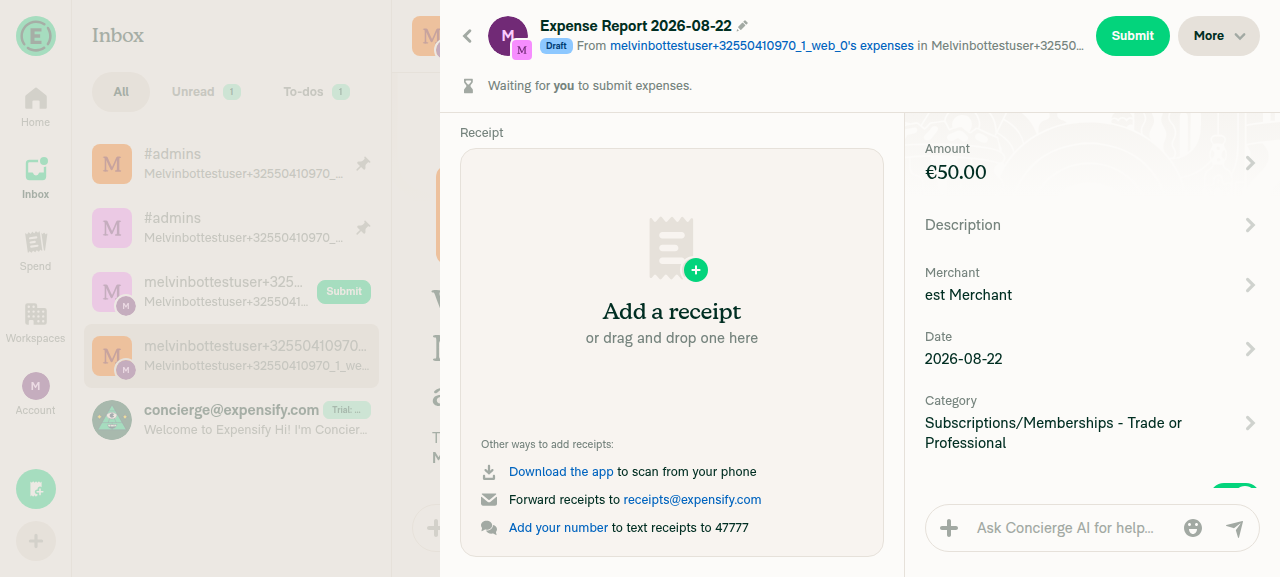
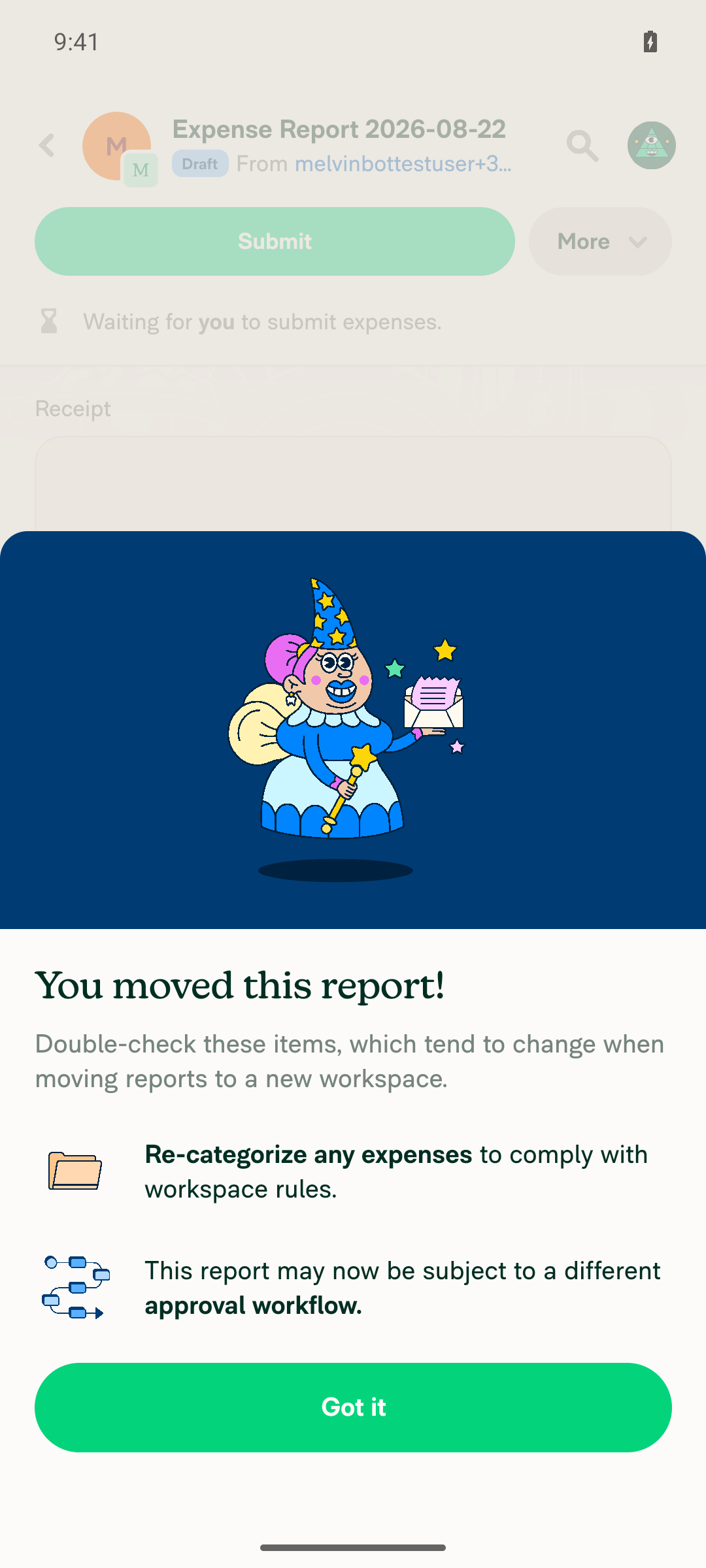
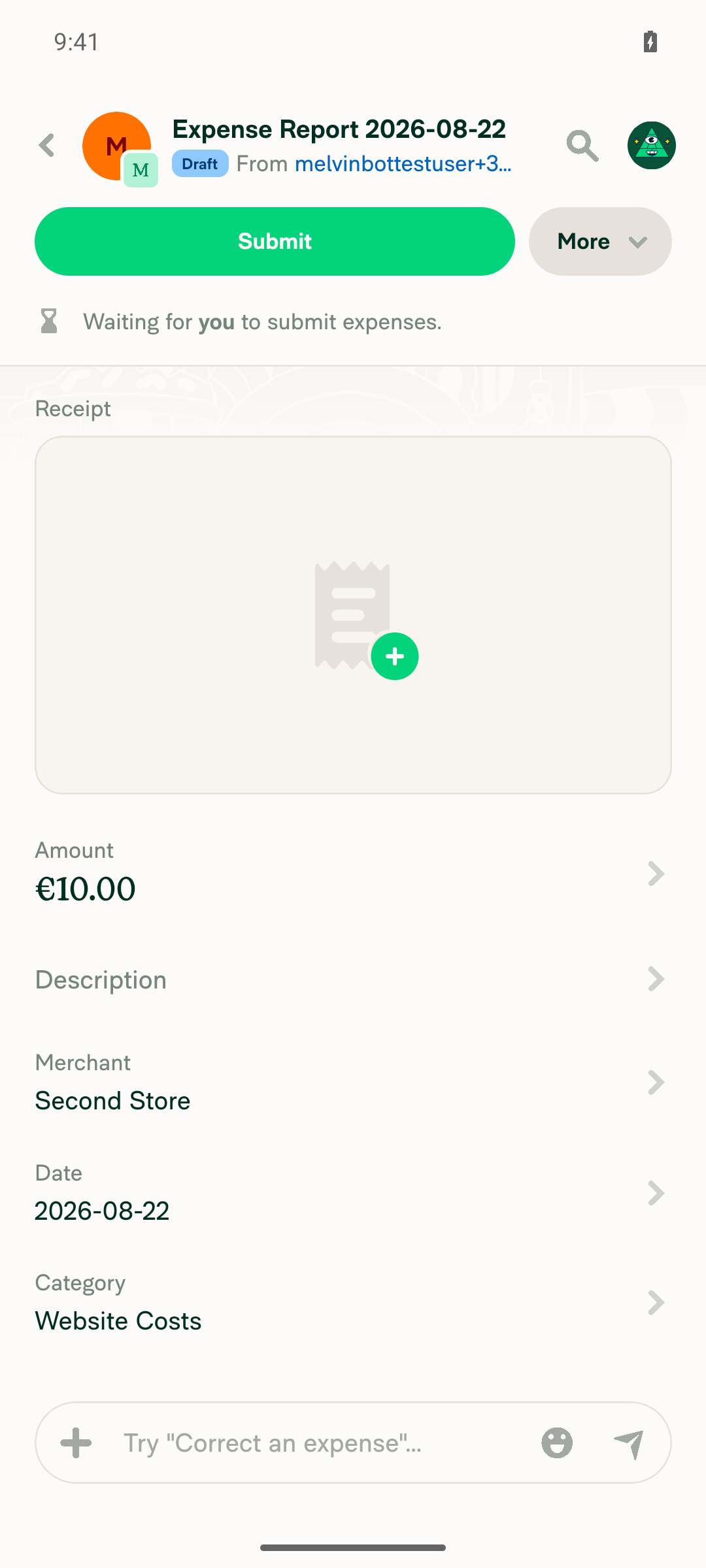
  3. Pressed Save → the "You moved this report!" modal appeared, the picker closed, and the report header updated to the newly selected workspace. The commit happened only on Save.

Set default workspace (SetDefaultWorkspacePage) — not exercised live: its trigger requires a member of 2+ group workspaces with no resolved active policy, which this fresh test account doesn't naturally reach once an active policy is set. The code implements the identical staged pattern (draftPolicyID state, onSelectRow only sets the draft, Save disabled until the staged value differs).

Domain group preferred workspace (DomainGroupPreferredWorkspacePage) — not tested: it's a domain-admin-only page not reachable with a standard test account.

No error dialogs/toasts were observed during the flow.

Evidence

Change workspace picker open — current workspace checked, Save dimmed/disabled

Change workspace picker open, current workspace checked, Save dimmed/disabled

Other workspace row tapped — staged (checked, promoted to top), still on picker, Save now enabled

Other workspace row tapped and staged, still on picker screen, Save now enabled

After pressing Save — "You moved this report!" confirmation, picker closed

After pressing Save: You moved this report confirmation modal, picker closed

Report header now shows the report on the newly selected Workspace 1

Report header now shows the report attached to the newly selected Workspace 1


view run

@MelvinBot

Copy link
Copy Markdown
Contributor Author

🤖 Ran the testing steps on Android (standalone NewDot, emulator). Result: ✅ pass — tapping a workspace row now stages the selection (highlights it and enables Save) instead of committing and navigating away; the change only commits when Save is pressed.

Change workspace on an expense report (DynamicReportChangeWorkspacePage) — verified live:

  1. Opened the picker from the report's More → Change workspace: the current workspace is checked and Save is disabled.
  2. Tapped the other workspace row → the picker stayed open (no navigation), the row became checked, and Save switched from disabled to enabled.
  3. Pressed Save → the "You moved this report!" confirmation appeared, and after dismissing it the report header updated to the newly selected workspace. The commit happened only on Save.

The other two pages in this PR weren't exercised on Android: Set default workspace (SetDefaultWorkspacePage) isn't reachable in a fresh account's natural state (its trigger requires 2+ group workspaces with no resolved active policy), and Domain group preferred workspace (DomainGroupPreferredWorkspacePage) is domain-admin-only. Both implement the identical staged-selection pattern in code.

No JS console errors or error toasts observed during the flow.

Note: "Change workspace" only appears in the More menu while the report is still Open/Draft, so the flow was exercised against a draft expense.

Evidence

Change workspace picker open — current workspace checked, Save disabled

Change workspace picker open, Save disabled, current workspace checked

Other workspace row tapped — staged (checked), still on picker, Save now enabled

Workspace 1 row staged/checked, Save button enabled, still on picker

After pressing Save — "You moved this report!" confirmation

You moved this report confirmation dialog after pressing Save

Report now on the newly selected Workspace 1

Report screen showing From ... in ...'s Workspace 1 after commit


view run

@truph01

truph01 commented Aug 22, 2026

Copy link
Copy Markdown
Contributor

@MelvinBot Mark this PR as ready

@MelvinBot
MelvinBot marked this pull request as ready for review August 22, 2026 05:10
@MelvinBot
MelvinBot requested a review from a team as a code owner August 22, 2026 05:10
@melvin-bot
melvin-bot Bot requested review from trjExpensify and truph01 and removed request for a team August 22, 2026 05:10
@melvin-bot

melvin-bot Bot commented Aug 22, 2026

Copy link
Copy Markdown

@truph01 Please copy/paste the Reviewer Checklist from here into a new comment on this PR and complete it. If you have the K2 extension, you can simply click: [this button]

@melvin-bot
melvin-bot Bot removed the request for review from a team August 22, 2026 05:10
@MelvinBot

Copy link
Copy Markdown
Contributor Author

🤖 Done — this PR is now marked Ready for review.


view run

@chatgpt-codex-connector chatgpt-codex-connector Bot left a comment

Copy link
Copy Markdown

Choose a reason for hiding this comment

The reason will be displayed to describe this comment to others. Learn more.

💡 Codex Review

Here are some automated review suggestions for this pull request.

Reviewed commit: f75446aef0

ℹ️ About Codex in GitHub

Codex has been enabled to automatically review pull requests in this repo. Reviews are triggered when you

  • Open a pull request for review
  • Mark a draft as ready
  • Comment "@codex review".

If Codex has suggestions, it will comment; otherwise it will react with 👍.

When you sign up for Codex through ChatGPT, Codex can also answer questions or update the PR, like "@codex address that feedback".

currentUserLogin: session?.email,
shouldShowPendingDeletePolicy: false,
selectedPolicyIDs: report.policyID ? [report.policyID] : undefined,
selectedPolicyIDs: currentSelection ? [currentSelection] : undefined,

Copy link
Copy Markdown

Choose a reason for hiding this comment

The reason will be displayed to describe this comment to others. Learn more.

P2 Badge Keep draft workspace selections in place until Save

When a user selects a workspace that is not already first—particularly while searching—passing the changing currentSelection to useWorkspaceList triggers its default shouldSortSelectedToTop behavior, immediately moving that row to the top before Save. During an active search, SelectionList retains its numeric focused index, so focus can now point to a different workspace and the next Enter press selects that unintended row; the immediate reorder also preserves the input-driven context shift this change is meant to prevent. Set shouldSortSelectedToTop: false here and in the corresponding SetDefaultWorkspacePage call while retaining selectedPolicyIDs for highlighting.

Useful? React with 👍 / 👎.

Copy link
Copy Markdown
Contributor

Choose a reason for hiding this comment

The reason will be displayed to describe this comment to others. Learn more.

Set shouldSortSelectedToTop: false

@MelvinBot, check this. I still want to move the selected option to the top, but not the checked option without saving

Copy link
Copy Markdown
Contributor Author

Choose a reason for hiding this comment

The reason will be displayed to describe this comment to others. Learn more.

Done — kept the saved workspace pinned to the top, and stopped the checked row from being pinned before Save. Pushed in 2d89ed7.

useWorkspaceList used one list (selectedPolicyIDs) for both the checkmark and the sort-to-top, so staging a draft selection reordered the list. I split them: a new optional policyIDsToSortToTop drives the sort and falls back to selectedPolicyIDs when omitted, so every existing caller is unchanged.

  • src/pages/DynamicReportChangeWorkspacePage.tsx:225 — pins report.policyID (the saved workspace) while the checkmark follows the draft. Same order as before this PR; checking a row no longer moves it.
  • src/pages/SetDefaultWorkspacePage.tsx:80shouldSortSelectedToTop: false. Judgment call: this page passed selectedPolicyIDs: undefined before the PR, so nothing was ever pinned here and the list was plain alphabetical. I kept that rather than newly pinning the active workspace. Say the word if you'd rather pin the active default here too.
  • DomainGroupPreferredWorkspacePage needed nothing — it sorts by created date, so checking a row never reordered it.

That also covers the search-focus concern in the parent comment: with the order stable, the focused index can't end up pointing at a different workspace after a check.

Checks run
  • npm run typecheck
  • eslint on the 3 changed files ✅ — 3 pre-existing no-inline-useOnyx-selector errors on untouched lines 93–95 of DynamicReportChangeWorkspacePage.tsx (grandfathered by the seatbelt ratchet)
  • react-compiler-compliance-check on the 3 changed files ✅
  • PolicyUtilsTest + tokenizedSearchTest (the suites covering sortWorkspacesBySelected and tokenizedSearch) ✅ — 406 tests
  • lint-changed / spell-changed couldn't run: they need git merge-base, and this is a depth-1 CI checkout

I could not verify this in the browser — the prestarted web session went blank and unresponsive (0 DOM nodes, no network activity) even though the dev server built fine, so there are no screenshots for this change. Worth a manual pass on the reorder behavior with 3+ workspaces.

@MelvinBot

Copy link
Copy Markdown
Contributor Author

The only failing checks are non-code gates that require human action, not a code fix — there's nothing here I can push a fix for:

  • PR Reviewer Checklist / checklist — fails because the reviewer checklist hasn't been completed yet. It passes once a reviewer fills it out.
  • Check independent approval — fails because the PR doesn't yet have the required independent approval. It passes once a reviewer approves.

Every actual code/build check is green: test (jobs 1–8), typecheck, ESLint, Oxfmt, React Compiler Compliance, Storybook tests, Bun tests, Check for unused styles, knip, and all build jobs all passed.

So no fix is needed — these two checks will clear on their own once the PR gets a reviewer + independent approval.


view run

@MelvinBot

Copy link
Copy Markdown
Contributor Author

No change since my last analysis — the only two failing checks (PR Reviewer Checklist / checklist and Check independent approval) are human-action gates, not code failures, so there's no fix to push. Every code/build check is green. These clear once a reviewer completes the checklist and approves.


view run

@trjExpensify trjExpensify left a comment

Copy link
Copy Markdown
Contributor

Choose a reason for hiding this comment

The reason will be displayed to describe this comment to others. Learn more.

@Expensify/design is this new pattern on your radar to disable the confirmation button if the value selected hasn't changed? 🤔

@dannymcclain

Copy link
Copy Markdown
Contributor

@Expensify/design is this new pattern on your radar to disable the confirmation button if the value selected hasn't changed? 🤔

I thought we had decided (maybe elsewhere) that we would still let them click Save even if the value didn't change?

@MelvinBot

Copy link
Copy Markdown
Contributor Author

There's nothing for me to fix here — the only two failing checks are process/review checks, not code failures:

  • checklist (PR Reviewer Checklist) — fails with "No PR Reviewer Checklist was found". This clears once a reviewer completes the reviewer checklist on the PR.
  • Check independent approval — requires an independent reviewer's approval.

All build/test/lint/typecheck checks are passing. Neither failure can be resolved by pushing code to the branch, so I haven't made any changes.

Next step: have a reviewer complete their checklist and approve to clear both checks.


view run

@shawnborton

Copy link
Copy Markdown
Contributor

I thought we had decided (maybe elsewhere) that we would still let them click Save even if the value didn't change?

This is what I would assume we'd do too.

@truph01

truph01 commented Sep 9, 2026

Copy link
Copy Markdown
Contributor

@MelvinBot Merge main

…-pickers-save

Co-authored-by: truph01 <truph01@users.noreply.github.com>
@MelvinBot
MelvinBot requested a review from a team as a code owner September 9, 2026 10:27
@melvin-bot
melvin-bot Bot requested review from lakchote and mountiny September 9, 2026 10:27
The draft state, the checkmark and the Save button are one concern, so
owning them in the shared component instead of threading draftPolicyID
and confirmButtonOptions through each caller. Callers now pass a single
shouldConfirmSelection flag, and onSelectWorkspace means the same thing
in both modes: commit this workspace.

This also makes the broken prop combinations unrepresentable - there is
no longer a way to pass a draft with no Save button, or a Save button
with no draft.
@MelvinBot

Copy link
Copy Markdown
Contributor Author

⚠️ MelvinBot CI Fix Loop Detected

MelvinBot has made 5 consecutive commits trying to fix CI failures. Automatic CI fix dispatches are now paused for this PR.

Next steps: A human should review the recent commits and resolve the conflicting CI errors manually.

@truph01

truph01 commented Sep 9, 2026

Copy link
Copy Markdown
Contributor

Reviewer Checklist

  • I have verified the author checklist is complete (all boxes are checked off).
  • I verified the correct issue is linked in the ### Fixed Issues section above
  • I verified testing steps are clear and they cover the changes made in this PR
    • I verified the steps for local testing are in the Tests section
    • I verified the steps for Staging and/or Production testing are in the QA steps section
    • I verified the steps cover any possible failure scenarios (i.e. verify an input displays the correct error message if the entered data is not correct)
    • I turned off my network connection and tested it while offline to ensure it matches the expected behavior (i.e. verify the default avatar icon is displayed if app is offline)
  • I checked that screenshots or videos are included for tests on all platforms
  • I included screenshots or videos for tests on all platforms
  • I verified that the composer does not automatically focus or open the keyboard on mobile unless explicitly intended. This includes checking that returning the app from the background does not unexpectedly open the keyboard.
  • I verified tests pass on all platforms & I tested again on:
    • Android: HybridApp
    • Android: mWeb Chrome
    • iOS: HybridApp
    • iOS: mWeb Safari
    • MacOS: Chrome / Safari
  • If there are any errors in the console that are unrelated to this PR, I either fixed them (preferred) or linked to where I reported them in Slack
  • I verified proper code patterns were followed (see Reviewing the code)
    • I verified that any callback methods that were added or modified are named for what the method does and never what callback they handle (i.e. toggleReport and not onIconClick).
    • I verified that comments were added to code that is not self explanatory
    • I verified that any new or modified comments were clear, correct English, and explained """"why"""" the code was doing something instead of only explaining """"what"""" the code was doing.
    • I verified any copy / text that was added to the app is grammatically correct in English. It adheres to proper capitalization guidelines (note: only the first word of header/labels should be capitalized), and is either coming verbatim from figma or has been approved by marketing (in order to get marketing approval, ask the Bug Zero team member to add the Waiting for copy label to the issue)
  • If a new code pattern is added I verified it was agreed to be used by multiple Expensify engineers
  • I verified that this PR follows the guidelines as stated in the Review Guidelines
  • I verified other components that can be impacted by these changes have been tested, and I retested again (i.e. if the PR modifies a shared library or component like Avatar, I verified the components using Avatar have been tested & I retested again)
  • If a new component is created I verified that:
    • A similar component doesn't exist in the codebase
    • All props are defined accurately and each prop has a /** comment above it */
    • The file is named correctly
    • The component has a clear name that is non-ambiguous and the purpose of the component can be inferred from the name alone
    • The only data being stored in the state is data necessary for rendering and nothing else
    • For Class Components, any internal methods passed to components event handlers are bound to this properly so there are no scoping issues (i.e. for onClick={this.submit} the method this.submit should be bound to this in the constructor)
    • Any internal methods bound to this are necessary to be bound (i.e. avoid this.submit = this.submit.bind(this); if this.submit is never passed to a component event handler like onClick)
    • All JSX used for rendering exists in the render method
    • The component has the minimum amount of code necessary for its purpose, and it is broken down into smaller components in order to separate concerns and functions
  • If any new file was added I verified that:
    • The file has a description of what it does and/or why is needed at the top of the file if the code is not self explanatory
  • If a new CSS style is added I verified that:
    • A similar style doesn't already exist
    • The style can't be created with an existing StyleUtils function (i.e. StyleUtils.getBackgroundAndBorderStyle(theme.componentBG)
  • If the PR modifies code that runs when editing or sending messages, I tested and verified there is no unexpected behavior for all supported markdown - URLs, single line code, code blocks, quotes, headings, bold, strikethrough, and italic.
  • If the PR modifies a generic component, I tested and verified that those changes do not break usages of that component in the rest of the App (i.e. if a shared library or component like Avatar is modified, I verified that Avatar is working as expected in all cases)
  • If the PR modifies a component related to any of the existing Storybook stories, I tested and verified all stories for that component are still working as expected.
  • If the PR modifies a component or page that can be accessed by a direct deeplink, I verified that the code functions as expected when the deeplink is used - from a logged in and logged out account.
  • If the PR modifies the UI (e.g. new buttons, new UI components, changing the padding/spacing/sizing, moving components, etc) or modifies the form input styles:
    • I verified that all the inputs inside a form are aligned with each other.
    • I added Design label and/or tagged @Expensify/design so the design team can review the changes.
  • For any bug fix or new feature in this PR, I verified that sufficient unit tests are included to prevent regressions in this flow.
  • If the main branch was merged into this PR after a review, I tested again and verified the outcome was still expected according to the Test steps.
  • I have checked off every checkbox in the PR reviewer checklist, including those that don't apply to this PR.

Screenshots/Videos

Android: HybridApp
Screen.Recording.2026-09-10.at.03.47.01.mov
Screen.Recording.2026-09-10.at.03.49.04.mov
Screen.Recording.2026-09-10.at.03.53.07.mov
Android: mWeb Chrome
Screen.Recording.2026-09-10.at.03.58.07.mov
iOS: HybridApp
Screen.Recording.2026-09-10.at.03.59.56.mov
iOS: mWeb Safari
Screen.Recording.2026-09-10.at.04.01.11.mov
MacOS: Chrome / Safari
Screen.Recording.2026-09-10.at.03.54.05.mov

@truph01

truph01 commented Sep 9, 2026

Copy link
Copy Markdown
Contributor

@codex review

@truph01

truph01 commented Sep 9, 2026

Copy link
Copy Markdown
Contributor

@MelvinBot Please fill in the Test and QA Test sections of the author checklist. Keep them as short as possible.

@chatgpt-codex-connector

Copy link
Copy Markdown

Codex Review: Didn't find any major issues. 👍

Reviewed commit: a6c0d08636

ℹ️ About Codex in GitHub

Codex has been enabled to automatically review pull requests in this repo. Reviews are triggered when you

  • Open a pull request for review
  • Mark a draft as ready
  • Comment "@codex review".

If Codex has suggestions, it will comment; otherwise it will react with 👍.

When you sign up for Codex through ChatGPT, Codex can also answer questions or update the PR, like "@codex address that feedback".

@MelvinBot

Copy link
Copy Markdown
Contributor Author

Filled in both sections in the PR body.

Tests — steps 3-5 are the assertion set, reused across all three pickers so the list stays short:

  1. Sign in as a user who belongs to 2 or more group workspaces and has no default workspace set.
  2. FAB > Track expense > enter an amount > on the confirmation screen tap Category. The workspace picker opens.
  3. Tap a workspace row. Verify the checkmark moves to that row, the list does not reorder, the page does not navigate, and nothing is saved yet.
  4. Verify Save is disabled until the tapped row differs from the one already selected.
  5. Tap Save. Verify the workspace is applied and you leave the picker.
  6. Repeat 3-5 on the report picker: open an expense report > ... menu > Change workspace.
  7. Repeat 3-5 on the domain picker, as a domain admin: Settings > Workspaces > Domains > a domain > Groups > a group > turn Preferred workspace on > tap the Preferred workspace row.
  8. Regression, this picker is intentionally unchanged: on the Groups list tap New group > toggle Preferred workspace on > tap the row > tap a workspace. Verify it commits immediately and closes, with no Save button.

QA StepsSame as Tests.

I left every checkbox unchecked and did not touch the Offline tests section, since those are yours to attest to.

Two things worth a look while you're in there:

  • The Explanation of Change section is now stale. It says all three pages stage the pick "via confirmButtonOptions on SelectionList" and highlight the staged row "via selectedPolicyIDs", and describes the domain page as a "plain preferred-workspace write". Since a6c0d08 the domain page opts in with shouldConfirmSelection and the Save gate lives inside BaseDomainGroupPreferredWorkspacePage, shared with the group-create page. I left it alone as out of scope — say the word and I'll rewrite it.
  • Step 2's precondition is narrower than it looks. SetDefaultWorkspacePage only opens when the expense is a Track expense and shouldSelectPolicy is true, which needs 2+ eligible group workspaces and no usable default. With a default already set, the app skips straight to the category page and you never see the picker.

Steps 6 and 7 are derived from the navigation code, not from a live run.

Comment thread src/pages/SetDefaultWorkspacePage.tsx Outdated
showButton: true,
text: translate('common.save'),
onConfirm: () => selectPolicy(currentSelection),
isDisabled: currentSelection === activePolicyID,

Copy link
Copy Markdown
Contributor

Choose a reason for hiding this comment

The reason will be displayed to describe this comment to others. Learn more.

Save stays disabled for the already-active workspace

Unlike the other two pages, selectPolicy here also navigates to navigateTo, so picking the current activePolicyID is a real action — could isDisabled be just !currentSelection?

Copy link
Copy Markdown
Contributor

Choose a reason for hiding this comment

The reason will be displayed to describe this comment to others. Learn more.

@MelvinBot Check it

Copy link
Copy Markdown
Contributor Author

Choose a reason for hiding this comment

The reason will be displayed to describe this comment to others. Learn more.

You're right that confirming the active workspace is a real action here, and I've changed it — but I gated on the draft rather than on !currentSelection, in 80cc7fb.

The actual defect is that the two were keyed off different values: the checkmark came from draftPolicyID, while isDisabled compared currentSelection to activePolicyID. So tapping the already-active workspace checked the row and left Save dead, with no way forward — exactly the case you spotted.

onConfirm: () => selectPolicy(draftPolicyID),
isDisabled: !draftPolicyID,

Save is now enabled precisely when a row is checked. currentSelection is gone, since its activePolicyID fallback was only feeding those two lines.

Why not !currentSelection literally

currentSelection is draftPolicyID ?? activePolicyID, so !currentSelection would enable Save on open whenever activePolicyID is set but nothing is checked — and confirming would write that policy back as the default.

That state is reachable. The page only opens when shouldSelectPolicy is true, which requires falling past the activePolicy branch in usePolicyForMovingExpenses.ts:129-136. activePolicy comes from ActivePolicyProvider.tsx:19, whose selector returns undefined for a personal policy — but SetDefaultWorkspacePage.tsx:44 reads the raw NVP. So a user whose default is a personal policy (or one that's since been removed) opens this page with activePolicyID set and no row checked.

Gating on draftPolicyID handles both cases: nothing checked means disabled, and any checked row — including the active one — means enabled.

On reachability of your original case: the active workspace only appears in the list when it's a group policy that got disqualified upstream, which past this entry point means the Teachers Unite policy. Narrow, but the checkmark/Save mismatch was worth fixing on its own.

Checks: lint-changed ✅, typecheck ✅, React Compiler check ✅, spell-changed ✅. There's no test file for this page, and the dead-end path needs a specifically-shaped account, so I verified by reading the guard chain rather than in a browser.

@truph01

truph01 commented Sep 10, 2026

Copy link
Copy Markdown
Contributor

@MelvinBot Remove all redundant comments you added in this PR

selectPolicy on this page also advances the flow - it navigates to
navigateTo when the picked policy has categories enabled - so
confirming the already-active workspace is a real action, unlike on
the other two pickers where it would be a no-op.

isDisabled compared currentSelection against activePolicyID while the
checkmark was driven by draftPolicyID, so the two could disagree:
tapping the active workspace checked the row but left Save dead, with
no way to proceed. Gate on draftPolicyID instead, which is exactly the
row the list shows as checked.

Guarding on !currentSelection would instead enable Save on open
whenever activePolicyID is set but no row is checked - reachable,
since the page opens with a set activePolicyID when that policy is
personal or missing - and confirming would write that policy back as
the default.
Drops the comments that restated the code they sat on, and trims the
rest back to the one-line style of their surrounding files:

- useWorkspaceList: drop the policyIDsToSortToTop JSDoc block. No other
  param in that type is documented, and the name plus the
  'policyIDsToSortToTop ?? selectedPolicyIDs' fallback already say it.
- DynamicReportChangeWorkspacePage: drop the policyIDsToSortToTop
  comment, which restated the prop name and its value.
- BaseDomainGroupPreferredWorkspacePage: drop the file-header sentence
  that duplicated the shouldConfirmSelection prop doc, drop the
  checkedPolicyID comment (it described lines other than its own), and
  restore selectedPolicyID/onSelectWorkspace to their original wording.
- SetDefaultWorkspacePage: keep both comments but cut the halves that
  restated the flag they annotate.

Comment-only change; no logic touched.
@MelvinBot

Copy link
Copy Markdown
Contributor Author

Done — pushed in 92376e6. The PR added 16 comment lines; 6 remain.

Removed outright (each restated the code it sat on):

Where Comment Why it went
useWorkspaceList.ts:28 policyIDsToSortToTop JSDoc block No other param in that type is documented, and policyIDsToSortToTop ?? selectedPolicyIDs already shows the default
DynamicReportChangeWorkspacePage.tsx:224 "The report's saved workspace stays pinned to the top…" Restated the prop name and the value on the next line
BaseDomainGroupPreferredWorkspacePage.tsx:4 File-header sentence about how callers commit Duplicated the shouldConfirmSelection prop doc 40 lines below
BaseDomainGroupPreferredWorkspacePage.tsx:77 "The saved workspace drives which rows the list contains…" Described lines other than the one it was attached to

I also reverted selectedPolicyID and onSelectWorkspace to main's original wording — this PR had expanded both with behavior that's readable from the component body. selectedPolicyID keeps one word changed, "currently selected" → "saved", to distinguish it from the draft.

Kept, since they carry a reason the code can't:

  • shouldConfirmSelection JSDoc — collapsed to one line matching its sibling props. Every other prop in that type is documented, so dropping it entirely would be the inconsistent choice.
  • The two SetDefaultWorkspacePage comments — trimmed to one line each, keeping only the non-obvious halves: why shouldSortSelectedToTop: false is needed now that checking a row sets selectedPolicyIDs, and why this page's Save gates on !draftPolicyID rather than on the value changing.
  • The two Given/When/Then lines in the test — every other test in that file uses the same convention.

Tell me if you'd rather I strip any of those four too.

Verification

Comment-only change — no logic touched, which git diff confirms.

Check Result
npm run lint-changed
npm run typecheck
react-compiler-compliance-check check (4 edited files)
npm run spell-changed (4 edited files)
npm test tests/ui/DomainGroupPreferredWorkspacePageTest.tsx ✅ 8/8

Comment thread src/pages/SetDefaultWorkspacePage.tsx Outdated
showButton: true,
text: translate('common.save'),
onConfirm: () => selectPolicy(draftPolicyID),
// selectPolicy also advances the flow, so re-confirming the already-active workspace is a real action rather than a no-op.

Copy link
Copy Markdown
Contributor

Choose a reason for hiding this comment

The reason will be displayed to describe this comment to others. Learn more.

@MelvinBot Remove this redundant comment

Copy link
Copy Markdown
Contributor Author

Choose a reason for hiding this comment

The reason will be displayed to describe this comment to others. Learn more.

Removed in 72574f1d654.

You're right that it was dead weight. The comment justified not comparing draftPolicyID against activePolicyID — but that comparison was already gone as of 80cc7fb, so it was explaining an absence. isDisabled: !draftPolicyID says "enabled when a row is checked" on its own.

Comment-only change. lint-changed ✅, typecheck ✅, React Compiler check ✅, spell-changed ✅.

The comment justified not comparing draftPolicyID against
activePolicyID, but that comparison is already gone as of 80cc7fb.
'isDisabled: !draftPolicyID' reads plainly on its own.

@mountiny mountiny left a comment

Copy link
Copy Markdown
Contributor

Choose a reason for hiding this comment

The reason will be displayed to describe this comment to others. Learn more.

Thank you! Gonna move this ahead to avoid conflicts

@mountiny
mountiny merged commit 3078215 into main Sep 11, 2026
44 of 46 checks passed
@mountiny
mountiny deleted the claude-a11y-workspace-pickers-save branch September 11, 2026 15:08
@github-actions

Copy link
Copy Markdown
Contributor

🚧 mountiny has triggered a test Expensify/App build. You can view the workflow run here.

@OSBotify

Copy link
Copy Markdown
Contributor

✋ This PR was not deployed to staging yet because QA is ongoing. It will be automatically deployed to staging after the next production release.

@OSBotify

Copy link
Copy Markdown
Contributor

🚀 Deployed to staging by https://github.com/mountiny in version: 9.4.77-0 🚀

platform result
🕸 web 🕸 success ✅
🤖 android 🤖 success ✅
🍎 iOS 🍎 success ✅

@MelvinBot

Copy link
Copy Markdown
Contributor Author

Yes, help site changes are required. Draft PR: #101009

Two articles told members that tapping More > Change workspace moves the report. After this PR, the pick is staged and nothing happens until Save is pressed, so both now include the Save step:

The first file also wrote the label as "Change Workspace" in five places. I verified against the running app that the real label is Change workspace (sentence case), so I corrected those per docs/HELPSITE_NAMING_CONVENTIONS.md.

What I verified in the live UI, and what I deliberately left alone

Verified on web rather than inferred from the diff:

  • The report More menu option is Change workspace.
  • The picker screen header is Change workspace.
  • The bottom button is Save, and it stays disabled until the tapped row differs from the current workspace.
  • Tapping a row moves the checkmark and does not navigate away — matching the confirmButtonOptions change in src/pages/DynamicReportChangeWorkspacePage.tsx.

No changes needed for the other two pickers in this PR:

  • SetDefaultWorkspacePage — no article documents picking a default workspace step by step. Several articles mention "your default workspace" as a condition, never the picker flow.
  • BaseDomainGroupPreferredWorkspacePageCreate-and-Manage-Domain-Groups.md explains what Preferred workspace does but gives no selection steps, so nothing there describes the old immediate-commit behavior.

I also left Expense-and-Report-Actions.md alone. Its action tables describe outcomes ("Moves the report to another workspace"), which is still accurate; they contain no step instructions.

One thing worth a second look: I could not reach Domains in the test account, because creating a domain hit a magic-code account-validation wall. So the exact Preferred workspace row label is unconfirmed. That does not affect this PR, since I made no domain doc changes, but if you think the domain group picker deserves its own step-by-step section, say so and I'll add one.

npm run spell-changed passes on both changed files.

@truph01, please review the linked help site PR and confirm it reflects the current behavior. Then mark the linked help site PR Ready for review

@lanitochka17

Copy link
Copy Markdown

Deploy Blocker #101013 was identified to be related to this PR.

@OSBotify

Copy link
Copy Markdown
Contributor

🚀 Deployed to production by https://github.com/luacmartins in version: 9.4.77-4 🚀

platform result
🕸 web 🕸 success ✅
🤖 android 🤖 success ✅
🍎 iOS 🍎 success ✅

Bundle Size Analysis (Sentry):

Sign up for free to join this conversation on GitHub. Already have an account? Sign in to comment

Labels

Melvin-Test-Android Melvin-Test-Web Triggers Melvin to run the testing steps of the PR on web

Projects

None yet

Development

Successfully merging this pull request may close these issues.

8 participants