Skip to content

feat: size table columns from their content - #97755

Merged
luacmartins merged 16 commits into
Expensify:mainfrom
Krishna2323:krishna2323/dynamic-table-column-widths
Aug 21, 2026
Merged

luacmartins merged 16 commits into
Expensify:mainfrom
Krishna2323:krishna2323/dynamic-table-column-widths

Conversation

@Krishna2323

@Krishna2323 Krishna2323 commented Aug 4, 2026

Copy link
Copy Markdown
Contributor

Explanation of Change

Fixed Issues

$ #96510
PROPOSAL:

Tests

Setup

  1. Create a Control workspace (custom field columns only render on Control).

  2. Invite ~5 members, including:

    • One with a very long display name.
    • One with a very long email.
  3. Open staging.new.expensify.com in a maximized desktop browser.

  4. Go to Workspace settings → Members.

Test Steps

  1. With no custom fields set, verify:

    • The table matches the current layout.
    • Member fills the remaining space.
    • Role keeps its normal width.
    • No unexpected truncation or horizontal scrollbar.
  2. Set Custom field 1 to short values (e.g. A1, B2, C3) for a few members.

    • Verify the new column is only as wide as its content and Member fills the remaining space.
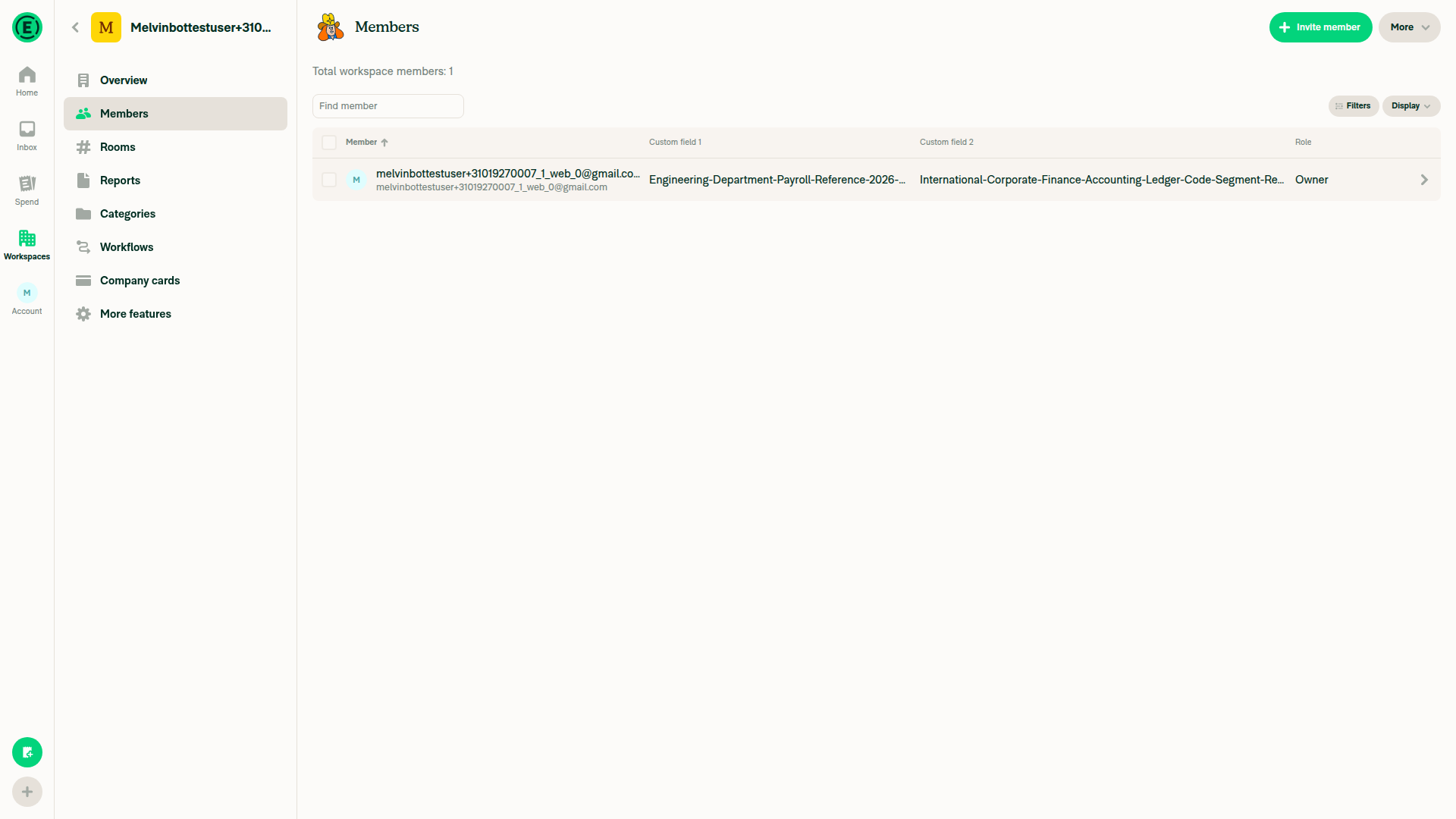
  3. Change one Custom field 1 value to a long string (e.g. Engineering-Department-Payroll-Reference-2026-Q3).

    • Verify:

      • The custom field column expands.
      • The Member column shrinks.
      • The Member column and Custom field 1 has width according to the content length.
      • The table still fills the available width.
  4. Set long values for Custom field 2 on several members.

    • Narrow the browser while staying in desktop layout.

    • Verify:

      • Columns shrink before scrolling appears.
      • Horizontal scrolling appears only when necessary.
      • Headers stay aligned with their columns.
      • Vertical scrolling still works.
  5. Search members, clear the search, apply a Role filter, and sort by Member.

    • Verify column widths remain stable throughout.
    • Verify the Member header is never truncated.
  6. Select individual members and then use Select all.

    • Verify the checkbox column stays aligned.
    • Verify bulk actions work as before.
  7. Resize the browser between desktop and tablet widths.

    • Verify columns reflow smoothly.
    • Verify there are no overlapping columns or layout flicker.
  8. Switch to tablet/mobile width.

    • Verify the existing card layout is unchanged.
    • Verify there is no horizontal scrolling.
  9. On iOS and Android (portrait & landscape), open the same workspace.

    • Verify the Members page behaves exactly as on main.
    • Verify there is no dynamic sizing, horizontal scrolling, or layout shift.
  10. Verify these tables are unchanged:

    • Workspaces list
    • Categories
    • Tags
    • Submit workspace Members
    • Company cards
    • Distance rates
    • Reports table (horizontal scrolling still works as before)
  • Verify that no errors appear in the JS console

Offline tests

Go offline, invite a member, and verify:

  • Pending row uses the correct column widths.
  • Pending styling remains unchanged.

QA Steps

  • Same as tests

  • Verify that no errors appear in the JS console

PR Author Checklist

  • I linked the correct issue in the ### Fixed Issues section above
  • I wrote clear testing steps that cover the changes made in this PR
    • I added steps for local testing in the Tests section
    • I added steps for the expected offline behavior in the Offline steps section
    • I added steps for Staging and/or Production testing in the QA steps section
    • I added steps to cover failure scenarios (i.e. verify an input displays the correct error message if the entered data is not correct)
    • I turned off my network connection and tested it while offline to ensure it matches the expected behavior (i.e. verify the default avatar icon is displayed if app is offline)
    • I tested this PR with a High Traffic account against the staging or production API to ensure there are no regressions (e.g. long loading states that impact usability).
  • I included screenshots or videos for tests on all platforms
  • I ran the tests on all platforms & verified they passed on:
    • Android: Native
    • Android: mWeb Chrome
    • iOS: Native
    • iOS: mWeb Safari
    • MacOS: Chrome / Safari
    • MacOS: Desktop
  • I verified there are no console errors (if there's a console error not related to the PR, report it or open an issue for it to be fixed)
  • I verified there are no new alerts related to the canBeMissing param for useOnyx
  • I followed proper code patterns (see Reviewing the code)
    • I verified that any callback methods that were added or modified are named for what the method does and never what callback they handle (i.e. toggleReport and not onIconClick)
    • I verified that comments were added to code that is not self explanatory
    • I verified that any new or modified comments were clear, correct English, and explained "why" the code was doing something instead of only explaining "what" the code was doing.
    • I verified any copy / text shown in the product is localized by adding it to src/languages/* files and using the translation method
      • If any non-english text was added/modified, I used JaimeGPT to get English > Spanish translation. I then posted it in #expensify-open-source and it was approved by an internal Expensify engineer. Link to Slack message:
    • I verified all numbers, amounts, dates and phone numbers shown in the product are using the localization methods
    • I verified any copy / text that was added to the app is grammatically correct in English. It adheres to proper capitalization guidelines (note: only the first word of header/labels should be capitalized), and is either coming verbatim from figma or has been approved by marketing (in order to get marketing approval, ask the Bug Zero team member to add the Waiting for copy label to the issue)
    • I verified proper file naming conventions were followed for any new files or renamed files. All non-platform specific files are named after what they export and are not named "index.js". All platform-specific files are named for the platform the code supports as outlined in the README.
    • I verified the JSDocs style guidelines (in STYLE.md) were followed
  • If a new code pattern is added I verified it was agreed to be used by multiple Expensify engineers
  • I followed the guidelines as stated in the Review Guidelines
  • I tested other components that can be impacted by my changes (i.e. if the PR modifies a shared library or component like Avatar, I verified the components using Avatar are working as expected)
  • I verified all code is DRY (the PR doesn't include any logic written more than once, with the exception of tests)
  • I verified any variables that can be defined as constants (ie. in CONST.ts or at the top of the file that uses the constant) are defined as such
  • I verified that if a function's arguments changed that all usages have also been updated correctly
  • If any new file was added I verified that:
    • The file has a description of what it does and/or why is needed at the top of the file if the code is not self explanatory
  • If a new CSS style is added I verified that:
    • A similar style doesn't already exist
    • The style can't be created with an existing StyleUtils function (i.e. StyleUtils.getBackgroundAndBorderStyle(theme.componentBG))
  • If new assets were added or existing ones were modified, I verified that:
    • The assets are optimized and compressed (for SVG files, run npm run compress-svg)
    • The assets load correctly across all supported platforms.
  • If the PR modifies code that runs when editing or sending messages, I tested and verified there is no unexpected behavior for all supported markdown - URLs, single line code, code blocks, quotes, headings, bold, strikethrough, and italic.
  • If the PR modifies a generic component, I tested and verified that those changes do not break usages of that component in the rest of the App (i.e. if a shared library or component like Avatar is modified, I verified that Avatar is working as expected in all cases)
  • If the PR modifies a component related to any of the existing Storybook stories, I tested and verified all stories for that component are still working as expected.
  • If the PR modifies a component or page that can be accessed by a direct deeplink, I verified that the code functions as expected when the deeplink is used - from a logged in and logged out account.
  • If the PR modifies the UI (e.g. new buttons, new UI components, changing the padding/spacing/sizing, moving components, etc) or modifies the form input styles:
    • I verified that all the inputs inside a form are aligned with each other.
    • I added Design label and/or tagged @Expensify/design so the design team can review the changes.
  • If a new page is added, I verified it's using the ScrollView component to make it scrollable when more elements are added to the page.
  • I added unit tests for any new feature or bug fix in this PR to help automatically prevent regressions in this user flow.
  • If the main branch was merged into this PR after a review, I tested again and verified the outcome was still expected according to the Test steps.

Screenshots/Videos

Android: Native
android_hybrid.mp4
Android: mWeb Chrome
android_mWeb.mp4
iOS: Native
ios_hybrid.mp4
iOS: mWeb Safari
ios_mWeb.mp4
MacOS: Chrome / Safari
Monosnap.screencast.2026-08-17.10-52-16.mp4

Signed-off-by: krishna2323 <belivethatkg@gmail.com>
@codecov

codecov Bot commented Aug 4, 2026

Copy link
Copy Markdown

Codecov Report

✅ Changes either increased or maintained existing code coverage, great job!

Files with missing lines Coverage Δ
src/CONST/index.ts 94.85% <ø> (ø)
src/components/Table/Table.tsx 96.42% <100.00%> (+0.51%) ⬆️
src/components/Table/TableContext.tsx 83.33% <ø> (ø)
src/components/Table/TableHeader.tsx 92.50% <100.00%> (ø)
src/components/Table/TableRow.tsx 84.09% <100.00%> (+0.18%) ⬆️
src/components/Table/TableSemanticContainer.tsx 100.00% <100.00%> (ø)
...c/components/Table/calculateDynamicColumnWidths.ts 100.00% <100.00%> (ø)
src/components/Table/getGridTemplateColumns.ts 100.00% <100.00%> (ø)
src/libs/measureTextWidth/index.native.ts 100.00% <100.00%> (ø)
.../components/Tables/WorkspaceMembersTable/index.tsx 34.28% <57.14%> (+0.95%) ⬆️
... and 2 more
... and 277 files with indirect coverage changes

Signed-off-by: krishna2323 <belivethatkg@gmail.com>
@Krishna2323

Copy link
Copy Markdown
Contributor Author

@codex review

@chatgpt-codex-connector

Copy link
Copy Markdown

You have reached your Codex usage limits for code reviews. You can see your limits in the Codex usage dashboard.

…erflow style

Signed-off-by: krishna2323 <belivethatkg@gmail.com>
@Krishna2323

Copy link
Copy Markdown
Contributor Author

@MelvinBot review

Signed-off-by: krishna2323 <belivethatkg@gmail.com>
@MelvinBot

Copy link
Copy Markdown
Contributor

Review — dynamic table column widths

Overall this is a clean, well-documented implementation that matches all three behaviors from #96510. The pure width algorithm is nicely factored out and unit-tested, and the native/web split correctly makes this a web-only, wide-layout-only enhancement (native measureTextWidth returns null, so those layouts are untouched). I verified the behavior in a Control workspace on wide desktop web (PR branch krishna2323/dynamic-table-column-widths, commit f5d0ffa):

  • No/short custom fields — Member fills remaining space, Role keeps fixed width, no scrollbar.
  • One long custom-field value — that column grows, Member shrinks, the long value renders untruncated, table still fills width.
  • No JS console errors observed.

Two things worth confirming before this merges:

1. Behavior #3 (horizontal scroll) is effectively unreachable for the Members table

The issue's third behavior — "if all columns are long and can't fit, allow horizontal scrolling" — could not be reproduced at any wide-layout viewport (tested 1026px → 1920px) even with two maximally long custom-field values. Instead the columns proportionally shrink and ellipsis-truncate.

The reason is that a dynamic column's minWidth defaults to its header-label width (useDynamicColumnWidths.ts:186), and shouldScrollHorizontally only becomes true once sum(minWidths) > availableWidth (calculateDynamicColumnWidths.ts:104). With only two optional dynamic columns whose header labels are small, that threshold is never crossed at any viewport ≥1024px (below which the custom columns disappear entirely). So on this table, long content truncates rather than scrolls.

This isn't a code defect — the scroll path is implemented and unit-tested at the algorithm level — but it does mean the Members table never exercises behavior #3, and long values silently truncate. Worth confirming with reviewers whether truncation-instead-of-scroll is acceptable for this first adopter, or whether the Member column should carry a larger minWidth so scrolling actually kicks in.

Two long custom field values truncated, no scrollbar

2. scrollWidth omits the row horizontal margin

availableWidth subtracts (ROW_HORIZONTAL_MARGIN + ROW_HORIZONTAL_PADDING) * 2 (useDynamicColumnWidths.ts:165), but the scrollWidth handed to the horizontal ScrollView adds back only ROW_HORIZONTAL_PADDING * 2, not the margin (useDynamicColumnWidths.ts:212). If the rows keep their mh5 margin inside the scroll content, the content container looks ~40px too narrow, which could clip the row's right edge when scrolled fully right. I couldn't verify this visually because (per #1) the scroll path never triggered on this table — please double-check it against a table that does scroll (or confirm the margin is dropped in scroll mode).

Minor notes (non-blocking)
  • Test coverage: the pure calculateDynamicColumnWidths is well covered, but useDynamicColumnWidths.ts (~15%) and measureTextWidth/index.ts (0%) are barely exercised. A lightweight test that mocks measureTextWidth and asserts the budget math + scrollWidth (which would also catch Fix spaces #2) would be valuable given how much layout logic lives in the hook.
  • maxWidth semantics: in case 2, after leftover space is distributed a column can end up wider than its maxWidth (your own test expects 574 > 500). That's fine/intended, but the doc comment says maxWidth is "largest width this column may claim" — consider clarifying it caps the content-driven desired width only, not the final width.

Reply with @MelvinBot <feedback> to refine, or address the two points above.

…dable width

Signed-off-by: krishna2323 <belivethatkg@gmail.com>
@Krishna2323
Krishna2323 marked this pull request as ready for review August 5, 2026 22:07
@Krishna2323
Krishna2323 requested review from a team as code owners August 5, 2026 22:07
@melvin-bot
melvin-bot Bot requested review from eVoloshchak and heyjennahay and removed request for a team August 5, 2026 22:07
@melvin-bot

melvin-bot Bot commented Aug 5, 2026

Copy link
Copy Markdown

@eVoloshchak Please copy/paste the Reviewer Checklist from here into a new comment on this PR and complete it. If you have the K2 extension, you can simply click: [this button]

@melvin-bot
melvin-bot Bot removed the request for review from a team August 5, 2026 22:07
Comment thread src/components/Table/TableSemanticContainer.tsx
Comment thread src/components/Table/useDynamicColumnWidths.ts Outdated
Comment thread src/components/Table/calculateDynamicColumnWidths.ts Outdated
Comment thread src/components/Table/useDynamicColumnWidths.ts
Comment thread src/components/Table/Table.tsx Outdated

@chatgpt-codex-connector chatgpt-codex-connector Bot left a comment

Copy link
Copy Markdown

Choose a reason for hiding this comment

The reason will be displayed to describe this comment to others. Learn more.

💡 Codex Review

Here are some automated review suggestions for this pull request.

Reviewed commit: 670eb12d84

ℹ️ About Codex in GitHub

Your team has set up Codex to review pull requests in this repo. Reviews are triggered when you

  • Open a pull request for review
  • Mark a draft as ready
  • Comment "@codex review".

If Codex has suggestions, it will comment; otherwise it will react with 👍.

Codex can also answer questions or update the PR. Try commenting "@codex address that feedback".

Comment thread src/components/Table/calculateDynamicColumnWidths.ts Outdated
Signed-off-by: krishna2323 <belivethatkg@gmail.com>
…cifies

Signed-off-by: krishna2323 <belivethatkg@gmail.com>
@github-actions

github-actions Bot commented Aug 6, 2026

Copy link
Copy Markdown
Contributor

🚧 dubielzyk-expensify has triggered a test Expensify/App build. You can view the workflow run here.

@luacmartins

Copy link
Copy Markdown
Contributor

@eVoloshchak can you please prioritize this review when you get a chance?

Comment thread src/components/Table/calculateDynamicColumnWidths.ts
Comment thread src/components/Table/calculateDynamicColumnWidths.ts Outdated
Comment thread src/components/Table/useDynamicColumnWidths.ts Outdated
Signed-off-by: krishna2323 <belivethatkg@gmail.com>
…t measure text

Signed-off-by: krishna2323 <belivethatkg@gmail.com>
@luacmartins

Copy link
Copy Markdown
Contributor

Is this change in column size expected? Asking because the PR test steps say that it should remain the same as now for the case without custom fields
Main
Screenshot 2026-08-18 at 3 10 35 PM
This branch
Screenshot 2026-08-18 at 3 11 16 PM

@shawnborton

Copy link
Copy Markdown
Contributor

I kinda think that is expected, that feels way nicer now since they are balanced.

@dubielzyk-expensify

Copy link
Copy Markdown
Contributor

Tested and it's feeling pretty great! Agree that spend page is the real test, but this is super promising and already just a way better experience

@eVoloshchak

Copy link
Copy Markdown
Contributor
  • Set long values for Custom field 2 and Custom field 1 on several members
  • Resize the window horizontally
  • At a certain point (right before the narrow layout treshold) the Role is truncated and horizontal scroll appears

Is this expected? It seems like we can safely truncate Custom field 2 and Custom field 1 in this case

Screen.Recording.2026-08-19.at.18.32.35.mov

@dubielzyk-expensify

Copy link
Copy Markdown
Contributor

Curious what @shawnborton thinks. I don't know if we have a clear rule for when we start horizontal scroll. I think custom fields 1/2 isn't crucial info so I can see truncating it, but I also don't mind the scroll. Role feels important though but the width is a bit small when it actually stops showing anyways

@shawnborton

shawnborton commented Aug 20, 2026

Copy link
Copy Markdown
Contributor

Hmm yeah that's a tricky one. I would assume we have some kind of min-width on the cells (at least ones that have long strings) and the summation of the minWidths across multiple cells in a horizontal row is what would trigger the horizontal scrolling? Sounds like a mouthful. Not sure how we implement it, but I guess I also feel like the video above is okay?

@dubielzyk-expensify

Copy link
Copy Markdown
Contributor

I would assume we have some kind of min-width on the cells (at least ones that have long strings) and the summation of the minWidths across multiple cells in a horizontal row is what would trigger the horizontal scrolling?

Yeah I think that makes. Totally fine with the video as well and we can adjust if we hear complaints, but I ultimately also think the system is probably working as intended

@Krishna2323

Copy link
Copy Markdown
Contributor Author

Its working as intended. Each column has a minimum width, and the table only scrolls when the sum of those minimums doesn't fit.

The four states are:

  1. Everything fits equally → equal columns.
  2. Uneven fit → a column takes its content width and the rest split what's left.
  3. Doesn't fit → columns squeeze toward their minimums, so custom fields truncate instead of scrolling.
  4. Even minimums don't fit → scroll.

For the current defaults:

Column Minimum Notes
Member min(content, 220) 180 + 40px for the avatar, so the text still gets 180px
Custom fields min(content, 180) Free text
Role Content width shouldFitContent: true, so it never truncates
Actions 20px Fixed
Checkbox 20px Fixed when selection is enabled

The important bit is min(content, 180): short values like A1 don't get inflated to 180px. They stay around their content width. The 180px only limits how much a longer column can be squeezed.

Role is different since it's shouldFitContent, so it keeps its full value. Its width also changes with the locale. For example, the Spanish label can be ~270px, so Role can get wider there.

@luacmartins

Copy link
Copy Markdown
Contributor

Cool. @eVoloshchak please continue your review

@eVoloshchak

eVoloshchak commented Aug 21, 2026

Copy link
Copy Markdown
Contributor

Reviewer Checklist

  • I have verified the author checklist is complete (all boxes are checked off).
  • I verified the correct issue is linked in the ### Fixed Issues section above
  • I verified testing steps are clear and they cover the changes made in this PR
    • I verified the steps for local testing are in the Tests section
    • I verified the steps for Staging and/or Production testing are in the QA steps section
    • I verified the steps cover any possible failure scenarios (i.e. verify an input displays the correct error message if the entered data is not correct)
    • I turned off my network connection and tested it while offline to ensure it matches the expected behavior (i.e. verify the default avatar icon is displayed if app is offline)
  • I checked that screenshots or videos are included for tests on all platforms
  • I included screenshots or videos for tests on all platforms
  • I verified that the composer does not automatically focus or open the keyboard on mobile unless explicitly intended. This includes checking that returning the app from the background does not unexpectedly open the keyboard.
  • I verified tests pass on all platforms & I tested again on:
    • Android: HybridApp
    • Android: mWeb Chrome
    • iOS: HybridApp
    • iOS: mWeb Safari
    • MacOS: Chrome / Safari
  • If there are any errors in the console that are unrelated to this PR, I either fixed them (preferred) or linked to where I reported them in Slack
  • I verified proper code patterns were followed (see Reviewing the code)
    • I verified that comments were added to code that is not self explanatory
    • I verified that any new or modified comments were clear, correct English, and explained "why" the code was doing something instead of only explaining "what" the code was doing.
    • I verified any copy / text that was added to the app is grammatically correct in English. It adheres to proper capitalization guidelines (note: only the first word of header/labels should be capitalized), and is either coming verbatim from figma or has been approved by marketing (in order to get marketing approval, ask the Bug Zero team member to add the Waiting for copy label to the issue)
  • If a new code pattern is added I verified it was agreed to be used by multiple Expensify engineers
  • I verified that this PR follows the guidelines as stated in the Review Guidelines
  • I verified other components that can be impacted by these changes have been tested, and I retested again (i.e. if the PR modifies a shared library or component like Avatar, I verified the components using Avatar have been tested & I retested again)
  • If a new component is created I verified that:
    • A similar component doesn't exist in the codebase
    • All props are defined accurately
    • The component has a clear name that is non-ambiguous and the purpose of the component can be inferred from the name alone
    • The only data being stored in the state is data necessary for rendering and nothing else
    • The component has the minimum amount of code necessary for its purpose, and it is broken down into smaller components in order to separate concerns and functions
  • If a new CSS style is added I verified that:
    • A similar style doesn't already exist
    • The style can't be created with an existing StyleUtils function (i.e. StyleUtils.getBackgroundAndBorderStyle(theme.componentBG)
  • If the PR modifies code that runs when editing or sending messages, I tested and verified there is no unexpected behavior for all supported markdown - URLs, single line code, code blocks, quotes, headings, bold, strikethrough, and italic.
  • If the PR modifies a generic component, I tested and verified that those changes do not break usages of that component in the rest of the App (i.e. if a shared library or component like Avatar is modified, I verified that Avatar is working as expected in all cases)
  • If the PR modifies a component related to any of the existing Storybook stories, I tested and verified all stories for that component are still working as expected.
  • If the PR modifies a component or page that can be accessed by a direct deeplink, I verified that the code functions as expected when the deeplink is used - from a logged in and logged out account.
  • If the PR modifies the UI (e.g. new buttons, new UI components, changing the padding/spacing/sizing, moving components, etc) or modifies the form input styles:
    • I verified that all the inputs inside a form are aligned with each other.
    • I added Design label and/or tagged @Expensify/design so the design team can review the changes.
  • For any bug fix or new feature in this PR, I verified that sufficient unit tests are included to prevent regressions in this flow.
  • If the main branch was merged into this PR after a review, I tested again and verified the outcome was still expected according to the Test steps.
  • I have checked off every checkbox in the PR reviewer checklist, including those that don't apply to this PR.

Screenshots/Videos

Android: HybridApp
screen-20260821-164244-1787323354302.mp4
Android: mWeb Chrome
Screen.Recording.2026-08-21.at.16.35.30.mov
iOS: HybridApp
Screen.Recording.2026-08-21.at.16.33.14.mov
iOS: mWeb Safari
Screen.Recording.2026-08-21.at.16.30.43.mov
MacOS: Chrome / Safari
Screen.Recording.2026-08-21.at.16.27.05.mov

@eVoloshchak eVoloshchak left a comment

Copy link
Copy Markdown
Contributor

Choose a reason for hiding this comment

The reason will be displayed to describe this comment to others. Learn more.

LGTM!

@melvin-bot
melvin-bot Bot requested review from JS00001 and luacmartins August 21, 2026 14:44
@JS00001

JS00001 commented Aug 21, 2026

Copy link
Copy Markdown
Contributor

@eVoloshchak looks like some checkboxes are missing, can you finish the checklist please?

* Upper bound on cached measurements. Text measurement is only used to size layouts, so a coarse cap is enough to keep
* the cache from growing without bound on long-lived sessions.
*/
const MAX_CACHE_SIZE = 5000;

Copy link
Copy Markdown
Contributor

Choose a reason for hiding this comment

The reason will be displayed to describe this comment to others. Learn more.

nab, did we want to lower this? I think we can reduce it a small bit

Copy link
Copy Markdown
Contributor

Choose a reason for hiding this comment

The reason will be displayed to describe this comment to others. Learn more.

I agree that we can lower this. Let's do it in a follow up though

@luacmartins
luacmartins merged commit 843e400 into Expensify:main Aug 21, 2026
39 of 47 checks passed
@OSBotify

Copy link
Copy Markdown
Contributor

✋ This PR was not deployed to staging yet because QA is ongoing. It will be automatically deployed to staging after the next production release.

@github-actions

Copy link
Copy Markdown
Contributor

🚧 luacmartins has triggered a test Expensify/App build. You can view the workflow run here.

@OSBotify

Copy link
Copy Markdown
Contributor

🚀 Deployed to staging by https://github.com/luacmartins in version: 9.4.59-0 🚀

platform result
🕸 web 🕸 success ✅
🤖 android 🤖 success ✅
🍎 iOS 🍎 success ✅

@MelvinBot

Copy link
Copy Markdown
Contributor

🤖 I reviewed the changes in this PR against Expensify's help site articles under docs/articles. No help site changes are required, so I did not open a docs PR.

Why: This PR is a purely visual/rendering enhancement — it sizes table columns dynamically from their content (introducing a shouldUseDynamicColumns flag, applied to the Workspace Members table). It doesn't add, rename, or change any user-facing feature, setting, tab, or workflow that the help site documents.

The closest article, Managing-Workspace-Members.md, describes members and custom fields as data/import concepts (e.g. mapping Custom field 1/Custom field 2 during import). None of it describes column widths or table layout, and this PR doesn't change any of that behavior — so nothing in it needs updating.

If you intended a specific user-facing behavior change that should be documented, let me know and I'll draft the docs PR.


view run

@OSBotify

Copy link
Copy Markdown
Contributor

🚀 Deployed to production by https://github.com/AndrewGable in version: 9.4.59-5 🚀

platform result
🕸 web 🕸 success ✅
🤖 android 🤖 success ✅
🍎 iOS 🍎 success ✅

Bundle Size Analysis (Sentry):

Sign up for free to join this conversation on GitHub. Already have an account? Sign in to comment

Labels

None yet

Projects

None yet

Development

Successfully merging this pull request may close these issues.

10 participants