Skip to content

Fix CSV import parsing two-digit-year dates as year 2-25 AD - #102947

Closed
MelvinBot wants to merge 2 commits into
mainfrom
claude-fixCSVTwoDigitYearDates
Closed

MelvinBot wants to merge 2 commits into
mainfrom
claude-fixCSVTwoDigitYearDates

Conversation

@MelvinBot

@MelvinBot MelvinBot commented Oct 4, 2026 •

Copy link
Copy Markdown
Contributor

Explanation of Change

CSV and spreadsheet imports saved two-digit-year dates with the wrong year. For example, 01/20/24 became 0024-01-20, and 11-02-25 became 0011-02-25. This regression came from #100612, which moved the date-fns format loop ahead of new Date() in parseCSVDate. The date-fns yyyy token matches one to four digits, so it reads 24 as year 24.

Putting new Date() back in front isn't enough. On native, Hermes's new Date() rejects strings such as 01/20/24, so they would still reach the yyyy formats. Instead, this PR keeps the date-fns format loop ahead of new Date(), so web and native give the same result:

  • yy formats (MM/dd/yy, dd/MM/yy, MM-dd-yy, dd-MM-yy, MMM d, yy, MMMM d, yy, d MMM yy) are tried before any yyyy format. yy reads at most two digits and maps them into the 100 years around today, so 01/20/24 and 20/01/24 both become 2024-01-20. 01/20/2024 doesn't match a yy format, so it falls through to MM/dd/yyyy.
  • A yyyy match with a year below 1000 is skipped, so a short year can't be saved as a date in the first millennium.
  • A bare yyyy-MM-dd value is built in local time by parseISODateOnly before the format loop. This keeps the time zone fix from Fix: CSV import shifts ISO date transactions one day earlier for users behind UTC #99583. It also keeps the month (01–12) and day (01–31) ranges of new Date(), so 2026-02-30 still rolls over to 2026-03-02, and 2026-13-01 and 2026-01-00 are still rejected.
  • The 5-digit Excel serial check still runs before new Date().
  • If the full value doesn't parse, the parser tries the first 10 characters (for example 2024-01-15 posted) and then the text before the first space (for example 01/20/24 10:30).

Unit tests cover two-digit years, a stubbed Date that rejects strings the way Hermes does, ISO rollover and rejection, and the fallbacks.

Fixed Issues

$ #102517
PROPOSAL: #102517 (comment)

Tests

Test 1: Two-digit year

  1. Go to Account > Wallet > Import transactions.
  2. Upload a CSV whose date column uses a two-digit year, for example 01/20/24 (sample: csv-2digit-year.csv).
  3. Finish the column mapping and import.
  4. Open an imported expense.
  5. Verify the date has the correct four-digit year, for example 01/20/24 shows as 2024-01-20, not 0024-01-20.

Test 2: ISO date in a time zone behind UTC

  1. Set the browser or device time zone to any time zone behind UTC (UTC-x).
  2. Go to Account > Wallet > Import transactions.
  3. Upload a CSV whose date column uses the ISO dashed format, for example 2026-07-15 (sample: csv-iso-date-repro.csv).
  4. Finish the column mapping and import.
  5. Verify the imported transactions' dates match the dates in the CSV, not the previous day.

Test 3: Excel date cells

  1. Use an XLSX file whose Date column is formatted as a date in Excel, not as text (sample: Mohan Amex 2026_08_19_xl.xlsx).
  2. Go to Account > Wallet > Import transactions.
  3. Set a name and a currency, set the transactions as non-reimbursable, and leave "Flip amount sign" disabled.
  4. Click Next.
  5. Select the XLSX file.
  6. Choose what each column corresponds to.
  7. Verify the date column shows correct dates, not raw Excel serial numbers such as 45678.
  • Verify that no errors appear in the JS console

Offline tests

QA Steps

Same as tests.

  • Verify that no errors appear in the JS console

PR Author Checklist

  • I linked the correct issue in the ### Fixed Issues section above
  • I wrote clear testing steps that cover the changes made in this PR
    • I added steps for local testing in the Tests section
    • I added steps for the expected offline behavior in the Offline steps section
    • I added steps for Staging and/or Production testing in the QA steps section
    • I added steps to cover failure scenarios (i.e. verify an input displays the correct error message if the entered data is not correct)
    • I turned off my network connection and tested it while offline to ensure it matches the expected behavior (i.e. verify the default avatar icon is displayed if app is offline)
    • I tested this PR with a High Traffic account against the staging or production API to ensure there are no regressions (e.g. long loading states that impact usability).
  • I included screenshots or videos for tests on all platforms
  • I ran the tests on all platforms & verified they passed on:
    • Android: Native
    • Android: mWeb Chrome
    • iOS: Native
    • iOS: mWeb Safari
    • MacOS: Chrome / Safari
  • I verified there are no console errors (if there's a console error not related to the PR, report it or open an issue for it to be fixed)
  • I followed proper code patterns (see Reviewing the code)
    • I verified that comments were added to code that is not self explanatory
    • I verified that any new or modified comments were clear, correct English, and explained "why" the code was doing something instead of only explaining "what" the code was doing.
    • I verified any copy / text that was added to the app is grammatically correct in English. It adheres to proper capitalization guidelines (note: only the first word of header/labels should be capitalized), and is either coming verbatim from figma or has been approved by marketing (in order to get marketing approval, ask the Bug Zero team member to add the Waiting for copy label to the issue)
  • If a new code pattern is added I verified it was agreed to be used by multiple Expensify engineers
  • I followed the guidelines as stated in the Review Guidelines
  • I tested other components that can be impacted by my changes (i.e. if the PR modifies a shared library or component like Avatar, I verified the components using Avatar are working as expected)
  • If a new CSS style is added I verified that:
    • A similar style doesn't already exist
    • The style can't be created with an existing StyleUtils function (i.e. StyleUtils.getBackgroundAndBorderStyle(theme.componentBG))
  • If new assets were added or existing ones were modified, I verified that:
    • The assets are optimized and compressed (for SVG files, run npm run compress-svg)
    • The assets load correctly across all supported platforms.
  • If the PR modifies code that runs when editing or sending messages, I tested and verified there is no unexpected behavior for all supported markdown - URLs, single line code, code blocks, quotes, headings, bold, strikethrough, and italic.
  • If the PR modifies a generic component, I tested and verified that those changes do not break usages of that component in the rest of the App (i.e. if a shared library or component like Avatar is modified, I verified that Avatar is working as expected in all cases)
  • If the PR modifies a component related to any of the existing Storybook stories, I tested and verified all stories for that component are still working as expected.
  • If the PR modifies a component or page that can be accessed by a direct deeplink, I verified that the code functions as expected when the deeplink is used - from a logged in and logged out account.
  • If the PR modifies the UI (e.g. new buttons, new UI components, changing the padding/spacing/sizing, moving components, etc) or modifies the form input styles:
    • I verified that all the inputs inside a form are aligned with each other.
    • I added Design label and/or tagged @Expensify/design so the design team can review the changes.
  • If the PR adds or modifies the UI:
    • I asked an AI agent to review the changes for accessibility issues and addressed its findings.
    • I tested with a screen reader (VoiceOver on macOS) and verified all new/changed elements are reachable with a logical focus order.
    • I verified all new/changed elements have meaningful accessible names and roles.
    • I verified state changes are announced (e.g. checked/unchecked, expanded/collapsed, selected).
  • I added unit tests for any new feature or bug fix in this PR to help automatically prevent regressions in this user flow.
  • If the main branch was merged into this PR after a review, I tested again and verified the outcome was still expected according to the Test steps.

Screenshots/Videos

Android: Native
Android: mWeb Chrome
iOS: Native
iOS: mWeb Safari
MacOS: Chrome / Safari

Co-authored-by: Roji Philip <rojiphil@users.noreply.github.com>
@MelvinBot
MelvinBot requested a review from a team October 4, 2026 19:56
@melvin-bot melvin-bot Bot added Melvin-Test-Android Melvin-Test-Web Triggers Melvin to run the testing steps of the PR on web labels Oct 4, 2026
@MelvinBot

Copy link
Copy Markdown
Contributor Author

I created this PR from an upstream branch since I don't have push access to your fork.

To take ownership of this branch and be able to push updates, run:

git remote add upstream https://github.com/Expensify/App.git
git fetch upstream claude-fixCSVTwoDigitYearDates
git checkout -b claude-fixCSVTwoDigitYearDates upstream/claude-fixCSVTwoDigitYearDates
git push -u origin claude-fixCSVTwoDigitYearDates

Then you can close this PR and open a new one from your fork.

@codecov

codecov Bot commented Oct 4, 2026 •

Copy link
Copy Markdown

Codecov Report

✅ Changes either increased or maintained existing code coverage, great job!

Files with missing lines Coverage Δ
src/libs/CSVDateUtils.ts 100.00% <100.00%> (+6.89%) ⬆️
... and 802 files with indirect coverage changes

@MelvinBot

MelvinBot commented Oct 4, 2026 •

Copy link
Copy Markdown
Contributor Author

🤖 Web test steps verification results: ⚠️ partial

I reached Account > Wallet > Import transactions, but I couldn't upload the test CSV. My web test tooling can't upload files, so the two-digit-year fix was not exercised on Web. The PR's Tests section is still a TODO, so I used the reproduction steps from the linked issue.
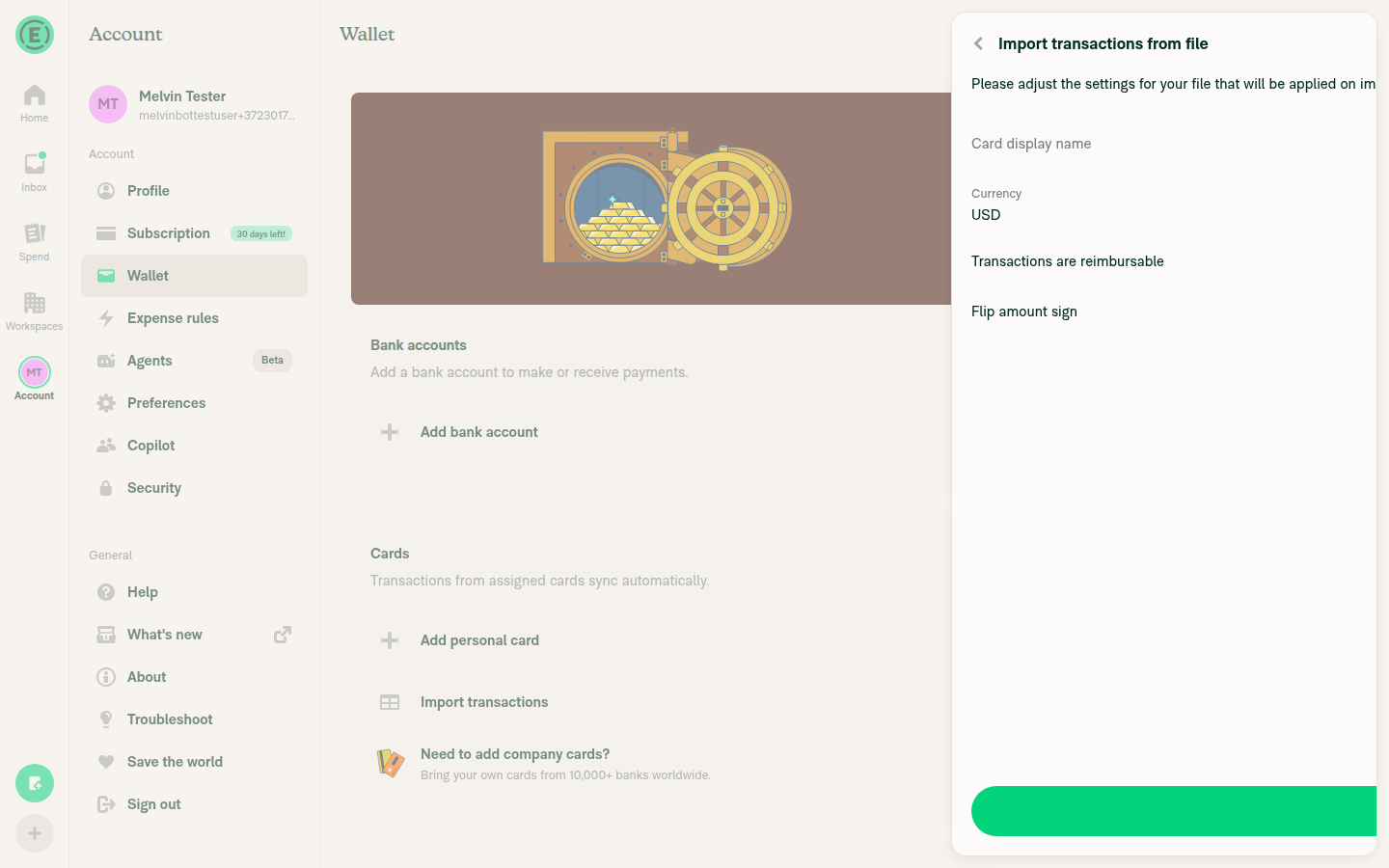
Import transactions from file settings screen in Account > Wallet

Step Status
Go to Account > Wallet > Import transactions; the import page opens.The "Import transactions from file" screen opened with Card display name, Currency (USD), the reimbursable and flip-sign toggles, and a Next button.
Import transactions from file settings screen in Account > Wallet
✅
Upload a CSV with dates 01/20/24, 11/2/25, 11-02-25, "Nov 2, 25", and 2 Nov 25; the column-mapping screen appears.Blocked by tooling. The web test driver can't select files in the browser's file picker, so the CSV was never uploaded.
⚠️
Map Date, Merchant, and Amount, then finish the import; it completes without error.Blocked by tooling. The column-mapping screen was never reached.
⚠️
Open the imported expenses; 01/20/24 shows Jan 20, 2024 and the other rows show Nov 2, 2025, with no year 0024, 0025, or 0011.Blocked by tooling. No expenses were imported, so I couldn't check the dates.
⚠️
No JS console errors related to the import.Blocked by tooling. The import never ran, and the web driver can't read console logs.
⚠️

To verify the fix, upload the CSV manually on Web, or rely on the new parseCSVDate unit tests in this PR.


view run · view recording

@MelvinBot

MelvinBot commented Oct 4, 2026 •

Copy link
Copy Markdown
Contributor Author

🤖 Android test steps verification results: ❌ fail

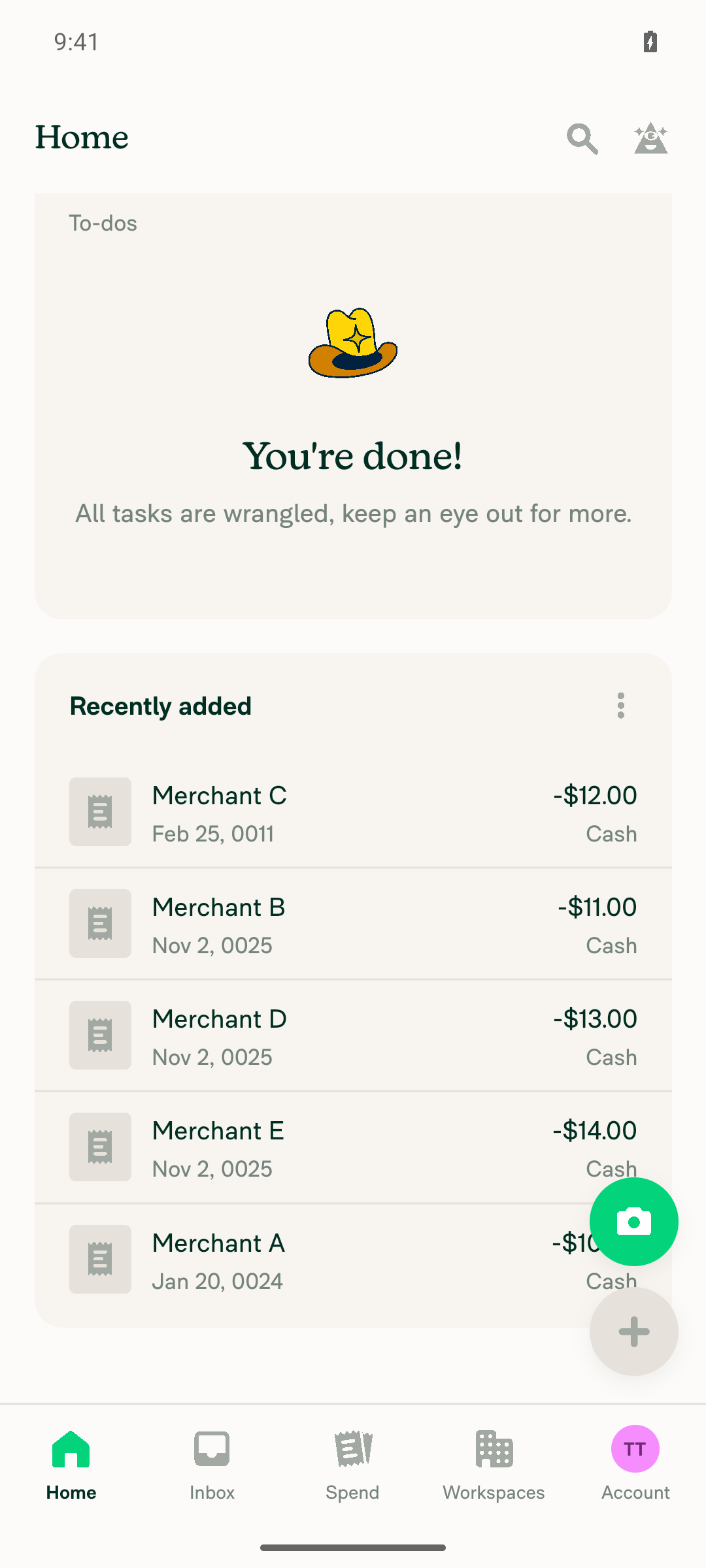
The CSV upload, column mapping, and import all work on Android, but all 5 two-digit-year dates still import with years 0011, 0024, or 0025, so the fix doesn't take effect on Android at commit 072b700. A likely cause, not yet confirmed: Hermes's new Date() doesn't parse strings like 01/20/24, so src/libs/CSVDateUtils.ts:73-80 falls through to the date-fns loop, while the Jest tests pass because they run on Node.
Recently added list showing imported expenses with years 0011, 0024, and 0025

Step Status
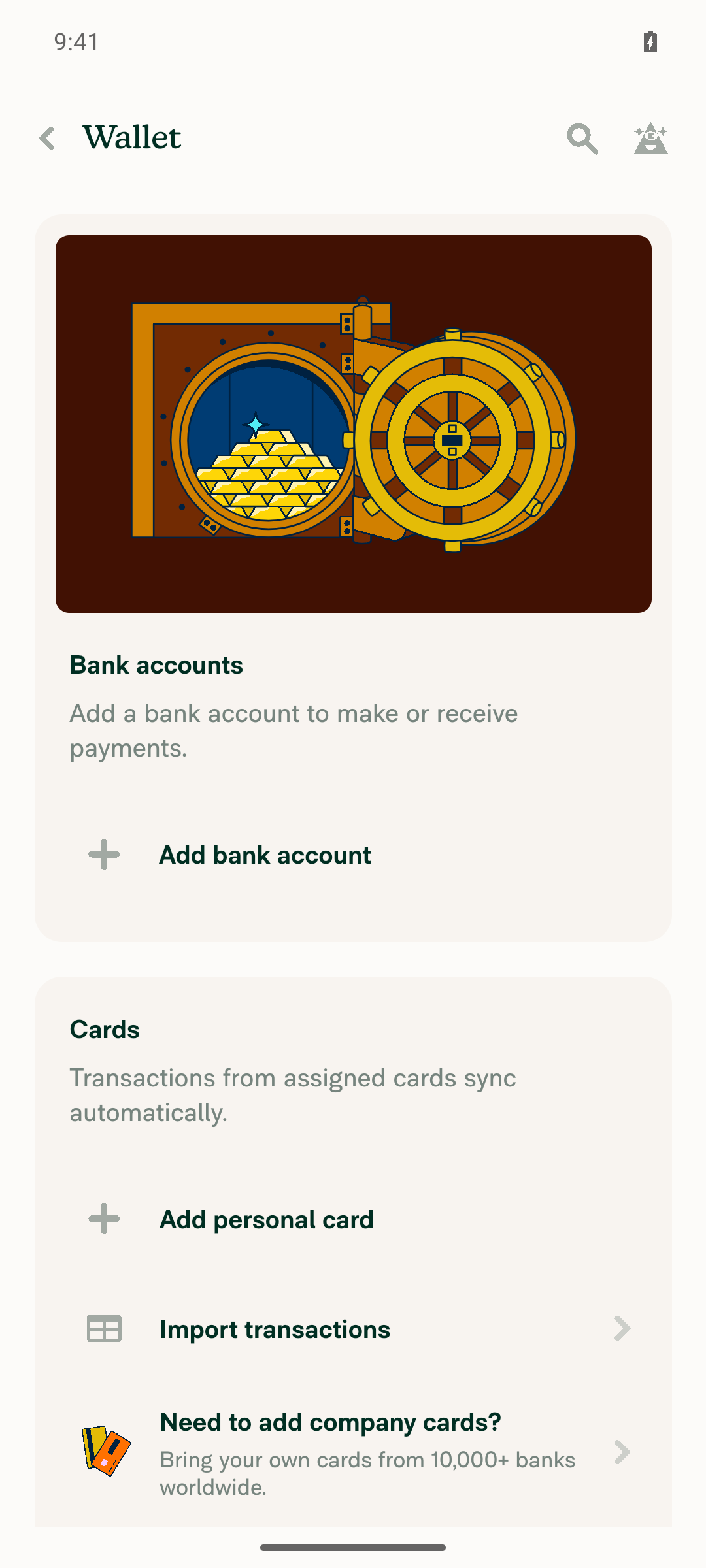
Go to Account > Wallet > Import transactions; the import page opens.Wallet showed an Import transactions button, and tapping it opened "Import transactions from file".
Wallet page with Import transactions button
✅
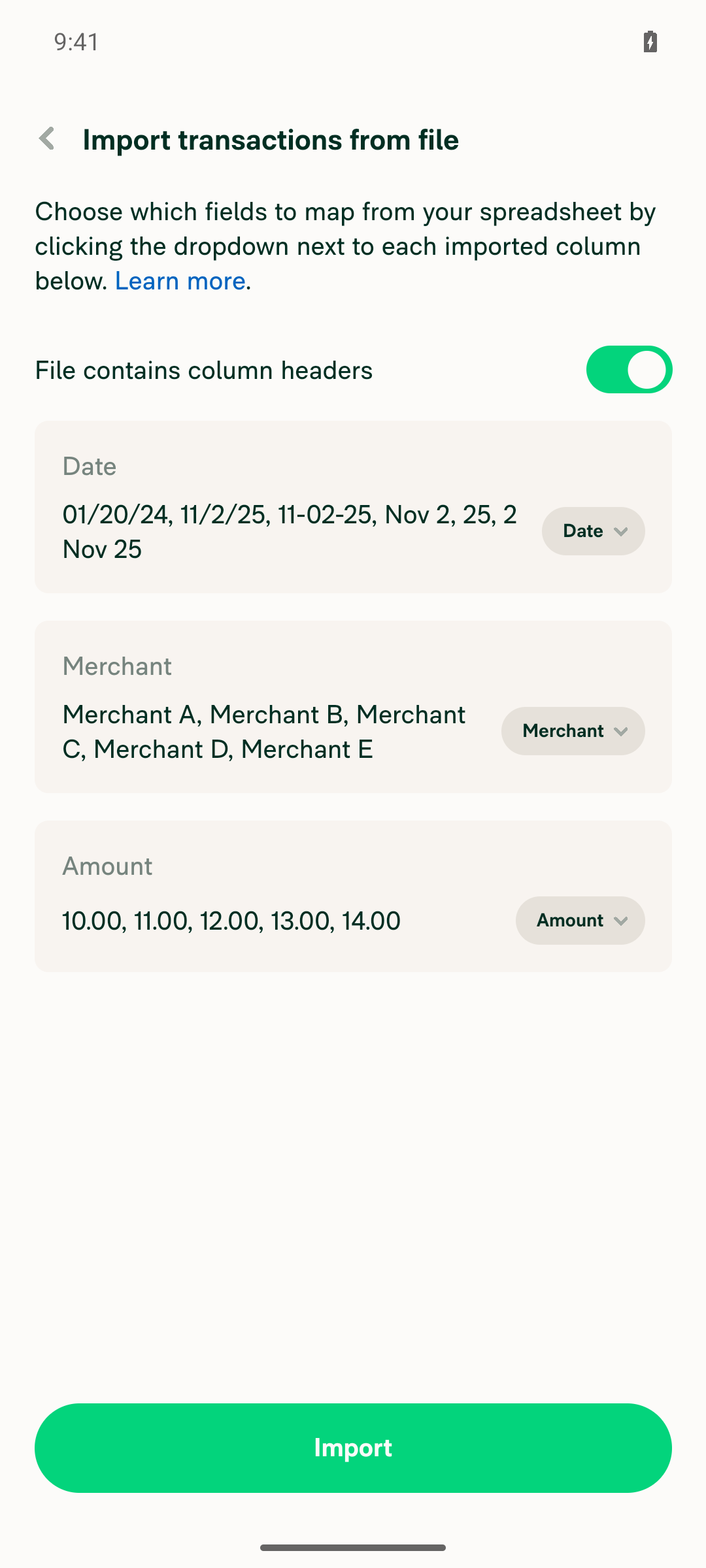
Upload a CSV with dates 01/20/24, 11/2/25, 11-02-25, "Nov 2, 25", and 2 Nov 25; the column-mapping screen appears.The CSV was picked from Downloads. Date, Merchant, and Amount were auto-mapped, and all 5 rows split correctly, including the quoted "Nov 2, 25".
Column mapping screen with Date, Merchant, and Amount columns
✅
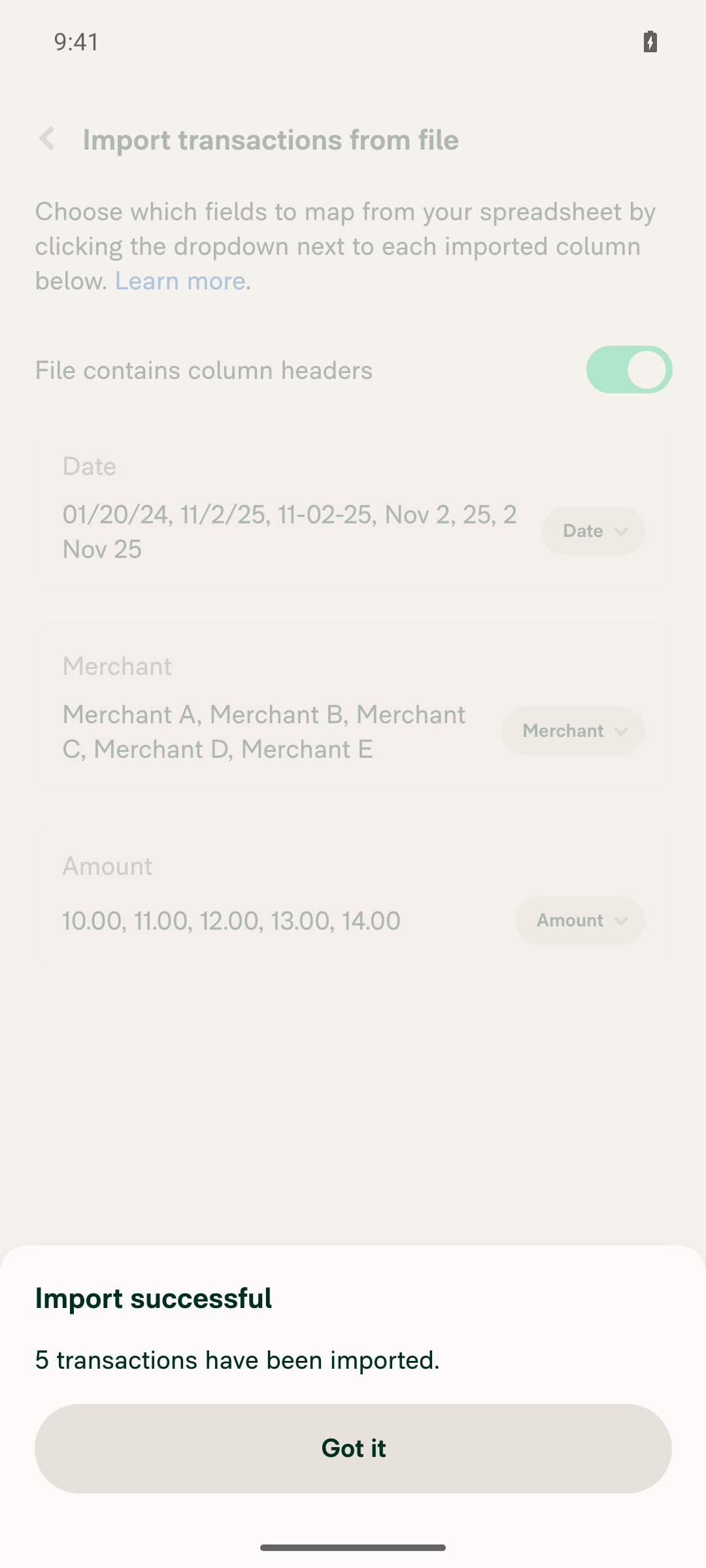
Map Date, Merchant, and Amount, then finish the import; it completes without error.The app showed "Import successful. 5 transactions have been imported."
Import successful dialog, 5 transactions imported
✅
Open the imported expenses; 01/20/24 shows Jan 20, 2024 and the other rows show Nov 2, 2025, with no year 0024, 0025, or 0011.Merchant A: Jan 20, 0024. Merchant B: Nov 2, 0025. Merchant C: Feb 25, 0011. Merchant D: Nov 2, 0025. Merchant E: Nov 2, 0025. All 5 match the original bug.
Recently added list showing imported expenses with years 0011, 0024, and 0025
❌
No JS errors related to the import.logcat showed no import or date-parsing errors. It showed only unrelated Pusher and Fabric noise.
✅

view run · view recording

@dylanexpensify

Copy link
Copy Markdown
Contributor

@rojiphil mind giving us an ETA on when this will be ready for review?

@rojiphil

rojiphil commented Oct 8, 2026

Copy link
Copy Markdown
Contributor

mind giving us an ETA on when this will be ready for review?

Will be ready for review today

@rojiphil

rojiphil commented Oct 8, 2026

Copy link
Copy Markdown
Contributor

@MelvinBot Tidy the tests/QA sections with the following test steps.

Test 1

  1. Go to Account > Wallet > Import transactions.
  2. Upload a CSV whose date column uses a two-digit year, for example 01/20/24. (e.g. csv-2digit-year.csv)
  3. Finish the column mapping and import.
  4. Open an imported expense.

Test 2

  1. Set the browser/device timezone to any UTC-i timezone (behind UTC)
  2. Account > Wallet > Import transactions
  3. Upload a CSV whose date column uses ISO dashed format, e.g. 2026-07-15 (e.g., csv-iso-date-repro.csv)
  4. Verify imported transactions' dates match the CSV's

Test 3

  1. Use an XLSX file whose Date column is formatted as a date in Excel (not as text).
  2. Navigate to Account > Wallet.
  3. Click "Import from Transactions".
  4. Set a name and a currency, set the transactions as non-reimbursable, and leave "Flip amount sign" disabled.
  5. Click Next.
  6. Select the XLSX file (e.g. Mohan Amex 2026_08_19_xl.xlsx)
  7. Choose what each column corresponds to.
  8. Verify that the date column is pulled in with correct dates, and not with raw Excel serial numbers such as 45678.

@MelvinBot

Copy link
Copy Markdown
Contributor Author

I replaced the Tests and QA sections with your test steps. I didn't change anything else in the PR body.

  • Tests: I added Test 1 (two-digit year), Test 2 (ISO date in a time zone behind UTC), and Test 3 (Excel date cells). I also kept the JS console check.
  • QA Steps: "Same as tests." I also kept the JS console check.

I made these small edits:

  • I added a final "Verify" step to Test 1 (01/20/24 shows as 2024-01-20, not 0024-01-20), because the original steps had no expected result.
  • I added "Finish the column mapping and import" to Test 2.
  • In Test 3, I merged the navigation steps into "Account > Wallet > Import transactions" and moved the sample file link to step 1.

view run

@rojiphil

rojiphil commented Oct 8, 2026

Copy link
Copy Markdown
Contributor

@MelvinBot The new Date()-first order in this pull request fixes two-digit years on V8 and leaves them broken on Android hybrid.

Android hybrid runs Hermes. Date.parse tries an ISO-8601 parse, then parseESDate. parseESDate returns NaN unless the string starts with a weekday such as Mon. These values from a normal bank export are therefore an invalid Date on Android:

CSV value Chrome, new Date() first Android hybrid, then the existing yyyy list
01/20/24 2024-01-20 0024-01-20
11/02/25 2025-11-02 0025-11-02
Nov 2, 25 2025-11-02 0025-11-02
2 Nov 25 2025-11-02 0025-11-02
11-02-25 2025-11-02 0011-02-25

yyyy matches one to four digits, so once new Date() fails the format list still accepts the string. 11-02-25 matches yyyy-MM-dd as year 11. Those rows are sent in the same ImportCSVTransactions request as the valid four-digit rows, and the import fails. Jest does not catch this. The suite runs on Node.

Please evaluate the following suggested fix, which does not use new Date() for these strings:

  1. Try yy patterns before any yyyy pattern: MM/dd/yy, dd/MM/yy, MM-dd-yy, dd-MM-yy, MMM d, yy, MMMM d, yy, d MMM yy. date-fns places yy in a 100-year window around the current year, in JavaScript, so Hermes and V8 get the same result. 01/20/24 is 2024-01-20, 11-02-25 stays 2 November 2025, and 20/01/24 is 2024-01-20.
  2. Ignore a yyyy match whose year is below 1000, so a short year cannot satisfy yyyy-MM-dd or MM/dd/yyyy when that pattern is reached first.
  3. Keep the format loop ahead of new Date(). A bare yyyy-MM-dd must stay a local date. new Date('2025-11-02') is UTC midnight and shifts to the previous day west of UTC. That is the bug fixed by Fix: CSV import shifts ISO date transactions one day earlier for users behind UTC #99583 and preserved by Read XLSX date cells as dates and parse Excel serial numbers correctly #100612.
  4. Keep the five-digit Excel serial check ahead of new Date(), so 45678 stays 2025-01-21 rather than the year 45678.

What do you think?

@MelvinBot

Copy link
Copy Markdown
Contributor Author

I agree. The bug is real, and your suggested fix is the right approach. With your go-ahead, I'll update this PR to use it.

The bug is real. Hermes Date.parse tries ISO-8601 first and then parseESDate. parseESDate returns NaN unless the string starts with a weekday (DateUtil.cpp:950-955). Hermes V1, which we enable in android/gradle.properties, has the same code. On native, new Date('01/20/24') is invalid, so the yyyy loop at CSVDateUtils.ts:78-83 handles it and returns year 24. This affects any Hermes build, not only Android hybrid.

All four points hold up:

  1. Try yy patterns first. This is safe. In date-fns, yy reads at most two digits, and parse rejects leftover characters. So 01/20/2024 fails MM/dd/yy and falls through to MM/dd/yyyy, and ISO-like strings fail because month 20 is invalid. MM and dd also accept one digit, so 1/2/25 needs no separate M/d/yy pattern. One difference from V8: in 2026, date-fns maps 00–75 to 2000–2075 and 76–99 to 1976–1999. V8 maps 50–99 to the 1900s. That's fine for bank exports.
  2. Reject yyyy years below 1000. Good safety net. Without it, yyyy matches one to four digits.
  3. Keep the format loop ahead of new Date(). Agreed. Then web and native give the same result. Keep parseISODateOnly before the loop. It preserves the local-date fix from Fix: CSV import shifts ISO date transactions one day earlier for users behind UTC and the 2026-02-30 rollover. date-fns rejects that rollover.
  4. Keep the Excel serial check ahead of new Date(). It already runs there in this PR.
Implementation notes
  • Move the format loop and the year check into one helper, and use it in both the main path and the 10-character fallback (CSVDateUtils.ts:86-105).
  • A known gap remains: a two-digit-year value with a time suffix, such as 01/20/24 10:30, still fails on Hermes, because the first 10 characters are 01/20/24 1. Splitting on the first space would cover it.
  • Jest runs on Node, so it can't catch Hermes behavior directly. Tests that assert results for 01/20/24, 11-02-25, Nov 2, 25, 2 Nov 25, and 20/01/24 show that the format loop handles them before new Date() runs. A test can also stub Date to return an invalid date for string input, which simulates Hermes.
  • 20/01/24 will now parse as 2024-01-20, so the note about it in the PR description should be removed.

Reply with @MelvinBot implement this and I'll push the change.


view run

@rojiphil

rojiphil commented Oct 8, 2026

Copy link
Copy Markdown
Contributor

@MelvinBot Implement this

… V8 agree

Hermes rejects strings such as 01/20/24 in new Date(), so the yyyy formats read them as the year 24 on native. Try yy formats first, reject yyyy matches below the year 1000, keep the format loop ahead of new Date(), and also try the text before the first space for values with a time suffix.

Co-authored-by: Roji Philip <rojiphil@users.noreply.github.com>
@MelvinBot

Copy link
Copy Markdown
Contributor Author

I pushed the change in bf63464. Two-digit years now parse through date-fns before new Date(), so web and Hermes give the same result.

  • Two-digit years first: yy formats are tried before any yyyy format, so 01/20/24, 11-02-25, Nov 2, 25, 2 Nov 25 and 20/01/24 get the right year. (CSVDateUtils.ts:8-16)
  • Short years: A yyyy match below the year 1000 is skipped. (CSVDateUtils.ts:57-67)
  • Order: The ISO local-date check and the Excel serial check run first. The format loop runs next, and new Date() runs last.
  • Time suffix: If the full value and the first 10 characters both fail, the text before the first space is parsed with the formats. This covers 01/20/24 10:30.

I also updated the PR description and removed the 20/01/24 note, since that value now parses correctly.

Tests
  • I added a test that stubs Date to reject strings the way Hermes does. Under that stub, the two-digit-year values still parse, and Nov 2, 025 returns null.
  • CSVDateUtils and ImportTransactions unit tests: 66 passed.
  • ESLint and typecheck pass.
  • npm run spell-changed couldn't run here because of a shallow-clone git merge-base error. CI will run the spelling check.

view run

@rojiphil

rojiphil commented Oct 9, 2026

Copy link
Copy Markdown
Contributor

@MelvinBot Please resolve conflicts

@MelvinBot

Copy link
Copy Markdown
Contributor Author

I didn't resolve the conflicts. main already has a different fix for the same bug, so resolving them means picking one design.

[Payment due @DylanDylann] Parse two-digit CSV years in the current century and reject years before 1900 was merged yesterday. It rewrote the same functions in src/libs/CSVDateUtils.ts that this PR changes:

  • main: It still runs the date-fns formats first, which keeps the time zone fix. It adds yy formats at the end of the list and rejects any year before 1900, so 01/20/24 and 20/01/24 both fall through to a yy format and parse as 2024.
  • This PR: It puts the yy formats first, adds parseISODateOnly, and adds a fallback that uses the text before the first space.

main already covers the main bug, including the 20/01/24 case in this PR's description. From reading the code, one case looks uncovered on native. On Hermes, a date followed by a time, such as 01/20/24 10:30, would still return no date. I couldn't run the unit tests here, so this is not verified.

How do you want to proceed?

  1. Close this PR, because [Payment due @DylanDylann] Parse two-digit CSV years in the current century and reject years before 1900 fixed the bug.
  2. I merge main and keep its approach. Then I add only the cases main misses, such as the date-plus-time fallback, along with this PR's tests for them.

view run

@rojiphil

Copy link
Copy Markdown
Contributor

@MelvinBot Close this PR as this is already addressed.

@MelvinBot MelvinBot closed this Oct 12, 2026
@MelvinBot

MelvinBot commented Oct 12, 2026 •

Copy link
Copy Markdown
Contributor Author

Sign up for free to join this conversation on GitHub. Already have an account? Sign in to comment

Labels

Melvin-Test-Android Melvin-Test-Web Triggers Melvin to run the testing steps of the PR on web

Projects

None yet

Development

Successfully merging this pull request may close these issues.

3 participants