Skip to content

Hide the Auto report option instead of reverting it - #101770

Closed
MelvinBot wants to merge 1 commit into
mainfrom
claude-hideAutoReportOption
Closed

MelvinBot wants to merge 1 commit into
mainfrom
claude-hideAutoReportOption

Conversation

@MelvinBot

@MelvinBot MelvinBot commented Sep 21, 2026 •

Copy link
Copy Markdown
Contributor

Explanation of Change

Hides the Auto report option added in #99688 instead of reverting that PR, per mkhutornyi's call on the deploy blocker.

Auto report is offered whenever every selected expense is on a managed card. The check behind that is isManagedCardTransaction, which reads a plain managedCard boolean off the transaction — it carries no feed, domain, or workspace identity. So the guard proves "this expense is on a managed card", never "this expense is on a card feed the acting admin can resolve a destination in".

In the deploy blocker's repro the admin selects another submitter's card expense that lives on that submitter's own workspace feed, visible only because they moved it onto a draft report in the shared workspace. The App offers Auto report, fires CHANGE_TRANSACTIONS_REPORT with reportID: '-3' for the whole batch, the backend can't resolve a destination for the foreign-feed expense, and the batch fails. Because autoReportTransactions ships no optimistic data, the only visible outcome is genericEditFailureMessage stamped on the expense — the error the tester reported.

The real fix needs a fourth guard resolving each expense's card feed to a policy and checking isPolicyAdmin, which is data the App does not have on the transaction today. That is not a deploy-blocker-sized change, so this PR gates the feature off instead:

  • Adds CONST.REPORT.IS_AUTO_REPORT_ENABLED: false next to AUTOMATIC_REPORT_ID, with a comment recording exactly what has to be true before it is flipped back on.
  • Gates canAutoReportAcrossSubmitters in useSearchBulkActions on it, so a mixed-submitter selection no longer gets a Move expenses bulk action at all. Without this the user would land in the RHP with a stripped report list and no valid destination.
  • Gates the autoReportOption row in IOURequestEditReportCommon on it, so the row cannot render even if some other caller wires the props.

Everything else from #99688 — autoReportTransactions, AUTOMATIC_REPORT_ID, the translations, the row markup — is left intact, so re-landing is a one-line flip once the guard is complete.

Fixed Issues

$ #101767

Tests

  • Verify that no errors appear in the JS console

Offline tests

QA Steps

  • Verify that no errors appear in the JS console

PR Author Checklist

  • I linked the correct issue in the ### Fixed Issues section above
  • I wrote clear testing steps that cover the changes made in this PR
    • I added steps for local testing in the Tests section
    • I added steps for the expected offline behavior in the Offline steps section
    • I added steps for Staging and/or Production testing in the QA steps section
    • I added steps to cover failure scenarios (i.e. verify an input displays the correct error message if the entered data is not correct)
    • I turned off my network connection and tested it while offline to ensure it matches the expected behavior (i.e. verify the default avatar icon is displayed if app is offline)
    • I tested this PR with a High Traffic account against the staging or production API to ensure there are no regressions (e.g. long loading states that impact usability).
  • I included screenshots or videos for tests on all platforms
  • I ran the tests on all platforms & verified they passed on:
    • Android: Native
    • Android: mWeb Chrome
    • iOS: Native
    • iOS: mWeb Safari
    • MacOS: Chrome / Safari
  • I verified there are no console errors (if there's a console error not related to the PR, report it or open an issue for it to be fixed)
  • I followed proper code patterns (see Reviewing the code)
    • I verified that any callback methods that were added or modified are named for what the method does and never what callback they handle (i.e. toggleReport and not onIconClick)
    • I verified that comments were added to code that is not self explanatory
    • I verified that any new or modified comments were clear, correct English, and explained "why" the code was doing something instead of only explaining "what" the code was doing.
    • I verified any copy / text that was added to the app is grammatically correct in English. It adheres to proper capitalization guidelines (note: only the first word of header/labels should be capitalized), and is either coming verbatim from figma or has been approved by marketing (in order to get marketing approval, ask the Bug Zero team member to add the Waiting for copy label to the issue)
  • If a new code pattern is added I verified it was agreed to be used by multiple Expensify engineers
  • I followed the guidelines as stated in the Review Guidelines
  • I tested other components that can be impacted by my changes (i.e. if the PR modifies a shared library or component like Avatar, I verified the components using Avatar are working as expected)
  • If any new file was added I verified that:
    • The file has a description of what it does and/or why is needed at the top of the file if the code is not self explanatory
  • If a new CSS style is added I verified that:
    • A similar style doesn't already exist
    • The style can't be created with an existing StyleUtils function (i.e. StyleUtils.getBackgroundAndBorderStyle(theme.componentBG))
  • If new assets were added or existing ones were modified, I verified that:
    • The assets are optimized and compressed (for SVG files, run npm run compress-svg)
    • The assets load correctly across all supported platforms.
  • If the PR modifies code that runs when editing or sending messages, I tested and verified there is no unexpected behavior for all supported markdown - URLs, single line code, code blocks, quotes, headings, bold, strikethrough, and italic.
  • If the PR modifies a generic component, I tested and verified that those changes do not break usages of that component in the rest of the App (i.e. if a shared library or component like Avatar is modified, I verified that Avatar is working as expected in all cases)
  • If the PR modifies a component related to any of the existing Storybook stories, I tested and verified all stories for that component are still working as expected.
  • If the PR modifies a component or page that can be accessed by a direct deeplink, I verified that the code functions as expected when the deeplink is used - from a logged in and logged out account.
  • If the PR modifies the UI (e.g. new buttons, new UI components, changing the padding/spacing/sizing, moving components, etc) or modifies the form input styles:
    • I verified that all the inputs inside a form are aligned with each other.
    • I added Design label and/or tagged @Expensify/design so the design team can review the changes.
  • I added unit tests for any new feature or bug fix in this PR to help automatically prevent regressions in this user flow.
  • If the main branch was merged into this PR after a review, I tested again and verified the outcome was still expected according to the Test steps.

The option is offered whenever every selected expense is on a managed card, but
that flag carries no feed or workspace identity, so a selection holding another
submitter's own-workspace card expense is offered the option and then rejected by
the backend, leaving an error on the expense.

Gate both the bulk-action entry point and the menu row on
CONST.REPORT.IS_AUTO_REPORT_ENABLED so the feature is hidden until the guard can
also confirm every card belongs to a feed on a workspace the mover administers.

Co-authored-by: mkhutornyi <mkhutornyi@users.noreply.github.com>
@mkhutornyi

Copy link
Copy Markdown
Contributor

@MelvinBot remove automated tests. No need for this PR

@mkhutornyi

Copy link
Copy Markdown
Contributor
Details

Explanation of Change

Hides the Auto report option added in #99688 instead of reverting that PR, per mkhutornyi's call on the deploy blocker.

Auto report is offered whenever every selected expense is on a managed card. The check behind that is isManagedCardTransaction, which reads a plain managedCard boolean off the transaction — it carries no feed, domain, or workspace identity. So the guard proves "this expense is on a managed card", never "this expense is on a card feed the acting admin can resolve a destination in".

In the deploy blocker's repro the admin selects another submitter's card expense that lives on that submitter's own workspace feed, visible only because they moved it onto a draft report in the shared workspace. The App offers Auto report, fires CHANGE_TRANSACTIONS_REPORT with reportID: '-3' for the whole batch, the backend can't resolve a destination for the foreign-feed expense, and the batch fails. Because autoReportTransactions ships no optimistic data, the only visible outcome is genericEditFailureMessage stamped on the expense — the error the tester reported.

The real fix needs a fourth guard resolving each expense's card feed to a policy and checking isPolicyAdmin, which is data the App does not have on the transaction today. That is not a deploy-blocker-sized change, so this PR gates the feature off instead:

  • Adds CONST.REPORT.IS_AUTO_REPORT_ENABLED: false next to AUTOMATIC_REPORT_ID, with a comment recording exactly what has to be true before it is flipped back on.
  • Gates canAutoReportAcrossSubmitters in useSearchBulkActions on it, so a mixed-submitter selection no longer gets a Move expenses bulk action at all. Without this the user would land in the RHP with a stripped report list and no valid destination.
  • Gates the autoReportOption row in IOURequestEditReportCommon on it, so the row cannot render even if some other caller wires the props.

Everything else from #99688 — autoReportTransactions, AUTOMATIC_REPORT_ID, the translations, the row markup — is left intact, so re-landing is a one-line flip once the guard is complete.

Fixed Issues

$ #101767

Tests

  • Verify that no errors appear in the JS console

Offline tests

QA Steps

  • Verify that no errors appear in the JS console

PR Author Checklist

  • I linked the correct issue in the ### Fixed Issues section above
  • I wrote clear testing steps that cover the changes made in this PR
    • I added steps for local testing in the Tests section
    • I added steps for the expected offline behavior in the Offline steps section
    • I added steps for Staging and/or Production testing in the QA steps section
    • I added steps to cover failure scenarios (i.e. verify an input displays the correct error message if the entered data is not correct)
    • I turned off my network connection and tested it while offline to ensure it matches the expected behavior (i.e. verify the default avatar icon is displayed if app is offline)
    • I tested this PR with a High Traffic account against the staging or production API to ensure there are no regressions (e.g. long loading states that impact usability).
  • I included screenshots or videos for tests on all platforms
  • I ran the tests on all platforms & verified they passed on:
    • Android: Native
    • Android: mWeb Chrome
    • iOS: Native
    • iOS: mWeb Safari
    • MacOS: Chrome / Safari
  • I verified there are no console errors (if there's a console error not related to the PR, report it or open an issue for it to be fixed)
  • I followed proper code patterns (see Reviewing the code)
    • I verified that any callback methods that were added or modified are named for what the method does and never what callback they handle (i.e. toggleReport and not onIconClick)
    • I verified that comments were added to code that is not self explanatory
    • I verified that any new or modified comments were clear, correct English, and explained "why" the code was doing something instead of only explaining "what" the code was doing.
    • I verified any copy / text that was added to the app is grammatically correct in English. It adheres to proper capitalization guidelines (note: only the first word of header/labels should be capitalized), and is either coming verbatim from figma or has been approved by marketing (in order to get marketing approval, ask the Bug Zero team member to add the Waiting for copy label to the issue)
  • If a new code pattern is added I verified it was agreed to be used by multiple Expensify engineers
  • I followed the guidelines as stated in the Review Guidelines
  • I tested other components that can be impacted by my changes (i.e. if the PR modifies a shared library or component like Avatar, I verified the components using Avatar are working as expected)
  • If any new file was added I verified that:
    • The file has a description of what it does and/or why is needed at the top of the file if the code is not self explanatory
  • If a new CSS style is added I verified that:
    • A similar style doesn't already exist
    • The style can't be created with an existing StyleUtils function (i.e. StyleUtils.getBackgroundAndBorderStyle(theme.componentBG))
  • If new assets were added or existing ones were modified, I verified that:
    • The assets are optimized and compressed (for SVG files, run npm run compress-svg)
    • The assets load correctly across all supported platforms.
  • If the PR modifies code that runs when editing or sending messages, I tested and verified there is no unexpected behavior for all supported markdown - URLs, single line code, code blocks, quotes, headings, bold, strikethrough, and italic.
  • If the PR modifies a generic component, I tested and verified that those changes do not break usages of that component in the rest of the App (i.e. if a shared library or component like Avatar is modified, I verified that Avatar is working as expected in all cases)
  • If the PR modifies a component related to any of the existing Storybook stories, I tested and verified all stories for that component are still working as expected.
  • If the PR modifies a component or page that can be accessed by a direct deeplink, I verified that the code functions as expected when the deeplink is used - from a logged in and logged out account.
  • If the PR modifies the UI (e.g. new buttons, new UI components, changing the padding/spacing/sizing, moving components, etc) or modifies the form input styles:
    • I verified that all the inputs inside a form are aligned with each other.
    • I added Design label and/or tagged @Expensify/design so the design team can review the changes.
  • I added unit tests for any new feature or bug fix in this PR to help automatically prevent regressions in this user flow.
  • If the main branch was merged into this PR after a review, I tested again and verified the outcome was still expected according to the Test steps.

@MelvinBot please set the PR body to the content in the details section above

@MelvinBot

MelvinBot commented Sep 21, 2026 •

Copy link
Copy Markdown
Contributor Author

🤖 Web test steps verification results: ⚠️ partial

I recovered the handed-over signed-out session by hand, then verified on dev NewDot web that the Move-to-report destination list renders no Auto report row and that a normal single-submitter bulk move still succeeds. The mixed-submitter / two-company-card-feed scenario this PR actually targets was not reachable with a single test account, and web console errors are not observable through agent-device — so the PR's own change was never exercised, only its no-regression half.

Destination report detail listing both moved expenses, no error

Step Status
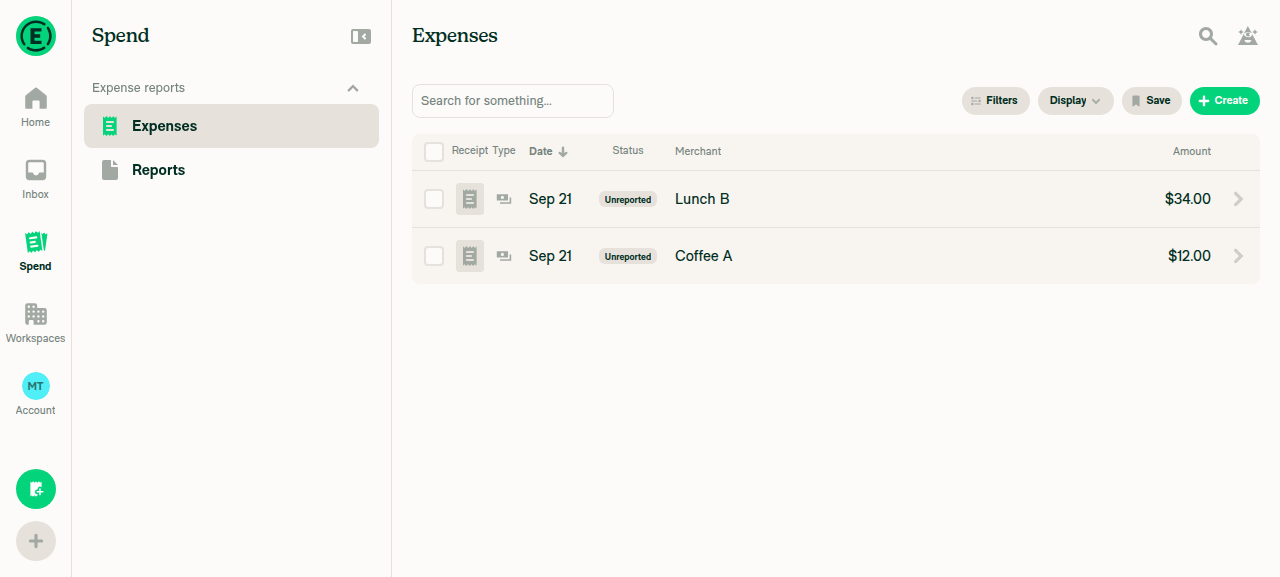
Signed in and the Reports > Expenses list loadsPrestart sign-in had timed out, but all four macro selector arms resolved against the live page — a slow dev server (snapshot p95 18.5s), not selector drift. Signed in by hand, completed onboarding, landed on Home. Created two manual self expenses ($12 Coffee A, $34 Lunch B) so the list had content; both rendered as Unreported.
Spend > Expenses list showing two Unreported expenses
✅
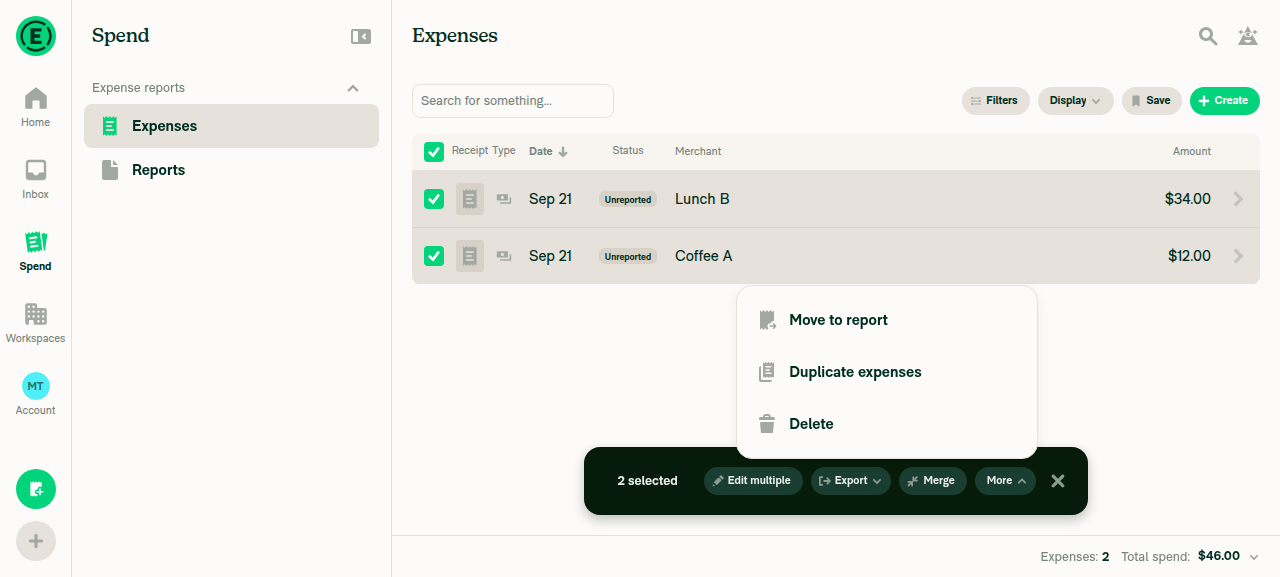
Select two or more unreported expenses and capture the bulk actions offeredSelected both expenses (toolbar: "2 selected", $46.00). The More menu offers exactly three rows: Move to report, Duplicate expenses, Delete. Both expenses share one submitter, so the hasMultipleOwners branch is not taken and Move to report is correctly still offered. This does NOT exercise the PR's change — the removal only applies when ownerAccountIDs.size > 1.
Bulk action menu with 2 selected showing Move to report, Duplicate expenses, Delete
✅
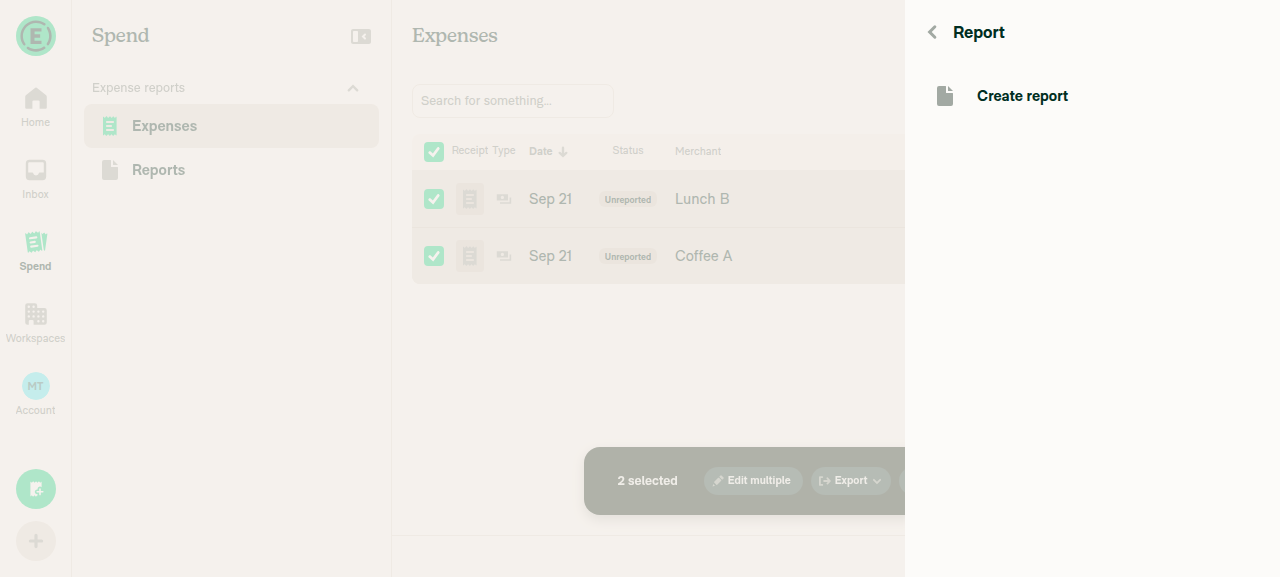
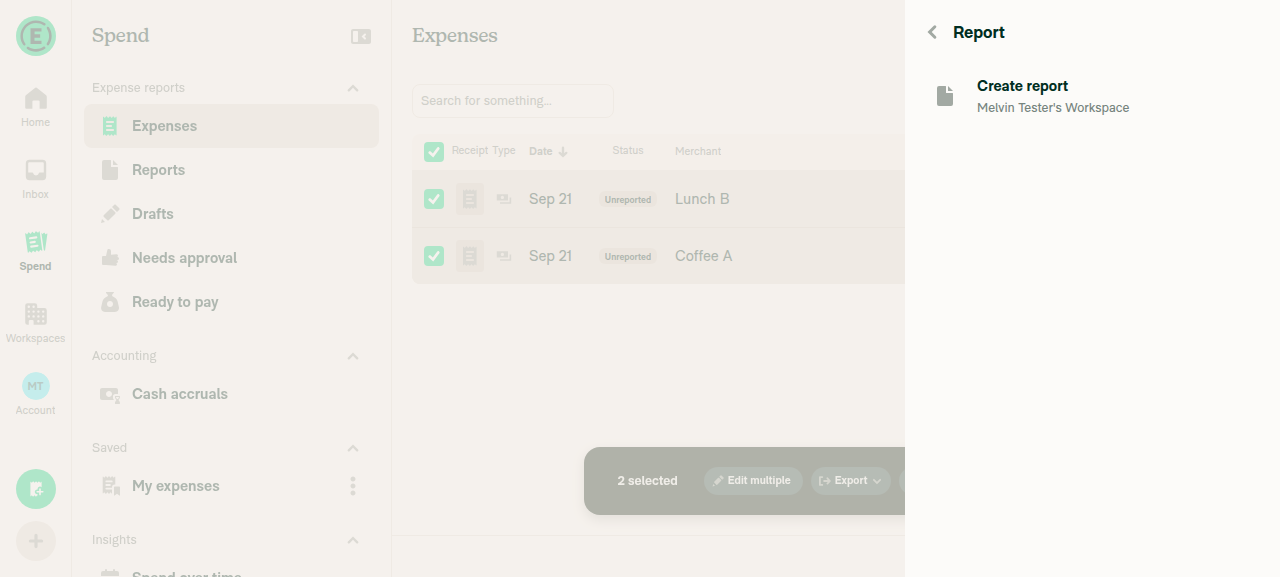
No "Auto report" row anywhere in the Move to report destination listOpened the destination list twice. Without a workspace the full snapshot returned 4 nodes — Back, heading "Report", "Create report" — and nothing else; with a workspace it added only the workspace entry. is absent 'label="Auto report"' returned ABSENT both times and a text scan for "Auto report" matched nothing. Caveat: with a single submitter the !hasMultipleSubmitters guard would also hide the row on main, so this confirms absence but does not isolate IS_AUTO_REPORT_ENABLED as the cause.
Move-to-report destination list showing only Create report, no Auto report row
Destination list with a workspace present, still no Auto report row
✅
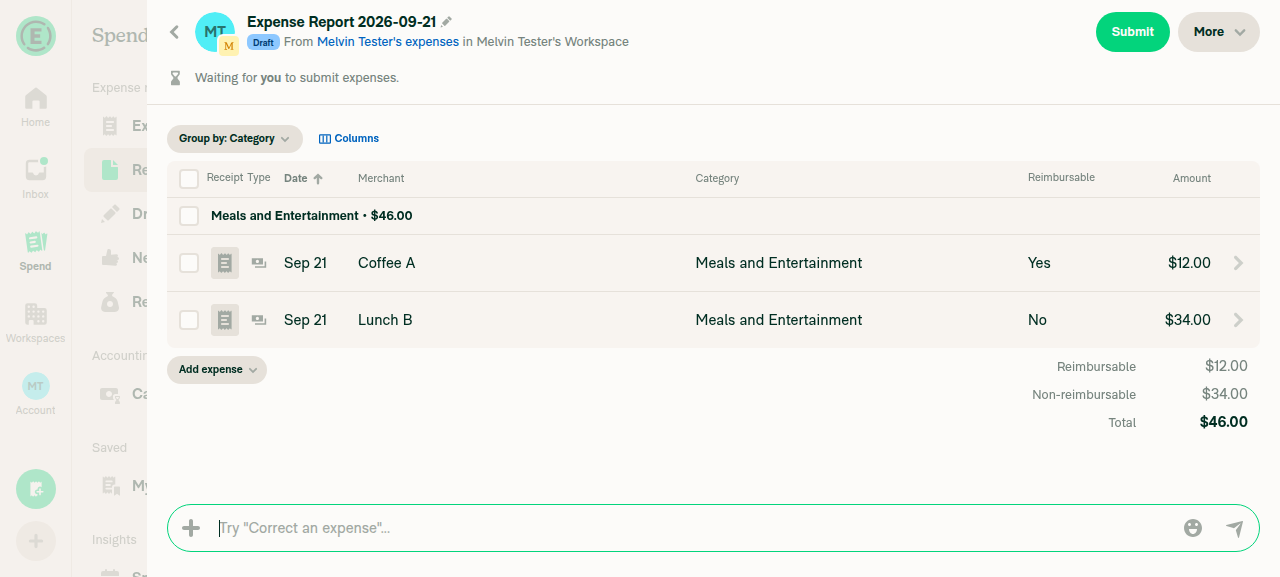
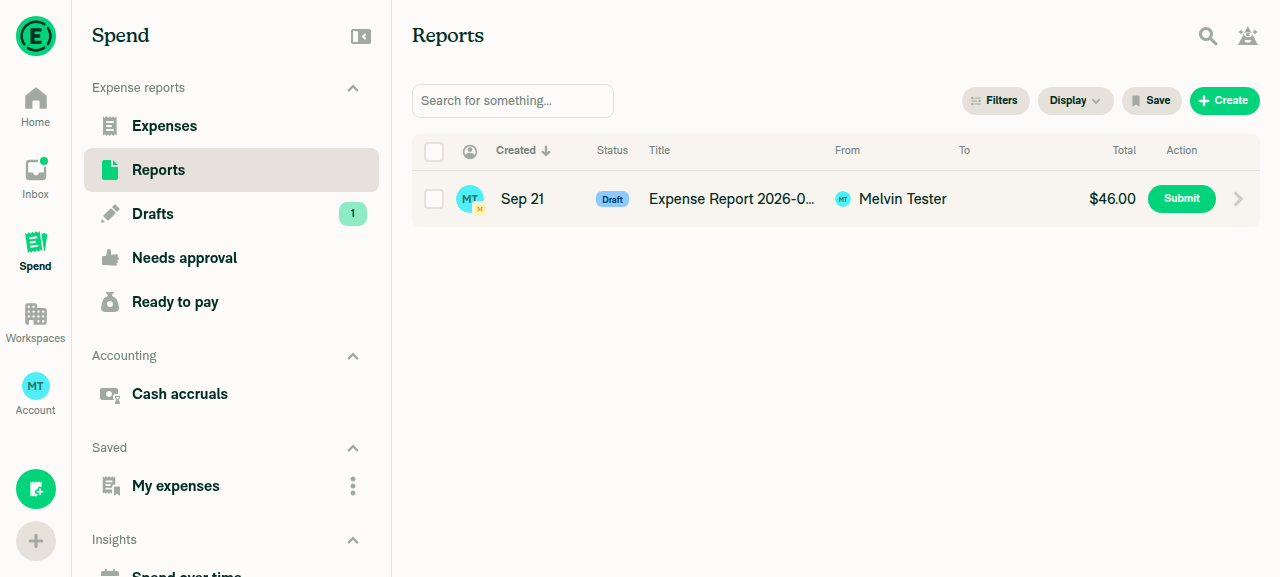
A normal single-submitter move still works, with no error on the expenseReport creation from the FAB hits an Upgrade wall on a personal account, so I created a free workspace and used the destination list's own "Create report" entry. Both expenses moved: status flipped Unreported → Draft, the Reports tab holds one Draft report totalling $46.00, and the report detail contains both expenses with no RBR indicator. Network log shows CreateAppReport 200 then ChangeTransactionsReport 200; scans for "error" / "went wrong" matched nothing.
Reports tab showing new Draft Expense Report totalling $46.00 with no error
Destination report detail listing both moved expenses, no error
✅
No JS console errors appear during the flowNot verifiable on this path, so not claimed as a pass: agent-device exposes no browser console for web (console is an unknown command, logs path returns UNSUPPORTED_OPERATION). Closest proxy: all 190 captured requests returned 200, zero non-200 responses, and no in-app error UI appeared.
❌

What was not reached: the deploy blocker's repro needs a selection spanning two submitters with expenses on two company card feeds across two workspaces. One test account means ownerAccountIDs.size is always 1, and there is no way to provision a company card feed here. So neither the Move to report removal in useSearchBulkActions.ts nor the Auto report row suppression in IOURequestEditReportCommon.tsx was actually driven — both remain covered only by the unit test on this branch.


view run · view recording

@lakchote

Copy link
Copy Markdown
Contributor

@lakchote lakchote closed this Sep 21, 2026
@MelvinBot

Copy link
Copy Markdown
Contributor Author

🤖 Done — the PR body is now set to the content you provided, verbatim.

I read it back from the API and compared it against what you sent: the explanation, Fixed Issues, Tests / Offline tests / QA Steps sections, and every checked box in the author checklist all match.

One thing worth flagging rather than silently leaving: this PR is currently closed, so the body edit doesn't put it back in the review flow. Reopen it if that was the intent.


view run

Sign up for free to join this conversation on GitHub. Already have an account? Sign in to comment

Labels

Melvin-Test-Android Melvin-Test-Web Triggers Melvin to run the testing steps of the PR on web

Projects

None yet

Development

Successfully merging this pull request may close these issues.

3 participants