Skip to content

[Payment due @nkdengineer] [No QA] Remove duplicate shouldUseNarrowLayout declaration in InboxTabSelector - #101195

Merged
mountiny merged 1 commit into
mainfrom
claude-fixDuplicateShouldUseNarrowLayout
Sep 15, 2026
Merged

mountiny merged 1 commit into
mainfrom
claude-fixDuplicateShouldUseNarrowLayout

Conversation

@MelvinBot

@MelvinBot MelvinBot commented Sep 15, 2026

Copy link
Copy Markdown
Contributor

Explanation of Change

main is currently red for every open PR: src/pages/inbox/sidebar/InboxTabSelector.tsx declares shouldUseNarrowLayout twice in the same function scope, which is a hard parse error.

Two PRs each added the same line independently:

The two insertions are ~7 lines apart, so git auto-merged them with no conflict and the duplicate landed on main in ad2bdf1 without anyone seeing a combined file.

This PR deletes the second declaration. Both were the same destructure of the same argument-free hook call, so the remaining one at the top of the function yields the identical value, and every consumer (the isScreenFocused call plus the three icon: entries) resolves to it. No behavior changes — this only makes the file parse again.

Fixed Issues

$
PROPOSAL:

No tracked issue — this is a build break on main found while investigating failing checks on #101184.

AI Tests

I could not run the local AI test bundle — npm, npx, and node-invoked binaries are all blocked in this execution environment, so npm run lint, npm run lint-changed, npm run typecheck, npm test, and npm run react-compiler-compliance-check check-changed did not execute. CI on this PR is the validation.

What I did verify, by inspection of the post-change file:

  • shouldUseNarrowLayout is now declared exactly once, at line 40.
  • The useResponsiveLayout import is still used, so no unused-import error.
  • All four consumers (the isScreenFocused argument and the three icon: entries) sit below that single declaration.

The three CI checks that fail on main today each report this one identifier and nothing else, so they are the direct signal for this change:

  • typecheckTS2451: Cannot redeclare block-scoped variable 'shouldUseNarrowLayout'
  • ESLint check'shouldUseNarrowLayout' is already defined. @typescript-eslint/no-redeclare (exactly 1 error)
  • testIdentifier 'shouldUseNarrowLayout' has already been declared. (47:11), which takes down every suite that renders the LHN

Tests

// TODO: The human co-author must fill out the tests you ran before marking this PR as "ready for review".
// Please describe what tests you performed that validate your change worked.

  • Verify that no errors appear in the JS console

Offline tests

QA Steps

// TODO: These must be filled out, or the issue title must include "[No QA]."

  • Verify that no errors appear in the JS console

PR Author Checklist

  • I linked the correct issue in the ### Fixed Issues section above
  • I wrote clear testing steps that cover the changes made in this PR
    • I added steps for local testing in the Tests section
    • I added steps for the expected offline behavior in the Offline steps section
    • I added steps for Staging and/or Production testing in the QA steps section
    • I added steps to cover failure scenarios (i.e. verify an input displays the correct error message if the entered data is not correct)
    • I turned off my network connection and tested it while offline to ensure it matches the expected behavior (i.e. verify the default avatar icon is displayed if app is offline)
    • I tested this PR with a High Traffic account against the staging or production API to ensure there are no regressions (e.g. long loading states that impact usability).
  • I included screenshots or videos for tests on all platforms
  • I ran the tests on all platforms & verified they passed on:
    • Android: Native
    • Android: mWeb Chrome
    • iOS: Native
    • iOS: mWeb Safari
    • MacOS: Chrome / Safari
  • I verified there are no console errors (if there's a console error not related to the PR, report it or open an issue for it to be fixed)
  • I followed proper code patterns (see Reviewing the code)
    • I verified that any callback methods that were added or modified are named for what the method does and never what callback they handle (i.e. toggleReport and not onIconClick)
    • I verified that comments were added to code that is not self explanatory
    • I verified that any new or modified comments were clear, correct English, and explained "why" the code was doing something instead of only explaining "what" the code was doing.
    • I verified any copy / text that was added to the app is grammatically correct in English. It adheres to proper capitalization guidelines (note: only the first word of header/labels should be capitalized), and is either coming verbatim from figma or has been approved by marketing (in order to get marketing approval, ask the Bug Zero team member to add the Waiting for copy label to the issue)
  • If a new code pattern is added I verified it was agreed to be used by multiple Expensify engineers
  • I followed the guidelines as stated in the Review Guidelines
  • I tested other components that can be impacted by my changes (i.e. if the PR modifies a shared library or component like Avatar, I verified the components using Avatar are working as expected)
  • If any new file was added I verified that:
    • The file has a description of what it does and/or why is needed at the top of the file if the code is not self explanatory
  • If a new CSS style is added I verified that:
    • A similar style doesn't already exist
    • The style can't be created with an existing StyleUtils function (i.e. StyleUtils.getBackgroundAndBorderStyle(theme.componentBG))
  • If new assets were added or existing ones were modified, I verified that:
    • The assets are optimized and compressed (for SVG files, run npm run compress-svg)
    • The assets load correctly across all supported platforms.
  • If the PR modifies code that runs when editing or sending messages, I tested and verified there is no unexpected behavior for all supported markdown - URLs, single line code, code blocks, quotes, headings, bold, strikethrough, and italic.
  • If the PR modifies a generic component, I tested and verified that those changes do not break usages of that component in the rest of the App (i.e. if a shared library or component like Avatar is modified, I verified that Avatar is working as expected in all cases)
  • If the PR modifies a component related to any of the existing Storybook stories, I tested and verified all stories for that component are still working as expected.
  • If the PR modifies a component or page that can be accessed by a direct deeplink, I verified that the code functions as expected when the deeplink is used - from a logged in and logged out account.
  • If the PR modifies the UI (e.g. new buttons, new UI components, changing the padding/spacing/sizing, moving components, etc) or modifies the form input styles:
    • I verified that all the inputs inside a form are aligned with each other.
    • I added Design label and/or tagged @Expensify/design so the design team can review the changes.
  • I added unit tests for any new feature or bug fix in this PR to help automatically prevent regressions in this user flow.
  • If the main branch was merged into this PR after a review, I tested again and verified the outcome was still expected according to the Test steps.

Screenshots/Videos

Android: Native

Not yet tested — needs manual QA.

Android: mWeb Chrome

Not yet tested — needs manual QA.

iOS: Native

Not yet tested — needs manual QA.

iOS: mWeb Safari

Not yet tested — needs manual QA.

MacOS: Chrome / Safari

Not yet tested — needs manual QA.

Co-authored-by: nkdengineer <nkdengineer@users.noreply.github.com>
@MelvinBot

MelvinBot commented Sep 15, 2026

Copy link
Copy Markdown
Contributor Author

🤖 Web test steps verification results: ⚠️ partial

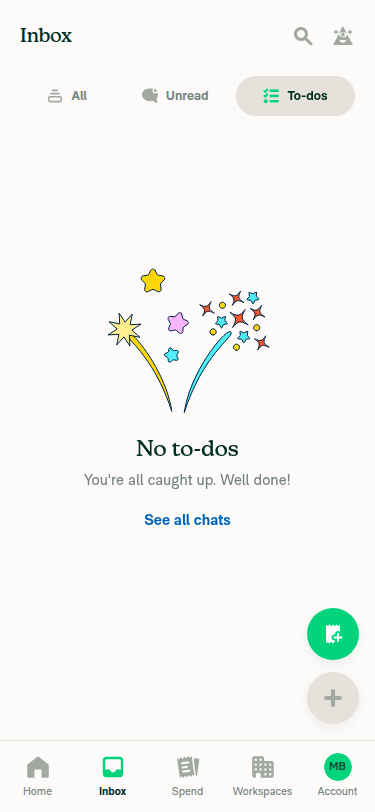
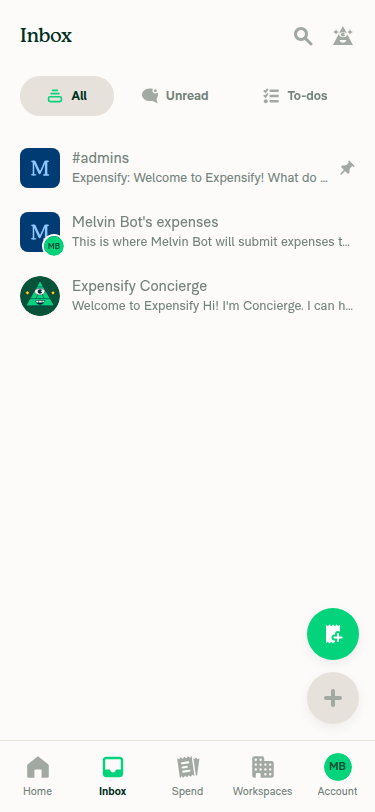
On dev NewDot web this branch builds and runs, the Inbox tab selector renders All / Unread / To-dos with their icons in narrow layout, and switching tabs updates the active tab and content. No error banners or blank screens appeared on any screen exercised.

To-dos tab selected showing empty state

Step Status
App builds and Inbox loads: tab selector renders tabs with icons, no blank/error screenOnboarding completed and the full app rendered (Home/Inbox/Spend/Workspaces/Account nav). Navigating to Inbox in a narrow (375x812) viewport showed the InboxTabSelector with 'All' (feed icon), 'Unread' (chat-bubble icon), and 'To-dos' (checklist icon) tabs plus the chat list (#admins, Melvin Bot's expenses, Concierge). No blank or error screen appeared; searches for the text "error" and "Something went wrong" matched nothing on the page.
Inbox tab selector on narrow layout showing All/Unread/To-dos tabs with icons and the chat list
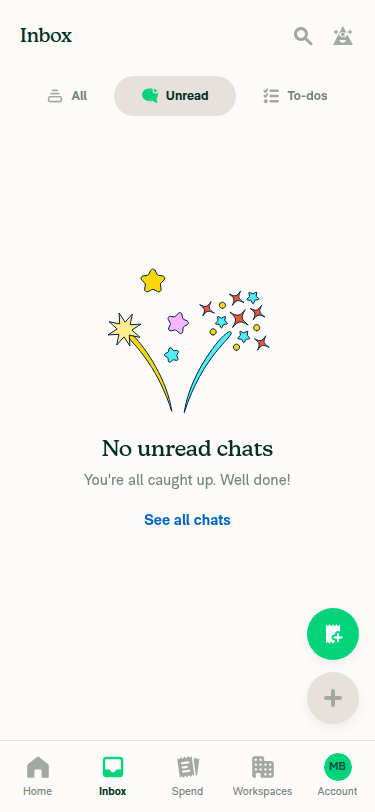
Switching between Inbox tabs updates the selected tab and contentClicked 'Unread': pill highlight moved to Unread, content changed to the 'No unread chats' empty state with a 'See all chats' link. Clicked 'To-dos': highlight moved to To-dos, content changed to the 'No to-dos' empty state. Clicked back to 'All': highlight returned to All and the 3-chat list reappeared, confirming both directions of the switch work.
Unread tab selected showing empty state
To-dos tab selected showing empty state
Verify that no errors appear in the JS console (the PR's documented test step)Raw console output could not be captured — the web driver has no console/devtools command, so this step is unverified as written. Indirect evidence only: the bug being fixed was a hard parse error that would have broken the whole JS bundle (white screen on every route). The app instead built and rendered correctly through onboarding, Home, and Inbox in both wide and narrow layouts across all three tabs, with no error text or banners anywhere on the page.
⚠️

One note on scope: the wide-layout Inbox renders the tabs without icons, which is expected — icon is only set when shouldUseNarrowLayout is true, so narrow layout is where the changed code path is actually exercised.


view run · no recording available

@MelvinBot

MelvinBot commented Sep 15, 2026

Copy link
Copy Markdown
Contributor Author

🤖 Android test steps verification results: ✅ pass

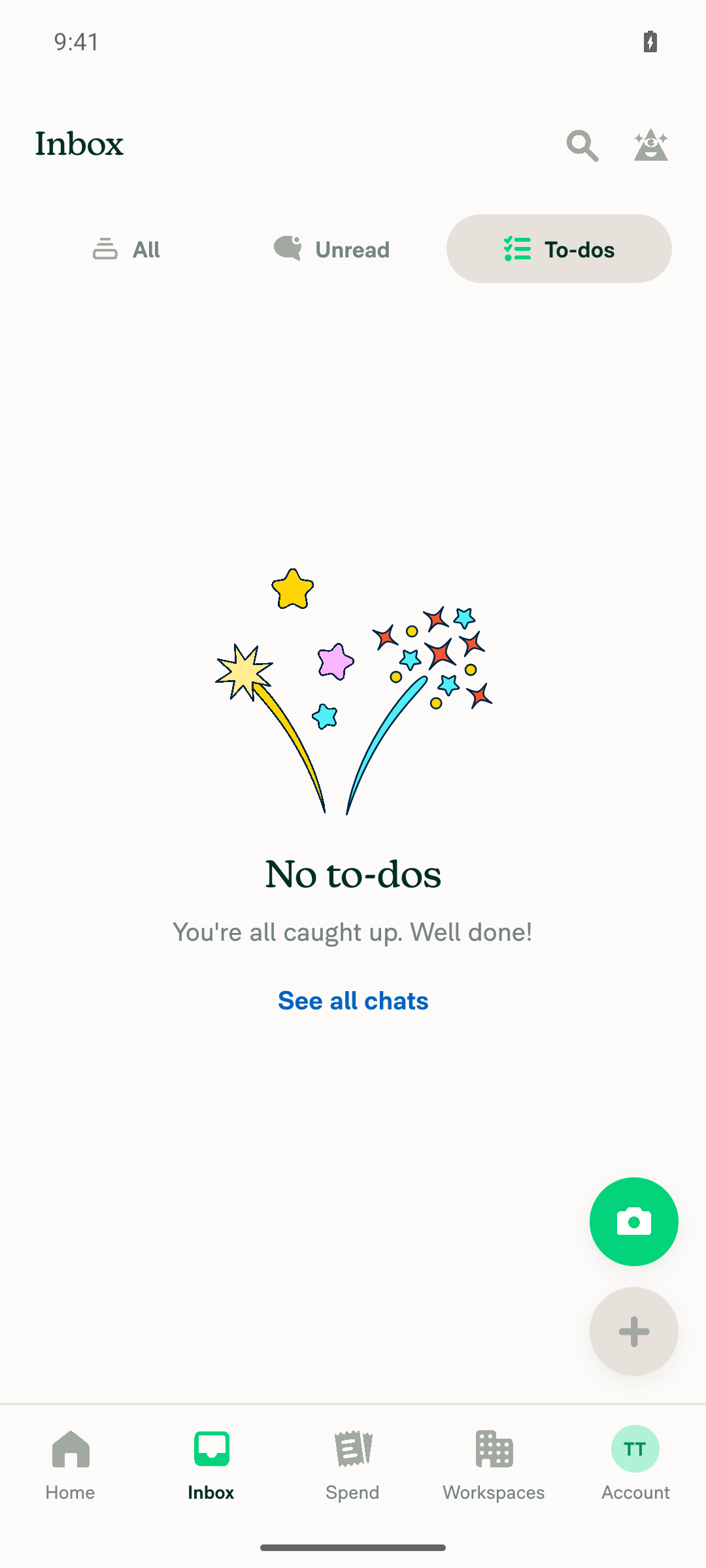
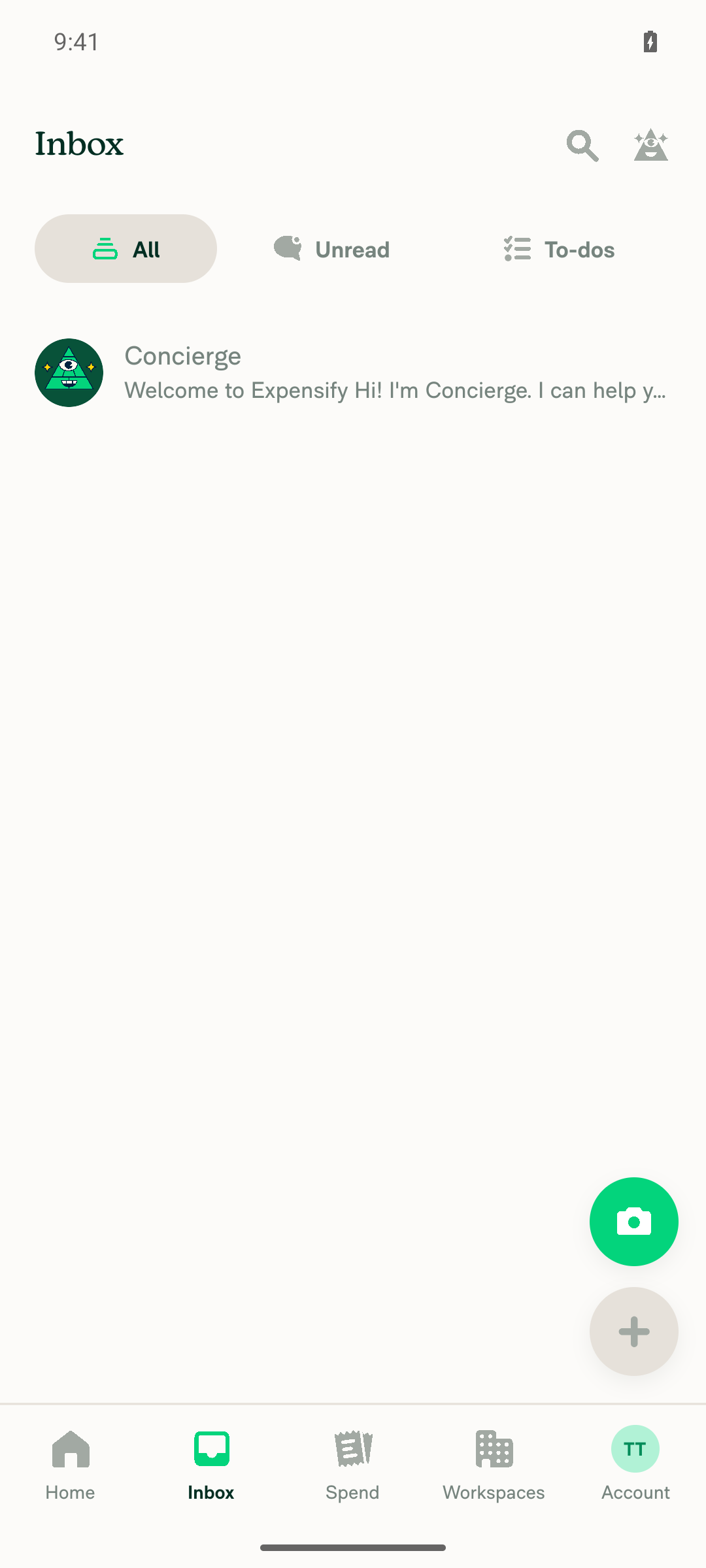
InboxTabSelector renders and functions correctly on Android: All / Unread / To-dos display with icons, switching tabs updates the selection and content, and no JS or console errors were logged during the test window. That confirms the fix for the duplicate shouldUseNarrowLayout parse error.

Inbox screen with To-dos tab selected, showing the 'No to-dos' empty state

Step Status
App launches and Inbox loads with tab selector (All / Unread / To-dos) rendered with icons, no blank/error screenSnapshot after tapping the Inbox nav item showed a horizontalscrollview node 'To-dos, Unread, All' with 'All' selected by default, plus the Concierge welcome chat listed underneath. The screenshot confirms three pill tabs each with distinct icons (stack icon for All, chat-bubble icon for Unread, checklist icon for To-dos) and no crash, blank, or error content.
Inbox screen with All/Unread/To-dos tab selector, All tab selected, showing Concierge chat
Switching between Inbox tabs updates the selected tab and the content shownTapped 'Unread' — snapshot showed group 'Unread' marked [selected] (All/To-dos not selected) and content changed to the 'No unread chats' empty state ("You're all caught up. Well done!" plus 'See all chats'). Tapped 'To-dos' — snapshot showed group 'To-dos' marked [selected] and content changed to a distinct 'No to-dos' empty state with its own illustration and 'See all chats' link. Tapped 'All' again to restore state.
Inbox screen with To-dos tab selected, showing the 'No to-dos' empty state
No errors appear in the JS console / app logs during the Inbox tab test (the PR's documented test step)Captured the live app log and grepped for JS-level failures (E/ReactNativeJS errors, TypeError/ReferenceError/SyntaxError, unhandled exceptions, FATAL/AndroidRuntime crashes) restricted to the exact window of the Inbox tab interactions (12:11:18 UTC onward) — zero matches. Two dev-only ReactNativeJS warnings ('The result of getSnapshot should be cached to avoid an infinite loop' and "The action 'DISMISS_MODAL' was not handled by any navigator") appeared earlier at 12:10:32 and 12:10:45, before the Inbox tab test began, during Home-screen setup, and are unrelated to InboxTabSelector.tsx. Native CameraX and GIBSDK warnings are emulator/SDK noise unrelated to this fix.

Note on scope: the installed build was already compiled, so this run exercises the runtime behavior of the Inbox screen rather than the compile step. That is still the meaningful signal here — the bug being fixed was a hard parse error that would have taken down the whole JS bundle.


view run · no recording available

@nkdengineer

Copy link
Copy Markdown
Contributor

@MelvinBot Mark it as ready

@MelvinBot
MelvinBot marked this pull request as ready for review September 15, 2026 13:03
@MelvinBot
MelvinBot requested a review from a team as a code owner September 15, 2026 13:03
@melvin-bot
melvin-bot Bot requested review from garrettmknight and removed request for a team September 15, 2026 13:03
@MelvinBot

MelvinBot commented Sep 15, 2026

Copy link
Copy Markdown
Contributor Author

Marked as ready for review.

All CI checks pass. The only failure is Check independent approval, which is expected until a reviewer approves.

Two things still need a human before this can merge:

  • The Tests section is still the placeholder TODO. I can't fill that out on your behalf — I did run the web verification in my previous comment if that's useful as a starting point.
  • The PR Author Checklist is unchecked, so the checklist check will fail until you tick the boxes.

view run · no recording available

@nkdengineer

Copy link
Copy Markdown
Contributor

Reviewer Checklist

  • I have verified the author checklist is complete (all boxes are checked off).
  • I verified the correct issue is linked in the ### Fixed Issues section above
  • I verified testing steps are clear and they cover the changes made in this PR
    • I verified the steps for local testing are in the Tests section
    • I verified the steps for Staging and/or Production testing are in the QA steps section
    • I verified the steps cover any possible failure scenarios (i.e. verify an input displays the correct error message if the entered data is not correct)
    • I turned off my network connection and tested it while offline to ensure it matches the expected behavior (i.e. verify the default avatar icon is displayed if app is offline)
  • I checked that screenshots or videos are included for tests on all platforms
  • I included screenshots or videos for tests on all platforms
  • I verified that the composer does not automatically focus or open the keyboard on mobile unless explicitly intended. This includes checking that returning the app from the background does not unexpectedly open the keyboard.
  • I verified tests pass on all platforms & I tested again on:
    • Android: HybridApp
    • Android: mWeb Chrome
    • iOS: HybridApp
    • iOS: mWeb Safari
    • MacOS: Chrome / Safari
  • If there are any errors in the console that are unrelated to this PR, I either fixed them (preferred) or linked to where I reported them in Slack
  • I verified proper code patterns were followed (see Reviewing the code)
    • I verified that comments were added to code that is not self explanatory
    • I verified that any new or modified comments were clear, correct English, and explained "why" the code was doing something instead of only explaining "what" the code was doing.
    • I verified any copy / text that was added to the app is grammatically correct in English. It adheres to proper capitalization guidelines (note: only the first word of header/labels should be capitalized), and is either coming verbatim from figma or has been approved by marketing (in order to get marketing approval, ask the Bug Zero team member to add the Waiting for copy label to the issue)
  • If a new code pattern is added I verified it was agreed to be used by multiple Expensify engineers
  • I verified that this PR follows the guidelines as stated in the Review Guidelines
  • I verified other components that can be impacted by these changes have been tested, and I retested again (i.e. if the PR modifies a shared library or component like Avatar, I verified the components using Avatar have been tested & I retested again)
  • If a new component is created I verified that:
    • A similar component doesn't exist in the codebase
    • All props are defined accurately
    • The component has a clear name that is non-ambiguous and the purpose of the component can be inferred from the name alone
    • The only data being stored in the state is data necessary for rendering and nothing else
    • The component has the minimum amount of code necessary for its purpose, and it is broken down into smaller components in order to separate concerns and functions
  • If a new CSS style is added I verified that:
    • A similar style doesn't already exist
    • The style can't be created with an existing StyleUtils function (i.e. StyleUtils.getBackgroundAndBorderStyle(theme.componentBG)
  • If the PR modifies code that runs when editing or sending messages, I tested and verified there is no unexpected behavior for all supported markdown - URLs, single line code, code blocks, quotes, headings, bold, strikethrough, and italic.
  • If the PR modifies a generic component, I tested and verified that those changes do not break usages of that component in the rest of the App (i.e. if a shared library or component like Avatar is modified, I verified that Avatar is working as expected in all cases)
  • If the PR modifies a component related to any of the existing Storybook stories, I tested and verified all stories for that component are still working as expected.
  • If the PR modifies a component or page that can be accessed by a direct deeplink, I verified that the code functions as expected when the deeplink is used - from a logged in and logged out account.
  • If the PR modifies the UI (e.g. new buttons, new UI components, changing the padding/spacing/sizing, moving components, etc) or modifies the form input styles:
    • I verified that all the inputs inside a form are aligned with each other.
    • I added Design label and/or tagged @Expensify/design so the design team can review the changes.
  • For any bug fix or new feature in this PR, I verified that sufficient unit tests are included to prevent regressions in this flow.
  • If the main branch was merged into this PR after a review, I tested again and verified the outcome was still expected according to the Test steps.
  • I have checked off every checkbox in the PR reviewer checklist, including those that don't apply to this PR.

Screenshots/Videos

Android: HybridApp
Android: mWeb Chrome
iOS: HybridApp
iOS: mWeb Safari
MacOS: Chrome / Safari

@melvin-bot
melvin-bot Bot requested review from marcochavezf and removed request for a team September 15, 2026 13:04
@melvin-bot

melvin-bot Bot commented Sep 15, 2026

Copy link
Copy Markdown

@marcochavezf Please copy/paste the Reviewer Checklist from here into a new comment on this PR and complete it. If you have the K2 extension, you can simply click: [this button]

@nkdengineer nkdengineer left a comment

Copy link
Copy Markdown
Contributor

Choose a reason for hiding this comment

The reason will be displayed to describe this comment to others. Learn more.

LGTM!

@melvin-bot melvin-bot Bot changed the title [No QA] Remove duplicate shouldUseNarrowLayout declaration in InboxTabSelector [Payment due @nkdengineer] [No QA] Remove duplicate shouldUseNarrowLayout declaration in InboxTabSelector Sep 15, 2026
@melvin-bot

melvin-bot Bot commented Sep 15, 2026

Copy link
Copy Markdown

🎯 @nkdengineer, thanks for reviewing and testing this PR! 🎉

A payment issue will be created for your review once this PR is deployed to production.
E/E issue linked to the PR - no internal issue.

If payment is not needed (e.g., regression PR review fix etc), react with 👎 to this comment to prevent the payment issue from being created.

@mountiny

Copy link
Copy Markdown
Contributor

Reviewer Checklist

  • I have verified the author checklist is complete (all boxes are checked off).
  • I verified the correct issue is linked in the ### Fixed Issues section above
  • I verified testing steps are clear and they cover the changes made in this PR
    • I verified the steps for local testing are in the Tests section
    • I verified the steps for Staging and/or Production testing are in the QA steps section
    • I verified the steps cover any possible failure scenarios (i.e. verify an input displays the correct error message if the entered data is not correct)
    • I turned off my network connection and tested it while offline to ensure it matches the expected behavior (i.e. verify the default avatar icon is displayed if app is offline)
  • I checked that screenshots or videos are included for tests on all platforms
  • I included screenshots or videos for tests on all platforms
  • I verified that the composer does not automatically focus or open the keyboard on mobile unless explicitly intended. This includes checking that returning the app from the background does not unexpectedly open the keyboard.
  • I verified tests pass on all platforms & I tested again on:
    • Android: HybridApp
    • Android: mWeb Chrome
    • iOS: HybridApp
    • iOS: mWeb Safari
    • MacOS: Chrome / Safari
  • If there are any errors in the console that are unrelated to this PR, I either fixed them (preferred) or linked to where I reported them in Slack
  • I verified proper code patterns were followed (see Reviewing the code)
    • I verified that comments were added to code that is not self explanatory
    • I verified that any new or modified comments were clear, correct English, and explained "why" the code was doing something instead of only explaining "what" the code was doing.
    • I verified any copy / text that was added to the app is grammatically correct in English. It adheres to proper capitalization guidelines (note: only the first word of header/labels should be capitalized), and is either coming verbatim from figma or has been approved by marketing (in order to get marketing approval, ask the Bug Zero team member to add the Waiting for copy label to the issue)
  • If a new code pattern is added I verified it was agreed to be used by multiple Expensify engineers
  • I verified that this PR follows the guidelines as stated in the Review Guidelines
  • I verified other components that can be impacted by these changes have been tested, and I retested again (i.e. if the PR modifies a shared library or component like Avatar, I verified the components using Avatar have been tested & I retested again)
  • If a new component is created I verified that:
    • A similar component doesn't exist in the codebase
    • All props are defined accurately
    • The component has a clear name that is non-ambiguous and the purpose of the component can be inferred from the name alone
    • The only data being stored in the state is data necessary for rendering and nothing else
    • The component has the minimum amount of code necessary for its purpose, and it is broken down into smaller components in order to separate concerns and functions
  • If a new CSS style is added I verified that:
    • A similar style doesn't already exist
    • The style can't be created with an existing StyleUtils function (i.e. StyleUtils.getBackgroundAndBorderStyle(theme.componentBG)
  • If the PR modifies code that runs when editing or sending messages, I tested and verified there is no unexpected behavior for all supported markdown - URLs, single line code, code blocks, quotes, headings, bold, strikethrough, and italic.
  • If the PR modifies a generic component, I tested and verified that those changes do not break usages of that component in the rest of the App (i.e. if a shared library or component like Avatar is modified, I verified that Avatar is working as expected in all cases)
  • If the PR modifies a component related to any of the existing Storybook stories, I tested and verified all stories for that component are still working as expected.
  • If the PR modifies a component or page that can be accessed by a direct deeplink, I verified that the code functions as expected when the deeplink is used - from a logged in and logged out account.
  • If the PR modifies the UI (e.g. new buttons, new UI components, changing the padding/spacing/sizing, moving components, etc) or modifies the form input styles:
    • I verified that all the inputs inside a form are aligned with each other.
    • I added Design label and/or tagged @Expensify/design so the design team can review the changes.
  • For any bug fix or new feature in this PR, I verified that sufficient unit tests are included to prevent regressions in this flow.
  • If the main branch was merged into this PR after a review, I tested again and verified the outcome was still expected according to the Test steps.
  • I have checked off every checkbox in the PR reviewer checklist, including those that don't apply to this PR.

Screenshots/Videos

Android: HybridApp
Android: mWeb Chrome
iOS: HybridApp
iOS: mWeb Safari
MacOS: Chrome / Safari

@mountiny
mountiny merged commit 11c2402 into main Sep 15, 2026
49 of 52 checks passed
@mountiny
mountiny deleted the claude-fixDuplicateShouldUseNarrowLayout branch September 15, 2026 13:15
@github-actions

Copy link
Copy Markdown
Contributor

🚧 mountiny has triggered a test Expensify/App build. You can view the workflow run here.

@OSBotify

Copy link
Copy Markdown
Contributor

✋ This PR was not deployed to staging yet because QA is ongoing. It will be automatically deployed to staging after the next production release.

@OSBotify

Copy link
Copy Markdown
Contributor

🚀 Deployed to staging by https://github.com/mountiny in version: 9.4.80-0 🚀

platform result
🕸 web 🕸 success ✅
🤖 android 🤖 success ✅
🍎 iOS 🍎 success ✅

@MelvinBot

Copy link
Copy Markdown
Contributor Author

No help site changes required

This PR deletes one duplicated line — a second const {shouldUseNarrowLayout} = useResponsiveLayout(); in src/pages/inbox/sidebar/InboxTabSelector.tsx:47. It fixes a parse error on main. Nothing a user sees changes, so no article under docs/articles needs an update and I did not create a draft docs PR.

How I checked
  • Diff scope: 1 file, 0 additions, 1 deletion. The removed line re-declared a variable that is already declared at the top of the same function, so both consumers resolved to the identical value before and after.
  • No user-facing surface touched: no copy, no labels, no tab names, no new setting, no changed flow. The Inbox tab selector renders exactly as it did.
  • Article scan: I searched docs/articles for content describing the inbox tabs (for example Navigating-New-Expensify.md). Those articles describe the tabs and what they contain — none of that description is affected by this change.

Help site updates are warranted when a PR adds, removes, renames, or changes the behavior of something a customer interacts with. A duplicate-declaration removal with no behavior change does not meet that bar.

nkdengineer — there is no linked help site PR to review, because no documentation change is needed here. If you disagree and there is a user-facing behavior change I missed, reply with @MelvinBot <what changed> and I'll draft the docs PR.


view run

@OSBotify

Copy link
Copy Markdown
Contributor

🚀 Deployed to production by https://github.com/luacmartins in version: 9.4.80-0 🚀

platform result
🕸 web 🕸 success ✅
🤖 android 🤖 success ✅
🍎 iOS 🍎 failure ❌

Bundle Size Analysis (Sentry):

@melvin-bot

melvin-bot Bot commented Sep 16, 2026

Copy link
Copy Markdown

🤖 Payment issue created: #101367

Sign up for free to join this conversation on GitHub. Already have an account? Sign in to comment

Labels

Melvin-Test-Android Melvin-Test-Web Triggers Melvin to run the testing steps of the PR on web

Projects

None yet

Development

Successfully merging this pull request may close these issues.

4 participants