Skip to content

feat: Add count and spend total selectors to the Spend footer - #100674

Open
truph01 wants to merge 64 commits into
Expensify:mainfrom
truph01:feat/99452
Open

truph01 wants to merge 64 commits into
Expensify:mainfrom
truph01:feat/99452

Conversation

@truph01

@truph01 truph01 commented Sep 9, 2026 •

Copy link
Copy Markdown
Contributor

Explanation of Change

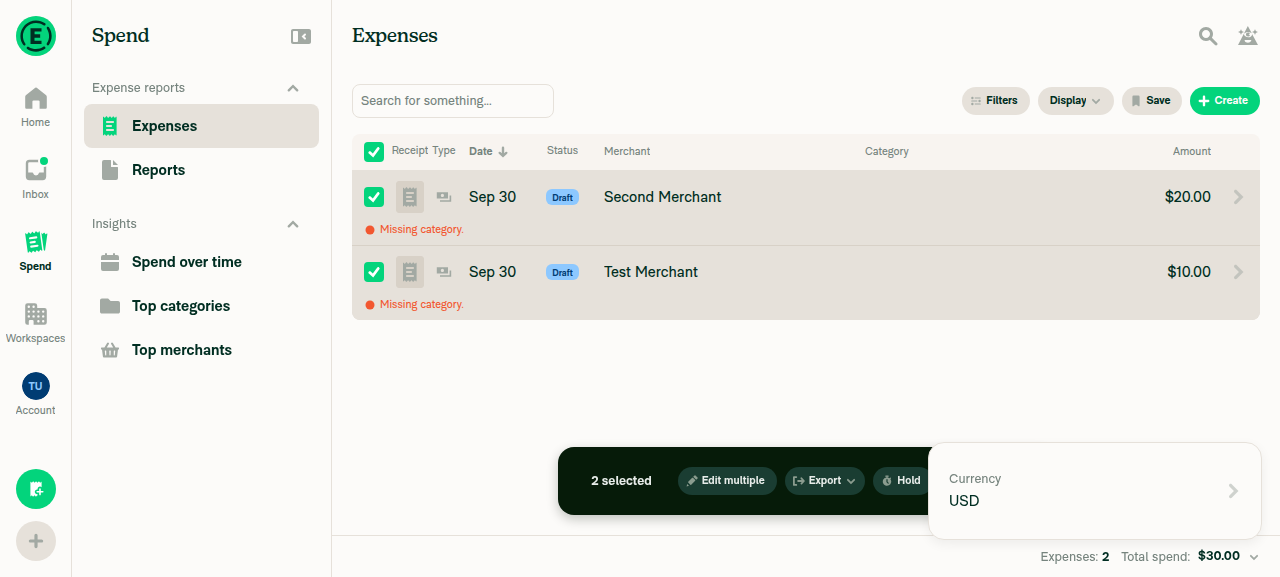
Adds the count and spend total selectors to the Spend footer, alongside the existing currency one, all three in a single display menu opened from the footer.

  • footerCount, footerTotal and footerCurrency are new search filters, so each selection persists with the search. Only footerTotal enters the query hash, since only it changes what the backend returns.
  • Count switches between the expense and report counts. Both already come back on every search, so it applies with no round trip.
  • Total offers Spend, Reimbursable, Non-reimbursable, Billable and Non-billable. With no selection the backend swaps the aggregate into search.total and the total shows a skeleton while it loads. With rows selected it is summed on the client from those rows.

Fixed Issues

$ #99452
PROPOSAL:

Tests

  1. Go to Spend > Expenses > Choose any rows > Verify the footer shows a count, a total and a chevron.
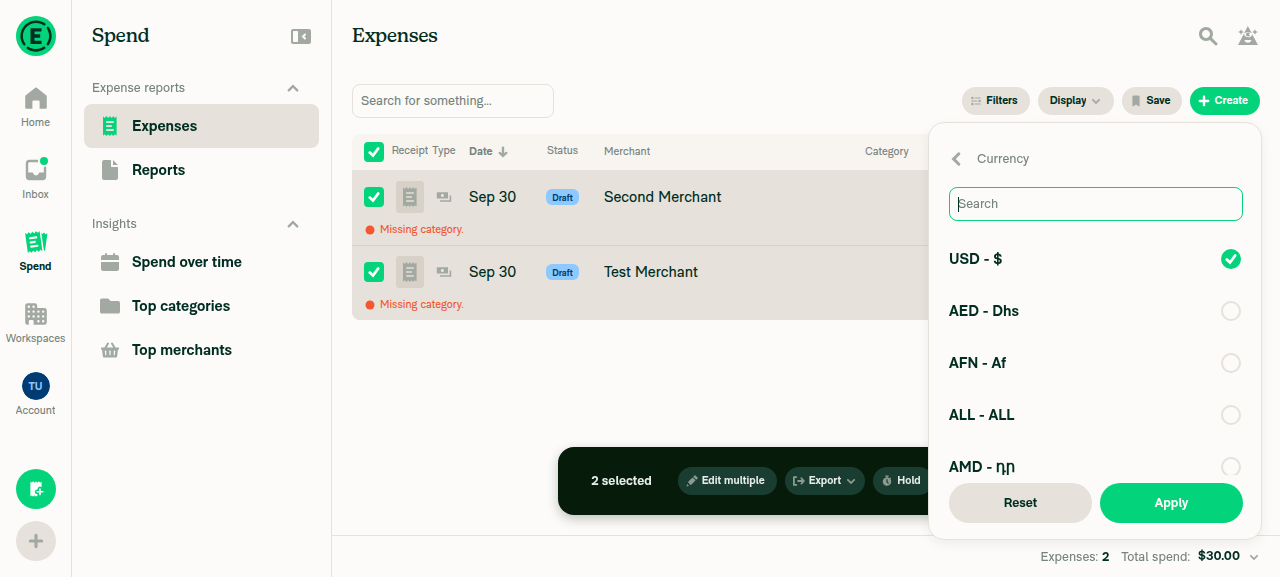
  2. Open the chevron. Verify rows for Count, Total and Currency.
  3. Count > Reports > Apply. Verify the footer reads Reports: X.
  4. Total > Reimbursable > Apply. Verify the total shows a reimbursable figure.
  • Verify that no errors appear in the JS console

Offline tests

QA Steps

// TODO: These must be filled out, or the issue title must include "[No QA]."
Same as tests

  • Verify that no errors appear in the JS console

PR Author Checklist

  • I linked the correct issue in the ### Fixed Issues section above
  • I wrote clear testing steps that cover the changes made in this PR
    • I added steps for local testing in the Tests section
    • I added steps for the expected offline behavior in the Offline steps section
    • I added steps for Staging and/or Production testing in the QA steps section
    • I added steps to cover failure scenarios (i.e. verify an input displays the correct error message if the entered data is not correct)
    • I turned off my network connection and tested it while offline to ensure it matches the expected behavior (i.e. verify the default avatar icon is displayed if app is offline)
    • I tested this PR with a High Traffic account against the staging or production API to ensure there are no regressions (e.g. long loading states that impact usability).
  • I included screenshots or videos for tests on all platforms
  • I ran the tests on all platforms & verified they passed on:
    • Android: Native
    • Android: mWeb Chrome
    • iOS: Native
    • iOS: mWeb Safari
    • MacOS: Chrome / Safari
  • I verified there are no console errors (if there's a console error not related to the PR, report it or open an issue for it to be fixed)
  • I verified there are no new alerts related to the canBeMissing param for useOnyx
  • I followed proper code patterns (see Reviewing the code)
    • I verified that any callback methods that were added or modified are named for what the method does and never what callback they handle (i.e. toggleReport and not onIconClick)
    • I verified that comments were added to code that is not self explanatory
    • I verified that any new or modified comments were clear, correct English, and explained "why" the code was doing something instead of only explaining "what" the code was doing.
    • I verified any copy / text shown in the product is localized by adding it to src/languages/* files and using the translation method
      • If any non-english text was added/modified, I used JaimeGPT to get English > Spanish translation. I then posted it in #expensify-open-source and it was approved by an internal Expensify engineer. Link to Slack message:
    • I verified all numbers, amounts, dates and phone numbers shown in the product are using the localization methods
    • I verified any copy / text that was added to the app is grammatically correct in English. It adheres to proper capitalization guidelines (note: only the first word of header/labels should be capitalized), and is either coming verbatim from figma or has been approved by marketing (in order to get marketing approval, ask the Bug Zero team member to add the Waiting for copy label to the issue)
    • I verified proper file naming conventions were followed for any new files or renamed files. All non-platform specific files are named after what they export and are not named "index.js". All platform-specific files are named for the platform the code supports as outlined in the README.
    • I verified the JSDocs style guidelines (in STYLE.md) were followed
  • If a new code pattern is added I verified it was agreed to be used by multiple Expensify engineers
  • I followed the guidelines as stated in the Review Guidelines
  • I tested other components that can be impacted by my changes (i.e. if the PR modifies a shared library or component like Avatar, I verified the components using Avatar are working as expected)
  • I verified all code is DRY (the PR doesn't include any logic written more than once, with the exception of tests)
  • I verified any variables that can be defined as constants (ie. in CONST.ts or at the top of the file that uses the constant) are defined as such
  • I verified that if a function's arguments changed that all usages have also been updated correctly
  • If any new file was added I verified that:
    • The file has a description of what it does and/or why is needed at the top of the file if the code is not self explanatory
  • If a new CSS style is added I verified that:
    • A similar style doesn't already exist
    • The style can't be created with an existing StyleUtils function (i.e. StyleUtils.getBackgroundAndBorderStyle(theme.componentBG))
  • If new assets were added or existing ones were modified, I verified that:
    • The assets are optimized and compressed (for SVG files, run npm run compress-svg)
    • The assets load correctly across all supported platforms.
  • If the PR modifies code that runs when editing or sending messages, I tested and verified there is no unexpected behavior for all supported markdown - URLs, single line code, code blocks, quotes, headings, bold, strikethrough, and italic.
  • If the PR modifies a generic component, I tested and verified that those changes do not break usages of that component in the rest of the App (i.e. if a shared library or component like Avatar is modified, I verified that Avatar is working as expected in all cases)
  • If the PR modifies a component related to any of the existing Storybook stories, I tested and verified all stories for that component are still working as expected.
  • If the PR modifies a component or page that can be accessed by a direct deeplink, I verified that the code functions as expected when the deeplink is used - from a logged in and logged out account.
  • If the PR modifies the UI (e.g. new buttons, new UI components, changing the padding/spacing/sizing, moving components, etc) or modifies the form input styles:
    • I verified that all the inputs inside a form are aligned with each other.
    • I added Design label and/or tagged @Expensify/design so the design team can review the changes.
  • If a new page is added, I verified it's using the ScrollView component to make it scrollable when more elements are added to the page.
  • I added unit tests for any new feature or bug fix in this PR to help automatically prevent regressions in this user flow.
  • If the main branch was merged into this PR after a review, I tested again and verified the outcome was still expected according to the Test steps.

Screenshots/Videos

Android: Native
Android: mWeb Chrome
iOS: Native
iOS: mWeb Safari
MacOS: Chrome / Safari

@melvin-bot

melvin-bot Bot commented Sep 9, 2026

Copy link
Copy Markdown

Hey, I noticed you changed src/languages/en.ts in a PR from a fork. For security reasons, translations are not generated automatically for PRs from forks.

If you want to automatically generate translations for other locales, an Expensify employee will have to:

  1. Look at the code and make sure there are no malicious changes.
  2. Run the Generate static translations GitHub workflow. If you have write access and the K2 extension, you can simply click: [this button]

Alternatively, if you are an external contributor, you can run the translation script locally with your own OpenAI API key. To learn more, try running:

npx bun ./scripts/generateTranslations.ts --help

Typically, you'd want to translate only what you changed by running npx bun ./scripts/generateTranslations.ts --compare-ref main

@codecov

codecov Bot commented Sep 9, 2026 •

Copy link
Copy Markdown

Codecov Report

✅ Changes either increased or maintained existing code coverage, great job!

Files with missing lines Coverage Δ
src/CONST/index.ts 95.79% <ø> (ø)
src/components/Search/SearchResultsProvider.tsx 100.00% <100.00%> (ø)
src/components/Search/index.tsx 71.37% <100.00%> (+0.11%) ⬆️
src/hooks/useSearchBulkActions.ts 76.51% <100.00%> (ø)
src/hooks/useSearchPageSetup.ts 97.61% <100.00%> (+0.25%) ⬆️
src/libs/SearchAutocompleteUtils.ts 63.50% <100.00%> (+1.32%) ⬆️
src/libs/SearchParser/searchParser.js 85.31% <100.00%> (+0.30%) ⬆️
src/libs/SearchQueryUtils.ts 89.84% <100.00%> (+0.32%) ⬆️
src/libs/SearchUIUtils.ts 72.40% <100.00%> (+0.14%) ⬆️
src/libs/actions/IOU/SearchUpdate.ts 93.93% <100.00%> (ø)
... and 10 more
... and 10 files with indirect coverage changes

@truph01
truph01 marked this pull request as ready for review September 17, 2026 05:45
@truph01
truph01 requested review from a team as code owners September 17, 2026 05:45
@melvin-bot
melvin-bot Bot requested review from JmillsExpensify and mkhutornyi and removed request for a team September 17, 2026 05:45
@melvin-bot

melvin-bot Bot commented Sep 17, 2026

Copy link
Copy Markdown

@mkhutornyi Please copy/paste the Reviewer Checklist from here into a new comment on this PR and complete it. If you have the K2 extension, you can simply click: [this button]

@melvin-bot
melvin-bot Bot removed the request for review from a team September 17, 2026 05:45
Comment thread src/components/Search/SearchSelectionFooter.tsx Outdated
@mkhutornyi

mkhutornyi commented Sep 28, 2026 •

Copy link
Copy Markdown
Contributor

Reviewer Checklist

  • I have verified the author checklist is complete (all boxes are checked off).
  • I verified the correct issue is linked in the ### Fixed Issues section above
  • I verified testing steps are clear and they cover the changes made in this PR
    • I verified the steps for local testing are in the Tests section
    • I verified the steps for Staging and/or Production testing are in the QA steps section
    • I verified the steps cover any possible failure scenarios (i.e. verify an input displays the correct error message if the entered data is not correct)
    • I turned off my network connection and tested it while offline to ensure it matches the expected behavior (i.e. verify the default avatar icon is displayed if app is offline)
  • I checked that screenshots or videos are included for tests on all platforms
  • I included screenshots or videos for tests on all platforms
  • I verified that the composer does not automatically focus or open the keyboard on mobile unless explicitly intended. This includes checking that returning the app from the background does not unexpectedly open the keyboard.
  • I verified tests pass on all platforms & I tested again on:
    • Android: HybridApp
    • Android: mWeb Chrome
    • iOS: HybridApp
    • iOS: mWeb Safari
    • MacOS: Chrome / Safari
  • If there are any errors in the console that are unrelated to this PR, I either fixed them (preferred) or linked to where I reported them in Slack
  • I verified proper code patterns were followed (see Reviewing the code)
    • I verified that any callback methods that were added or modified are named for what the method does and never what callback they handle (i.e. toggleReport and not onIconClick).
    • I verified that comments were added to code that is not self explanatory
    • I verified that any new or modified comments were clear, correct English, and explained "why" the code was doing something instead of only explaining "what" the code was doing.
    • I verified any copy / text that was added to the app is grammatically correct in English. It adheres to proper capitalization guidelines (note: only the first word of header/labels should be capitalized), and is either coming verbatim from figma or has been approved by marketing (in order to get marketing approval, ask the Bug Zero team member to add the Waiting for copy label to the issue)
  • If a new code pattern is added I verified it was agreed to be used by multiple Expensify engineers
  • I verified that this PR follows the guidelines as stated in the Review Guidelines
  • I verified other components that can be impacted by these changes have been tested, and I retested again (i.e. if the PR modifies a shared library or component like Avatar, I verified the components using Avatar have been tested & I retested again)
  • If a new component is created I verified that:
    • A similar component doesn't exist in the codebase
    • All props are defined accurately and each prop has a /** comment above it */
    • The file is named correctly
    • The component has a clear name that is non-ambiguous and the purpose of the component can be inferred from the name alone
    • The only data being stored in the state is data necessary for rendering and nothing else
    • For Class Components, any internal methods passed to components event handlers are bound to this properly so there are no scoping issues (i.e. for onClick={this.submit} the method this.submit should be bound to this in the constructor)
    • Any internal methods bound to this are necessary to be bound (i.e. avoid this.submit = this.submit.bind(this); if this.submit is never passed to a component event handler like onClick)
    • All JSX used for rendering exists in the render method
    • The component has the minimum amount of code necessary for its purpose, and it is broken down into smaller components in order to separate concerns and functions
  • If any new file was added I verified that:
    • The file has a description of what it does and/or why is needed at the top of the file if the code is not self explanatory
  • If a new CSS style is added I verified that:
    • A similar style doesn't already exist
    • The style can't be created with an existing StyleUtils function (i.e. StyleUtils.getBackgroundAndBorderStyle(theme.componentBG)
  • If the PR modifies code that runs when editing or sending messages, I tested and verified there is no unexpected behavior for all supported markdown - URLs, single line code, code blocks, quotes, headings, bold, strikethrough, and italic.
  • If the PR modifies a generic component, I tested and verified that those changes do not break usages of that component in the rest of the App (i.e. if a shared library or component like Avatar is modified, I verified that Avatar is working as expected in all cases)
  • If the PR modifies a component related to any of the existing Storybook stories, I tested and verified all stories for that component are still working as expected.
  • If the PR modifies a component or page that can be accessed by a direct deeplink, I verified that the code functions as expected when the deeplink is used - from a logged in and logged out account.
  • If the PR modifies the UI (e.g. new buttons, new UI components, changing the padding/spacing/sizing, moving components, etc) or modifies the form input styles:
    • I verified that all the inputs inside a form are aligned with each other.
    • I added Design label and/or tagged @Expensify/design so the design team can review the changes.
  • For any bug fix or new feature in this PR, I verified that sufficient unit tests are included to prevent regressions in this flow.
  • If the main branch was merged into this PR after a review, I tested again and verified the outcome was still expected according to the Test steps.
  • I have checked off every checkbox in the PR reviewer checklist, including those that don't apply to this PR.

Screenshots/Videos

Android: HybridApp
Android: mWeb Chrome
iOS: HybridApp
iOS: mWeb Safari
MacOS: Chrome / Safari

@mkhutornyi

Copy link
Copy Markdown
Contributor

Please fix conflict

@JS00001

JS00001 commented Sep 28, 2026

Copy link
Copy Markdown
Contributor

Bunch of conflicts @truph01

@MelvinBot

MelvinBot commented Sep 28, 2026 •

Copy link
Copy Markdown
Contributor

Regression review at a6cae54

I found 2 new regressions from the latest commits. Four earlier findings are also still present. I read the code only: the live web session was blank before I could sign in, so none of this was reproduced in the app.

🟠 New since the last review

  1. Changing Total (with nothing selected, or with select-all) replaces the whole list with the loading skeleton.

    • SearchSelectionFooter.tsx:583-586 says "the page is told first so the rows stay on screen". No code does that anymore.
    • SearchPage keeps the old rows only for a query marked with markQueryAsRefinement (SearchPage.tsx:144-148). 23d1b0f imported it and a6cae54 removed the unused import, so it is never called.
    • Result: the new hash has no snapshot, so the list unmounts to SearchLoadingSkeleton. The footer returns null while metadata.count is empty, so your total skeleton never shows. After the remount, rows ticked outside the first loaded page may drop out of the selection (not verified in the app).
    • Fix: call markQueryAsRefinement(nextQuery) in applyFooterSelection. Also pass the held metadata to the footer: it gets searchResults, not contentSearchResults.
  2. To-do and grouped searches can show a blank "Reports:". a95a916 removed the typeof metadataReportCount === 'number' guard from shouldShowCountSelector. The comment above it still describes that guard.

    • Submit, Approve, Pay and Export default to Reports. Their count comes from the stored server snapshot, not live Onyx data. So it is blank until the first response and while offline, and it doesn't update as you act on reports.
    • Count → Reports on a grouped search reads the server's reportCount, which your earlier type comment said is absent there. I didn't confirm the backend response.

🟡 Still present from earlier reviews

  1. Footer keys still count as filters. Picking any footer option changes existing behavior, and the menu has no way to remove the keys again:
  2. Switching back to "Total spend" writes footerTotal:total (SearchQueryUtils.ts:724-733). It enters the hash at :982-985, so you get a new snapshot, another request, and regression 1 again. Leave out default values.
  3. The report count is wrong for part of a selection (:718-724). On a Reports search, ticking 1 of a report's 3 expenses shows "Reports: 0" beside a non-zero total. After select-all, unticking a report leaves the server's reportCount unchanged.
  4. footerCurrency isn't checked against the currency list (:709). footer-currency:xyz requests a conversion to a currency that doesn't exist.
The Non-reimbursable crash, merge conflicts, and what checked clean

Crash: I found no remaining front-end crash path. 41d5498 fixed the likely cause (data[ → data?.[ in useSearchBulkActions.ts). But the reviewer's second report came from the adhoc build of exactly a6cae54 (run 36249744041), so a stale cache is unlikely. One path fits "consistent, survives a refresh": if Auth errors on footerTotal:non-reimbursable, Search shows its error view. The footer disappears with it, and footerTotal stays in the URL. A stack trace, or a note on which error screen appeared, would settle it.

Conflicts: 9 files conflict, all with [NoQA] [Insights] Add compare root key to search grammar. They are list additions: keep both sides, then regenerate searchParser.js and autocompleteParser.js from the merged .peggy files. Nothing on main changes the PR's approach.

Checked clean:

  • Queries without footer keys hash exactly as before, so saved searches and cached snapshots still match.
  • With no footerTotal, to-do totals from useTodoSearchResults match main.
  • The refetch skeleton (isLoading && offset === 0) is restored.
  • A footer-only change no longer clears the selection in useSearchPageSetup.
  • All translation keys exist in every locale.

Reply with @MelvinBot <feedback> to discuss any item.


view run · no recording available

@truph01

truph01 commented Sep 29, 2026

Copy link
Copy Markdown
Contributor Author
  1. Changing Total (with nothing selected, or with select-all) replaces the whole list with the loading skeleton.
  2. To-do and grouped searches can show a blank "Reports:". a95a916 removed the typeof metadataReportCount === 'number' guard from shouldShowCountSelector. The comment above it still describes that guard.

Resolved via a0430da

@truph01

truph01 commented Sep 29, 2026 •

Copy link
Copy Markdown
Contributor Author

Resolved

  1. Footer keys still count as filters. Picking any footer option changes existing behavior, and the menu has no way to remove the keys again:
  1. Switching back to "Total spend" writes footerTotal:total (SearchQueryUtils.ts:724-733). It enters the hash at :982-985, so you get a new snapshot, another request, and regression 1 again. Leave out default values.

Unable to reproduce:

  1. The report count is wrong for part of a selection (:718-724). On a Reports search, ticking 1 of a report's 3 expenses shows "Reports: 0" beside a non-zero total. After select-all, unticking a report leaves the server's reportCount unchanged.

Currencies always come from CurrencyPopup, which only offers codes from the account's list — no free-text entry in the UI. footer-currency:xyz means hand-editing the URL, and the worst case is a stuck total skeleton on that search, cleared by picking any currency.

  1. footerCurrency isn't checked against the currency list (:709). footer-currency:xyz requests a conversion to a currency that doesn't exist.

@truph01

truph01 commented Sep 29, 2026

Copy link
Copy Markdown
Contributor Author

@mkhutornyi Should we add a beta flag for this issue so QA can test it without needing to revert this PR, since it includes a lot of changes?

@mkhutornyi

Copy link
Copy Markdown
Contributor

@mkhutornyi Should we add a beta flag for this issue so QA can test it without needing to revert this PR, since it includes a lot of changes?

Agree

Copy link
Copy Markdown
Contributor

Also agree. Let's be careful on this one.

@JS00001

JS00001 commented Sep 29, 2026

Copy link
Copy Markdown
Contributor

Yeah we can do a FE beta here, works for me 👍🏻

@truph01

truph01 commented Sep 29, 2026

Copy link
Copy Markdown
Contributor Author

@mkhutornyi I added beta flag

)}
<View style={[shouldUseNarrowLayout ? styles.justifyContentStart : styles.justifyContentEnd, styles.flexRow, styles.alignItemsCenter]}>
<FilterPopupButton
PopoverComponent={renderFooterPopup}

@mkhutornyi mkhutornyi Sep 30, 2026 •

Copy link
Copy Markdown
Contributor

Choose a reason for hiding this comment

The reason will be displayed to describe this comment to others. Learn more.

Changing the footer currency now takes an extra step for non-beta users

  1. Without the spendFooterSelectors beta, open Spend > Expenses and select 2 expenses.
  2. Press the total in the footer.

Expected: the currency list, as on production.
Actual: a one-row menu reading "Currency", which has to be pressed to reach the list. The whole footer row, including "Expenses: 2", is also now the press target for non-beta users.

Gate the menu on the beta too, falling back to CurrencyPopup when it is off

Screen.Recording.2026-09-29.at.10.51.34.PM.mov

@mkhutornyi

Copy link
Copy Markdown
Contributor

Bug: sometimes footer disappears (00:04s) or selection is cleared (00:19s) when select Total

Reporting because not reproducible when change Currency

Screen.Recording.2026-09-30.at.9.25.07.AM.mov

@mkhutornyi

Copy link
Copy Markdown
Contributor

Bug: On Drafts tab, footer Total switch stays on the skeleton forever

Screen.Recording.2026-09-30.at.9.36.38.AM.mov

@MelvinBot

MelvinBot commented Sep 30, 2026 •

Copy link
Copy Markdown
Contributor

Fresh regression review at f51b7a3

I found 2 regressions that reach users without the spendFooterSelectors beta, and 6 bugs for beta users. Everything comes from reading the code, except the non-beta footer menu, which I reproduced on web.

🔴 Without the beta (ships to everyone)

  1. The footer UI has no beta gate. The gate only covers the data in SearchSelectionFooter. SearchPageFooter.tsx:155-217 always renders the new single button and SearchFooterPopup. This confirms mkhutornyi's inline comment, and it causes more than the extra step:

    • Pressing the total, or "Expenses: 2", opens a menu with one "Currency" row (SearchFooterPopup.tsx:111-118). The currency list only opens after a second press, and it now has a back button. Reproduced on web.
    • The dropdown also shows when there's no total (hasTotal at :174 now hides only the amount).
    • While the total loads, the button stays pressable, and the Currency row is inert (interactive={!isTotalLoading}), so the menu leads nowhere. The labels also shift sideways around the fixed-width skeleton bar.
    • Offline, the whole row dims to 50%, not just the amount.
    • Fix: when the beta is off, render the footer as main does, with CurrencyPopup directly on the amount.
  2. Footer keys are still parsed, hashed and applied for users without the beta. If a non-beta user opens a shared link or saved search with footer-total:reimbursable, they get a separate snapshot. The breakdown figure then shows under the "Total spend" label, because totalType is undefined (SearchPageFooter.tsx:143-144). On to-do searches the total is filtered on the client with no beta check (SearchResultsProvider.tsx:52-53). Fix: ignore footer keys in the provider and hash when the beta is off.

Web evidence (account without the beta)

Single-row Currency menu opens when pressing the footer Currency list opens only after a second press

Currency conversion still works ($30.00 → €26.46), footer-currency stays out of the search bar, and the router shows no footer autocomplete suggestions.

🟠 With the beta

  1. Changing Total still clears the selection once the new results arrive. a0430da keeps the old rows on screen, but Search isn't remounted. Its cleanup at Search/index.tsx:586-598 then sees the held hash differ from currentSearchHash, so it clears the selection and exits selection mode.
    • Repro: tick 3 expenses → Total → Billable. The subtotal shows, then the selection and the bulk bar vanish when the search returns.
  2. To-do searches get stuck on the skeleton after a Total change. The footer-only hold at SearchPage.tsx:157-169 has no timeout. Nothing requests the new hash for live data (useSearchPageSetup.ts:93), and live results carry hash: 0 (SearchResultsProvider.tsx:61), so the query never resolves.
    • Repro: Spend > Approve → Total → Reimbursable. The total skeleton never ends, and the list freezes on the old data.
  3. Rows go missing after paging. Search keeps its old offset, so when the hold ends it requests the new query at that offset (index.tsx:505-512). Load 3 pages, then change Total: rows 51–100 never load.
  4. onlyFromFilter still counts footer keys (SearchUpdate.ts:110). bdd82b0 fixed hasNoFlatFilters but missed this line. On "My expenses" (from:me) with a footer currency, a new offline expense doesn't appear.
  5. Selecting whole groups shows "Total spend" over the breakdown figure. Group selection hides both selectors, so the label falls back to "Total spend" while the amount is still the footerTotal:billable aggregate (SearchSelectionFooter.tsx:324-338).
  6. The report count ignores exclusions under select-all (SearchSelectionFooter.tsx:734). Reports > select all > untick one report: "Reports: N" stays the same while the expense count and total drop.
Lower severity, the crash, and what checked clean

Lower:

  • With select-all, an excluded report, a custom currency and a non-default Total, each excluded report's full converted total is subtracted, not just the matching part (SearchSelectionFooter.tsx:656-657). The total can go negative.
  • The Total selector has no type check (:338), so it appears on invoice and trip searches with a selection.
  • Sorting during a hold uses the held query, which silently drops the new Total.

Crash: I found no remaining front-end crash on the Total-change path. 41d5498 fixed the likely cause (data[ → data?.[ in useSearchBulkActions). If the backend rejects a footerTotal value, Search shows its error screen, and footerTotal stays in the URL. That would fit a "crash" that survives a refresh. A console stack trace would settle it.

Fix verdicts:

Checked clean: queries without footer keys hash exactly as before. Recent and similar hashes exclude footer keys. Currency conversion for non-beta users matches main. The to-do total math in useTodoSearchResults is correct. Translations exist in every locale.


Reply with @MelvinBot <feedback> to discuss any item.


view run · no recording available

@truph01

truph01 commented Oct 1, 2026

Copy link
Copy Markdown
Contributor Author

Bug: sometimes footer disappears (00:04s) or selection is cleared (00:19s) when select Total

I fixed it via 1241b3c

@mkhutornyi

Copy link
Copy Markdown
Contributor

One more potential bug not mentioned by Melvin:

Bug: selection is still cleared after a Total switch when the selected expenses are beyond the first page (root cause might be same as Melvin's #5 bug)

Precondition: spendFooterSelectors beta enabled, account with more than 50 expenses.

  1. Go to Spend > Expenses.
  2. Scroll down until more expenses load (past the first 50).
  3. Select two expenses from the newly loaded ones, below the first 50.
  4. Click the chevron in the footer.
  5. Click Total > Billable > Apply.

Expected: Both expenses stay selected and the footer shows their billable total.
Actual: The selection is cleared and the footer and bulk actions disappear once the search finishes loading. If expenses from both pages are selected, only the ones in the first 50 stay selected.

This branch has not been deployed

No deployments
Sign up for free to join this conversation on GitHub. Already have an account? Sign in to comment

Labels

None yet

Projects

None yet

Development

Successfully merging this pull request may close these issues.

10 participants