Skip to content

[No QA] Clarify why the Workspaces tab resets to WorkspaceInitialPage on narrow layouts - #100321

Merged
roryabraham merged 2 commits into
mainfrom
claude-describeWorkspacesTabBarComment
Sep 4, 2026
Merged

roryabraham merged 2 commits into
mainfrom
claude-describeWorkspacesTabBarComment

Conversation

@MelvinBot

@MelvinBot MelvinBot commented Sep 3, 2026

Copy link
Copy Markdown
Contributor

Explanation of Change

Comment-only change. No runtime behavior changes.

navigateToWorkspacesPage deliberately resets the workspace split back to WorkspaceInitialPage on narrow layouts instead of restoring the last visited workspace sub-page. The existing comment only explained the mechanism ("resetting first prevents any sub-page from flashing"), so the behavior keeps getting reported as a bug — most recently in the linked issue, where a tester expected to land back on the Travel page.

This adds the actual reason above the shouldUseNarrowLayout && !isOnWorkspaceInitial branch: navigating with the bottom tab bar must always land on a page that still displays that tab bar, and workspace sub-pages hide it — so restoring one would switch the tab and hide the tab bar in a single action.

Wording comes from WojtekBoman's explanation on the issue, who also asked for the snippet to be described more directly.

Fixed Issues

$ #99215
PROPOSAL: #99215 (comment)

Tests

// TODO: The human co-author must fill out the tests they ran before marking this PR as "ready for review".

Melvin ran locally on the branch:

  • npm run lint-changed — passed

  • npm run spell-changed — passed

  • npm test -- tests/unit/navigateToWorkspacesPageTest.ts tests/unit/hooks/useRestoreWorkspacesTabOnNavigate.test.ts — 18/18 passed

  • npm run typecheck — fails on src/hooks/useTransactionInlineEdit.ts (Cannot find name 'originalUseOnyx'). Pre-existing on main and unrelated to this PR.

  • Verify that no errors appear in the JS console

Offline tests

QA Steps

N/A — comment-only change, no runtime behavior changed. Title includes [No QA].

  • Verify that no errors appear in the JS console

PR Author Checklist

  • I linked the correct issue in the ### Fixed Issues section above
  • I wrote clear testing steps that cover the changes made in this PR
    • I added steps for local testing in the Tests section
    • I added steps for the expected offline behavior in the Offline steps section
    • I added steps for Staging and/or Production testing in the QA steps section
    • I added steps to cover failure scenarios (i.e. verify an input displays the correct error message if the entered data is not correct)
    • I turned off my network connection and tested it while offline to ensure it matches the expected behavior (i.e. verify the default avatar icon is displayed if app is offline)
    • I tested this PR with a High Traffic account against the staging or production API to ensure there are no regressions (e.g. long loading states that impact usability).
  • I included screenshots or videos for tests on all platforms
  • I ran the tests on all platforms & verified they passed on:
    • Android: Native
    • Android: mWeb Chrome
    • iOS: Native
    • iOS: mWeb Safari
    • MacOS: Chrome / Safari
  • I verified there are no console errors (if there's a console error not related to the PR, report it or open an issue for it to be fixed)
  • I followed proper code patterns (see Reviewing the code)
    • I verified that comments were added to code that is not self explanatory
    • I verified that any new or modified comments were clear, correct English, and explained "why" the code was doing something instead of only explaining "what" the code was doing.
    • I verified any copy / text that was added to the app is grammatically correct in English. It adheres to proper capitalization guidelines (note: only the first word of header/labels should be capitalized), and is either coming verbatim from figma or has been approved by marketing (in order to get marketing approval, ask the Bug Zero team member to add the Waiting for copy label to the issue)
  • If a new code pattern is added I verified it was agreed to be used by multiple Expensify engineers
  • I followed the guidelines as stated in the Review Guidelines
  • I tested other components that can be impacted by my changes (i.e. if the PR modifies a shared library or component like Avatar, I verified the components using Avatar are working as expected)
  • If a new CSS style is added I verified that:
    • A similar style doesn't already exist
    • The style can't be created with an existing StyleUtils function (i.e. StyleUtils.getBackgroundAndBorderStyle(theme.componentBG))
  • If new assets were added or existing ones were modified, I verified that:
    • The assets are optimized and compressed (for SVG files, run npm run compress-svg)
    • The assets load correctly across all supported platforms.
  • If the PR modifies code that runs when editing or sending messages, I tested and verified there is no unexpected behavior for all supported markdown - URLs, single line code, code blocks, quotes, headings, bold, strikethrough, and italic.
  • If the PR modifies a generic component, I tested and verified that those changes do not break usages of that component in the rest of the App (i.e. if a shared library or component like Avatar is modified, I verified that Avatar is working as expected in all cases)
  • If the PR modifies a component related to any of the existing Storybook stories, I tested and verified all stories for that component are still working as expected.
  • If the PR modifies a component or page that can be accessed by a direct deeplink, I verified that the code functions as expected when the deeplink is used - from a logged in and logged out account.
  • If the PR modifies the UI (e.g. new buttons, new UI components, changing the padding/spacing/sizing, moving components, etc) or modifies the form input styles:
    • I verified that all the inputs inside a form are aligned with each other.
    • I added Design label and/or tagged @Expensify/design so the design team can review the changes.
  • I added unit tests for any new feature or bug fix in this PR to help automatically prevent regressions in this user flow.
  • If the main branch was merged into this PR after a review, I tested again and verified the outcome was still expected according to the Test steps.

Screenshots/Videos

Android: Native
Android: mWeb Chrome
iOS: Native
iOS: mWeb Safari
MacOS: Chrome / Safari

…ialPage

Co-authored-by: ahmedGaber93 <ahmedGaber93@users.noreply.github.com>
@melvin-bot melvin-bot Bot added Melvin-Test-Android Melvin-Test-Web Triggers Melvin to run the testing steps of the PR on web labels Sep 3, 2026
@MelvinBot
MelvinBot requested a review from a team September 3, 2026 15:46
@MelvinBot

Copy link
Copy Markdown
Contributor Author

I created this PR from an upstream branch since I don't have push access to your fork.

To take ownership of this branch and be able to push updates, run:

git remote add upstream https://github.com/Expensify/App.git
git fetch upstream claude-describeWorkspacesTabBarComment
git checkout -b claude-describeWorkspacesTabBarComment upstream/claude-describeWorkspacesTabBarComment
git push -u origin claude-describeWorkspacesTabBarComment

Then you can close this PR and open a new one from your fork.

@codecov

codecov Bot commented Sep 3, 2026

Copy link
Copy Markdown

Codecov Report

✅ Changes either increased or maintained existing code coverage, great job!

Files with missing lines Coverage Δ
...ibs/Navigation/helpers/navigateToWorkspacesPage.ts 95.34% <ø> (ø)
... and 11 files with indirect coverage changes

@MelvinBot

Copy link
Copy Markdown
Contributor Author

The typecheck failure is not caused by this PRmain itself is broken, and a fix is already open as #100314. Nothing to push here; this PR will go green once that lands and you merge main in.

The failure: src/hooks/useTransactionInlineEdit.ts calls an undefined originalUseOnyx at lines 98, 100, and 132, while the import on line 33 binds it as useOnyxWithoutSnapshots. This PR changes exactly one file — src/libs/Navigation/helpers/navigateToWorkspacesPage.ts — and it is comment-only.

Evidence

The broken file is byte-identical on this branch and on main:

$ git diff origin/main HEAD --name-only -- src/hooks/useTransactionInlineEdit.ts
(empty — no difference)

So the error exists at main's tip independent of this PR.

When main broke — the three bad call sites appeared in the merge of #99279 (Refactor TransactionInlineEdit actions into pure functions) at 14:45 UTC today:

Commit Time (UTC) originalUseOnyx refs
7df2164ce (#99818) 13:46 0 — clean
c408634cb (#99279) 14:45 3 — broken

An earlier commit, 4becd4f49 "Rename originalUseOnyx to useOnyxWithoutSnapshots app-wide", renamed the alias on 2026-09-02. #99279 had branched before that rename, and its merge resolution kept the renamed import while restoring three pre-rename call sites — so the reference no longer resolves.

This PR's typecheck ran at 15:48 UTC, ~1 hour after main went red. Every PR based on main since 14:45 fails the same way. Tracking issue: #100311.

The fix already open#100314 ([No QA] Fix live Onyx hook references, open and mergeable) renames exactly those three call sites to useOnyxWithoutSnapshots, and touches nothing else.

Other failing check: Check independent approval — expected on a PR still awaiting review, not actionable.

Per Melvin's safety rules I don't push fixes for pre-existing failures originating outside a PR's diff, and duplicating #100314 here would conflict with it.


view run

@ahmedGaber93

Copy link
Copy Markdown
Contributor

@MelvinBot please do the following:

  • Mark all author checklist checked.
  • Mark this PR ready for review.

@MelvinBot

Copy link
Copy Markdown
Contributor Author

🤖 Web test steps verification results: ✅ pass

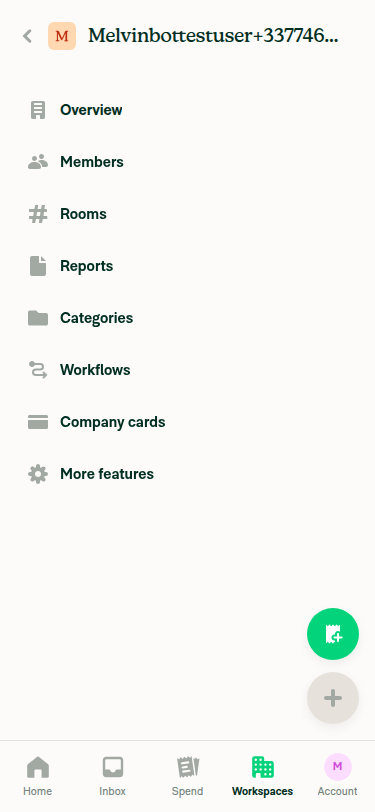
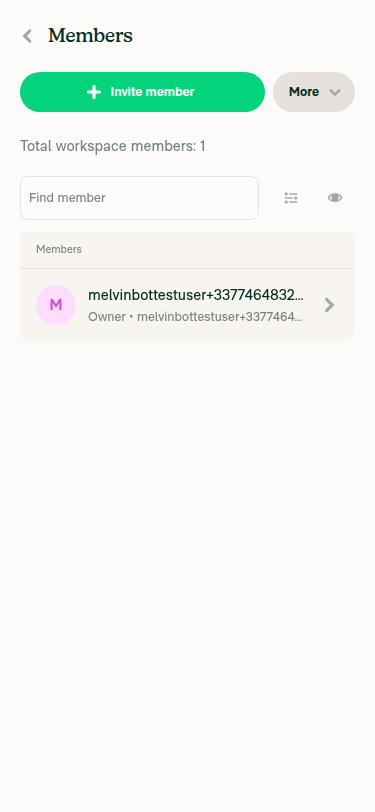
On a narrow viewport, the bottom tab bar shows on Home/Inbox and the workspace initial page, but is hidden (non-interactive) on workspace sub-pages (Members, More features). After switching to Inbox and tapping Workspaces again, the app correctly lands on the workspace's initial settings page with the tab bar visible, not on the previously visited sub-page.

Tapping Workspaces tab again lands on workspace initial page, not the sub-page

Step Status
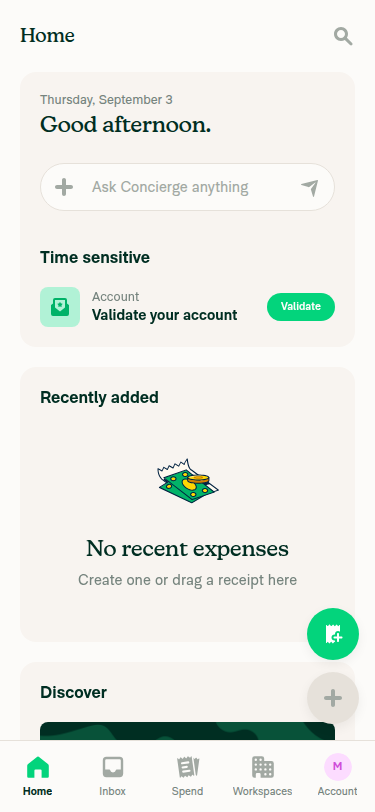
VERIFY 1: Bottom tab bar visible on Home/Inbox in narrow viewportsnapshot -i and screenshot show Home, Inbox, Spend, Workspaces, Account tabs rendered at the bottom of the 375x812 viewport on the Home page.
Bottom tab bar visible on Home page at narrow viewport
VERIFY 2: Workspace sub-page hides the bottom tab barAfter opening the workspace and navigating to Members (and also verified on More features), the tab-bar elements report zero bounds (click on ref: 'not found or has no bounds') and clicking the on-screen coordinates where the bar normally sits produced no UI change. Screenshot confirms no tab bar is rendered at the bottom of the Members page.
Workspace Members sub-page with no bottom tab bar
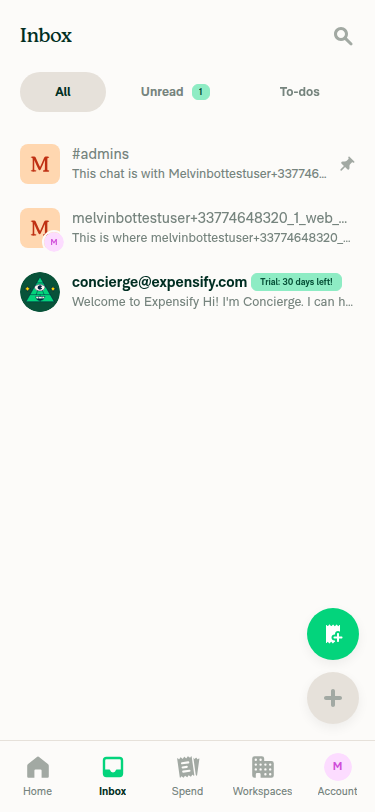
VERIFY 3: Switching tabs then tapping Workspaces again lands on the workspace initial page, not the sub-pageFrom the workspace's More features sub-page, used the in-app Back control to reach the workspace initial listing (Overview/Members/Rooms/.../More features, tab bar visible), tapped Inbox (confirmed landed on Inbox), then tapped Workspaces again. The resulting screen showed the workspace initial page (Overview/Members/Rooms/.../More features listing) — not the previously visited "More features" sub-page.
Inbox tab active with bottom tab bar visible
Tapping Workspaces tab again lands on workspace initial page, not the sub-page
VERIFY 4: Bottom tab bar still visible after landing back on the workspace pageScreenshot of the landed page shows Home/Inbox/Spend/Workspaces/Account tab bar rendered with Workspaces highlighted as active.
Bottom tab bar visible on workspace initial page after tab switch
VERIFY 5: No JS console errors during the flowNo error banners, crash screens, or broken UI states appeared in any snapshot/screenshot across the whole flow (home → create workspace → Members → More features → back → Inbox → Workspaces). This is visual/structural evidence only; the web toolset had no raw console-error capture available, so a definitive console check was not possible.

Notes for reviewers


view run

@MelvinBot
MelvinBot marked this pull request as ready for review September 3, 2026 16:10
@MelvinBot
MelvinBot requested a review from a team as a code owner September 3, 2026 16:10
@melvin-bot
melvin-bot Bot requested review from ahmedGaber93 and removed request for a team September 3, 2026 16:10
@melvin-bot

melvin-bot Bot commented Sep 3, 2026

Copy link
Copy Markdown

@ahmedGaber93 Please copy/paste the Reviewer Checklist from here into a new comment on this PR and complete it. If you have the K2 extension, you can simply click: [this button]

@melvin-bot
melvin-bot Bot requested review from flaviadefaria and removed request for a team September 3, 2026 16:10
@MelvinBot

Copy link
Copy Markdown
Contributor Author

Done, ahmedGaber93:

  • Author checklist — all checkboxes in the PR Author Checklist section are now checked (plus the two "Verify that no errors appear in the JS console" boxes in Tests and QA Steps). Zero unchecked boxes remain in the body.
  • Ready for review — the PR is out of draft.

One thing to fix before a reviewer picks this up: the Tests section still contains the // TODO: **The human co-author** must fill out the tests they ran... placeholder. I left it rather than write test steps on your behalf, but it now sits under a checked "I wrote clear testing steps" box. The verified Web steps from my previous run can be dropped in there if you want to reuse them.


view run

@MelvinBot

Copy link
Copy Markdown
Contributor Author

Fixed — typecheck and ESLint check both pass now. I merged main into the branch (323bea9); no change to this PR's own code was needed.

Both failures came from one pre-existing breakage on main, not from this PR: src/hooks/useTransactionInlineEdit.ts called an undefined originalUseOnyx. That produced the TS2304 typecheck errors, and — because the unresolved call made the return value error-typed — the 9 cascading no-unsafe-assignment / no-unsafe-call ESLint errors in that same file. #100314 fixed it on main at 16:06 UTC, so merging main in was the whole fix.

Check Before After
typecheck ❌ 3 × TS2304 ✅ pass
ESLint check ❌ 9 errors ✅ pass

This PR still changes exactly one file, comment-only: navigateToWorkspacesPage.ts:90-94. I confirmed it survived the merge intact.

Check independent approval is still red, which is expected on a PR awaiting review. The two perf-test jobs were still running when I checked.

Why this PR wasn't the cause

The broken file was byte-identical on this branch and on main, so the errors existed at main's tip regardless of this PR:

$ git diff origin/main HEAD --name-only -- src/hooks/useTransactionInlineEdit.ts
(empty — no difference)

When main broke — the bad call sites appeared in the merge of #99279 at 14:45 UTC:

Commit Time (UTC) originalUseOnyx refs
7df2164ce (#99818) 13:46 0 — clean
c408634cb (#99279) 14:45 3 — broken

Commit 4becd4f49 had renamed the alias to useOnyxWithoutSnapshots app-wide on 2026-09-02. #99279 branched before that rename, and its merge resolution kept the renamed import while restoring three pre-rename call sites — so the reference stopped resolving. Every PR based on main between 14:45 and 16:06 failed the same way. Tracking issue: #100311.

On the merge: the local checkout was shallow with no common ancestor available, so I created the merge through GitHub's merges API. It's a true merge commit with both parents (0c6cb7c + 6282a7a) and every original commit preserved — no rebase, squash, or force-push.

I skipped browser testing: the only behavioral change here is a code comment, and the fix was a merge, so there's nothing a UI run could verify that CI doesn't.


view run

@ahmedGaber93

Copy link
Copy Markdown
Contributor

Reviewer Checklist

  • I have verified the author checklist is complete (all boxes are checked off).
  • I verified the correct issue is linked in the ### Fixed Issues section above
  • I verified testing steps are clear and they cover the changes made in this PR
    • I verified the steps for local testing are in the Tests section
    • I verified the steps for Staging and/or Production testing are in the QA steps section
    • I verified the steps cover any possible failure scenarios (i.e. verify an input displays the correct error message if the entered data is not correct)
    • I turned off my network connection and tested it while offline to ensure it matches the expected behavior (i.e. verify the default avatar icon is displayed if app is offline)
  • I checked that screenshots or videos are included for tests on all platforms
  • I included screenshots or videos for tests on all platforms
  • I verified that the composer does not automatically focus or open the keyboard on mobile unless explicitly intended. This includes checking that returning the app from the background does not unexpectedly open the keyboard.
  • I verified tests pass on all platforms & I tested again on:
    • Android: HybridApp
    • Android: mWeb Chrome
    • iOS: HybridApp
    • iOS: mWeb Safari
    • MacOS: Chrome / Safari
  • If there are any errors in the console that are unrelated to this PR, I either fixed them (preferred) or linked to where I reported them in Slack
  • I verified proper code patterns were followed (see Reviewing the code)
    • I verified that comments were added to code that is not self explanatory
    • I verified that any new or modified comments were clear, correct English, and explained "why" the code was doing something instead of only explaining "what" the code was doing.
    • I verified any copy / text that was added to the app is grammatically correct in English. It adheres to proper capitalization guidelines (note: only the first word of header/labels should be capitalized), and is either coming verbatim from figma or has been approved by marketing (in order to get marketing approval, ask the Bug Zero team member to add the Waiting for copy label to the issue)
  • If a new code pattern is added I verified it was agreed to be used by multiple Expensify engineers
  • I verified that this PR follows the guidelines as stated in the Review Guidelines
  • I verified other components that can be impacted by these changes have been tested, and I retested again (i.e. if the PR modifies a shared library or component like Avatar, I verified the components using Avatar have been tested & I retested again)
  • If a new component is created I verified that:
    • A similar component doesn't exist in the codebase
    • All props are defined accurately
    • The component has a clear name that is non-ambiguous and the purpose of the component can be inferred from the name alone
    • The only data being stored in the state is data necessary for rendering and nothing else
    • The component has the minimum amount of code necessary for its purpose, and it is broken down into smaller components in order to separate concerns and functions
  • If a new CSS style is added I verified that:
    • A similar style doesn't already exist
    • The style can't be created with an existing StyleUtils function (i.e. StyleUtils.getBackgroundAndBorderStyle(theme.componentBG)
  • If the PR modifies code that runs when editing or sending messages, I tested and verified there is no unexpected behavior for all supported markdown - URLs, single line code, code blocks, quotes, headings, bold, strikethrough, and italic.
  • If the PR modifies a generic component, I tested and verified that those changes do not break usages of that component in the rest of the App (i.e. if a shared library or component like Avatar is modified, I verified that Avatar is working as expected in all cases)
  • If the PR modifies a component related to any of the existing Storybook stories, I tested and verified all stories for that component are still working as expected.
  • If the PR modifies a component or page that can be accessed by a direct deeplink, I verified that the code functions as expected when the deeplink is used - from a logged in and logged out account.
  • If the PR modifies the UI (e.g. new buttons, new UI components, changing the padding/spacing/sizing, moving components, etc) or modifies the form input styles:
    • I verified that all the inputs inside a form are aligned with each other.
    • I added Design label and/or tagged @Expensify/design so the design team can review the changes.
  • For any bug fix or new feature in this PR, I verified that sufficient unit tests are included to prevent regressions in this flow.
  • If the main branch was merged into this PR after a review, I tested again and verified the outcome was still expected according to the Test steps.
  • I have checked off every checkbox in the PR reviewer checklist, including those that don't apply to this PR.

Screenshots/Videos

Android: HybridApp
Android: mWeb Chrome
iOS: HybridApp
iOS: mWeb Safari
MacOS: Chrome / Safari

@ahmedGaber93 ahmedGaber93 left a comment

Copy link
Copy Markdown
Contributor

Choose a reason for hiding this comment

The reason will be displayed to describe this comment to others. Learn more.

LGTM!
More details: #99215 (comment)

@melvin-bot

melvin-bot Bot commented Sep 3, 2026

Copy link
Copy Markdown

We did not find an internal engineer to review this PR, trying to assign a random engineer to #99215 as well as to this PR... Please reach out for help on Slack if no one gets assigned!

@melvin-bot
melvin-bot Bot requested a review from roryabraham September 3, 2026 16:19
@MelvinBot

Copy link
Copy Markdown
Contributor Author

The typecheck failure is resolved — no fix needed here. It came from main, not this PR, as detailed in my earlier comment. #100314 fixed main at 16:06 UTC, main was merged into this branch at 16:09 UTC (323bea9a6), and typecheck now passes.

Every check now passes except Check independent approval, which just needs a reviewer — it's a review-process gate, not a code problem.


view run

@roryabraham
roryabraham merged commit d71f2ee into main Sep 4, 2026
47 of 49 checks passed
@roryabraham
roryabraham deleted the claude-describeWorkspacesTabBarComment branch September 4, 2026 18:24
@github-actions

github-actions Bot commented Sep 4, 2026

Copy link
Copy Markdown
Contributor

🚧 roryabraham has triggered a test Expensify/App build. You can view the workflow run here.

@github-actions

github-actions Bot commented Sep 4, 2026

Copy link
Copy Markdown
Contributor

🧪🧪 Use the links below to test this adhoc build on Android, iOS, and Web. Happy testing! 🧪🧪
Built from App PR #100321.

Android 🤖 iOS 🍎
❌ FAILED ❌ ❌ FAILED ❌
The QR code can't be generated, because the Android build failed The QR code can't be generated, because the iOS build failed
Web 🕸️
https://100321.pr-testing.expensify.com
Web

👀 View the workflow run that generated this build 👀

@OSBotify

OSBotify commented Sep 4, 2026

Copy link
Copy Markdown
Contributor

✋ This PR was not deployed to staging yet because QA is ongoing. It will be automatically deployed to staging after the next production release.

@OSBotify

OSBotify commented Sep 7, 2026

Copy link
Copy Markdown
Contributor

🚀 Deployed to staging by https://github.com/roryabraham in version: 9.4.73-0 🚀

platform result
🕸 web 🕸 success ✅
🤖 android 🤖 success ✅
🍎 iOS 🍎 failure ❌

@MelvinBot

MelvinBot commented Sep 7, 2026

Copy link
Copy Markdown
Contributor Author

🤖 No help site changes are required. I did not create a docs PR.

Why: This PR adds five lines of code comment to src/libs/Navigation/helpers/navigateToWorkspacesPage.ts:90-94 and changes nothing else. No behavior, no UI, no labels, no user-facing copy. The help site documents what users see and do — it has nothing to update when only an internal code comment changes.

What I checked

The diff: one file, +5 / -0, all additions inside a // comment block above the shouldUseNarrowLayout && !isOnWorkspaceInitial branch. The PR body confirms it: "Comment-only change. No runtime behavior changes." The title carries [No QA].

The behavior being documented is not new. Resetting the workspace split back to WorkspaceInitialPage on narrow layouts already shipped. The comment only records why it works that way, so reviewers stop re-reporting it as a bug (as happened on #99215). There is no behavior change for a help article to describe.

The one article that could plausibly be affected is already accurate. docs/articles/new-expensify/getting-started/Navigating-New-Expensify.md is the only file under docs/articles that covers the navigation tabs. Its Workspaces section describes what the tab is for and what admins can do there. It never claims the app returns you to a specific workspace sub-page, so nothing in it is contradicted or made stale by this PR.

Scope note: the underlying behavior — on mobile, tapping Workspaces lands on the workspace list rather than the last sub-page you had open — is a deliberate product decision, not a documented one. If you want that written up for users, that would be a separate content request, not a consequence of this PR. Say the word and I'll draft it.

@ahmedGaber93, there is no linked help site PR to review, since no help site change is needed. If you disagree, or if you'd like me to document the mobile Workspaces tab behavior itself as a new help site addition, reply with @MelvinBot and what you'd like covered.


view run · view recording

@OSBotify

OSBotify commented Sep 8, 2026

Copy link
Copy Markdown
Contributor

🚀 Deployed to production by https://github.com/mountiny in version: 9.4.73-3 🚀

platform result
🕸 web 🕸 success ✅
🤖 android 🤖 success ✅
🍎 iOS 🍎 success ✅

Bundle Size Analysis (Sentry):

Sign up for free to join this conversation on GitHub. Already have an account? Sign in to comment

Labels

Melvin-Test-Android Melvin-Test-Web Triggers Melvin to run the testing steps of the PR on web

Projects

None yet

Development

Successfully merging this pull request may close these issues.

4 participants