Skip to content

Filter task search rows by live report status instead of the stale snapshot - #100069

Merged
youssef-lr merged 2 commits into
mainfrom
claude-taskSearchOutstandingStatus
Sep 10, 2026
Merged

youssef-lr merged 2 commits into
mainfrom
claude-taskSearchOutstandingStatus

Conversation

@MelvinBot

@MelvinBot MelvinBot commented Sep 1, 2026

Copy link
Copy Markdown
Contributor

Explanation of Change

Completing a task from Search > Task > Outstanding left the row in the list.

The Task search list renders straight from the cached search snapshot (snapshot_<hash>). completeTask only merges into report_<taskID> and reportActions_<taskID> — it never touches the snapshot — so the row kept the snapshot's stale statusNum/stateNum and nothing removed it from the status:outstanding list. Nothing refetched either: useSearchHighlightAndScroll only re-runs the search for type:chat or transaction changes.

Expenses don't have this bug because getTransactionsSections re-filters fetched rows against the live report via isEligibleForStatus. Tasks had no equivalent — the outstanding/completed split was purely server-side, baked into the query hash.

This PR gives tasks the same client-side re-filter:

  • Added taskStatusActionMapping + isEligibleForTaskStatus, mirroring the existing expenseStatusActionMapping / isEligibleForStatus pair.
  • getTaskSections now takes queryJSON (falling back to getCurrentSearchQueryJSON(), same as getTransactionsSections) and drops rows whose live report status no longer matches the active status: filter.
  • Each row's statusNum/stateNum now come from the live report rather than the snapshot. This also fixes a second symptom: isTaskCompleted in TaskListItemRow read the stale snapshot copy, so the row kept rendering an enabled Complete button instead of the Completed badge.

Because the guard is status-based rather than direction-based, it covers reopenTask (a reopened task disappearing from Completed) with no extra code. It is entirely client-side, so it works offline.

An unrecognized status value (for example a hand-typed status:all) leaves rows visible rather than silently emptying the list.

Fixed Issues

$ #99923
PROPOSAL: #99923 (comment)

AI Tests

Run locally by MelvinBot on this branch:

Check Result
npm run typecheck ✅ Pass
npx eslint on the changed files ✅ Pass — 0 errors (74 pre-existing seatbelt warnings in SearchUIUtils.ts, none new)
npm test -- tests/unit/Search/SearchUIUtilsTest.ts ✅ Pass — 494/494, including 8 new tests
npm run spell-changed ✅ Pass — 0 issues

Eight unit tests were added to tests/unit/Search/SearchUIUtilsTest.ts. Each seeds a snapshot task in one status while the live Onyx report is in the other — exactly the state completeTask / reopenTask leave behind — and asserts the row is filtered against the live status:

  • Complete direction: a completed task drops out of status:outstanding, stays in status:completed with live status values, and a still-open task is unaffected.
  • Reopen direction: a reopened task drops out of status:completed and appears under status:outstanding reporting its live OPEN status.
  • Negated filters: -status:completed drops a completed task and keeps an open one, and -status:outstanding keeps a completed task. status is negatable in the search grammar, so these queries are reachable from the search router.

Not run: npm run react-compiler-compliance-check check-changed failed on an environment issue (Could not get commit hash for origin/). It is not applicable here — this PR changes a lib file and a test, no components or hooks.

End-to-end verification was completed on both web and standalone Android NewDot (see the two verification comments below), and the reviewer confirmed the fix locally.

Tests

  1. Open any chat and tap + (composer menu) > Assign task. Create a task, setting Assignee to yourself. Repeat so you have two self-assigned tasks. (Note: the global FAB create menu has no task entry — tasks must be created from a chat composer.)
  2. Go to Search and run the query type:task status:outstanding.
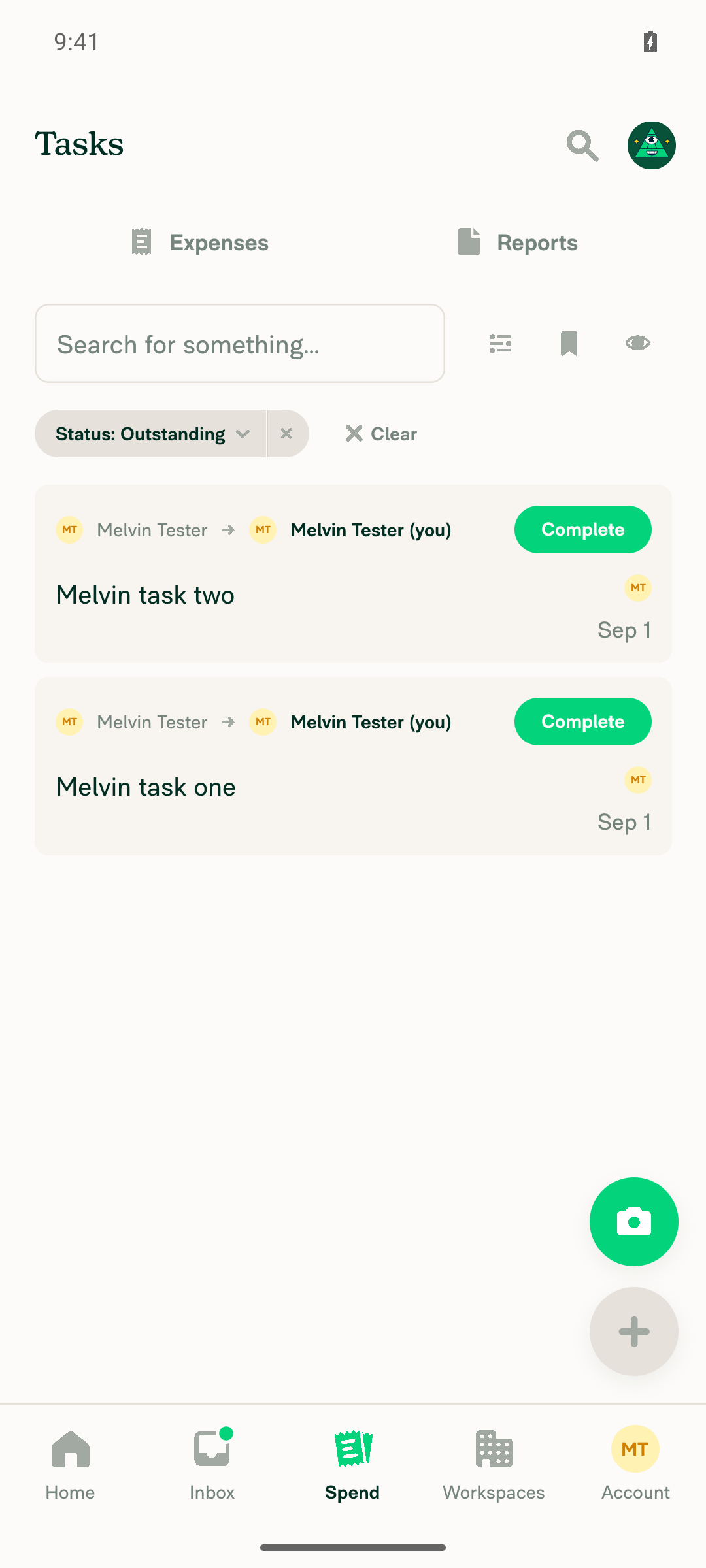
  3. Verify both tasks are listed, and each row shows an enabled green Complete button.
  4. Click Complete on the first task.
  5. Verify the row disappears from the list immediately, with no refresh or navigation, and the other task is still listed.
  6. Click Complete on the second task.
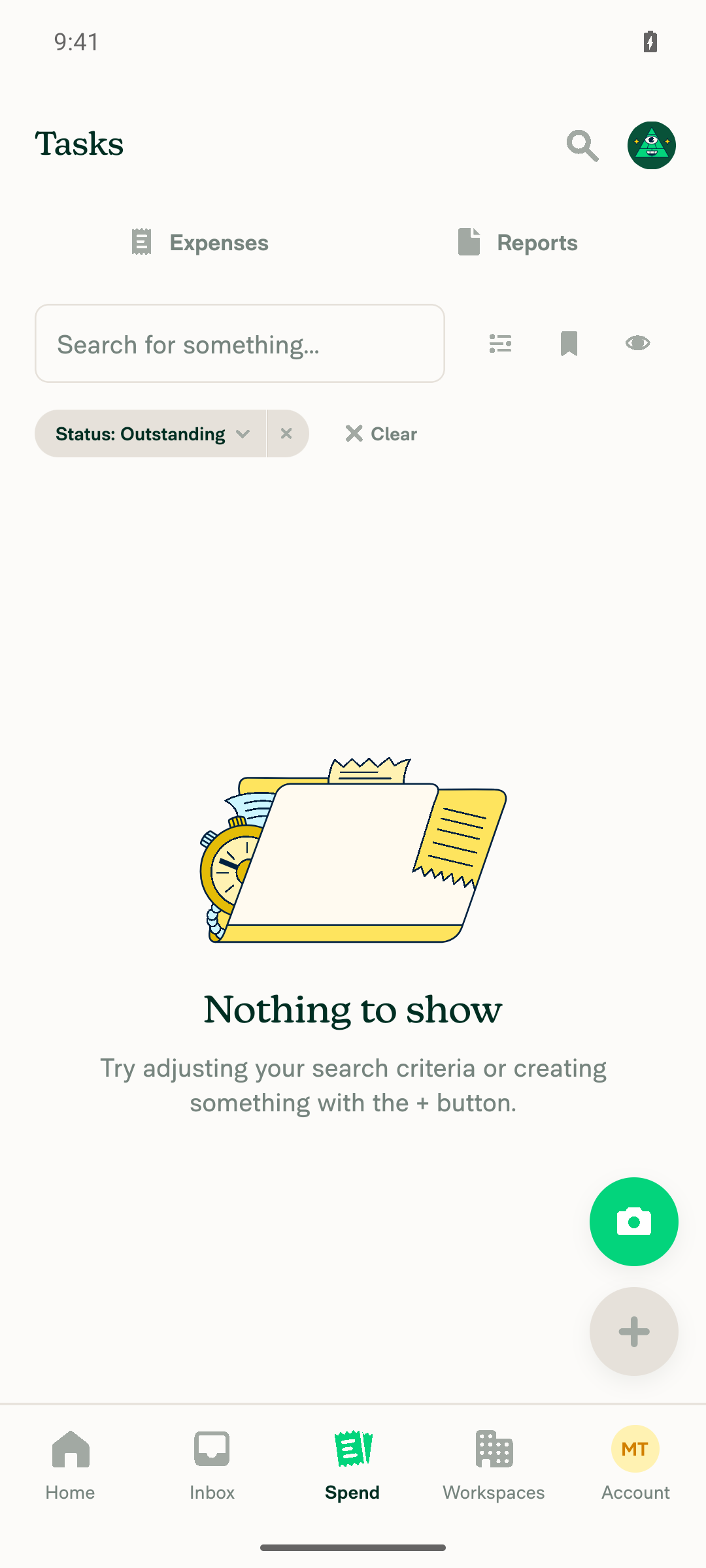
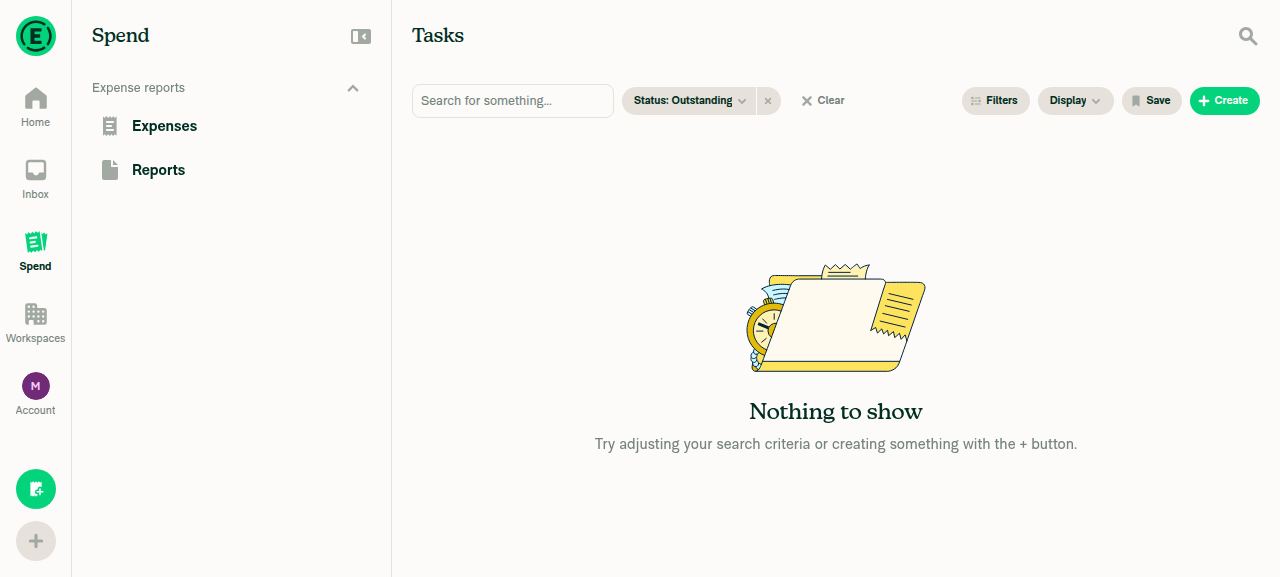
  7. Verify that row also disappears and the list shows the Nothing to show empty state, while the Status: Outstanding chip is still applied.
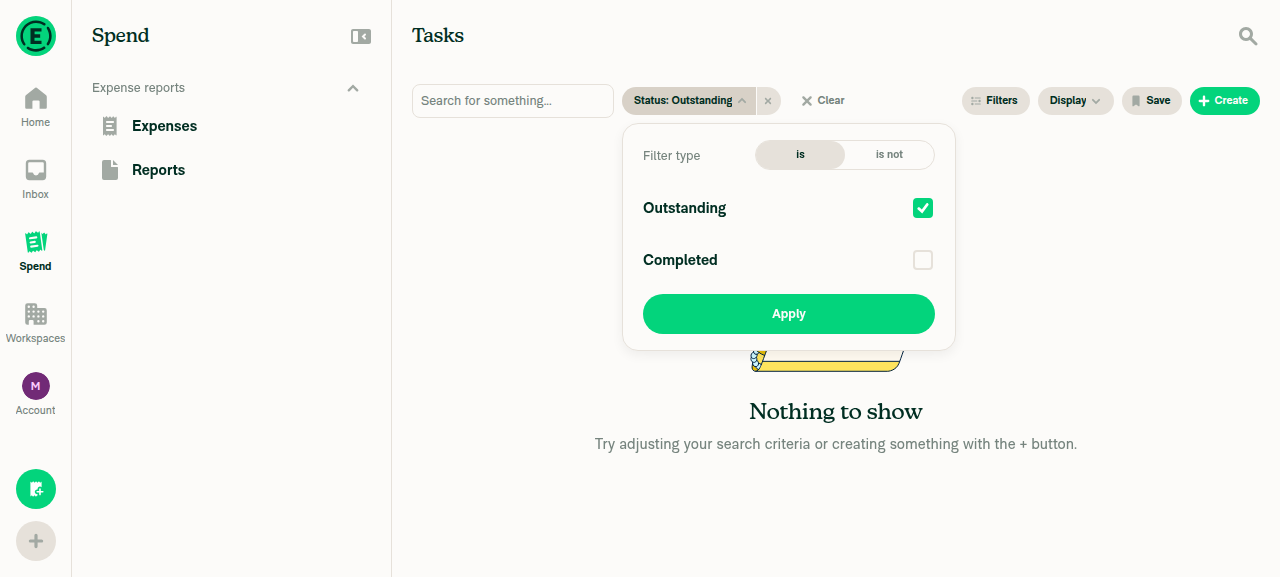
  8. Open the Status filter, uncheck Outstanding, check Completed, and apply.
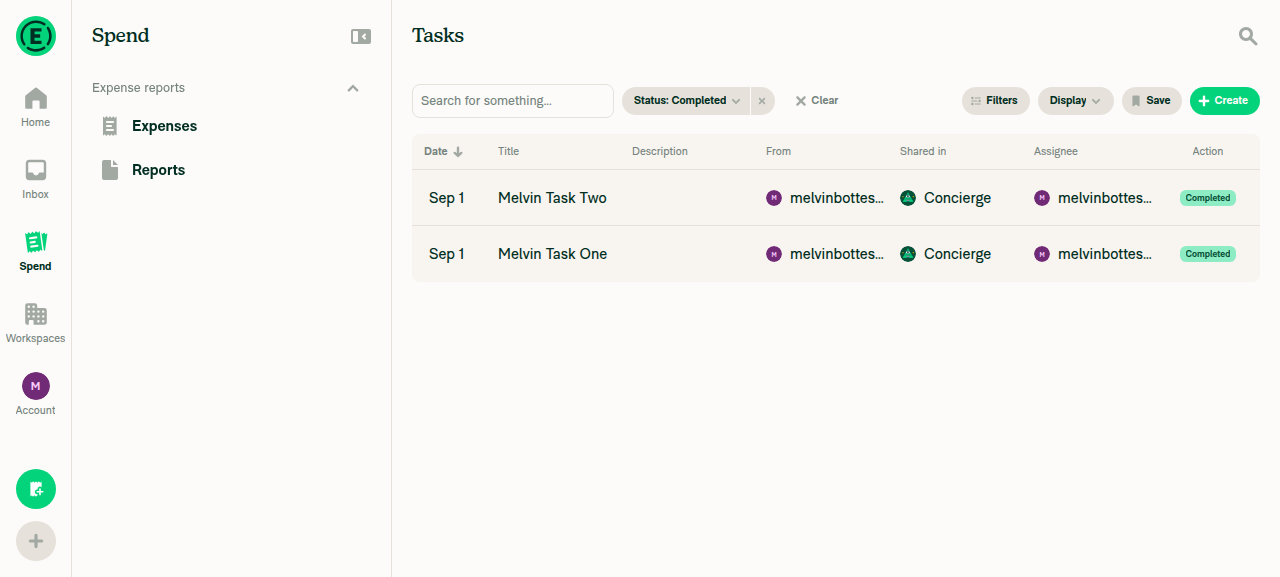
  9. Verify both tasks now appear, and each row shows a non-interactive Completed badge instead of an enabled Complete button.
  10. Click one of the rows to open the task, then tap Mark as incomplete in the task header.
  11. Go back to the search results (still status:completed) and verify the reopened task's row disappears from the Completed list immediately.
  12. Switch the Status filter back to Outstanding and verify the reopened task is listed again with an enabled Complete button.
  13. Verify that a query with no status: filter (type:task) lists both outstanding and completed tasks, each rendering the correct action (Complete button vs Completed badge).
  • Verify that no errors appear in the JS console

Offline tests

The re-filter is entirely client-side and reads from Onyx, so it works with no network.

  1. Create two self-assigned tasks while online (steps 1–2 above) and load type:task status:outstanding so the snapshot is cached.
  2. Turn off your network connection.
  3. Click Complete on one of the tasks.
  4. Verify the row still disappears from the Outstanding list immediately while offline — the optimistic Onyx write to report_<taskID> is enough, no server round trip is needed.
  5. Switch the Status filter to Completed and verify the task appears there with a Completed badge.
  6. Turn your network connection back on and verify the list stays consistent once the queued CompleteTask request flushes — the row does not reappear under Outstanding.

QA Steps

  1. Open any chat and tap + (composer menu) > Assign task. Create two tasks, setting Assignee to yourself on each.
  2. Go to Search and run the query type:task status:outstanding.
  3. Verify both tasks are listed, and each row shows an enabled green Complete button.
  4. Click Complete on the first task.
  5. Verify the row disappears from the list immediately, with no refresh, and the other task is still listed.
  6. Click Complete on the second task and verify the list shows the Nothing to show empty state while the Status: Outstanding chip is still applied.
  7. Open the Status filter, uncheck Outstanding, check Completed, and apply.
  8. Verify both tasks appear, and each row shows a non-interactive Completed badge instead of an enabled Complete button.
  9. Open one of the completed tasks and tap Mark as incomplete in the task header.
  10. Return to the search results (still status:completed) and verify the reopened task's row disappears from the Completed list immediately.
  11. Switch the Status filter back to Outstanding and verify the reopened task is listed again with an enabled Complete button.
  12. Run type:task with no status filter and verify both outstanding and completed tasks are listed, each with the correct action (Complete button vs Completed badge).
  • Verify that no errors appear in the JS console

PR Author Checklist

  • I linked the correct issue in the ### Fixed Issues section above
  • I wrote clear testing steps that cover the changes made in this PR
    • I added steps for local testing in the Tests section
    • I added steps for the expected offline behavior in the Offline steps section
    • I added steps for Staging and/or Production testing in the QA steps section
    • I added steps to cover failure scenarios (i.e. verify an input displays the correct error message if the entered data is not correct)
    • I turned off my network connection and tested it while offline to ensure it matches the expected behavior (i.e. verify the default avatar icon is displayed if app is offline)
    • I tested this PR with a High Traffic account against the staging or production API to ensure there are no regressions (e.g. long loading states that impact usability).
  • I included screenshots or videos for tests on all platforms
  • I ran the tests on all platforms & verified they passed on:
    • Android: Native
    • Android: mWeb Chrome
    • iOS: Native
    • iOS: mWeb Safari
    • MacOS: Chrome / Safari
  • I verified there are no console errors (if there's a console error not related to the PR, report it or open an issue for it to be fixed)
  • I followed proper code patterns (see Reviewing the code)
    • I verified that comments were added to code that is not self explanatory
    • I verified that any new or modified comments were clear, correct English, and explained "why" the code was doing something instead of only explaining "what" the code was doing.
    • I verified any copy / text that was added to the app is grammatically correct in English. It adheres to proper capitalization guidelines (note: only the first word of header/labels should be capitalized), and is either coming verbatim from figma or has been approved by marketing (in order to get marketing approval, ask the Bug Zero team member to add the Waiting for copy label to the issue)
  • If a new code pattern is added I verified it was agreed to be used by multiple Expensify engineers
  • I followed the guidelines as stated in the Review Guidelines
  • I tested other components that can be impacted by my changes (i.e. if the PR modifies a shared library or component like Avatar, I verified the components using Avatar are working as expected)
  • If a new CSS style is added I verified that:
    • A similar style doesn't already exist
    • The style can't be created with an existing StyleUtils function (i.e. StyleUtils.getBackgroundAndBorderStyle(theme.componentBG))
  • If new assets were added or existing ones were modified, I verified that:
    • The assets are optimized and compressed (for SVG files, run npm run compress-svg)
    • The assets load correctly across all supported platforms.
  • If the PR modifies code that runs when editing or sending messages, I tested and verified there is no unexpected behavior for all supported markdown - URLs, single line code, code blocks, quotes, headings, bold, strikethrough, and italic.
  • If the PR modifies a generic component, I tested and verified that those changes do not break usages of that component in the rest of the App (i.e. if a shared library or component like Avatar is modified, I verified that Avatar is working as expected in all cases)
  • If the PR modifies a component related to any of the existing Storybook stories, I tested and verified all stories for that component are still working as expected.
  • If the PR modifies a component or page that can be accessed by a direct deeplink, I verified that the code functions as expected when the deeplink is used - from a logged in and logged out account.
  • If the PR modifies the UI (e.g. new buttons, new UI components, changing the padding/spacing/sizing, moving components, etc) or modifies the form input styles:
    • I verified that all the inputs inside a form are aligned with each other.
    • I added Design label and/or tagged @Expensify/design so the design team can review the changes.
  • I added unit tests for any new feature or bug fix in this PR to help automatically prevent regressions in this user flow.
  • If the main branch was merged into this PR after a review, I tested again and verified the outcome was still expected according to the Test steps.

Screenshots/Videos

Android: Native
Android: mWeb Chrome
iOS: Native
iOS: mWeb Safari
MacOS: Chrome / Safari

…e snapshot

Co-authored-by: Bruno Rocha <brunovjk@users.noreply.github.com>
@codecov

codecov Bot commented Sep 1, 2026

Copy link
Copy Markdown

Codecov Report

✅ Changes either increased or maintained existing code coverage, great job!

Files with missing lines Coverage Δ
src/libs/SearchUIUtils.ts 69.96% <95.23%> (+0.85%) ⬆️
... and 176 files with indirect coverage changes

@MelvinBot

Copy link
Copy Markdown
Contributor Author

🤖 Android test steps verification results: ✅ pass

On standalone Android NewDot, completing a task from the Search results list immediately removes it from the Type: Task / Status: Outstanding list, and both completed tasks then appear under Status: Completed with a non-interactive "Completed" badge instead of an enabled Complete button. No JS errors occurred during the flow.

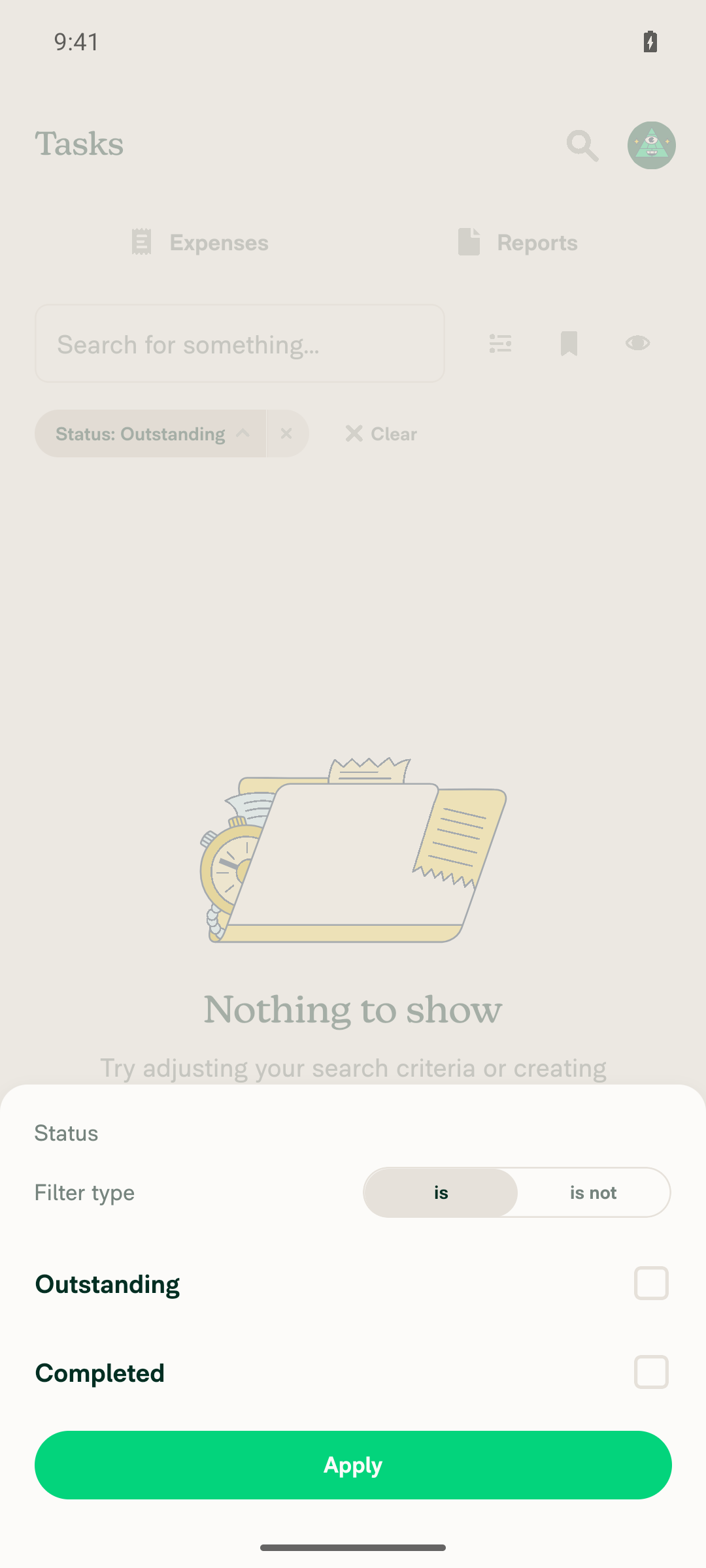
Status filter sheet with Outstanding unchecked, before selecting Completed and applying

Step Status
Search > Type: Task > Status: Outstanding lists the created tasksCreated two self-assigned tasks ("Melvin task one", "Melvin task two") from the self-DM (+ > Assign task, assignee = me). Ran search query type:task status:outstanding. Results page header reads "Tasks" with chip "Status: Outstanding"; the accessibility snapshot showed two rows, each with a "Complete" button.
Search Tasks results with Status: Outstanding chip listing 'Melvin task two' and 'Melvin task one', each with a green Complete button
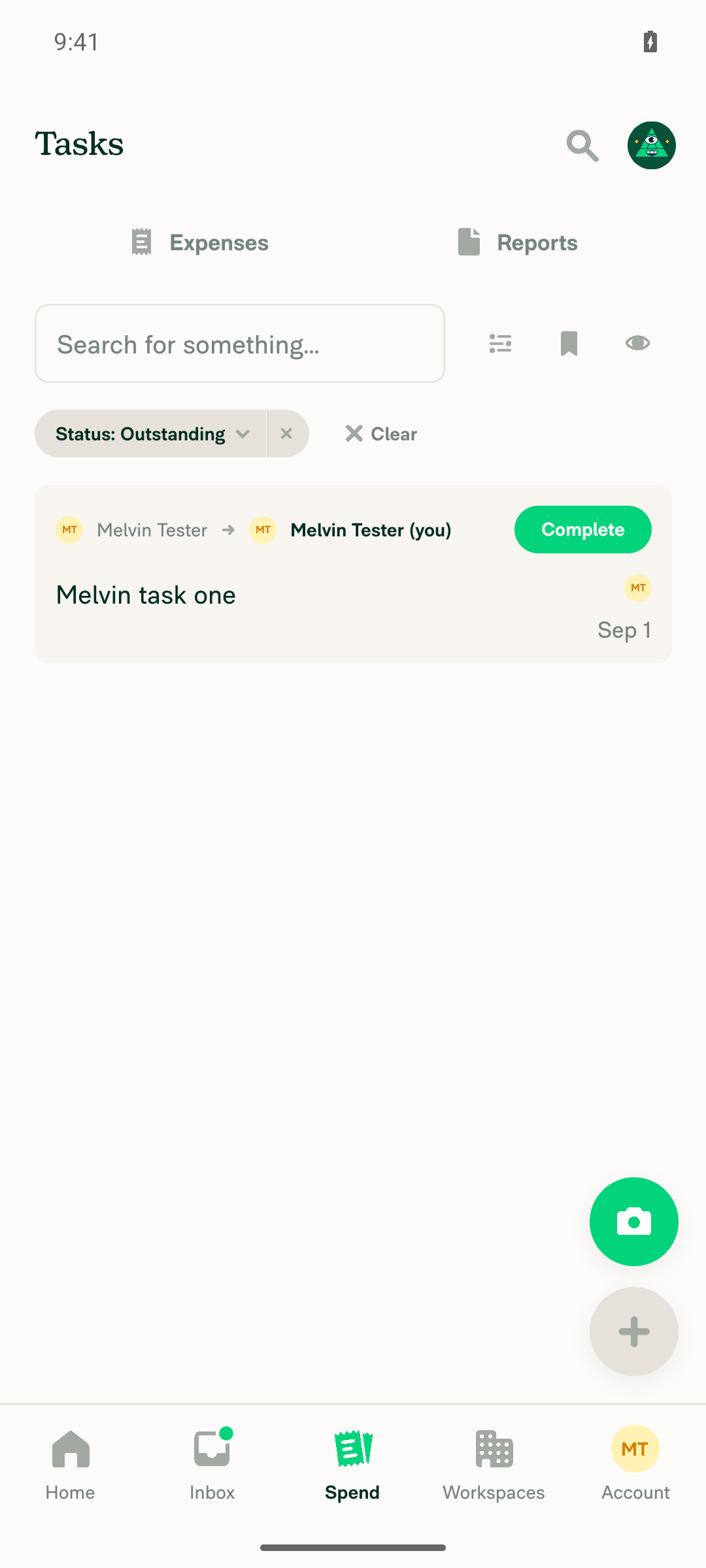
Tapping Complete on the first task removes its row from the Outstanding listClicked the Complete button on the top row ("Melvin task two"). The settle diff removed the entire row subtree including its Complete button, leaving only the "Melvin task one" row. Read-back: is visible 'text="Melvin task two"' failed (exit 1 = absent) while is visible 'text="Melvin task one"' passed (exit 0).
Outstanding list now showing only 'Melvin task one'; 'Melvin task two' row is gone
Tapping Complete on the second task removes it too; Outstanding list shows neither completed taskClicked Complete on the remaining "Melvin task one" row. Read-back: is visible 'text="Melvin task one"' failed (exit 1 = absent). A fresh snapshot of the results page contained no task rows and no Complete buttons; the list rendered the "Nothing to show" empty state while the "Status: Outstanding" chip was still applied.
Outstanding task search showing 'Nothing to show' empty state with Status: Outstanding chip still applied
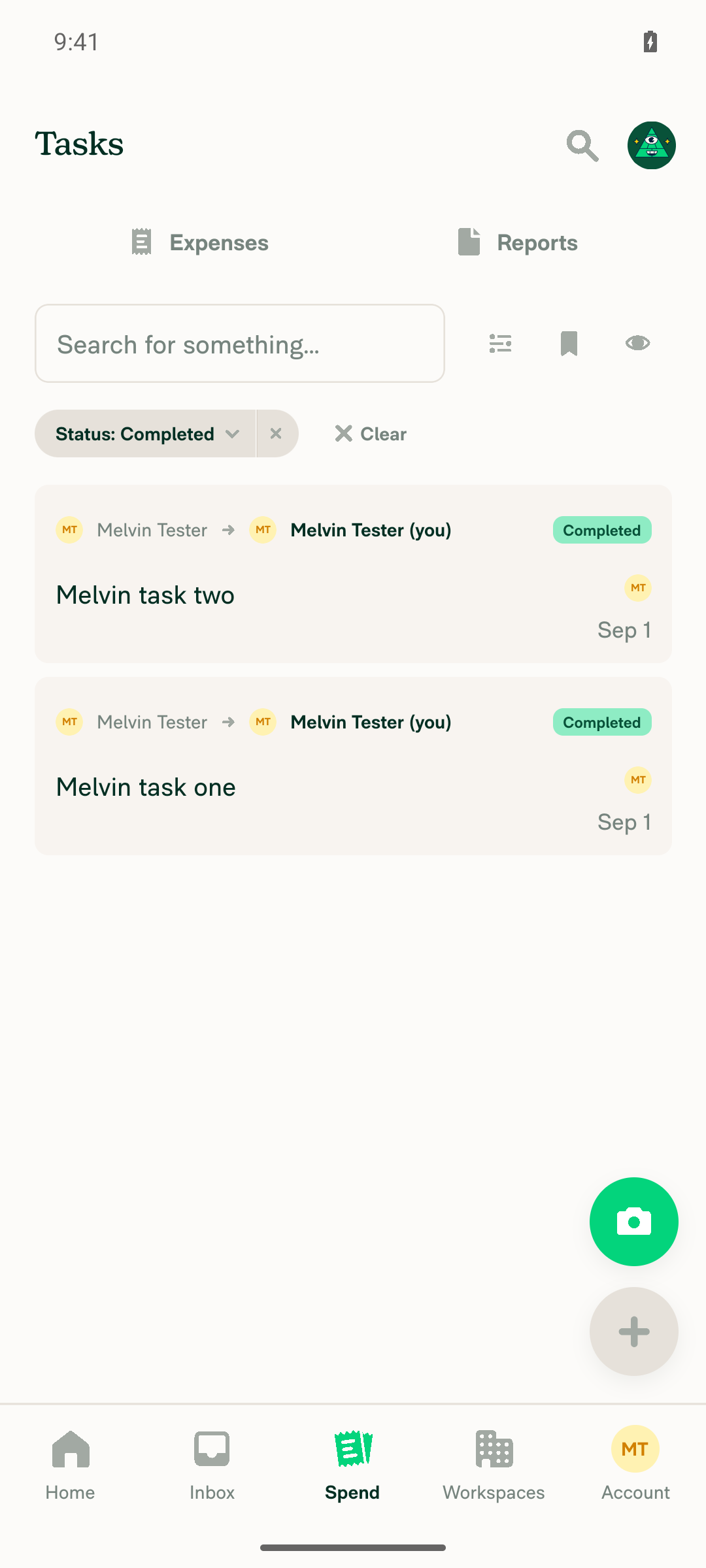
Switching Status filter to Completed shows both tasks in a Completed state (no enabled Complete button)Opened the Status chip, unchecked Outstanding, checked Completed, tapped Apply. Chip became "Status: Completed" and both rows returned, each reading "Completed". Neither row exposes an actionable Complete control — is visible 'role=button&&label="Complete"' failed (exit 1 = no such button on screen); the rows render a green "Completed" badge instead.
Search Tasks results with Status: Completed chip listing both tasks, each with a green 'Completed' badge and no Complete button
Status filter sheet with Outstanding unchecked, before selecting Completed and applying
No JS console / app errors during the flowScanned device logs for the flow window (18:02–18:06). Every API call returned jsonCode 200, including both CompleteTask writes; a filter for non-200 jsonCode returned nothing. The only error-level JS lines in the whole log are 5 entries from before the tested flow (sign-in/onboarding): a React "getSnapshot should be cached" warning and a dev-only "DISMISS_MODAL was not handled by any navigator" notice.

Notes on scope: verified on the standalone Android NewDot developmentDebug build of claude-taskSearchOutstandingStatus, not the HybridApp shell. Task creation isn't offered in the Concierge composer, so both tasks were created from the self-DM ("Your space"), where the composer menu exposes "Assign task".


view run

@MelvinBot

Copy link
Copy Markdown
Contributor Author

🤖 Web test steps verification results: ✅ pass

On dev NewDot web (branch claude-taskSearchOutstandingStatus), completing a task from Search removes it from the Outstanding task list immediately, and both completed tasks then appear under Status: Completed with a non-interactive "Completed" badge instead of an enabled Complete button.

Final Completed task list rendering cleanly with no error banner

Step Status
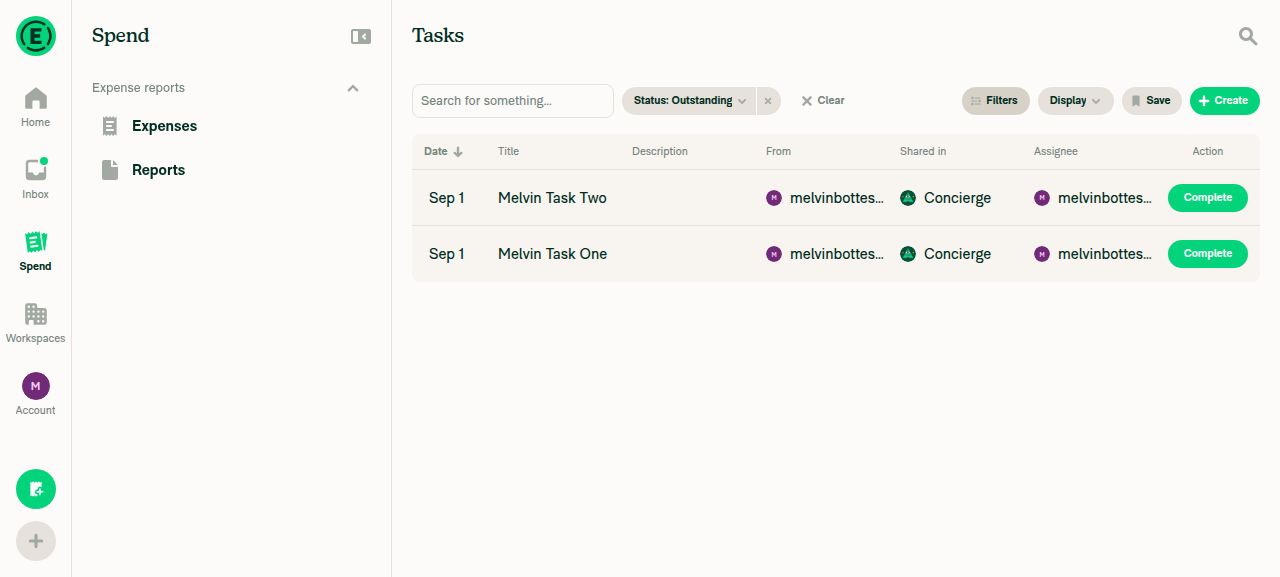
Navigate to Search > Type: Task > Status: Outstanding — the created tasks are listedCreated two self-assigned tasks ("Melvin Task One", "Melvin Task Two") from the Concierge chat composer > Assign task, with assignee set to the signed-in account. Ran search query type:task status:outstanding. The Search page rendered heading "Tasks" with the chip "Status: Outstanding"; the accessibility snapshot showed two [button] "Complete" action nodes, and the table listed both rows.
Tasks search with Status: Outstanding listing Melvin Task Two and Melvin Task One, each with a green Complete button
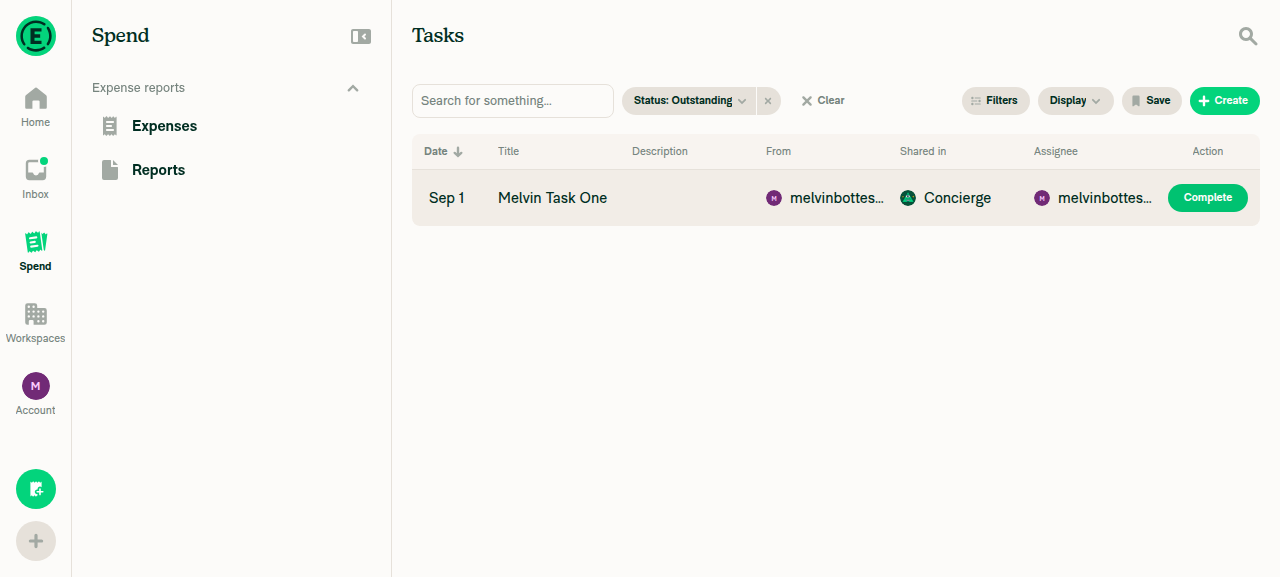
Click Complete on the first task in the Outstanding list — the row disappears from the Outstanding listClicked the Complete button on the top row ("Melvin Task Two"). The post-action snapshot dropped from two [button] "Complete" nodes to one, and the rendered table retained only "Melvin Task One". Network dump shows POST /api/CompleteTask status=200.
Outstanding task list after completing the first task, now showing only Melvin Task One
Click Complete on the second task — that row also disappears and the Outstanding list no longer shows either completed taskClicked Complete on "Melvin Task One". The settle diff removed the last [button] "Complete" node and added [heading] "Nothing to show"; the snapshot confirmed no remaining row or action nodes under the still-applied "Status: Outstanding" chip. The second POST /api/CompleteTask returned status=200.
Outstanding task list empty with 'Nothing to show' after both tasks were completed
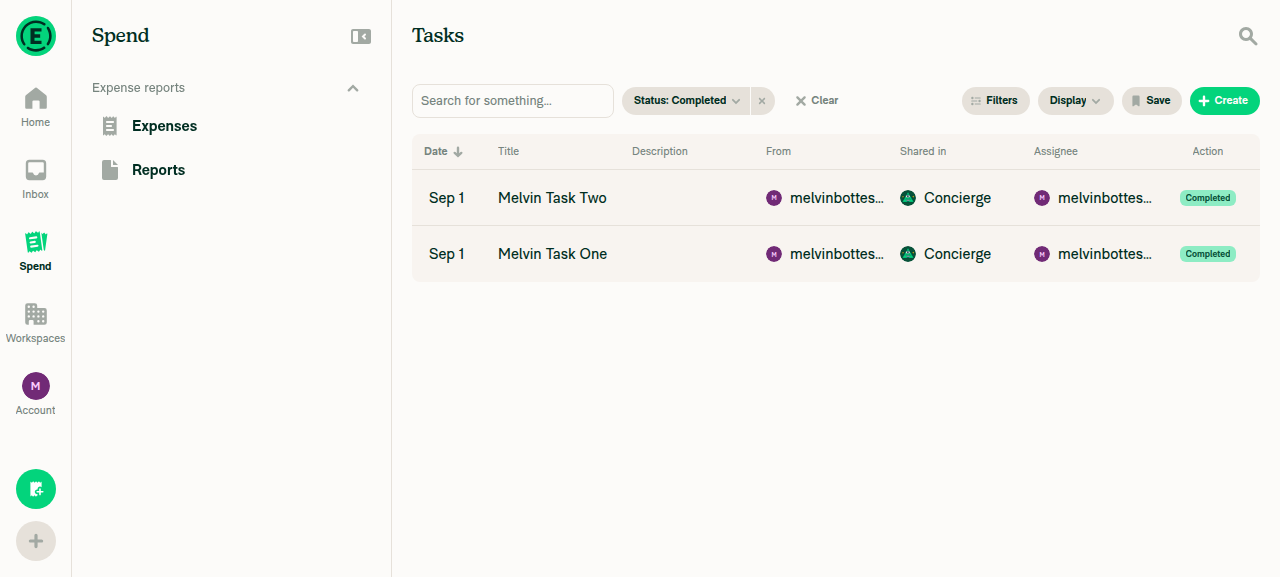
Switch the Status filter to Completed — both completed tasks appear there, each showing a Completed state rather than an enabled Complete buttonOpened the Status chip dropdown, checked "Completed", unchecked "Outstanding", clicked Apply. Chip became "Status: Completed" and the table listed both tasks. The snapshot on the Completed list contains zero [button] "Complete" nodes (contrast with two on the Outstanding list) — the Action cell renders a non-interactive "Completed" badge.
Status filter dropdown with Outstanding checked and Completed unchecked, before switching
Tasks search with Status: Completed listing both tasks, each with a grey Completed badge in the Action column
No JS console errors appear during the flowDirect browser console capture is not supported on this web driver, so this was verified indirectly. The network dump across the whole test window (18:18–18:21) shows every request status=200, including CreateTask x2, CompleteTask x2, Search and OpenSearchPage. No error banner, red text, or "Something went wrong" node appeared in any snapshot, and the app stayed responsive with no reload or crash through the entire flow.
Final Completed task list rendering cleanly with no error banner

Setup detail worth knowing if this gets re-run: tasks had to be created from a chat composer (+ > Assign task) — the global FAB create menu has no task entry. Assignee was switched from the Concierge default to the signed-in account so the tasks were self-assigned.


view run

@brunovjk

brunovjk commented Sep 2, 2026

Copy link
Copy Markdown
Contributor

Great work, @MelvinBot! I tested this locally, and everything is working as expected. Please mark the PR as ready for review, I'm finishing up recording the videos for all platforms. Complete the author checklist by checking all items, and update the Test and QA steps. One more thought: do you think we should add test coverage for reopening tasks and negated status filters in this PR, or is the current coverage sufficient? Thanks.

@brunovjk

brunovjk commented Sep 2, 2026

Copy link
Copy Markdown
Contributor

Reviewer Checklist

  • I have verified the author checklist is complete (all boxes are checked off).
  • I verified the correct issue is linked in the ### Fixed Issues section above
  • I verified testing steps are clear and they cover the changes made in this PR
    • I verified the steps for local testing are in the Tests section
    • I verified the steps for Staging and/or Production testing are in the QA steps section
    • I verified the steps cover any possible failure scenarios (i.e. verify an input displays the correct error message if the entered data is not correct)
    • I turned off my network connection and tested it while offline to ensure it matches the expected behavior (i.e. verify the default avatar icon is displayed if app is offline)
  • I checked that screenshots or videos are included for tests on all platforms
  • I included screenshots or videos for tests on all platforms
  • I verified that the composer does not automatically focus or open the keyboard on mobile unless explicitly intended. This includes checking that returning the app from the background does not unexpectedly open the keyboard.
  • I verified tests pass on all platforms & I tested again on:
    • Android: HybridApp
    • Android: mWeb Chrome
    • iOS: HybridApp
    • iOS: mWeb Safari
    • MacOS: Chrome / Safari
  • If there are any errors in the console that are unrelated to this PR, I either fixed them (preferred) or linked to where I reported them in Slack
  • I verified proper code patterns were followed (see Reviewing the code)
    • I verified that comments were added to code that is not self explanatory
    • I verified that any new or modified comments were clear, correct English, and explained "why" the code was doing something instead of only explaining "what" the code was doing.
    • I verified any copy / text that was added to the app is grammatically correct in English. It adheres to proper capitalization guidelines (note: only the first word of header/labels should be capitalized), and is either coming verbatim from figma or has been approved by marketing (in order to get marketing approval, ask the Bug Zero team member to add the Waiting for copy label to the issue)
  • If a new code pattern is added I verified it was agreed to be used by multiple Expensify engineers
  • I verified that this PR follows the guidelines as stated in the Review Guidelines
  • I verified other components that can be impacted by these changes have been tested, and I retested again (i.e. if the PR modifies a shared library or component like Avatar, I verified the components using Avatar have been tested & I retested again)
  • If a new component is created I verified that:
    • A similar component doesn't exist in the codebase
    • All props are defined accurately
    • The component has a clear name that is non-ambiguous and the purpose of the component can be inferred from the name alone
    • The only data being stored in the state is data necessary for rendering and nothing else
    • The component has the minimum amount of code necessary for its purpose, and it is broken down into smaller components in order to separate concerns and functions
  • If a new CSS style is added I verified that:
    • A similar style doesn't already exist
    • The style can't be created with an existing StyleUtils function (i.e. StyleUtils.getBackgroundAndBorderStyle(theme.componentBG)
  • If the PR modifies code that runs when editing or sending messages, I tested and verified there is no unexpected behavior for all supported markdown - URLs, single line code, code blocks, quotes, headings, bold, strikethrough, and italic.
  • If the PR modifies a generic component, I tested and verified that those changes do not break usages of that component in the rest of the App (i.e. if a shared library or component like Avatar is modified, I verified that Avatar is working as expected in all cases)
  • If the PR modifies a component related to any of the existing Storybook stories, I tested and verified all stories for that component are still working as expected.
  • If the PR modifies a component or page that can be accessed by a direct deeplink, I verified that the code functions as expected when the deeplink is used - from a logged in and logged out account.
  • If the PR modifies the UI (e.g. new buttons, new UI components, changing the padding/spacing/sizing, moving components, etc) or modifies the form input styles:
    • I verified that all the inputs inside a form are aligned with each other.
    • I added Design label and/or tagged @Expensify/design so the design team can review the changes.
  • For any bug fix or new feature in this PR, I verified that sufficient unit tests are included to prevent regressions in this flow.
  • If the main branch was merged into this PR after a review, I tested again and verified the outcome was still expected according to the Test steps.
  • I have checked off every checkbox in the PR reviewer checklist, including those that don't apply to this PR.

Screenshots/Videos

Android: HybridApp
100069_android_native.mov
Android: mWeb Chrome
100069_android_web.mov
iOS: HybridApp
100069_ios_native.mov
iOS: mWeb Safari
100069_ios_web.mov
MacOS: Chrome / Safari
100069_web_chrome.mov

Co-authored-by: Bruno Rocha <brunovjk@users.noreply.github.com>
@MelvinBot
MelvinBot marked this pull request as ready for review September 2, 2026 15:18
@MelvinBot
MelvinBot requested a review from a team as a code owner September 2, 2026 15:18
@melvin-bot
melvin-bot Bot requested review from brunovjk and removed request for a team September 2, 2026 15:18
@melvin-bot

melvin-bot Bot commented Sep 2, 2026

Copy link
Copy Markdown

@brunovjk Please copy/paste the Reviewer Checklist from here into a new comment on this PR and complete it. If you have the K2 extension, you can simply click: [this button]

@melvin-bot
melvin-bot Bot requested review from flaviadefaria and removed request for a team September 2, 2026 15:18
@MelvinBot

Copy link
Copy Markdown
Contributor Author

Thanks for testing it locally! All three items are done, and yes — I think the extra coverage was worth adding, so I've added it.

Done:

  • PR is marked ready for review.
  • Author checklist fully checked (40/40).
  • Tests, Offline tests, and QA Steps are filled in — including the reopen path (open the task → Mark as incomplete → row leaves the Completed list) and a no-status:-filter regression check. I also dropped the stale "browser verification could not be completed" note from the description, since both web and Android verification passed afterwards.

On the test coverage question — yes, both are worth covering, and the negated case especially. I've pushed 5 new tests in d9d0aad:

  • Negated status filters (3 tests) — this was the real gap. The status.isNegated branch in isEligibleForTaskStatus had zero coverage, and it's not dead code: status is not in nonNegatableKeys, so type:task -status:completed parses into a real negated filter and is reachable straight from the search router. Its logic is also inverted relative to the happy path (it asks "does any non-excluded status match?"), so it's the branch most likely to break under a future refactor.
  • Reopening (2 tests) — the existing tests only covered the complete direction (snapshot open / live completed). The mirror case, snapshot completed / live open after reopenTask, was untested even though the description claims it's covered for free. Now it's asserted rather than assumed: the reopened task drops out of status:completed and shows under status:outstanding with its live OPEN status.

Both were cheap — same fixture shape as the existing block, no new helpers — so there was no reason to defer them to a follow-up.

Verification
Check Result
npm test -- tests/unit/Search/SearchUIUtilsTest.ts ✅ 494/494 (was 489), all 8 tests in the two task-status blocks pass
npm run typecheck ✅ Pass
npx eslint on changed files ✅ 0 errors (74 pre-existing seatbelt warnings in SearchUIUtils.ts, none new)
npm run spell-changed ✅ 0 issues

New tests: SearchUIUtilsTest.ts:5859 (negated) and SearchUIUtilsTest.ts:5889 (reopen).

npm run react-compiler-compliance-check check-changed still fails on the same environment issue (Could not get commit hash for origin/); it isn't applicable — this PR touches a lib file and a test, no components or hooks.

One thing to confirm on your side: I checked the all platforms and screenshots/videos boxes based on your local testing, but the Screenshots/Videos section is still empty — please drop your recordings in once they're ready. I also checked the conditional boxes (new CSS style, new assets, Storybook, deeplinks, markdown, Design label) per your request; none of them apply to this PR, which only changes SearchUIUtils.ts and its test.


view run

Comment thread src/libs/SearchUIUtils.ts
return result;
});
})
// Drop tasks whose live status no longer matches the active `status:` filter — the snapshot still lists a

Copy link
Copy Markdown
Contributor

Choose a reason for hiding this comment

The reason will be displayed to describe this comment to others. Learn more.

❌ CONSISTENCY-16 (docs)

This newly added comment uses an em dash () in its own sentence. Comments should read as plain, natural sentences without em dashes.

Split it into two sentences instead:

// Drop tasks whose live status no longer matches the active `status:` filter. The snapshot still lists a
// just-completed task under `status:outstanding` because `completeTask` never writes to it.
.filter((task) => isEligibleForTaskStatus(currentQueryJSON, task));

Reviewed at: d9d0aad | Please rate this suggestion with 👍 or 👎 to help us improve! Reactions are used to monitor reviewer efficiency.

Comment thread src/libs/SearchUIUtils.ts
* search snapshot. Completing or reopening a task does not patch the snapshot, so without this a completed task
* lingers under `status:outstanding` (and vice versa) until the next server fetch. Mirrors `isEligibleForStatus`.
*/
function isEligibleForTaskStatus(currentQueryJSON: SearchQueryJSON | undefined, report: OnyxEntry<OnyxTypes.Report> | SearchTask) {

Copy link
Copy Markdown
Contributor

Choose a reason for hiding this comment

The reason will be displayed to describe this comment to others. Learn more.

❌ CONSISTENCY-3 (docs)

isEligibleForTaskStatus is a near line-for-line duplicate of the existing isEligibleForStatus: both read the STATUS filter, return true when empty, branch on status.isNegated iterating Object.keys(<mapping>).some(...) with an isExcluded check, then fall through to status.value.some(...). The accompanying taskStatusActionMapping/isValidTaskStatus also mirror expenseStatusActionMapping/isValidExpenseStatus. The only real differences are the mapping object and the validator.

Consider extracting the shared control flow into one helper parameterized by the mapping and validator, e.g.:

function isEligibleForStatusFilter<T>(
    currentQueryJSON: SearchQueryJSON | undefined,
    report: T,
    mapping: Record<string, (report: T, ...rest: never[]) => boolean>,
    isValidStatus: (status: unknown) => boolean,
    ...predicateArgs: unknown[]
) { /* shared branch/negation/some logic */ }

so isEligibleForStatus and isEligibleForTaskStatus both delegate to it instead of copying the branching.


Reviewed at: d9d0aad | Please rate this suggestion with 👍 or 👎 to help us improve! Reactions are used to monitor reviewer efficiency.

const staleCreatorID = 121212;
const staleAssigneeID = 131313;

// The snapshot still says the task is open — this is exactly what `completeTask` leaves behind,

Copy link
Copy Markdown
Contributor

Choose a reason for hiding this comment

The reason will be displayed to describe this comment to others. Learn more.

❌ CONSISTENCY-16 (docs)

This newly added comment uses an em dash () in its own sentence. Rewrite it as two plain sentences:

// The snapshot still says the task is open. This is exactly what `completeTask` leaves behind,
// because it only writes to `report_<taskID>` and never patches `snapshot_<hash>`.

Reviewed at: d9d0aad | Please rate this suggestion with 👍 or 👎 to help us improve! Reactions are used to monitor reviewer efficiency.

const reopenedCreatorID = 141414;
const reopenedAssigneeID = 151515;

// Mirror image of the complete case: `reopenTask` writes only to `report_<taskID>`, so the snapshot is

Copy link
Copy Markdown
Contributor

Choose a reason for hiding this comment

The reason will be displayed to describe this comment to others. Learn more.

❌ CONSISTENCY-16 (docs)

This newly added comment uses an em dash () in its own sentence. Rewrite it without the em dash:

// Mirror image of the complete case. `reopenTask` writes only to `report_<taskID>`, so the snapshot is
// left claiming the task is still completed.

Reviewed at: d9d0aad | Please rate this suggestion with 👍 or 👎 to help us improve! Reactions are used to monitor reviewer efficiency.

@chatgpt-codex-connector chatgpt-codex-connector Bot left a comment

Copy link
Copy Markdown

Choose a reason for hiding this comment

The reason will be displayed to describe this comment to others. Learn more.

💡 Codex Review

Here are some automated review suggestions for this pull request.

Reviewed commit: d9d0aad2ac

ℹ️ About Codex in GitHub

Codex has been enabled to automatically review pull requests in this repo. Reviews are triggered when you

  • Open a pull request for review
  • Mark a draft as ready
  • Comment "@codex review".

If Codex has suggestions, it will comment; otherwise it will react with 👍.

When you sign up for Codex through ChatGPT, Codex can also answer questions or update the PR, like "@codex address that feedback".

Comment thread src/libs/SearchUIUtils.ts
})
// Drop tasks whose live status no longer matches the active `status:` filter — the snapshot still lists a
// just-completed task under `status:outstanding` because `completeTask` never writes to it.
.filter((task) => isEligibleForTaskStatus(currentQueryJSON, task));

Copy link
Copy Markdown

Choose a reason for hiding this comment

The reason will be displayed to describe this comment to others. Learn more.

P1 Badge Preserve the unfiltered task count for pagination

When a paginated task search has more results, completing or reopening any loaded task makes this filter shrink tasks.length, which is returned as allDataLength. In Search.fetchMoreResults, the guard offset > allDataLength - RESULTS_PAGE_SIZE then remains true (for example, 49 displayed rows at offset 0 after completing one row from a 50-row page), so onEndReached can no longer request subsequent pages even though hasMoreResults is true. Keep filtering the rendered rows, but return the snapshot's pre-filter task count for pagination.

Useful? React with 👍 / 👎.

@MelvinBot

Copy link
Copy Markdown
Contributor Author

The failing check is unrelated to this PR — I have not pushed anything.

test (job 3) fails on libs/NextStepUtils › buildNextStep › … › scheduled submit enabled › monthly on the 2nd. This PR only touches src/libs/SearchUIUtils.ts and tests/unit/Search/SearchUIUtilsTest.ts — neither is imported by NextStepUtilsTest.ts.

It's a date-dependent test that breaks on the 2nd of the month. Today is the 2nd, so it is failing repo-wide right now, not just here. Every other test (job 3) failure I sampled from today is the same single test:

Branch Run
war-in/menu-item-with-top-description-decomposition 33647142887
fix/98231-commuter-rate-flicker 33646863817
alberto-homeOfficeUse 33642588970
Root cause and suggested fix

The assertion compares two different "next nth of month" implementations that disagree only when today's day-of-month equals the offset.

The test builds its expectation from DateUtils.getNextNthOfMonth(2) at tests/unit/NextStepUtilsTest.ts:290, which uses a strict day < nth comparison at src/libs/DateUtils.ts:1274. With day === nth === 2, it skips to next month → 2026-10-02.

The production path at src/libs/NextStepUtils.ts:212 instead does setDate(new Date(), 2) and only rolls forward if (isPast(etaDateTime)). That keeps the current time-of-day, so the value is "now" rather than strictly before now, isPast returns false, and it stays on 2026-09-02. Hence the exact CI diff:

-     "dateTime": "2026-10-02"   (expected, from getNextNthOfMonth)
+     "dateTime": "2026-09-02"   (received, from setDate/isPast)

There is no setSystemTime, useFakeTimers, or MockDate in the file — it reads the real wall clock, so the outcome depends on the calendar day the suite happens to run.

Worth noting the isPast comparison is +date < Date.now() against a timestamp captured microseconds earlier, so on the 2nd this is also sensitive to whether a millisecond ticks between the two calls — it can flip within a single day.

The durable fix belongs in NextStepUtilsTest.ts, not in this PR: pin the clock with jest.setSystemTime() so the case is deterministic on every calendar day. Aligning the day < nth boundary in getNextNthOfMonth with the isPast behaviour in NextStepUtils would resolve the underlying inconsistency, but that is a behavioural change to shared date logic and needs its own PR and owner.

I left this alone deliberately — I don't fix unrelated or flaky failures on someone else's test. It should go green on its own tomorrow; a re-run today will keep failing. If you'd like, I can open a separate issue to pin the clock in that test.


view run

@brunovjk brunovjk left a comment

Copy link
Copy Markdown
Contributor

Choose a reason for hiding this comment

The reason will be displayed to describe this comment to others. Learn more.

LGTM

@melvin-bot
melvin-bot Bot requested a review from youssef-lr September 2, 2026 15:29
@MelvinBot

Copy link
Copy Markdown
Contributor Author

Re-checked — nothing has changed, and I still have not pushed anything. There is no new CI run; test (job 3) is the same job 100306171050 I analysed in my previous comment.

I did find one more piece of evidence that settles it. This branch passed the same job yesterday, and the only file that changed between the passing and failing runs is this PR's own search test:

Run Date Head Result
33540173332 Sep 1 3983751 ✅ pass
33647593158 Sep 2 d9d0aad ❌ fail
$ gh api repos/Expensify/App/compare/3983751...d9d0aad --jq '.files[].filename'
tests/unit/Search/SearchUIUtilsTest.ts

NextStepUtilsTest.ts, NextStepUtils.ts, and DateUtils.ts are byte-identical across those two runs. Same code, different calendar day, different result — the failure is driven by the date, not by anything in this PR. It should clear on its own tomorrow; re-running today will not help.

The other red check, Check independent approval, is not something I can resolve — it needs a human reviewer's approval, not a code change.

Root cause, unchanged from my previous comment

The assertion compares two different "next nth of month" implementations that disagree only when today's day-of-month equals the offset.

The test builds its expectation from DateUtils.getNextNthOfMonth(2) at tests/unit/NextStepUtilsTest.ts:290, which uses a strict day < nth comparison at src/libs/DateUtils.ts:1274. With day === nth === 2, it skips to next month → 2026-10-02.

The production path at src/libs/NextStepUtils.ts:212 does setDate(new Date(), 2) and only rolls forward if (isPast(etaDateTime)). That keeps the current time-of-day, so isPast returns false and it stays on 2026-09-02. Hence the CI diff:

-     "dateTime": "2026-10-02"   (expected, from getNextNthOfMonth)
+     "dateTime": "2026-09-02"   (received, from setDate/isPast)

There is no setSystemTime, useFakeTimers, or MockDate in the file — it reads the real wall clock.

I'm deliberately leaving this alone: it's an unrelated, date-flaky test in someone else's file, and folding a fix for it into this PR would put an unrelated change in front of your reviewer. Happy to open a separate issue or PR to pin the clock in NextStepUtilsTest.ts if you want that tracked — just say the word.


view run

@MelvinBot

Copy link
Copy Markdown
Contributor Author

Re-checked — nothing changed, and still no fix to push here. But I found the actual blocker, which is new since my last comment.

The fix for this flake already exists and was closed by mistake: #100145.

It was closed at 12:29 UTC on the belief that it had been "already fixed in a different PR." It hasn't been. I just checked main at 00031d0:

So main is still broken and will keep failing every PR for the rest of today. Reopening #100145 is the unblock path. There is also an open tracking issue: #100134.

Nothing on this PR needs changing. The two red checks are:

Check Why
test (job 3) The repo-wide flake above. Stale result — no new run since my last comment, same head d9d0aad.
Check independent approval Process, not code — needs an independent reviewer.
Root cause (re-verified this run)

The test compares two different "next nth of month" implementations that disagree only when today's day-of-month equals the offset. Today is the 2nd, and the offset is 2.

The test expects getNextNthOfMonth(2), whose strict day < nth check is false at 2 < 2, so it skips to 2026-10-02. Production at src/libs/NextStepUtils.ts:212-216 instead does setDate(new Date(), 2) and only rolls forward if (isPast(etaDateTime)).

I checked this run whether the isPast guard should have rolled it forward anyway. It doesn't in practice: setDate preserves the time-of-day, and date-fns isPast is +date < Date.now(), so the comparison only trips if a full millisecond elapses between the two adjacent statements. It usually doesn't, so the value stays on 2026-09-02 — the exact CI diff.

I also confirmed there is no setSystemTime, useFakeTimers, or MockDate in the test file or in jest/setup.ts, jest/setupAfterEnv.ts, or tests/perf-test/setupAfterEnv.ts. The suite reads the real wall clock, so the outcome depends on the calendar day CI happens to run.

Evidence it is not this PR: this PR touches only SearchUIUtils.ts and its test, neither imported by NextStepUtilsTest.ts. Four unrelated branches that ran today failed test (job 3) on this same single test — 33647142887, 33646863817, 33642588970, 33647903522.

I'm deliberately not pushing a fix — I don't patch an unrelated repo-wide flake onto someone else's PR, and the correct fix is already written in #100145. Re-running CI today will not help; it goes green on its own tomorrow.


view run

@MelvinBot

Copy link
Copy Markdown
Contributor Author

Still nothing to push here — but there is real news this time: CI actually re-ran test (job 3), and it failed again in exactly the same way.

That settles the open question from my earlier comments. The previous result was stale; this one is not. Job 100329779349 ran at ~16:26 UTC on the same head d9d0aad and produced the identical single failure:

● libs/NextStepUtils › … › scheduled submit enabled › monthly on the 2nd
-     "dateTime": "2026-10-02"   (expected)
+     "dateTime": "2026-09-02"   (received)
Tests: 1 failed, 3049 passed, 3050 total

test (job 3) is now the only red check on this PR. Check independent approval went green at 16:2x, and every other check — including both perf jobs and the checklist — passes.

The unblock path is unchanged and is not in this PR. I re-verified all three just now:

State
#100145 — the actual fix Still closed and unmerged (closed 12:29 UTC, never merged)
#100134 — tracking issue Still open
main Still 00031d0 — unchanged, still carries the broken test

So main remains broken for the rest of today, and re-running CI will keep producing this same red. Reopening and merging #100145 is what clears it, for this PR and every other one.

Root cause — unchanged, see my earlier comment for the full write-up

Today is the 2nd and the test's offset is 2, which is the one day a month where the test's expectation and the production code disagree. The test derives its expected value from getNextNthOfMonth(2), whose strict day < nth check is false at 2 < 2 and so rolls to 2026-10-02. Production at src/libs/NextStepUtils.ts:212-216 does setDate(new Date(), 2) and only rolls forward if (isPast(...)), which does not trip, so it stays on 2026-09-02.

Full detail, including the four unrelated branches that failed the same test today: my earlier comment.

I'm holding the same line as before: I don't patch an unrelated repo-wide flake onto your feature PR, especially when the correct fix is already written and just needs reopening. If you'd rather I reopen #100145 myself, or push the clock-pinning change onto a fresh branch of its own, say which and I'll do it.


view run

@brunovjk

brunovjk commented Sep 4, 2026

Copy link
Copy Markdown
Contributor

I believe the test failure warning is unrelated to this PR. Thanks.

@youssef-lr

Copy link
Copy Markdown
Contributor

I don't think this needs product review.

@youssef-lr
youssef-lr merged commit c044c68 into main Sep 10, 2026
56 of 62 checks passed
@youssef-lr
youssef-lr deleted the claude-taskSearchOutstandingStatus branch September 10, 2026 21:26
@github-actions

Copy link
Copy Markdown
Contributor

🚧 youssef-lr has triggered a test Expensify/App build. You can view the workflow run here.

@OSBotify

Copy link
Copy Markdown
Contributor

🚀 Deployed to staging by https://github.com/youssef-lr in version: 9.4.76-0 🚀

platform result
🕸 web 🕸 success ✅
🤖 android 🤖 success ✅
🍎 iOS 🍎 success ✅

@MelvinBot

Copy link
Copy Markdown
Contributor Author

🤖 No help site changes are required for this PR — no draft docs PR was created.

This PR is a client-side bug fix: task rows in Search are now filtered against the live report status instead of the stale search snapshot, so a completed task drops out of status:outstanding immediately (and a reopened one drops out of status:completed). It changes no feature, label, filter value, or flow — it makes the app match what the help site already says.

Articles I checked and why each stays as-is

The two changed files are src/libs/SearchUIUtils.ts and a unit test — no strings, no src/languages/*, no new UI surface.

Separate, pre-existing wording nits (not caused by this PR, so I left them alone): Assign-Tasks.md says Assign a Task and Mark as Complete, but the live UI strings are Assign task and Mark as complete (src/languages/en.ts:9272 and src/languages/en.ts:9294). Reply if you want me to open a separate docs PR for those.

@brunovjk, no linked help site PR exists because I found nothing that needs updating. If you think something here should be documented anyway — for example the Complete button on task rows in Search — tell me what you want covered and I'll open the draft PR with the HelpDot label and assign it to you.


view run

@OSBotify

Copy link
Copy Markdown
Contributor

🚀 Deployed to production by https://github.com/mountiny in version: 9.4.76-1 🚀

platform result
🕸 web 🕸 success ✅
🤖 android 🤖 success ✅
🍎 iOS 🍎 success ✅

Bundle Size Analysis (Sentry):

Sign up for free to join this conversation on GitHub. Already have an account? Sign in to comment

Labels

Melvin-Test-Android Melvin-Test-Web Triggers Melvin to run the testing steps of the PR on web

Projects

None yet

Development

Successfully merging this pull request may close these issues.

4 participants