Repository navigation
[Due for payment 2026-09-03] Report changes from expense details thread to expense report after navigating via arrows #99621


Description
Activity
While Applause doesn't embed attachments for this bug, here are the links for quick view:
https://platform.applause.com/services/links/v1/external/32b154b535b2e7d6fde931b28d0cf98db8be10ae30f4647f9ed062ef5f6ee423You have been assigned to this deploy blocker because you recently merged this PR: #98611
@JS00001 @ShridharGoel you have been assigned to this deploy blocker because you reviewed the offending PR: #98611
@thelullabyy you have been assigned to this deploy blocker because you authored the offending PR: #98611
💬 A slack conversation has been started in #expensify-open-source
👋 Friendly reminder that deploy blockers are time-sensitive ⏱ issues! Check out the open `StagingDeployCash` deploy checklist to see the list of PRs included in this release, then work quickly to do one of the following:
- Identify the pull request that introduced this issue and revert it.
- Find someone who can quickly fix the issue.
- Fix the issue yourself.
🔍 Investigation Summary
Classification: Frontend bug
Causing PR: #98611 - "Standardize Expense Report and Expense header with predictable button placement and carousel counter" by @thelullabyy (High confidence)
Related Issues: N/ARecommendation: ROLL FORWARD
A newly added "one-transaction report" branch in the prev/next carousel handlers pre-empts the descriptor-based branch used by the Home "For You / Recently added" flow, so arrow navigation lands on the parent expense report instead of the expense details thread. Reverting is problematic (this is a 33-file PR that also ships the header standardization and carousel counter); a small, localized reorder is safer and simpler than a full revert.
Assigned: @thelullabyy (PR author), @ShridharGoel and @JS00001 (approving reviewers)
Labels: No changes.DeployBlockerCashretained (App-side fix required); noDeployBlockerpresent to remove.📋 Detailed Analysis
Evidence
- The bug reproduces on staging (v9.4.62-1) but not production, and PR Standardize Expense Report and Expense header with predictable button placement and carousel counter #98611 is item Find a way to do 'calc(100vh - 73px)' with flexbox because mobile can't use this #20 on the current StagingDeployCash checklist (2026-08-26) — merged 2026-08-26, so it is staging-only, matching the report.
- The repro ("Create two reports with one expense each … Review 2 expenses … Next/Previous arrow") is exactly the Home "For You / Recently added" carousel flow, and PR Standardize Expense Report and Expense header with predictable button placement and carousel counter #98611 heavily rewrote the arrow-navigation handlers (
MoneyRequestReportTransactionsNavigation.tsx: +233 / -148). - The PR added a brand-new early-return branch to both
onNextandonPreviousthat navigates tonextTransaction.reportID/prevTransaction.reportID(the parent expense report) when the sibling's parent is a one-transaction report.
Verification
- Affected file:
src/components/MoneyRequestReportView/MoneyRequestReportTransactionsNavigation.tsx. - PR Standardize Expense Report and Expense header with predictable button placement and carousel counter #98611's file list includes this file, and the offending branches are present in the deployed code:
- The descriptor-based branch that the Home flow relies on comes after it:
#L239-L252. getReportIDToOpenForExpense(used by the descriptor branch) resolves to the transaction thread'schildReportID— i.e. the expense details thread — confirming that branch is what keeps the user on the correct view.
Root Cause
The Home "For You / Recently added" carousel is seeded with a descriptor per sibling via
setActiveTransactionIDs(siblingTransactionIDs, undefined, siblingDescriptorsByTransactionID)insrc/pages/home/RecentlyAddedSection/index.tsx, and it opens each expense on its transaction thread (expense details thread).In this repro each of the two reports contains a single expense, so every sibling's parent is a one-transaction report. PR #98611 inserted this branch at the very top of
onNext/onPrevious:if (isOneTransactionReport(nextTransactionParentReport) && nextTransaction?.reportID && nextTransaction.reportID !== CONST.REPORT.UNREPORTED_REPORT_ID) { const targetReportID = nextTransaction.reportID; // <- parent EXPENSE REPORT, not the thread markReportRHPWidth(targetReportID, 'wide'); requestAnimationFrame(() => startTransition(() => Navigation.setParams({reportID: targetReportID, ...}))); return; }
Because this runs before the
nextDescriptorbranch, it short-circuits the descriptor-driven resolution. Instead of resolving the sibling's transaction thread viagetReportIDToOpenForExpense(which returns thechildReportID/ expense details thread), it navigates straight tonextTransaction.reportID— the parent expense report. The RHP therefore switches from the expense details thread to the expense report view, exactly as reported.Suggested targeted fix
Move the descriptor branch (
nextDescriptor/prevDescriptor) above the one-transaction-report branch in bothonNextandonPrevious. When a sibling descriptor exists (the Home/"For You" seeded-carousel case), it should take priority and resolve the transaction thread, preserving the expense details view. The one-transaction-report optimization then remains for the search/report flows that don't seed descriptors. This is a minimal reorder confined to the two handlers, avoiding a large multi-file revert.✅ Deploy blocker confirmed & reproduced
Building on the investigation above, I reproduced the bug end-to-end on a fresh web build following the exact repro steps.
Cause: #98611 (High confidence) — a newly added "one-transaction report" branch at the top of the prev/next carousel handlers pre-empts the descriptor-based branch that the Home "For You / Recently added" flow relies on, so arrow navigation lands on the parent expense report instead of the expense details thread.
Recommendation: ROLL FORWARD with a targeted fix (a full revert is disproportionate for a 33-file PR). Move the descriptor branch (
nextDescriptor/prevDescriptor) above the one-transaction-report branch in bothonNextandonPreviousinMoneyRequestReportTransactionsNavigation.tsxso a seeded sibling descriptor takes priority and resolves the transaction thread, preserving the expense details view.Reproduction result: FAIL (bug confirmed)
Setup: workspace chat → created two reports, each with one uncategorized expense → Home.
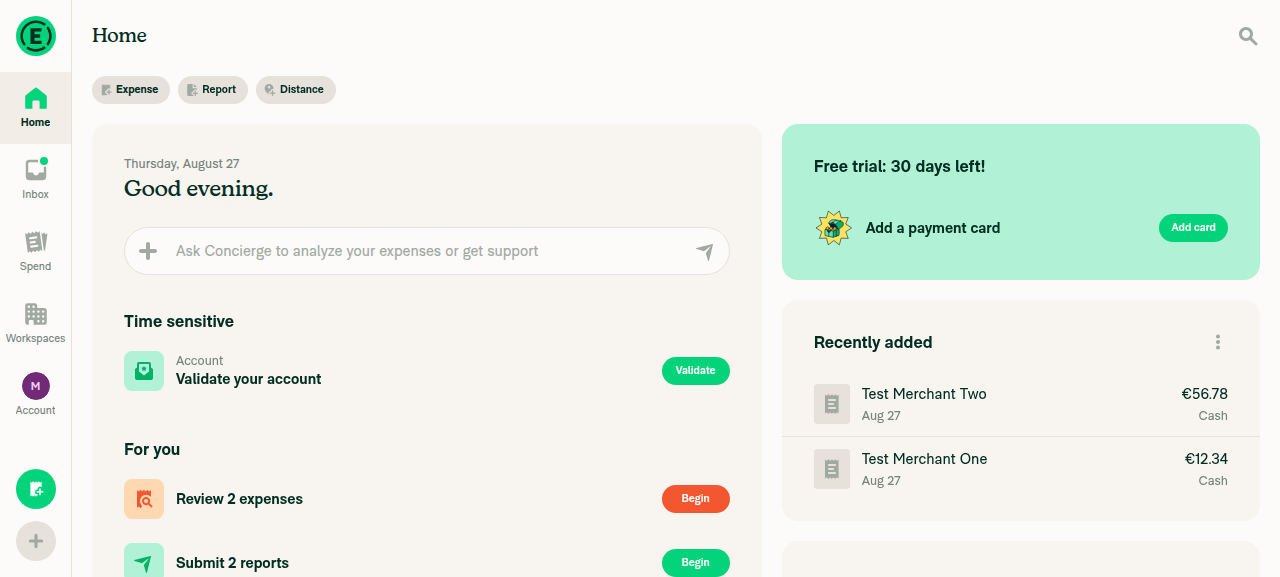
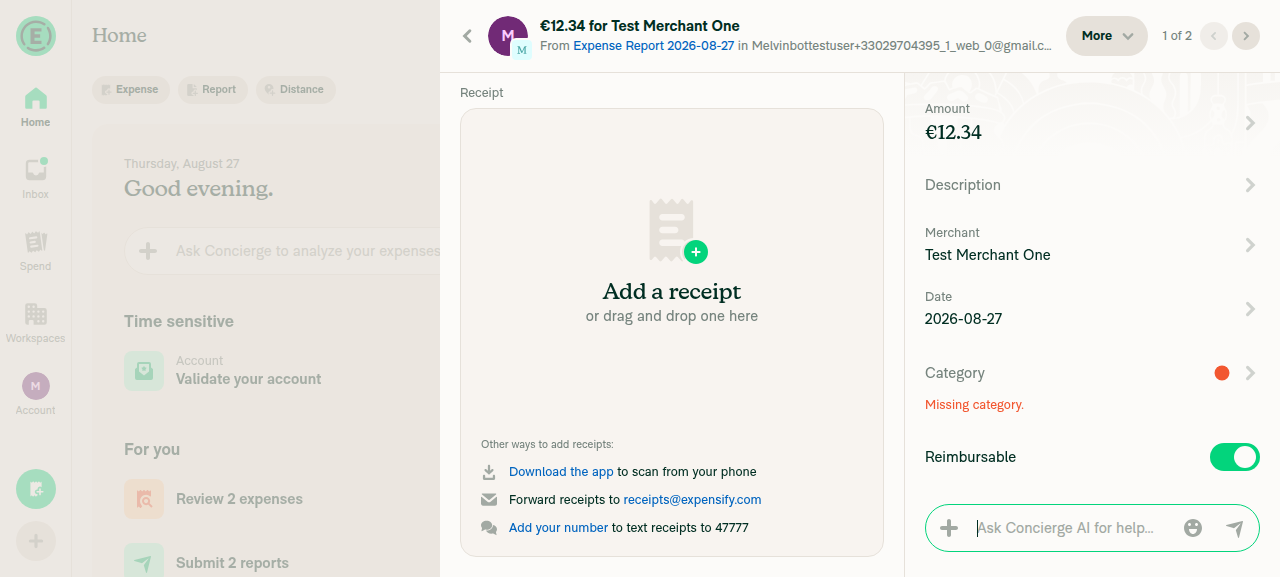
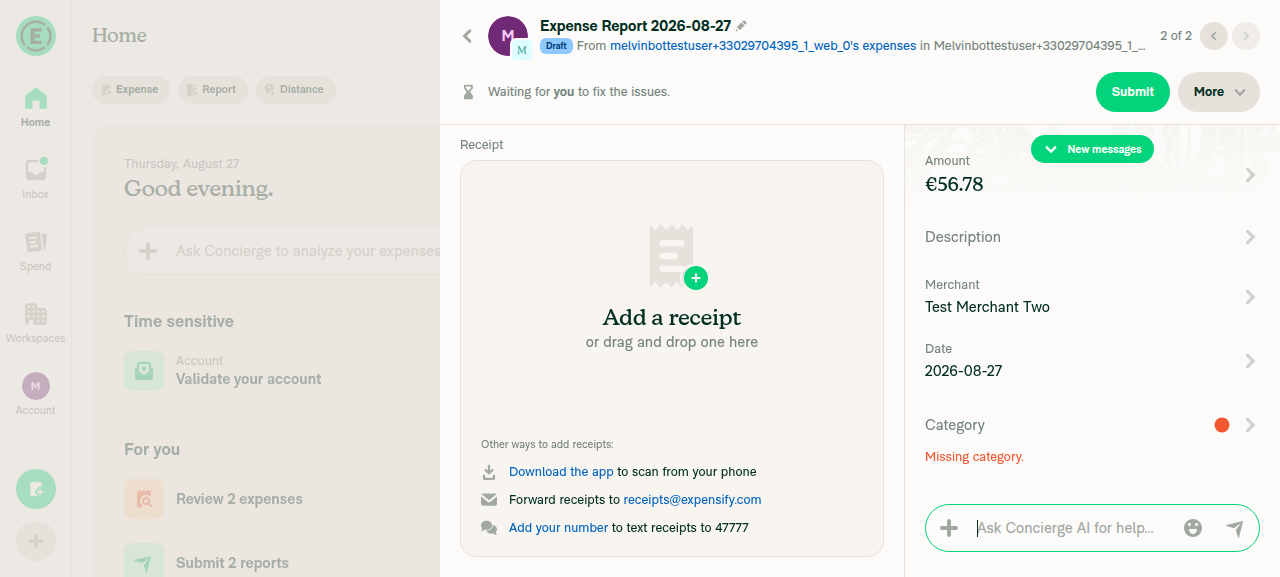
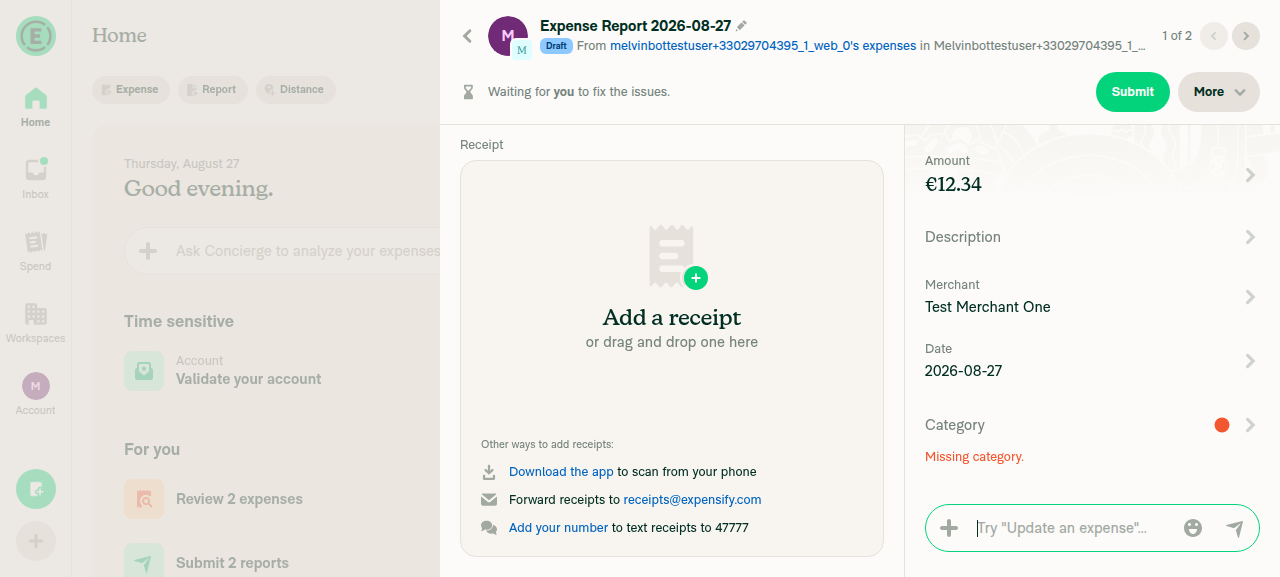
Step Status Observation Home "For You" shows "Review 2 expenses" entry ✅ Pass Entry shown; clicking it opens the expense details thread Review entry opens expense details thread with arrows ✅ Pass Header "€12.34 for Test Merchant One", breadcrumb "From Expense Report… in …Workspace", pagination "1 of 2", ‹ / › arrows Click Next → shows a view for expense 2 ✅ Pass Navigates to expense 2 but renders the expense report view (header "Expense Report 2026-08-27", Draft badge, Submit/More), pagination "2 of 2" Click Previous → stays on / returns to expense details thread ❌ Fail Returns to expense 1 ("1 of 2") but incorrectly shows the expense report view instead of the original "€12.34 for Test Merchant One" details thread 📷 Screenshots
Home For You section showing Review 2 expenses
Expense details thread view for expense 1, 1 of 2
After clicking Next: expense report view shown for expense 2, 2 of 2
After clicking Previous: expense report view incorrectly shown for expense 1 instead of expense details thread, 1 of 2
Not repro in Win 11/Chrome, v9.4.62-4
Recording.3439.mp4
- changed the title
[-]Report changes from expense details thread to expense report after navigating via arrows[/-][+][Due for payment 2026-09-03] Report changes from expense details thread to expense report after navigating via arrows[/+]on Aug 27, 2026 The solution for this issue has been 🚀 deployed to production 🚀 in version 9.4.62-4 and is now subject to a 7-day regression period 📆. Here is the list of pull requests that resolve this issue:
If no regressions arise, payment will be issued on 2026-09-03. 🎊
The following checklist (instructions) will need to be completed before the issue can be closed. Please copy/paste the Contributor+ Checklist from here into a new comment on this GH and complete it. If you have the K2 extension, you can simply click: [this button]. If no checklist is needed for this issue, you can click: [no checklist button]




Metadata
Metadata
Assignees
Type
Projects
- Status
If you haven’t already, check out our contributing guidelines for onboarding. To join our Slack channel, fill out this form.
Version Number: 9.4.62-1
Reproducible in staging?: Yes
Reproducible in production?: No
If this was caught during regression testing, add the test name, ID and link from BrowserStack: #98611
Email or phone of affected tester (no customers): sdsiodjnosdjiodsj@gmail.com
Issue reported by: Applause Internal Team
Bug source: Exploratory - Significant User Experience Deterioration
Device used: Mac 26.5 / Chrome
App Component: Money Requests
Action Performed:
Expected Result:
After navigating to another expense via arrow button, report will not change.
Actual Result:
After navigating to another expense via arrow button, report changes from expense details thread to expense report.
Workaround:
Unknown
Platforms:
Screenshots/Videos
Bug7243792_1787791856719.10.mp4
View all open jobs on GitHub
Issue Owner
Current Issue Owner: @thelullabyy